


ArtGateOne_2
ArtGateOne_2

Arduino - Arduino Mega 2560
x 1


WIZnet - W5500
x 1
What the Project Does
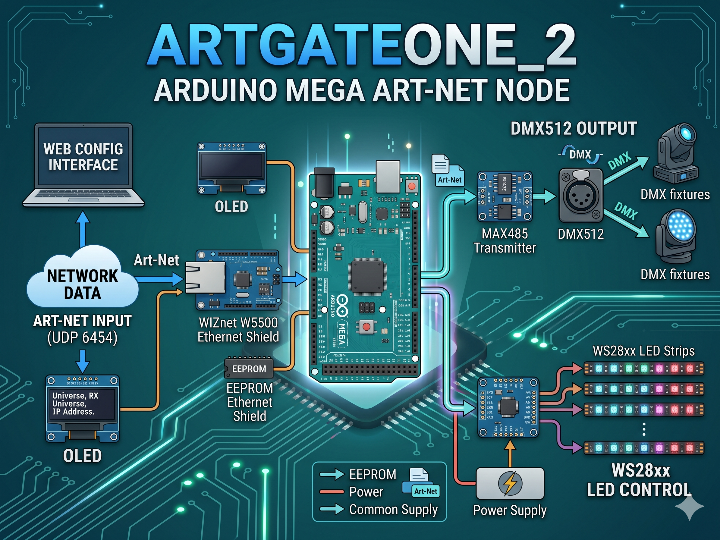
이 프로젝트는 Arduino Mega 기반의 Art-Net 노드 프로젝트입니다. 네트워크로 들어온 Art-Net 데이터를 받아 DMX512 또는 WS28xx LED 출력으로 변환하며, WIZnet W5500 호환 Ethernet Shield는 이 과정에서 UDP 기반 Art-Net 수신과 웹 설정 인터페이스를 담당하는 유선 네트워크 프런트엔드로 동작합니다.
- ArtGateOne_2_DMX
Art-Net 데이터를 UDP 6454 포트로 받아 DMX512로 출력하는 버전입니다. Ethernet Shield를 통해 네트워크를 초기화하고, 포트 80에서 웹 설정 인터페이스를 제공하며, MAX485를 통해 DMX 송신기로 동작합니다. 즉, 조명 콘솔이나 Art-Net 소스에서 들어온 데이터를 표준 DMX 출력으로 바꾸는 역할을 합니다. - ArtGateOne_2_LED
같은 Art-Net 입력 구조를 사용하지만, 최종 출력은 DMX 대신 WS28xx LED 스트립으로 바뀝니다. 기본 네트워크 초기화와 설정 방식은 DMX 버전과 같고, 마지막 출력 계층만 LED 제어로 바뀐 구조입니다. 따라서 동일한 Ethernet 기반 노드를 LED 픽셀 제어용으로 확장한 버전으로 볼 수 있습니다.
두 버전의 공통점은 분명합니다. EEPROM에 저장된 네트워크 설정을 읽어 부팅하고, Ethernet Shield를 통해 Art-Net 패킷을 수신하며, OLED에 상태를 표시하고, 웹 페이지에서 기본 설정을 변경할 수 있습니다. 차이는 마지막 출력 단계가 DMX인지 WS28xx LED인지에 있습니다.
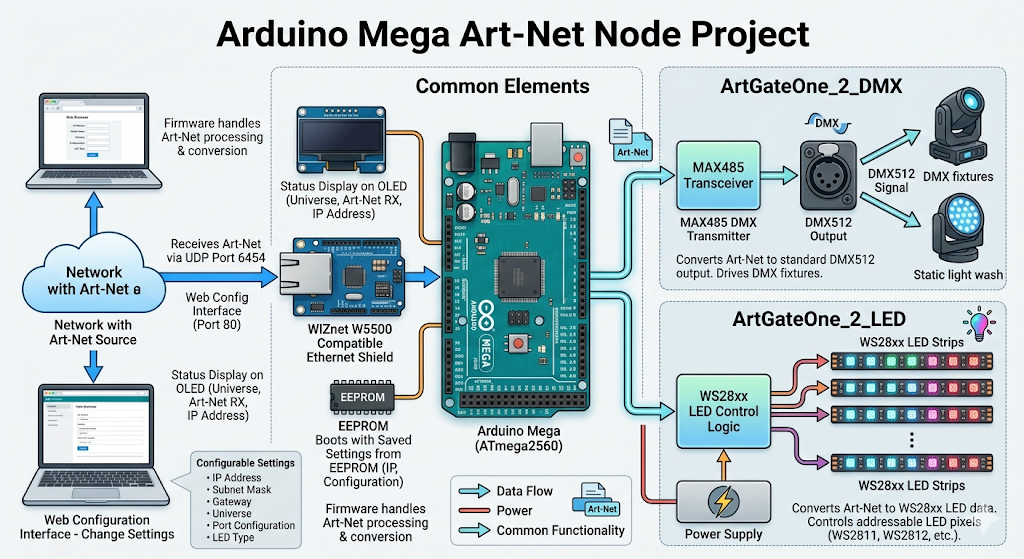
이미지 출처 : AI 생성
ArtGateOne-DMX와 ArtGateOne_2의 차이
기존 ArtGateOne-DMX는 Arduino UNO 기반의 단일 DMX 노드에 가깝습니다. 반면 ArtGateOne_2는 Arduino Mega를 기반으로 하며, DMX와 LED 두 가지 출력 형태로 확장된 버전입니다. 원본이 “작고 단순한 Art-Net to DMX 노드”였다면, 후속 버전은 “같은 Ethernet 기반 구조를 더 넓은 출력과 더 많은 노드 기능으로 확장한 버전”이라고 정리할 수 있습니다.
가장 중요한 차이는 구현 방식입니다. 기존 ArtGateOne-DMX는 제한된 메모리를 고려해 작은 버퍼로 Art-Net 헤더를 먼저 읽고, DMX 데이터를 순차적으로 처리하는 구조에 가깝습니다. 반면 ArtGateOne_2는 더 큰 버퍼를 사용해 전체 패킷을 읽고, ArtPoll, ArtDmx, ArtIpProg 같은 여러 Art-Net 프레임을 분기 처리합니다. 단순한 DMX 수신기에서 한 단계 더 나아가, 네트워크 상태 표현과 설정 응답성까지 강화한 노드 구조로 바뀐 셈입니다.
차이 요약 표
| 항목 | ArtGateOne-DMX | ArtGateOne_2 |
|---|---|---|
| 기본 플랫폼 | Arduino UNO | Arduino Mega |
| 출력 대상 | DMX512 | DMX512 또는 WS28xx LED |
| 프로젝트 구조 | DMX 중심 단일 구조 | DMX와 LED로 분리된 구조 |
| 패킷 처리 방식 | 작은 헤더 중심 처리 | 큰 버퍼 기반의 전체 패킷 처리 |
| 프로토콜 범위 | 기본적인 Art-Net/DMX 수신 중심 | ArtPoll, ArtDmx, ArtIpProg 등 확장 처리 |
| 운용 성격 | 단순하고 가벼운 구조 | 기능이 많고 구조가 더 복잡함 |
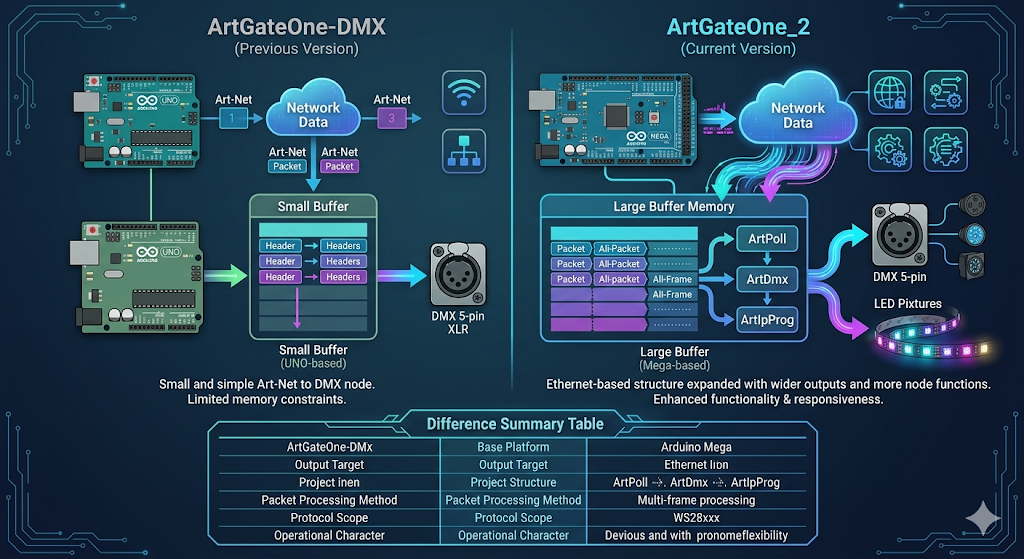
이미지 출처 : AI 생성
Where WIZnet Fits
이 저장소는 WIZnet ioLibrary를 직접 호출하지는 않습니다. 대신 Arduino Ethernet 라이브러리를 통해 W5100 또는 W5500 기반 Ethernet Shield를 제어합니다. 즉, WIZnet 칩을 저수준 드라이버 수준에서 직접 다루기보다는, Arduino 환경에서 네트워크 계층을 안정적으로 제공하는 Ethernet 프런트엔드로 사용합니다.
이 프로젝트에서 W5500의 역할은 분명합니다. Art-Net 패킷을 유선 Ethernet으로 받아들이고, 웹 기반 설정 페이지를 제공하며, 나머지 애플리케이션 계층이 DMX 또는 LED 출력에 집중할 수 있게 앞단을 맡습니다. DMX나 LED 출력은 각각 별도의 출력 계층이 처리하고, W5500은 그 앞에서 패킷 수신과 노드 설정 기능을 담당합니다.
이 구조는 Arduino Mega 같은 MCU 환경과 잘 맞습니다. 네트워크 처리와 출력 처리를 깔끔하게 분리할 수 있기 때문입니다. 특히 조명 제어처럼 무선보다 유선 연결이 더 안정적인 환경에서는 W5500 기반 Ethernet Shield 구성이 실용적인 선택입니다.
Practical Tips / Pitfalls
- 업로드 전에 EEPROM을 초기화하는 편이 안전합니다. 이전 설정이 남아 있으면 예상과 다른 IP나 Universe로 동작할 수 있습니다.
- Ethernet Shield의 CS 핀은 10번으로 설정되어 있습니다. 다른 SPI 장치와 함께 사용할 때 충돌 여부를 먼저 확인해야 합니다.
- DMX 버전에서는 MAX485 제어선이 코드의 2번 핀 설정과 맞아야 합니다. 배선이 다르면 네트워크는 정상이어도 DMX 출력이 나오지 않을 수 있습니다.
- LED 버전은 기본적으로 170개의 RGB LED를 기준으로 작성되어 있습니다. 더 긴 스트립을 쓰려면 Universe 분할이나 출력 구조 변경이 필요합니다.
- DHCP를 사용하더라도 실패 시 저장된 고정 IP로 되돌아갈 수 있습니다. 현장에서 장치를 찾지 못하면 EEPROM의 네트워크 설정부터 확인하는 것이 좋습니다.
ArtGateOne_2는 원본보다 기능이 많습니다. 반대로 단순한 1포트 DMX 노드만 필요하다면 기존ArtGateOne-DMX쪽이 더 직관적일 수 있습니다.
FAQ
Q: 왜 이 프로젝트에서 W5500이 잘 맞나요?
A: 이 프로젝트는 Art-Net 수신, 웹 설정, 상태 표시, DMX 또는 LED 출력까지 한 보드에서 처리합니다. W5500 기반 Ethernet Shield를 사용하면 네트워크 입력부를 안정적으로 분리할 수 있어, Arduino Mega는 출력 로직에 더 집중할 수 있습니다.
Q: Arduino Mega에는 어떻게 연결하나요?
A: 기본 구성은 Arduino Mega에 Ethernet Shield를 연결하고, OLED를 I2C로 연결하는 방식입니다. DMX 버전은 여기에 MAX485가 추가되고, LED 버전은 WS28xx 스트립이 추가됩니다. 코드 기준으로 Ethernet CS는 10번 핀, DMX 제어 핀은 2번, LED 데이터 핀은 6번입니다.
Q: 이 프로젝트에서 W5500은 정확히 어떤 역할을 하나요?
A: W5500 계열 실드는 UDP 기반 Art-Net 패킷을 수신하고, 웹 기반 설정 인터페이스를 제공하며, 장치가 네트워크 노드로 동작하도록 해 줍니다. 실제 DMX 송신이나 LED 제어는 그 다음 단계의 출력 회로와 라이브러리가 담당합니다.
Q: 초보자도 따라할 수 있나요?
A: 완전 초보보다는 Arduino 사용 경험이 있는 중급자에게 더 적합합니다. EEPROM 초기화, IP 설정, Ethernet Shield 사용, 그리고 DMX 또는 LED 배선에 대한 기본 이해가 있으면 따라가기 수월합니다.
Q: Wi-Fi 기반 Art-Net 노드와 비교하면 어떤 차이가 있나요?
A: 이 프로젝트는 처음부터 유선 Ethernet 기반으로 설계되어 있습니다. 네트워크 라이브러리, 연결 상태 확인, UDP 수신, 웹 설정 흐름 모두 Ethernet Shield에 맞춰져 있어 현재 구조에서는 W5500 기반 구성이 더 직접적입니다.
What the Project Does
This project is an Arduino Mega-based Art-Net node. It receives Art-Net data from the network and converts it into either DMX512 output or WS28xx LED output. In this setup, a WIZnet W5500-compatible Ethernet Shield acts as the wired network front end, handling UDP-based Art-Net reception and the web configuration interface.
ArtGateOne_2_DMX
This version receives Art-Net data on UDP port 6454 and outputs it as DMX512. It initializes the network through the Ethernet Shield, provides a web configuration interface on port 80, and operates as a DMX transmitter through the MAX485. In other words, it converts data coming from a lighting console or other Art-Net source into standard DMX output.
ArtGateOne_2_LED
This version uses the same Art-Net input structure, but the final output is changed from DMX to a WS28xx LED strip. The basic network initialization and configuration flow are the same as in the DMX version, and only the final output layer is replaced with LED control. As a result, it can be seen as an expanded version of the same Ethernet-based node for LED pixel control.
The similarities between the two versions are clear. Both boot by reading the network settings stored in EEPROM, receive Art-Net packets through the Ethernet Shield, display status information on the OLED, and allow basic settings to be changed through a web page. The difference lies in the final output stage: DMX in one case, WS28xx LED in the other.
Image source: AI-generated
Differences Between ArtGateOne-DMX and ArtGateOne_2
The original ArtGateOne-DMX is closer to a single DMX node based on the Arduino UNO. By contrast, ArtGateOne_2 is built on the Arduino Mega and expands the design into two output forms: DMX and LED. If the original can be described as “a small and simple Art-Net to DMX node,” then the later version can be summarized as “an expanded version of the same Ethernet-based architecture with broader output options and more node-level features.”
The most important difference lies in the implementation. The original ArtGateOne-DMX appears to use a small buffer to read the Art-Net header first, then process DMX data sequentially, reflecting the limits of a smaller memory environment. ArtGateOne_2, on the other hand, uses a larger buffer to read the full packet and branches across multiple Art-Net frame types such as ArtPoll, ArtDmx, and ArtIpProg. In other words, it evolved from a simple DMX receiver into a node structure with stronger network status handling and configuration responsiveness.
Summary Table of Differences
| Item | ArtGateOne-DMX | ArtGateOne_2 |
|---|---|---|
| Base platform | Arduino UNO | Arduino Mega |
| Output target | DMX512 | DMX512 or WS28xx LED |
| Project structure | Single DMX-focused structure | Split into separate DMX and LED structures |
| Packet handling | Small header-focused processing | Full-packet processing with a larger buffer |
| Protocol scope | Focused on basic Art-Net/DMX reception | Extended handling including ArtPoll, ArtDmx, and ArtIpProg |
| Operational character | Simple and lightweight | More feature-rich and structurally more complex |
Image source: AI-generated
Where WIZnet Fits
This repository does not call the WIZnet ioLibrary directly. Instead, it controls a W5100- or W5500-based Ethernet Shield through the Arduino Ethernet library. In other words, rather than handling the WIZnet chip at the low-level driver layer, it uses the chip as a stable Ethernet front end for the network layer in the Arduino environment.
The role of the W5500 in this project is clear. It receives Art-Net packets over wired Ethernet, provides the web-based configuration page, and handles the front-end networking so that the rest of the application layer can focus on DMX or LED output. DMX and LED output are each handled by their own output layer, while the W5500 takes care of packet reception and node configuration at the front end.
This structure fits well with an MCU environment such as the Arduino Mega because it cleanly separates network handling from output handling. In applications such as lighting control, where wired connections are often more reliable than wireless ones, a W5500-based Ethernet Shield is a practical choice.
Practical Tips / Pitfalls
- It is safer to initialize the EEPROM before uploading. If previous settings remain, the device may start with an unexpected IP address or Universe value.
- The Ethernet Shield CS pin is set to pin 10. If you are using other SPI devices, check for conflicts first.
- In the DMX version, the MAX485 control line must match the code setting on pin 2. If the wiring does not match, the network may work normally while DMX output fails.
- The LED version is written around a default of 170 RGB LEDs. If you want to use a longer strip, you will need Universe splitting or a change in the output structure.
- Even when DHCP is enabled, the device may fall back to a stored static IP if DHCP fails. If you cannot find the device on site, checking the EEPROM network settings is a good first step.
- ArtGateOne_2 has more features than the original. On the other hand, if you only need a simple one-port DMX node, the original ArtGateOne-DMX may be more straightforward.
FAQ
Q: Why is the W5500 a good fit for this project?
A: This project handles Art-Net reception, web configuration, status display, and either DMX or LED output on a single board. Using a W5500-based Ethernet Shield makes it possible to separate the network input stage cleanly, allowing the Arduino Mega to focus more on output logic.
Q: How is it connected to the Arduino Mega?
A: The basic setup connects an Ethernet Shield to the Arduino Mega and the OLED over I2C. The DMX version adds a MAX485, while the LED version adds a WS28xx strip. In the code, Ethernet CS is pin 10, the DMX control pin is pin 2, and the LED data pin is pin 6.
Q: What exactly does the W5500 do in this project?
A: The W5500-based shield receives UDP-based Art-Net packets, provides the web-based configuration interface, and allows the device to operate as a network node. The actual DMX transmission or LED control is handled afterward by the output circuitry and libraries.
Q: Can beginners follow this project?
A: It is better suited to intermediate users with some Arduino experience than to complete beginners. It helps to understand EEPROM initialization, IP configuration, Ethernet Shield usage, and the basics of either DMX or LED wiring.
Q: How does it compare with a Wi-Fi-based Art-Net node?
A: This project was designed from the beginning around wired Ethernet. The network library, link-status handling, UDP reception, and web configuration flow are all built around the Ethernet Shield, so in the current structure a W5500-based setup is the more direct choice.
-
Github Code


