


Implementing Auto-Recovery for STM32 + W5500: W5500 모듈테스트
Implementing Auto-Recovery for STM32 + W5500: Handling Ethernet Cable Disconnects
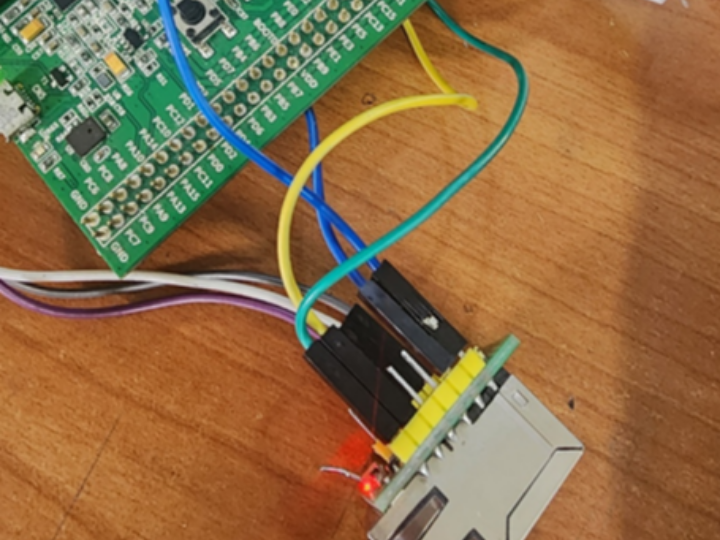

WIZnet - W5500
x 1

STMicroelectronics - STM32F103RCT6
x 1
Implementing Auto-Recovery for STM32 + W5500: Handling Ethernet Cable Disconnects
One of the most common challenges when using the WIZnet W5500 in real-world applications is handling "Hot-plugging"—scenarios where the Ethernet cable is unplugged and then reconnected. Since the W5500 hardware stack does not automatically close established sockets when the physical link is lost, your system can end up in a "Ghost Socket" state, preventing communication even after the cable is reinserted.
In this post, I will share an Auto-Recovery routine and a Hardware Checklist to ensure your connection remains robust.
Software Solution: The check_cable_presence() Routine
To prevent the system from hanging or losing its network identity, we must actively monitor the PHY layer and re-initialize the chip if a disconnection occurs.
void check_cable_presence() {
    uint8_t phy_status;
    int error_status;

    do {
        // 1. Check the physical link status via W5500 registers
        error_status = ctlwizchip(CW_GET_PHYLINK, (void*)&phy_status);

        if (phy_status == PHY_LINK_OFF) {
            printf("Link Down detected! Starting Auto-Recovery...\r\n");

            // 2. Re-initialize the W5500 chip to clear ghost sockets
            w5500_init();

            // 3. Re-apply network configurations (IP, MAC, GW, etc.)
            static_host_configuration(mac, ip, sn, gw, dns);

            // 4. Wait for PHY signal stabilization (recommended >1s)
            HAL_Delay(1500);
        }
    } while (error_status == -1 || phy_status == PHY_LINK_OFF);

    printf("Link Restored! System is back online.\r\n");
}
Why is this necessary?
Ghost Sockets: Without re-initialization, the W5500 may keep a socket in the ESTABLISHED state even if the cable is gone, causing data to go nowhere.
State Mismatch: A hardware reset or re-init ensures that the internal state machine and the PHY layer are perfectly synchronized.
Hardware Checklist for Link Stability
Even the best code cannot fix a shaky circuit. Based on the WIZnet Ethernet Design Guide, here are the critical points to verify in your schematic:
https://docs.wiznet.io/img/design_guide/Wiznet%20Ethernet%20Design%20Guide_ENG.pdf
Component | Official Requirement | Why it matters |
|---|---|---|
EXRES1 (Pin 10) | 12.4kΩ (1% Tolerance) | Sets the bias current for the PHY. Incorrect values cause link failure. |
Transformer Center Tap | Connect to 3.3V (AVCC) | W5500 uses a Voltage Mode PHY. Stable power here is vital for signal integrity. |
Power Isolation | Use Ferrite Beads between VCC/AVCC | Prevents digital noise from interfering with the sensitive analog Ethernet signals. |
Reset (RSTn) | MCU-controlled GPIO | Allows for a true Hardware Reset if the chip becomes unresponsive. |
Q1. Why doesn't the connection restore immediately after reconnecting the LAN cable?
A1. While the W5500 features a hardware TCP/IP stack, it does not automatically terminate existing socket sessions when a physical link is lost. This leads to a "Ghost Socket" phenomenon where the software assumes the connection is still ESTABLISHED while the hardware is disconnected. To fix this, you must monitor the PHY link and force a re-initialization upon reconnection.
Q2. How can I check the Ethernet link status on the W5500?
A2. You can use the ctlwizchip(CW_GET_PHYLINK, ...) command provided by the WIZnet library. This function directly reads the internal PHY registers to determine if the cable is physically connected (PHY_LINK_ON) or disconnected (PHY_LINK_OFF) in real-time.
Q3. What is the most effective software logic for network recovery?
A3. For a robust recovery, follow this 3-step Auto-Recovery process:
Chip Reset: Call w5500_init() to clear the internal state machine and stuck sockets.
Re-configuration: Re-apply the MAC address and IP settings, as these may be cleared during reset.
Stability Delay: Wait for at least 1.0 to 1.5 seconds to allow the PHY signal to stabilize before resuming communication.
Q4. Which hardware components affect Ethernet link stability the most?
A4. The most critical component is the 12.4kΩ (1% precision) resistor on the EXRES1 pin (Pin 10), which sets the PHY bias current. Additionally, ensuring the Transformer Center Tap is connected to a stable 3.3V (AVCC) is vital, as the W5500 uses a Voltage Mode PHY that is sensitive to power fluctuations. Using Ferrite Beads for power isolation is also highly recommended.
Q5. Are there specific tips for using W5500 with STM32?
A5. It is highly recommended to connect the W5500 RSTn (Reset) pin to an STM32 GPIO. If the chip enters an unrecoverable state due to electrical noise during cable swapping, the MCU can trigger a hardware reset (Low Pulse) to physically reboot the chip, which is more reliable than a software-only reset.


