



esp32-w5500-l2discover
An ESP32 paired with a WIZnet W5500 passively sniffs LLDP/CDP packets from the Ethernet cable
Project Overview
Anyone who has ever done cable management in an office or data center knows the frustration: dozens of Ethernet cables tangled together, and no easy way to tell which cable connects to which switch port. Commercial solutions mean spending hundreds to thousands of dollars on a handheld cable tester.
This project reproduces the core feature of those tools at a fraction of the cost.
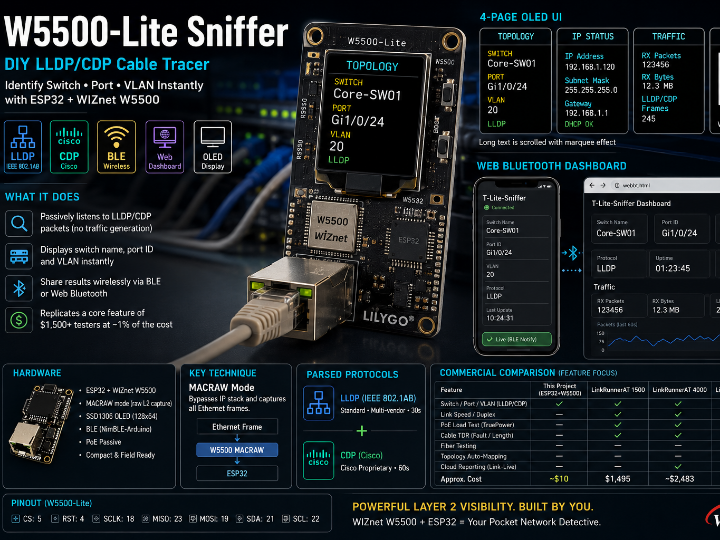
An ESP32 paired with a WIZnet W5500 passively sniffs LLDP/CDP packets from the Ethernet cable, then instantly displays the connected switch name, port, and VLAN on an OLED screen. Results can also be read wirelessly via BLE from a smartphone.
Protocols Used: LLDP and CDP
LLDP (Link Layer Discovery Protocol)
An IEEE 802.1AB standard, vendor-neutral Layer 2 discovery protocol.
- Switches and routers periodically broadcast their information every 30 seconds by default as multicast frames to all ports
- Destination MAC:
01:80:C2:00:00:0E, EtherType0x88CC - Data is carried in TLV (Type-Length-Value) structures: System Name, Port ID, Port Description, VLAN info, and more
- Supported across all major vendors — Cisco, Juniper, HP/Aruba, MikroTik, Ubiquiti — making it ideal for multi-vendor environments
CDP (Cisco Discovery Protocol)
A Cisco proprietary protocol, predating LLDP (1994) and still enabled by default on most Cisco equipment.
- Default interval: 60 seconds, destination MAC
01:00:0C:CC:CC:CC - Uses LLC/SNAP encapsulation (hence the 26-byte header skip in the code)
- Carries Device ID, Port ID, Native VLAN, Software Version, PoE negotiation info
| Feature | LLDP | CDP |
|---|---|---|
| Standard | IEEE 802.1AB (open) | Cisco proprietary |
| Multi-vendor support | Broad | Mostly Cisco only |
| Interval | 30 seconds | 60 seconds |
| VLAN info | Via 802.1 extension TLV | Via Native VLAN TLV |
This project parsing both protocols is a deliberate design choice — you never know which vendor's switch is at the other end of the cable.
The Technical Core: W5500 MACRAW Mode
Most W5500 tutorials cover TCP/UDP socket programming (web servers, MQTT, etc.). This project uses a lesser-known W5500 feature: MACRAW mode.
What Is MACRAW?
A standard socket receives only packets addressed to the device, after passing through the IP stack. A socket opened in MACRAW mode bypasses the IP stack entirely and receives all raw Ethernet frames — including those not addressed to the device. This is how the project captures LLDP/CDP frames that are multicast to specific MAC addresses.
// Switch W5500 socket 0 to MACRAW mode (direct register access)
w5500.execCmdSn(0, Sock_CLOSE);
w5500.writeSnMR(0, SnMR::MACRAW);  // Socket 0 → raw L2 capture mode
w5500.execCmdSn(0, Sock_OPEN);
The library used (sstaub/Ethernet3) does not expose MACRAW through its standard API (EthernetClient / EthernetUDP), so the project accesses the internal utility/w5500.h object directly to manipulate the registers.
Solving the DHCP vs. MACRAW Socket Conflict
MACRAW occupies an entire socket exclusively. Since the buffer is concentrated on a single socket (Ethernet.init(1), 16 KB), obtaining an IP via DHCP and running MACRAW sniffing must share the same socket in a time-sliced fashion. The solution:
1. Boot → set MAC only (initialize with IP 0.0.0.0)
2. Core 0 FreeRTOS task → run DHCP in the background
3. DHCP complete → close the socket, reopen in MACRAW mode, start sniffing
4. Main loop (Core 1) → check dhcpTaskRunning flag to avoid SPI bus conflicts
This is a practical pattern for time-slicing W5500 socket modes on a shared SPI bus in a multi-core ESP32 environment — the code itself is a useful reference.
Hardware Configuration
| Pin | Value |
|---|---|
| W5500_CS | 5 |
| W5500_RST | 4 |
| SCLK / MISO / MOSI | 18 / 23 / 19 |
| OLED SDA / SCL | 21 / 22 |
The board used is the LilyGo W5500-Lite (ESP32 + W5500 + SSD1306 OLED, integrated).
⚠️ The similarly named "T-ETH-Lite" uses a LAN8720/RTL8201 PHY — it is a different board and does not use a WIZnet chip. Don't confuse the two.
Software Stack
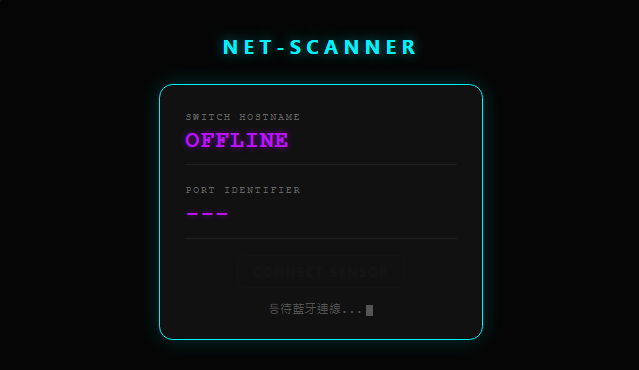
- OLED (U8g2, SSD1306): 4-page cycle — Topology / IP status / Traffic stats / QR code. Long text is scrolled with a marquee effect
- BLE (NimBLE-Arduino): Advertises as
T-Lite-Sniffer; exposesSwitchName|PortIDas a single characteristic (READ + NOTIFY) - Web Bluetooth dashboard (
src/webbt.html): A browser-based viewer that subscribes directly to the BLE characteristic
Comparison with Commercial Solutions
The feature this project replicates is handled in professional settings by equipment costing hundreds to thousands of dollars. The most representative product line is the NetAlly LinkRunnerAT series — from the company that built the world's first handheld network analyzer in 1993 (formerly Fluke Networks, then NETSCOUT, now NetAlly).
Price Comparison
| Model | Features | Price | Link |
|---|---|---|---|
| LinkRunnerAT 1500 | Copper only, entry-level. PoE++ 90W, VLAN/link speed validation | $1,495 MSRP | netally.com |
| LinkRunnerAT 3000 | Copper + fiber (SFP), touchscreen, LANBERT media validation | ~$2,483 (unit) | netally.com |
| LinkRunnerAT 4000 | All 3000 features + topology auto-mapping, L2/L3 path analysis | ~$3,959 (unit) | netally.com |
| LinkRunnerAT 1000/2000 (legacy) | Discontinued, supported until September 2027 | ~$1,200–1,800 used | netally.com |
Full product overview: https://www.netally.com/linkrunner-ethernet-testers/
Prices vary by distributor and bundle configuration — verify current pricing at the links above before publishing.
Feature Comparison
| Feature | This Project (ESP32+W5500) | LinkRunnerAT 1500 | LinkRunnerAT 3000 | LinkRunnerAT 4000 |
|---|---|---|---|---|
| Switch/port identification (LLDP/CDP) | ✅ | ✅ (+EDP) | ✅ (+EDP) | ✅ (+EDP) |
| VLAN identification | ✅ | ✅ | ✅ | ✅ |
| Link speed / duplex verification | ❌ | ✅ (up to 10G) | ✅ (up to 10G) | ✅ (up to 10G) |
| PoE load testing (TruePower) | ❌ | ✅ (90W) | ✅ (90W) | ✅ (90W) |
| Cable TDR (fault/length) | ❌ | ✅ | ✅ | ✅ |
| Fiber testing | ❌ | ❌ | ✅ | ✅ |
| Topology auto-mapping | ❌ | ❌ | ❌ | ✅ |
| Cloud reporting (Link-Live) | ❌ | ✅ | ✅ | ✅ |
| Wireless result readout (BLE/Web Bluetooth) | ✅ | △ (optional Wi-Fi adapter) | △ (optional) | △ (optional) |
| Handheld display | ✅ (OLED) | ✅ (touchscreen) | ✅ (touchscreen) | ✅ (touchscreen) |
| Approximate cost | ~$10 in parts | $1,495 | ~$2,483 | ~$3,959 |
Key takeaway: This project reproduces exactly one feature from a commercial tester — switch/port/VLAN auto-identification — at roughly 1% of the cost. PoE testing, cable TDR, cloud reporting, and topology mapping are intentionally absent. Rather than positioning this as a replacement for commercial tools, it's best framed as a technical demo showing that WIZnet W5500's MACRAW capability alone is enough to build a practical field tool.
Summary
| Item | Details |
|---|---|
| WIZnet chip used | W5500 (core component) |
| Key technique | MACRAW mode for raw Ethernet frame capture |
| Parsed protocols | LLDP (IEEE 802.1AB) + CDP (Cisco) |
| Output | Switch name / port ID / VLAN number |
| UI | 4-page OLED + BLE + Web Bluetooth dashboard |
| Positioning | DIY handheld cable tracer (replicates core feature of commercial Fluke LinkRunnerAT) |
This project is a strong reference showing that the W5500 goes beyond being a simple TCP/UDP offload chip — it can serve as the foundation of a Layer 2 network diagnostic tool.


