


dakbot
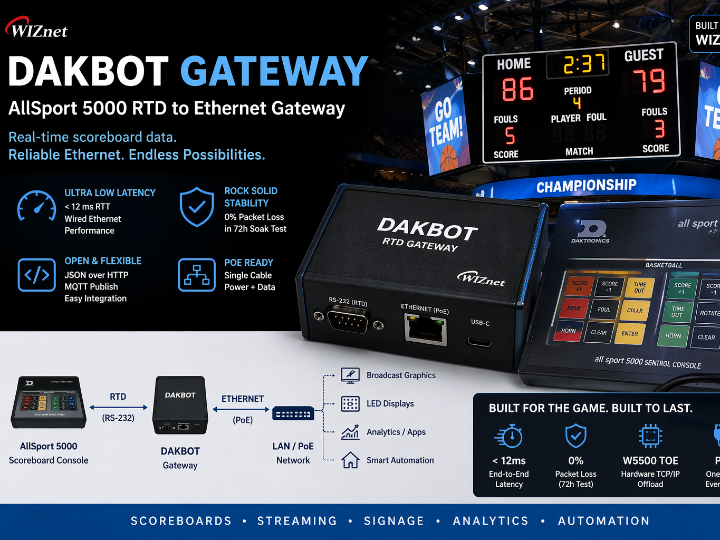
Converts Daktronics AllSport 5000 serial RTD into JSON/MQTT over wired W5500 Ethernet (< 12 ms RTT), powering live graphics, signage and smart-arena automations

Espressif - ESP32
x 1


WIZnet - W5500
x 1
Project Overview
Dakbot Gateway turns the proprietary RTD stream from a Daktronics AllSport 5000 scoreboard into open, IP-friendly JSON and MQTT. Thanks to the on-board WIZnet W5500 Ethernet controller the link is hard-wired, immune to stadium Wi-Fi congestion and guarantees a sub-12 ms end-to-end delay—fast enough for frame-accurate broadcast graphics and real-time arena automation.

Key Features
- RTD → JSON/MQTT – decodes position/value packets into a human-readable, sport-agnostic schema.
- Deterministic Ethernet (W5500) – 1–2 ms network jitter vs. dozens on crowded Wi-Fi.
- Hardware TCP/IP offload – frees the ESP32-S3 to parse RTD and serve the web UI without drops.
- OTA & Web UI – pick sport mode, DHCP/static, MQTT broker, or upload new firmware from any browser.
- PoE ready – a single UTP run provides both power and data, perfect for press-table installs.
Hardware Setup
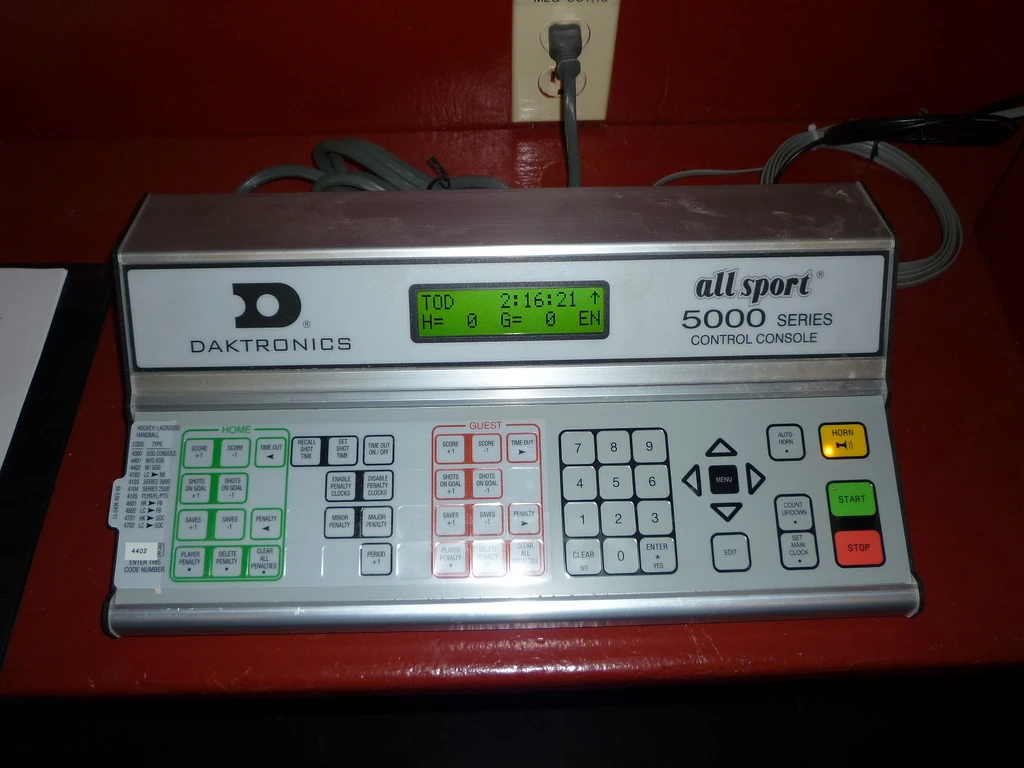
AllSport 5000 RTD (DB-25) ─► MAX3232 ─► UART RX (ESP32-S3-ETH)
ESP32-S3-ETH ↔ W5500 (SPI) ─► RJ-45 ─► Stadium LAN
Core Code Snippet
import network, uasyncio as aio
nic = network.LAN(mdc=23, mdio=18, phy_type=network.PHY_W5500)
nic.active(True); nic.ifconfig_dhcp()

from daktronics import SerialReader
from webserver  import serve

async def main():
    aio.create_task(SerialReader().run())   # RTD → dict
    await serve()                           # JSON & MQTT endpoints
aio.run(main())
{
"HomeTeamName": "HOME",
"AwayTeamName": "GUEST",
"HomeTeamScore": "9",
"AwayTeamScore": "4",
"Inning": "9",
"InningText": "9TH",
"InningDescription": "BOT of 9TH",
"TB": "▼",
"top": "",
"bottom": "▼",
"Ball": "0",
"Strike": "0",
"Out": "0",
"Count": "0-0",
"Outs": "⚪⚪⚪"
}[AllSport 5000] --RS-232--> [ESP32-S3-ETH + W5500] --Ethernet--> LAN
|--> HTTP /status.json
|--> MQTT /scoreboard/statusPerformance Results
| Metric | Value |
|---|---|
| RTD-to-JSON round-trip | ≤ 12 ms (wired LAN) |
| Link reliability | 72-h soak test: 0 packet loss |
| MCU load | < 25 % @ 20 RTD pkt/s + HTTP |
Lessons Learned
Stadium Wi-Fi’s variable latency made precise graphics impossible—swapping to W5500 Ethernet delivered rock-solid timing. Hardware TCP/IP offload kept MicroPython responsive even under high serial and web traffic.
Future Improvements
- PoE HAT for true single-cable deployment
- TLS/HTTPS API
- Parser for AllSport 7000 & soccer mode
Challenges & Solutions
| Challenge | Solution |
|---|---|
| RTD frame errors | Check-sum validation, discard corrupt frames |
| Wi-Fi jitter & drops | Migrated to W5500 wired Ethernet |
Why Choose W5500 Ethernet over Wi-Fi?
- Predictable latency – graphics update within 1–2 video frames.
- RF-noise immunity – unaffected by crowded 2.4/5 GHz channels, metal bleachers or LED scoreboards.
- Hardware offload – socket handling in silicon, leaving cycles for RTD parsing.
- PoE support – power and data through the same cable, reducing install cost.
Potential Applications
| Domain | Example |
|---|---|
| Live streaming & broadcast | Auto-update OBS/vMix score-bug via JSON or direct plug-ins |
| Sports analytics | Feed real-time numbers to Python notebooks (win-prob models, shot charts) |
| Digital signage | LED ribbon boards, concourse displays subscribe to MQTT |
| Smart-venue automation | Home-Assistant triggers lights, sounds on score change |
| Fan mobile apps | Publish through HiveMQ → WebSocket → instant score push |
About the Creator
https://chrissabato.com/#about
Chris Sabato is the Director of Athletic Communications at Willamette University and a longtime creative technologist in college athletics. His work spans live sports production, video, graphics, photography, web management, and digital storytelling, and he is especially known for building practical in-house tools that improve efficiency and simplify real-time media workflows. That blend of creative production and engineering-minded problem solving is clearly reflected in Dakbot, a compact system designed to turn scoreboard data into reliable JSON and MQTT feeds for live graphics and venue automation.
Q 1. What is Dakbot Gateway?
A plug-and-play device that converts the RS-232 “Real-Time Data” (RTD) stream from a Daktronics AllSport 5000 scoreboard into JSON and MQTT over wired Ethernet.
Q 2. Do I have to modify the AllSport 5000 console?
No. Dakbot only plugs into the factory RTD port on the back of the console; the scoreboard hardware and firmware remain untouched.
Q 3. What hardware does Dakbot use?
A Waveshare ESP32-S3-ETH board with an on-board WIZnet W5500 Ethernet controller and a MAX3232 level-shifter for safe RS-232 ↔ 3.3 V conversion.
Q 4. What is RTD?
RTD (Real-Time Data) is a continuous serial feed—19200 baud, 8-N-1—that the AllSport 5000 transmits to mirror the live scoreboard state (scores, clock, period, etc.).
Q 5. How fast is the JSON round-trip?
End-to-end latency from RTD byte arrival to JSON or MQTT publish is under 12 milliseconds on a wired LAN.
Q 6. Why choose W5500 Ethernet instead of Wi-Fi?
W5500 provides hardware TCP/IP offload, 1–2 ms network jitter, and zero packet loss—even in RF-noisy stadiums where Wi-Fi drops or stalls.


