



PipeInspect: Wired Ethernet Control & Wi-Fi Video Streaming
PipeInspect drives a dual-steer pipe inspection robot over W5500 Ethernet on ESP32-C3, keeping commands wired while SJ4000 video streams over Wi-Fi
📌 Overview
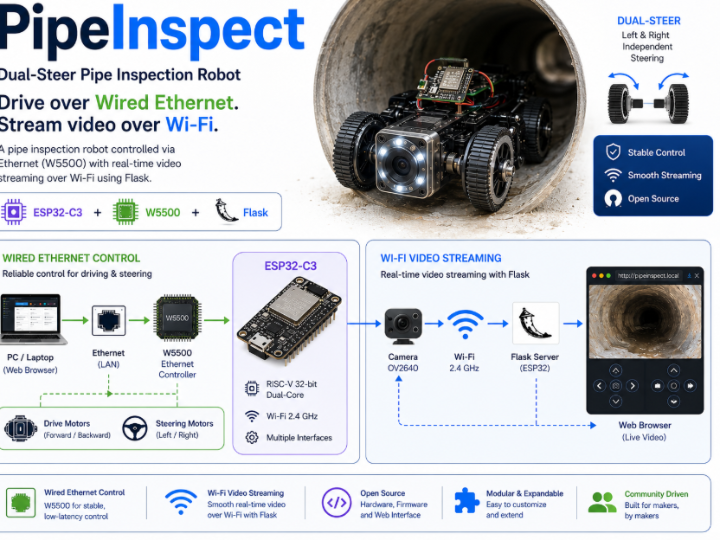
PipeInspect는 배관 내부를 점검하는 dual-steer inspection robot을 PC의 web dashboard에서 조종하는 open source project입니다. Robot controller는 ESP32-C3이며, W5500이 SPI로 연결되어 PC와의 command link를 wired Ethernet으로 담당합니다.
이 project에서 눈에 띄는 점은 control path와 video path를 물리적으로 분리했다는 것입니다. 조종 명령은 W5500 Ethernet을 통해 유선으로 전달되고, 영상은 SJCAM SJ4000 action camera의 자체 Wi-Fi AP를 통해 전달됩니다. PC는 두 network에 동시에 접속한 상태에서 Flask 기반 web UI를 제공하며, 사용자는 브라우저 키보드 입력만으로 주행·조향·camera pan/tilt를 조작합니다.
Repository는 다음 세 부분으로 구성됩니다.
firmware/pipeinspect_esp32c3/pipeinspect_esp32c3.ino— ESP32-C3 + W5500 Arduino sketchapp.py+requirements.txt— Flask server 및 camera stream proxytemplates/+static/— HTML/CSS/JS front-end
Language 비중은 C++ 24.3%, JavaScript 22.0%, Python 19.4%, HTML 17.3%, CSS 17.0%로 firmware와 web stack이 거의 균등하게 나뉘어 있습니다.
다만 이 repository는 commit 4개, star 0, license 없음, release 없음의 초기 prototype 단계이며, 뒤에서 설명할 미완성 부분과 pin 충돌이 존재합니다. 완성된 제품 사례가 아니라 W5500을 mobile robot의 control link로 사용한 초기 구현 사례로 읽는 것이 정확합니다.
📌Components
| Component | Role | 수량 |
|---|---|---|
| WIZnet - W5500 | ESP32-C3의 wired Ethernet interface (SPI 연결) | x 1 |
| ESP32-C3 | Robot controller, HTTP command server | x 1 |
| Drive motors | Forward / reverse 구동 | x 2 |
| Front / back steer servos | 전륜·후륜 독립 조향 | x 2 |
| Pan / tilt servos | Camera mount 방향 제어 | x 2 |
| SJCAM SJ4000 | Wi-Fi action camera (MJPEG / RTSP video feed) | x 1 |
| PC | Flask web UI 및 stream proxy 실행 | x 1 |
📌 Features
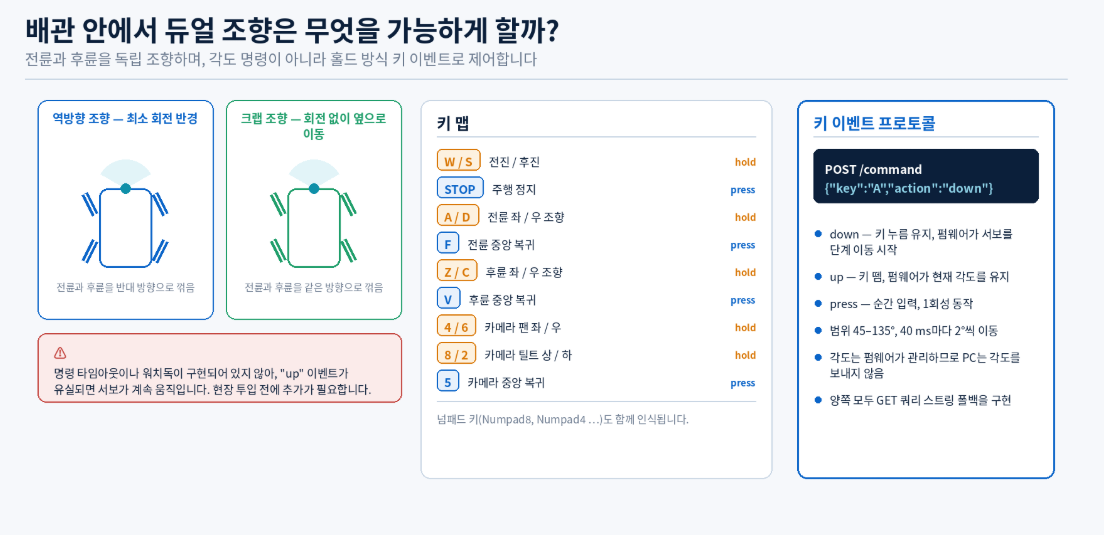
1. Dual-steer — 전륜과 후륜을 독립 조향
일반적인 rover는 전륜만 조향하거나 differential drive로 회전합니다. PipeInspect는 front steer servo와 back steer servo를 각각 별도 key로 제어합니다.
| 구분 | 좌 | 우 | 중앙 복귀 |
|---|---|---|---|
| 주행 | W 전진 (hold) | S 후진 (hold) | STOP |
| 전륜 조향 | A | D | F |
| 후륜 조향 | Z | C | V |
| Camera pan/tilt | 4 / 6 (pan), 8 / 2 (tilt) | — | 5 |
Numpad key도 지원합니다. Steer key는 hold 방식으로 각도를 45–135° 범위에서 40 ms마다 2°씩 이동시키고, key를 떼면 그 각도를 유지합니다. 전륜과 후륜을 반대 방향으로 꺾으면 회전 반경을 줄일 수 있고 같은 방향으로 꺾으면 crab steering이 되므로, 좁은 배관 내부처럼 선회 공간이 부족한 환경에 맞는 선택입니다.
2. Control은 W5500 wired Ethernet, video는 camera Wi-Fi
Firmware는 Arduino Ethernet.h (W5x00) library로 W5500을 초기화하고 static IP 192.168.1.100에서 port 80의 HTTP server를 엽니다.
#define W5500_CS   7
#define W5500_RST  10
#define SPI_MOSI   6
#define SPI_MISO   5
#define SPI_SCK    4

SPI.begin(SPI_SCK, SPI_MISO, SPI_MOSI, W5500_CS);
Ethernet.init(W5500_CS);
Ethernet.begin(mac, ip, gateway, subnet);   // MAC DE:AD:BE:EF:FE:ED
EthernetServer server(80);
Video는 SJ4000이 만드는 별도 Wi-Fi AP(192.168.1.254)에서 가져옵니다. 즉 PC는 Ethernet과 Wi-Fi 두 interface를 동시에 사용하는 구조입니다.
3. 간결한 HTTP/JSON command protocol
| Method | Endpoint | Body |
|---|---|---|
GET | /status | — |
POST | /command | {"key":"W","action":"down"} |
action은 down(key 누름 유지), up(뗌), press(순간 입력) 세 가지이고, key는 W, S, STOP, A, D, F, Z, C, V, 8, 2, 4, 6, 5입니다. 응답은 {"key_received":"W","action":"up"} 형태의 JSON입니다. Firmware와 server 양쪽에 GET query string fallback도 구현되어 있어, JSON POST가 실패하는 환경에서도 동작할 수 있습니다.
Command가 상태(state)가 아니라 key event로 정의되어 있다는 점이 특징입니다. Firmware가 key hold 상태를 직접 관리하므로 PC가 각도를 계산해 보낼 필요가 없고, 그만큼 packet 수가 줄어듭니다. 반대로 up event가 유실되면 조향이 계속 움직이는 위험이 있는데, 공개 source에는 watchdog이나 command timeout이 구현되어 있지 않습니다.
4. Flask가 camera stream을 proxy
SJ4000은 mode에 따라 두 가지 방식으로 영상을 내보냅니다.
- Photo mode — MJPEG,
http://192.168.1.254:8192/ - Video mode — RTSP,
rtsp://192.168.1.254/sjcam.mov
브라우저는 RTSP를 직접 재생하지 못하므로 Flask가 FFmpeg subprocess를 띄워 MJPEG으로 변환합니다.
ffmpeg -rtsp_transport tcp -i rtsp://192.168.1.254/sjcam.mov -c:v mjpeg -f mpjpeg pipe:1Mode 전환은 SJCAM 자체 HTTP command(cmd=3001&par=0|1)로 수행합니다. Flask가 stream을 중계하는 또 다른 이유는 브라우저 CORS 제약을 우회하기 위해서입니다.
5. 별도 sensor 없이 camera 영상만으로 운용
Firmware에는 encoder, IMU, 거리 센서 등 어떤 sensor도 없습니다. Operator가 보는 정보는 camera 영상 하나뿐이며, robot은 자신의 위치나 자세를 알지 못합니다. Pipe inspection이라는 목적에서 보면 "사람이 영상을 보고 판단한다"는 전제가 명확한 설계이지만, 자동 주행이나 위치 기록으로 확장하려면 sensor와 telemetry 계층을 새로 추가해야 합니다.
📌 System Architecture
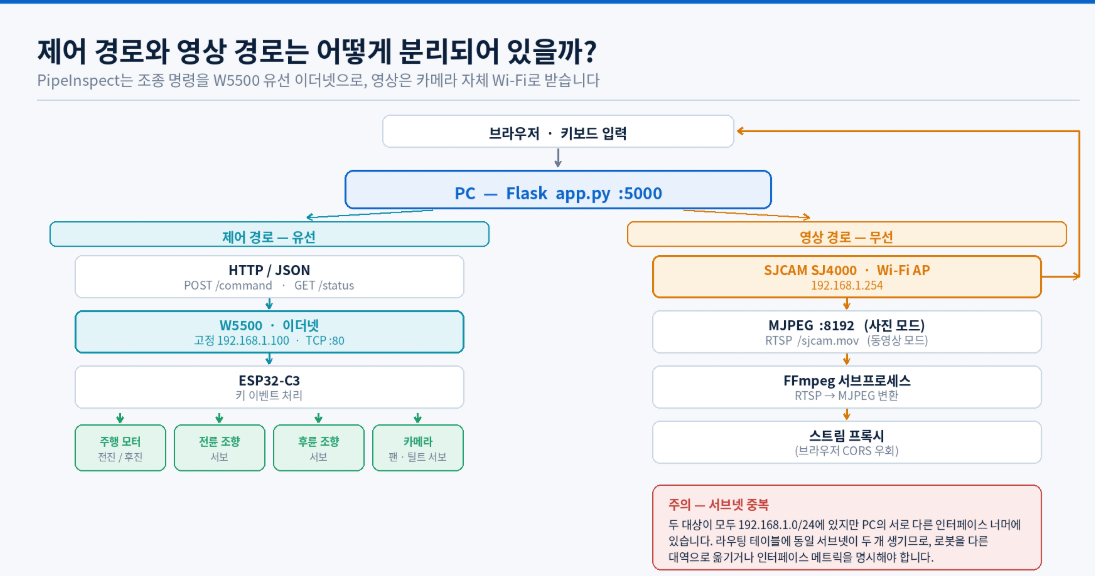
확인 가능한 전체 흐름은 다음과 같습니다.
[ Browser (keyboard) ]
          │  HTTP  :5000
          ▼
[ PC — Flask app.py ]
          │                         └── FFmpeg (RTSP → MJPEG)
          │                                     ▲
          │ HTTP/JSON                           │ Wi-Fi
          │ POST /command                       │
          ▼                                     │
   Ethernet (W5500)                    [ SJCAM SJ4000 AP ]
          │                                192.168.1.254
          ▼
[ ESP32-C3 — 192.168.1.100 : 80 ]
          │
          ├── Drive motors (fwd / rev)
          ├── Front steer servo
          ├── Back steer servo
          └── Camera pan / tilt servos
PC 쪽 network 구성은 다음과 같이 두 갈래입니다.
PC ── Ethernet ──► Router / Switch ──► ESP32-C3   192.168.1.100
PC ── Wi-Fi ─────────────────────────► SJ4000 AP  192.168.1.254
여기서 한 가지 짚어 둘 점이 있습니다. 두 대상이 모두 192.168.1.0/24 대역에 있습니다. 하나는 Ethernet interface 너머에, 하나는 Wi-Fi interface 너머에 있으므로 PC의 routing table에 동일 subnet이 두 개 생기고, 어느 interface로 packet을 보낼지 OS가 결정하게 됩니다. 실제 설치에서는 robot 쪽을 다른 대역(예: 192.168.2.x)으로 옮기거나 interface metric을 명시적으로 지정하는 편이 안전합니다. 이 문제는 공개 README에 언급되어 있지 않으며, 위 구성은 repository에 기재된 기본값 기준입니다.
📌 Role and Application of the WIZnet Chip
사용된 chip
Firmware header에 PipeInspect dual-steer robot firmware for ESP32-C3 + W5500 Ethernet.으로 명시되어 있으며, README hardware table에도 ESP32-C3 + W5500이 "Robot controller over Ethernet"으로 기재되어 있습니다. 확인되는 WIZnet chip은 W5500 하나입니다.
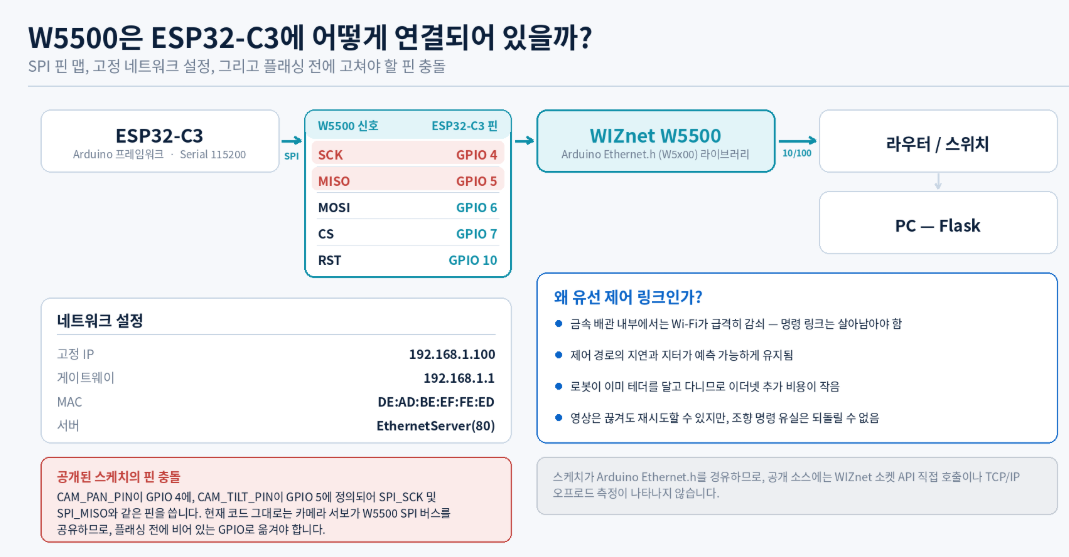
Network에서 담당하는 역할
ESP32-C3
   │ SPI  (SCK 4 · MISO 5 · MOSI 6 · CS 7 · RST 10)
   ▼
W5500
   │ 10/100 Ethernet  ·  static 192.168.1.100  ·  TCP :80
   ▼
Router / Switch
   │
   ▼
PC (Flask)
W5500은 Arduino Ethernet.h library를 통해 사용되므로, socket 처리는 library가 W5500의 hardware socket을 호출하는 형태입니다. 다만 이 project는 WIZnet socket API를 직접 호출하거나 offload 성능을 측정하지 않으므로, W5500을 활용한 Ethernet 연결 사례로 해석하는 것이 정확합니다.
Mobile inspection robot에서 wired control link가 갖는 실용적 의미는 다음과 같이 정리할 수 있습니다.
- 금속 배관 내부처럼 Wi-Fi 전파가 급격히 감쇠하는 환경에서도 명령 전달이 유지된다.
- 조종 명령의 latency와 jitter가 무선보다 예측 가능하다.
- Robot이 이미 tether(견인·회수용 케이블)를 달고 다니는 경우가 많아, 그 케이블에 Ethernet을 함께 넣는 데 추가 부담이 적다.
- 영상은 대역폭을 많이 쓰지만 유실되어도 재시도가 가능하고, 명령은 대역폭은 작지만 유실되면 위험하다 — 두 traffic을 다른 매체로 분리한 것은 이 성질에 부합한다.
위 내용은 project의 wiring 구조를 바탕으로 한 기술적 해석이며, 공개 자료에 유선과 무선 control link를 비교한 측정 결과는 없습니다.
확인되는 한계
정확한 평가를 위해 공개 source에서 확인되는 미완성 부분을 함께 기록합니다.
| 항목 | 내용 |
|---|---|
| Servo 출력 미완성 | Servo 구동이 analogWrite placeholder이며 TODO: replace with your servo library (ESP32Servo, PCA9685, etc.) 주석이 남아 있음 |
| 속도 제어 없음 | Drive motor가 PWM 없이 digital HIGH/LOW로만 제어됨 |
| Subnet 중복 | ESP32-C3와 SJ4000이 동일 192.168.1.0/24 대역 |
| Safety 계층 없음 | Command timeout, watchdog, e-stop 미구현 |
| 운영 설정 | Flask가 debug=True로 실행되며 production 설정이 아님 |
📌 Related Existing Contents & Expansion Value
1. W5500-Based ESP32-S3 micro-ROS Node Suite for a Distributed Rover Control System
- Link: WIZnet Maker Site – W5500-Based ESP32-S3 micro-ROS Node Suite
- Similarity Point: ESP32 계열 MCU에 W5500을 붙여 rover의 motor와 상태 정보를 wired Ethernet으로 주고받는다는 점에서 목적이 같습니다. 무선 대신 유선을 선택한 이유도 link 신뢰성이라는 공통점이 있습니다.
- Difference: micro-ROS Node Suite는 다섯 개의 ESP32-S3 node가 ROS 2 topic으로 통신하는 distributed architecture이고 BMS telemetry까지 포함합니다. PipeInspect는 단일 MCU에 단순 HTTP/JSON key event를 쓰는 최소 구성입니다.
- Connection Value: PipeInspect를 telemetry와 자동 주행으로 확장할 때 참고할 다음 단계에 해당합니다. HTTP key event → ROS 2 topic으로 옮겨 가는 경로를 보여 줍니다.
2. How to Bridge a ROS2 Jazzy Rover to Wired Ethernet with W5500 on ESP32?
- Link: WIZnet Maker Site – ROS2 Jazzy Rover Control with W5500
- Similarity Point: ESP32가 low-level motor I/O를 담당하고 상위 PC가 판단을 담당하는 역할 분리 구조가 PipeInspect의 "firmware는 key event 처리, PC는 UI"와 같은 방향입니다.
- Difference: MQTT 기반 message bus를 사용하고 ROS2 stack과 통합됩니다. PipeInspect는 broker 없이 PC가 robot에 직접 HTTP 요청을 보냅니다.
- Connection Value: Robot을 여러 대로 늘리거나 원격 감시를 붙일 때 broker 도입이 왜 필요해지는지 비교할 수 있는 사례입니다.
3. PoliTOcean-EVA — Distributed Underwater Robot Control System
- Link: WIZnet Maker Site – PoliTOcean-EVA
- Similarity Point: 사람이 접근하기 어려운 공간(수중 / 배관 내부)에 tether로 연결된 inspection robot을 유선 Ethernet으로 조종한다는 점에서 application 성격이 가장 가깝습니다.
- Difference: EVA ROV는 여러 microcontroller를 MQTT로 묶은 distributed control system이며 real-time 요구사항이 훨씬 높습니다. PipeInspect는 지상 배관용 단일 controller입니다.
- Connection Value: Tethered inspection robot에서 유선 Ethernet이 표준적인 선택인 이유를 뒷받침하는 상위 참고 사례입니다.
4. ESP32-CameraWebServer-ov5640 (ESP32-CAM + W5500)
- Link: WIZnet Maker Site – ESP32-CameraWebServer-ov5640
- Similarity Point: W5500 Ethernet으로 영상을 실시간 전송하는 사례입니다.
- Difference: PipeInspect는 영상을 W5500이 아니라 camera의 Wi-Fi로 받습니다. 이 project는 반대로 영상까지 유선으로 보냅니다.
- Connection Value: PipeInspect의 가장 유력한 개선 방향을 보여 줍니다. Camera를 Wi-Fi action cam에서 Ethernet camera module로 바꾸면 PC의 dual-network 구성과 subnet 중복 문제가 함께 사라집니다.
📌 Market & Application Value
적용 가능한 분야
| 적용 분야 | 활용 방식 |
|---|---|
| 배관·하수관 점검 | 관 내부 균열, 퇴적물, 이음부 상태 육안 점검 |
| 덕트·환기구 점검 | HVAC duct 내부 오염도 및 손상 확인 |
| 설비 하부·협소 공간 | 사람이 진입하기 어려운 기계 하부 및 crawl space 점검 |
| 건축물 유지보수 | 벽체 내부 공간, 배선 경로 확인 |
| 교육·연구 | Tethered mobile robot과 wired control link 실습 교재 |
Dual-steer 구조와 소형 form factor 덕분에 선회 공간이 부족한 관 내부에 적합합니다. 다만 공개 자료에는 방수 등급, 내구성 시험, 최소 통과 관경 같은 사양이 없으므로 실제 현장 적용 가능 범위를 판단할 근거는 없습니다.
B2C와 B2B 적용성
- Maker·교육: Arduino 수준 firmware와 Flask web UI로 구성되어 있어 "유선 제어 + 무선 영상"이라는 구조를 학습하기 좋은 최소 예제입니다.
- 소규모 시설관리: 상용 배관 카메라 대비 훨씬 낮은 비용으로 자체 제작할 여지가 있습니다. 다만 현재 상태로는 servo 구현과 pin 배치를 직접 완성해야 합니다.
- Product developer: ESP32-C3 + W5500 조합에서 command latency가 중요한 motion application의 reference로 활용할 수 있습니다.
Solution package로의 확장 가능성
- ESP32-C3 + W5500 SPI reference wiring (pin 충돌 없는 정정본)
- Command timeout / watchdog을 포함한 안전 계층 예제
- Dual-steer 기구 설계 및 servo 선정 가이드
- Ethernet camera로 전환한 단일 network 구성안
- PoE 급전으로 tether를 전원+데이터 하나로 통합하는 구성
실제 reference package로 발전시키려면 방수 enclosure, tether 관리, 조명, 전원 설계가 추가로 필요합니다.
📌 External Indicators
아래 수치는 2026-08-12 확인 기준 snapshot이며 이후 변경될 수 있습니다.
| Indicator | 확인 결과 | 해석 |
|---|---|---|
| GitHub Stars | 0 | 외부 관심이 아직 형성되지 않은 개인 prototype입니다. |
| GitHub Forks | 0 | 외부 재사용 흔적이 없습니다. |
| GitHub Commits | 4 | 초기 구현 직후 단계이며 지속적 유지보수 이력은 없습니다. |
| Releases / Packages | 0 | 배포 가능한 산출물이 발행되지 않았습니다. |
| License | 없음 | LICENSE file이 없어 재사용·재배포 조건이 정의되지 않았습니다. |
| Topics / Description | 없음 | Repository 메타데이터가 비어 있습니다. |
| Languages | C++ 24.3% · JavaScript 22.0% · Python 19.4% · HTML 17.3% · CSS 17.0% | Firmware와 web stack이 균형 있게 구성되어 있습니다. |
| 문서 일관성 | README의 project root가 getabec/로 표기되어 repository 이름과 불일치 | Rename 잔재로 보입니다. |
⚠️ License 관련 주의
LICENSE file이 없다는 것은 "자유 이용 가능"이 아니라 기본 저작권이 그대로 유지된다는 의미입니다. 코드 인용 범위를 넘어서는 소개나 재배포 전에는 작성자 확인이 필요합니다.
📌 WIZnet Strategic Value
확인된 사실
PipeInspect는 W5500을 sensor node나 controller 고정 설치가 아니라 이동하는 robot의 command link에 사용했습니다. WIZnet Maker Site에 축적된 W5500 robotics 사례와 함께 놓고 보면 일정한 흐름이 보입니다.
W5500 in Robotics — Maker Site 사례 계열

정적 제어 (Fixed installation)
├─ STM32F103 Multi-Axis Motion Controller
└─ ESP32UDP LinuxCNC Motion Controller
        └─ 공작기계·다축 모션, 결정적 latency가 핵심

이동 로봇 (Mobile / tethered)
├─ ROS2 Jazzy Rover (ESP32 + W5500 + MQTT)
├─ ESP32-S3 micro-ROS Node Suite (5-node rover)
├─ PoliTOcean-EVA (수중 ROV, tethered)
└─ PipeInspect (배관 점검, tethered)  ← 본 프로젝트
        └─ 무선이 닿지 않거나 신뢰할 수 없는 공간
해석
이 계열의 공통 요구는 다음과 같이 정리됩니다.
- 명령 전달의 신뢰성이 대역폭보다 중요하다.
- 이미 물리적 케이블(tether)이 존재하므로 유선화 비용이 낮다.
- 금속 구조물·수중·지하처럼 RF 환경이 나쁘다.
- MCU와 SPI로 연결되는 compact Ethernet interface가 필요하다.
- Motor·servo 제어 loop와 network 처리가 같은 MCU에서 공존해야 한다.
PipeInspect가 이 계열에서 갖는 위치는 가장 단순한 진입점입니다. ROS도 MQTT도 없이 HTTP/JSON만으로 구현되어 있어, W5500 기반 robot control을 처음 접하는 개발자가 읽어 낼 수 있는 최소 구성입니다. 반대로 말하면 신뢰성·안전성 계층은 전부 비어 있으므로, 앞의 세 사례가 왜 broker와 real-time stack을 도입했는지를 대비적으로 보여 주는 자료이기도 합니다.
📌 Summary
PipeInspect(GetabegRobot)는 ESP32-C3와 W5500을 사용해 dual-steer 배관 점검 robot을 wired Ethernet으로 조종하고, 영상은 SJCAM SJ4000의 Wi-Fi로 별도 수신하는 open source project입니다. Control과 video를 서로 다른 매체로 분리한 구성, hold 방식 key event 기반의 간결한 HTTP/JSON protocol, 전륜·후륜 독립 조향이 이 project의 특징입니다.
W5500은 ESP32-C3와 SPI(SCK 4 · MISO 5 · MOSI 6 · CS 7 · RST 10)로 연결되어 static IP 192.168.1.100에서 HTTP server를 제공합니다. Arduino Ethernet.h library를 경유하므로 direct socket API나 TOE 성능 활용은 공개 source에서 확인되지 않으며, 이 사례의 확실한 가치는 이동 robot의 신뢰성 있는 command link로 W5500을 사용했다는 점에 있습니다.
동시에 이 repository는 commit 4개, star 0, license 없음의 초기 prototype이며 servo 출력이 미완성이고 camera servo pin이 W5500 SPI pin과 충돌합니다. PC 양쪽 network가 같은 subnet을 쓰는 문제도 있습니다. 따라서 그대로 재현 가능한 완성품이 아니라, 구조적 아이디어를 참고하고 구현은 직접 정정해야 하는 자료로 다루는 것이 정확합니다.
📌 Key Questions & Clear Answers
1. PipeInspect는 어떤 문제를 해결하는가?
사람이 들어갈 수 없는 배관 내부를 육안 점검하기 위해, 좁은 공간에서도 선회할 수 있는 dual-steer robot을 PC 브라우저에서 조종하고 실시간 영상을 확인할 수 있게 합니다.
2. W5500은 이 project에서 어떤 역할을 하는가?
ESP32-C3와 SPI로 연결되어 조종 명령 전용 wired Ethernet interface를 제공합니다. 영상 전송이나 servo 구동에는 관여하지 않습니다. Direct WIZnet socket API 또는 TCP/IP offload 활용 여부는 공개 source에서 확인되지 않습니다.
3. 왜 영상까지 Ethernet으로 보내지 않았는가?
기성품 SJCAM SJ4000을 그대로 사용했기 때문입니다. 이 camera는 자체 Wi-Fi AP로만 영상을 내보냅니다. Ethernet camera module로 교체하면 single-network 구성이 가능하며, 이는 이 project의 가장 유력한 개선 방향입니다.
4. 이 코드를 그대로 flash하면 동작하는가?
동작하지 않습니다. Servo 출력이 analogWrite placeholder 상태이고, CAM_PAN_PIN/CAM_TILT_PIN이 W5500의 SPI_SCK/SPI_MISO와 같은 GPIO로 정의되어 있습니다. Camera servo pin을 다른 GPIO로 옮기고 ESP32Servo 등 실제 servo library를 적용해야 합니다.
5. 개발자가 재사용할 수 있는 부분은 무엇인가?
down / up / press 세 가지 action으로 구성된 key event protocol 설계, firmware가 hold 상태를 직접 관리해 packet 수를 줄이는 방식, Flask가 RTSP를 FFmpeg으로 MJPEG 변환해 CORS를 우회하는 stream proxy 패턴이 재사용 가치가 있습니다.
6. 실제 제품으로 확장하려면 무엇이 더 필요한가?
Command timeout과 watchdog을 포함한 안전 계층, PWM 기반 속도 제어, 방수 enclosure와 조명, tether 관리 구조, 그리고 license 명시가 필요합니다.
📌 Overview
PipeInspect is an open source project that drives a dual-steer pipe inspection robot from a web dashboard on a PC. The robot controller is an ESP32-C3, and a W5500 connected over SPI carries the command link to the PC as wired Ethernet.
What stands out here is that the control path and the video path are physically separated. Steering and drive commands travel over W5500 Ethernet on a cable; video arrives over the SJCAM SJ4000 action camera's own Wi-Fi access point. The PC sits on both networks at once and serves a Flask-based web UI, so the operator drives, steers and aims the camera entirely from browser keyboard input.
The repository has three parts:
firmware/pipeinspect_esp32c3/pipeinspect_esp32c3.ino— ESP32-C3 + W5500 Arduino sketchapp.py+requirements.txt— Flask server and camera stream proxytemplates/+static/— HTML/CSS/JS front end
Language share is C++ 24.3%, JavaScript 22.0%, Python 19.4%, HTML 17.3%, CSS 17.0% — firmware and web stack are split almost evenly.
That said, this repository is an early prototype: 4 commits, 0 stars, no license, no releases, with unfinished code and a pin conflict described below. It should be read not as a finished product but as an early implementation showing the W5500 used as a mobile robot's command link.
📌 Features
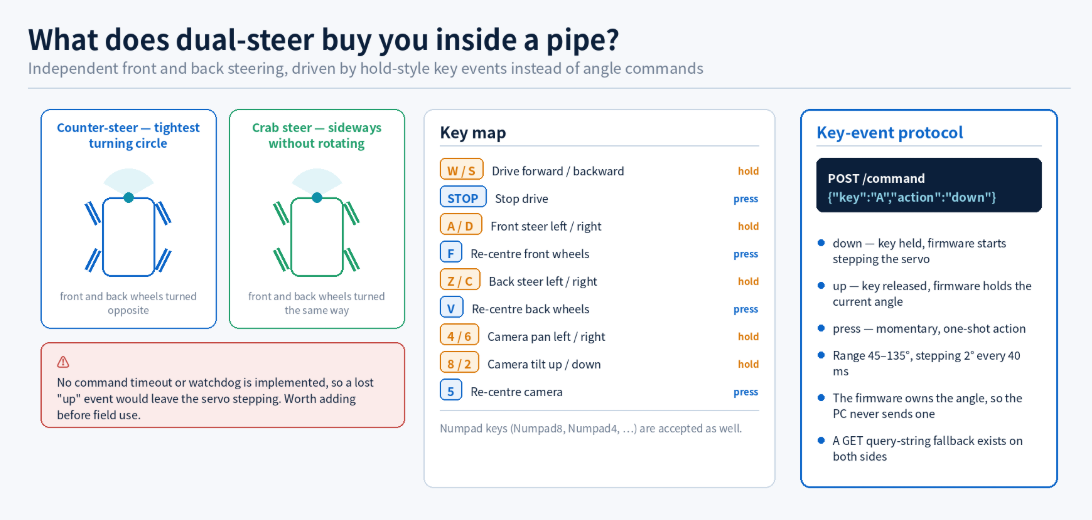
1. Dual-steer — front and back wheels steered independently
A typical rover either steers only the front wheels or turns by differential drive. PipeInspect drives a front steer servo and a back steer servo from separate keys.
| Function | Left | Right | Re-centre |
|---|---|---|---|
| Drive | W forward (hold) | S backward (hold) | STOP |
| Front steering | A | D | F |
| Back steering | Z | C | V |
| Camera pan / tilt | 4 / 6 (pan), 8 / 2 (tilt) | — | 5 |
Numpad keys are also accepted. Steer keys work by hold: the angle moves 2° every 40 ms across a 45–135° range, and releasing the key holds the current angle. Turning front and back wheels in opposite directions tightens the turning circle; turning them the same way produces crab steering. Both matter inside a pipe, where there is no room to swing the chassis around.
2. Control over W5500 wired Ethernet, video over the camera's Wi-Fi
The firmware initialises the W5500 through the Arduino Ethernet.h (W5x00) library and opens an HTTP server on port 80 at static IP 192.168.1.100.
#define W5500_CS   7
#define W5500_RST  10
#define SPI_MOSI   6
#define SPI_MISO   5
#define SPI_SCK    4

SPI.begin(SPI_SCK, SPI_MISO, SPI_MOSI, W5500_CS);
Ethernet.init(W5500_CS);
Ethernet.begin(mac, ip, gateway, subnet);   // MAC DE:AD:BE:EF:FE:ED
EthernetServer server(80);
Video comes from the separate Wi-Fi AP the SJ4000 creates (192.168.1.254). The PC therefore uses its Ethernet and Wi-Fi interfaces simultaneously.
3. A compact HTTP/JSON command protocol
| Method | Endpoint | Body |
|---|---|---|
GET | /status | — |
POST | /command | {"key":"W","action":"down"} |
action is one of down (key held), up (released) or press (momentary). key is one of W, S, STOP, A, D, F, Z, C, V, 8, 2, 4, 6, 5. The response is JSON of the form {"key_received":"W","action":"up"}. Both the firmware and the server also implement a GET query-string fallback, so the link still works where JSON POST does not.
The notable design choice is that commands are key events, not state. The firmware owns the hold state, so the PC never has to compute and transmit an angle, and packet volume stays low. The trade-off is that a lost up event leaves the servo stepping — and the public source implements no watchdog or command timeout.
4. Flask proxies the camera stream
The SJ4000 exposes video two different ways depending on mode:
- Photo mode — MJPEG,
http://192.168.1.254:8192/ - Video mode — RTSP,
rtsp://192.168.1.254/sjcam.mov
Browsers cannot play RTSP directly, so Flask spawns an FFmpeg subprocess to transcode it:
ffmpeg -rtsp_transport tcp -i rtsp://192.168.1.254/sjcam.mov -c:v mjpeg -f mpjpeg pipe:1Mode switching uses the SJCAM's own HTTP command (cmd=3001&par=0|1). The other reason Flask relays the stream is to work around browser CORS restrictions.
5. No sensors — the camera feed is the only feedback
The firmware carries no encoder, IMU or range sensor. The operator's only information is the video, and the robot has no knowledge of its own position or attitude. For pipe inspection that is a coherent assumption — a human watches and decides — but extending this to autonomous driving or position logging would require adding a sensor and telemetry layer from scratch.
📌 System Architecture
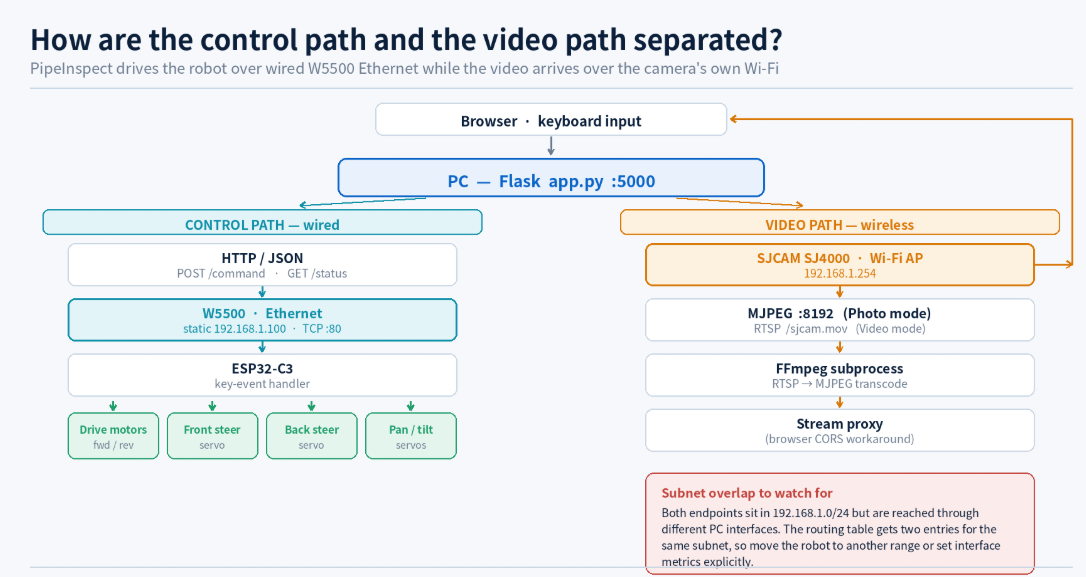
The verifiable end-to-end flow is as follows.
[ Browser (keyboard) ]
          │  HTTP  :5000
          ▼
[ PC — Flask app.py ]
          │                         └── FFmpeg (RTSP → MJPEG)
          │                                     ▲
          │ HTTP/JSON                           │ Wi-Fi
          │ POST /command                       │
          ▼                                     │
   Ethernet (W5500)                    [ SJCAM SJ4000 AP ]
          │                                192.168.1.254
          ▼
[ ESP32-C3 — 192.168.1.100 : 80 ]
          │
          ├── Drive motors (fwd / rev)
          ├── Front steer servo
          ├── Back steer servo
          └── Camera pan / tilt servos
The PC-side networking splits in two directions:
PC ── Ethernet ──► Router / Switch ──► ESP32-C3   192.168.1.100
PC ── Wi-Fi ─────────────────────────► SJ4000 AP  192.168.1.254
One point deserves attention here. Both endpoints live in 192.168.1.0/24. One is reached through the Ethernet interface and the other through Wi-Fi, so the PC's routing table ends up with two entries for the same subnet and the OS decides which interface a packet takes. In a real deployment it is safer to move the robot to a different range (for example 192.168.2.x) or to set interface metrics explicitly. This is not mentioned in the public README; the configuration above reflects the defaults committed to the repository.
📌 Role and Application of the WIZnet Chip
Chip used
The firmware header states PipeInspect dual-steer robot firmware for ESP32-C3 + W5500 Ethernet., and the README hardware table lists ESP32-C3 + W5500 as "Robot controller over Ethernet". The only WIZnet chip present is the W5500.
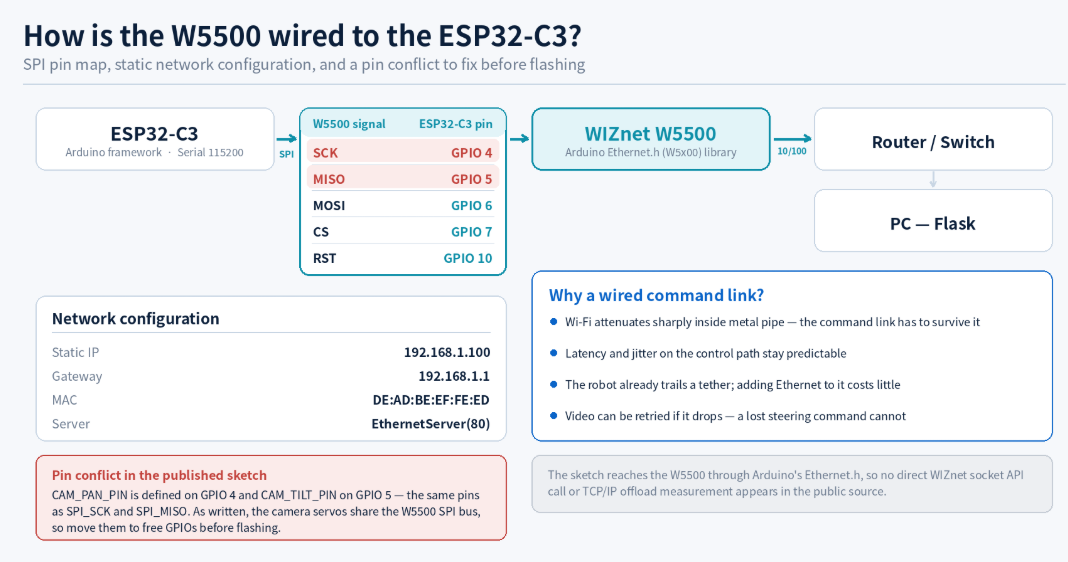
Role in the network
ESP32-C3
   │ SPI  (SCK 4 · MISO 5 · MOSI 6 · CS 7 · RST 10)
   ▼
W5500
   │ 10/100 Ethernet  ·  static 192.168.1.100  ·  TCP :80
   ▼
Router / Switch
   │
   ▼
PC (Flask)
Because the W5500 is reached through the Arduino Ethernet.h library, socket handling is whatever that library issues to the chip's hardware sockets. The project does not call the WIZnet socket API directly or measure offload performance, so this is best described as a case of using the W5500 for Ethernet connectivity rather than a TOE demonstration.
For a mobile inspection robot, a wired control link carries a few practical advantages:
- Command delivery survives environments such as metal pipe interiors where Wi-Fi attenuates sharply.
- Latency and jitter on the control path are more predictable than over a wireless link.
- The robot usually trails a tether for retrieval anyway, so adding Ethernet to that bundle costs little.
- Video is bandwidth-hungry but tolerant of loss; commands are tiny but intolerant of it. Splitting the two across different media matches those properties.
This is a technical reading based on the project's wiring; no measurement comparing wired and wireless control links appears in the public material.
Confirmed limitations
For an accurate assessment, the unfinished parts visible in the public source are recorded here as well.
| Item | Detail |
|---|---|
| Servo output unfinished | Servo drive is an analogWrite placeholder with the comment TODO: replace with your servo library (ESP32Servo, PCA9685, etc.) |
| No speed control | Drive motors are switched with digital HIGH/LOW only, no PWM |
| Subnet overlap | ESP32-C3 and SJ4000 both sit in 192.168.1.0/24 |
| No safety layer | No command timeout, watchdog, or e-stop |
| Runtime settings | Flask runs with debug=True, not a production configuration |
📌 Related Existing Contents & Expansion Value
1. W5500-Based ESP32-S3 micro-ROS Node Suite for a Distributed Rover Control System
- Link: WIZnet Maker Site – W5500-Based ESP32-S3 micro-ROS Node Suite
- Similarity Point: Same purpose — an ESP32-family MCU with a W5500 exchanging motor commands and status over wired Ethernet — and the same reasoning behind choosing wired over wireless: link reliability.
- Difference: The micro-ROS Node Suite is a distributed architecture of five ESP32-S3 nodes communicating over ROS 2 topics, including BMS telemetry. PipeInspect is a minimal single-MCU setup with plain HTTP/JSON key events.
- Connection Value: It is the natural next step if PipeInspect were extended with telemetry and autonomy, showing the path from HTTP key events to ROS 2 topics.
2. How to Bridge a ROS2 Jazzy Rover to Wired Ethernet with W5500 on ESP32?
- Link: WIZnet Maker Site – ROS2 Jazzy Rover Control with W5500
- Similarity Point: The same division of labour — the ESP32 handles low-level motor I/O while the host PC handles decisions — matching PipeInspect's "firmware handles key events, PC handles the UI".
- Difference: It uses an MQTT message bus and integrates with the ROS2 stack. PipeInspect has no broker; the PC talks to the robot with direct HTTP requests.
- Connection Value: A useful comparison for understanding when a broker becomes necessary — scaling to multiple robots or adding remote monitoring.
3. PoliTOcean-EVA — Distributed Underwater Robot Control System
- Link: WIZnet Maker Site – PoliTOcean-EVA
- Similarity Point: The closest match in application character: a tethered inspection robot operating in a space humans cannot enter (underwater / inside a pipe), controlled over wired Ethernet.
- Difference: EVA ROV is a distributed control system linking several microcontrollers over MQTT with far stricter real-time requirements. PipeInspect is a single-controller machine for above-ground pipework.
- Connection Value: Supports the case that wired Ethernet is the standard choice for tethered inspection robots.
4. ESP32-CameraWebServer-ov5640 (ESP32-CAM + W5500)
- Link: WIZnet Maker Site – ESP32-CameraWebServer-ov5640
- Similarity Point: Real-time video transported over W5500 Ethernet.
- Difference: PipeInspect receives video over the camera's Wi-Fi rather than the W5500. This project does the opposite and sends video over the wire too.
- Connection Value: It points at PipeInspect's most promising improvement: swapping the Wi-Fi action cam for an Ethernet camera module removes the dual-network setup and the subnet overlap in one move.
📌 Market & Application Value
Applicable fields
| Field | Use |
|---|---|
| Pipe and sewer inspection | Visual checks for cracks, sediment and joint condition inside pipework |
| Duct and ventilation inspection | Contamination and damage checks inside HVAC ducting |
| Under-equipment and confined spaces | Machine undersides and crawl spaces humans cannot easily enter |
| Building maintenance | Wall cavities and cable routing verification |
| Education and research | A teaching example of a tethered mobile robot with a wired control link |
The dual-steer layout and small form factor suit pipe interiors where there is no room to turn. However, the public material contains no ingress-protection rating, durability testing or minimum traversable pipe diameter, so there is no basis for judging real-world deployment limits.
B2C and B2B applicability
- Makers and education: Arduino-level firmware plus a Flask web UI makes this a good minimal example of the "wired control, wireless video" pattern.
- Small facility management: There is room to build something similar at a fraction of the cost of a commercial pipe camera — though in its current state the servo implementation and pin assignment must be completed by hand.
- Product developers: Usable as a reference for ESP32-C3 + W5500 in motion applications where command latency matters.
Expansion into a solution package
- ESP32-C3 + W5500 SPI reference wiring (a corrected version without the pin conflict)
- A safety layer example including command timeout and watchdog
- Dual-steer mechanical design and servo selection guide
- A single-network variant using an Ethernet camera
- A PoE configuration collapsing the tether into one power-plus-data cable
Turning this into a real reference package would additionally require a waterproof enclosure, tether management, lighting, and power design.
📌 External Indicators
The figures below are a snapshot verified on 2026-08-12 and may change.
| Indicator | Result | Interpretation |
|---|---|---|
| GitHub Stars | 0 | An individual prototype with no external attention yet. |
| GitHub Forks | 0 | No evidence of external reuse. |
| GitHub Commits | 4 | Immediately post-initial-implementation; no sustained maintenance history. |
| Releases / Packages | 0 | No distributable artefact has been published. |
| License | None | No LICENSE file, so reuse and redistribution terms are undefined. |
| Topics / Description | None | Repository metadata is empty. |
| Languages | C++ 24.3% · JavaScript 22.0% · Python 19.4% · HTML 17.3% · CSS 17.0% | Firmware and web stack are evenly balanced. |
| Documentation consistency | The README's project root is written as getabec/, which does not match the repository name | Appears to be a leftover from a rename. |
⚠️ Note on licensing
The absence of a LICENSE file does not mean the code is free to use — it means default copyright applies in full. Confirm with the author before any coverage or redistribution that goes beyond fair quotation of code.
📌 WIZnet Strategic Value
Confirmed facts
PipeInspect uses the W5500 not in a fixed sensor node or a stationary controller, but as the command link of a moving robot. Placed alongside the W5500 robotics cases already on the WIZnet Maker Site, a pattern emerges.
W5500 in Robotics — Maker Site case lineage

Fixed installation
├─ STM32F103 Multi-Axis Motion Controller
└─ ESP32UDP LinuxCNC Motion Controller
        └─ machine tools, multi-axis motion; deterministic latency is the point

Mobile / tethered
├─ ROS2 Jazzy Rover (ESP32 + W5500 + MQTT)
├─ ESP32-S3 micro-ROS Node Suite (5-node rover)
├─ PoliTOcean-EVA (underwater ROV, tethered)
└─ PipeInspect (pipe inspection, tethered)  ← this project
        └─ spaces where wireless does not reach or cannot be trusted
Interpretation
The shared requirements across this lineage are:
- Reliability of command delivery matters more than bandwidth.
- A physical tether already exists, so the marginal cost of going wired is low.
- The RF environment is hostile — metal structures, water, underground.
- A compact Ethernet interface that connects to an MCU over SPI is required.
- Motor/servo control loops and network handling must coexist on the same MCU.
PipeInspect's place in that lineage is the simplest entry point. With no ROS and no MQTT — just HTTP/JSON — it is the minimum viable form of W5500-based robot control, readable by a developer encountering the pattern for the first time. Conversely, because its reliability and safety layers are entirely absent, it also illustrates by contrast why the other three cases reached for brokers and real-time stacks.
📌 Summary
PipeInspect (GetabegRobot) is an open source project that uses an ESP32-C3 and a W5500 to drive a dual-steer pipe inspection robot over wired Ethernet, while receiving video separately over the SJCAM SJ4000's Wi-Fi. Its distinguishing traits are the split of control and video across different media, a compact hold-style key-event HTTP/JSON protocol, and independent front and rear steering.
The W5500 connects to the ESP32-C3 over SPI (SCK 4 · MISO 5 · MOSI 6 · CS 7 · RST 10) and serves HTTP at static IP 192.168.1.100. Because access goes through the Arduino Ethernet.h library, no direct socket API use or TOE performance figure appears in the public source; the firm value of this case lies in using the W5500 as a reliable command link for a mobile robot.
At the same time this repository is an early prototype — 4 commits, 0 stars, no license — with unfinished servo output and, critically, camera servo pins that collide with the W5500 SPI pins. Both PC-side networks also share one subnet. It should therefore be treated as a source of structural ideas whose implementation must be corrected by the reader, not as a reproducible finished build.
📌 Key Questions & Clear Answers
1. What problem does PipeInspect solve?
It lets an operator visually inspect the inside of pipework that humans cannot enter, using a dual-steer robot that can manoeuvre in confined space, driven from a PC browser with a live video feed.
2. What role does the W5500 play?
It connects to the ESP32-C3 over SPI and provides a dedicated wired Ethernet interface for control commands. It is not involved in video transport or servo drive. Whether the direct WIZnet socket API or TCP/IP offload is used is not verifiable from the public source.
3. Why isn't the video sent over Ethernet too?
Because the project uses an off-the-shelf SJCAM SJ4000, which only exposes video through its own Wi-Fi AP. Replacing it with an Ethernet camera module would allow a single-network design, and that is the project's most promising improvement.
4. Will the code work if flashed as-is?
No. Servo output is still an analogWrite placeholder, and CAM_PAN_PIN / CAM_TILT_PIN are defined on the same GPIOs as the W5500's SPI_SCK / SPI_MISO. You must move the camera servo pins to free GPIOs and apply a real servo library such as ESP32Servo.
5. What can a developer reuse?
The key-event protocol design built from just three actions (down / up / press), the approach of letting the firmware own the hold state to reduce packet volume, and the Flask stream-proxy pattern that transcodes RTSP to MJPEG with FFmpeg to sidestep CORS.
6. What would it take to turn this into a product?
A safety layer with command timeout and watchdog, PWM-based speed control, a waterproof enclosure and lighting, a tether management scheme, and an explicit license.