



FireFly: Home Lighting project
Open-source software-defined lighting controller using ESP32 + WIZnet W5500. Offline-first, MQTT-native with Home Assistant auto-discovery.

PROJECT DESCRIPTION
프로젝트가 하는 일
이 프로젝트(FireFly-Controller, 제작자 @BrentIO)는 가정과 소규모 사업장을 위한 소프트웨어 정의(software-defined) 조명 제어 시스템입니다. 저가형 Arduino/ESP32 계열 마이크로컨트롤러를 사용해, 상용 스마트 조명 제어 시스템에 비해 합리적인 비용으로 신뢰성 높은 조명 제어를 구현하는 것을 목표로 합니다.
핵심 설계 철학은 "스위치를 누르면 100년 전부터 그래왔듯 그냥 불이 켜진다"는 신뢰성입니다. 이를 위해 인터넷, 로컬 네트워크, 홈 오토메이션 허브가 모두 없어도 기본 동작이 보장되도록 오프라인 우선(offline-first) 으로 설계되었습니다. 이 "항상 안정적이어야 한다"는 목표를 네트워크 계층에서 뒷받침하는 부품이 바로 WIZnet W5500 유선 Ethernet입니다 — Wi-Fi의 끊김/지연 없이 하드웨어 TCP/IP로 통신합니다.
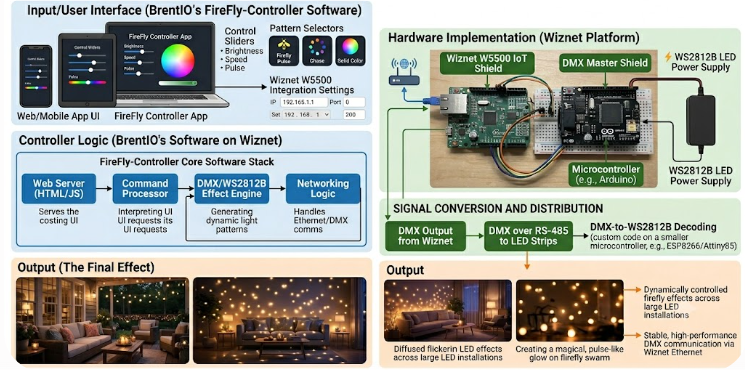
시스템은 두 가지 핵심 하드웨어로 구성됩니다.
- FireFly Controller — 시스템의 심장. 입력(주로 사람이 누르는 물리 버튼)을 받아들이고, 출력은 고전압 릴레이(high voltage relay) 로 연결되어 실제 조명을 스위칭합니다. 네트워크는 W5500 기반 유선 Ethernet으로 연결되며, 웹 기반 Configurator 로 입력/출력/회로/차단기/구역(Area)/MQTT/OTA 등을 설정합니다.
- FireFly Client — 하나 이상의 벽 스위치를 대체하는 장치로, LED로 버튼 피드백을 제공합니다. 컨트롤러와는 전원이 공급되는 이더넷 케이블로 통신합니다.
설정을 마치고 재부팅하면 MQTT 자동 검색(Auto Discovery) 을 통해 Home Assistant에 자동 등록됩니다. MQTT 네이티브라 Home Assistant뿐 아니라 다른 홈 오토메이션 플랫폼, 음성 비서, 커스텀 앱과도 연동할 수 있습니다.
WIZnet이 들어가는 위치
이 프로젝트에서 사용되는 WIZnet 제품은 W5500입니다.
W5500은 FireFly Controller의 유선 Ethernet 인터페이스를 담당합니다. ESP32가 입력 스캐닝과 릴레이 제어, MQTT 발행 같은 애플리케이션 로직에 집중하는 동안, W5500은 하드웨어 TCP/IP 스택으로 네트워크 통신을 처리합니다. 컨트롤러가 MQTT(=TCP/IP)로 Home Assistant 및 다른 기기와 통신하는 구간에서 네트워크 안정성이 곧 사용성과 직결되는데, Wi-Fi의 간헐적 끊김·채널 혼잡·재접속 지연을 피하기 위해 유선 Ethernet을 선택한 것은 "항상 작동해야 한다"는 FireFly의 설계 철학과 정확히 맞아떨어집니다.
역할을 나누면 구조가 명확해집니다.
- 물리 버튼 입력: 사람이 누르는 입력
- 고전압 릴레이 출력: 실제 조명 스위칭
- ESP32 (컨트롤러 펌웨어): 입력 스캐닝 + 릴레이 제어 + MQTT 발행
- W5500 Ethernet: MQTT 백홀, 웹 Configurator 접근, OTA, 상태 확인을 유선으로 안정적으로 처리
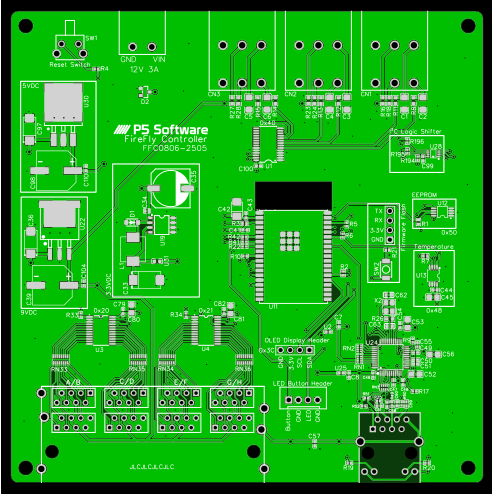
W5500은 하드웨어 TCP/IP 스택, SPI 인터페이스, 8개 독립 socket, 32KB 내부 buffer를 제공하므로 ESP32가 네트워크 프로토콜 처리 부담을 덜고 제어 로직에 집중할 수 있습니다.
같은 WIZnet 제품군 내에서, IPv4/IPv6 듀얼스택이 필요하면 W6100, MCU와 이더넷을 단일 칩으로 통합하고 싶다면 W55RP20(RP2040 + W5500) 같은 대안도 고려할 수 있습니다.
구현 메모
FireFly Controller는 커스텀 Arduino/C++ 펌웨어(언어 비중 C++ ~49%, Vue ~35%)로 동작하며, 설정은 웹 기반 Configurator에서 이뤄집니다.
ESP32 + W5500 조합은 SPI로 연결되며, WIZnet의 Ethernet 라이브러리 또는 ioLibrary_Driver로 구성합니다. 아래는 ESP32에서 W5500을 초기화하는 일반적인 구성 예시입니다(특정 핀맵은 보드 사양에 맞춰 조정).
// ESP32 + W5500 (Arduino Ethernet 라이브러리 기준 일반 구성 예시)
#include <SPI.h>
#include <Ethernet.h>

#define W5500_CS   5     // SPI Chip Select (보드 사양에 맞게 조정)
byte mac[] = { 0xDE, 0xAD, 0xBE, 0xEF, 0xFE, 0xED };

void setup() {
  Ethernet.init(W5500_CS);
  if (Ethernet.begin(mac) == 0) {
    // DHCP 실패 시 정적 IP로 폴백
    IPAddress ip(192, 168, 1, 50);
    Ethernet.begin(mac, ip);
  }
  // 이후 MQTT 클라이언트를 EthernetClient 위에 올려 사용
}
참고: ESP32에서 W5500은 SPI로 연결되며
CLK / MOSI / MISO / CS / RESET / INT핀을 보드 사양에 맞춰 설정해야 합니다. SPI 핀을 다른 장치와 공유하지 않는 것이 안정적입니다. (정확한 핀맵은 FFC0806-2505 하드웨어 사양 페이지를 참고하세요.)
실전 팁 / 주의점
- 고전압 릴레이/주전원 배선은 실제 감전·화재 위험이 있습니다. 지역 전기 규정 준수와 적절한 보호장치가 필수입니다.
- FireFly는 커스텀 PCB와 케이스를 직접 제작/조달해야 하는 메이커 프로젝트입니다. 완제품이 아닙니다.
- W5500은 SPI 기반 Ethernet 컨트롤러입니다.
CLK / MOSI / MISO / CS / RESET / INT핀을 보드 사양과 펌웨어 설정에서 동일하게 맞춰야 합니다. - 유선 Ethernet과 Wi-Fi를 동시에 의심해야 하는 상태로 디버깅하면 원인 추적이 어렵습니다. 네트워크 경로를 명확히 하나로 고정하세요.
- MIT 라이선스이므로 자유롭게 포크·수정할 수 있으나, 원저작권 표시는 유지해야 합니다.
유사 프로젝트
https://maker.wiznet.io/Benjamin/projects/smart-device-control-using-wiznet-w5500-and-stm32/
두 프로젝트는 모두 W5500 유선 Ethernet을 사용하는 로컬 제어 기반 오픈소스 장치라는 점에서 유사합니다. 다만 FireFly-Controller는 전체 주택 규모의 전용 조명 제어 시스템(컨트롤러 + 클라이언트 + 릴레이) 인 반면, Benjamin의 프로젝트는 W5500 웹 인터페이스로 단일 기기를 제어/모니터링하는 데모에 가깝습니다.
유사점
| 항목 | 유사한 점 |
|---|---|
| 목적 | 둘 다 로컬 제어 기반의 스마트 홈/기기 제어를 지향합니다. |
| 오픈소스 | 둘 다 오픈소스 라이선스(MIT 등)로 공개되어 있습니다. |
| 플랫폼 | 둘 다 저가형 MCU(ESP32 / STM32)를 사용합니다. |
| W5500 | 둘 다 W5500 하드웨어 TCP/IP 유선 Ethernet을 사용합니다. |
| Wi-Fi 대체 | 둘 다 유선 Ethernet으로 Wi-Fi보다 안정적인 네트워크를 구성합니다. |
| 설치 환경 | 둘 다 고정 설치형 제어 장치에 가깝습니다. |
차이점
| 항목 | FireFly-Controller | Smart Device Control (W5500 + STM32) |
|---|---|---|
| 핵심 목적 | 주택 전체 조명 제어 시스템 | 단일 기기 웹 제어 데모 |
| 구성 | Controller + Client + 고전압 릴레이 | STM32 + W5500 + 센서(DHT22, MQ2 등) |
| MCU | ESP32 / Arduino | STM32F103C8T6 |
| 네트워킹 | W5500 유선 Ethernet + MQTT + 웹 Configurator | W5500가 직접 호스팅하는 웹 인터페이스 |
| 통합 | Home Assistant MQTT 자동 검색 | 자체 웹 UI 중심 |
| W5500 역할 | 컨트롤러의 MQTT/웹/OTA 네트워크 백본 | 웹 서버/네트워크 인터페이스 본체 |
| 규모 | 다중 입력/출력, 다중 구역 | 소수 채널 제어/모니터링 |
FAQ
Q: 이 프로젝트는 어떤 WIZnet 칩을 사용하나요? A: FireFly Controller(FFC0806-2505)는 유선 Ethernet에 W5500을 사용합니다.
Q: 왜 Wi-Fi 대신 유선 Ethernet인가요? A: 조명 제어처럼 항상 작동해야 하는 고정 설치 장치에서는 Wi-Fi 끊김·지연이 치명적입니다. W5500 하드웨어 TCP/IP로 MQTT·웹·OTA를 더 예측 가능한 경로로 운용할 수 있습니다.
Q: 인터넷이 끊겨도 동작하나요? A: 네. FireFly는 오프라인 우선 설계로, 인터넷·로컬 네트워크·홈 오토메이션 허브가 없어도 기본 조명 제어가 동작합니다.
Q: Home Assistant와 어떻게 연동되나요? A: 펌웨어를 올리고 웹 Configurator에서 입출력을 설정한 뒤 재부팅하면 MQTT 자동 검색으로 Home Assistant에 자동 등록됩니다.
What the Project Does
This project (FireFly-Controller, created by @BrentIO) is a software-defined lighting control system for the home and small business. Using low-cost Arduino/ESP32-class microcontrollers, it aims to deliver reliable lighting control at a reasonable price compared with commercial smart-lighting systems.
Its core philosophy is reliability — "press the switch and the light just turns on, like it has for a hundred years." To achieve this, it is designed offline-first, so basic operation is guaranteed with no internet, no local network, and no home-automation hub required. The component that backs this "always reliable" goal at the network layer is the WIZnet W5500 wired Ethernet — communicating via hardware TCP/IP without Wi-Fi dropouts or latency.
The system has two main hardware components:
- FireFly Controller — the heart of the system. It accepts inputs (usually a human pressing a physical button) and drives outputs connected to high-voltage relays that switch the lights. The network is connected over W5500-based wired Ethernet, and a web-based Configurator handles inputs, outputs, circuits, breakers, areas, MQTT, OTA, and more.
- FireFly Client — replaces one or more wall switches and provides LED button feedback. It talks to the Controller over a powered Ethernet cable.
After configuration and a reboot, everything is auto-registered to Home Assistant via MQTT auto-discovery. Because it is MQTT-native, it also works with other automation platforms, voice assistants, and custom apps.
Where WIZnet Fits
The WIZnet product used in this project is the W5500.
The W5500 provides the FireFly Controller's wired Ethernet interface. While the ESP32 focuses on application logic such as input scanning, relay control, and MQTT publishing, the W5500 handles network communication through its hardware TCP/IP stack. In the segment where the controller talks MQTT (over TCP/IP) to Home Assistant and other devices, network stability is directly tied to usability. Choosing wired Ethernet to avoid Wi-Fi's intermittent dropouts, congestion, and reconnect delays aligns precisely with FireFly's "must always work" design philosophy.
Separating the roles makes the structure clear:
- Physical button input: human input
- High-voltage relay output: actual lighting switching
- ESP32 (controller firmware): input scanning + relay control + MQTT publishing
- W5500 Ethernet: handles the MQTT backhaul, web Configurator access, OTA, and status checks reliably over wire
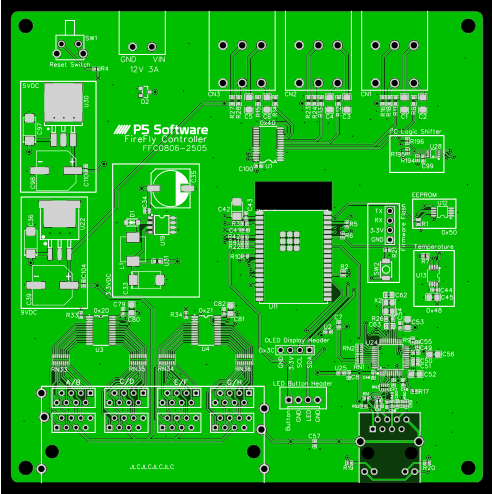
Since the W5500 provides a hardware TCP/IP stack, an SPI interface, eight independent sockets, and a 32 KB internal buffer, it relieves the ESP32 of network protocol processing so it can focus on control logic.
Within the same WIZnet family, you could also consider W6100 if IPv4/IPv6 dual-stack is needed, or W55RP20 (RP2040 + W5500) to integrate the MCU and Ethernet into a single chip.
Implementation Notes
The FireFly Controller runs on custom Arduino/C++ firmware (language mix: C++ ~49%, Vue ~35%), configured through a web-based Configurator.
The ESP32 + W5500 combination connects over SPI and is set up using WIZnet's Ethernet library or ioLibrary_Driver. Below is a typical example of initializing the W5500 on an ESP32 (adjust the specific pin map to the board specification).
// ESP32 + W5500 (typical Arduino Ethernet library setup)
#include <SPI.h>
#include <Ethernet.h>

#define W5500_CS   5     // SPI Chip Select (adjust to your board spec)
byte mac[] = { 0xDE, 0xAD, 0xBE, 0xEF, 0xFE, 0xED };

void setup() {
  Ethernet.init(W5500_CS);
  if (Ethernet.begin(mac) == 0) {
    // Fall back to static IP if DHCP fails
    IPAddress ip(192, 168, 1, 50);
    Ethernet.begin(mac, ip);
  }
  // Then run an MQTT client on top of EthernetClient
}
Note: On the ESP32, the W5500 connects over SPI and the
CLK / MOSI / MISO / CS / RESET / INTpins must be configured per the board specification. It is more stable not to share the SPI pins with other devices. (Refer to the FFC0806-2505 hardware spec page for the exact pin map.)
Practical Tips / Pitfalls
- High-voltage relays / mains wiring carry real shock and fire risk. Compliance with local electrical codes and proper protective devices are essential.
- FireFly is a maker project requiring custom PCBs and enclosures to be built or sourced. It is not a finished retail product.
- The W5500 is an SPI-based Ethernet controller. The
CLK / MOSI / MISO / CS / RESET / INTpins must match between the board specification and the firmware configuration. - Debugging while suspecting both wired Ethernet and Wi-Fi at once makes root-cause analysis harder. Keep the network path clearly fixed to one.
- As an MIT-licensed project, you may freely fork and modify it, but you must keep the original copyright notice.
Similar Project
https://maker.wiznet.io/Benjamin/projects/smart-device-control-using-wiznet-w5500-and-stm32/
Both projects are similar in that they are locally-operated, open-source devices using W5500 wired Ethernet. However, FireFly-Controller is a whole-home dedicated lighting control system (controller + client + relays), while Benjamin's project is closer to a single-device web control/monitoring demo using W5500.
Similarities
| Item | Similarity |
|---|---|
| Purpose | Both target local-control-based smart home / device control. |
| Open source | Both are released under open-source licenses (e.g., MIT). |
| Platform | Both use low-cost MCUs (ESP32 / STM32). |
| W5500 | Both use the W5500 hardware TCP/IP wired Ethernet. |
| Wi-Fi replacement | Both use wired Ethernet for a more stable network than Wi-Fi. |
| Installation | Both are close to fixed-installation control devices. |
Differences
| Item | FireFly-Controller | Smart Device Control (W5500 + STM32) |
|---|---|---|
| Main purpose | Whole-home lighting control system | Single-device web control demo |
| Composition | Controller + Client + high-voltage relays | STM32 + W5500 + sensors (DHT22, MQ2, etc.) |
| MCU | ESP32 / Arduino | STM32F103C8T6 |
| Networking | W5500 wired Ethernet + MQTT + web Configurator | Web interface hosted directly by W5500 |
| Integration | Home Assistant MQTT auto-discovery | Self-hosted web UI |
| W5500 role | MQTT/web/OTA network backbone of the controller | The web server / network interface itself |
| Scale | Many inputs/outputs, multiple areas | A few channels of control/monitoring |
FAQ
Q: Which WIZnet chip does this project use? A: The FireFly Controller (FFC0806-2505) uses the W5500 for wired Ethernet.
Q: Why wired Ethernet instead of Wi-Fi? A: For fixed-installation devices that must always work, like lighting control, Wi-Fi dropouts/latency are critical. The W5500's hardware TCP/IP lets MQTT, web, and OTA run over a more predictable path.
Q: Does it work when the internet is down? A: Yes. FireFly is offline-first, so basic lighting control works without internet, local network, or a home-automation hub.
Q: How does it integrate with Home Assistant? A: Flash the firmware, configure inputs/outputs in the web Configurator, reboot — and it auto-registers to Home Assistant via MQTT auto-discovery.
Documents
- GitHub Code: https://github.com/BrentIO/FireFly-Controller
- Docs: https://docs.fireflylx.com
- Hardware spec (Network): https://docs.fireflylx.com/controller/hardware/FFC0806_2505/#network
Tags: ESP32, W5500, MQTT, Home Assistant, smart-lighting, offline-first, open-source
-
site

-
Schematic
-
FFC0806_2505