W5500 Down/Lose Connection after some hours/days
Ethernet Chips
No replies yet. Be the first to reply.
Join the discussion.
Ethernet Chips
No replies yet. Be the first to reply.
Join the discussion.
Share projects and connect with makers.
Joined before the site update? first.
New to WIZnet Makers?
We sent a verification link to your address. Open it to activate your account, then log in.
Accounts from this email provider are reviewed by an administrator after verification. Approval usually takes one business day.
Already have an account?
Enter your email address. If it belongs to an account, we'll send a link to set a new password. Members who joined before the site update use this to set their password.
If an account uses that address, we sent a link to set a new password. The link works once and expires in 30 minutes.
Know your password?
Need an account?
RE: W5500 Down/Lose Connection after some hours/days
by seniman ·
This is physical W5500 that I was used.
Wireshark Debug
RE: W5500 Down/Lose Connection after some hours/days
by Eugeny ·
Does the word “now” means that you have this board connected differently before (e.g. direct connect to server) and it was working without this problem?
First, it is good that it is reproducible. I would do the following:
RE: W5500 Down/Lose Connection after some hours/days
by seniman ·
Hello, based on email replied from the wiznet technical support, this problem is caused by w5500 is reset externally.
It maybe caused by ESD.
What is ESD actually ?
Is ESD attack on PHY line or spi line or reset line ?
Anyone experience, how to solve this problem ?
RE: RE: W5500 Down/Lose Connection after some hours/days
by Eugeny ·
But it is easy to test. When chip is soft or hard reset, it has network property registers cleared. You may consider putting regular checks of the W5500 SIP registers if they are having values required. As soon as value differs, you perform software reset using MR register, and reinitialize W5500.
I explained workaround above. It is NOT a solution. To find a solution you must:
Regarding ESD (you can find respective Wikipedia article on it) it is low probability that issue comes through network cable as it is DC decoupled (however you may consider using shielded twisted pair as a test); you must consider (a) power supply issue or (b) some electromagnetic interference (for example, induced by the relays). You must also consider having proper design of the relay circuits (e.g. protection diode) as switching relay consuming power may cause instability in operation of the digital part of the circuits. I mentioned it before in my previous post, you did not provide related circuit and any information regarding this part of the device.
RE: W5500 Down/Lose Connection after some hours/days
by seniman ·
I will try this first.
As you see above is W5500 module I used. When this is module work normally and there is request or send data, I try place DC PCB drill near the reset pin (BLue Arrow) of the module, I turn on the drill then I get information from arduino serial monitor that IP, subnetmask, default gateway and DNS become 0.0.0.0 as shown below. As the same time I also look at the 2 LEDs of this module, these LEDs suddenly turn off then turn on again, this maybe because of reset.
RE: W5500 Down/Lose Connection after some hours/days
by seniman ·
This should not be a problem because I used 12V 3A swithing power supply.
I use common 2 relay module which maybe sold widely, below is the picture and there is protction diode in the module.
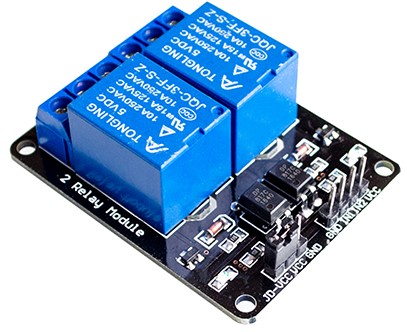
The distance between RJ45 in the W5500 module and the relay is about 10 CM, distance between transformer power supply and the main module is longer (about 15CM)
Is this condition can cause interfere ?
thank you
RE: W5500 Down/Lose Connection after some hours/days
by seniman ·
This maybe W5500 has been reset externally cause of ESD in the reset pin, but where does ESD come from ?
I also never write software reset code in the sketch.
Or maybe there is condition which can cause W5500 reset by it self (maybe software reset), maybe somethin about heating of the chip ?
But I also have placed heatsink on top of the chip, so heating should not be problem.
RE: W5500 Down/Lose Connection after some hours/days
by Eugeny ·
This is very important information. So I looked at the design of the module.
I must say that miniaturization comes at the cost. This module is having several obvious issues in its design, and these issues most probably affect its operation in your conditions.
To see design requirements yourself, go here, click “HW design guide” icon, open zip file, and then
W5100_Layout_Guide.pdffile. This guide applies to whole W5xxx family.So the issues I see:
As I do not have circuitI have circuit in your question, but questions remain (1) grounding of the jack (through additional cap? - this circuit is used for separate magnetics and jack, here we have integrated magnetics); (2) LED traces are too close to the analog pins.In your case: I think you found the vulnerability in the design of your door lock solution; the only way I see here is to shield everything including board itself and cable coming to its connector, and ensure the cable length as short as possible, and location of cabling as far as possible from the outer surface of the door (so that someone coming to you with drilling device or other device generating electromagnetic field would have minimal chances influencing your device with EMI).
Thus at this point I fully agree with WIZnet engieers’ conclusion, and think that this module can not and should not be used in industrial applications.
RE: W5500 Down/Lose Connection after some hours/days
by seniman ·
Here is schematic and PCB I get from the seller.
W5500.zip (73.2 KB)
Bad crystal should be affect on error data communication, but as far I used this module even I can handle up to 5KB or 5120Bytes (this only my limitation array variable in sketch) encrypted HTTP data sent from the chrome browser and then decrypted back by the main system (STM32 and W5500 module) without no error (and result the same plaintext), and wireshark debug shows all green mark packet.
When I try place solder tip (solder is turn off) onto the RST terminal, the W5500 module is restart also. The STM32 module (blue pill) is stronger, with the same solder tip placed onto the RST of STM32, The STM32 keep running, no reset.
But with finger touch or any conductor contact with my hand then put onto STM32 RST pin, the STM32 is got reset.
Maybe other members here can test with their owned W5100 or W5500 module, turn on the module and place solder tip (solder is turned off) onto the RST pin of your module, with you only holding the isolator body of solder (no touch the solder AC plug). And what is happen ?
I will try to cut the RST line in the bottom of this module (and keep the 10K pull up resistor), then touch with the solder tip as the case above, can it be strong as the STM32 module.
I think the main problem is W5500 reset is very sensitive to ESD or EMI or other unknow case. Wiznet also does not provide any recomendation for protection of their RESET pin in their hardware design guide documents/files. They should be care about this serious problem and give this warning notification/announcement urgently to their buyers and hardware developers.
Because W5100 or W5500 should be suffer in the real environment with noisy and many of EMI or ESD attack, which I was experienced.
RE: RE: W5500 Down/Lose Connection after some hours/days
by Eugeny ·
It is wrong assumption that unsuitable crystal causes bad communication only.
Do short test, take one probe of the multimeter in AC voltage measurement mode into your hand touching the probe, and put another probe to the ground of the W5500 module. You may be surprised to see tens of AC volts.
It is a task of board designer to ensure device is EMI protected - through board design and application guidelines. Chip manufacturer can only bear responsibility for chip ESD guidelines, and this info can be found in chapter 5.2 of the datasheet. Applying external AC or DC to the chip through finger, iron tip of whatever is simply out of electrical specification for the chip.
RE: W5500 Down/Lose Connection after some hours/days
by Marco Napoleone ·
Hi all, I have exactly the same problem with a different W5500 shield https://robotdyn.com/ethernet-module-w5500-3-3v-5v.html
Since the reset line of the module is not used (originally it was connected with the board reset line), I decided to cut the reset pin of the shield. In this way the RST pin is pulled up only to 3v3 by a 10k resistor (instead of the 77Kohm suggested in the datasheet). I think that a lower value is better.
Despite this I continue to have unexpected reset. For example I can reproduce the problem by putting the multimeter probe in order to measure the RST-GND dc voltage.
Marco
RE: W5500 Down/Lose Connection after some hours/days
by dmitriybabintsev ·
Hello guys. Have anybody managed to fix the issue with unexpected reset?
I face the same problem.
RE: RE: W5500 Down/Lose Connection after some hours/days
by Eugeny ·
If you follow hardware design guide, you’ll minimize such issues. If it still happens, there must be a reason for it in your design, therefore each design must be considered individually. So first your task is to see how your design differs with WIZnet design and if you power the design reliably.
RE: RE: W5500 Down/Lose Connection after some hours/days
by spontomdela ·
Try placing a 100nF capacitor in package 0603 between the GND and RSTn port, near the w5500.