Link LED starts flashing when ethernet cable connected, but no network activity
Ethernet Chips
No replies yet. Be the first to reply.
Join the discussion.
Ethernet Chips
No replies yet. Be the first to reply.
Join the discussion.
Share projects and connect with makers.
Joined before the site update? first.
New to WIZnet Makers?
We sent a verification link to your address. Open it to activate your account, then log in.
Accounts from this email provider are reviewed by an administrator after verification. Approval usually takes one business day.
Already have an account?
Enter your email address. If it belongs to an account, we'll send a link to set a new password. Members who joined before the site update use this to set their password.
If an account uses that address, we sent a link to set a new password. The link works once and expires in 30 minutes.
Know your password?
Need an account?
RE: Link LED starts flashing when ethernet cable connected, but no network activity
by seands ·
Here’s my schematic:
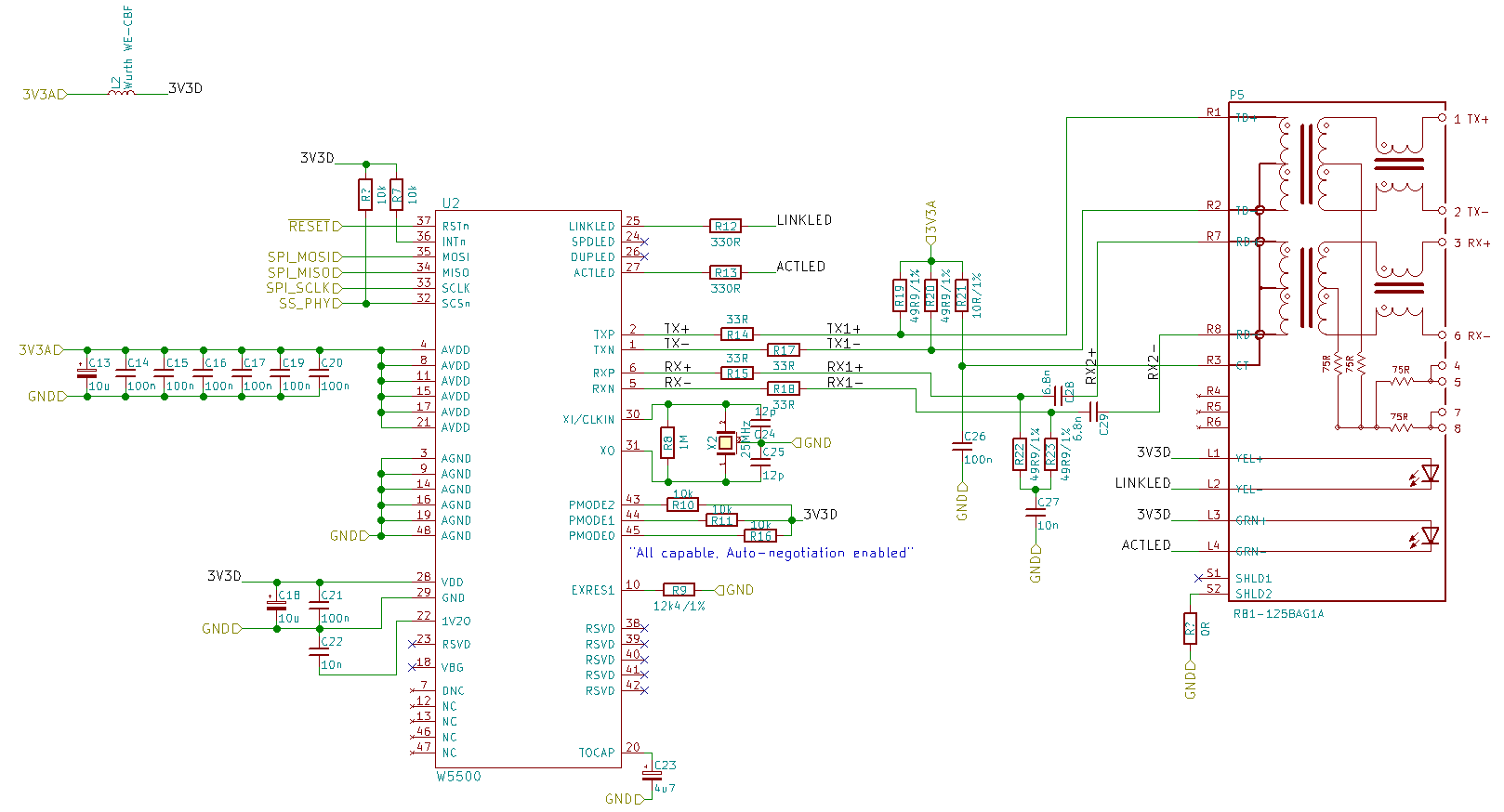
I can also provide the microcontroller schematic, but I doubt that will be necessary. Note that in the above schematic I already fixed the SCSn pin to pull up to the 3V3D rail. In the actual board I made, this is not pulled up.
Feedback welcome!
RE: Link LED starts flashing when ethernet cable connected, but no network activity
by Eugeny ·
[quote=“seands, post:1, topic:3209”]I also used the Arduino Ethernet Shield 2.0 schematic as a reference
[/quote]
I also did this mistake in the past; Arduino shield is not the best (and sometimes not the right) design, not following several design recommendations.
Sounds line chip sees the issue on its TX/RX lines, and tries to reinitialize its PHY in order and in hope to fix the issue.
It matters, and 1% also matters. See datasheet page 12.
[quote=“seands, post:1, topic:3209”]The SCSn chip select pin on the W5500 is not pulled up to Vcc
[/quote]
Not a problem if you constantly drive this pin, and every time it has defined logical level on it.
W5500 datasheet says that pin 23 must be tied to ground, but also says that all these RSVD pins are having internal pull-downs. I would connect them to ground as Arduino does.
In general, if you want to avoid issues, just follow reference schematics.
RE: RE: Link LED starts flashing when ethernet cable connected, but no network activity
by seands ·
I also did this mistake in the past; Arduino shield is not the best (and sometimes not the right) design, not following several design recommendations.[/quote]
Good to know, thanks. In my case, the difference between the reference schematic and Arduino ethernet shield was small: some resistors were slightly different values, and there weren’t damping resistors in series with the RX/TX lines, and there isn’t a separate ground plane on the Arduino for the shield. My board will not go into an EMI critical environment.
[quote=“Eugeny, post:3, topic:3209, full:true”]
Sounds line chip sees the issue on its TX/RX lines, and tries to reinitialize its PHY in order and in hope to fix the issue.[/quote]
The RJ45 on my board is on the opposite side to the PHY, so I need to use vias and I cross the RX/TX pairs on opposite sides. Could this be the issue?
[quote=“Eugeny, post:3, topic:3209, full:true”]
It matters, and 1% also matters. See datasheet page 12.[/quote]
Hmm ok. Do you think this could cause the problem I see?
[quote=“Eugeny, post:3, topic:3209, full:true”]
W5500 datasheet says that pin 23 must be tied to ground, but also says that all these RSVD pins are having internal pull-downs. I would connect them to ground as Arduino does.[/quote]
I tied them to ground directly. I guess since there are internal pull-downs, I don’t need to connect them the way the Arduino does, but keep it the way I did it already?
Your help is much appreciated!
RE: Link LED starts flashing when ethernet cable connected, but no network activity
by Eugeny ·
I do not think so. They may increase probability of transmission errors, but not this behavior you observe. Put appropriate resistor (or resistors in series) to EXRES1 pin, and then we will see.
RE: Link LED starts flashing when ethernet cable connected, but no network activity
by seands ·
Alright, I’ll swap the resistor and hopefully it’ll work. Cheers.
RE: Link LED starts flashing when ethernet cable connected, but no network activity
by seands ·
I swapped the resistor and it didn’t make a difference. I fired up my Atmel ICE JTAG debugger and set some breakpoints in the code. It turns out the program infinitely loops between the following lines of code, in socket.cpp within the sendUDP() function within the Arduino Ethernet2 library:
Basically, the program jumps between evaluating the while() part and the if() part. I guess that the expression (w5500.readSnIR(s) & SnIR::SEND_OK) != SnIR::SEND_OK is never true. If I go to W5500.h and find the SnIR definition, it turns out it’s the socket’s interrupt signal.
I’m not sure exactly what this means, but I guess some sort of hardware problem is causing the software problem.
RE: RE: Link LED starts flashing when ethernet cable connected, but no network activity
by Eugeny ·
Thanks for telling us about your progress.
This code should be run after SEND command is written to socket’s command register, and does the simple things -
checks if interrupt register is having SEND_OK bit set. If it is set, then W5500 completed sending data without errors.
performs check if TIMEOUT bit in interrupt register is set in case SEND_OK bit is not set (there is no indication from W5500 that it has successfully sent data).
this code resets SEND_OK and TIMEOUT bits in interrupt register, and is executed when W5500 did not send data (bit SEND_OK was not eventually set), and W5500 set timeout bit = error.
Again, this code must be executing after issuing SEND command to the socket; if executed in another circumstances it will hang. After SEND command, W5500 must return either timeout, or send_ok status.
You also must check that you supply correct socket # as input parameter, and in general check if this code is being executed in correct moment as I described above.
RE: Link LED starts flashing when ethernet cable connected, but no network activity
by seands ·
Thanks for the breakdown. I assume that the commands are being issued, because I’m using the Arduino library without modification, and running the “print DHCP” example that comes with it (basically it just gets an IP address via DHCP, then prints it to the serial port - I’ve disabled the serial port printing since I don’t have one). If you look at the code I linked to, there is a call to
immediately before the while loop that hangs. That function looks like this:
The
writeSnCRfunction just writes the command into the W5500’s command register, I think.So, it looks like the software is doing what it is supposed to do, and sending the UDP DHCP message to the W5500, but the W5500 is not acknowledging it…?
RE: Link LED starts flashing when ethernet cable connected, but no network activity
by Eugeny ·
Seems so, the only question is why it happens. Let’s return back to your original issue, you said that link LED is flashing 0.5 Hz, in other words with period of every 2 seconds.
May I make a guess that W5100 is resetting every 2 seconds; after reset, of course, no interrupt will happen, and code will hang.
Do the following - put register dump into this loop; it should then be easy to see if chip has reset because all its mandatory for configuration registers in common register set will reset.
RE: Link LED starts flashing when ethernet cable connected, but no network activity
by seands ·
[quote=“Eugeny, post:10, topic:3209, full:true”]Do the following - put register dump into this loop; it should then be easy to see if chip has reset because all its mandatory for configuration registers in common register set will reset.
[/quote]
Ok, I changed the code to the following:
Before the first evaluation of the while() expression (i.e. immediately after x1…x16 are initialised), all variable values are listed as 0 except x5 = 105, x6 = 10, x7 = 9, x9 = 10, x10 = 84, x12 = 255, x13 = 25, x14 = 54. I’m not sure why that is, because this is just after I initialise all of those variables to 0. Perhaps the variables instead see some junk from previously used memory. I don’t know C well enough to understand what’s going on there.
Anyway, when the program gets to the line
if (w5500.readSnIR(s) & SnIR::TIMEOUT), all of the variables are reset to 0. If I continue to run through the loop, the variables stay at 0.I guess this supports your hypothesis about resetting…?
RE: Link LED starts flashing when ethernet cable connected, but no network activity
by seands ·
Oops, I realised that x5…x16 are
uint16_tand notuint8_t. If I set these correctly, then all are 0 except x1 = 10, x5 = 17674, x7 = 5152, x10 = 26880, x11 = 2314, x12 = 2560, x13 = 84, x14 = 6655, x15 = 54, x16 = 26880. I’m not sure if these values mean anything. They still all get set to 0 before theif(...)statement.RE: Link LED starts flashing when ethernet cable connected, but no network activity
by Eugeny ·
Your readings look strange. For DHCP (at least) destination port should be 53 (0x35), in your can it differs.
How do you initialize W5500? Which registers do you write to before sending data?
Can you make dump of the common register set? Do not use these special register read commands, there should be generic register read command allowing reading bytes from specific area of the register block.