UART pin voltage
Wireless
No replies yet. Be the first to reply.
Join the discussion.
Wireless
No replies yet. Be the first to reply.
Join the discussion.
Share projects and connect with makers.
Joined before the site update? first.
New to WIZnet Makers?
We sent a verification link to your address. Open it to activate your account, then log in.
Accounts from this email provider are reviewed by an administrator after verification. Approval usually takes one business day.
Already have an account?
Enter your email address. If it belongs to an account, we'll send a link to set a new password. Members who joined before the site update use this to set their password.
If an account uses that address, we sent a link to set a new password. The link works once and expires in 30 minutes.
Know your password?
Need an account?
RE: UART pin voltage
by kaizen ·
Hi
These are my answer.
1 . Are the UART pins of Wizfi250 5v or 3.3v compatible? Can I connect directly the MCU to the Wzfi250 or should I have resistors as well?
2 . What about the CTS and RTS pins on the wizfi250? Should I leave them unconnected or short them?
3 . If I send data from UART or SPI what would be the form? String of data ( IN THE FORM OF “AT”) ?
RE: UART pin voltage
by soellicha ·
Hello Kaizen,
I appreciate your response.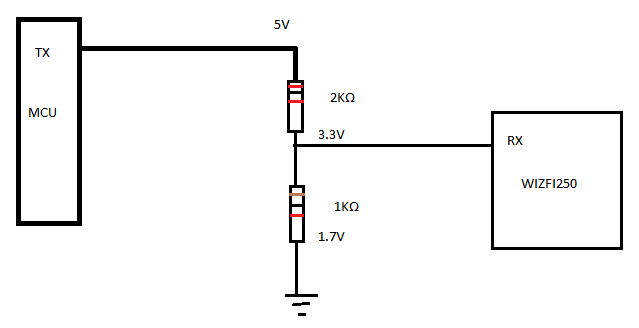
1 . Instead of using a Voltage-Level Translator as you said can I just use resistors to do that?
2 . Can I first configure wizfi250 as TCP server/AP from the web page configuration and then transfer data with peer system?
If yes what would be the command sequence? Is this the command mode?
For example:
1.Go to S2W setting on the wizfi250 browser- configure it as TCP server
2.send from MCU through UART the command AT+SSEND
3.Receive OK from wizfi250.
Or I should use the following commands:
1.AT+SCON
2.AT+SMGMT
3.AT+SSEND
4.AT+SFORM with that specific order?
Thank you,
Best Regards,
Andreas Achilleos
RE: UART pin voltage
by felix ·
Hello Andreas,
This setup will not work. You have to switch both resistors, the 1k needs to be connected to +5V and the 2k resistor needs to be connected to GND. The corresponding equation for calculating the voltage divider does normally not show the output voltage but the voltage that drops over the appropriate resistor.
Best regards,
Felix
RE: UART pin voltage
by soellicha ·
Thank you Felix, I will try that!
RE: UART pin voltage
by soellicha ·
Hello,
While I am sending data from the android app to the wizfi I do not see the Tx/Rx leds blink! Is that normal?
Thank you
RE: UART pin voltage
by wizdaniel ·
Hi soellicha,
No. It’s not normal.
When you send data, you can see the Tx/Rx led’s blink.
Please check the IP address at Smartphone. Is that correct IP?
[quote]
There are simple AT command for setting up the AP mode.
[url]http://wizwiki.net/wiki/doku.php?id=products:wizfi250:wizfi250pg:start[/url]
at+wset=1,WizFi250AP
at+wsec=1,WPA2,12345678
at+wnet=0,192.168.11.1,255.255.255.0,192.168.11.1
at+wjoin
at+scon=o,tsn,5000,1[/quote]
Otherwise, I recommend using other TCP Client Application in play store.
Thanks.
RE: UART pin voltage
by soellicha ·
Hello wizdaniel,
Thank you for your reply,
Even if the Tx led is not blinking, I still manage to send data from android app to the Wizfi and then to the MCU through UART.
I have not though , managed to transfer data from MCU to WIzfi.
Once the leds tried to blink when I raised the Rx pin of wizfi250 up to 5V!
Thank you,
Best Regards