Question about AT+FOTA
Wireless
No replies yet. Be the first to reply.
Join the discussion.
Wireless
No replies yet. Be the first to reply.
Join the discussion.
Share projects and connect with makers.
Joined before the site update? first.
New to WIZnet Makers?
We sent a verification link to your address. Open it to activate your account, then log in.
Accounts from this email provider are reviewed by an administrator after verification. Approval usually takes one business day.
Already have an account?
Enter your email address. If it belongs to an account, we'll send a link to set a new password. Members who joined before the site update use this to set their password.
If an account uses that address, we sent a link to set a new password. The link works once and expires in 30 minutes.
Know your password?
Need an account?
RE: Question about AT+FOTA
by wizdaniel ·
hi phil31
You can refer below regular steps as you know
[code]WizFi250 Version 1.0.1.8 (WIZnet Co.Ltd){0D}{0A}
SEND: AT+MINFO{0D}{0A}
RECV: FW version/HW version{0D}{0A}
RECV: 1.0.1.8/WizFi250 Rev 1.0{0D}{0A}
RECV: [OK]{0D}{0A}
SEND: AT+FOTA{0D}{0A}
RECV: [OK]{0D}{0A}
RECV: {0D}{0A}{0D}{0A}
RECV: [OTA Upgrade Handler]{0D}{0A}{0D}{0A}{0D}{0A}
RECV: >>> Start OTA >>>>>>>>>>>>>>>>{0D}{0A}{0D}[/code]
But you cannot receive special messages about OTA mode from WizFi250.
There are few guides for how to start OTA mode.
If you find AP name “WIZFI_OTA_0008DCxxxxxx”, WizFi250 will start OTA mode even if there is no reply.
[url]http://wizwiki.net/wiki/doku.php?id=products:wizfi250:wizfi250pg:firmware_upgrade[/url]
RE: Question about AT+FOTA
by phil31 ·
Hi Wizdaniel
thanks for your reply.
but my problem is not about send the AT+FOTA command (1), or check on my smartphone to see the AP name (2)
ALL others AT commands works as expected ( as AT+MINFO by example), so i don’t think i have a problem with the UART communication ( hardware handshake is enable, so RX, TX, CTS and RTS lines are right wired)
my problem occur ONLY on my specific board, not with the evaluation (white board WIZFI250 EVB V1.0)
i do a hard reset to the module, then i send the AT+FOTA command, i receive ONLY :
i don’t receive the next part of the message :
so the module don’t start the OTA procedure ( so i don’t see the AP in my smartphone list !
this procedure work perfectly with the EVB board !
same issue if i try to start the OTA mode by toggling twice the FUNCTION pin. i receive ONLY the first part of the message !!!
i verify that with the help of a logic analyzer … the WIZFI250 module send only the first part of the message !!
RE: Question about AT+FOTA
by wizdaniel ·
hi phil31
I think it’s not a normal situation that you don’t receive OTA message.
So. I prefer to reset the state of FACTORY DEFAULT or upgrade WizFi250 firmware
Because the OTA mode of WizFi250 just needs simple UART(VCC, GND, RX, TX).
1. How to reset to the factory default
Then… Try AT+FOTA again.
2. How to use OTA mode(for upgrading firmware) without ‘AT+FOTA’ command
First step. The Web server can be generated by the code below.
Second step. You can find and connect the AP(AP name is ‘WIZFI’) on the list of WLAN
Third step. Connect the web page on the Web browser(IP:192.168.12.1) then the configuration page appears.
Fourth step. Use the OTA for upgrading firmware.
[url]http://wizwiki.net/wiki/doku.php?id=products:wizfi250:wizfi250pg:firmware_upgrade[/url]
RE: Question about AT+FOTA
by phil31 ·
Hi Wizdaniel
well is there anything (hardware or software view) that can bloc the module to send the second part of the message after sending AT+FOTA message ?
by second part of the message i think :
is there any reason to freeze the module ? or any thing else ?
the issue is the same if i try the AT command (AT+FOTA) or the FUNCTION twice toggle procedures !
i will try doing a factory reset just before launch the AT+FOTA when i back on this issue.
thanks for your suggestion, regards
Phil
RE: Question about AT+FOTA
by wizdaniel ·
HI phil31
When a critical problem occurred in WizFi250 application firmware.
You can recover the firmware(in a flash memory) using the backup firmware(another serial flash memory for backup firmware).
Run the Serial Terminal tool and open the Serial port in PC
Set the boot pin to LOW and reset the WizFi250. it can start the boot mode.
(Reference: pin description and schematic of EVB)
wizwiki.net/wiki/doku.php?id=pro … escription
wizwiki.net/wiki/lib/exe/fetch.p … 31224_.pdf
You can check the Serial message like below
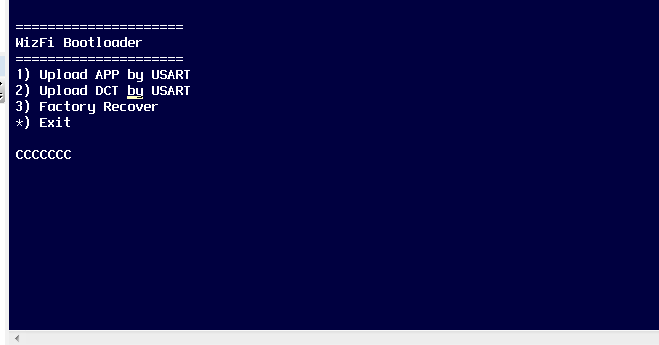
Press the ‘3’ for firmware recovery. then it will start firmware recovery using the backup firmware
[url]http://wizwiki.net/wiki/doku.php?id=products:wizfi250:wizfi250pg:firmware_upgrade#firmware_recovery[/url]