Flash Loader
General
No replies yet. Be the first to reply.
Join the discussion.
General
No replies yet. Be the first to reply.
Join the discussion.
Share projects and connect with makers.
Joined before the site update? first.
New to WIZnet Makers?
We sent a verification link to your address. Open it to activate your account, then log in.
Accounts from this email provider are reviewed by an administrator after verification. Approval usually takes one business day.
Already have an account?
Enter your email address. If it belongs to an account, we'll send a link to set a new password. Members who joined before the site update use this to set their password.
If an account uses that address, we sent a link to set a new password. The link works once and expires in 30 minutes.
Know your password?
Need an account?
RE: Flash Loader
by irina WIZnet ·
안녕하세요.
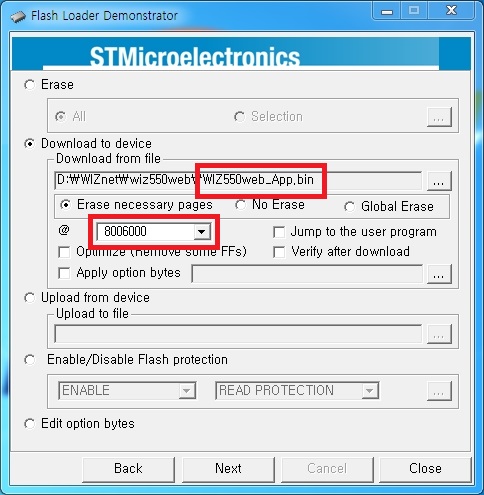
WizWIki 내 WIZ550web Download – Download firmware 항목의 binary images 압축파일을 다운로드 하면 Boot / App과 더불어 통합 파일인 WIZ550web.hex 파일이 들어있습니다. ST Loader Demo 프로그램을 이용하여 WIZ550web.hex 파일을 선택 후 program 해 주시면 default firmware로 복구됩니다.
Firmware binary image의 다이렉트 링크는 다음과 같습니다.
wizwiki.net/wiki/lib/exe/fetch.p … v1.0.1.zip
Flash program이 수행된 후 모듈을 reboot 하시면 serial terminal을 통해 다음과 같은 메시지를 확인 할 수 있습니다.
이는 Code flash memory의 Global Erase가 수행되어 초기에 입력되어 제공된 device MAC address가 저장된 부분이 지워졌기 때문입니다.
모듈에 부착된 MAC address를 확인하셔서 terminal 프로그램으로 다음과 같이 입력하여 주십시오.
정상적으로 입력이 완료되면 모듈은 'R’을 리턴하고 ‘OK’ 메시지와 함께 factory default 값으로 설정되어 동작을 수행하게 됩니다. 이후 ST loader 프로그램이나 Configuration tool의 TFTP client를 이용하여 APP 영역 펌웨어만 수정 후 업데이트 하시면 됩니다.
ST loader 사용 시 다음과 같은 설정을 지켜주십시오.