Module telnet behavior
Serial-to-Ethernet & ConfigTool
No replies yet. Be the first to reply.
Join the discussion.
Serial-to-Ethernet & ConfigTool
No replies yet. Be the first to reply.
Join the discussion.
Share projects and connect with makers.
Joined before the site update? first.
New to WIZnet Makers?
We sent a verification link to your address. Open it to activate your account, then log in.
Accounts from this email provider are reviewed by an administrator after verification. Approval usually takes one business day.
Already have an account?
Enter your email address. If it belongs to an account, we'll send a link to set a new password. Members who joined before the site update use this to set their password.
If an account uses that address, we sent a link to set a new password. The link works once and expires in 30 minutes.
Know your password?
Need an account?
RE: Module telnet behavior
by gthompson ·
Anyone out there? This is a show stopper for me. I’ve got 100 modules here I can’t use if I don’t find a solution/work around for this.
Gary
RE: Module telnet behavior
by jameskim ·
Hi Gary,
I’m sorry for our late response.
I’m the developer of WIZ145SR.
I’ll support you since now.
To answer you correctly, I have to check it at my side.
Please wait for several days and I’ll give you my feedback as soon as possible.
Thank you.
James.
RE: Module telnet behavior
by jameskim ·
Hi Gary,
I tested WIZ145SR with firmware ver 1.6.1 and figured out what you told.
I looked through the source code of WIZ145SR carefully and found out what made this symptom.
Yes, it has had some bug in handling serial buffer.
There are several timer for handling serial data and several pointer to serial buffer.
When WIZ145SR receives data after connection is established, initialization of several timers and pointer is done correctly.
But the initialization is done by receiving data from serial port and timers and pointer is already being updated, even though the tcp connection is not established yet.
This is the reason why WIZ145SR pushed wrong data.
I fixed and tested it at my side.
I hope you to test with my revised firmware at your side.
WIZ140v1_6_2_140326.zip (24.5 KB)
I put its version 1.6.2 temporarily and it is not the official version yet.
In order to release its firmware officially, we need more time to test by our rule.
Anyway, you can test with the attached file at your side.(I compressed it as a zip file. please decompress it first.^^)
Thank you.
BR, James.
RE: Module telnet behavior
by gthompson ·
James,
Thanks for looking at this.
I think things are improving. I don’t see the buffered characters when I start a telnet session now, but I do still see some characters thrown out the serial port when a telnet session is started. I don’t think this is supposed to happen.
Output from the terminal server serial port when I start a telnet session:
0xFF
0xFD
0x03
0xFF
0xFD
0x01
~2.5ms gap
0xFF
0xFC
0x3c
~32ms gap
Baud rate and signalling looks correct, but establishing a telnet session shouldn’t initiate anything out the serial port.
RE: Module telnet behavior
by jameskim ·
Hi gthompson,
I’m happy to hear that your test is going forward.
Anyway I’m sorry you’re still in some trouble.
When I was testing with the firmware ver 1.6.2 which I uploaded here, I couldn’t see the symptom you said above.
I’ll test again. Could you tell me your test condition more details? How are all devices connected?
When were above data, which were displayed on telnet program, sent from your terminal server?
And are those real data from terminal server or garbage?
If those are real data, I think timing mismatch between serial and ethernet make outputting data on telnet program.
Because serial port is much slow compared to ethernet, your terminal server may be still having data to output into serial port in its tx buffer when telnet session is created.
So, I recommend you check the timing of those signals, RXD of UARTs and STATUS pins.
When every connection is established, its corresponding STATUS pin is changed to LOW.
If RXD is not idle after STATUS pin is changed, above data is correct.
If there is no transition of RXD after changing of STATUS pin, my firmware has still some fault.
Please inform me your test result.
Thank you.
James.
RE: Module telnet behavior
by gthompson ·
That was real output from the terminal server taken on an oscilloscope, so I know the timing and protocol look correct. This output occurs immediately after I establish a telnet session with the module, but before I start to send it any real data.
It is consistent in that I get the same data every time, and every time I start a new telnet session, I get the same data.
I see no difference between 1.6.1 and 1.6.2 in this regard.
Here is my configuration:
network side attached to a live network
I telnet into the terminal server from a Linux box
Linux version 2.6.18-274.18.1.el5 (mockbuild@x86-001.build.bos.redhat.com) (gcc version 4.1.2 20080704 (Red Hat 4.1.2-51)) #1 SMP Fri Jan 20 15:11:18 EST 2012
Serial port 0 is configured for 9600,N,8,1 port 5000.
Serial port 0 is connected to a small microprocessor running Linux u-boot. Only RXD/TXD are connected. Handshake signals are not used. The microprocessor is booted to the u-boot prompt and sitting waiting for a command. It will not send any characters to the terminal server unless it receives something.
So, sequence of events is as follows:
If I move step 2 after step 4, everything works as it should (the target isn’t alive to see the junk at the time the telnet session is started, so it is happy). Unfortunately, this is not always a viable option since I need to be able to initiate and terminate telnet sessions without resetting the target.
If I remove the Wiznet module from the system, and wire the target console connection to a Cisco 2800 or a Digi PortServer TS16 terminal server, everything works great. I can initiate and terminate telnet sessions at will without disturbing the target. Unfortunately, these don’t fit in my chassis very well posting.php?mode=reply&f=21&t=667#
I haven’t looked at what is happening on UART1_RTS or UART1_CTS yet, but I will.
Gary
RE: Module telnet behavior
by gthompson ·
OK, a little more data.
When I start the telnet session in your default line mode setting, I don’s see any characters out when the telnet session is initiated. When I escape back to the telnet prompt and change the mode to character, I see the above characters come out the serial port. Similarly, when I start a telnet session with a .telnetsrc file that automatically switches to character mode, I see the characters.
So I guess I see why you don’t see the same thing I do. Try changing the telnet mode from line mode to character mode and see if you don’t see the same extraneous character pop out the serial port.
BTW, I looked at CTS and RTS, and they both stay at 0 (on the module pins) through the whole process. I have an LED on the STATUS pin, and I do see it light (STATUS goes low) well before the characters are sent.
Gary
RE: Module telnet behavior
by jameskim ·
OK, I understood what the problem was.
At first, WIZ145SR doesn’t have any special consideration for telnet modes.
It just exchage data transparently between serial port and ethernet socket.
I think normal telnet server do some different action according to telnet mode.
This is why our WIZ145SR didn’t operate as you expected.
I’ll check what I should do to meet your demand. Please wait for a few days.
And as I told you before, You found that WIZ145SR get received data via UART port from your serial device after telnet session was established.
The timing of signal transition is the evidence of what I told you.
Yes, as CTS and RTS is signals for flow control, if you didn’t set RTX/CST mode for flow control, those wouldn’t change those level.
When STATUS pin went to low, it means telnet session was established and WIZ145SR send all data received via UART from this point. WIZ145SR worked well even at your side as I expected.
Anyway, the problem which you encountered came from the lack of special consideration for telnet mode.
I’ll survey how I can fix it and inform you the result as soon as possible.
Thank you.
James.
RE: Module telnet behavior
by tobias ·
Hello Gary,
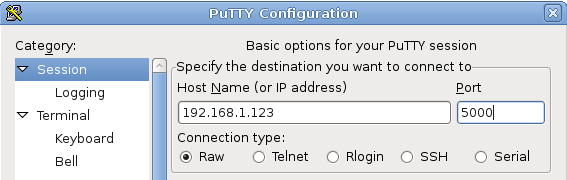
I did some tests to reproduce the behavior. My Testsetup was Putty as Telnet client and hterm as serial client programme.
When I set putty to use Telnet mode I can see the extra characters. When I set putty to raw mode there are no extra characters. As James already mentioned this is because the current firmware has no support for “telnet” mode but only for “raw” mode.
So my question is, do you really need the telnet mode? Or is “raw” mode sufficient? If you set your client to “raw” mode it will immediately work as you expect it. But if you really need telnet mode, then James has to enhance the firmware for this.
Please tell if raw mode works for you. You can test this easily this with putty as client.
Regards Tobias
RE: Module telnet behavior
by gthompson ·
Tobias,
Thanks for your help with this.
Unfortunately, I really need telnet mode. I’ve got a bunch of software developers and hardware validation guys using these terminal servers to access test systems. They’ve got years worth of automated test scripts and processes that I can’t really ask them to change. My decision to transfer from rack mounted Cisco terminal servers to Wiznet embedded terminal servers needs to be completely transparent to them.
If I had realized your terminal servers weren’t really telnet-capable, I would have never gone down this path.