A watcher device to monitor the room occupation
TinyML based room occupation watcher
chalei-

Views 2201
-

Comments 0
A watcher device to monitor the room occupation
TinyML based room occupation watcher
chalei
Views 2201
Comments 0
IoTMacroPad - Customizable keypad with IoT service
IoTMacroPad
rudals
Views 2859
Comments 0
This project captures any image or screen in real-time, sends it over Ethernet, and outputs it to HDMI.
Ultra-low-cost, network-based HDMI output module
nexp
Views 2731
Comments 3
Low-cost HMI for industrial systems. Interface with ModbusTCP. Uses MicroPython for easy on-site modifications with heads-up LCD.
Modular HMI
zst123
Views 2579
Comments 0
A desktop light design to give a visual indication of how far away the International Space Station is, and to alert when it is visible.
WIZnet ISS Notifier
alistair
Views 3042
Comments 0
This project streams real-time AC voltage online via the W55RP20, unlocking potential for smart energy devices.
Networked Energy Monitoring System
amalmathewtech
Views 3053
Comments 0
Introduction:
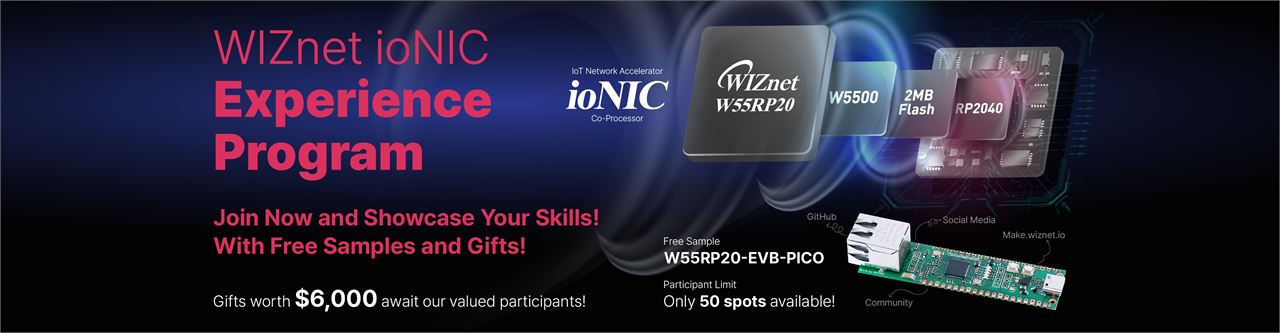
Welcome to the WIZnet ioNIC Experience Program! This program is designed to explore and demonstrate the capabilities of the WIZnet ioNIC EVB Board, featuring the new WIZnet W55RP20 chip. Unlike a traditional contest, the ioNIC Experience Program is a collaborative platform where participants from around the world can learn, create, and share innovative IoT projects. Whether you are a Raspberry Pi enthusiast, IoT hobbyist, developer, IT professional, or member of the DIY community, this program provides a unique opportunity to develop your skills and contribute to the growing WIZnet ecosystem.
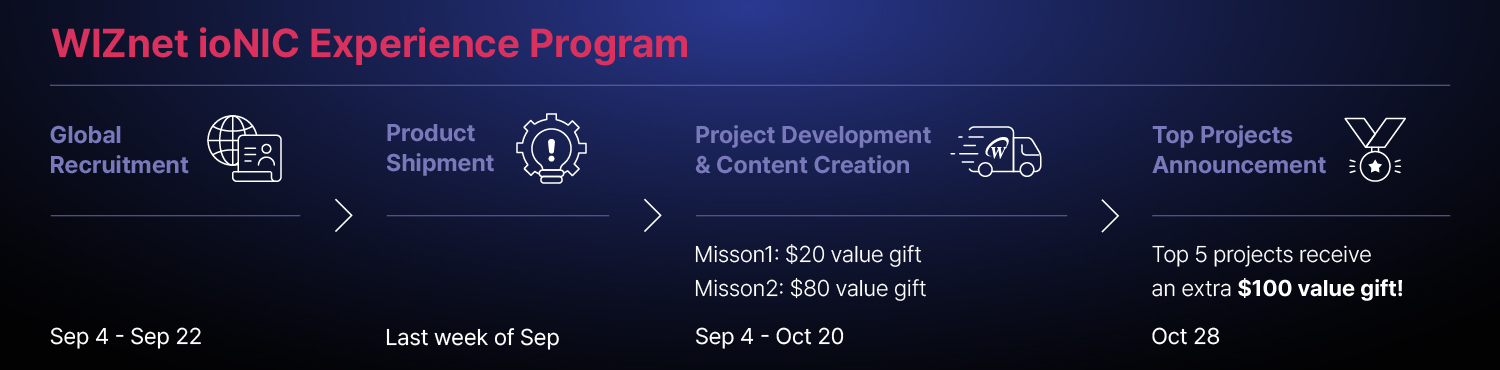
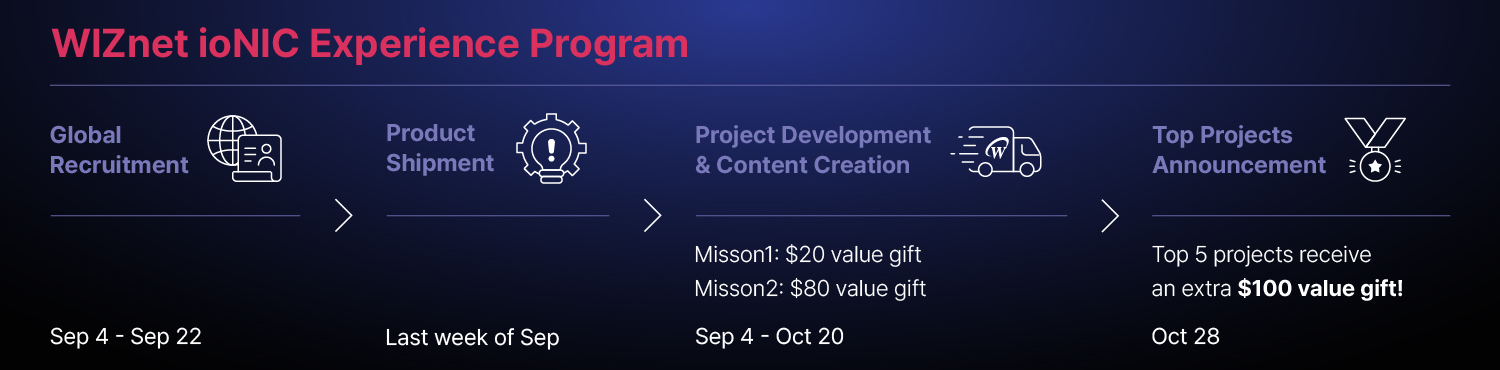
Event Timeline
Awards:
All participants will be awarded with gifts upon completion of the missions:
20$ value gift for Misson 1: Initial engagement
Once the sample is received, share your opinion about the board online. Do not forget to tag our official accounts!
80$ value gift for Mission 2: Project development
Develop creative and practical projects using the WIZnet ioNIC EVB. Projects can range from simple tutorials to complex IoT applications, focusing on both creativity and technical depth. Upload to Maker site under the contest section for project to be evaluated by WIZnet committee.
Top 5 projects will be additionally awarded with 100$ value gift
About the chip & the board
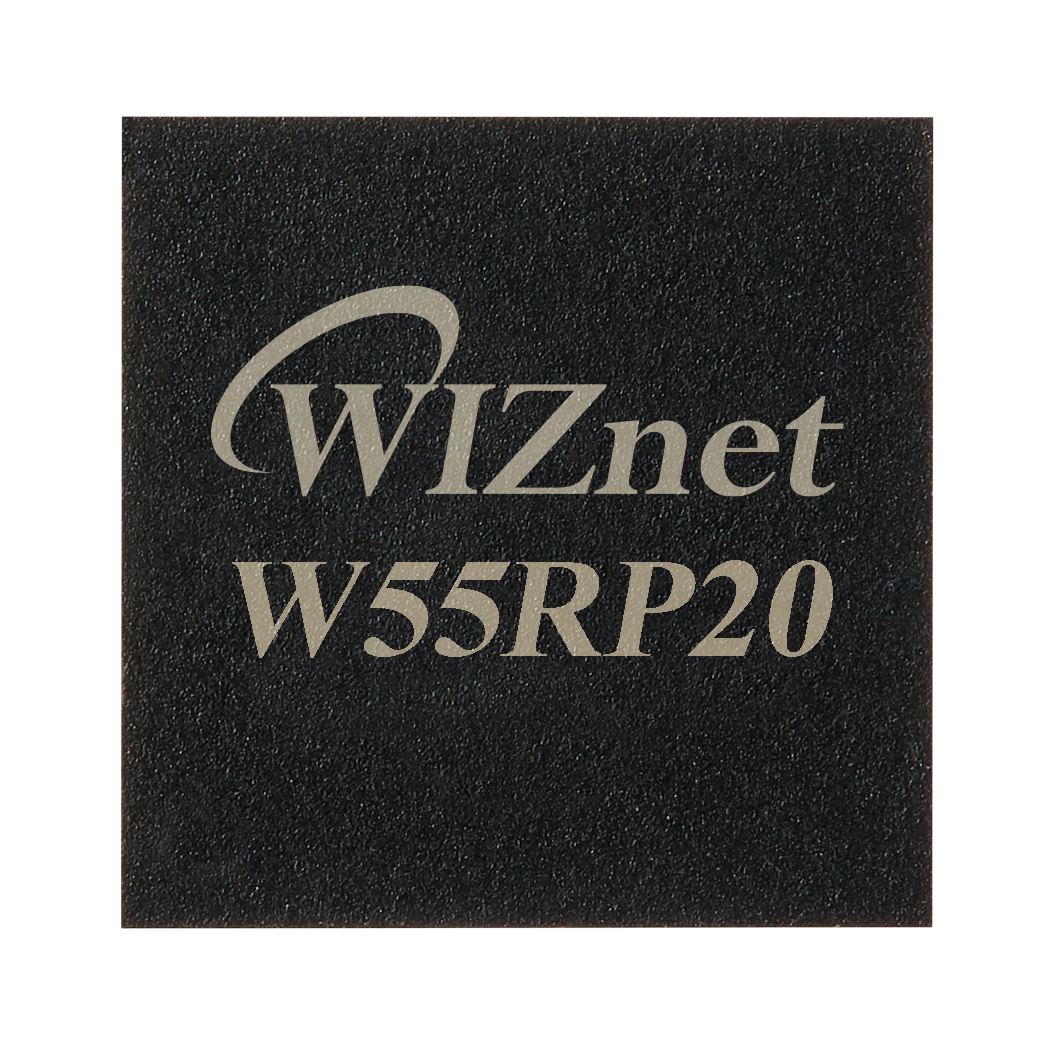
The ioNIC W55RP20 is a System in Package (SiP) developed by Wiznet, combining the RP2040 dual-core ARM Cortex-M0+ microcontroller, the W5500 Ethernet chip, and built-in 2MB flash memory into a single package. This product is designed to be ideal for a variety of network applications, offering high performance and multifunctionality in a compact form factor.
More information: https://docs.wiznet.io/Product/ioNIC/W55RP20/overview
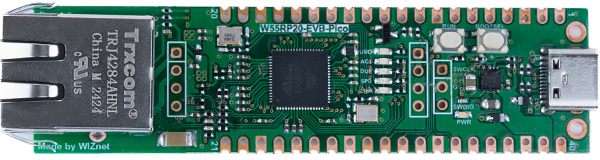
W55RP20-EVB-Pico is an evaluation board for W55RP20, a chip that combines W5500, a wired TCP/IP controller, and RP2040. Therefore, both the functions of Raspberry Pi Pico and those of the W5500 are available.
More information: https://docs.wiznet.io/Product/ioNIC/W55RP20/w55rp20-evb-pico
Event Timeline
Eligibility:
You are eligible to enter if you meet the following requirements at time of entry:
Selection Criteria:
Participants will be chosen based on creativity in project ideas, technical skills, proposed activities, and engagement with the community. Selected participants will be notified via e-mail
Participation Guidelines
Step 0. Create a WIZnet Makers account
Start by creating a free account (or sign-in if already a member)
Step 1. Go to Contest section and find ioNIC Experience Program.
Step 2. Submit your project idea and provide shipping information for sample provision
While we will handle the shipment fees, participants are responsible for covering any expenses associated with customs clearance or local taxes.
Step 3. Complete the missions below.
Mission 1: Social Content Creation
Share your initial experiences with the WIZnet ioNIC EVB, including unboxing, reviews, or tutorials. Make sure to tag WIZnet accounts. If your content could potentially conflict with WIZnet’s interests, please consult with a WIZnet representative before posting.
Mission 2: Project Development
Build and document your project using WIZnet Maker’s project template. To create a new project, click “Contest” menu, select ioNIC Experience Program and press “Submit” button. Document your project thoroughly on the WIZnet Maker Site, including all development steps, code, and results. Use visual content like photos, videos, and diagrams to enhance your presentation. Project must be written in English or Korean.
Judging criteria
1. Community Engagement (40 points)
Active Participation: The participant’s involvement in the WIZnet community, including sharing their experiences, posting updates, asking questions, and engaging with others.
Promotion Efforts: How well the participant promotes their project and the ioNIC Experience Group through social media, blogs, or other platforms. Points are awarded for effort and creativity, regardless of the reach or impact.
2. Creativity and Originality (30 points)
Unique Ideas: The originality of the project idea. Is it something new or a fresh take on existing concepts? Projects that showcase personal creativity and innovation are highly valued.
Fun and Interesting Approaches: Does the project have an engaging or fun element? Even simple projects can score high if they are presented in an interesting way or provide a unique user experience.
3. Effort and Documentation (20 points)
Effort Displayed: Points are awarded based on the effort put into developing the project, regardless of technical complexity. This includes time spent, dedication, and enthusiasm.
Basic Documentation: The clarity of basic project documentation, including a simple explanation of how the project works and any instructions needed to replicate it. High-quality visuals like photos or videos that make the project easy to understand are a plus.
4. Overall Presentation (10 points)
Presentation Quality: The overall presentation of the project, including how clearly it is communicated and how easy it is for others to follow along. This is more about how well the project is shared than its technical depth.
How are prizes awarded?
Participants who complete the missions will be awarded gifts after the program ends.
Once the missions results are confirmed and participant is entitled to get award, following rules apply:
What other conditions am I agreeing to by entering?
By entering this event, you are agreeing to the following statements:
You agree to abide by these full rules:
Important note about Copyright:
Your project must only consist of material (such as hardware, source code, user interface, music, video, or images) that you either own or have obtained permission from the copyright/trademark owner to use. Your entry cannot include any copyrighted material (such as source code, user interface, background music, images, or video) unless you have ownership or the necessary authorization. Simply purchasing a CD or using a copyrighted recording or application's user interface does not count as ownership and may result in your entry being disqualified. If you use copyrighted material that you are allowed to use, you must include the proper credits, including the artist/creator and licensing information. Keep in mind, even material that is available under licenses like Creative Commons, open source code licenses, or similar licenses may require permission or citation as per the specific license terms.
Disqualification:
WIZnet reserves the right to remove any participant who does not adhere to the rules, engages in inappropriate behavior, or attempts to manipulate the program’s processes.
Contact Information:
For any questions or comments regarding the program, please contact us at contest@wiznet.io.
A smart camera doorbell where W55RP20 controls a vision NPU. It texts user when a stranger is detected.
W55RP20 smart doorbell
teamprof
Views 491
Comments 0
In this short article I will talk about my experience with the W55RP20-EVB-PICO board for the WIZnet ioNIC Experience Program.
Rack monitor
CarloR
Views 1817
Comments 0
Getting started with W55RP20 circuitpython
Getting started with W55RP20 circuitpython
louis_m
Views 4117
Comments 0
A simple MicroPython example implementing SNTP functionality for the W55RP20-EVB-Pico board
W55RP20-EVB-PICO SNTP example
josephsr
Views 3902
Comments 0
This project uses the W55RP20-EVB-Pico to implement a simple chat interface that establishes an Ethernet connection and interacts with the OpenAI ChatGPT API
W55RP20-EVB-Pico: Chat with ChatGPT Example
Benjamin
Views 6508
Comments 0
Test of reference voltage change of RP2040 internal temperature sensor of SIP chip W55RP20
Test of reference voltage change of RP2040 internal temperature sensor of SIP chip W55RP20
bruno
Views 5700
Comments 0
Execute the loopback example in PICO-C.
W55RP20-EVB-PICO Loopback example
Grace_Koo
Views 3576
Comments 0
IP Camera Made from W55RP20, SiP chip of RP2040 and W5500
A really small PoE IP Camera
Alan
Views 4739
Comments 0
Introducing W55RP-W module
Pico-W + W5500 in one module!
jaden
Views 4256
Comments 0
"This content posts how to build WIZnet-ioNIC-micropython.
How to build WIZnet-ioNIC-micropython
mason
Views 8673
Comments 0
WIZnet developed a chip that combines RP2040 and W5500. Let's take a look at the new chip, W55RP20
Adding Ethernet to RP2040? Take a look at W55RP20
Alan
Views 3910
Comments 1
In this short article I will talk about my experience with the W55RP20-EVB-PICO board for the WIZnet ioNIC Experience Program.
Rack monitor
CarloR
Views 1817
Comments 0
Digital nursing refers to the integration of digital technologies into nursing practice to enhance patient home care.
Enhancing Patient Home Care: The Role of Digital Nursing in Modern Healthcare
sekolahrobot
Views 1677
Comments 0
A desktop light design to give a visual indication of how far away the International Space Station is, and to alert when it is visible.
WIZnet ISS Notifier
alistair
Views 3042
Comments 0
This project streams real-time AC voltage online via the W55RP20, unlocking potential for smart energy devices.
Networked Energy Monitoring System
amalmathewtech
Views 3053
Comments 0
A watcher device to monitor the room occupation
TinyML based room occupation watcher
chalei
Views 2201
Comments 0
This project captures any image or screen in real-time, sends it over Ethernet, and outputs it to HDMI.
Ultra-low-cost, network-based HDMI output module
nexp
Views 2731
Comments 3
This project is to aimed to develop Infrared temperature sensor with W55RP20-EVB-PICO
Infrared temperature sensor with W55RP20-EVB-PICO
ahmadradhy
Views 1674
Comments 0
IoTMacroPad - Customizable keypad with IoT service
IoTMacroPad
rudals
Views 2859
Comments 0
Classroom Atterndance/Pass system that collects RFID badge taps and logs them over MQTT.
RFID attendance system
awoodbridge
Views 1888
Comments 0
Low-cost HMI for industrial systems. Interface with ModbusTCP. Uses MicroPython for easy on-site modifications with heads-up LCD.
Modular HMI
zst123
Views 2579
Comments 0
A silent door security system with intrusion detection and ethernet communication which is resistant to deauthentication attacks.
Smart security system
ndaniel
Views 2150
Comments 0
Leverage ArduProf library to create a event driven application, running on W55RP20-EVB-PICO.
Create an Arduino event driven app on W55RP20-EVB-PICO
teamprof
Views 2206
Comments 0
Demo with W55RP20-EVB-PICO use RP2040 PWM output 25MHz as W5500 clock.
How to use PWM as W5x00 clock
momososo
Views 1955
Comments 2
Share projects and connect with makers.
Joined before the site update? first.
New to WIZnet Makers?
We sent a verification link to your address. Open it to activate your account, then log in.
Accounts from this email provider are reviewed by an administrator after verification. Approval usually takes one business day.
Already have an account?
Enter your email address. If it belongs to an account, we'll send a link to set a new password. Members who joined before the site update use this to set their password.
If an account uses that address, we sent a link to set a new password. The link works once and expires in 30 minutes.
Know your password?
Need an account?