


temprepo
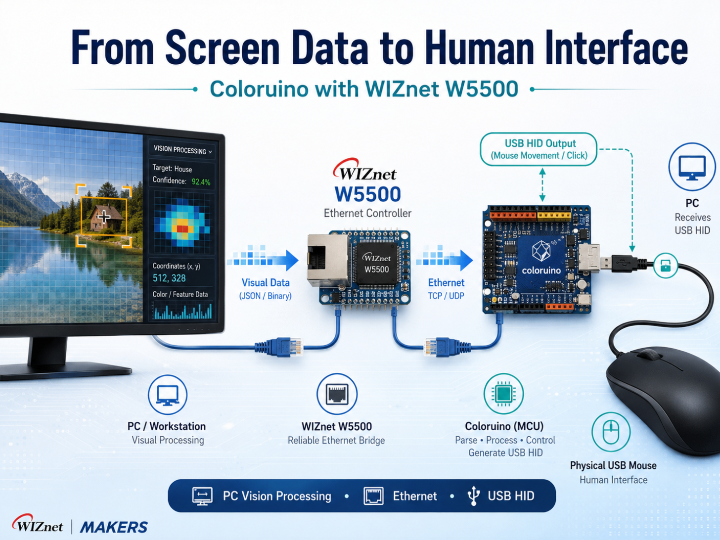
Coloruino sends motion commands over Ethernet to a WIZnet W5500-based Arduino running USB Host Shield and HID firmware.

WIZnet - W5500
x 1

Direct answer: Coloruino is a human-interface processing system that converts visual information from a PC screen into physical mouse input. A Windows application captures a selected screen region, identifies relevant pixels, calculates movement, and sends the result over Ethernet. An external Arduino-class controller receives the command through a WIZnet W5500 and combines it with input from a real USB mouse.
From an interface-design perspective, the project is interesting because the final output is not a software API call or an application-specific command. The output is a standard USB HID report that a computer can understand in the same general format used by a physical mouse.
This creates a bridge between three different domains:
- Visual information produced by software
- Network commands transmitted between systems
- Physical input understood by a human-facing computer interface
The original repository is associated with game automation and contains security-evasion techniques. Those parts should not be treated as a normal maker implementation. The reusable engineering value lies in the screen-to-input pipeline, external HID processing, physical mouse pass-through, and division of work between a PC and an embedded controller.
What Problem Is It Solving?
Human-interface devices normally depend on direct physical action. A user moves a mouse, presses a button, rotates a wheel, or touches a surface, and the device converts that action into a HID report.
However, some applications need to generate or modify an interface action based on information that is not directly available to the input device. Examples include:
- An accessibility tool responding to visual screen elements
- An automated test system operating a graphical interface
- A remote-control system combining local and network input
- A vision-guided industrial control panel
- A training system that assists or constrains pointer movement
A small MCU cannot efficiently capture a Windows desktop or analyze thousands of pixels per frame. At the same time, a PC application alone cannot directly behave like an independent physical USB device without relying on operating-system input APIs or special drivers.
Coloruino separates those tasks. The PC performs visual analysis, while the embedded hardware produces the final human-interface report.
System Architecture
Screen Content                         Physical Mouse
      ↓                                      ↓
DXGI Screen Capture                    USB Host Shield
      ↓                                      ↓
Color Detection and Target Selection   Mouse Report Parser
      ↓                                      ↓
Movement Calculation                   Current User Input
      └──────────────┬───────────────────────┘
                     ↓
             UDP Control Command
                     ↓
             WIZnet W5500 Ethernet
                     ↓
              Arduino Firmware
                     ↓
           Combined USB HID Report
                     ↓
              PC / User Interface
The Ethernet link does not carry video frames. It carries only reduced control information such as movement, button, or operating-state commands.
This is an important system-design choice. High-bandwidth image processing remains on the PC, while the embedded controller handles only the data required to generate the final interface action.
Role of the WIZnet W5500
Ethernet Connection
The W5500 provides the wired communication path between the visual-processing application and the external human-interface controller.
A wired connection is useful in an interactive system because it avoids radio interference, Wi-Fi reconnection, and wireless power-management behavior. The controller can remain continuously available on the local network.
UDP Processing
The project sends short, latency-sensitive control messages using UDP. The W5500 handles Ethernet, IP, and UDP socket processing in hardware, allowing the MCU to receive small commands without running a large software network stack.
The documented implementation uses a custom packet format. Its protocol-mimicry behavior is not necessary for a legitimate human-interface product. A normal implementation should instead use a clearly documented packet header, sequence number, timeout, and authentication mechanism.
MCU Interface
The MCU communicates with the W5500 over SPI. Network packets are read through the W5500 socket interface and converted into internal movement or button states.
The same MCU must also poll the USB Host Shield, track the real mouse state, and transmit USB HID reports. Hardware TCP/IP offload reduces the amount of processing time and RAM required for networking.
Why W5500 Is Important
The W5500 is not the component that recognizes screen colors or moves the pointer. Its role is to connect two different processing environments:
- A high-performance PC that understands visual context
- A resource-constrained embedded controller that understands physical interfaces
Without the W5500, the system would need another communication method such as USB serial, Wi-Fi, or a software TCP/IP stack. The W5500 makes wired network communication practical without taking control away from the MCU’s USB-processing loop.
How the Firmware Works
The firmware coordinates three ongoing activities: network reception, physical mouse input, and USB HID output.
1. Network Initialization
The controller initializes the W5500, configures its network settings, and opens a UDP socket for incoming control messages.
2. USB Host Initialization
The USB Host Shield detects the connected mouse. The firmware begins reading movement, button, and wheel reports generated by the user.
3. Packet Reception
The firmware regularly checks the W5500 receive buffer. The provided analysis notes that network polling occurs around USB Host processing to reduce the delay caused by blocking USB operations.
4. Command Validation
An incoming command is checked for the expected size, structure, and integrity value. Invalid or unrelated packets are ignored.
5. Input-State Merging
The external command is not treated as a completely separate virtual mouse. Instead, the firmware reads the current physical mouse state and combines it with the received movement or button action.
This allows one output report to contain both:
- The user’s physical input
- The externally calculated assistance or automation input
6. HID Report Generation
The firmware sends a complete USB mouse report containing button state, X movement, Y movement, and wheel data.
Using one combined report is preferable to issuing several separate mouse operations because it avoids unnecessary intermediate states.
Human-Interface Processing on the PC
The PC application performs the calculations that determine what interface action should be generated.
Region-Based Capture
DXGI Desktop Duplication captures screen frames directly from the Windows graphics pipeline. The application copies only a selected field of view rather than the complete desktop.
This reduces memory movement and keeps the processing focused on the area that can affect the output.
Precomputed Color Classification
Instead of converting every pixel to HSV during each frame, the application creates a lookup table covering the complete 24-bit RGB space.
At runtime, checking a pixel becomes a single table access. This trades approximately 16 MB of memory for faster and more predictable classification.
GPU Target Selection
The optional compute-shader path searches for the nearest matching pixel in parallel. Distance and coordinate information are packed into one integer so an atomic minimum operation can select the closest candidate.
This is a compact example of reducing a large visual dataset to one interface decision.
Movement Smoothing
Calculated movement may contain fractional values that cannot be represented directly in an integer HID report. The application carries the remaining fraction into the next frame instead of discarding it.
That technique reduces accumulated rounding error and produces smoother low-speed movement.
Hardware Design
The documented prototype combines several existing boards rather than presenting a complete custom PCB.
Ethernet LAN
     ↓
WIZnet W5500
     ↕ SPI
Arduino-Class MCU
     ↕
USB Host Shield ← Physical Mouse
     ↓
USB Device Interface
     ↓
Host Computer
The mouse connects to the USB Host Shield. The MCU behaves as a USB device toward the PC while simultaneously acting as a USB host toward the physical mouse.
This dual role is central to the design. The controller is not simply creating artificial movement; it is acting as an interface aggregator that receives input from more than one source and produces one standard HID stream.
The available material does not establish a fully reproducible hardware release. A verified schematic, custom PCB source, bill of materials, connector map, and enclosure package would be required for a complete maker build.
Why This Project Is Interesting
Typical W5500 demonstrations exchange sensor values, host a configuration page, or send simple commands between two devices. Coloruino uses the network as an internal link inside a human-interface pipeline.
The project also demonstrates that a user interface does not have to be generated entirely inside one computer. Interface processing can be distributed:
- Visual context is interpreted on the PC.
- Control decisions are reduced to compact commands.
- Ethernet transports those decisions.
- An embedded device combines them with physical user input.
- USB HID presents one standardized interface to the operating system.
This architecture is relevant to more than mouse automation. Similar patterns could be used in:
- Accessibility input adapters
- Operator-assistance devices
- GUI regression-test equipment
- Remote KVM-style controllers
- Vision-guided laboratory instruments
- Training simulators
- Industrial control consoles
- Human-in-the-loop robotics
The key technical idea is not automatic pointer movement. It is the conversion of software-observed conditions into a physical interface that remains compatible with standard computer input.
Limits and Upgrade Ideas
- Redefine the application around legitimate HMI use. Remove game-specific logic and demonstrate the architecture through accessibility, testing, or operator-assistance scenarios.
- Document the input-merging policy. Define whether physical user input has priority, whether generated movement can be cancelled, and how conflicting button states are resolved.
- Add an immediate manual override. Any assisted interface should allow the user to regain full control without waiting for a network timeout.
- Use a transparent protocol. Replace disguised packets with a versioned and authenticated UDP message format.
- Measure interaction latency. Publish capture, processing, Ethernet, MCU, and USB timing separately.
- Define communication-loss behavior. The controller should stop generated movement and return to physical-mouse-only operation when commands expire.
- Modernize the hardware. A native-USB MCU combined with W5500, or an integrated W55RP20 design, could reduce board count and simplify timing control.
- Publish complete hardware files. Provide the PCB design, schematic, BOM, firmware build instructions, and enclosure files.
Source-Backed Summary
Coloruino demonstrates how PC-side visual analysis can be connected to a physical human-interface device through wired Ethernet. The Windows application captures a limited screen region, classifies pixels, calculates movement, and sends compact commands to an Arduino-class controller. The WIZnet W5500 handles UDP communication in hardware, while the MCU reads a real mouse through a USB Host Shield and generates a merged USB HID report. Its main educational value is the distributed HMI architecture: visual processing, network transport, physical input, and USB output are assigned to separate components according to their capabilities.
FAQ
What is a human-interface device?
A human-interface device, or HID, is a device such as a mouse, keyboard, game controller, or control panel that sends standardized user-input reports to a computer. USB HID devices usually work without a custom driver because the operating system already understands the report format.
What does the W5500 do in the interface pipeline?
The W5500 transports control commands between the PC application and the embedded controller. It handles Ethernet and UDP socket processing so the MCU can concentrate on USB Host polling and HID report generation.
Does the W5500 generate mouse movement?
No. The PC calculates the requested movement, and the MCU creates the USB HID report. The W5500 only provides the network path between them.
Why connect a real mouse through a USB Host Shield?
The Host Shield allows the controller to read the user’s physical mouse reports. The firmware can then preserve the real button and movement state while combining it with another input source.
Could this architecture be used outside gaming?
Yes. The same structure could support accessibility devices, automated GUI testing, remote input systems, operator-assistance tools, or vision-guided control interfaces. The application logic and safety policy would need to be redesigned for the intended use.
Documents
- Original GitHub Repository — Main source tree and project documentation
- Windows Application Source — Screen capture, color detection, movement calculation, networking, and WebUI
- Embedded Firmware Source — W5500 communication, USB Host processing, and HID report generation
- USB HID Support Files — Mouse reports and USB interface definitions
- Engineering Teardown — System-level analysis used as the primary source for this article
- WIZnet W5500 Documentation — Ethernet controller, hardware socket, SPI, TCP, and UDP reference
- USB HID Specification — Standard report and interface definitions for human-interface devices
- DXGI Desktop Duplication Documentation — Windows desktop frame-capture reference
Related Maker Projects
- [silenthid] — A W55RP20-EVB-Pico network HID controller that receives TLS-secured WebSocket commands and emulates USB keyboard and mouse input without additional PC drivers.
- [IP Keyboard on w5500-evb-pico] — A CircuitPython-based USB HID keyboard that executes remote keystroke commands received over UDP through the W5500 Ethernet interface.
Tags
W5500, Human Interface Device, USB HID, USB Host, Arduino, Ethernet, UDP, Human-Machine Interface, Accessibility Technology, Real-Time Processing