


ESP32 + W5500 + TFT 기반 HWANHEE NET-CHECKER 제작기
HWANHEE NET-CHECKER: ESP32+W5500 handheld LAN tester for quick on-site IP, gateway, DNS, and loop checks.

WIZnet - W5500
x 1

System Configuration
The project uses:
- ESP32 Dev Module as the main controller
- W5500 Ethernet module for wired LAN access
- ST7789 320×240 TFT LCD for the user interface
- Rotary encoder and push button for menu navigation
- K0 button for back/cancel
- Buzzer for scan, warning, and menu feedback
- Optional future enclosure, RJ45 mounting parts, switch, and battery module
The blog lists the W5500 connection as SPI-based: SCK GPIO18, MOSI GPIO23, MISO GPIO19, CS GPIO16, and RST GPIO4.
Architecture / Data Flow
The data flow is straightforward:
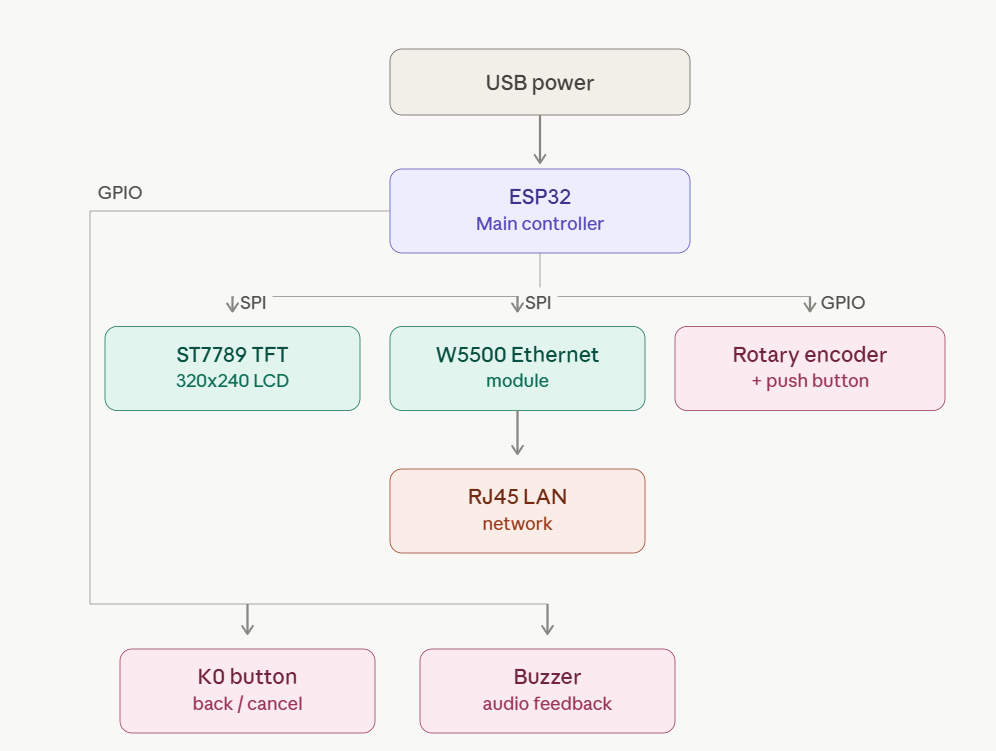
User input comes from the rotary encoder and buttons. The ESP32 updates the menu, applies DHCP or static IP settings, controls the display, and runs the diagnostic logic. When wired LAN testing is needed, the ESP32 communicates with the W5500 over SPI. The W5500 handles Ethernet connectivity, allowing the device to perform LAN TEST, IP INFO, DNS WATCH, LOOP WATCH, and ARP-based IP SCAN operations. Results are rendered on the ST7789 display and optionally accompanied by buzzer feedback.
Role of W5500
The W5500 is the wired Ethernet interface of the NET-CHECKER. The source explicitly states that the device combines “ESP32 + W5500 + TFT,” and that the W5500 is responsible for “wired LAN testing and ARP scanning” in the hardware configuration section.
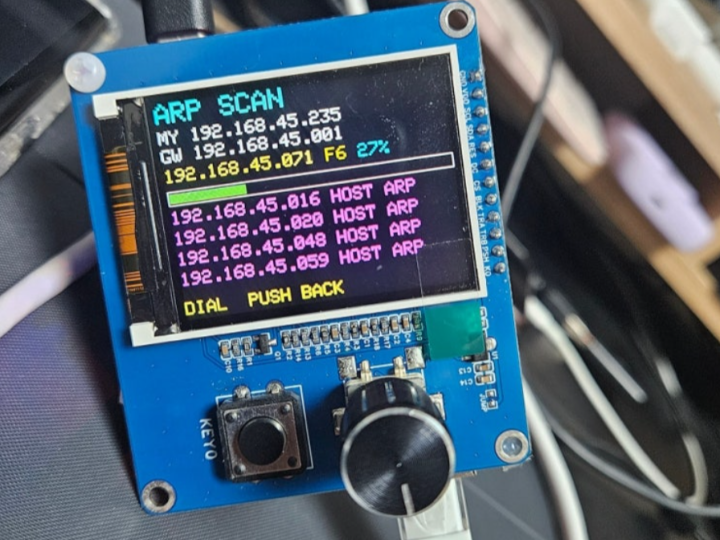
Its role is especially important in IP SCAN, where the source says ARP scanning is performed through the W5500 wired LAN path. The source also states that Wi-Fi mode cannot perform full ARP scanning and displays “LAN CABLE REQUIRED / FOR ARP FULL SCAN,” which makes the W5500 path the required interface for full internal network discovery.
Typical Field Scenarios
Scenario 1 — No Internet, but the Router Appears Normal
Situation:
A user reports that the internet is unavailable even though the router LEDs look normal.
Use the NET-CHECKER to:
- Verify whether a DHCP address is assigned.
- Check the default gateway.
- Test DNS server responsiveness.
- Confirm external internet connectivity.
This allows technicians to determine whether the issue is local network configuration or upstream internet access before opening a laptop.
Scenario 2 — Identifying Devices on a Local Network
Situation:
You need to know which devices are currently connected to a customer’s LAN.
Use the NET-CHECKER to:
- Perform an ARP-based IP scan through the W5500 Ethernet interface.
- Discover active hosts on the subnet.
- Quickly verify whether expected devices are online.
This is useful for checking printers, NAS devices, IP cameras, and other embedded systems.
Scenario 3 — Testing a Static IP Environment
Situation:
A PLC, industrial controller, or legacy device requires a manually assigned IP address.
Use the NET-CHECKER to:
- Switch from DHCP to Static IP mode.
- Configure IP address, subnet mask, gateway, and DNS manually.
- Verify network communication without changing the existing infrastructure.
Scenario 4 — Suspected Network Loop
Situation:
A switch or router repeatedly freezes after new cables have been connected.
Use the NET-CHECKER to:
- Monitor loop-related network conditions.
- Compare DHCP, Static, and Test-IP states.
- Identify situations that may indicate an unintended Layer-2 loop.
Note: The original project warns that loop testing can temporarily disrupt a live network.
Market / Application Value
This project is useful for field technicians, small office network maintenance, apartment LAN troubleshooting, router/bridge checks, and quick DHCP/static IP verification. Its value is not replacing professional certification testers, but reducing the need to open a laptop for first-pass diagnostics.
Strategic Value
For WIZnet, this is a clear maker-to-field example: W5500 turns a general-purpose ESP32 board into a wired network diagnostic device. The project highlights why wired Ethernet still matters in field tools: ARP scanning, LAN cable-based inspection, and stable local network testing are difficult to replace with Wi-Fi-only diagnostics.
Limits
Source limit: The source does not disclose firmware source code, PCB design files, enclosure CAD, ARP scan implementation details, loop-detection algorithm details, DNS timeout values, benchmark results, scan speed, power consumption, or long-term reliability data.
Additional limitations stated or implied by the source:
- W5500 is 10/100 Ethernet, so it cannot directly verify gigabit link status.
- Full ARP scanning requires wired LAN.
- Loop testing can disrupt the real network.
- Korean text rendering is limited by font support.
- The device did not yet have a finished case at the time of writing.
Related Reading Path
A natural follow-up would be:
- Building an ESP32 + W5500 wired Ethernet diagnostic tool
- Comparing W5500 Ethernet diagnostics with Wi-Fi-based ESP32 tools
- Designing a field-ready enclosure and power system for a handheld LAN tester
Source-backed Summary
HWANHEE NET-CHECKER is an ESP32-based handheld LAN diagnostic device using a W5500 Ethernet module, ST7789 TFT display, rotary encoder, buttons, and buzzer. The W5500 provides the wired Ethernet path required for LAN testing and full ARP scanning, while the ESP32 manages the interface, settings, Wi-Fi assist mode, DHCP/static IP handling, and diagnostic workflow. The source does not disclose the firmware source code or detailed algorithms.
Related Projects
| Project | Site | Core hardware | Key functions | Link |
|---|---|---|---|---|
| Pocket-sized network tester (WizFi Trundlebot author, Benjamin) | maker.wiznet.io | WIZnet W5500-EVB-Pico2 + OLED | A battery-powered portable network tester that instantly verifies Ethernet port connectivity and DHCP configuration WIZnet Makers | maker.wiznet.io/alistair/contest/wizfi-trundlebot-the-teaching-robot |
| EtherSnoop | maker.wiznet.io (Hannah) | WIZnet W55RP20-EVB-Pico + OLED, MicroPython | A pocket-sized Ethernet discovery tool that listens to Cisco Discovery Protocol (CDP) packets at Layer 2 and displays switch name, port ID, VLAN ID, IOS version, and assigned DHCP IP — plug in a cable with no laptop or Wireshark needed WIZnet Makers | maker.wiznet.io/Hannah/projects/ethersnoop |
| Flipper Zero ETH Troubleshooter | maker.wiznet.io (bruno) | W5500 Ethernet module + Flipper Zero (GPIO) | Lets users check link status, configure network parameters, and run connectivity diagnostics directly from the Flipper Zero by attaching an Ethernet module — useful for portable diagnostics, quick lab testing, and educational environments WIZnet Makers | maker.wiznet.io/bruno/projects/flipper-w550-ethernet-app |
FAQ
Q: Why is W5500 used in this project?
A: W5500 provides the wired Ethernet interface needed for LAN testing and ARP-based IP scanning. The source specifically separates full ARP scanning from Wi-Fi mode, making wired Ethernet necessary for that function.
Q: How does W5500 connect to the ESP32?
A: It connects over SPI. The source lists SCK GPIO18, MOSI GPIO23, MISO GPIO19, CS GPIO16, and RST GPIO4.
Q: What does W5500 do in this device?
A: It handles the wired LAN path used by LAN TEST, IP INFO, DNS WATCH, LOOP WATCH, and ARP IP SCAN functions. The ESP32 still runs the application logic.
Q: Can beginners build this?
A: A beginner can follow the hardware concept, but the full device requires ESP32 firmware development, SPI wiring, TFT display control, network configuration, and ARP/DNS/IP diagnostic logic.
Q: How is this different from a Wi-Fi-only ESP32 network tool?
A: Wi-Fi can help check internet connectivity, but the source states that full ARP scanning requires a LAN cable. W5500 makes the device useful for actual wired network inspection.
Source
Original source: NAVER Blog post, “아두이노 ESP32 현장용 미니 랜 테스터 직접 만들기,” by 지환이아빠 / Hwanheecom, published June 28, 2026.
License: Not specified.
Tags
#W5500 #ESP32 #Ethernet #LANTester #NetworkDiagnostics #ARPScan #DHCP #StaticIP #WIZnet #MakerProject