unifan
Rack Fan Module & Controll System
0
Project description
Project description
UNIFAN — A W5500-Based Rack Fan Monitoring System
Visual notice: The explanatory images in this article were created with AI as conceptual illustrations. They are not screenshots of the actual UNIFAN interface or finished hardware.
English
01 — What Problem Is This Project Trying to Address?
Rack-mounted equipment needs airflow to remain within a safe operating range. A fan module can provide cooling, but monitoring several fans and checking device status remotely becomes harder when each device must be managed locally.
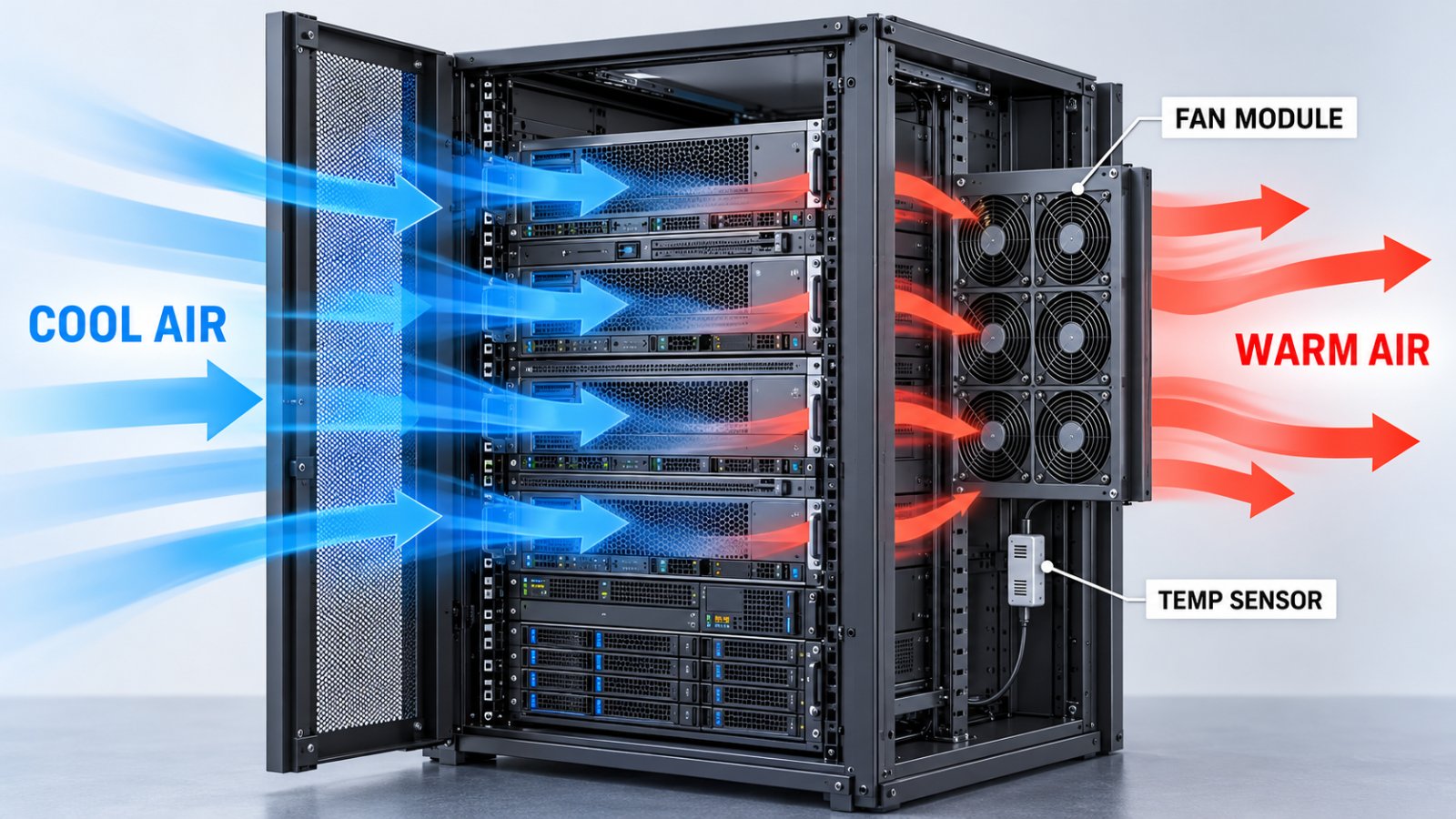
UNIFAN explores a network-connected approach: use a compact ESP32-S3 board to collect and present rack-fan information, then make that information available through a wired Ethernet connection. The project combines a WIZnet W5500 with a StampS3 board and uses MicroPython for the device application and network services.
The intended system is broader than a basic “sensor sends data” demo. Its repository includes a web dashboard, REST management endpoints, MQTT telemetry, TLS configuration, and an application update framework. The practical value is the integration of device management and network services around a planned rack fan module.
However, the current implementation must be described carefully: the environmental and fan measurements are simulated. The project has verified its W5500 network path on real hardware, but the physical fan-control system is not complete.
02 — What Does the Repository Actually Build?
The application targets an M5Stack StampS3 based on the ESP32-S3. A W5500 Ethernet controller provides the wired network interface. The device software is written in MicroPython and divided into a fixed startup layer, a network configuration layer, an OTA support library, and an application directory.
The repository’s documented application includes:
- A web dashboard showing environmental, fan, network, and system status
- HTTPS routes for the dashboard and REST API
- MQTT TLS publishing for periodic device status
- A network manager for W5500 initialization and link monitoring
- A/B application directories for controlled software deployment
- Host-side tests and tools for building, deploying, and verifying the services
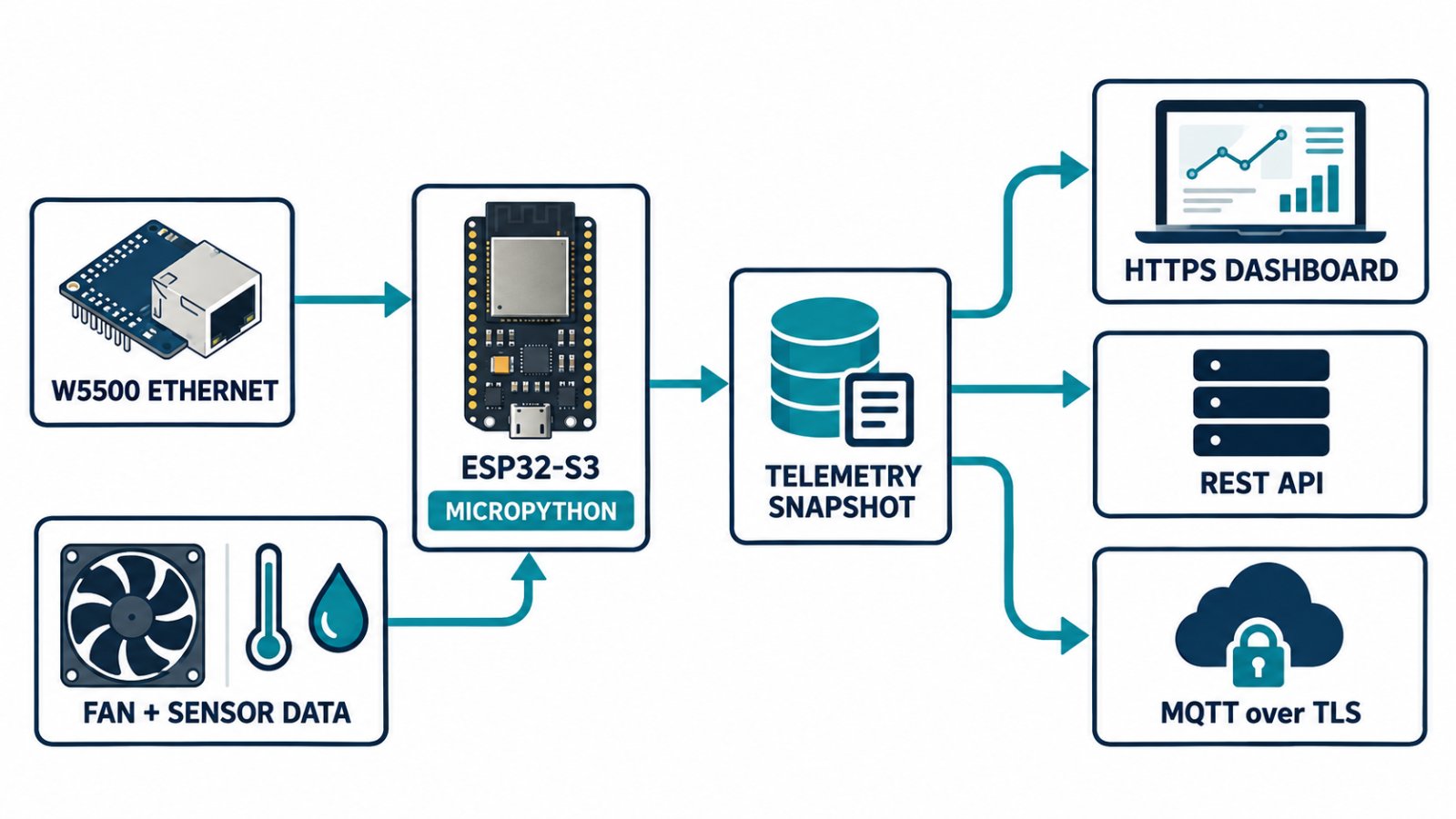
The intended flow is:
W5500 Ethernet
      ↓
ESP32-S3 / MicroPython network interface
      ↓
Device application and shared telemetry snapshot
      ├── HTTPS dashboard and REST API
      └── MQTT over TLS
The web and MQTT services read shared telemetry data. A browser request does not cause a new sensor read; it reads the latest stored snapshot.
03 — How Does the Device Use W5500?
The firmware’s W5500Ethernet class creates an SPI interface and passes it to MicroPython’s network.LAN constructor using network.PHY_W5500. The board configuration defines the SPI bus and the SCLK, MOSI, MISO, CS, interrupt, and reset pins.
The device disables any existing Wi-Fi station or access point interface, then configures DHCP or a static IPv4 address. A background task monitors link and address status. The code avoids repeatedly reconstructing the SPI bus and LAN object during ordinary disconnections.
The project’s Ethernet notes say that the W5500 connects through the ESP32’s lwIP network stack, after which standard socket, asyncio, SSL, and Microdot services can be used. MicroPython’s documentation also identifies network.LAN as the ESP32 interface for W5500 support.
This means the repository is using W5500 as its wired Ethernet connection, but the application code is not written around WIZnet’s ioLibrary socket functions.
Relevant files:
04 — Is W5500’s Hardware TOE Used?
The application should not be described as a direct W5500 TOE socket example.
The repository uses MicroPython’s network.LAN API and documents an ESP32/lwIP network path. HTTPS and MQTT are implemented using standard socket and TLS facilities. I found no application-level use of ioLibrary functions such as socket(), wizchip_init(), or direct W5500 socket-register setup.
So the accurate story is:
W5500 provides wired Ethernet to a MicroPython device whose application services use the ESP32/lwIP networking interface.
That is a meaningful WIZnet use case, but it does not demonstrate the application using W5500’s TCP/UDP hardware socket API directly.
05 — What Does the Dashboard and REST API Provide?
The dashboard presents a status view for the device, including temperature, humidity, fan channels, network state, system status, and MQTT status. The repository documents a single HTTPS listener shared by the web interface and REST endpoints.
The REST API includes status, health, diagnostics, MQTT configuration, and authenticated time-setting features. The service applies request size and connection limits, checks authentication for configuration writes, and avoids returning the MQTT password in responses.
These features make the project more than a basic connectivity test. It explores the operational side of a networked embedded device: viewing status, changing settings, handling TLS, and surviving service interruptions.
The key limitation is that the page’s fan and environmental values currently come from simulated hardware interfaces. A dashboard displaying six fans does not mean six physical fans are already controlled or measured.
06 — How Does MQTT Fit Into the Design?
The device publishes status over MQTT 3.1.1 with TLS. The repository documents retained status and availability messages, a last will, a periodic publish interval, connection retries, and behavior when the broker is unavailable.
The project separates MQTT from the local device-health path. If the broker is unreachable, the design intends for local sampling and HTTPS management to remain available. After a broker reconnect, the device publishes its current snapshot rather than replaying every missed interval.
A device-side service test recorded a 620-second run with approximately ten-minute regular publishing intervals and 40 successful HTTPS status requests. This is evidence of a real-device service test, although it is not a long-duration production reliability study.
See HTTPS, REST, and MQTT service documentation and the service deployment record.
07 — What Does the A/B Update Framework Do?
The repository includes an A/B directory layout for application code. The intent is to install a new application into an inactive directory, run it as a candidate, and confirm it after startup checks. The fixed startup code and network configuration are kept outside the replaceable application directory.
This is a useful design for maintaining application software on a device, but the current verification boundary matters:
- The service version was deployed through USB to the inactive application slot.
- The repository does not document a completed end-to-end network OTA installation on the test device.
- Power-loss recovery during an update remains unverified.
- OTA maintenance endpoints are not yet integrated into the active management web service.
Therefore, this project can be described as having an A/B application update framework, but not as a fully validated remote OTA product.
08 — What Is Real and What Is Simulated?
The W5500 network connection is real. The repository documents a StampS3 device configured with W5500, a DHCP-assigned address, HTTPS certificate validation, and MQTT TLS testing.
The fan and environmental hardware are not yet real in the application:
- Temperature and humidity are generated by a simulation module.
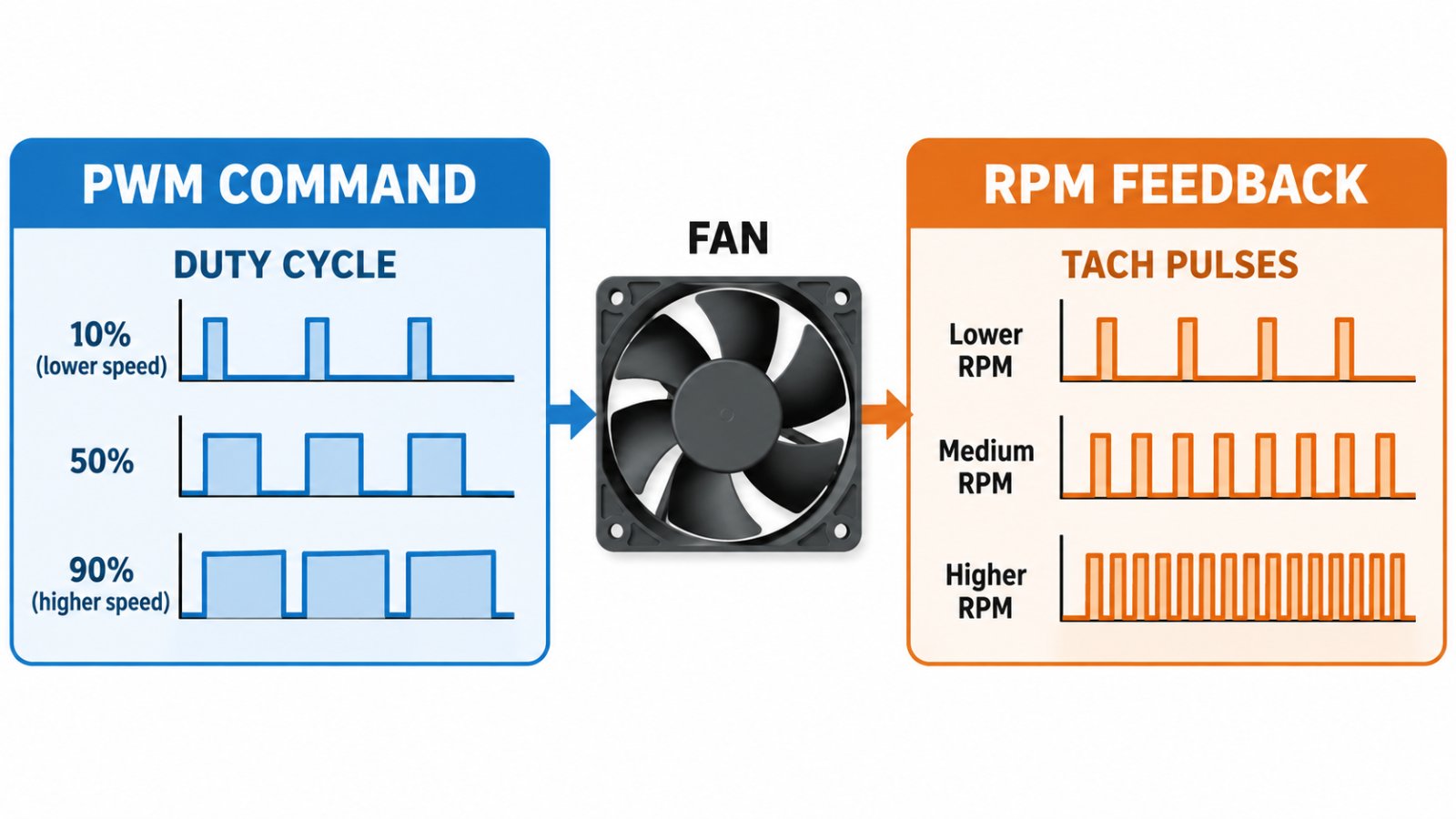
- Fan PWM values are in-memory simulated values.
- RPM is calculated from a demonstration formula, not measured from tachometer pulses.
- The real sensor and fan classes are placeholders that raise
NotImplementedError. - The temperature-based fan-control policy is not implemented.
The repository explicitly says that switching the configuration to hardware mode does not provide working hardware drivers. This is good documentation practice: the dashboard and telemetry can be tested without misleading the user into treating simulated data as real measurements.
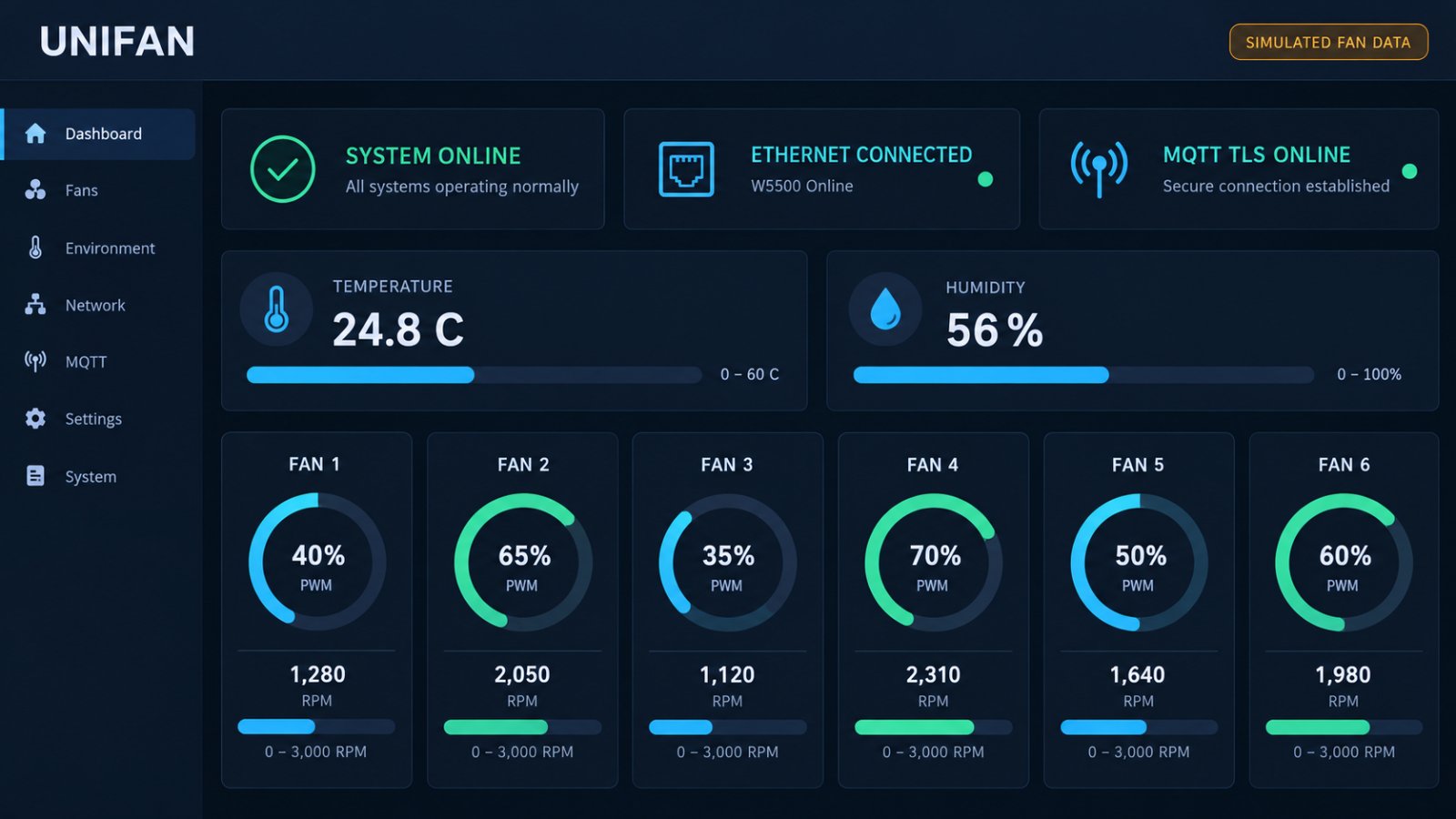
See simulation and hardware replacement notes.
09 — What Has Been Verified on Hardware?
The repository includes deployment records for an ESP32-S3 StampS3 board running MicroPython 1.29.0 with a W5500. The records report:
- W5500 LAN interface initialization
- DHCP address assignment
- HTTPS requests with certificate validation
- MQTT TLS connection and publishing
- Repeated HTTPS status queries during a 620-second test
- Broker interruption and reconnection testing
The same records also state what has not been established: full network OTA installation and rollback, power-loss recovery during update, long-duration reliability, and real fan-control behavior.
That makes the project more credible as a network-service prototype than as a finished hardware controller. Its validation is specific and useful, but the limits should accompany any presentation.
10 — Where Could This Project Be Useful?
If the planned physical hardware is completed, the architecture could support several rack-management scenarios:
Local status panel: An operator checks temperature, fan status, and network health from a browser on the local network.
Central monitoring: A broker or monitoring platform receives periodic MQTT status from several devices.
Remote configuration: An authenticated administrator updates MQTT settings through the HTTPS API.
Prototype development: Developers can evaluate a W5500-based Ethernet management path before the final fan hardware and control policy are ready.
These are potential uses of the architecture. The repository does not yet demonstrate a deployed multi-device rack installation or a validated cooling-control system.
11 — Why Is This a WIZnet Use Case?
UNIFAN shows a W5500 used as the real wired network interface in a MicroPython-based ESP32-S3 device. It has device-side code for initialization and link handling, plus hardware test records for DHCP, HTTPS, and MQTT TLS.
Its value is the integration story: a small embedded device uses W5500 Ethernet for web management and telemetry while keeping the network path separate from the unfinished sensor and fan-control layer.
It is not a strong example of W5500 TOE usage, and it should not be presented as a completed rack fan product. The most defensible description is a W5500-connected rack fan monitoring prototype with tested network services and simulated fan hardware.
Q&A
Does the project use W5500?
Yes. The code initializes network.LAN with network.PHY_W5500, and the deployment record documents W5500 Ethernet on a StampS3 device.
Does the application use W5500 TOE sockets?
No direct application-level ioLibrary or W5500 socket-register use was found. The repository documents an ESP32/lwIP network path.
Does the project control real fans?
Not yet. Fan PWM and RPM are simulated, and the physical fan drivers are placeholders.
Is network OTA fully validated?
No. The repository documents USB deployment to an A/B slot. Network OTA and power-loss recovery remain unverified.
Is it a commercial product?
The repository documents a development project and a hardware test device. It does not provide evidence of a product currently being sold.
프로젝트 설명
UNIFAN — W5500 기반 랙 팬 모니터링 시스템
이미지 안내: 이 글의 설명 이미지는 이해를 돕기 위해 AI로 제작한 개념 이미지입니다. 실제 UNIFAN UI 화면이나 완성된 하드웨어를 촬영한 자료가 아닙니다.
한국어
01 — 이 프로젝트는 어떤 문제를 다루는가?
랙에 장착된 장비는 안정적인 온도 유지를 위해 공기 흐름이 필요합니다. 팬 모듈로 냉각할 수 있지만, 여러 팬과 장치 상태를 원격으로 확인하려면 각각의 장치를 직접 관리하는 것보다 편리한 방법이 필요합니다.
UNIFAN은 소형 ESP32-S3 보드로 랙 팬 관련 정보를 수집하고, 유선 Ethernet을 통해 장치 상태를 확인하는 구조를 시도합니다. StampS3 보드에 WIZnet W5500을 연결하고, MicroPython으로 장치 애플리케이션과 네트워크 서비스를 구성합니다.
단순히 “센서 데이터를 네트워크로 전송하는 예제”보다 넓은 구성을 목표로 합니다. 웹 대시보드, REST 관리 API, MQTT 상태 발행, TLS 설정, 애플리케이션 업데이트 구조를 저장소에 포함합니다. 핵심 가치는 랙 팬 모듈을 위한 장치 관리와 네트워크 서비스를 함께 구성하는 데 있습니다.
다만 현재 상태를 정확히 구분해야 합니다. 환경 센서와 팬 데이터는 시뮬레이션 값입니다. W5500 네트워크 경로는 실기기에서 검증됐지만, 실제 팬 제어 시스템은 아직 완성되지 않았습니다.
저장소: imkink/unifan
02 — 저장소에서 실제로 구현한 것은 무엇인가?
이 프로젝트는 ESP32-S3 기반 M5Stack StampS3를 대상으로 합니다. WIZnet W5500이 유선 네트워크를 제공하고, 장치 애플리케이션은 MicroPython으로 작성돼 있습니다. 구조는 고정 시작 코드, 네트워크 설정, OTA 실행 라이브러리, 애플리케이션 디렉터리로 나뉩니다.
저장소에 설명된 애플리케이션 기능은 다음과 같습니다.
- 환경·팬·네트워크·시스템 상태를 보여주는 웹 대시보드
- 대시보드와 REST API를 위한 HTTPS 서버
- 주기적인 장치 상태 발행을 위한 MQTT TLS
- W5500 초기화 및 링크 상태 관리 모듈
- 애플리케이션 배포와 복구를 위한 A/B 디렉터리 구조
- 호스트 측 테스트와 빌드·배포·검증 도구
전체 흐름을 단순화하면 다음과 같습니다.
W5500 Ethernet
      ↓
ESP32-S3 / MicroPython 네트워크 인터페이스
      ↓
장치 애플리케이션과 공유 텔레메트리 데이터
      ├── HTTPS 대시보드 및 REST API
      └── MQTT TLS 상태 발행
웹과 MQTT 서비스는 공통 텔레메트리 데이터를 읽습니다. 브라우저가 상태를 요청할 때마다 센서를 새로 읽는 방식이 아니라, 최신 상태 스냅샷을 조회합니다.
03 — 장치가 W5500을 어떻게 사용하는가?
펌웨어의 W5500Ethernet 클래스가 SPI 인터페이스를 만들고, MicroPython의 network.LAN 생성자에 network.PHY_W5500과 함께 전달합니다. 보드 설정에는 SPI 버스와 SCLK, MOSI, MISO, CS, 인터럽트, 리셋 핀이 정의돼 있습니다.
장치는 기존 Wi-Fi STA/AP 인터페이스를 비활성화한 뒤 DHCP 또는 고정 IPv4 주소를 설정합니다. 백그라운드 태스크가 링크와 IP 상태를 감시합니다. 일반적인 네트워크 단절 상황에서 SPI 버스와 LAN 객체를 반복해서 새로 만들지 않도록 구성돼 있습니다.
Ethernet 설명 문서는 W5500이 ESP32의 lwIP 네트워크 스택을 통해 연결되며, 이후 표준 소켓, asyncio, SSL, Microdot을 사용할 수 있다고 설명합니다. MicroPython 문서도 ESP32의 W5500을 network.LAN 인터페이스로 지원한다고 안내합니다.
즉, W5500은 실제 유선 네트워크 연결에 사용되지만 애플리케이션은 WIZnet ioLibrary의 소켓 함수 중심으로 작성된 것은 아닙니다.
관련 파일:
04 — W5500의 Hardware TOE를 사용하는가?
W5500의 하드웨어 TOE 소켓 API를 직접 사용하는 애플리케이션으로 소개해서는 안 됩니다.
저장소는 MicroPython의 network.LAN API와 ESP32/lwIP 기반 네트워크 경로를 사용합니다. HTTPS와 MQTT는 표준 소켓 및 TLS 기능을 통해 구현돼 있습니다. 애플리케이션 수준에서 socket(), wizchip_init()과 같은 ioLibrary 함수를 사용하거나 W5500 소켓 레지스터를 직접 설정하는 코드는 확인되지 않았습니다.
따라서 정확한 설명은 다음과 같습니다.
W5500이 MicroPython 기반 장치에 유선 Ethernet을 제공하고, 애플리케이션 서비스는 ESP32/lwIP 네트워크 인터페이스를 사용한다.
이 역시 의미 있는 WIZnet 사용 사례지만, 애플리케이션이 W5500의 TCP/UDP 하드웨어 소켓 API를 직접 사용한다는 사례는 아닙니다.
05 — 웹 대시보드와 REST API는 무엇을 제공하는가?
대시보드는 환경 상태, 팬 채널, 네트워크와 시스템 상태, MQTT 상태를 보여줍니다. 저장소는 웹 페이지와 REST API가 하나의 HTTPS 서버를 공유하도록 구성했다고 설명합니다.
REST API에는 장치 정보, 상태, 헬스, 진단, MQTT 설정, 인증된 시간 설정 기능이 포함돼 있습니다. 설정 변경에는 인증을 적용하고, 요청 크기와 연결 수를 제한하며, 응답에서 MQTT 비밀번호를 반환하지 않도록 했습니다.
따라서 이 프로젝트는 단순한 Ethernet 연결 테스트를 넘어, 임베디드 장치의 운영 기능을 함께 다룹니다. 상태 조회, 설정 변경, TLS, 서비스 중단 시 복구를 고려한 점이 특징입니다.
다만 대시보드에 팬 6개가 표시된다고 해서 실제 팬 6개를 제어하거나 측정하는 것은 아닙니다. 현재 표시되는 팬과 환경 값은 시뮬레이션 인터페이스에서 가져옵니다.
06 — MQTT는 어떤 역할을 하는가?
장치는 TLS를 사용한 MQTT 3.1.1 연결로 상태를 발행합니다. 저장소에는 retained 상태 및 가용성 메시지, 마지막 유언 메시지, 주기적인 발행 간격, 재접속 처리, 브로커에 연결할 수 없는 경우의 동작이 문서화돼 있습니다.
설계상 MQTT 서비스는 장치의 로컬 상태 관리와 분리돼 있습니다. 브로커에 연결할 수 없어도 로컬 샘플링과 HTTPS 관리는 계속 동작하도록 구성했습니다. MQTT가 재연결되면 누락된 모든 데이터를 재생하는 대신 최신 상태를 발행합니다.
장치 서비스 검증 기록에는 약 620초 동안의 테스트, 약 10분 간격의 정기 발행, HTTPS 상태 조회 40회 성공이 기재돼 있습니다. 실기기 서비스 검증의 근거는 되지만, 장기간 운영 신뢰성을 입증하는 테스트는 아닙니다.
자세한 내용은 HTTPS·REST·MQTT 서비스 설명과 서비스 배포 기록을 참고하면 됩니다.
07 — A/B 업데이트 구조는 무엇을 하는가?
저장소는 애플리케이션 코드를 A/B 디렉터리로 분리합니다. 새 애플리케이션을 비활성 디렉터리에 설치하고 후보 버전으로 실행한 다음, 시작 검사를 통과하면 확인 처리하는 구조입니다. 고정 시작 코드와 네트워크 설정은 교체 가능한 애플리케이션 디렉터리 바깥에 둡니다.
다만 현재 검증 범위를 함께 설명해야 합니다.
- 서비스 버전은 USB를 이용해 비활성 슬롯에 배포했습니다.
- 테스트 장치에서 네트워크 OTA 설치 전체 절차를 완료했다는 기록은 없습니다.
- 업데이트 중 전원 차단 시 복구도 검증되지 않았습니다.
- OTA 유지보수 API는 현재 관리 웹 서비스에 연결되지 않았습니다.
따라서 “A/B 애플리케이션 업데이트 구조가 있다”고 설명할 수는 있지만, “원격 OTA 제품으로 완전히 검증됐다”고 소개하기는 어렵습니다.
08 — 실제 구현과 시뮬레이션은 어떻게 구분해야 하는가?
W5500 네트워크 연결은 실제입니다. 저장소에는 StampS3에 W5500을 연결하고 DHCP 주소를 할당받은 뒤, HTTPS 인증서 검증과 MQTT TLS 통신을 수행한 기록이 있습니다.
반면 팬과 환경 센서 하드웨어는 애플리케이션에서 아직 구현되지 않았습니다.
- 온도·습도는 시뮬레이션 모듈에서 생성합니다.
- 팬 PWM 값은 메모리 내 시뮬레이션 값입니다.
- RPM은 타코미터 펄스를 읽는 대신 시연용 계산식으로 생성합니다.
- 실제 센서·팬 클래스는
NotImplementedError를 발생시키는 자리표시자입니다. - 온도에 따른 팬 제어 정책은 미완성입니다.
저장소는 하드웨어 모드로 설정을 바꾼다고 실제 드라이버가 생기지는 않는다고 명시합니다. 시뮬레이션 데이터를 실제 측정값처럼 보이지 않게 설계한 점은 문서화 측면에서 적절합니다.
자세한 내용은 시뮬레이션 및 하드웨어 교체 설명을 참고하면 됩니다.
09 — 실기기에서 무엇을 검증했는가?
저장소에는 MicroPython 1.29.0을 실행하는 ESP32-S3 StampS3와 W5500의 배포 기록이 있습니다. 기록된 검증 항목은 다음과 같습니다.
- W5500 LAN 인터페이스 초기화
- DHCP 주소 할당
- 인증서 검증을 포함한 HTTPS 요청
- MQTT TLS 연결 및 메시지 발행
- 620초 테스트 중 반복적인 HTTPS 상태 조회
- 브로커 중단 후 재연결
같은 기록에서 검증되지 않은 범위도 구분하고 있습니다. 네트워크 OTA 전체 설치와 롤백, 업데이트 중 전원 차단 복구, 장기 안정성, 실제 팬 제어 동작은 아직 입증되지 않았습니다.
따라서 이 프로젝트는 완성된 팬 컨트롤러보다 네트워크 서비스 시제품으로 소개할 때 근거가 더 탄탄합니다. 검증 결과는 구체적이지만 그 한계도 함께 전달해야 합니다.
10 — 이 프로젝트를 어디에 활용할 수 있는가?
실제 하드웨어가 완성되면 다음과 같은 랙 관리 시나리오에 활용할 수 있습니다.
로컬 상태 확인: 운영자가 로컬 네트워크의 웹 브라우저에서 온도, 팬, 네트워크 상태를 확인합니다.
중앙 모니터링: MQTT 브로커나 모니터링 플랫폼에서 여러 장치의 상태를 수신합니다.
원격 설정: 인증된 관리자가 HTTPS API를 통해 MQTT 설정을 변경합니다.
시제품 개발: 최종 팬 하드웨어와 제어 정책을 준비하기 전에 W5500 기반 Ethernet 관리 경로를 검증합니다.
이는 현재 구조를 바탕으로 한 활용 가능성입니다. 저장소가 여러 랙에 설치된 운영 사례나 검증된 냉각 제어 시스템을 보여주는 것은 아닙니다.
11 — 이 프로젝트가 WIZnet 사례로 의미 있는 이유
UNIFAN은 MicroPython 기반 ESP32-S3 장치의 실제 Ethernet 인터페이스로 W5500을 사용합니다. 초기화와 링크 관리 코드가 있고, DHCP·HTTPS·MQTT TLS 통신을 실기기에서 시험한 기록도 있습니다.
가장 큰 의미는 통합 사례라는 점입니다. 소형 임베디드 장치가 W5500 Ethernet을 통해 웹 관리와 텔레메트리를 제공하면서, 네트워크 서비스와 아직 완성되지 않은 팬 제어 계층을 분리해 구성합니다.
다만 W5500 TOE 사용 사례로 소개하기에는 적합하지 않고, 완성된 랙 팬 제품으로 소개해서도 안 됩니다. 가장 정확한 설명은 **“실기기 네트워크 서비스를 검증했고 팬 하드웨어는 시뮬레이션 중인 W5500 기반 랙 팬 모니터링 시제품”**입니다.
Q&A
W5500을 실제로 사용하는가?
네. 코드에서 network.LAN과 network.PHY_W5500을 초기화하며, 배포 기록에도 StampS3와 W5500의 네트워크 테스트가 있습니다.
애플리케이션에서 W5500 TOE 소켓을 사용하는가?
애플리케이션 수준에서 ioLibrary 함수나 W5500 소켓 레지스터를 직접 사용하는 코드는 확인되지 않았습니다. 저장소는 ESP32/lwIP 네트워크 경로를 설명합니다.
실제 팬을 제어하는가?
아직 아닙니다. PWM과 RPM은 시뮬레이션 값이고 실제 팬 드라이버는 자리표시자입니다.
네트워크 OTA까지 검증됐는가?
아닙니다. 저장소에는 A/B 슬롯으로 USB 배포한 기록이 있습니다. 네트워크 OTA와 전원 차단 복구는 미검증 상태입니다.
상용 제품인가?
저장소는 개발 프로젝트와 실기기 테스트 장치를 설명하지만, 현재 판매 중인 제품이라는 근거는 제공하지 않습니다.
