



SKVMOIP
Scalable KVM Over IP Software Suite for Managing Servers and Remote Computers.
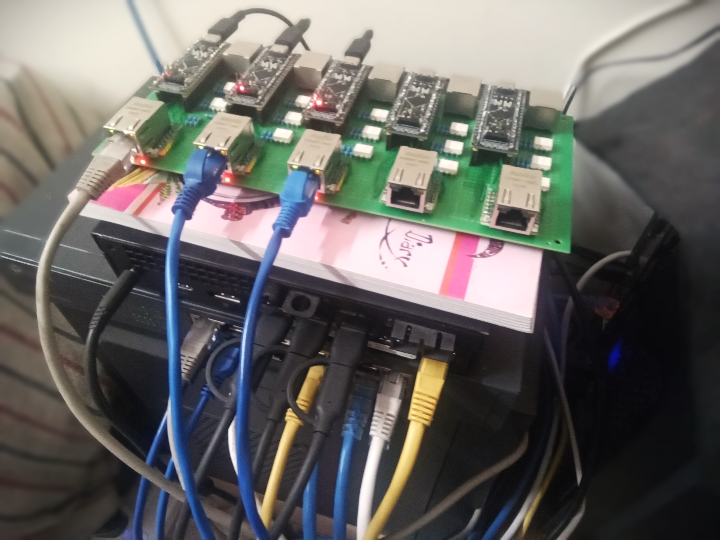
SKVMOIP — Scalable KVM Over IP: One Ethernet Spine for an Entire Server Rack
#KVM-over-IP #RemoteDesktop #ServerManagement #TOE-TCP #STM32 #W5500 #USB-HID #HDMI-over-IP #Vulkan #GPU-Accelerated
📚 Individual open-source project — hobby-scale hardware + production-grade ambition Firmware verified on STM32F401CCU6 + W5500; client runs on Windows (alpha release v1.0.0)
01 — What is this project?
Managing a rack of servers from a single seat is a solved problem — if you can afford it. Commercial KVM-over-IP appliances from APC, ATEN, or IPMI-equipped boards cost hundreds to thousands of dollars per node, and most single-board solutions like PiKVM or TinyPilot solve only the one-machine case: want to cover ten servers? Buy ten units.
SKVMOIP (Scalable KVM Over IP) attacks this scaling problem directly. Instead of replicating expensive hardware per machine, it separates the concerns:
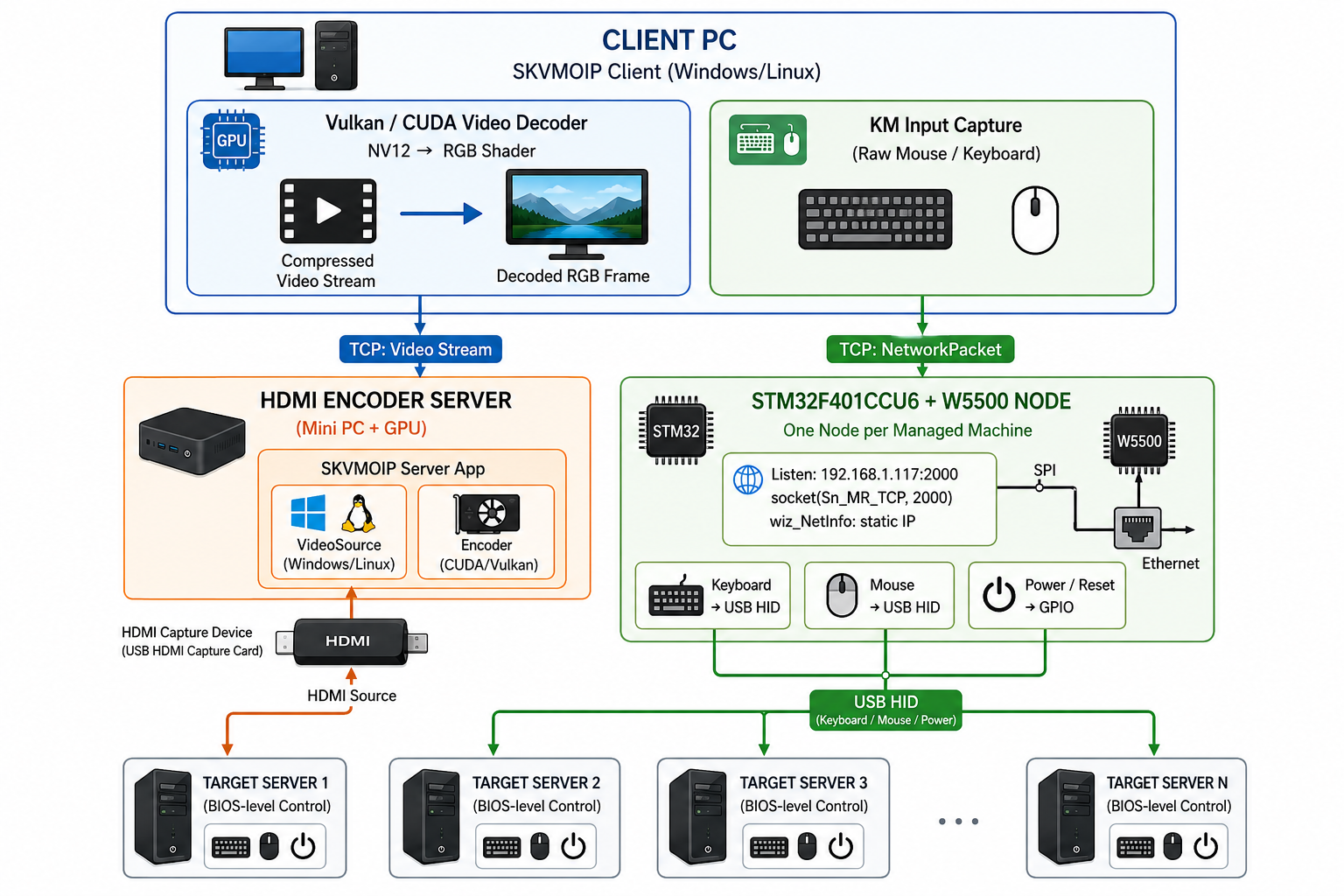
- A STM32F401CCU6 + W5500 module handles keyboard, mouse, power button, and reset signals for each managed machine — inexpensive, the size of a credit card.
- A single HDMI Encoder Server (a mini-PC with enough GPU) captures and encodes video from the target machines.
- A client PC (Windows or Linux) connects to both, rendering the remote desktop via GPU-accelerated Vulkan decoding.
The result is a software suite that can grow to cover an entire server rack by adding only cheap STM32+W5500 nodes, without multiplying the cost of video processing hardware.
02 — Why KVM Over IP?
🔷 Agentless, Pre-OS Control
KVM-over-IP operates below the operating system. Keyboard and mouse signals are injected as USB HID, and video is captured directly from the HDMI port — the target machine needs no software installed. This means the operator can enter BIOS, run OS installers, recover from kernel panics, and manage power state as if sitting physically in front of the machine. No SSH, no VNC agent, no Windows Remote Desktop prerequisites.
🔷 Scalability as the Core Design Constraint
Existing cheap KVM solutions (PiKVM, TinyPilot) treat scalability as an afterthought. SKVMOIP's architecture decouples the input/power path (cheap, per-machine) from the video path (shared, centralized). A single encoder server and Ethernet switch can front an entire lab. Adding a new machine costs only the STM32+W5500 module.
🔷 GPU-Accelerated Video Path
The client software uses Vulkan and NVIDIA CUDA for hardware-accelerated HDMI stream decoding. NV12-to-RGB conversion is handled in shader code (shaders/ directory), keeping latency low even at high resolutions. This is categorically different from CPU-decoded VNC streams.
03 — System Architecture
04 — Why W5500?
🔷 TOE TCP Socket Mode — Reliable Delivery for Control Commands
The STM32 firmware uses W5500's hardware TCP socket mode (Sn_MR_TCP, port 2000). This is the correct choice for a keyboard-mouse control channel where every packet must arrive reliably and in order. A dropped key event or a missed power-button press is operationally unacceptable when managing a remote server.
W5500's TOE offloads the entire TCP/IP stack into silicon — the STM32 simply calls socket(), listen(), and receives NetworkPacket structs from the IP stack without managing retransmission timers, sequence numbers, or connection state in firmware code. The STM32's CPU budget is freed entirely for USB HID injection and GPIO front-panel control.
// From firmware/STM32F401CCU6/SKMOIP/Core/Src/main.c
W5500_Init();                                  // SPI-connected W5500 initialization
wizchip_setnetinfo(&netInfo);                  // Static IP: 192.168.1.117
SOCKET mySocket = socket(0, Sn_MR_TCP, 2000, 0);  // TCP socket, port 2000
listen(mySocket);                              // Wait for client connection
// Loop: recv() → decode NetworkPacket → inject USB HID / toggle GPIO
🔷 SPI Integration on STM32F401CCU6
STM32F401CCU6 is an 84 MHz Cortex-M4 without a native Ethernet MAC. W5500 fills this gap cleanly over SPI1 — no external PHY power domain, no RMII timing constraints. The w5500_spi.c driver handles the chip-select and frame-layer; the application code uses the standard ioLibrary socket API. This is precisely the integration pattern W5500 was designed for: Ethernet capability for any SPI-capable MCU.
🔷 Static IP, Minimal Overhead
The firmware uses NETINFO_STATIC (no DHCP) and a hardcoded IP (192.168.1.117). For a lab KVM node, this is correct: the device must be reachable immediately after power-on, before any DHCP server responds. W5500's onboard register set retains network configuration in hardware, so the STM32 can enter its listen loop within milliseconds of power-on — deterministic, no boot negotiation.
🔷 Verified Evidence ✅
socket(0, Sn_MR_TCP, 2000, 0)andlisten(mySocket)confirmed inmain.cwizchip_setnetinfo(&netInfo)andW5500_Init()confirmed in application codeNetworkPacketstruct encodes keyboard, mouse, and front-panel commands — all transmitted over this single TCP socket- Alpha release v1.0.0 published (Mar 2024) with real hardware setup photo in repository
05 — Key Components
🌐 WIZnet W5500 — TCP TOE Mode (Sn_MR_TCP)
Hardware-offloaded TCP/IP on SPI bus. Powers the keyboard-mouse-power control channel from STM32 to the SKVMOIP client. One socket, one TCP connection, one NetworkPacket stream. No TCP stack in firmware; CPU fully dedicated to USB HID and GPIO.
🔧 STM32F401CCU6
84 MHz Cortex-M4 acting as the KVM endpoint node. Enumerates as USB HID device (keyboard + mouse composite) to the managed server. GPIO controls front-panel signals (power, reset, power LED).
🎬 HDMI Capture + Encoder Server
USB HDMI capture card feeds raw HDMI signal to the encoder server PC. SKVMOIP server app encodes the stream with GPU hardware (NVIDIA CUDA; Intel/AMD in progress). Delivered to the client over TCP on a separate connection.
💻 SKVMOIP Client (Windows/Linux)
Vulkan-based GUI client with NV12→RGB shader pipeline for GPU-decoded video display. Manages VIP (Video Server IP) and KMIP (Keyboard-Mouse Server IP) connections separately. GTK3 UI allows adding multiple machines and switching between them.
06 — Application Scenarios
01. Headless Server Lab Management
A developer running 5–10 bare-metal servers in a home lab deploys one STM32+W5500 node per machine. All machines are accessible from a single SKVMOIP client window. BIOS tweaks, OS reinstalls, kernel crash recovery — all handled remotely without a crash cart.
02. Small Data Center On-Site Operations
A small hosting provider replaces per-rack KVM switches with SKVMOIP nodes. The single encoder server handles video for the entire rack. Staff walk the floor with a laptop, not a KVM cart.
03. Hardware Bringup and Firmware Development
Embedded teams use SKVMOIP to manage target boards during bringup. The pre-OS video path means the team can observe BIOS POST, U-Boot output, and early kernel messages before any network stack on the target machine is alive.
04. Remote Power Management
Administrators manage server power state (boot, reboot, hard reset, power LED monitoring) over IP without IPMI. The STM32 GPIO-to-front-panel bridge makes this possible on any server that lacks remote management hardware.
07 — Similar Projects on WIZnet Makers
Two projects on the platform share the same problem space.
SimpleIPMI (same author) tackles KVM-over-IP with ESP32-S3 + W5500 — browser-based control, MJPEG video, USB HID, GPIO power control. Single-machine scope, no dedicated client app. W5500 is optional (WiFi AP fallback exists). → https://maker.wiznet.io/Lihan__/projects/simpleipmi/
IP Keyboard on W5500-EVB-Pico strips the idea down to keyboard-only: UDP commands → USB HID keystrokes via CircuitPython. No video, no mouse, no power control. → https://maker.wiznet.io/josephsr/projects/ip-keyboard-on-w5500-evb-pico/
SilentHID focuses on secure keyboard+mouse remote control over TLS WebSocket, targeting robotics and test automation. No video or power control. → https://maker.wiznet.io/Aimee0/projects/silenthid/
| SKVMOIP | SimpleIPMI | IP Keyboard | SilentHID | |
|---|---|---|---|---|
| Core MCU | STM32F401 | ESP32-S3 | RP2040 | W55RP20 |
| W5500 role | Required (TCP KM channel) | Optional (LAN extension) | On-board | On-board |
| Keyboard Over IP | ✅ TCP | ✅ WebSocket | ✅ UDP | ✅ TLS WebSocket |
| Mouse Over IP | ✅ | ✅ | ❌ | ✅ |
| Video Over IP | ❌ | ❌ | ❌ | ❌ |
| Power/Reset control | ✅ GPIO | ✅ GPIO | ❌ | ❌ |
| Scalability | Multi-server | Single | Single | Single |
| Client | Dedicated app (Vulkan) | Browser | UDP socket | WebSocket |
| Security | None (LAN assumed) | None | None | TLS 1.2 |
| Complexity | High (C++, STM32) | Medium (ESP32) | Low (Python) | Medium |
The ecosystem shows a clear spectrum: from single-function primitives (IP Keyboard) to security-focused controllers (SilentHID) to full KVM suites (SimpleIPMI, SKVMOIP). SKVMOIP is the only one architected for scale — separating the video path (centralized GPU encoder) from the control path (per-machine STM32+W5500 node) so that adding a new machine costs only a cheap module, not another full stack.
Conclusion
SKVMOIP turns the STM32+W5500 combination into a scalable KVM infrastructure node, demonstrating that W5500's hardware TCP offload is exactly what you need when reliable control delivery matters more than raw throughput.
- ✅ W5500 TCP TOE socket mode confirmed in
main.c—socket(0, Sn_MR_TCP, 2000, 0)+listen() - ✅ Static IP configuration via
wiz_NetInfoandwizchip_setnetinfo()— deterministic power-on connectivity - ✅ Full keyboard (USB HID composite) + mouse + power/reset + power LED over IP
- ✅ BIOS-level, pre-OS control — no target software required
- ✅ GPU-accelerated video path via NVIDIA CUDA + Vulkan NV12→RGB shader
- ✅ Scalable architecture: add machines by adding only cheap STM32+W5500 nodes
- ✅ Alpha release v1.0.0 published with real hardware setup photograph
A server rack, a mini-PC encoder, and a handful of STM32+W5500 modules. This kind of project also uses W5500.
Q&A
Q: Why use W5500's TCP mode rather than UDP for the keyboard-mouse channel? A: KVM control events are small but loss-intolerant. A missed keyboard HID report or an undelivered power-button command can leave a server in an undefined state. TCP's reliable delivery guarantee — offloaded entirely into W5500's silicon without firmware overhead — is the correct choice for this workload.
Q: Why not use Raspberry Pi's onboard Ethernet instead of W5500? A: The STM32F401CCU6 was chosen as the KVM endpoint because it can enumerate as a USB HID device directly, which is how it injects keyboard/mouse signals into the target machine's USB port. Raspberry Pi would require a USB gadget mode setup that is more complex and more expensive. W5500 adds Ethernet to the STM32 without changing the USB HID architecture.
Q: Can SKVMOIP scale beyond a single LAN? A: The current architecture uses static LAN IPs. Cross-subnet or VPN access would require additional network configuration not yet addressed in the project. The TODO list mentions HDMI routing over IP as a planned scaling enhancement.
SKVMOIP — 확장형 KVM Over IP: 이더넷 하나로 서버 랙 전체를 제어하다
#KVM-over-IP #원격데스크톱 #서버관리 #TOE-TCP #STM32 #W5500 #USB-HID #HDMI-over-IP #Vulkan #GPU가속
📚 개인 오픈소스 프로젝트 — 저가 하드웨어에 프로덕션급 확장성 설계 STM32F401CCU6 + W5500 기반 펌웨어 검증 완료; 클라이언트는 Windows 지원 (alpha v1.0.0)
01 — 이 프로젝트는 무엇인가?
서버 랙을 단일 좌석에서 원격 관리하는 것은 '해결된 문제'다 — 비용만 감수한다면. APC, ATEN 등 상용 KVM-over-IP 장비는 노드당 수십만~수백만 원이고, PiKVM이나 TinyPilot 같은 단일 보드 솔루션은 머신 한 대만 지원한다. 열 대를 관리하려면 열 세트를 사야 한다.
SKVMOIP(Scalable KVM Over IP)는 이 확장성 문제를 정면으로 해결한다. 머신마다 비싼 하드웨어를 복제하는 대신, 역할을 분리한다:
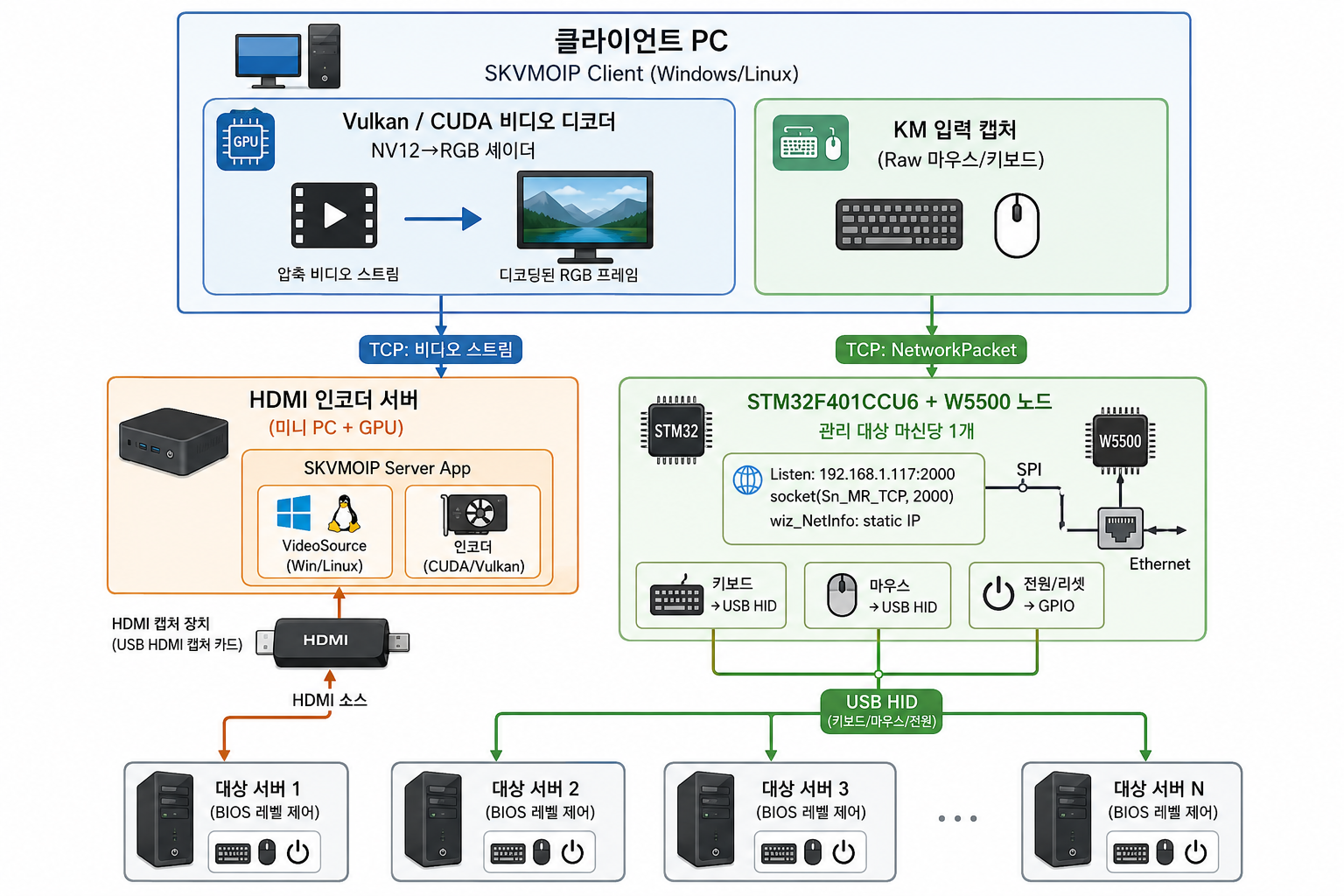
- STM32F401CCU6 + W5500 모듈이 관리 대상 머신마다 키보드, 마우스, 전원 버튼, 리셋 신호를 담당 — 저렴하고 신용카드 크기.
- 단일 HDMI 인코더 서버(GPU 있는 미니 PC)가 대상 머신들의 비디오를 캡처/인코딩.
- 클라이언트 PC(Windows/Linux)가 두 경로에 모두 접속, Vulkan GPU 가속으로 원격 화면을 렌더링.
결과적으로 저렴한 STM32+W5500 노드만 추가하면 서버 랙 전체로 확장되는 소프트웨어 스위트가 완성된다.
02 — KVM Over IP가 왜 필요한가?
🔷 에이전트 없는 OS 이전 제어
KVM-over-IP는 운영체제 아래에서 동작한다. 키보드/마우스 신호는 USB HID로 주입되고, 비디오는 HDMI 포트에서 직접 캡처된다. 대상 머신에 소프트웨어가 설치되어 있지 않아도 BIOS 진입, OS 설치, 커널 패닉 복구, 전원 제어가 모두 가능하다.
🔷 확장성이 핵심 설계 제약
기존 저가 KVM 솔루션들은 확장성을 부차적으로 취급한다. SKVMOIP는 입력/전원 경로(저렴, 머신당)와 비디오 경로(공유, 중앙화)를 명시적으로 분리한다. 단일 인코더 서버와 이더넷 스위치 하나로 실험실 전체를 커버할 수 있다.
🔷 GPU 가속 비디오 경로
클라이언트 소프트웨어는 Vulkan과 NVIDIA CUDA로 HDMI 스트림을 하드웨어 가속 디코딩한다. NV12→RGB 변환은 셰이더(shaders/ 디렉토리)에서 처리되어, 고해상도에서도 지연 시간이 낮게 유지된다. CPU 디코딩 기반 VNC와는 범주 자체가 다르다.
03 — 시스템 아키텍처
04 — 왜 W5500인가?
🔷 TOE TCP 소켓 모드 — 제어 명령의 신뢰 전달 보장
STM32 펌웨어는 W5500의 **하드웨어 TCP 소켓 모드(Sn_MR_TCP, 포트 2000)**를 사용한다. 키보드-마우스 제어 채널에서는 모든 패킷이 신뢰성 있게, 순서대로 도달해야 한다. 키 이벤트 하나가 누락되거나 전원 버튼 신호가 유실되면 원격 서버 상태가 정의되지 않은 상태로 빠진다 — 운영 관점에서 허용 불가.
W5500의 TOE는 TCP/IP 스택 전체를 실리콘에 오프로드한다. STM32는 단순히 socket(), listen(), recv()를 호출하고 NetworkPacket 구조체를 받아 처리할 뿐이다. 재전송 타이머, 시퀀스 번호, 연결 상태 관리를 펌웨어 코드에서 전혀 다룰 필요가 없다. STM32의 CPU 예산은 전부 USB HID 주입과 GPIO 전면 패널 제어에 투입된다.
// firmware/STM32F401CCU6/SKMOIP/Core/Src/main.c 에서 확인
W5500_Init();                                  // SPI 연결 W5500 초기화
wizchip_setnetinfo(&netInfo);                  // Static IP: 192.168.1.117
SOCKET mySocket = socket(0, Sn_MR_TCP, 2000, 0);  // TCP 소켓, 포트 2000
listen(mySocket);                              // 클라이언트 연결 대기
// 루프: recv() → NetworkPacket 디코드 → USB HID 주입 / GPIO 토글
🔷 STM32F401CCU6에서의 SPI 통합
STM32F401CCU6은 온보드 이더넷 MAC이 없는 84 MHz Cortex-M4이다. W5500은 SPI1 버스 하나로 이 공백을 채운다 — 외부 PHY 전원 도메인도 없고, RMII 타이밍 제약도 없다. w5500_spi.c 드라이버가 칩 셀렉트와 프레임 레이어를 처리하고, 애플리케이션 코드는 표준 ioLibrary 소켓 API를 그대로 사용한다. SPI 지원 MCU에 이더넷 능력을 추가한다는 것이 W5500이 설계된 바로 그 역할이다.
🔷 Static IP, 최소 오버헤드
펌웨어는 NETINFO_STATIC(DHCP 없음)과 하드코딩된 IP(192.168.1.117)를 사용한다. 실험실 KVM 노드에서 이는 올바른 선택이다. 장치는 전원 투입 직후, DHCP 서버 응답보다 먼저 도달 가능해야 한다. W5500의 온보드 레지스터 셋이 네트워크 설정을 하드웨어에 유지하므로, STM32는 전원 투입 후 수 밀리초 이내에 listen 루프에 진입할 수 있다.
🔷 검증된 증거 ✅
socket(0, Sn_MR_TCP, 2000, 0)및listen(mySocket)—main.c에서 직접 확인wizchip_setnetinfo(&netInfo)및W5500_Init()— 애플리케이션 코드에서 확인NetworkPacket구조체가 키보드, 마우스, 전면 패널 명령을 이 단일 TCP 소켓으로 전송- 실제 하드웨어 셋업 사진 포함 Alpha v1.0.0 릴리즈 (2024년 3월) 공개
05 — 핵심 컴포넌트
🌐 WIZnet W5500 — TCP TOE 모드 (Sn_MR_TCP)
SPI 버스의 하드웨어 오프로드 TCP/IP. STM32에서 SKVMOIP 클라이언트까지 키보드-마우스-전원 제어 채널을 담당. 소켓 하나, TCP 연결 하나, NetworkPacket 스트림 하나. 펌웨어에 TCP 스택 코드 없음; CPU는 USB HID와 GPIO에만 집중.
🔧 STM32F401CCU6
84 MHz Cortex-M4가 KVM 엔드포인트 노드 역할. 관리 대상 서버에 USB HID 복합 장치(키보드 + 마우스)로 열거. GPIO로 전면 패널 신호(전원, 리셋, 전원 LED) 제어.
🎬 HDMI 캡처 + 인코더 서버
USB HDMI 캡처 카드가 원시 HDMI 신호를 인코더 서버 PC에 공급. SKVMOIP 서버 앱이 GPU 하드웨어(NVIDIA CUDA; Intel/AMD 진행 중)로 스트림 인코딩. 별도 TCP 연결로 클라이언트에 전달.
💻 SKVMOIP 클라이언트 (Windows/Linux)
NV12→RGB 셰이더 파이프라인을 가진 Vulkan 기반 GUI 클라이언트. VIP(Video Server IP)와 KMIP(KM Server IP)를 분리 관리. GTK3 UI로 복수의 머신 추가 및 전환 가능.
06 — 활용 시나리오
01. 헤드리스 서버 실험실 관리
개발자가 홈 랩의 5~10대 베어메탈 서버에 STM32+W5500 노드를 각각 배치. 모든 머신에 SKVMOIP 클라이언트 하나로 접속. BIOS 설정, OS 재설치, 커널 크래시 복구 — 크래시 카트 없이 원격으로 처리.
02. 소규모 데이터센터 현장 운영
소형 호스팅 업체가 랙별 KVM 스위치를 SKVMOIP 노드로 교체. 단일 인코더 서버가 랙 전체의 비디오를 처리. 담당자는 KVM 카트 없이 노트북 하나로 현장을 커버.
03. 하드웨어 브링업 및 펌웨어 개발
임베디드 팀이 대상 보드 브링업 중 SKVMOIP를 활용. OS 이전 비디오 경로 덕분에 대상 머신의 네트워크 스택이 살아있기 전에도 BIOS POST, U-Boot 출력, 초기 커널 메시지를 실시간으로 관찰 가능.
04. 원격 전원 관리
IPMI 없는 서버의 전원 상태(부팅, 재부팅, 강제 리셋, 전원 LED 모니터링)를 IP 경유로 관리. STM32 GPIO-전면 패널 브리지가 원격 관리 하드웨어가 없는 서버에서도 이 기능을 가능하게 한다.
07 — WIZnet Makers 유사 프로젝트
플랫폼 내에서 같은 문제를 다루는 프로젝트 세 개가 존재한다.
SimpleIPMI (동일 작성자)는 ESP32-S3 + W5500으로 KVM-over-IP를 구현한다 — 브라우저 기반 제어, MJPEG 비디오, USB HID, GPIO 전원 제어. 단일 머신 범위이며 전용 클라이언트 앱이 없다. W5500은 선택적(WiFi AP 폴백 존재). → https://maker.wiznet.io/Lihan__/projects/simpleipmi/
IP Keyboard on W5500-EVB-Pico 는 아이디어를 키보드 단일 기능으로 압축한다 — UDP 명령 → CircuitPython → USB HID 키스트로크. 비디오, 마우스, 전원 제어 없음. → https://maker.wiznet.io/josephsr/projects/ip-keyboard-on-w5500-evb-pico/
SilentHID 는 TLS WebSocket 기반 보안 키보드+마우스 원격 제어에 집중한다. 로봇/테스트 자동화 타겟. 비디오, 전원 제어 없음. → https://maker.wiznet.io/Aimee0/projects/silenthid/
| SKVMOIP | SimpleIPMI | IP Keyboard | SilentHID | |
|---|---|---|---|---|
| 핵심 MCU | STM32F401 | ESP32-S3 | RP2040 | W55RP20 |
| W5500 역할 | 필수 (TCP KM채널) | 선택 (LAN 확장) | 온보드 | 온보드 |
| 키보드 Over IP | ✅ TCP | ✅ WebSocket | ✅ UDP | ✅ TLS WebSocket |
| 마우스 Over IP | ✅ | ✅ | ❌ | ✅ |
| 비디오 Over IP | ❌ | ❌ | ❌ | ❌ |
| 전원/리셋 제어 | ✅ GPIO | ✅ GPIO | ❌ | ❌ |
| 확장성 | 다중 서버 | 단일 | 단일 | 단일 |
| 클라이언트 | 전용 앱(Vulkan) | 브라우저 | UDP 소켓 | WebSocket |
| 보안 | 없음(LAN 가정) | 없음 | 없음 | TLS 1.2 |
| 난이도 | 높음(C++,STM32) | 중간(ESP32) | 낮음(Python) | 중간 |
이 생태계는 하나의 스펙트럼을 보여준다 — 단일 기능 원시형(IP Keyboard)에서 보안 특화형(SilentHID), 풀셋 KVM(SimpleIPMI, SKVMOIP)까지. SKVMOIP는 그 중 유일하게 확장을 설계 중심에 둔 프로젝트다 — 비디오 경로(중앙화된 GPU 인코더)와 제어 경로(머신당 STM32+W5500 노드)를 분리해, 머신 추가 비용을 전체 스택 복제가 아닌 저가 모듈 하나로 낮췄다.
결론
SKVMOIP는 STM32+W5500 조합을 확장형 KVM 인프라 노드로 전환하여, W5500의 하드웨어 TCP 오프로드가 처리량보다 신뢰성 있는 제어 전달이 중요한 상황에서 정확히 맞는 선택임을 보여준다.
- ✅ W5500 TCP TOE 소켓 모드
main.c에서 확인 —socket(0, Sn_MR_TCP, 2000, 0)+listen() - ✅
wiz_NetInfo및wizchip_setnetinfo()를 통한 Static IP 설정 — 전원 투입 즉시 도달 가능 - ✅ 키보드(USB HID 복합) + 마우스 + 전원/리셋 + 전원 LED Over IP 완전 구현
- ✅ BIOS 레벨, OS 이전 제어 — 대상 소프트웨어 불필요
- ✅ NVIDIA CUDA + Vulkan NV12→RGB 셰이더를 통한 GPU 가속 비디오 경로
- ✅ 확장 아키텍처: 저렴한 STM32+W5500 노드 추가만으로 머신 수 증가
- ✅ 실제 하드웨어 셋업 사진 포함 Alpha v1.0.0 릴리즈 공개
서버 랙, 미니 PC 인코더, 그리고 STM32+W5500 모듈 몇 개. 이런 종류의 프로젝트도 W5500을 사용한다.
Q&A
Q: 키보드-마우스 채널에 UDP 대신 TCP를 사용한 이유는? A: KVM 제어 이벤트는 크기는 작지만 유실을 허용하지 않는다. 키보드 HID 리포트가 누락되거나 전원 버튼 명령이 전달되지 않으면 서버가 정의되지 않은 상태에 빠질 수 있다. TCP의 신뢰 전달 보장 — W5500 실리콘에 전부 오프로드되어 펌웨어 오버헤드 없음 — 이 이 워크로드에 올바른 선택이다.
Q: Raspberry Pi 온보드 이더넷 대신 W5500을 쓴 이유는? A: STM32F401CCU6은 USB HID 장치로 직접 열거할 수 있어 KVM 엔드포인트로 선택되었다. 이것이 대상 머신의 USB 포트에 키보드/마우스 신호를 주입하는 방법이다. Raspberry Pi는 USB gadget 모드 설정이 더 복잡하고 비용도 더 높다. W5500은 USB HID 아키텍처를 변경하지 않고 STM32에 이더넷을 추가한다.
Q: SKVMOIP가 단일 LAN을 넘어 확장될 수 있나? A: 현재 아키텍처는 Static LAN IP를 사용한다. 서브넷 간 또는 VPN 접근은 아직 프로젝트에서 다루지 않는다. TODO 목록에는 비디오 Over IP의 HDMI 라우팅 확장이 계획으로 명시되어 있다.
Original Link: https://github.com/ravi688/SKVMOIP