esp32-wifi-bridge
Use esp32-s3-poe-eth to connect to Tesla Powerwall AP and proxy requests to ethernet
0
Project description
ESP32-S3 WiFi-Ethernet SSL Bridge — A W5500 TLS Passthrough Bridge That Pulls an Isolated Powerwall AP onto Your Home LAN
#W5500 #MACRAW #ESP32S3 #ESP-IDF #TLS-Passthrough #PoE #TeslaPowerwall #HomeEnergy #OTA #NetworkBridge
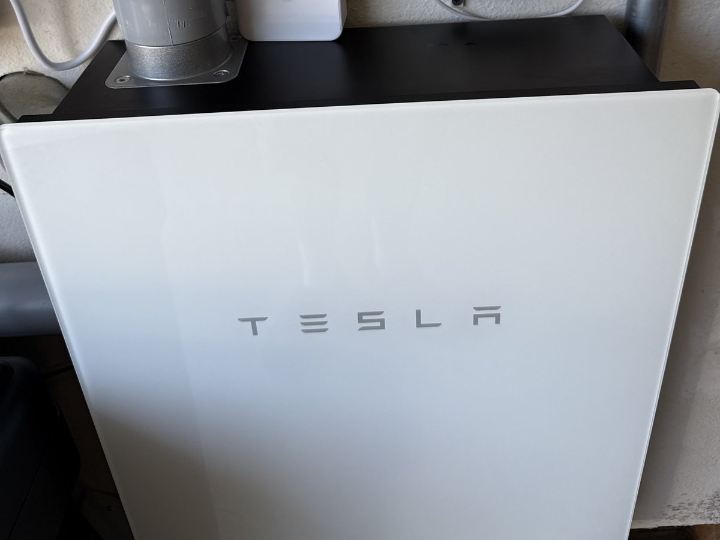
📚 Context: A live home-energy deployment (built and operated by a Tesla Powerwall owner in their own house) Verification status: Photos of the hardware installed on PoE next to an actual Powerwall, screenshots of the running dashboard, 130+ commits of iterative refinement, and a full GitHub Actions firmware-release and OTA pipeline are all public. This is not a hobby demo — it is equipment that runs every day.
01 — What is this project?
Forked from https://github.com/mccahan/esp32-wifi-bridge
but not a copy. The original stopped at v1.0.4 in February 2026; this repository picked it up six months later and added 46 commits and some 2,700 lines to reach v1.4.2. Authentication, Ethernet static IP with DNS defense, log and temperature monitoring, and a self-hosted OTA pipeline were all added here.
🔷 Background — the Powerwall and its local API
The Tesla Powerwall is a residential energy storage system (ESS). It banks electricity generated by solar during the day, or cheap off-peak grid power, and discharges it at night or during an outage. Alongside the battery sits a separate controller called the Backup Gateway — the brain that meters grid, solar, and household load in real time and orchestrates battery charge and discharge.
What Powerwall owners want is the second-by-second telemetry this gateway holds. How many watts solar is producing right now, what the battery state of charge is, whether the house is importing from or exporting to the grid — owners pull this into Home Assistant or Grafana to build their own dashboards and automations. Tesla's official app routes through the cloud, so refresh intervals are slow and call limits apply; serious users query the gateway's local API directly.
🔷 The problem — the local API is stranded on an island
The obstacle is the access path. The Backup Gateway permanently broadcasts its own Wi-Fi AP for installation and servicing, and the TEDAPI endpoint that serves the extended dataset is only reachable at 192.168.91.1, an address inside that AP. But this AP is a completely isolated island — no internet, no link to the home LAN.
The gateway chassis does have an Ethernet port, but that is the gateway's own uplink to Tesla's servers; it does not expose 192.168.91.1 to the home LAN. In other words, the only way to reach this data is to associate with that AP over Wi-Fi.
Every existing workaround was awkward.
- Park a laptop or Raspberry Pi on the Powerwall AP → that machine vanishes from the home network the moment it connects. Dual NICs or elaborate routing rules are required.
- Bridge in a Wi-Fi router in repeater mode → an entire piece of dedicated hardware is wasted, and the Powerwall now sees foreign traffic.
- Use the cloud API → high latency, dies with the internet connection, and is hostage to Tesla policy changes.
🔷 The solution — a single bridge board
This project settles all of it with one PoE board that fits in your palm.
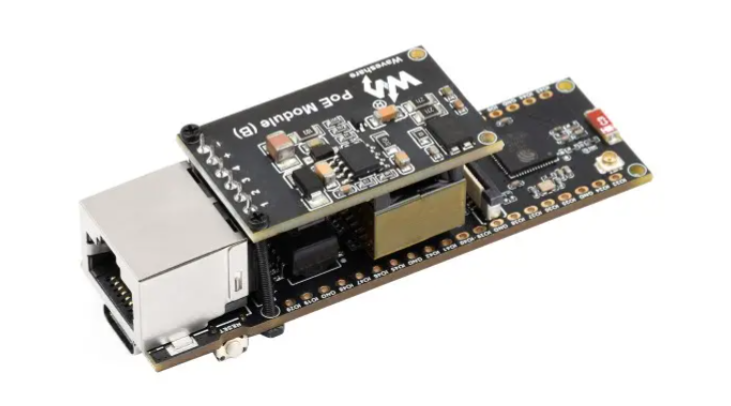
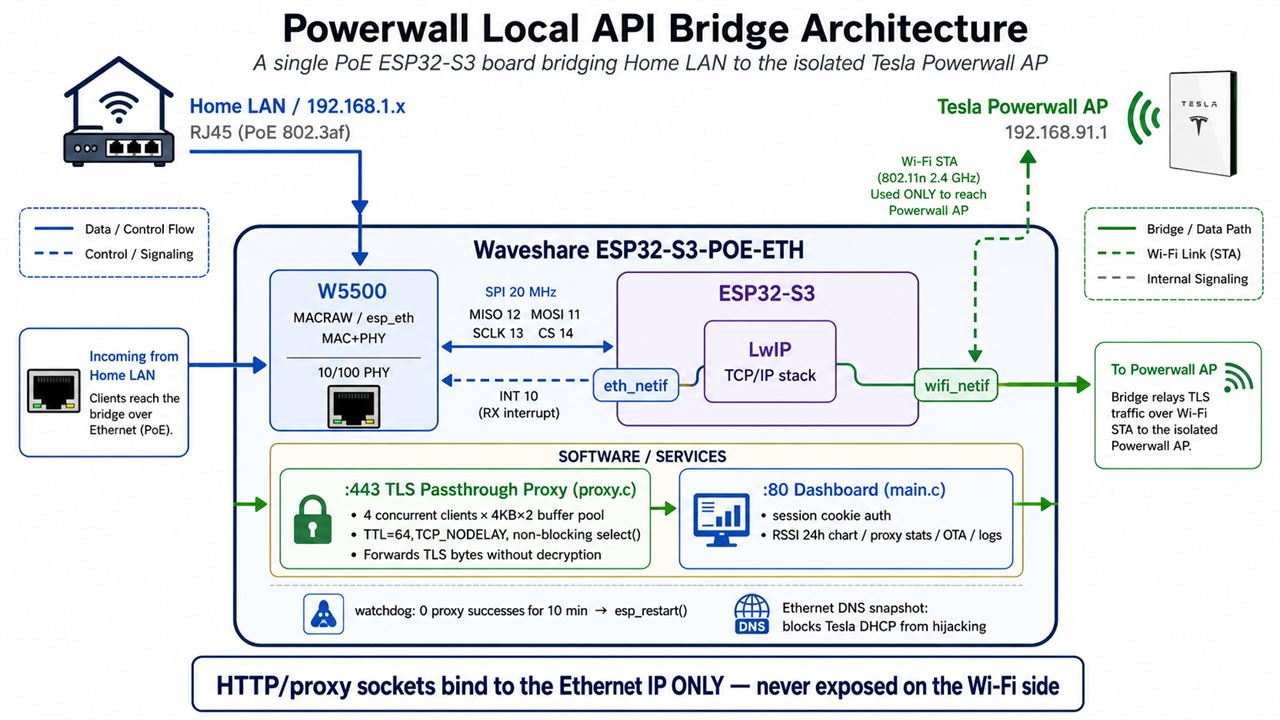
Firmware running on a Waveshare ESP32-S3-POE-ETH board attaches simultaneously to the home LAN over W5500 Ethernet on one side and to the Powerwall AP as a Wi-Fi STA on the other. TLS traffic arriving at :443 on the Ethernet IP is pushed through to the Powerwall byte-for-byte, without decryption.
The end result: from any PC in the house, typing https://powerwall.local/ simply opens the Powerwall local API. The user never has to be aware they are talking to an isolated AP at all.
🔷 In one line
Powerwall's real-time data can only be retrieved over Wi-Fi. This bridge moves that Wi-Fi data onto Ethernet, so it can be picked up over a LAN cable from anywhere in the house.
02 — System architecture
03 — Why TLS "passthrough"?
Passthrough means the intermediate device hands encrypted traffic straight through byte-for-byte, without ever opening it. The bridge is not a participant in the TLS session — it is plumbing. The opposite concept, termination, has the intermediate device decrypt the TLS session and establish a new one, effectively becoming a sanctioned man-in-the-middle (MITM).
🔷 The design decision not to decrypt
The commit history preserves a telling trail. The author initially tried to implement TLS termination with mbedTLS, and nearly twenty commits went into embedding certificates and wrestling with esp_tls configuration. Then, finally: Revert to transparent TCP proxy to fix memory exhaustion crashes — rolled back because of memory exhaustion crashes.
Terminating TLS on an ESP32-S3 costs tens of kilobytes of heap per session, and just a few overlapping connections drain it. Worse, the moment you terminate, the device becomes a MITM and creates one more point where Powerwall credentials exist in plaintext.
The final choice is unambiguous: relay ciphertext as ciphertext. The client and the Powerwall negotiate end-to-end TLS, and the bridge simply moves bytes between them. The security surface shrinks, and memory cost collapses to two 4KB buffers per session.
🔷 TTL=64 — persuading the Powerwall rather than deceiving it
int ttl = TTL_VALUE;   // 64
setsockopt(powerwall_sock, IPPROTO_IP, IP_TTL, &ttl, sizeof(ttl));
From the Powerwall's vantage point, this traffic must look like it originated locally rather than having crossed a hop. These two lines, explicitly pinning TTL to 64, are what make the Powerwall accept a proxied request as a legitimate local client. Nothing about the protocol is forged — this is an honest way of preserving locality at the IP layer.
04 — Why WIZnet W5500? ⭐
🔷 The ESP32-S3 has no built-in Ethernet MAC
This is the project's actual starting point. The original ESP32 integrates an EMAC, but the ESP32-S3 has no Ethernet MAC at all. Wired Ethernet on the S3 therefore requires an external controller over SPI — which makes the W5500 not a choice but a precondition.
That is the same reason Waveshare put a W5500 on the ESP32-S3-POE-ETH board, and WIZnet's recently announced ESP32-W5500 Dev-kit / EOD-W55 SoM consolidates exactly this pairing (ESP32-S3 + W5500) into a single module. This project is best read as field evidence of why that pairing is needed in the first place.
🔷 Operating mode: MACRAW (esp_eth backend)
The project initializes the W5500 through the standard ESP-IDF drivers esp_eth_mac_new_w5500() / esp_eth_phy_new_w5500(). Internally this API family opens Socket 0 of the W5500 in MACRAW mode to exchange raw Ethernet frames. The W5500 here is therefore not a hardware TCP/IP offload engine (TOE) but a full 10/100 Ethernet MAC + PHY, with TCP/IP handled by the ESP32-S3's LwIP.
Why MACRAW rather than TOE — this is the most consequential technical judgment in the project.
- Standard BSD sockets were required. The proxy watches two sockets at once with
select()while running a bidirectional relay, and uses theIP_TTL/TCP_NODELAY/SO_RCVTIMEOsocket options directly. That code is only possible on top of LwIP. - Wi-Fi and Ethernet had to be alive simultaneously. Both interfaces must exist as
esp_netifinstances for a single socket API to address either side. - TLS passthrough gains nothing from offload. Since the device only shuttles ciphertext bytes, delegating checksums and reassembly to the chip buys little.
- HTTPS OTA, mDNS, and NTP all had to work. Every one of those needs the full feature set of the software stack.
Among the W5500's four socket modes (TCP TOE / UDP / IPRAW / MACRAW), MACRAW is precisely the answer to these requirements, making this project a textbook case of "why you would run a W5500 in MACRAW."
🔷 Advantages over alternative solutions
| Criterion | W5500 (MACRAW) | ENC28J60 | LAN8720 and other RMII PHYs |
|---|---|---|---|
| ESP32-S3 support | ✅ Official IDF esp_eth driver | Third-party, many caveats | ❌ No EMAC on the S3 |
| Speed | 10/100 Mbps | 10 Mbps only | 10/100 |
| Interface | SPI 4-wire + INT | SPI | RMII 9-wire + 25MHz clock |
| Driver maturity | Built into ESP-IDF, interrupt-driven RX | Frequent instability reports | Unusable on the S3 |
| PoE board ecosystem | Waveshare, WIZnet SoM, and more | Rare | — |
The decisive factor is that a single line, CONFIG_ETH_SPI_ETHERNET_W5500=y, enables official IDF support. This project began on the Arduino framework and migrated wholesale to ESP-IDF in the commit Migrate from Arduino to ESP-IDF framework with native W5500 support — the stated reason being exactly that native W5500 support. The IDF standard driver ended a stretch of struggling with library compatibility.
05 — Key components
🌐 WIZnet W5500 — MACRAW mode (esp_eth MAC + PHY)
SPI3_HOST at 20MHz, MISO 12 / MOSI 11 / SCLK 13 / CS 14 / INT 10. The ESP-IDF esp_eth driver delivers raw Ethernet frames to LwIP via Socket 0 in MACRAW. Both DHCP and static IP are supported, with configuration persisted in NVS.
🔌 Waveshare ESP32-S3-POE-ETH
802.3af PoE. A single Ethernet cable carries both power and data, which reduces the wiring next to the Powerwall to the absolute minimum. USB power also works.
🔀 TLS passthrough proxy (src/proxy.c, 567 lines)
- Up to 4 concurrent clients, with 4KB × 2 buffers per client allocated from a static pool (no dynamic allocation → no heap fragmentation)
- A
select()loop on a 100ms timeout watches both directions; sessions close after 60 seconds of inactivity - TTFB / TTLB measurement plus a ring buffer of request logs
📊 Dashboard (src/main.c, 3,389 lines)
24-hour Wi-Fi RSSI chart, Powerwall reachability, CPU and die temperature, heap, uptime, proxy statistics, log download (last 200 lines), and local/remote OTA. Authentication stores a salt plus SHA-256 in NVS behind an HTML login with a 7-day session cookie (HttpOnly; SameSite=Lax, and Secure when behind the HTTPS proxy).
🔄 OTA pipeline (src/remote_ota.c)
Pushing a v* tag makes GitHub Actions publish firmware.bin and version.json to GitHub Pages, and the device checks for and installs them itself. Initial flashing over USB from a browser (Chrome/Edge/Opera) is also supported. The partition table is 24KB nvs plus two 1.75MB OTA slots.
One buried detail deserves attention — the instant the device associates with the Powerwall AP, Tesla's DHCP overwrites LwIP's DNS server with 192.168.91.1, leaving GitHub Pages unresolvable. The project snapshots the Ethernet DNS and restores it at OTA time (remote_ota_apply_eth_dns()). This is a trap that only surfaces on dual-interface devices, and the kind of bug you only learn about by living through it.
06 — Application scenarios
01. Home energy monitoring automation
Home Assistant, Node-RED, or InfluxDB can poll the Powerwall local API directly with no cloud round trip. Latency falls to tens of milliseconds, and the setup keeps working when the internet is down.
02. Gateway for isolated industrial equipment
Substitute something else for the Powerwall and the same pattern becomes an industrial one. Inverters, PLCs, instruments, and medical devices that expose nothing but their own AP — a bridge that makes them reachable from the corporate LAN without touching the vendor network. Because management ports bind only to the Ethernet side, the attack surface on the vendor equipment does not grow.
03. Template for field-installed protocol bridges
Single-cable PoE power, a web dashboard, OTA, a watchdog, and a factory-reset button. Those five are, in practice, the common requirements of every field-installed embedded device. This repository is a reference implementation of that skeleton, ready to be reused as-is.
04. Teaching material for dual-network development
Keeping Wi-Fi and Ethernet alive at the same time detonates default-route, DNS-ownership, and socket bind-address problems all at once. This project has a commit-by-commit record of stepping on those traps and fixing them, making it an unusually good text for studying dual esp_netif under ESP-IDF.
Conclusion
The problem of sacrificing a laptop to one isolated Wi-Fi AP is closed out by a single palm-sized PoE board carrying a W5500.
- ✅ Fills the Ethernet MAC the ESP32-S3 lacks with W5500 MACRAW, and implements full LwIP socket programming on top of it
- ✅ Passthrough rather than decryption of TLS, minimizing security surface and memory footprint at once (including the documented rollback after memory crashes with the termination approach)
- ✅ TTL=64 socket option makes the Powerwall read the traffic as local
- ✅ Binds management ports to the Ethernet IP only, categorically preventing exposure on the vendor network
- ✅ Single-cable PoE power collapses field wiring to one run
- ✅ Operations-grade dashboard with 24-hour RSSI history, die temperature, and proxy statistics
- ✅ GitHub Actions → Pages → device OTA fully automated, plus browser-based flashing
- ✅ Redundant unattended-recovery paths: watchdog auto-reboot, DHCP fallback, and 15-second BOOT factory reset
- ✅ Defends against Tesla DHCP's DNS hijack via snapshot and restore — hard-won dual-interface know-how
Q&A
Q. Isn't it a waste not to use the W5500 as a TOE (hardware TCP/IP)? A. For this workload, MACRAW is correct. The proxy requires select() multiplexing, the IP_TTL / TCP_NODELAY / SO_RCVTIMEO socket options, and coexistence with a Wi-Fi interface — all of it standard socket semantics. Under TOE the chip owns the socket, which makes those semantics hard to use directly. Conversely, for a workload like a simple Modbus TCP gateway where MCU resources must be conserved, TOE would have been the right answer. Same chip, different mode, different correct answer — that is the W5500's strength.
Q. Why the W5500 instead of an ENC28J60? A. The ENC28J60 is 10Mbps-only and its ESP-IDF driver maturity does not match the W5500's. The W5500 gets official IDF support from the single line CONFIG_ETH_SPI_ETHERNET_W5500=y, and ships 10/100 full-duplex with INT-based RX as standard. This project itself struggled with Arduino library compatibility and then migrated its entire framework specifically because of IDF's native W5500 support.
Q. Why bother wiring the interrupt pin (GPIO10)? A. Polling keeps SPI transactions running continuously, wasting CPU and bus bandwidth while increasing latency. Using the W5500's INT pin wakes SPI only when a frame has arrived. That said, this project hit an ordering dependency — gpio_install_isr_service() must be called before esp_eth_driver_install() registers the INT GPIO handler — and fixed it in a dedicated commit. It is a trap you are likely to meet in practice with the W5500 + ESP-IDF combination.
Q. Could this design move to the W6300? A. Yes, with clear benefits. The W6300 supports QSPI, which substantially raises bandwidth over SPI, and adds IPv6. WIZnet's wsm_driver component abstracts the W5500 and W6300 behind an identical API, so changing the board selection automatically configures the pin map and chip type. For a workload like TLS passthrough where raw bandwidth translates directly into response time, the QSPI gain would be felt immediately.
Original Link: https://github.com/cwagz/esp32-wifi-bridge Upstream: https://github.com/mccahan/esp32-wifi-bridge
[한글 버전]
ESP32-S3 WiFi-Ethernet SSL Bridge — 격리된 Powerwall AP를 우리 집 LAN으로 끌어오는 W5500 TLS 패스스루 브리지
#W5500 #MACRAW #ESP32S3 #ESP-IDF #TLS-Passthrough #PoE #TeslaPowerwall #HomeEnergy #OTA #NetworkBridge
📚 컨텍스트: 홈 에너지 시스템 실사용 프로젝트 (Tesla Powerwall 소유자가 자기 집에 설치·운영 중) 검증 상태: 실제 Powerwall 옆에 PoE로 설치된 하드웨어 사진, 실 운영 대시보드 스크린샷, 130여 개 커밋의 반복 개선 이력, GitHub Actions 기반 펌웨어 릴리스·OTA 파이프라인까지 모두 공개되어 있음. 취미 수준의 데모가 아니라 매일 돌고 있는 장비입니다.
01 — 이 프로젝트는 무엇인가?
https://github.com/mccahan/esp32-wifi-bridge 에서 포크했지만 단순 복제가 아닙니다.
원본은 2026년 2월 v1.0.4에서 멈췄고, 이 저장소는 6개월 뒤 이어받아 46개 커밋, 2,700여 줄을 더해 v1.4.2까지 완성했습니다. 보안 인증, 이더넷 정적 IP와 DNS 방어, 로그·온도 모니터링, 자체 OTA 파이프라인이 모두 여기서 추가됐습니다.
🔷 배경 — Powerwall과 로컬 API
Tesla Powerwall은 가정용 에너지 저장 시스템(ESS)입니다. 낮에 태양광으로 만든 전기나 심야 저렴한 전력을 배터리에 저장했다가, 밤이나 정전 시에 꺼내 씁니다. 배터리 옆에는 Backup Gateway라는 컨트롤러가 따로 붙는데, 이 장치가 계통·태양광·가정 부하의 전력을 실시간으로 계측하고 배터리 충방전을 지휘하는 두뇌 역할을 합니다.
Powerwall 소유자들이 원하는 건 이 게이트웨이가 들고 있는 초 단위 실시간 데이터입니다. 지금 태양광이 몇 W를 만들고 있는지, 배터리 잔량이 몇 %인지, 계통에서 사고 있는지 팔고 있는지 — 이걸 Home Assistant나 Grafana로 끌어와 직접 대시보드를 만들고 자동화를 겁니다. Tesla 공식 앱은 클라우드를 거치기 때문에 갱신 주기가 느리고 호출 제한도 있어서, 진지한 사용자들은 게이트웨이의 로컬 API를 직접 찌릅니다.
🔷 문제 — 자체 Wi-Fi AP만을 이용할 수 있다
여기서 걸리는 게 접근 경로입니다. Backup Gateway는 설치·점검용으로 자체 Wi-Fi AP를 상시 띄우고 있고, 확장 데이터를 제공하는 TEDAPI 엔드포인트는 그 AP 안쪽 주소인 192.168.91.1에만 열립니다. 그런데 이 AP는 인터넷도 없고 집 LAN과도 이어지지 않는 완전히 격리된 섬입니다.
게이트웨이 본체에 이더넷 포트가 있긴 하지만, 그건 게이트웨이가 Tesla 서버로 나가는 자기 업링크일 뿐 192.168.91.1을 집 LAN에 노출시켜 주지는 않습니다. 즉 이 데이터를 보려면 Wi-Fi로 그 AP에 붙는 것 외에 방법이 없습니다.
그래서 기존에 쓰던 방법들은 하나같이 불편했습니다.
- 노트북/라즈베리파이를 Powerwall AP에 붙여둔다 → 그 장비는 그 순간부터 집 네트워크에서 사라짐. 이중 NIC나 복잡한 라우팅 설정이 필요.
- Wi-Fi 라우터를 리피터 모드로 물린다 → 전용 하드웨어 하나를 통째로 낭비하고, Powerwall이 외부 트래픽을 인지함.
- 클라우드 API를 쓴다 → 지연이 크고, 인터넷이 끊기면 같이 끊기고, Tesla 정책 변경에 종속됨.
🔷 해법 — 브리지 한 장
이 프로젝트는 이걸 손바닥만 한 PoE 보드 한 장으로 정리합니다.
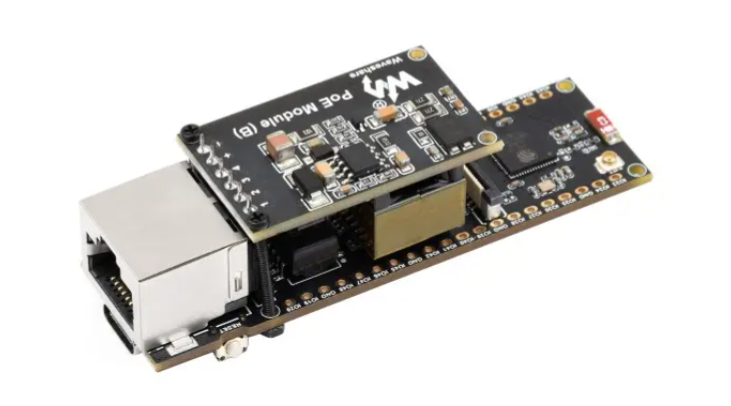
Waveshare ESP32-S3-POE-ETH 보드에 올라간 펌웨어가 한쪽으로는 W5500 이더넷으로 집 LAN에, 다른 쪽으로는 Wi-Fi STA로 Powerwall AP에 동시에 붙습니다. 그리고 이더넷 IP의 :443으로 들어온 TLS 트래픽을 복호화하지 않고 바이트 그대로 Powerwall로 흘려보냅니다.
최종 결과물은 이렇습니다. 집 안 아무 PC에서나 https://powerwall.local/을 치면 Powerwall 로컬 API가 그냥 열립니다. 사용자는 자기가 격리된 AP와 통신하고 있다는 사실 자체를 인식할 필요가 없습니다.
🔷 한마디로
Powerwall의 실시간 데이터는 Wi-Fi로만 꺼낼 수 있습니다. 이 브리지가 그 Wi-Fi 데이터를 이더넷으로 옮겨, 집 안 어디서든 랜선으로 받아볼 수 있게 해줍니다.
02 — 시스템 아키텍처
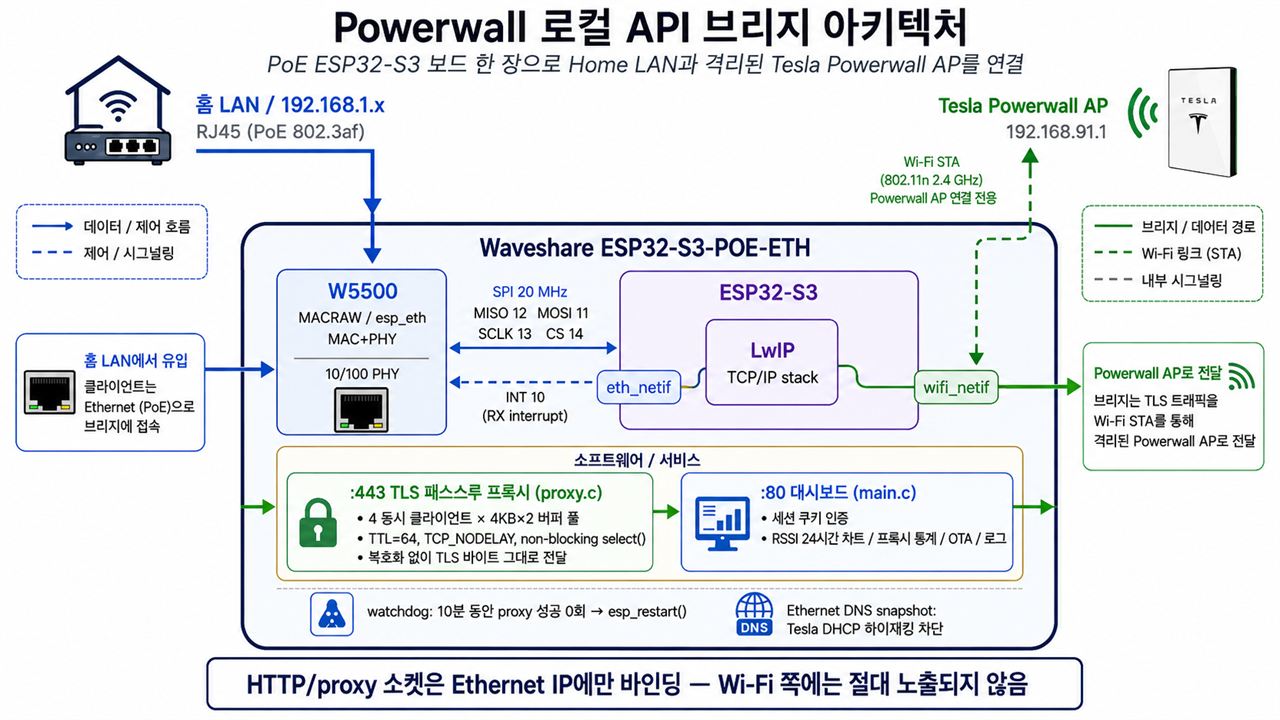
03 — 왜 TLS "패스스루"인가?
**패스스루(passthrough)**란 중간 장비가 암호화된 트래픽을 풀어보지 않고 바이트 그대로 넘겨주는 방식입니다. 브리지는 TLS 세션의 참여자가 아니라 배관일 뿐입니다. 반대 개념인 **종단(termination)**은 중간 장비가 TLS를 직접 풀고 다시 맺는 방식으로, 사실상 합법적인 중간자(MITM)가 됩니다.
🔷 복호화하지 않는다는 설계 결단
이 프로젝트의 커밋 히스토리에는 흥미로운 흔적이 남아 있습니다. 초기에는 mbedTLS로 TLS 종단(termination) 을 구현하려 했고, 인증서를 임베딩하고 esp_tls 설정과 씨름한 커밋이 20개 가까이 이어집니다. 그리고 결국 Revert to transparent TCP proxy to fix memory exhaustion crashes — 메모리 고갈 크래시 때문에 되돌립니다.
ESP32-S3에서 TLS를 종단하려면 세션마다 수십 KB의 힙이 필요하고, 동시 접속이 몇 개만 겹쳐도 heap이 바닥납니다. 게다가 종단하는 순간 이 장비는 중간자(MITM) 가 되어, Powerwall 자격증명이 평문으로 지나가는 지점이 하나 더 생깁니다.
최종 선택은 명쾌합니다. 암호문은 암호문인 채로 relay한다. 클라이언트와 Powerwall이 end-to-end TLS를 맺고, 브리지는 그 사이에서 바이트만 옮깁니다. 보안 표면이 줄고, 메모리는 세션당 4KB 버퍼 두 개로 끝납니다.
🔷 TTL=64 — Powerwall을 속이지 않고 설득하기
int ttl = TTL_VALUE;   // 64
setsockopt(powerwall_sock, IPPROTO_IP, IP_TTL, &ttl, sizeof(ttl));
Powerwall 쪽에서 봤을 때 이 트래픽은 홉을 하나 건너온 게 아니라 로컬에서 온 것처럼 보여야 합니다. TTL을 명시적으로 64로 세팅하는 이 두 줄이, 프록시를 통과한 요청을 Powerwall이 "정상적인 로컬 클라이언트"로 받아들이게 만드는 핵심입니다. 프로토콜을 위조하는 게 아니라, IP 계층에서 로컬성을 유지해 주는 정직한 방식입니다.
04 — 왜 WIZnet W5500인가? ⭐
🔷 ESP32-S3에는 내장 이더넷 MAC이 없다
이 프로젝트의 출발점 자체가 여기입니다. ESP32(오리지널)에는 EMAC이 내장되어 있지만, ESP32-S3에는 이더넷 MAC이 아예 없습니다. 즉 S3에서 유선 이더넷을 쓰려면 SPI로 붙는 외장 컨트롤러가 필수이고, 여기서 W5500이 선택지가 아니라 전제 조건이 됩니다.
Waveshare가 ESP32-S3-POE-ETH 보드를 만들 때 W5500을 얹은 것도 같은 이유이며, WIZnet이 최근 발표한 ESP32-W5500 Dev-kit / EOD-W55 SoM 역시 정확히 이 조합(ESP32-S3 + W5500)을 하나의 모듈로 정리한 제품입니다. 이 프로젝트는 그 조합이 실제 현장에서 왜 필요한지를 보여주는 실증 사례에 가깝습니다.
🔷 사용 모드: MACRAW (esp_eth 백엔드)
이 프로젝트는 ESP-IDF 표준 드라이버인 esp_eth_mac_new_w5500() / esp_eth_phy_new_w5500()으로 W5500을 초기화합니다. 이 계열 API는 내부적으로 W5500의 Socket 0을 MACRAW 모드로 열어 생 이더넷 프레임을 주고받습니다. 즉 여기서 W5500은 하드웨어 TCP/IP 오프로드 엔진(TOE)이 아니라 완전한 10/100 이더넷 MAC + PHY로 동작하고, TCP/IP 처리는 ESP32-S3의 LwIP가 담당합니다.
왜 TOE가 아니라 MACRAW여야 했는가 — 이게 이 프로젝트에서 가장 중요한 기술적 판단입니다.
- 표준 BSD 소켓이 필요했다. 프록시는
select()로 두 소켓을 동시에 감시하며 양방향 relay를 돌리고,IP_TTL/TCP_NODELAY/SO_RCVTIMEO소켓 옵션을 그대로 씁니다. LwIP 위에서만 가능한 코드입니다. - Wi-Fi와 이더넷이 동시에 살아 있어야 했다. 두 인터페이스가 모두
esp_netif로 존재해야 하나의 소켓 API로 양쪽을 다룰 수 있습니다. - TLS 패스스루는 오프로드의 이점이 없다. 어차피 암호문 바이트를 옮길 뿐이라 체크섬·재조립을 칩에 맡길 실익이 크지 않습니다.
- HTTPS OTA / mDNS / NTP를 다 써야 했다. 전부 소프트웨어 스택의 풀 기능이 필요한 영역입니다.
W5500의 4가지 소켓 모드(TCP TOE / UDP / IPRAW / MACRAW) 중 MACRAW가 정확히 이 요구사항의 답이며, 이 프로젝트는 "W5500을 왜 MACRAW로 쓰는가"의 교과서적인 사례입니다.
🔷 대체 솔루션 대비 우위
| 항목 | W5500 (MACRAW) | ENC28J60 | LAN8720 등 RMII PHY |
|---|---|---|---|
| ESP32-S3 지원 | ✅ IDF 공식 esp_eth 드라이버 | 서드파티/제약 많음 | ❌ S3에 EMAC 없음 |
| 속도 | 10/100 Mbps | 10 Mbps only | 10/100 |
| 인터페이스 | SPI 4핀 + INT | SPI | RMII 9핀 + 25MHz 클럭 |
| 드라이버 성숙도 | ESP-IDF 내장, 인터럽트 구동 RX | 불안정 사례 다수 | S3 사용 불가 |
| PoE 보드 생태계 | Waveshare, WIZnet SoM 등 다수 | 드묾 | — |
특히 CONFIG_ETH_SPI_ETHERNET_W5500=y 한 줄로 IDF에서 정식 지원된다는 점이 결정적입니다. 이 프로젝트는 초기에 Arduino 프레임워크로 시작했다가 Migrate from Arduino to ESP-IDF framework with native W5500 support 커밋에서 ESP-IDF로 전면 이전했는데, 그 사유가 바로 "W5500 네이티브 지원" 이었습니다. 라이브러리 호환성 문제로 헤매던 시기를 IDF 표준 드라이버가 끝내준 셈입니다.
05 — 핵심 구성 요소
🌐 WIZnet W5500 — MACRAW 모드 (esp_eth MAC + PHY)
SPI3_HOST, 20MHz, MISO 12 / MOSI 11 / SCLK 13 / CS 14 / INT 10. ESP-IDF의 esp_eth 드라이버로 Socket 0 MACRAW를 통해 생 이더넷 프레임을 LwIP에 전달. DHCP / 정적 IP 모두 지원하며 설정은 NVS에 저장.
🔌 Waveshare ESP32-S3-POE-ETH
802.3af PoE 지원. 이더넷 케이블 한 가닥으로 전원과 데이터를 동시에 받으므로 Powerwall 옆 배선이 극단적으로 단순해집니다. USB 전원도 사용 가능.
🔀 TLS 패스스루 프록시 (src/proxy.c, 567줄)
- 최대 4개 동시 클라이언트, 클라이언트당 4KB × 2 버퍼를 정적 풀에서 할당 (동적 할당 없음 → 힙 파편화 방지)
select()100ms 타임아웃 루프로 양방향 감시, 60초 무활동 시 세션 종료- TTFB / TTLB 측정 및 요청 로그 링 버퍼
📊 대시보드 (src/main.c, 3,389줄)
Wi-Fi RSSI 24시간 차트, Powerwall 도달성, CPU·다이 온도·힙·업타임, 프록시 통계, 로그 다운로드(최근 200줄), 로컬/원격 OTA. 인증은 salt + SHA-256을 NVS에 저장하고 HTML 로그인 + 7일 세션 쿠키(HttpOnly; SameSite=Lax, HTTPS 프록시 뒤에서는 Secure).
🔄 OTA 파이프라인 (src/remote_ota.c)
v* 태그를 푸시하면 GitHub Actions가 firmware.bin과 version.json을 GitHub Pages에 발행하고, 장비가 이를 직접 확인·설치합니다. 브라우저(Chrome/Edge/Opera)에서 USB로 초기 플래싱도 가능. 파티션은 nvs 24KB + 1.75MB OTA 슬롯 2개.
여기에 숨은 디테일 하나 — Powerwall AP에 붙는 순간 Tesla의 DHCP가 LwIP의 DNS 서버를 192.168.91.1로 덮어씁니다. 그러면 GitHub Pages를 해석할 수 없게 되죠. 이 프로젝트는 이더넷 DNS를 스냅샷해 두었다가 OTA 시점에 복원합니다(remote_ota_apply_eth_dns()). 듀얼 인터페이스 장비에서만 나타나는 함정이고, 실제로 겪어봐야 알 수 있는 종류의 버그입니다.
06 — 응용 시나리오
01. 홈 에너지 모니터링 자동화
Home Assistant, Node-RED, InfluxDB에서 Powerwall 로컬 API를 클라우드 경유 없이 직접 폴링. 지연이 수십 ms 수준으로 떨어지고, 인터넷이 끊겨도 계속 동작합니다.
02. 격리된 산업 장비 게이트웨이
Powerwall을 다른 것으로 바꿔 읽으면 그대로 산업용 패턴이 됩니다. 자체 AP만 띄우는 인버터, PLC, 계측기, 의료 장비 — 벤더 네트워크를 건드리지 않고 사내 LAN에서 접근하게 만드는 브리지. 관리 포트가 이더넷 측에만 bind되는 설계라 벤더 장비 쪽 공격 표면이 늘지 않습니다.
03. 현장 설치형 프로토콜 브리지 템플릿
PoE 단선 급전 + 웹 대시보드 + OTA + 워치독 + 공장초기화 버튼. 이 다섯 가지는 사실 모든 현장 설치형 임베디드 장비의 공통 요구사항입니다. 이 저장소는 그 골격을 그대로 재사용할 수 있는 참조 구현입니다.
04. 이중 네트워크 개발 학습 자료
Wi-Fi와 이더넷을 동시에 살려두면 기본 라우트, DNS 소유권, 소켓 bind 주소 같은 문제가 한꺼번에 터집니다. 이 프로젝트는 그 함정들을 실제로 밟고 고친 기록이 커밋 단위로 남아 있어, ESP-IDF 듀얼 netif를 공부하기에 대단히 좋은 교재입니다.
Conclusion
격리된 Wi-Fi AP 하나 때문에 노트북을 희생하던 문제를, W5500을 얹은 손바닥만 한 PoE 보드 한 장이 끝냅니다.
- ✅ ESP32-S3에 없는 이더넷 MAC을 W5500 MACRAW로 채우고, 그 위에서 완전한 LwIP 소켓 프로그래밍을 구현
- ✅ TLS를 복호화하지 않는 패스스루 설계로 보안 표면과 메모리 사용량을 동시에 최소화 (종단 방식에서 메모리 크래시를 겪고 되돌린 실증 기록 포함)
- ✅ TTL=64 소켓 옵션으로 Powerwall이 트래픽을 로컬로 인식
- ✅ 관리 포트를 이더넷 IP에만 bind해 벤더 네트워크 측 노출을 원천 차단
- ✅ PoE 단선 급전으로 현장 배선을 한 가닥으로 축소
- ✅ 24시간 RSSI 히스토리, 다이 온도, 프록시 통계까지 갖춘 운영급 대시보드
- ✅ GitHub Actions → Pages → 장비 OTA 전 과정 자동화 + 브라우저 플래싱
- ✅ 워치독 자동 재부팅, DHCP 폴백, BOOT 15초 공장초기화 등 무인 운영 복구 경로 다중화
- ✅ Tesla DHCP의 DNS 탈취를 스냅샷·복원으로 방어 — 듀얼 인터페이스 실전 노하우
Q&A
Q. W5500을 TOE(하드웨어 TCP/IP)로 안 쓴 게 아깝지 않나요? A. 이 워크로드에서는 MACRAW가 맞습니다. 프록시가 select() 다중화, IP_TTL / TCP_NODELAY / SO_RCVTIMEO 소켓 옵션, 그리고 Wi-Fi 인터페이스와의 공존을 전부 요구하기 때문입니다. TOE는 칩이 소켓을 소유하는 구조라 이런 표준 소켓 시맨틱을 그대로 쓰기 어렵습니다. 반대로 MCU 자원을 아껴야 하는 단순 Modbus TCP 게이트웨이 같은 워크로드였다면 TOE가 정답이었을 겁니다. 같은 칩, 다른 모드, 다른 정답이라는 점이 W5500의 강점입니다.
Q. 왜 ENC28J60이 아니라 W5500인가요? A. ENC28J60은 10Mbps 전용이고 ESP-IDF에서의 드라이버 성숙도가 W5500에 못 미칩니다. W5500은 CONFIG_ETH_SPI_ETHERNET_W5500=y 한 줄로 IDF 공식 지원을 받고, 10/100 full-duplex에 INT 기반 RX까지 표준으로 제공됩니다. 실제로 이 프로젝트도 Arduino 라이브러리 호환성 문제로 헤매다가 IDF의 W5500 네이티브 지원을 이유로 프레임워크를 통째로 갈아탔습니다.
Q. 왜 인터럽트 핀(GPIO10)까지 연결했나요? A. 폴링 방식이면 SPI 트랜잭션이 계속 돌아 CPU와 버스를 낭비하고 지연도 커집니다. W5500의 INT 핀을 쓰면 수신 프레임이 있을 때만 SPI가 깨어납니다. 다만 이 프로젝트는 esp_eth_driver_install()이 INT GPIO 핸들러를 등록하기 전에 gpio_install_isr_service()가 먼저 호출되어야 한다는 순서 의존성에 걸려 별도 커밋으로 수정했습니다. W5500 + ESP-IDF 조합에서 실제로 만나기 쉬운 함정입니다.
Q. 이 구조를 W6300으로 옮길 수 있나요? A. 가능하며 이점도 분명합니다. W6300은 QSPI를 지원해 SPI 대비 대역폭이 크게 올라가고 IPv6도 지원합니다. WIZnet의 wsm_driver 컴포넌트가 W5500/W6300을 동일 API로 추상화하고 있어, 보드 선택만 바꾸면 핀맵과 칩 타입이 자동 구성됩니다. TLS 패스스루처럼 순수 대역폭이 곧 응답 속도인 워크로드에서는 QSPI의 이득이 그대로 체감될 영역입니다.
Original Link: https://github.com/cwagz/esp32-wifi-bridge Upstream: https://github.com/mccahan/esp32-wifi-bridge
