


Why Does This Open-Source Antenna Rotator Firmware Build for W6300-EVB-Pico2 First?
Web Radio Control's GPL-3.0 azimuth rotator firmware added W6300 support on 2026-08-04. PlatformIO default_envs names W6300-EVB-Pico2 before two Wi-Fi Picos.
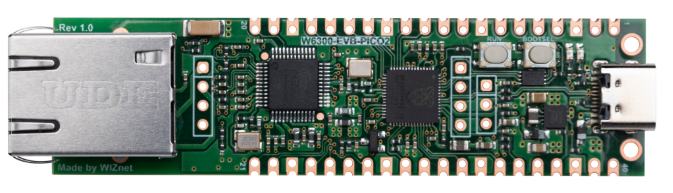
WIZnet - W6300-EVB-Pico2
x 1

First entry in the firmware's supported board table and first in the PlatformIO default_envs list, built with -D NETWORK_ETHERNET_W6300. The integrated W6300 is reached over PIO-driven QSPI through ar
📌 A Rotator Controller Whose First Build Target Carries a W6300
Mikael Nousiainen, call sign OH3BHX, is a Finnish engineer whose GitHub profile describes him as a "Full-stack software engineer with embedded systems and RF electronics experience" and who runs Web Radio Control, browser-based remote control software for amateur radio stations. The Web Radio Control organisation on GitHub holds his generic antenna rotator controller firmware under GPL-3.0, created on 16 February 2025 and last pushed on 4 August 2026 with the commit that added W6300 support, and the first row of its supported board table is the WIZnet W6300-EVB-Pico2.
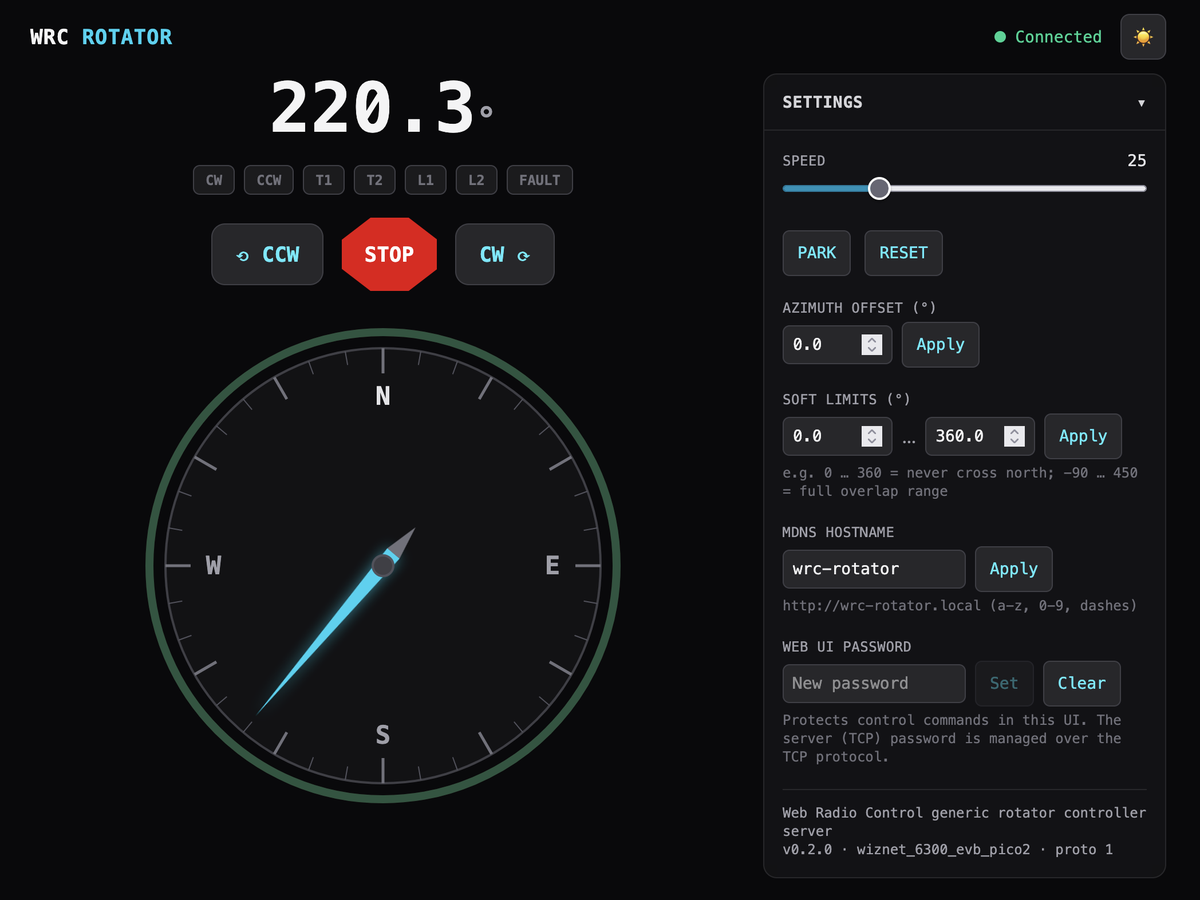
The firmware turns a Raspberry Pi Pico class board into the controller for an azimuth antenna rotator, the motor assembly that swings a beam antenna on a mast so it points at the station you want to work. It reads the mast heading from a US Digital MA3 absolute magnetic shaft encoder, drives clockwise and counter-clockwise relays through GPIO, and serves a line-based TCP protocol on port 1234 alongside a browser UI on port 80.
Antenna rotator projects are already well represented on the WIZnet Maker site, and what sets this one apart is the build configuration rather than the application. The supported board table opens with the row "WIZnet W6300-EVB-Pico2 (RP2350) | Wired Ethernet (integrated W6300, recommended for reliability) | wiznet_6300_evb_pico2", and the Raspberry Pi Pico 2 W and Pico W follow it with plain Wi-Fi entries.
Three Build Environments Behind One Network Interface
PlatformIO builds all three targets by default, and the W6300 board is named first. The relevant lines of platformio.ini are short enough to read whole.
[platformio]
default_envs = wiznet_6300_evb_pico2, rpipico2w, rpipicow

; WIZnet W6300-EVB-Pico2: RP2350 + integrated W6300 QSPI Ethernet
[env:wiznet_6300_evb_pico2]
extends = pico_base
board = wiznet_6300_evb_pico2
build_flags =
    ${pico_base.build_flags}
    -D NETWORK_ETHERNET_W6300
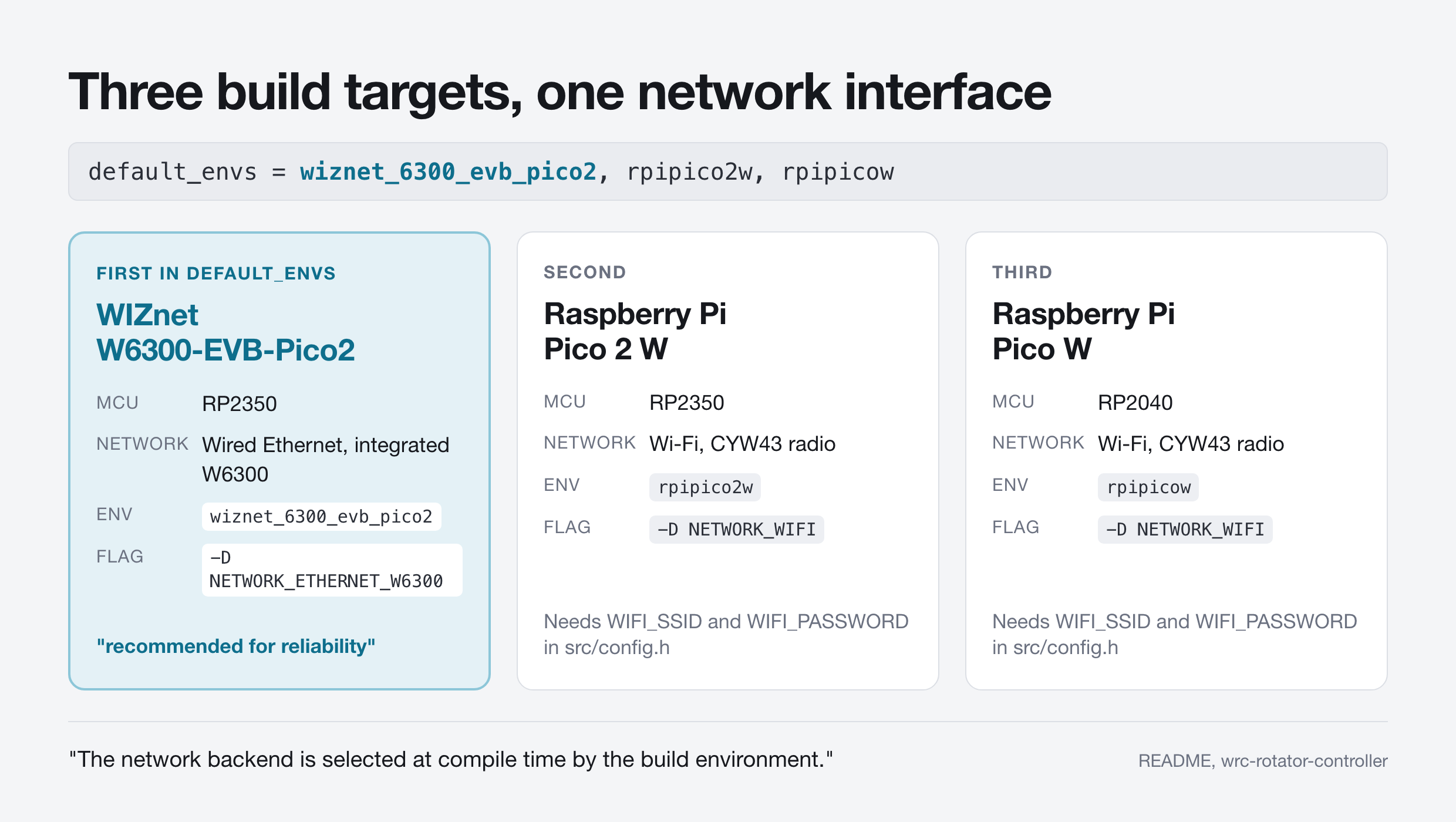
The wired and wireless paths never coexist. src/network_w6300.cpp is wrapped in #if defined(NETWORK_ETHERNET_W6300) and src/network_wifi.cpp in #if defined(NETWORK_WIFI), and the header that declares both states the rule directly: "Exactly one backend is compiled per build environment".
What the two files share is a six-function contract in src/network_interface.h: begin, maintain, isUp, localIP, typeName and accept. The last one hands the application an arduino::Client * and nothing more specific, so the rotator protocol code, the web server and the settings store never learn whether the bytes arrived over a cable or a radio. Moving this firmware between W6300 Ethernet and CYW43 Wi-Fi is a change of one build flag, not a port.
⚙️ How the W6300 Is Wired and Driven
The W6300 on the W6300-EVB-Pico2 talks to the RP2350 over quad SPI driven by the RP2350 programmable I/O block, and the pin assignment is fixed by the arduino-pico core rather than chosen by this project. In arduino-pico 5.7.0 the header libraries/lwIP_w6300/src/utility/w6300.h pins chip select to GP16, the clock to GP17 and IO0 to IO3 to GP18 through GP21. The firmware adds the interrupt line and instantiates the interface in a handful of lines.
// The arduino-pico W6300 driver transfers data over PIO-QSPI with pins fixed
// to CS=16, SCK=17, IO0-3=18-21 (exactly this board's layout); the interrupt
// pin removes the need for periodic lwIP polling.
#define W6300_PIN_CS 16
#define W6300_PIN_INT 15

static Wiznet6300lwIP eth(W6300_PIN_CS, SPI, W6300_PIN_INT);
static WiFiServer server(SERVER_TCP_PORT);
The WiFiServer declaration is not a mistake. arduino-pico implements WiFiServer and WiFiClient on top of lwIP rather than on top of any radio, so the same server class listens on the W6300 interface, which is why the backend split can be as thin as it is.
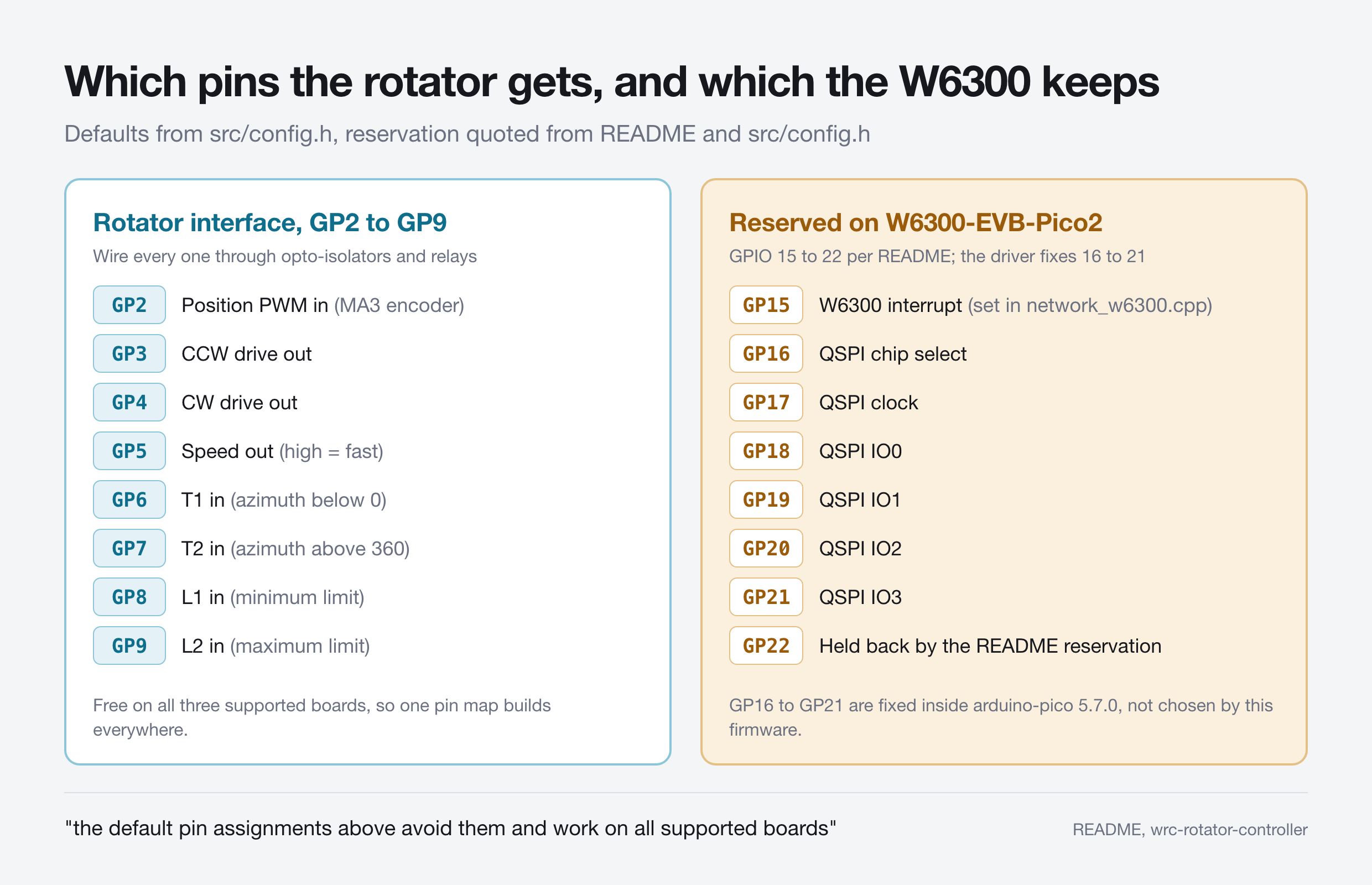
Both README.md and src/config.h carry the same warning about the consequence: "on the WIZnet W6300-EVB-Pico2 board, GPIO 15-22 are reserved for the W6300 Ethernet controller", and the rotator defaults were chosen so that "the default pin assignments above avoid them and work on all supported boards". Those defaults run from GP2 to GP9: the encoder PWM input on GP2, the counter-clockwise and clockwise drive outputs on GP3 and GP4, speed on GP5, the overlap threshold inputs on GP6 and GP7, and the hard limit switches on GP8 and GP9. The README is blunt about the electrical side: "Connect all pins via opto-isolators and relays to protect the board."
Bring-up never blocks. src/network_w6300.cpp retries chip detection every 15 seconds when eth.begin() fails and blinks the on-board LED at 2 Hz while the link is down, because src/main.cpp requires that "the rotator control loop (and its safety functions) must run even when no network is available".
Why Ten TCP Connections Needed a Build Flag
The W6300 build runs lwIP, so the number of sessions the device can hold is a software pool rather than a chip register, and the author had to raise it. platformio.ini doubles the lwIP memory pools with -D __LWIP_MEMMULT=2 and states the arithmetic in a comment: "MEMP_NUM_TCP_PCB 5 -> 10 concurrent TCP connections (8 rotator-TCP client slots + web UI clients ...)" followed by the price, "Costs ~29 kB of RAM".
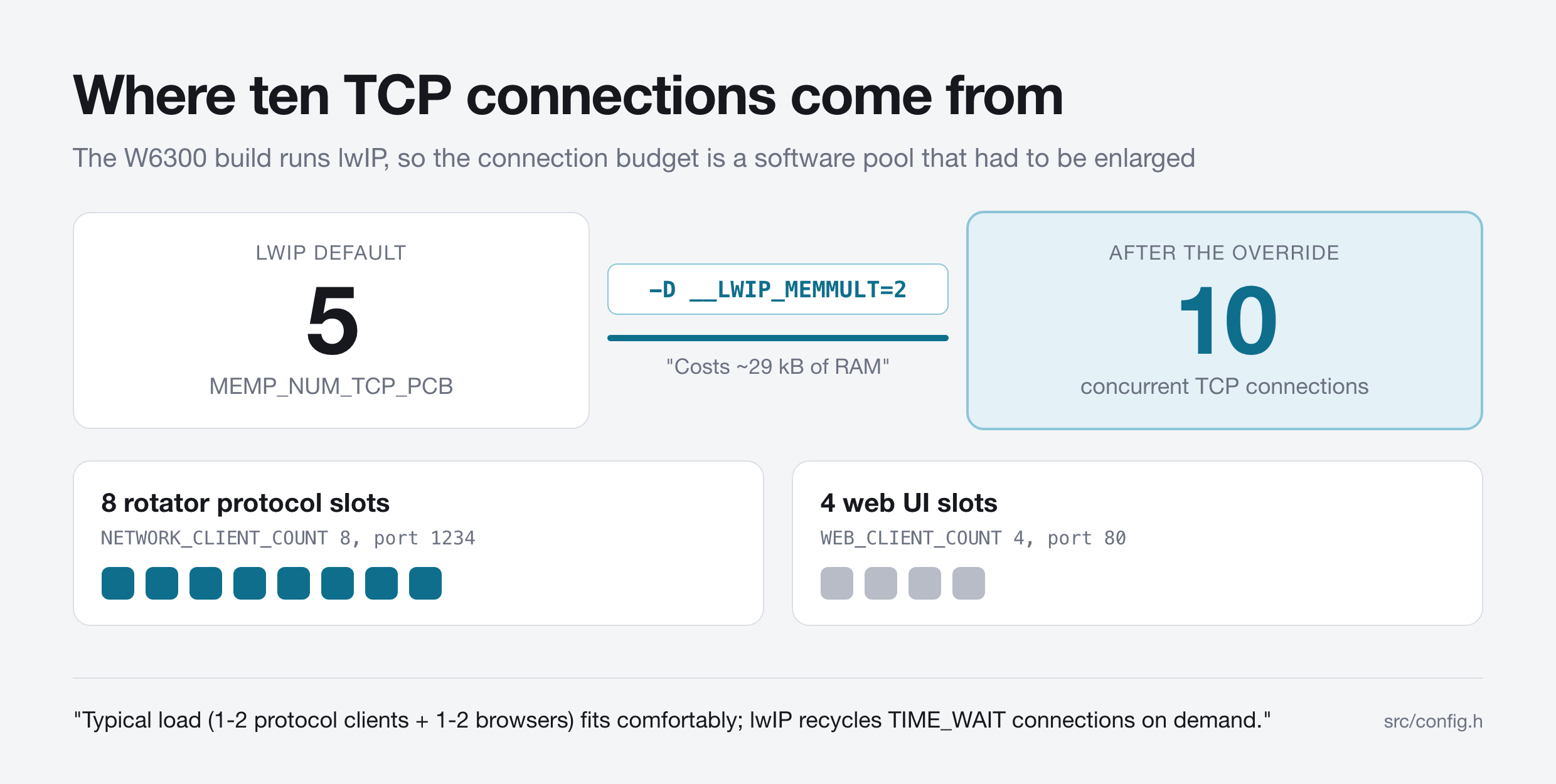
The declared slots add up to more than the pool: src/config.h sets NETWORK_CLIENT_COUNT to 8 and WEB_CLIENT_COUNT to 4. The same file treats that as intentional overbooking, noting "Typical load (1-2 protocol clients + 1-2 browsers) fits comfortably; lwIP recycles TIME_WAIT connections on demand." Web UI clients receive a state push every 100 ms, and a rotator protocol client receives the same push only after it sends MONITOR 1, because src/main.cpp calls pushToMonitoringClients. Both paths read the 100 ms figure from CLIENT_PUSH_INTERVAL in src/config.h.
What the Controller Says on the Wire
The TCP protocol is plain text, one command per line, with every successful reply beginning OK and every failure beginning ERROR. The README documents the protocol in eighteen subsections, and six of those commands carry most of the day-to-day work.
| Command | What it does | Example reply |
|---|---|---|
STATE | Reports azimuth, speed and active flags | OK STATE AZ=50.9 SPEED=50 FLAGS= |
AZ 180 | Commands a target azimuth | OK AZ TARGET=180.0 |
AZ? | Reads the current heading | OK AZ 50.9 |
MOVE CW | Starts free rotation clockwise | OK MOVE CW |
AZLIMITS 0 360 | Sets and persists the soft limit window | OK AZLIMITS MIN=0.0 MAX=360.0 |
MONITOR 1 | Turns on continuous state push | OK MONITOR 1 |
Seven flags describe what the mast is doing, and the same seven appear as chips across the top of the web UI:
CW, clockwise drive activeCCW, counter-clockwise drive activeT1, overlap threshold below 0 degrees reachedT2, overlap threshold above 360 degrees reachedL1, minimum azimuth limit switch reachedL2, maximum azimuth limit switch reachedFAULT, position reading missing or implausible
src/config.h defines implausible in numbers: samples implying rotation faster than 15 degrees per second are rejected, and the position is declared invalid after 250 ms without an accepted sample. The rotator is modelled as a linear axis spanning -90 to 450 degrees, which is how a 540 degree overlap rotator physically behaves.
A Web UI Served From Program Flash
The browser interface is not a separate service, it is a byte array inside the firmware image. scripts/build_webui.py compiles the React application in webui/ into src/generated/webui_bundle.h, and the committed manifest records the result as 73,186 bytes gzipped, produced with Node v24.12.0. As the README puts it, "The single-file UI bundle is served gzipped from program flash".
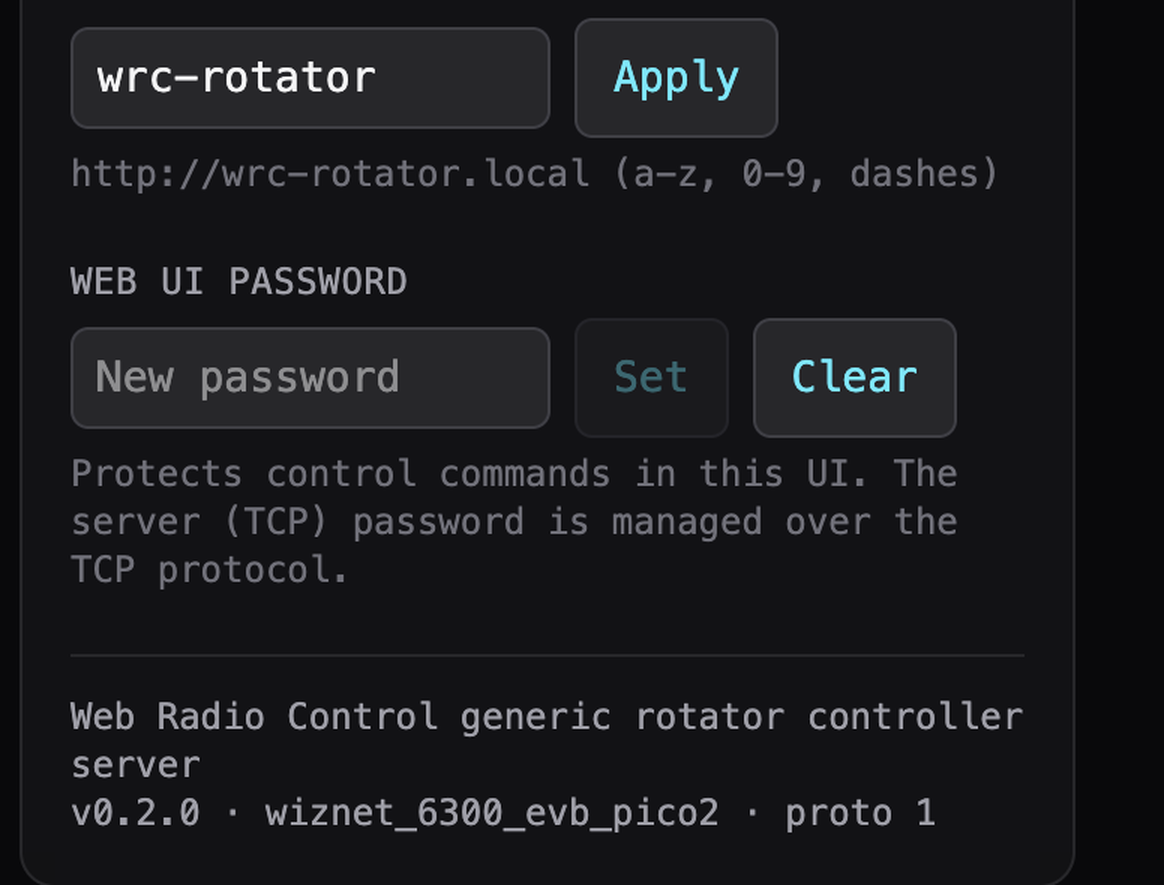
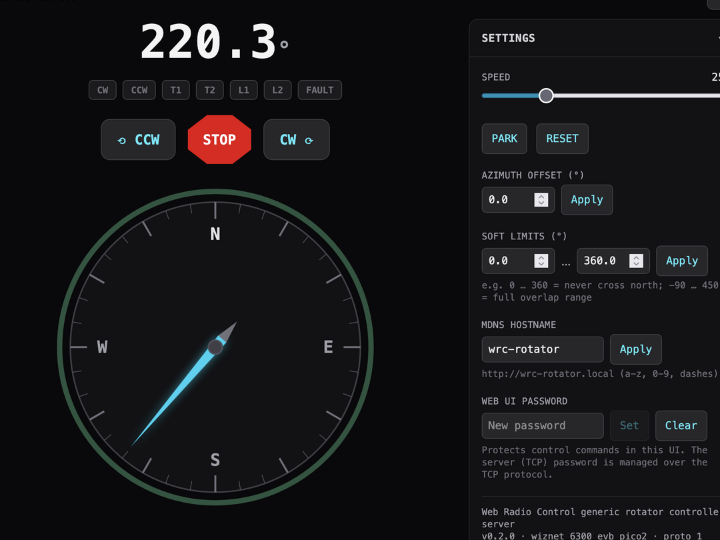
The firmware footer line repays attention. src/web_command_handler.h fills a hello message with doc["board"] = BOARD_NAME, which arduino-pico sets from the selected board, so the committed screenshot is direct evidence that the W6300 target was built and run rather than only declared. The same drawer shows the mDNS hostname, wrc-rotator by default, which is how the UI is reached without hunting for a DHCP address.
Access control is optional and off by default: "No password is set by default: nothing is asked and everything works without authentication". With a password set, read-only commands keep working while anything that changes state is refused with ERROR UNAUTHORIZED, and the project is clear about the boundary, noting that "the protocols themselves are unencrypted (no TLS)".
The Same Protocol, Two WIZnet Parts, 2020 and 2026
The Web Radio Control rotator firmware did not appear from nothing, and the earlier version is public. The same author published oh3aarot-controller, an Arduino Due rotator controller built for the Finnish radio club OH3AA, and pushed it for the last time on 15 November 2020, five years and nine months before the W6300 commit. That 2020 repository carries the same file layout, the same APP_VERSION "0.2.0" string and the same 8 client slots and 100 ms push interval, and its network hardware was a WIZnet W5100 Ethernet shield.
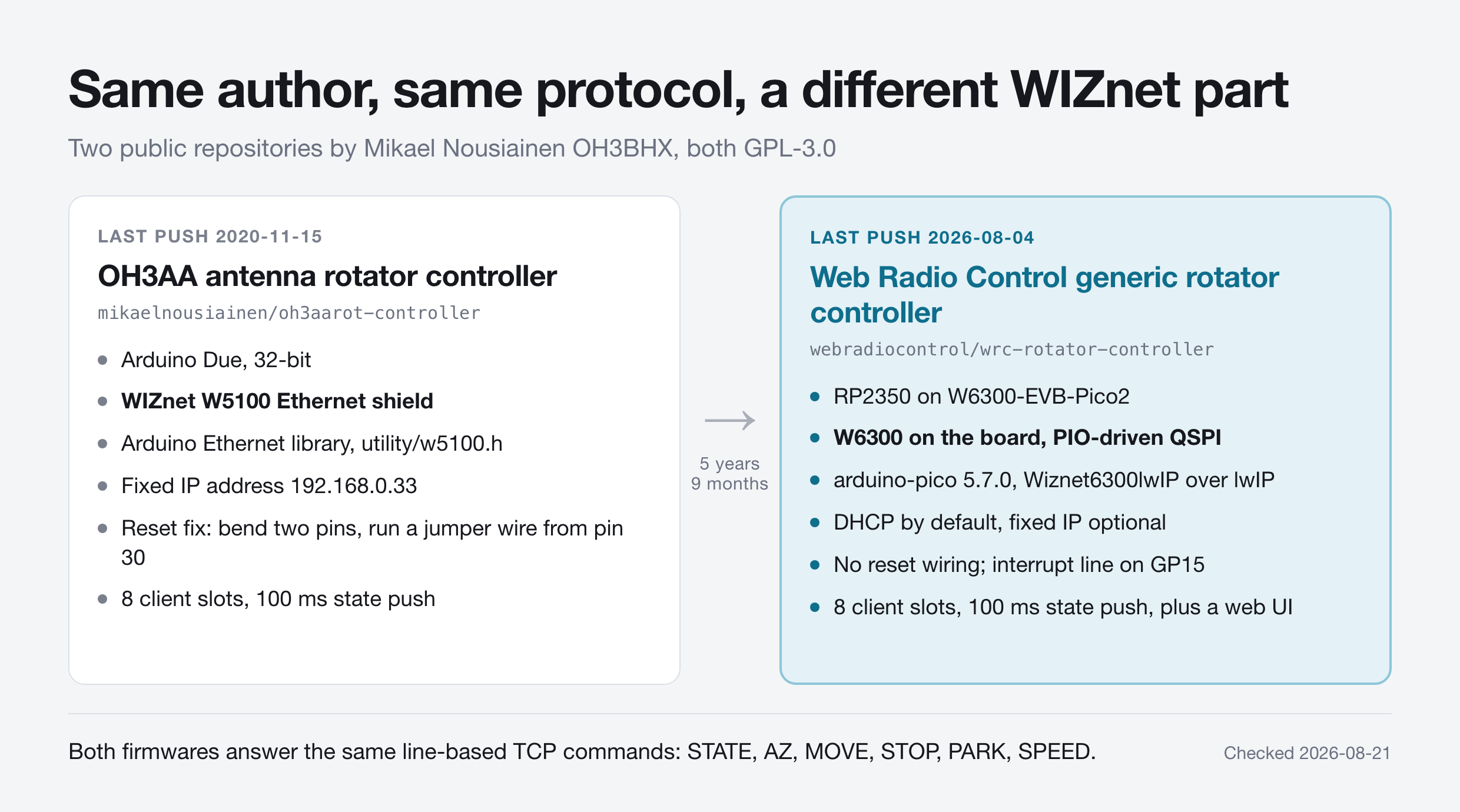
The contrast in installation effort is the useful part. Getting the 2020 build online meant a hardware modification, spelled out in its README as "Bend W5100 RESET pin so that it is not connected to Arduino Due RESET pin" followed by a jumper wire from pin 30, plus a hard-coded SERVER_IP_ADDRESS "192.168.0.33". The 2026 build has the Ethernet controller on the board, takes DHCP by default, and reduces the wiring question to which GPIO the interrupt uses.
One loose end matters to anyone driving this from station software. The author also maintains a Hamlib rotator backend for the protocol, rotators/oh3aarot/oh3aarot.c on the oh3aarot branch of his Hamlib fork, and Web Radio Control's own supported rotator controllers page lists it as entry 2801, model "OH3AArot 1", version 20201206, status Beta. That page states its list was "updated on April 21st 2023 for Hamlib 4.6", and the backend is not present in the upstream Hamlib repository as of 2026-08-21. The backend opens a session with INFO and then a bare AZLIMITS, while in the 2026 firmware AZLIMITS takes two arguments and sets the window, with the read moved to AZLIMITS?.
What the Repository Publishes and What It Does Not
The code side is unusually complete for a two-commit repository. The rotator control logic is a host-testable library with 27 host-native Unity test cases, the WebSocket codec adds 30 more, the browser UI carries 50 vitest cases across six test files, and every framework version is pinned, including the arduino-pico core at 5.7.0, released 2026-07-16.
| Item | Published | Where |
|---|---|---|
| Firmware source and build config | Yes | src/, lib/, platformio.ini |
| Rotator pin assignments and protocol | Yes | README.md, src/config.h |
| Web UI source and embedded bundle | Yes | webui/, src/generated/webui_bundle.h |
| Interface board schematic or BOM | No | Not in the repository |
| Photograph of an assembled controller | No | Not in the repository or on webradiocontrol.tech |
| Web UI protocol design document | No | README links doc/web-ui-plan.md, which is absent |
The hardware gap is the real limitation. The README tells you which pins to use and insists on opto-isolators and relays, but the board that carries them is left to the builder, and no picture of a finished unit exists in public. The reception gap is just as plain: on 2026-08-21 the repository showed 0 stars, 0 forks, 1 watcher, no releases and no issues, with the W6300 support 17 days old. Read it as a reference design with a documented preference, not as a field record.
Related WIZnet Maker Projects
Ethernet Hamlib Adaptor for the G-5500 Azimuth/Elevation Rotator, published 16 July 2026, is the nearest neighbour to this rotator controller. Both projects put a Pico class board with a WIZnet part between a network and a rotator, but they sit in different places: the G-5500 adaptor is written in Rust on a W5500-EVB-Pico and speaks the Hamlib rotctld interface in front of an existing Yaesu controller across azimuth and elevation, while the Web Radio Control firmware replaces the controller outright, drives the relays itself and handles azimuth only.
Arduino Ethernet/USB Interface for Yaesu Rotators takes the third position by emulating the GS-232 protocol so existing PC software recognises the hardware unchanged. Together the three map the options: emulate an established protocol, translate to a library interface, or define your own and ship a client backend with it.
How to Connect MELSEC PLCs with Binary SLMP 3E/4E on W6300-EVB-Pico2? exercises the same board and the same arduino-pico W6300 path for an industrial protocol rather than an antenna, and The Community Is Asking Espressif to Officially Support W6300 Quad SPI Ethernet covers an open feature request asking Espressif for QSPI Ethernet driver support with the W6300 as the example. The RP2350 side of that comparison is why a two-commit project could adopt the part at all, since arduino-pico 5.7.0 already ships the W6300 driver this firmware builds against.
❓ FAQ
Q. Which WIZnet chip does this rotator controller use, and how? The firmware targets the W6300 integrated on the WIZnet W6300-EVB-Pico2 board, reached over PIO-driven quad SPI through the arduino-pico Wiznet6300lwIP interface with chip select on GP16 and the interrupt on GP15. It carries both the port 1234 rotator protocol and the port 80 web UI.
Q. Can the same firmware run over Wi-Fi instead? Yes, by building the rpipico2w or rpipicow environment, which compiles src/network_wifi.cpp instead of src/network_w6300.cpp. The README marks the wired W6300 build as "recommended for reliability".
Q. What position sensor does the controller expect? A US Digital MA3 absolute magnetic shaft encoder, read as a PWM duty cycle through the RP2350 programmable I/O block. The README notes that the MA3 output needs 5 V to 3.3 V level conversion before reaching a Pico input.
Q. Is there a hardware design I can build from? No. The repository publishes the firmware, the pin assignments and the protocol, but no schematic, no bill of materials and no photograph, so the opto-isolator and relay stage is the builder's own work.
Q. How mature is the project as of August 2026? The repository was created on 16 February 2025 and had two commits when checked on 21 August 2026, the second of which added W6300 support on 4 August 2026. It carried 0 stars, 0 forks and no releases at that point, so treat it as a fresh publication rather than a widely used product.
-
wrc-rotator-controller repository
GPL-3.0 firmware source, README with the supported board table, protocol reference and pin defaults. Created 2025-02-16, last push 2026-08-04.

-
platformio.ini build environments
default_envs lists wiznet_6300_evb_pico2 first, and pins the arduino-pico core to 5.7.0. Also carries the -D __LWIP_MEMMULT=2 override and its RAM cost note.
-
src/network_w6300.cpp
The W6300 backend: Wiznet6300lwIP instantiation, CS on GP16, interrupt on GP15, non-blocking link state machine and TCP listener.
-
OH3AA antenna rotator controller (2020 predecessor)
The same author's earlier controller for the OH3AA club, on an Arduino Due with a WIZnet W5100 Ethernet shield and a manual shield reset jumper.
-
Hamlib oh3aarot rotator backend
The author's Hamlib backend for this text protocol, listed by Web Radio Control as ROT_MODEL_OH3AAROT1. It lives on a fork branch and is not in upstream Hamlib as of 2026-08-21.
-
Web Radio Control supported rotator controllers
Web Radio Control documentation stating that rotator control runs through Hamlib, with entry 2801 OH3AArot 1 at the end of the list. Page states the list was updated 2023-04-21 for Hamlib 4.6.
-
arduino-pico lwIP_w6300 library
Upstream driver behind the build: Wiznet6300lwIP is LwipIntfDev<Wiznet6300>, with QSPI pins fixed at CS 16, SCK 17 and IO0 to IO3 on 18 to 21.
-
WIZnet W6300-EVB-Pico2
Official board documentation for the RP2350 plus W6300 QSPI Ethernet board used as the first build target.
-
US Digital MA3 absolute magnetic shaft encoder
The rotator position sensor the firmware expects, read as a PWM duty cycle through RP2350 PIO.
-
Web Radio Control
The author's remote station software and the origin of the firmware's naming. Site content is published under a Creative Commons BY-NC-ND 4.0 licence.


