


PUSIT: RFID Canteen Payment System Powered by W5500 Ethernet and ESP32 Wi-Fi
A complete IoT-based cashless canteen system using Arduino Nano + W5500 for secure card provisioning and ESP32 Wi-Fi for wireless payment processing.
Arduino - Arduino Nano R3
x 1


WIZnet - W5500
x 1

Espressif - ESP32-WROOM-32E
x 1
A Cashless Canteen, Built from Scratch with IoT
PUSIT (which translates loosely to "match" or "fit" in Filipino) is an integrated electronic payment and canteen sales management system designed for small-scale school canteen environments. The project addresses a common challenge in educational institutions: streamlining food ordering and payment processes through RFID-based cashless transactions.
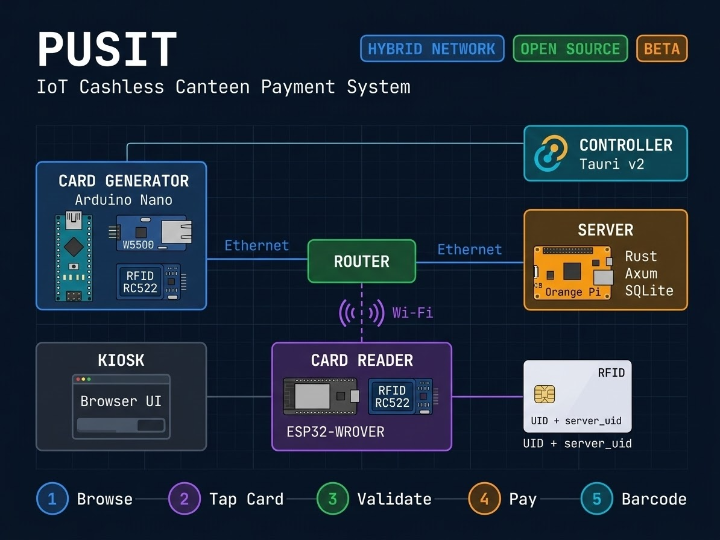
What makes PUSIT architecturally interesting is its hybrid network design — the system deliberately uses two different connectivity approaches for two distinct roles. The Card Generator station uses an Arduino Nano with a W5500 Ethernet module for reliable, wired provisioning of RFID cards, while the Card Reader station uses an ESP32 with Wi-Fi for flexible, wireless placement near the student-facing kiosk. This isn't an accidental design choice; the developer explicitly notes in the Generator README:
"Unlike the READER, I chose it to be wired so that it is alongside the server"
The full system consists of five interconnected components:
- Card Generator (Arduino Nano + W5500)
- Card Reader (ESP32-WROVER)
- Server (Orange Pi One H3 running Rust)
- Kiosk (browser-based ordering UI)
- Controller (Tauri-based admin app with barcode scanning).
System Architecture
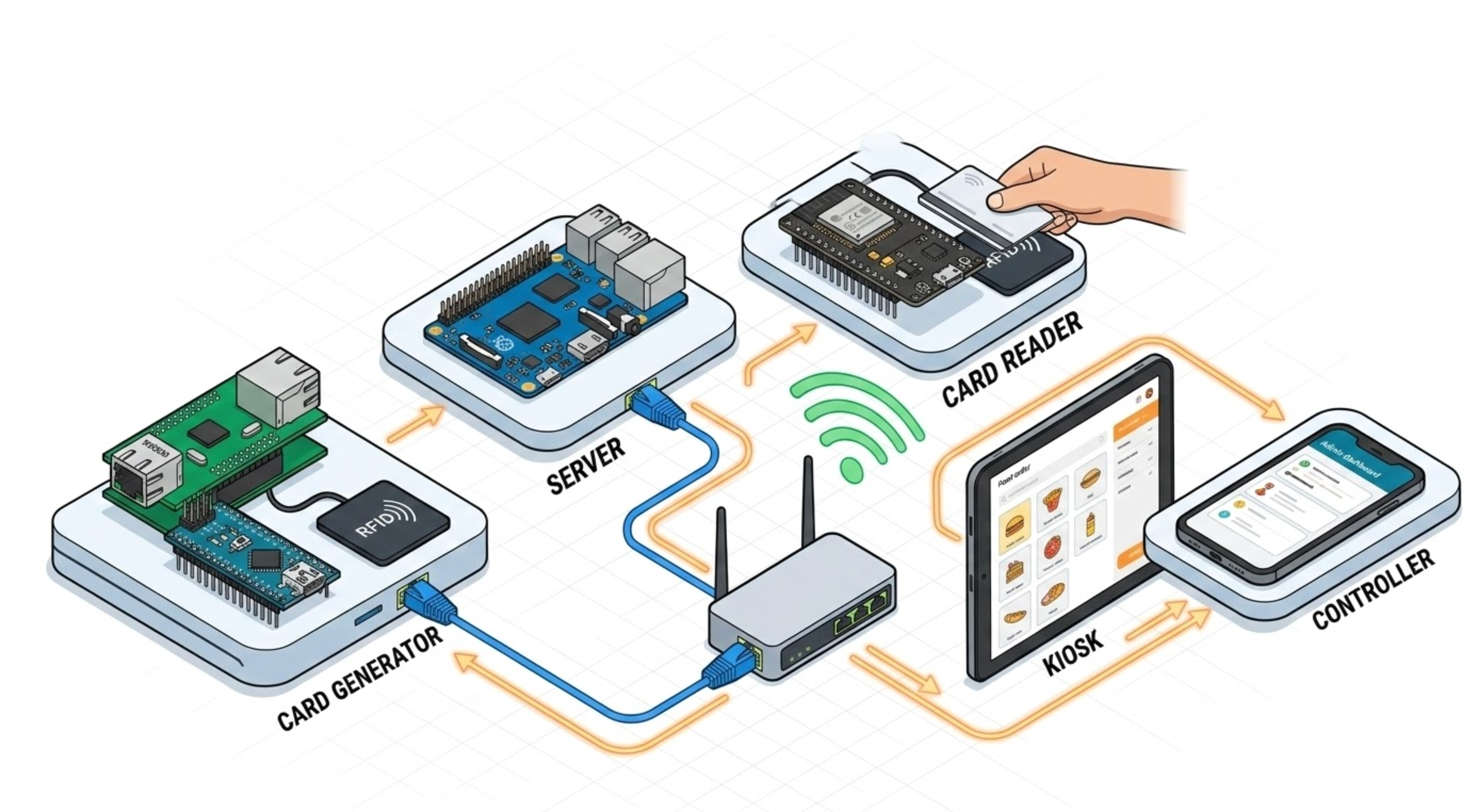
The system operates on a local network with static IPs. The W5500-based Card Generator sits at 192.168.2.200, the Rust server at 192.168.2.100, and the ESP32 Card Reader at 192.168.2.101.
How the W5500 Powers Secure Card Provisioning
The W5500's role in PUSIT is critical — it forms the backbone of the card registration infrastructure. The Generator node runs a full HTTP server on the Arduino Nano via the W5500 Ethernet module, handling two distinct network operations:
1. Inbound: HTTP server for Controller requests
The Generator listens for incoming HTTP connections from the Controller app. When a staff member initiates card creation, the Controller first pings the Generator to verify readiness:
// generator.ino — HTTP server on W5500, port 80
EthernetServer server(80);

void loop() {
    if (!requested) {
        EthernetClient client = server.available();
        if (client) {
            if (client.find("GET /ping")) {
                client.println(
                    "HTTP/1.1 200 OK\r\n"
                    "Content-Type: text/plain\r\n"
                    "Access-Control-Allow-Origin: *\r\n"
                    "Connection: close\r\n"
                    "\r\n"
                    "TAP"
                );
                client.stop();
            } else {
                requested = true;
                current_client = client;
                request_start_time = millis();
            }
        }
    }
Once the ping succeeds (returning "TAP"), the Controller waits for the actual card data. The Generator enters a card-waiting state with a 5-second timeout.
2. Outbound: HTTP POST to Rust server
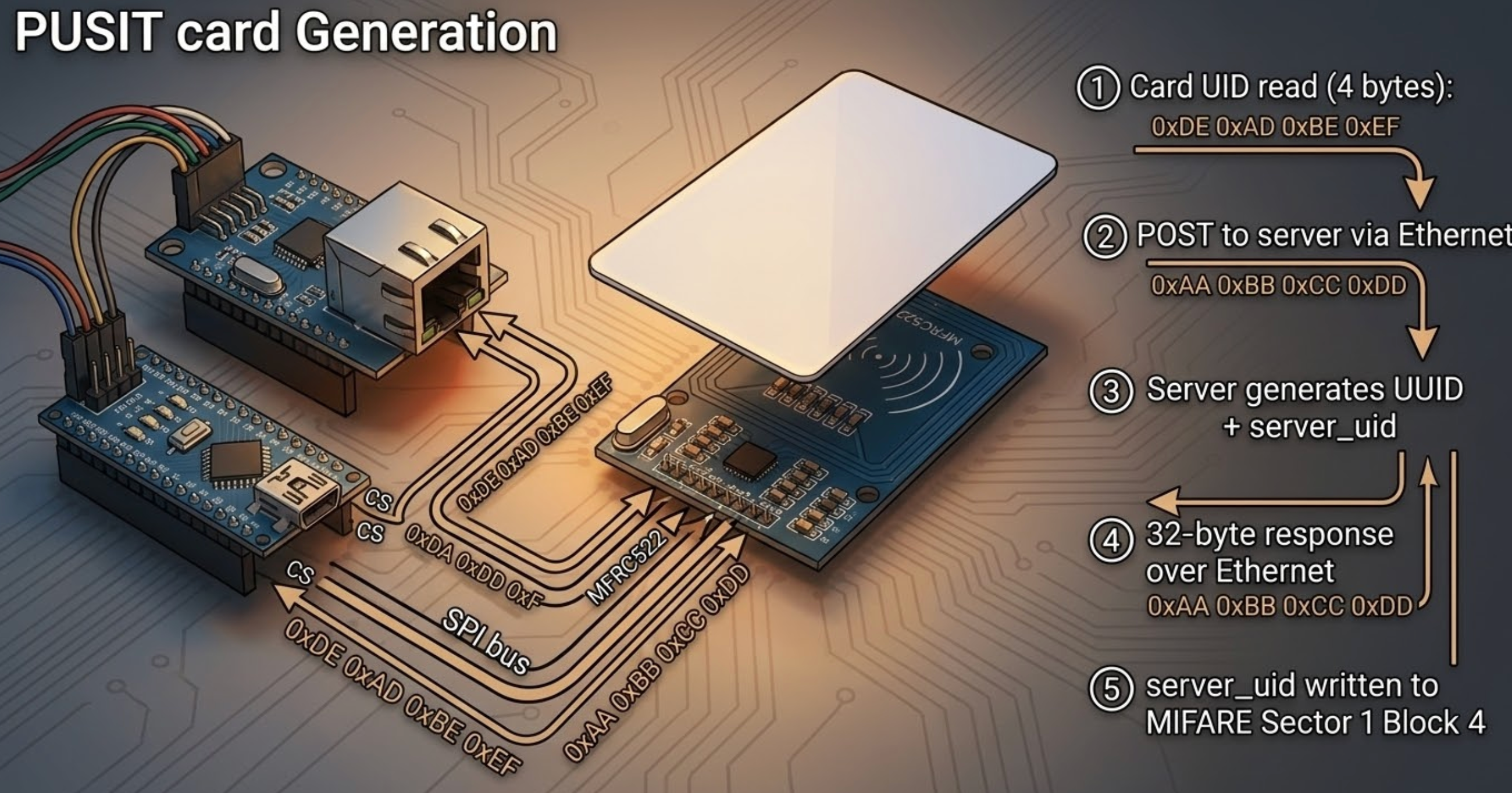
When an RFID card is tapped on the Generator's RC522 reader, the Arduino sends the card's 4-byte UID to the Rust server via HTTP POST over the W5500 Ethernet connection:
// generator.ino — POST card UID to server for registration
void send_rfid_uid_data(EthernetClient &client, MFRC522 &rfid) {
    if (client.connect(root_server, 80)) {
        client.println("POST /generate-card HTTP/1.1");
        client.print("Host: ");
        client.println(root_server);
        client.println("Content-Type: application/octet-stream");
        client.print("Content-Length: ");
        client.println(4);
        client.println();
        client.write(rfid.uid.uidByte, 4);
    }
}
The server responds with a 32-byte payload: 16 bytes of randomly generated server_uid + 16 bytes of UUID v4. The Generator then writes the server_uid to the MIFARE card's Sector 1, Block 4 using Key B authentication, and returns the UUID to the Controller for display.
This dual-key approach — the card's physical UID (read-only, factory-set) plus a server-generated server_uid (written to card memory) — creates a two-factor card validation scheme. During payment, both values must match the database record.
The Payment Flow: From Kiosk to Kitchen
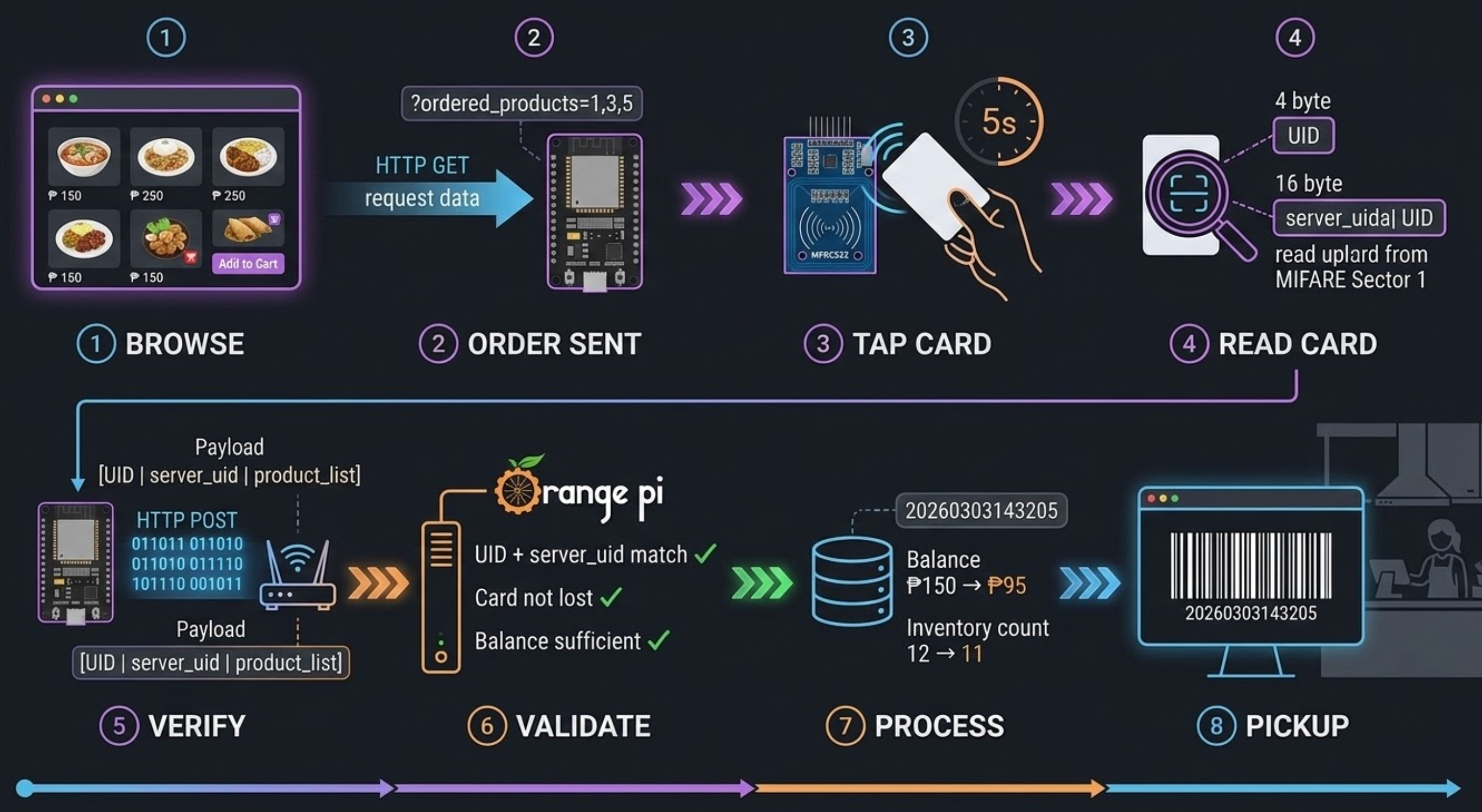
The payment transaction involves a coordinated sequence across four components:
- Student browses products on the Kiosk (browser UI) and adds items to cart
- Kiosk sends order to the ESP32 Card Reader via HTTP GET with product IDs as query parameters
- Student taps RFID card on the Reader's RC522 module within a 5-second window
- Reader extracts the card's physical UID (4 bytes) and stored
server_uid(16 bytes from Sector 1) - Reader POSTs the combined binary data (UID + server_uid + product list) to the Rust server
- Server validates the card: checks if both UID and server_uid match, confirms the card isn't marked as lost, and verifies sufficient balance (in Philippine Pesos, ₱)
- Server deducts balance, decrements product inventory, and generates a timestamped reference number
- Kiosk displays the reference as a Code128 barcode for kitchen pickup
The Rust server handles all business logic with database transactions using SQLx:
// order.rs — atomic order processing with balance check
if server_uid_db != server_uid_provided {
    return Err((StatusCode::UNAUTHORIZED, "PUSIT CARD INVALID".to_string()));
}
if is_lost {
    return Err((StatusCode::FORBIDDEN, "PUSIT CARD REPORTED AS LOST".to_string()));
}
if total_price > balance {
    return Err((StatusCode::PAYMENT_REQUIRED,
        format!("YOUR CARD BALANCE IS JUST ₱{}", balance)));
}
The Controller app (built with Tauri v2) enables staff to deliver orders by scanning the barcode using the device camera via tauri-plugin-barcode-scanner, which is conditionally compiled for Android/iOS targets.
Why W5500 for the Card Generator?
The choice of W5500 Ethernet for the Generator (rather than Wi-Fi) reflects a deliberate architectural decision rooted in three practical considerations:
Reliability at the provisioning point. Card generation is a critical operation — if a write to the RFID card succeeds but the network confirmation fails, the system could end up with orphaned cards. The W5500's hardwired TCP/IP stack provides deterministic connectivity without the latency variability of Wi-Fi association and DHCP negotiation. The Generator uses a static IP configuration (192.168.2.200) with the W5500's hardware TCP/IP offloading, leaving the ATmega328's limited resources free for SPI communication with both the W5500 and the RFID module.
Shared SPI bus management. The Generator simultaneously drives two SPI peripherals — the W5500 (CS on pin 5) and the MFRC522 RFID reader (CS on pin 2). The W5500's SPI interface is well-suited for this multiplexed arrangement on the Arduino Nano's single SPI bus:
#define RFID_SS_PIN 2
#define ETHERNET_SS_PIN 5

// W5500 initialization with explicit CS pin
Ethernet.init(ETHERNET_SS_PIN);
Ethernet.begin(mac, ip, dns, gateway, subnet);
Physical colocation with the server.
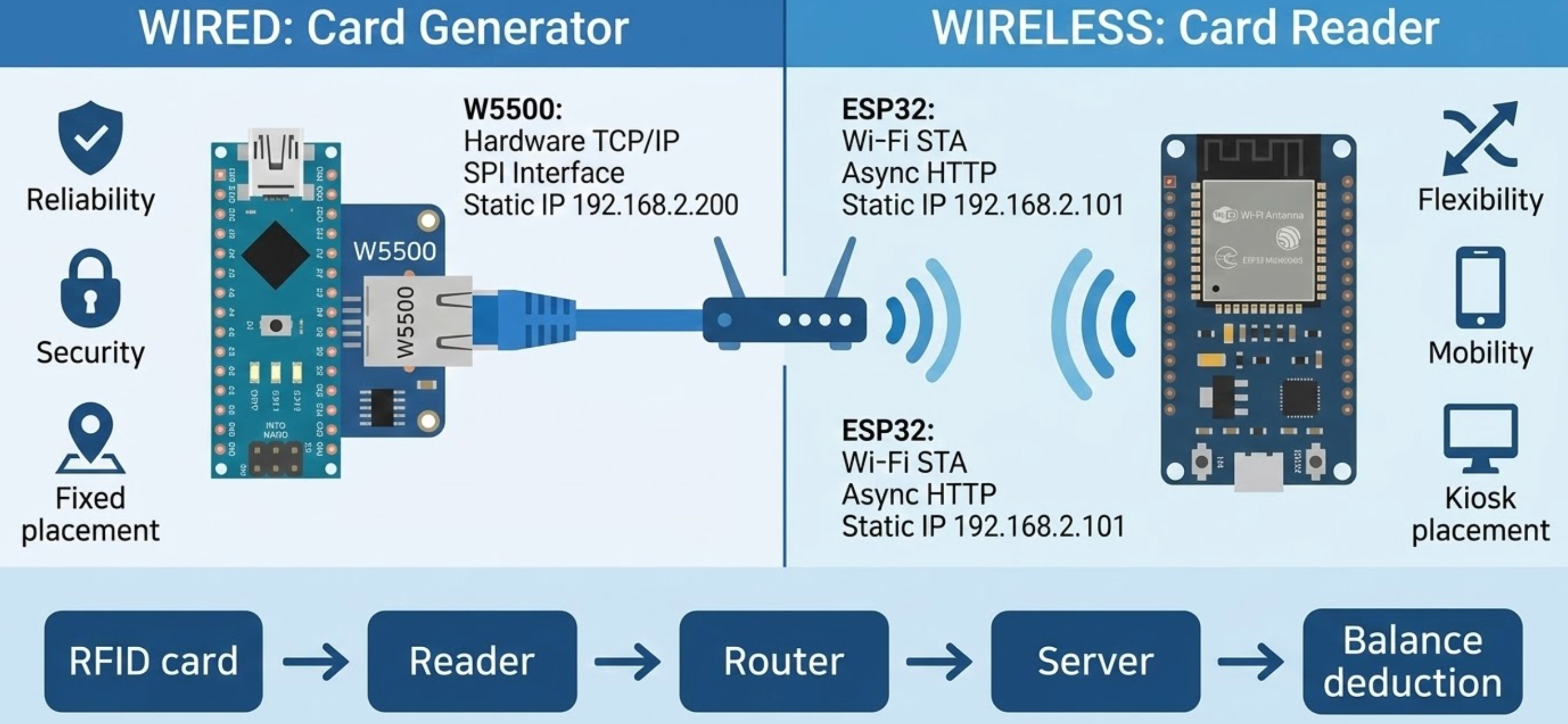
The Generator is intended to sit next to the Orange Pi server, making a wired Ethernet connection both practical and preferable. Meanwhile, the Reader uses ESP32 Wi-Fi because it needs to be placed wherever the student-facing kiosk is located — potentially across the canteen, away from network infrastructure.
Technology Stack Summary
The project showcases an impressive breadth across languages and frameworks:
- Embedded C++ (Arduino): Generator (ATmega328) and Reader (ESP32-WROVER) firmware using MFRC522v2 library for RFID and standard Ethernet/WiFi libraries
- Rust (Axum + SQLx): Async HTTP server with SQLite persistence, handling card management, product inventory, order processing, and balance tracking
- JavaScript (Alpine.js): Reactive UIs for both the Kiosk (student-facing) and Controller (staff-facing) interfaces
- Rust (Tauri v2): Cross-platform wrapper for the Controller app with native barcode scanning on mobile
Project Status and Limitations
The developer notes that PUSIT is in beta and has been tested only in a small canteen environment. Some observations from the code analysis:
- The system currently uses HTTP without TLS, which is acceptable for a local network deployment but would need upgrading for any larger-scale use
- Balance management is integer-based (whole pesos), with no decimal support
- The W5500 Generator has a 5-second timeout for card taps, after which the session closes
- Card generation relies on a single SPI bus for both W5500 and RC522, which the code manages through separate chip-select pins
- The server uses SQLite with WAL (Write-Ahead Logging) mode for concurrent read/write access
FAQ
Q1: Can I replace the Arduino Nano with a different MCU for the Generator? Yes, as long as the replacement supports SPI and has enough GPIO for two SPI chip-select pins (W5500 and RC522). The code uses standard Arduino Ethernet and MFRC522v2 libraries, so any AVR or ARM Arduino-compatible board should work. You would need to adjust the RFID_SS_PIN and ETHERNET_SS_PIN definitions and the FQBN in the flash script.
Q2: Why does the Generator use a W5500 module instead of Wi-Fi like the Reader? The developer intentionally chose wired Ethernet for the Generator because it sits alongside the server. This provides more reliable connectivity for the critical card provisioning operation — writing cryptographic identifiers to RFID cards requires consistent network availability. The Reader uses Wi-Fi for placement flexibility near the student kiosk.
Q3: What RFID cards are supported? The code explicitly checks for MIFARE Mini, MIFARE 1K, and MIFARE 4K card types in the is_card_supported() function. The system writes a 16-byte server_uid to Sector 1, Block 4 of the card using Key B authentication. Standard MIFARE Classic cards (the most common type) are fully compatible.
Q4: How does the two-factor card validation work? Each PUSIT card carries two identifiers: the factory-set 4-byte UID (read-only, embedded in the chip) and a randomly generated 16-byte server_uid written to the card's data block during provisioning. During payment, the Reader sends both values to the server, which checks that the combination matches the database record. This prevents simple UID-cloning attacks since the attacker would also need to know the server_uid stored in the card's authenticated sector.
Q5: Can the system handle multiple concurrent orders? The ESP32 Reader uses ESPAsyncWebServer for non-blocking HTTP handling, but the RFID reading loop is sequential — only one card can be processed at a time (with a 5-second timeout per request). For a single canteen kiosk this is sufficient. Scaling to multiple kiosks would require additional Reader nodes, each with its own ESP32 and RC522 module.
Q6: What database does the server use, and can it be changed? The server uses SQLite via the SQLx library with WAL journal mode and auto-creation. For a small canteen, SQLite is well-suited and requires no external database server. The SQLx abstraction layer in the Rust code would make migration to PostgreSQL or MySQL relatively straightforward if needed — the query syntax is standard SQL.
Q7: Is this a hybrid network project? Yes. PUSIT uses Ethernet (W5500) for the Card Generator and Wi-Fi (ESP32) for the Card Reader, making it a true hybrid network IoT system. The two connectivity methods are chosen deliberately based on each node's role and physical placement requirements.


