


How Does Pico 2W Use W5500 Ethernet for CircuitPython MQTT?
Haljion shows Raspberry Pi Pico 2W using Adafruit W5500 over SPI and CircuitPython MiniMQTT to subscribe to a local broker over wired LAN.
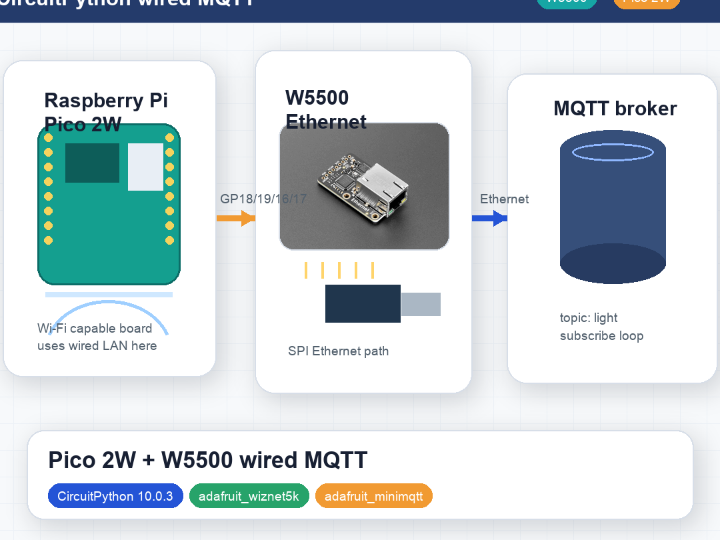

WIZnet - W5500
x 1

W5500 Ethernet controller on the Adafruit W5500 module, used as the Pico 2W CircuitPython SPI-to-wired-LAN path for MiniMQTT subscribe.
Overview
Haljion's Japanese article, written by Kazuki Ashida (芦田 和毅), shows a Raspberry Pi Pico 2W running CircuitPython 10.0.3 and using an Adafruit W5500 Ethernet module for a wired MQTT subscribe test. The author's profile page lists Kazuki Ashida as a professor at Nagano College, Department of Engineering, Information and Electronics, so this is a lab-style educational note rather than a commercial product page.
The practical issue is simple: Pico 2W includes Wi-Fi hardware, but the article points out that wireless-heavy environments can create communication trouble. This example takes the same Pico 2W class board and moves the MQTT path to wired LAN by adding a W5500 Ethernet module over SPI.
For WIZnet readers, the key value is the network boundary. W5500 is the Ethernet controller that lets the CircuitPython MQTT client use wired LAN. The Python code creates a WIZNET5K interface, builds a socket pool from it, and then uses Adafruit MiniMQTT to subscribe to the light topic on a local broker.
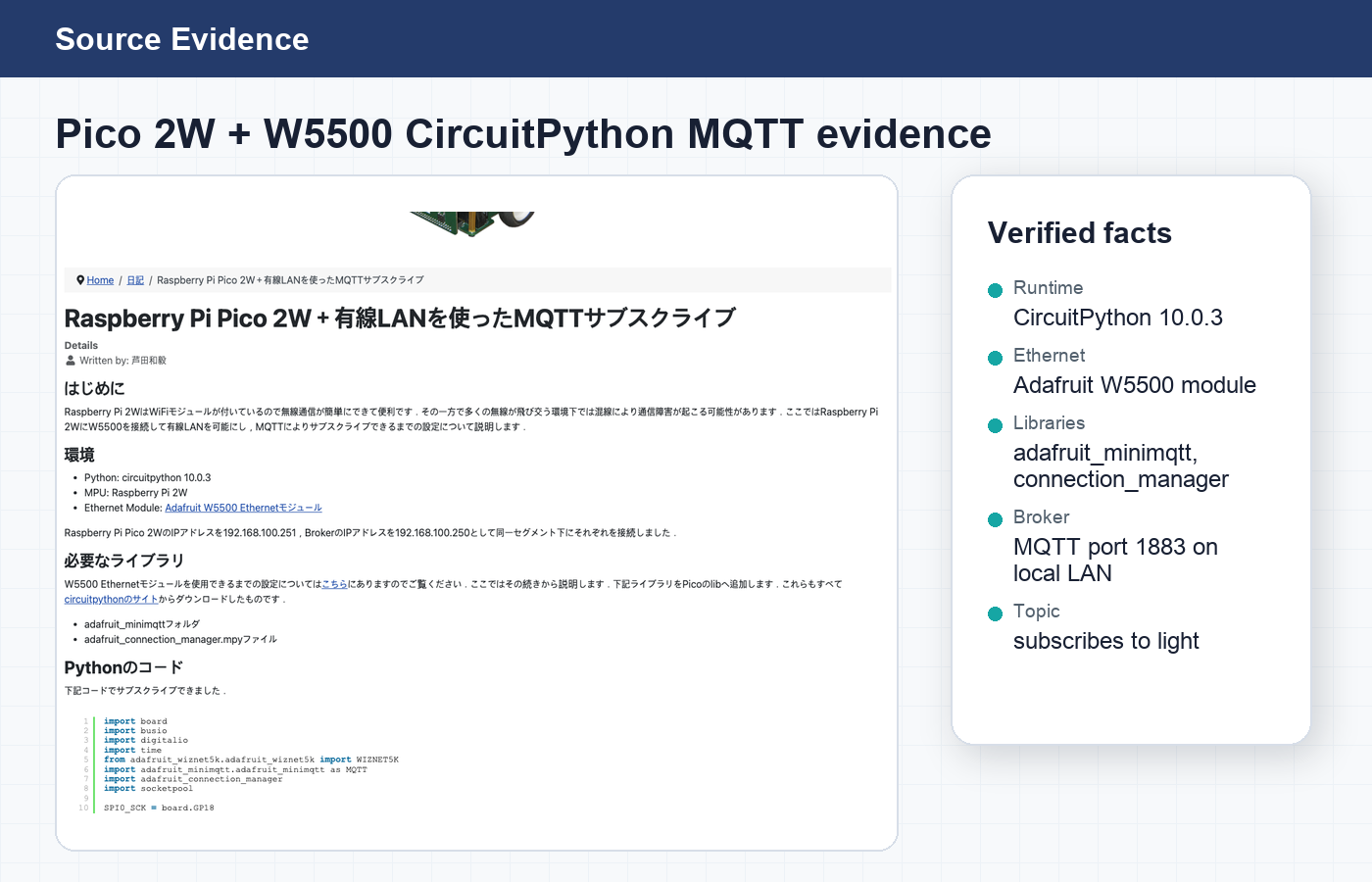
WIZnet role: W5500 provides the wired Ethernet interface for the Pico 2W CircuitPython MQTT client. It is not the MQTT broker and it is not a Wi-Fi path.
Why Wired LAN on a Pico 2W?
The source article frames wired LAN as a practical alternative when many wireless signals are present. Pico 2W can use Wi-Fi, but this example intentionally uses W5500 so the MQTT client communicates over Ethernet.
That distinction matters for classification. This is a CircuitPython W5500 MQTT subscriber, not a simultaneous Wi-Fi plus Ethernet hybrid design. The Wi-Fi-capable board is the starting hardware, while the implemented data path is wired LAN.
The article's setup uses local private addresses. The prose mentions a Pico 2W address and broker address in the 192.168.100.x segment, while the code snippet uses 192.168.200.x values. Both should be read as lab-network examples, not fixed deployment settings.
Source Configuration
The hardware and software evidence is concrete:
- Board context: Raspberry Pi Pico 2W.
- Runtime: CircuitPython 10.0.3.
- Ethernet hardware: Adafruit W5500 Ethernet module.
- SPI pins: GP18 SCK, GP19 MOSI, GP16 MISO, GP17 CS.
- Reset pin: GP20 for W5500 reset.
- MQTT broker: local broker on port 1883 in the code path.
- MQTT topic: the callback subscribes to
light.
The source has one small naming wrinkle: the page title and surrounding text repeatedly identify Raspberry Pi Pico 2W, while one environment bullet says MPU: Raspberry Pi 2W. This post follows the repeated title and code context and treats the board as Pico 2W.
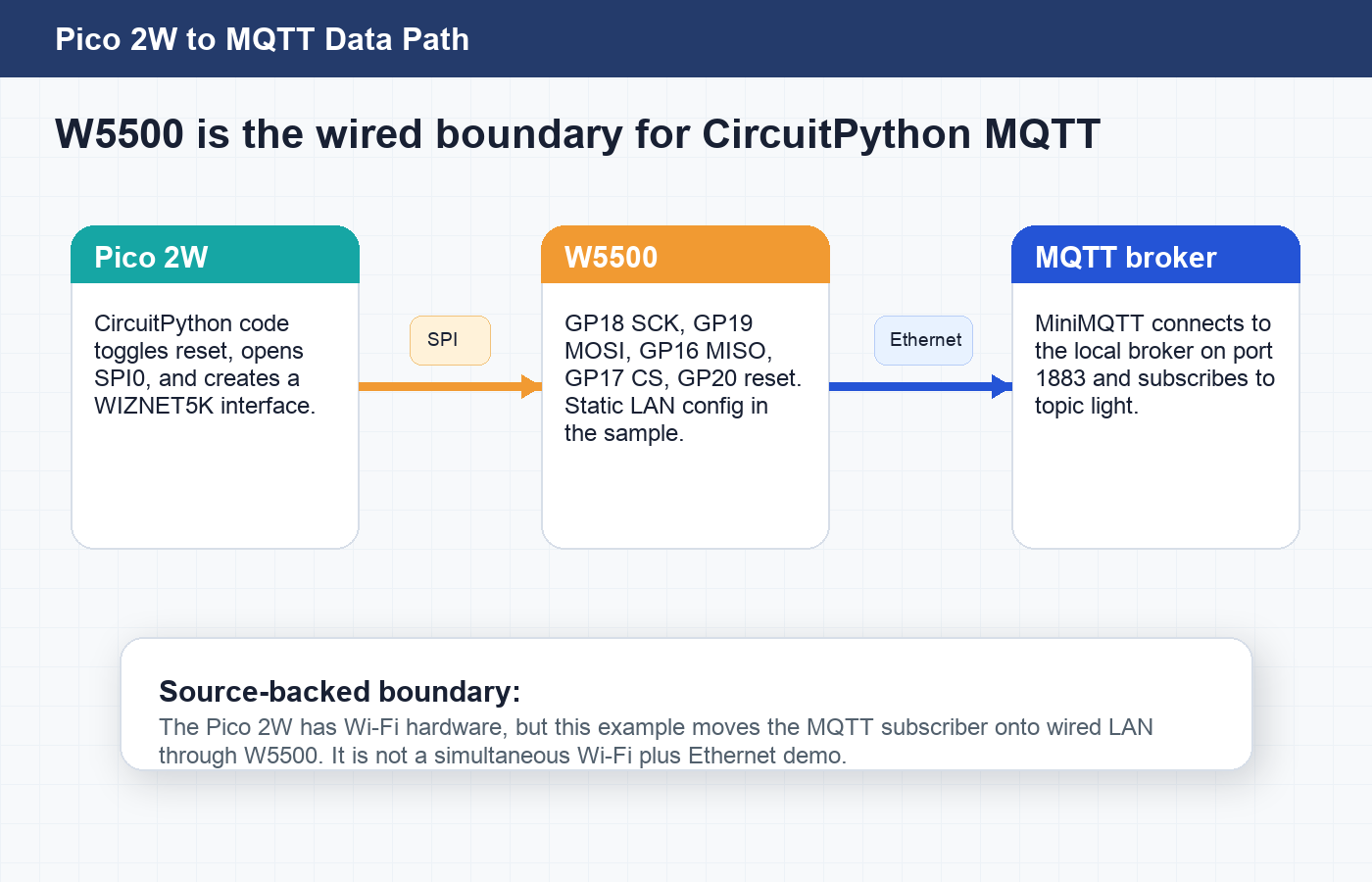
CircuitPython Library Path
The MQTT article links to an adjacent Haljion setup post that documents getting CircuitPython libraries from the official bundle before using W5500. That setup article lists Raspberry Pi Pico 2W and CircuitPython 10.0.3, then describes copying W5500-related libraries into the Pico lib folder.
For the W5500 bring-up article, the listed library set includes:
adafruit_bus_deviceadafruit_wiznet5kadafruit_requests.mpyadafruit_tick.mpy
For the MQTT subscribe article, the required additions are:
adafruit_minimqttadafruit_connection_manager.mpy
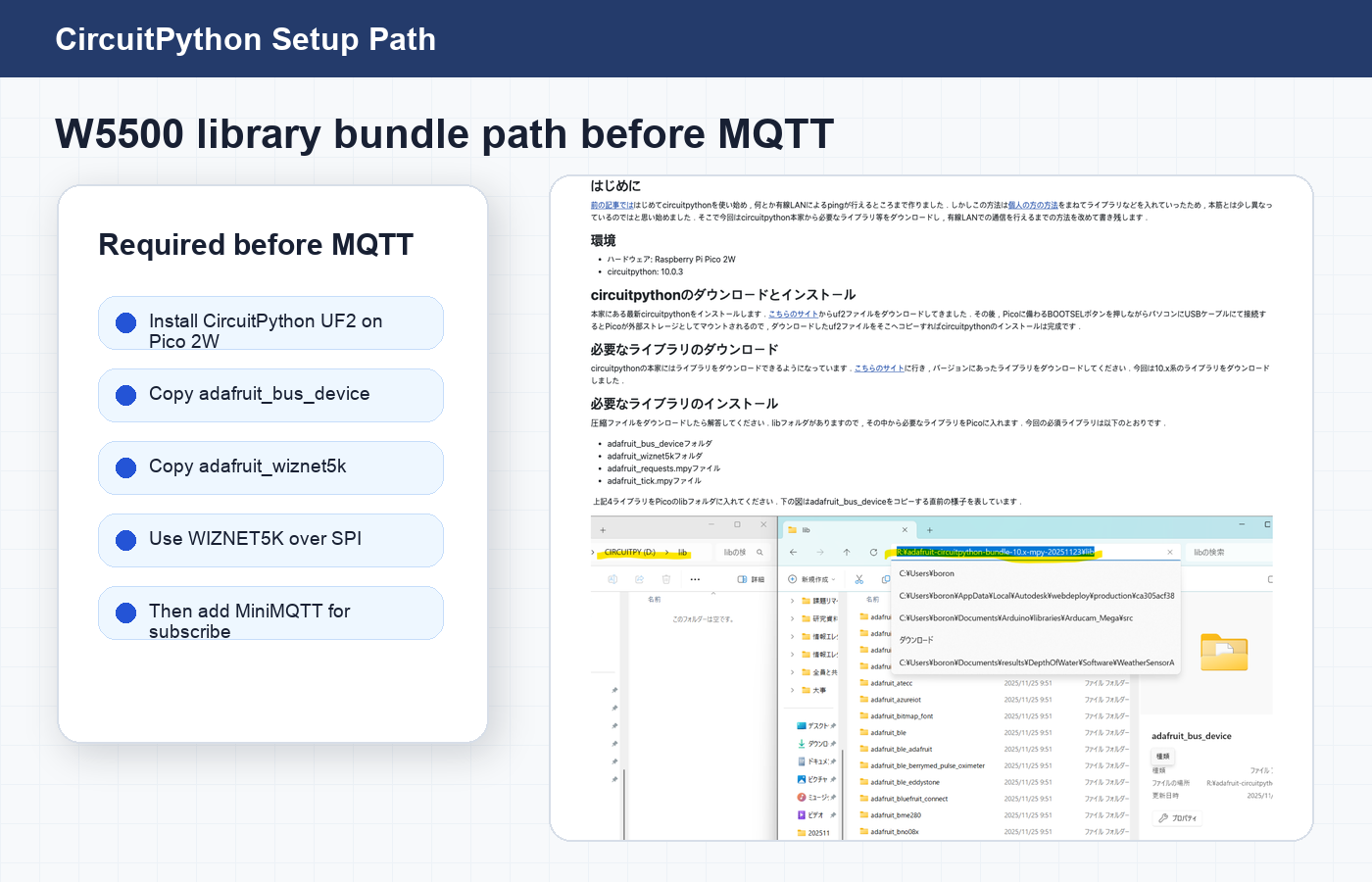
This is a useful reader path because it separates the two jobs. First, make the W5500 work as a CircuitPython Ethernet interface. Then add MiniMQTT and subscribe to the broker.
W5500 and MQTT Data Flow
The code path uses busio.SPI with Pico GPIO pins, sets the W5500 chip-select and reset pins, resets the Ethernet module, and creates the WIZnet interface:
spi_bus = busio.SPI(SPI0_SCK, MOSI=SPI0_TX, MISO=SPI0_RX)
eth = WIZNET5K(spi_bus, cs, is_dhcp=False, mac=MY_MAC)
pool = adafruit_connection_manager.get_radio_socketpool(eth)
That socket pool is then passed into the MiniMQTT client. The client uses a broker on port 1883 and subscribes to light inside the connect callback. The loop then calls mqtt_client.loop() continuously so incoming messages can be processed.
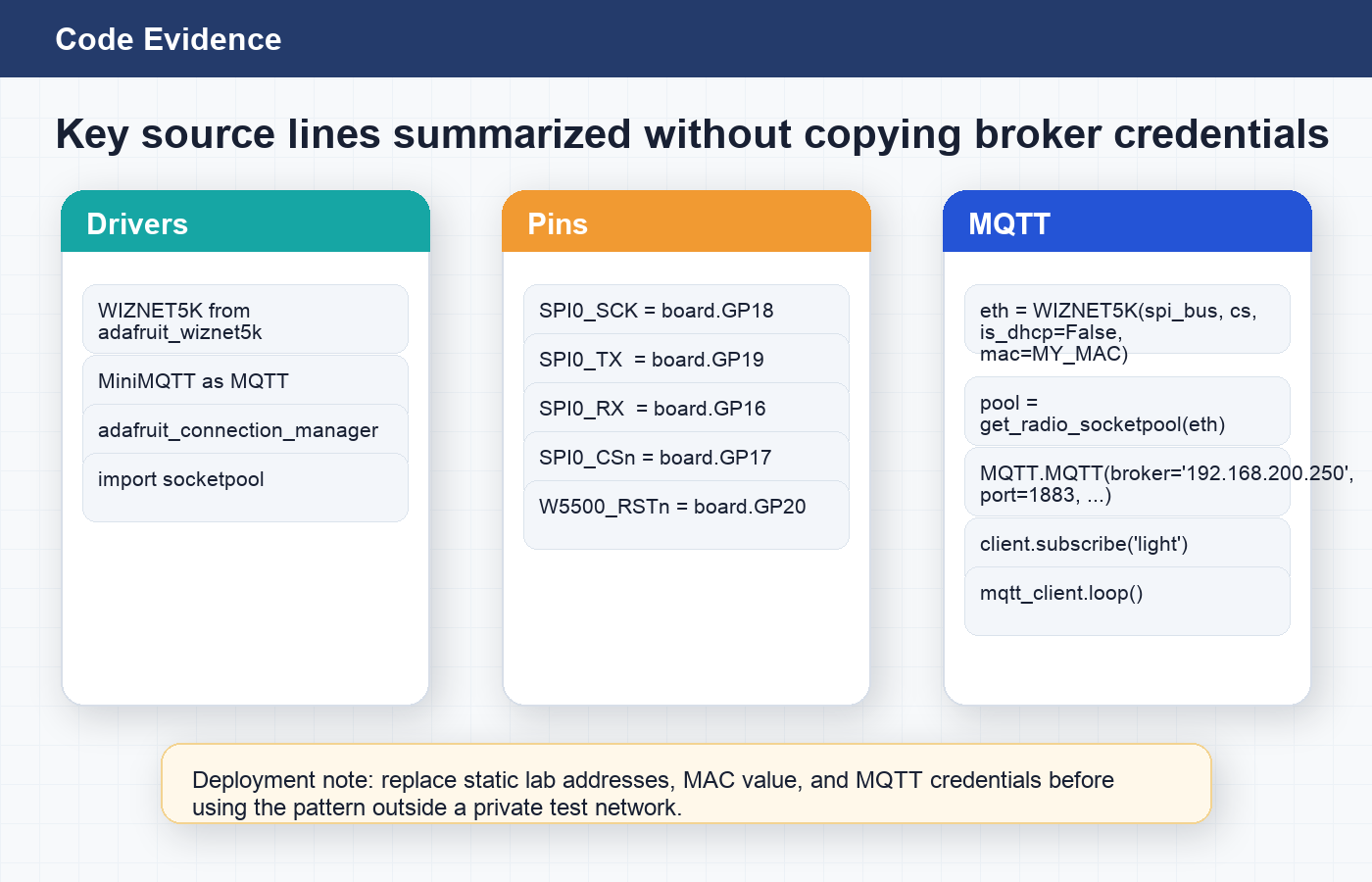
Source evidence: The W5500 role is backed by code-level details: `WIZNET5K`, Pico SPI pins, `get_radio_socketpool(eth)`, `MQTT.MQTT(...)`, `client.subscribe("light")`, and `mqtt_client.loop()`.
Deployment Notes and Limits
This source is strongest as a small, inspectable CircuitPython pattern. It shows how to make a Pico 2W MQTT subscriber use W5500 wired Ethernet instead of relying on Wi-Fi.
Before adapting it beyond a private test network, a reader should change several values:
- Replace the example MAC address with a valid, unique value for the device.
- Decide whether static IP or DHCP is appropriate for the target LAN.
- Replace local broker IP values with the real broker address.
- Replace sample MQTT username and password values. The public post intentionally does not copy them.
- Add the security controls required by the broker and LAN environment.
The source page does not include a complete hardware wiring photo of Pico 2W plus W5500. For that reason, the article images here focus on source screenshots and diagrams rather than pretending to show a finished build photo.
Related WIZnet Maker Projects
mqtt2pins-wiznet5k is the closest protocol-side neighbor. It also connects MQTT behavior to WIZnet5k hardware, but its goal is mapping MQTT messages to pins, while this Haljion article is a Pico 2W CircuitPython subscribe example over W5500 Ethernet.
Build an Ethernet-Powered IoT Camera with HTTP / MQTT is a broader application reference. It uses WIZnet Ethernet with HTTP/MQTT in a camera workflow, while this source stays intentionally small: one Pico 2W, one W5500 module, one local MQTT subscribe path.
CircuitPython Wiznet5k: PR #178 Socket Reliability Update is a good library-level follow-up. It focuses on CircuitPython Wiznet5k socket behavior, which is directly relevant to projects that build MQTT clients on top of the WIZnet5k CircuitPython stack.
Source-Backed Summary
This Haljion article is a useful WIZnet Maker reference because it keeps the role of W5500 easy to inspect. Raspberry Pi Pico 2W runs CircuitPython, W5500 provides the wired Ethernet interface over SPI, and MiniMQTT subscribes to a broker topic through that Ethernet socket pool. The best next step would be a wiring photo or schematic and a cleaned sample configuration that separates secrets from code.
FAQ
Q. Why add W5500 Ethernet to a Raspberry Pi Pico 2W board that already has Wi-Fi? The source uses Pico 2W in a context where wireless-heavy environments may be unreliable. W5500 lets the MQTT subscriber use wired LAN instead of the board's Wi-Fi path.
Q. Which CircuitPython libraries are used for MQTT over W5500? The source imports adafruit_wiznet5k, adafruit_minimqtt, adafruit_connection_manager, and socketpool. The adjacent setup article also lists adafruit_bus_device, adafruit_requests.mpy, and adafruit_tick.mpy for the W5500 bring-up path.
Q. How is the W5500 module connected to Pico 2W in the source code? The code maps W5500 SPI to GP18 SCK, GP19 MOSI, GP16 MISO, GP17 chip select, and GP20 reset.
Q. What does the MQTT example subscribe to? The connect callback subscribes to the light topic, and the receive callback prints the incoming topic and message.
Q. Is this a hybrid Wi-Fi plus Ethernet project? No. Pico 2W has Wi-Fi hardware, but the source code path uses W5500 wired Ethernet for MQTT. The Wi-Fi context explains the motivation, not a second active network path.
Q. What should be changed before deployment? Replace the example MAC address, local IP settings, broker address, and MQTT credentials. Then add the broker authentication and LAN security controls required by the target environment.
한국어 (Korean)
개요
Haljion의 일본어 글은 Kazuki Ashida (芦田 和毅)가 작성한 글로, Raspberry Pi Pico 2W에서 CircuitPython 10.0.3을 실행하고 Adafruit W5500 Ethernet module을 붙여 유선 LAN 기반 MQTT subscribe를 테스트하는 내용을 다룹니다. 저자 프로필에는 Kazuki Ashida가 Nagano College 공학과 정보전자계 교수로 소개되어 있으므로, 이 글은 상용 제품 소개라기보다 연구실/교육용 기술 노트에 가깝습니다.
문제의식은 명확합니다. Pico 2W에는 Wi-Fi가 있지만, 무선 신호가 많은 환경에서는 통신 문제가 생길 수 있습니다. 이 예제는 같은 Pico 2W 계열 보드에 W5500을 SPI로 연결해 MQTT 경로를 유선 LAN으로 옮깁니다.
WIZnet 관점의 핵심은 네트워크 경계입니다. W5500은 CircuitPython MQTT client가 유선 LAN을 사용할 수 있게 하는 Ethernet controller입니다. Python 코드는 WIZNET5K interface를 만들고, 그 Ethernet interface에서 socket pool을 만든 뒤, Adafruit MiniMQTT로 light topic을 subscribe합니다.
WIZnet 역할: W5500은 Pico 2W CircuitPython MQTT client의 유선 Ethernet interface입니다. MQTT broker도 아니고 Wi-Fi path도 아닙니다.
왜 Pico 2W에서 유선 LAN인가?
원문은 무선 신호가 많은 환경에서 유선 LAN이 실용적인 대안이 될 수 있다는 관점으로 시작합니다. Pico 2W는 Wi-Fi를 쓸 수 있지만, 이 예제는 W5500을 사용해 MQTT client가 Ethernet으로 통신하게 합니다.
이 구분은 분류에서도 중요합니다. 이 글은 CircuitPython W5500 MQTT subscriber이지, Wi-Fi와 Ethernet을 동시에 쓰는 hybrid design은 아닙니다. Wi-Fi가 가능한 보드는 출발점이고, 실제 구현된 data path는 유선 LAN입니다.
원문 설정은 private address를 사용합니다. 설명 문단은 192.168.100.x segment를 언급하지만, code snippet은 192.168.200.x 값을 사용합니다. 둘 다 고정 배포 값이 아니라 lab network 예시로 보는 것이 맞습니다.
소스 구성
하드웨어와 소프트웨어 근거는 구체적입니다.
- Board context: Raspberry Pi Pico 2W.
- Runtime: CircuitPython 10.0.3.
- Ethernet hardware: Adafruit W5500 Ethernet module.
- SPI pins: GP18 SCK, GP19 MOSI, GP16 MISO, GP17 CS.
- Reset pin: GP20 for W5500 reset.
- MQTT broker: code path 기준 local broker port 1883.
- MQTT topic: callback에서
light를 subscribe.
원문에는 작은 이름 표기 문제가 하나 있습니다. 페이지 제목과 본문 문맥은 반복해서 Raspberry Pi Pico 2W를 가리키지만, 환경 항목 하나에는 MPU: Raspberry Pi 2W라고 적혀 있습니다. 이 글은 반복되는 제목과 코드 문맥에 따라 Pico 2W로 해석합니다.
CircuitPython 라이브러리 경로
MQTT 글은 W5500을 사용하기 전에 필요한 CircuitPython library bundle을 정리한 Haljion의 인접 setup 글로 연결됩니다. 그 setup 글은 Raspberry Pi Pico 2W와 CircuitPython 10.0.3을 명시하고, W5500 관련 library를 Pico의 lib folder에 복사하는 과정을 설명합니다.
W5500 bring-up 글의 library set은 다음과 같습니다.
adafruit_bus_deviceadafruit_wiznet5kadafruit_requests.mpyadafruit_tick.mpy
MQTT subscribe 글에서 추가로 필요한 항목은 다음과 같습니다.
adafruit_minimqttadafruit_connection_manager.mpy
이 흐름은 독자에게 유용합니다. 먼저 W5500을 CircuitPython Ethernet interface로 동작시키고, 그 다음 MiniMQTT를 추가해 broker를 subscribe하는 순서로 볼 수 있기 때문입니다.
W5500과 MQTT 데이터 흐름
코드는 busio.SPI로 Pico GPIO pin을 열고, W5500 chip-select와 reset pin을 설정한 뒤, Ethernet module을 reset하고 WIZnet interface를 만듭니다.
spi_bus = busio.SPI(SPI0_SCK, MOSI=SPI0_TX, MISO=SPI0_RX)
eth = WIZNET5K(spi_bus, cs, is_dhcp=False, mac=MY_MAC)
pool = adafruit_connection_manager.get_radio_socketpool(eth)
이 socket pool은 MiniMQTT client로 전달됩니다. Client는 port 1883의 broker를 사용하고, connect callback 안에서 light를 subscribe합니다. 이후 loop에서 mqtt_client.loop()를 계속 호출해 incoming message를 처리합니다.
소스 근거: W5500 역할은 code-level detail로 확인됩니다. `WIZNET5K`, Pico SPI pins, `get_radio_socketpool(eth)`, `MQTT.MQTT(...)`, `client.subscribe("light")`, `mqtt_client.loop()`가 모두 원문 code path에 있습니다.
배포 전 확인할 점과 한계
이 소스는 작고 확인하기 쉬운 CircuitPython pattern으로 가치가 있습니다. Pico 2W의 MQTT subscriber를 Wi-Fi 대신 W5500 유선 Ethernet으로 동작시키는 방법을 보여줍니다.
Private test network 밖에서 응용하려면 다음 값을 바꿔야 합니다.
- Example MAC address를 실제 장치에 맞는 고유 값으로 교체합니다.
- Target LAN에 맞게 static IP 또는 DHCP 사용 여부를 결정합니다.
- Local broker IP 값을 실제 broker address로 바꿉니다.
- Sample MQTT username/password 값을 교체합니다. 이 공개 글에서는 해당 값을 복사하지 않았습니다.
- Broker와 LAN 환경에 맞는 authentication과 security control을 추가합니다.
원문 페이지에는 Pico 2W와 W5500 wiring을 보여주는 완성 hardware photo가 없습니다. 따라서 이 글의 이미지는 완성품 사진처럼 꾸미지 않고, source screenshot과 diagram 중심으로 구성했습니다.
관련 WIZnet Maker 프로젝트
mqtt2pins-wiznet5k는 protocol 측면에서 가장 가까운 참고 글입니다. MQTT 동작을 WIZnet5k hardware와 연결한다는 공통점이 있지만, 그 프로젝트는 MQTT message를 pin 동작에 연결하는 것이고, Haljion 글은 Pico 2W CircuitPython subscribe 예제입니다.
Build an Ethernet-Powered IoT Camera with HTTP / MQTT는 더 큰 application reference입니다. WIZnet Ethernet과 HTTP/MQTT를 camera workflow에 사용하지만, 이 소스는 one Pico 2W, one W5500 module, one local MQTT subscribe path라는 작은 예제에 집중합니다.
CircuitPython Wiznet5k: PR #178 Socket Reliability Update는 library-level 후속 읽기로 좋습니다. CircuitPython Wiznet5k socket behavior를 다루므로, WIZnet5k CircuitPython stack 위에 MQTT client를 만들려는 프로젝트와 직접 연결됩니다.
소스 기반 요약
이 Haljion 글은 W5500의 역할을 쉽게 확인할 수 있다는 점에서 WIZnet Maker에 유용합니다. Raspberry Pi Pico 2W가 CircuitPython을 실행하고, W5500이 SPI 기반 wired Ethernet interface를 제공하며, MiniMQTT가 그 Ethernet socket pool을 통해 broker topic을 subscribe합니다. 다음 단계로는 wiring photo 또는 schematic, 그리고 secret과 code를 분리한 sample configuration이 있으면 더 좋습니다.
FAQ
Q. Wi-Fi가 있는 Raspberry Pi Pico 2W에 왜 W5500 Ethernet을 추가하나요? 원문은 무선 신호가 많은 환경에서 Wi-Fi가 불안정할 수 있다는 상황을 다룹니다. W5500을 사용하면 MQTT subscriber를 Wi-Fi 대신 유선 LAN으로 동작시킬 수 있습니다.
Q. W5500 기반 MQTT에 어떤 CircuitPython library를 쓰나요? 원문은 adafruit_wiznet5k, adafruit_minimqtt, adafruit_connection_manager, socketpool을 import합니다. 인접 setup 글은 W5500 bring-up 경로에서 adafruit_bus_device, adafruit_requests.mpy, adafruit_tick.mpy도 함께 다룹니다.
Q. W5500 module은 Pico 2W에 어떻게 연결되나요? 코드에서는 GP18 SCK, GP19 MOSI, GP16 MISO, GP17 chip select, GP20 reset을 사용합니다.
Q. MQTT 예제는 어떤 topic을 subscribe하나요? Connect callback에서 light topic을 subscribe하고, receive callback이 들어오는 topic과 message를 출력합니다.
Q. 이 프로젝트는 Wi-Fi와 Ethernet을 동시에 쓰는 hybrid project인가요? 아닙니다. Pico 2W에는 Wi-Fi hardware가 있지만, 원문 code path는 W5500 유선 Ethernet으로 MQTT를 처리합니다. Wi-Fi는 동기와 배경 설명이고, 두 번째 active network path는 아닙니다.
Q. 배포 전에 무엇을 바꿔야 하나요? Example MAC address, local IP setting, broker address, MQTT credential을 바꿔야 합니다. 이후 target broker와 LAN 환경에 필요한 authentication과 security control을 추가해야 합니다.
-
Original Haljion article
Original Japanese article showing Raspberry Pi Pico 2W, Adafruit W5500, CircuitPython 10.0.3, and MQTT subscribe over wired LAN.

-
Haljion W5500 CircuitPython setup article
Adjacent source article documenting CircuitPython UF2 setup and required W5500 libraries before the MQTT example.
-
Author biography
Haljion profile page for Kazuki Ashida, the author named on the source article.
-
CircuitPython libraries
Official CircuitPython library bundle page linked from the source article.
-
Adafruit Wiz5500 product page
Official Adafruit product page for the Wiz5500 Ethernet co-processor breakout board.
-
Adafruit CircuitPython Wiznet5k library
CircuitPython WIZnet5k driver library used by the source code through WIZNET5K.
-
Adafruit CircuitPython MiniMQTT library
CircuitPython MQTT client library used by the source code for subscribe and loop handling.
-
WIZnet W5500 documentation
Official W5500 documentation for the hardwired TCP/IP Ethernet controller.


