


How Does a W5500 Network Toolbox Diagnose Ethernet from an M5Stack CoreS3?
Jesse Hills turns a CoreS3 and W5500 PoE base into a touchscreen tester for Ethernet link, DHCP, IPv6 and ping, with fixes for a shared SPI bus.
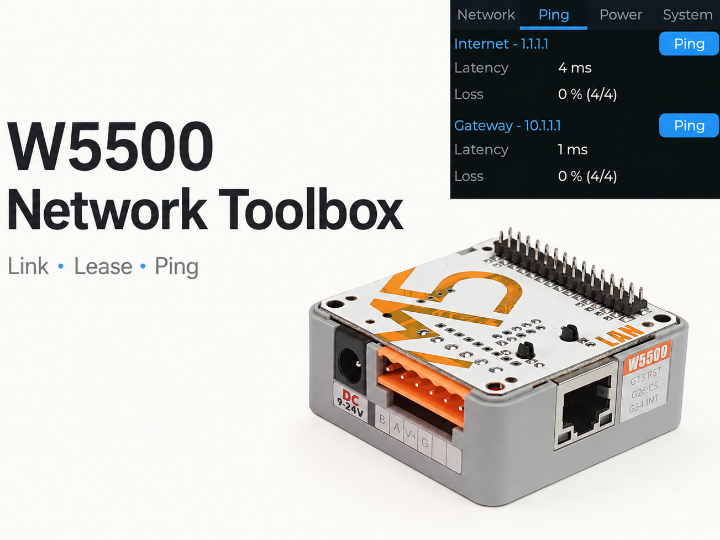

WIZnet - W5500
x 1

Ethernet controller in M5Stack Base LAN PoE v1.2. CoreS3 firmware shares its SPI bus with the LCD; CS GPIO9, reset GPIO7, interrupt GPIO14, 20 MHz SPI.
What Does the Ethernet Socket Give You?
Network Toolbox turns an M5Stack CoreS3 touchscreen and a W5500 Base LAN PoE v1.2 into a handheld Ethernet tester. Plug in a cable to see physical link status, the network address assigned to the device, and whether the gateway and internet answer ping requests. The display separates a disconnected cable from a working link that has not received an address.
Jesse Hills, an Open Home Foundation developer working on ESPHome in New Zealand, introduced the device configuration on 25 August 2026. Hills describes it as a “bench network tester.” ESPHome supplies the firmware framework; the CoreS3 runs the user interface and network software, while the W5500 connects that software to the Ethernet cable.
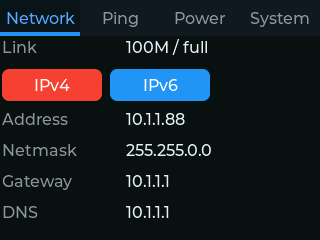
Original Network tab capture: Jesse Hills / Network Toolbox, Apache-2.0.
The practical first question is whether the problem sits at the cable, address assignment, or reachability stage. A link light alone cannot answer all three. Network Toolbox puts those stages on a small local screen, so a technician can inspect a socket without first configuring a laptop or connecting a monitoring service.
From Link to Lease to Reachability
The Network tab reports link speed and duplex, then the address, netmask, gateway and DNS server. DHCP, the service that lends an address and network settings to a newly connected device, is a separate step from establishing the electrical Ethernet link. An IPv4/IPv6 selector also exposes the IPv6 global and link-local addresses.
The firmware checks physical link state every 250 milliseconds. This matters when a cable is removed before DHCP completes: an ordinary connection event associated with getting an address can miss that transition. The YAML reads the Ethernet interface directly and refreshes the relevant fields when the physical link changes, keeping the screen useful even during failed address assignment.
Four tabs divide the workflow into Network, Ping, Power and System. Network Toolbox disables multicast DNS discovery and does not configure the Home Assistant API. That reduces background service traffic while the device examines an unfamiliar network. A user can still check firmware updates from the System tab, which also shows uptime, the MAC address and firmware version.
One SPI Bus, Two Demanding Devices
The CoreS3 display and W5500 share SPI, a local serial bus that lets the processor communicate with peripherals. The clock, output and input signals use GPIO36, GPIO37 and GPIO35; separate chip-select signals choose the display or Ethernet controller. The W5500 configuration selects GPIO9, resets through GPIO7 and receives interrupts through GPIO14, with the bus clock set to 20 MHz.
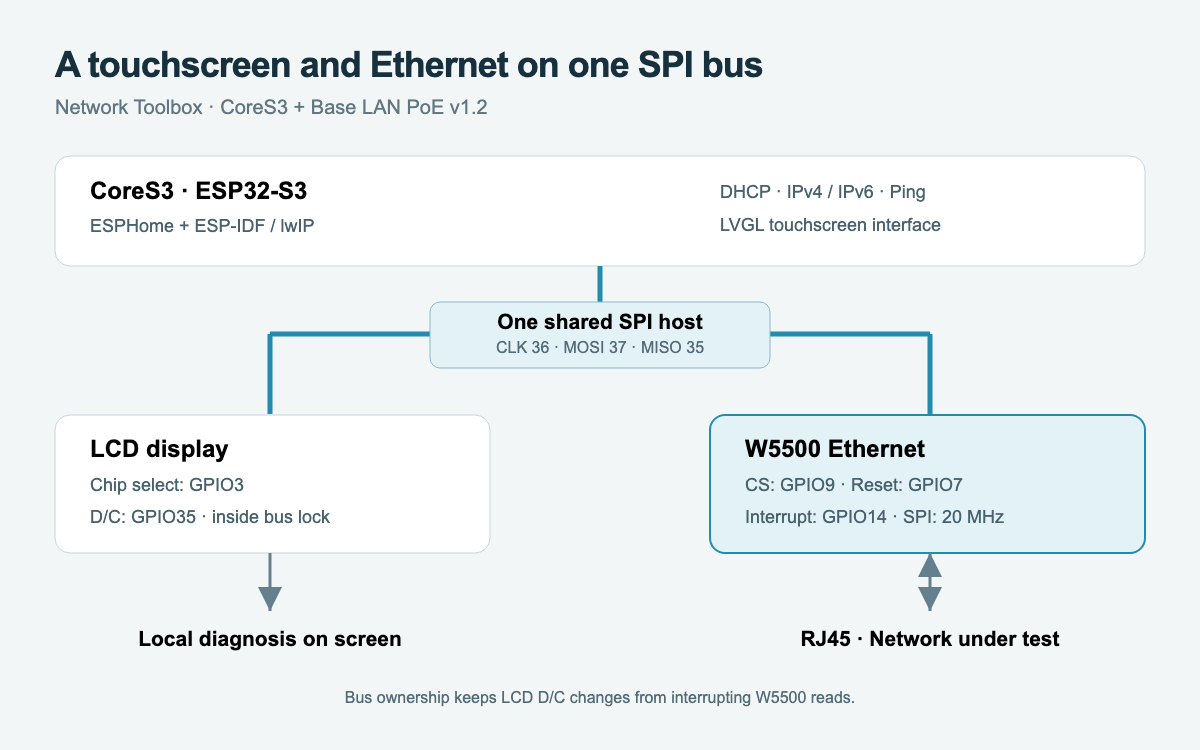
Generated technical diagram: the display and W5500 share the same hardware SPI bus.
Two upstream changes made this arrangement work in ESPHome. PR 18530 allows an Ethernet component to attach to an existing bus through spi_id. The W5500 can therefore use the same SPI host as the display, with transactions serialized by the ESP-IDF bus lock. The change merged on 25 August 2026.
The more surprising defect involved a single shared pin. GPIO35 serves as both SPI input and the LCD data/command signal. The display driver originally changed that signal outside the bus lock, allowing an LCD command to pull the line low while the W5500 was reading. Hills reported truncated Ethernet frames followed by watchdog resets. PR 18529, merged on 20 August, moved the signal changes inside the locked transaction and restored stable concurrent display and Ethernet operation.
The W5500 carries Ethernet frames between the cable and the ESP32-S3 over SPI. ESPHome uses the ESP-IDF Ethernet integration and the host lwIP network stack for addressing and network services. The IPv6 display therefore comes from the processor's software stack. The useful design lesson is precise bus ownership: a touchscreen update must respect an Ethernet transaction already in progress.
Ping Measures the Path Beyond the Socket
Ping sends a small echo request and measures whether the destination replies and how long the round trip takes. Network Toolbox tests both the local gateway and an internet target, making the distinction between local connectivity and a path beyond the router visible. Opening the Ping tab starts a four-probe test; individual buttons support continuing measurements.
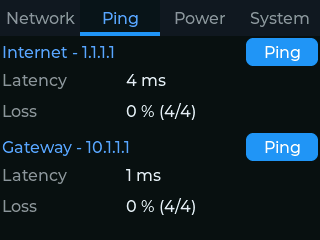
Original captured session: 4 ms to 1.1.1.1 and 1 ms to the gateway, with four replies each. Results depend on the network being tested.
The local C++ component wraps ESP-IDF's esp_ping service. Its loss calculation uses the number of probes requested, rather than only the number successfully transmitted. If a cable fails during a batch, unsent probes still count toward the requested test. That avoids presenting a shortened test as zero loss simply because the remaining packets never left the device.
The component also passes completed results back to the main application task before updating listeners. Together with the shared-bus fixes, this keeps display work and network work coordinated. The screen becomes a compact diagnostic sequence: establish link, inspect the lease, then compare gateway reachability with the internet path.
PoE Makes Power Part of the Diagnosis
Power over Ethernet, or PoE, carries power along the same cable used for networking. M5Stack's Base LAN PoE v1.2 provides the power conversion circuitry alongside its W5500 Ethernet controller. The CoreS3 can also operate from USB, so the direction of power across the M-Bus expansion connector changes with the supply arrangement.
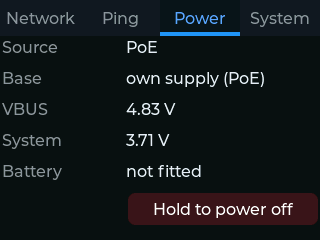
Original PoE screen capture: Network Toolbox reports supply source, base power direction and rail voltages.
Hills found that choosing the wrong direction could interrupt the board's own supply during startup. The firmware records its power decision in flash and preserves that state through peripheral initialization. The current YAML uses M5Stack's maintained AW9523B I/O-expander component, with its reset disabled so setup does not erase the power routing established earlier in boot.
The maker's hardware report covers USB and PoE boot behavior, link changes, DHCP and the ping interface. The Power tab then exposes those operating conditions to the person using the tester. Holding its power-off control fades the backlight for two seconds; releasing early cancels the shutdown.
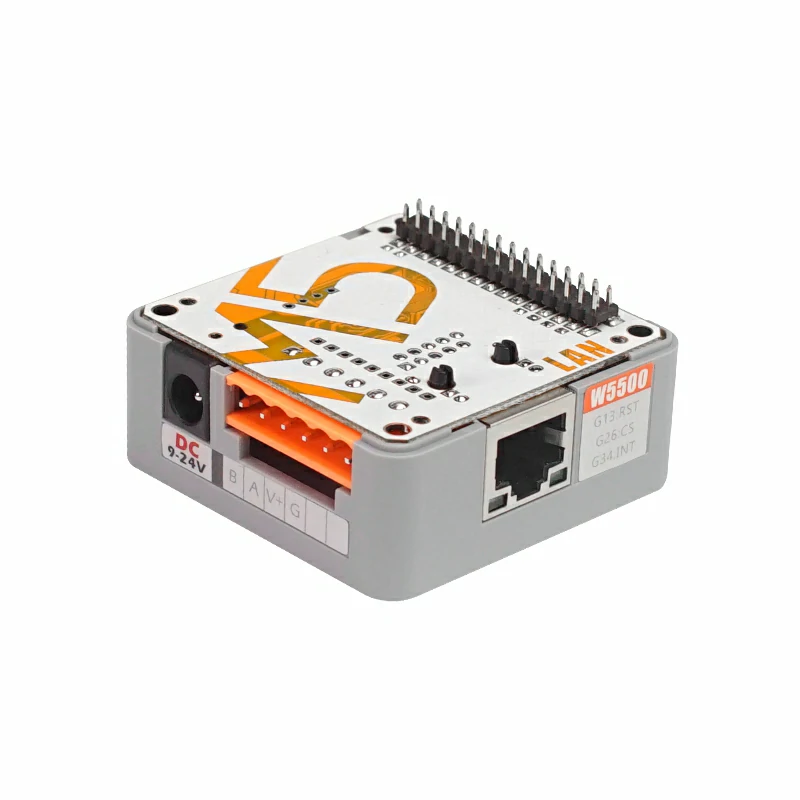
Base LAN PoE v1.2 hardware photograph: M5Stack. The CoreS3 touchscreen attaches above this base.
Installing and Extending the Tester
The public 26.8.1 release, published on 25 August, includes factory and update firmware, checksums and a debug ELF file. The project installation page provides a browser-based USB flasher backed by a live firmware manifest. Source builders can use the self-contained core-s3-poe-base.factory.yaml with ESPHome.
The repository's build workflow still selects ESPHome development code and pins the shared-bus contribution, although both upstream fixes have now merged. Keep that source configuration together when reproducing the build. The project is a connectivity instrument: its link, lease and ping views help locate a fault, while cable certification and throughput testing require other tools.
For a different kind of network investigation, the Maker article on a W5500 and ESP32-S3 industrial protocol scanner explores identifying protocols on an operational-technology network. Network Toolbox concentrates on the socket's basic service and reachability; the scanner offers a next step when the question concerns the devices and protocols behind it.
FAQ
Q. Which hardware does Network Toolbox currently target? The supplied configuration targets an M5Stack CoreS3 with Base LAN PoE v1.2, SKU K012-C-V12, using its W5500 Ethernet controller.
Q. Does the tester need Home Assistant? No. The firmware provides its interface locally on the touchscreen and leaves the Home Assistant API unconfigured.
Q. How can a W5500-based device show IPv6 addresses? The ESP32-S3 software network stack handles IPv6. The W5500 provides the Ethernet frame interface used by that stack.
Q. What does a working link with no lease mean? Physical Ethernet is established, but address assignment has not completed. The separate link and address fields make that state visible during troubleshooting.
Q. Is compiled firmware available? Yes. Release 26.8.1 includes factory and update images, and the project page offers USB installation from a browser.
-
Network Toolbox source
Complete device YAML, local ping component, screenshots and Apache-2.0 license.

-
CoreS3 factory configuration
W5500 shared SPI pin map, IPv6, UI and power sequence.
-
Hardware implementation and test report
Maker report covering USB and PoE boot, link changes, DHCP and ping.
-
Original display captures
Seven actual panel captures; unit identifiers blurred by the author.
-
Release 26.8.1
25 August 2026 release with factory and update images, ELF and checksums.
-
USB installation page
Browser installation and live firmware manifest.
-
ESPHome shared SPI Ethernet support
Merged 25 August 2026; lets Ethernet join an existing SPI bus.
-
LCD D/C bus-lock fix
Merged 20 August 2026; resolves interference with W5500 reads on CoreS3.
-
M5Stack Base LAN PoE v1.2
Official K012-C-V12 hardware documentation and photography.
-
Ping implementation
ESP-IDF ping wrapper and requested-probe loss accounting.
-
ESPHome ESP32 Ethernet implementation
ESP-IDF network-interface integration used by W5500 on ESP32.
-
Espressif W5500 MAC driver
Frame-based W5500 driver and MACRAW socket configuration.


