


Arduino W5500 Smart Factory Monitor for ThingsBoard
Two Arduino UNO nodes use W5500 Ethernet to send factory sensor data to ThingsBoard over HTTP.

Arduino - Arduino UNO
x 1


WIZnet - W5500
x 1

adafruit - DHT22 temperature-humidity sensor
x 1
Arduino - Arduino IDE
x 1
Two Arduino Ethernet Nodes for Factory Telemetry
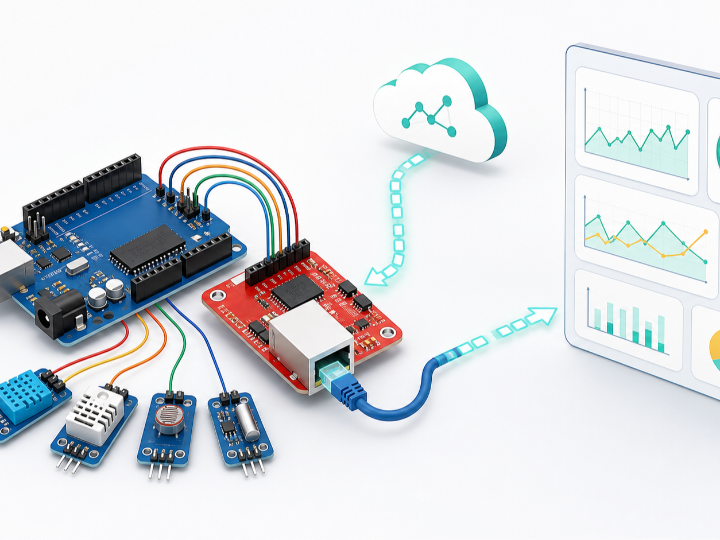
Tejaswhi K Y's Smart Factory Monitoring System is a recent educational IoT project that uses two Arduino UNO nodes and WIZnet W5500 Ethernet modules to send factory sensor data to ThingsBoard Cloud. Node 1 represents a production line monitor. Node 2 represents a warehouse monitor. Each node reads local sensors, builds a JSON telemetry payload, and sends it through wired Ethernet using HTTP.
The value of the project is its clarity. It does not try to hide the network path behind a large framework. The Arduino sketch shows the basic flow from sensor readout to W5500 Ethernet transport to a cloud dashboard. For makers and students learning industrial IoT, this is a practical starting point for understanding how a small MCU can publish telemetry without relying on Wi-Fi.
Production Line and Warehouse Monitoring
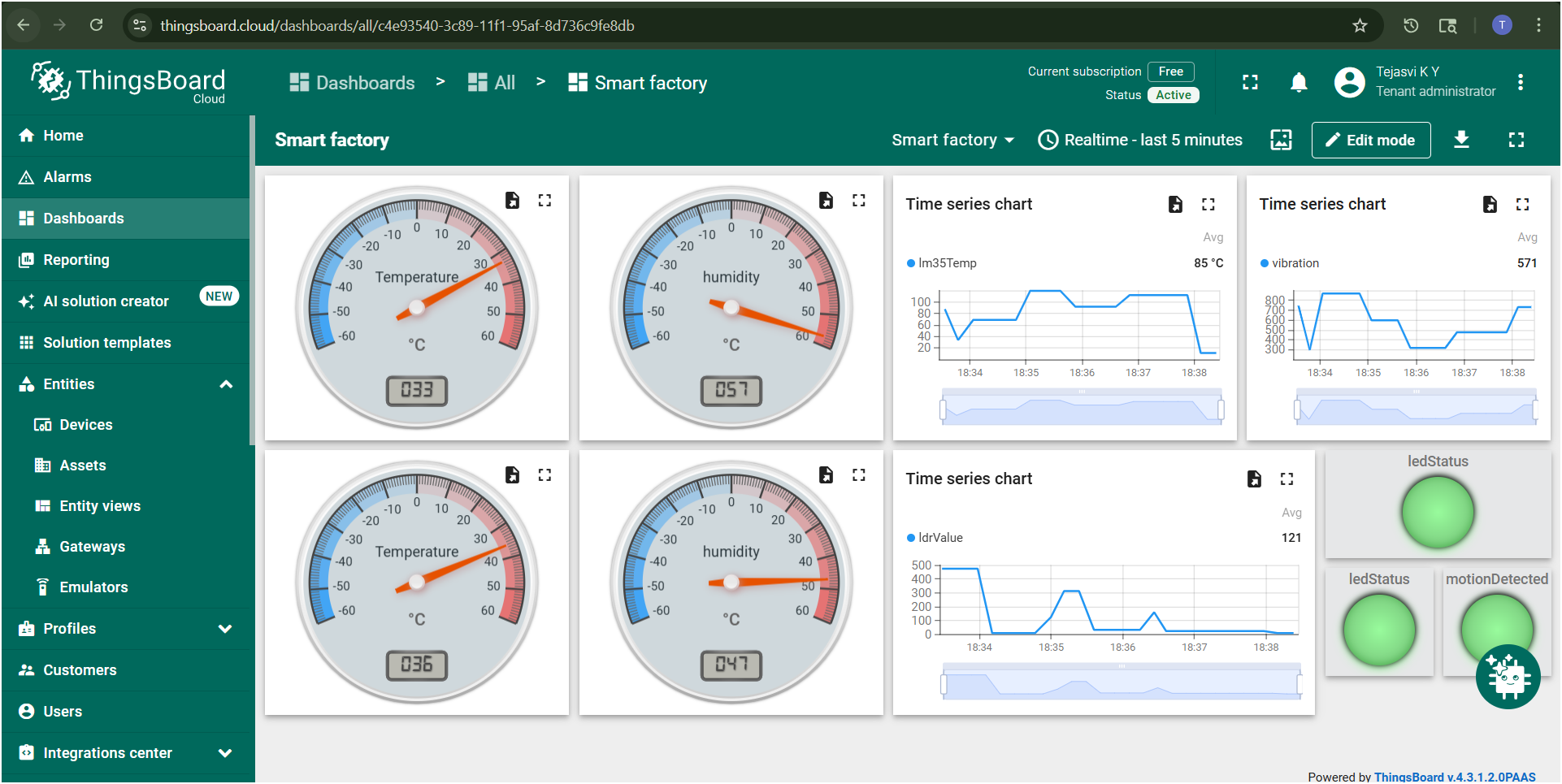
The repository separates the system into two sketches. node_1/node_1.ino is the production line node. It reads a DHT22 sensor for temperature and humidity, an LM35 analog temperature sensor, and a vibration input. It also drives an alert LED when the DHT22 temperature exceeds 35 degrees Celsius. The node sends temperature, humidity, lm35Temp, vibration, ledStatus, and systemStatus to ThingsBoard.
node_2/node_2.ino is the warehouse node. It reads a DHT22 sensor, an LDR light sensor, and a push button used as a motion or activity simulation input. The button toggles motionDetected, and the sketch mirrors that state on a system LED. Every five seconds, the node sends temperature, humidity, ldrValue, motionDetected, and systemStatus to ThingsBoard.
This split makes the project easy to follow. The two nodes share the same cloud telemetry pattern, but each one represents a different factory area and sensor set.
W5500 TCP Sockets Through Arduino Ethernet
The W5500 is used as the wired Ethernet interface for both Arduino nodes. The sketches include SPI.h and Ethernet.h, create an EthernetClient, connect to thingsboard.cloud on port 80, and send an HTTP POST request to the ThingsBoard telemetry API.
That means this project uses WIZnet's TCP/IP Offload Engine (TOE). The Arduino UNO does not implement a software TCP/IP stack in the sketch. Instead, the Arduino Ethernet library talks to the W5500, and the W5500 handles the TCP socket behavior in hardware. The Arduino code stays focused on reading sensors, formatting JSON, and sending application data.
Node 1 uses DHCP with Ethernet.begin(mac). Node 2 uses a static network configuration and explicitly checks the Ethernet hardware status. In node_2/node_2.ino, the sketch prints W5500 when the Ethernet library detects that chip:
Ethernet.init(ETH_CS);
Ethernet.begin(mac, ip, dns, gateway, subnet);

if (Ethernet.hardwareStatus() == EthernetNoHardware) {
  Serial.println("Ethernet shield not found");
  while (true) {}
}
The telemetry request is simple HTTP. The source code posts JSON to /api/v1/{token}/telemetry with Content-Type: application/json. The README mentions MQTT as conceptual understanding, but MQTT is not implemented in the current source code.
PICSimLab Before Hardware Deployment
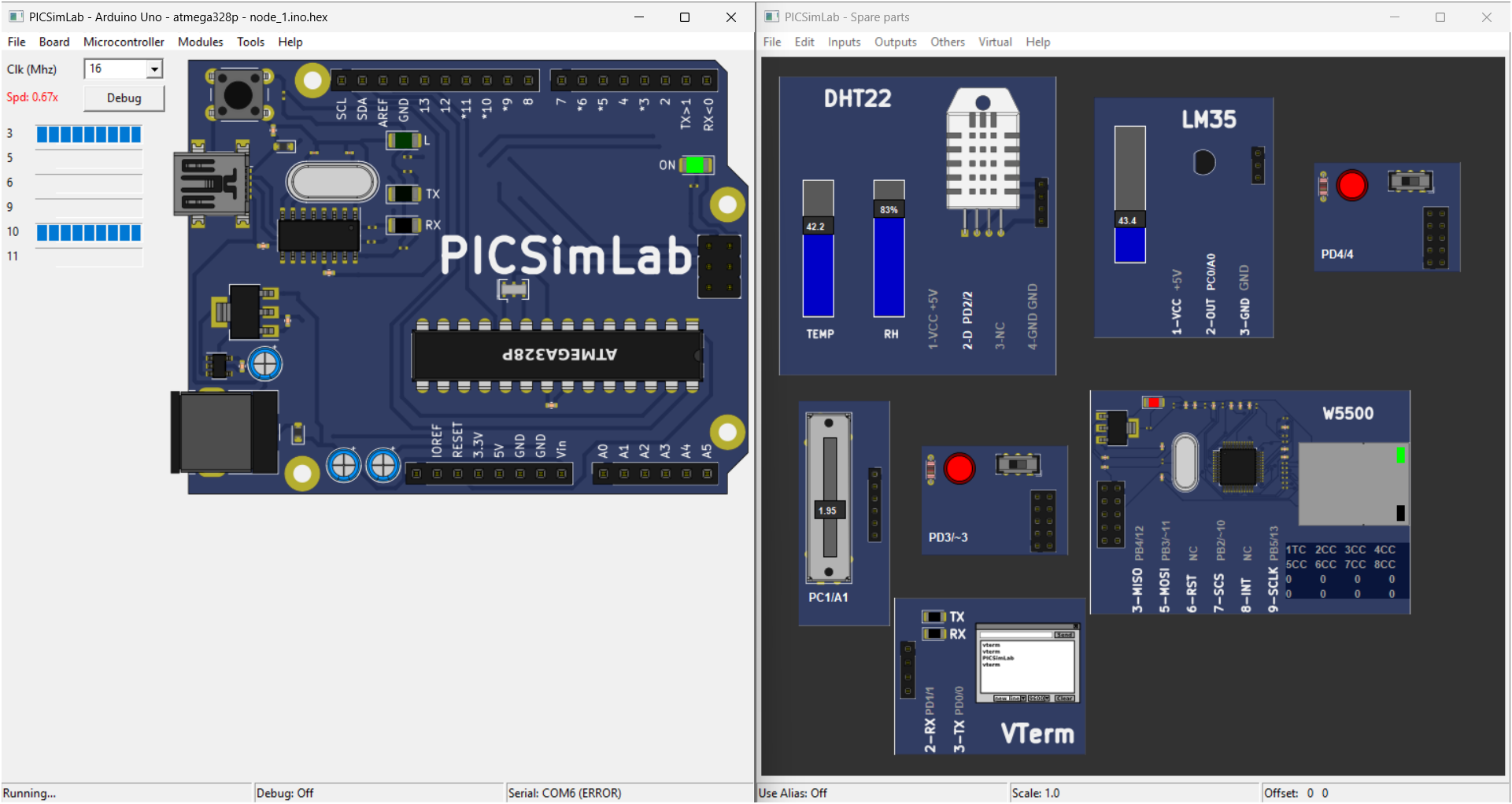
Another useful part of the repository is the PICSimLab simulation setup. The build folders include .pcf files for Arduino UNO simulation, and the screenshots show W5500 modules connected to the simulated circuits. This makes the project suitable for classroom or lab use where physical hardware may not always be available.
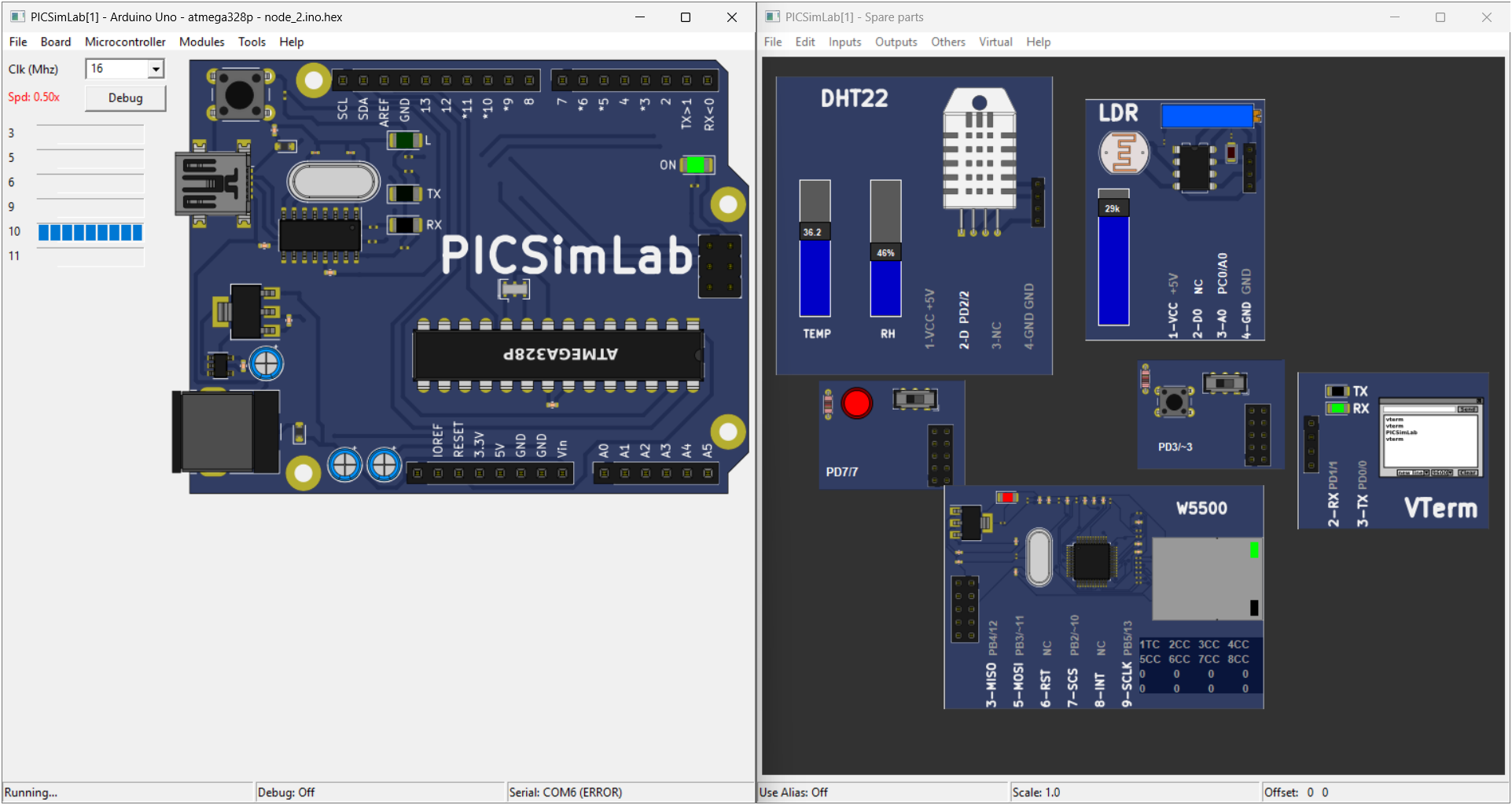
The simulation does not make the project production-ready by itself. It does make the data path easier to test: sensor values change in PICSimLab, serial output confirms local readings and HTTP responses, and the ThingsBoard dashboard visualizes the incoming telemetry.
Repository Structure
| File or Folder | Role |
|---|---|
node_1/node_1.ino | Production line monitoring sketch |
node_2/node_2.ino | Warehouse monitoring sketch |
node_1/build/arduino.avr.uno/node1.pcf | PICSimLab configuration for Node 1 |
node_2/build/arduino.avr.uno/node2.pcf | PICSimLab configuration for Node 2 |
node1_screenshots/ | Node 1 simulation, serial, and dashboard screenshots |
node 2 screenshots/ | Node 2 simulation, serial, and dashboard screenshots |
smart-factory.pdf | Project slide document |
demo-video.md | Link to the project demo video |
The code is intentionally small. There is no RTOS, gateway layer, local database, or industrial protocol such as Modbus. This is best understood as a W5500-based IoT telemetry example for smart factory education and prototyping.
Notes for Reuse
Before reusing the repository, replace the ThingsBoard access tokens in the Arduino sketches with your own device tokens. The current code also uses plain HTTP on port 80. That is acceptable for a simple lab demonstration, but a deployed system should consider secure transport, token management, and cloud-side rule definitions.
The README describes ThingsBoard Rule Engine alerts, including email and Telegram notifications. The Arduino source sends telemetry and local LED states, but the repository does not include exported ThingsBoard rule chains. Those alert features should be treated as dashboard or cloud configuration work rather than firmware features.
FAQ
Q: What does this project use the W5500 for?
A: The W5500 provides wired Ethernet connectivity for two Arduino UNO monitoring nodes. Each node uses Arduino Ethernet EthernetClient to send HTTP telemetry to ThingsBoard Cloud.
Q: Does this project use WIZnet TOE?
A: Yes. The sketches use the Arduino Ethernet library with a W5500 module, so TCP socket handling is offloaded to the W5500 hardware. The Arduino code only builds JSON payloads and writes HTTP request data through EthernetClient.
Q: Is this a hybrid Ethernet and wireless project?
A: No. The source code does not initialize or use Wi-Fi, BLE, LoRa, Zigbee, or any other wireless interface. The communication path is wired Ethernet through W5500.
Q: Does the current code use MQTT?
A: No. The README mentions MQTT as conceptual understanding, but the implemented telemetry path is HTTP POST to the ThingsBoard API.
Q: Is this ready for industrial deployment?
A: It is better viewed as an educational smart factory monitoring prototype. A production system would need stronger security, token handling, calibrated sensors, fault handling, and exported cloud alert rules.


