


How to Build a DSP-Enabled Network Audio Amplifier with W5500 on Louder-ESP32-Pro?
Louder ESP32 Pro

WIZnet - W5500
x 1

Summary
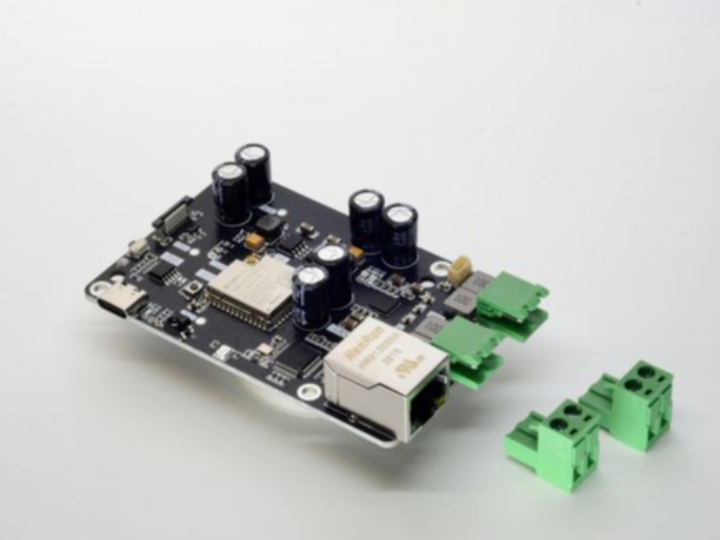
Louder-ESP32-Pro is an ESP32-S3-based network audio and amplifier board designed to drive passive speakers while performing audio processing inside a TAS5825M smart amplifier. Its main audio path uses I2S for digital audio, I2C for amplifier control, and onboard DSP for equalization, dynamic-range control, limiting, and speaker protection. An optional WIZnet W5500 module adds wired Ethernet for installations where stable network streaming is preferable to Wi-Fi.
What the Project Does
The Louder-ESP32-Pro combines an ESP32-S3, external PSRAM, a TAS5825M digital-input Class-D amplifier, USB-C Power Delivery, display support, infrared input, RGB indication, and active cooling control on a board shaped for Raspberry Pi 5 cooling hardware.
The signal path is straightforward:
- The ESP32-S3 receives or decodes a network audio stream.
- Audio samples are sent to the TAS5825M over I2S.
- The ESP32 configures volume, gain, mixer routing, and DSP parameters over I2C.
- The TAS5825M processes and amplifies the signal.
- The amplified stereo or mono output is connected directly to passive speakers.
The TAS5825M is central to the design. It provides digital volume and gain control, parametric equalization, FIR filtering, dynamic-range compression, automatic gain limiting, and speaker-oriented functions such as Smart Excursion, Smart Thermal, Smart Bass, and SmartEQ. The project documentation identifies a 15-biquad equalizer, a 128-tap FIR stage, three-band DRC, and AGL support.
The board uses an ESP32-S3 running at 240 MHz with 8 MB of flash and external PSRAM configured at 80 MHz in the current ESPHome configuration. This gives the software enough memory for network buffering, media pipelines, graphical interfaces, and audio services without moving the main DSP workload into the microcontroller.
Power delivery is also part of the audio design. The board accepts USB-C power, but the project recommends a 20 V, 3.25 A, 65 W supply when full output capability is required. Lower-voltage USB-PD supplies work, although available speaker power is correspondingly reduced.
Where WIZnet Fits
The Louder-ESP32-Pro supports a WIZnet W5500 SPI Ethernet module as an optional network interface. The W5500 is not part of the audio conversion or DSP chain. Its role is to provide the wired transport used to receive audio streams, Home Assistant commands, control traffic, or synchronized playback data before the ESP32 sends decoded PCM audio to the TAS5825M.
This distinction matters architecturally:
- W5500: Ethernet link, hardware TCP/IP sockets, packet buffering, and wired network transport.
- ESP32-S3: Application logic, stream decoding, media buffering, user interfaces, and I2S audio generation.
- TAS5825M: Audio mixing, filtering, dynamics processing, protection processing, digital-to-power conversion, and speaker drive.
The repository documents a dedicated W5500 header and ESP32-S3 pin assignment. It also provides configurations for Squeezelite-ESP32 and ESPHome. The ESP32-S3 connection uses GPIO11, GPIO12, and GPIO13 for SPI, with GPIO10 for chip select, GPIO6 for interrupt, and GPIO5 for reset.
A wired interface is useful when the amplifier is installed permanently in a speaker cabinet, rack, workshop, or multiroom system. Ethernet removes RF coverage and congestion from the audio transport path. The W5500 also handles TCP/IP socket processing and provides 32 KB of internal packet memory across eight hardware sockets, reducing the networking work that would otherwise compete with audio decoding and interface tasks on the ESP32-S3.
The W5500 remains optional. The default ESPHome file enables Wi-Fi, while Ethernet is included as a commented package that the developer activates when the hardware module is fitted.
Implementation Notes
The repository contains a board-specific ESPHome configuration for Louder-ESP32-Pro. It defines the I2S audio path and the I2C control interface used by the TAS5825M.
File: firmware/esphome/10-louder-esp32-pro/louder-esp32-s3-pro-idf.yaml
# I2S audio pins
i2s_lrclk_pin: GPIO15
i2s_bclk_pin: GPIO14
i2s_dout_pin: GPIO16

# TAS5825M
tas58xx_variant: TAS5825M
tas58xx_enable_pin: GPIO17
i2c_sda_pin: GPIO8
i2c_scl_pin: GPIO9
The three I2S signals carry digital audio from the ESP32-S3 to the amplifier. The I2C bus is separate because it controls the TAS5825M registers rather than transporting PCM samples. This separation allows the media pipeline to continue sending audio while software changes volume, filters, mixer modes, or protection settings.
The same configuration assigns the W5500 control pins and exposes the Ethernet package:
# Ethernet pins
eth_cs_pin: GPIO10
eth_interrupt_pin: GPIO6
eth_reset_pin: GPIO5

# Optional Ethernet
# - firmware/esphome/packages/ethernet-w5500.yaml
The W5500 shares the board’s SPI signals with other peripherals. The configuration comments specifically warn that enabling Ethernet may require excluding the OLED package to free the SPI bus. The W5500 package is commented out by default because Wi-Fi is the standard configuration.
For Squeezelite-ESP32, the repository provides the corresponding runtime settings:
eth_config = model=w5500,cs=10,speed=20000000,intr=6,rst=5
spi_config = mosi=11,clk=12,host=2,miso=13
This configures the W5500 for a 20 MHz SPI clock and identifies the complete SPI and control-pin mapping. The settings exist so that the streaming firmware can initialize the optional Ethernet module without changing the board firmware source.
Practical Tips / Pitfalls
- Match the supply to the speakers. A 65 W USB-C adapter provides headroom, but using a high supply voltage with low-power speakers increases the risk of overdriving them.
- Add suitable Raspberry Pi 5-compatible cooling hardware for sustained high-output operation. The board supports a four-pin fan with software-controlled speed and tachometer feedback.
- Treat DSP presets as speaker-specific. EQ, DRC, bass enhancement, and excursion control should be tuned for the driver, enclosure, impedance, and expected listening level.
- Confirm BTL or PBTL operation before connecting speakers. Stereo BTL and single-channel PBTL use different output wiring and mixer configurations.
- Keep the W5500 SPI wiring short and verify chip-select, interrupt, and reset assignments. The documented ESP32-S3 mapping is CS GPIO10, interrupt GPIO6, and reset GPIO5.
- Check SPI peripheral conflicts before enabling Ethernet. Display or OLED configurations may use the same SPI bus and can require package or chip-select changes.
- Implement recovery for stalled streams, link loss, and amplifier faults. Network reconnection should not leave the TAS5825M enabled with invalid or repeated audio samples.
FAQ
Q: Why use the W5500 with Louder-ESP32-Pro?
The W5500 provides wired Ethernet without requiring the ESP32-S3 to run the complete TCP/IP data path in software. This is useful for fixed network speakers, synchronized playback systems, and Home Assistant installations where Wi-Fi coverage or interference could interrupt streaming. It does not improve the DAC directly; it improves the reliability of the transport feeding the audio pipeline.
Q: How does the W5500 connect to the ESP32-S3?
It connects over SPI using GPIO11 for MOSI, GPIO12 for the clock, and GPIO13 for MISO. The board configuration uses GPIO10 for chip select, GPIO6 for the interrupt signal, and GPIO5 for reset. The repository’s Squeezelite configuration sets the SPI clock to 20 MHz.
Q: What role does the W5500 play in this product?
The W5500 receives Ethernet frames and provides TCP/IP socket transport for audio and control traffic. The ESP32-S3 still decodes the stream and generates I2S audio, while the TAS5825M performs DSP and drives the speakers. The W5500 is therefore the wired network front end, not the audio processor.
Q: Can beginners use Louder-ESP32-Pro with Ethernet?
A beginner familiar with ESPHome can use the supplied board configuration, but the hardware is more demanding than a basic ESP32 audio board. The user must understand speaker impedance, amplifier output wiring, USB-PD power limits, SPI pin assignments, and the difference between BTL and PBTL operation. Initial testing should be performed at low gain with an appropriate power supply.
Q: How does the W5500 option compare with Wi-Fi?
Wi-Fi requires no additional module and is appropriate for portable or easily relocated speakers. The W5500 requires a cable and occupies the SPI interface, but it provides a physically stable link that is less sensitive to radio congestion, walls, and access-point roaming. For permanent multiroom or automation installations, Ethernet is generally easier to diagnose and keep consistent.