


Smart Factory: Open-Source Industry 4.0 Robot Arm with YOLO Vision and Siemens PLC Integratiion
smart-factory-robot-arm

WIZnet - W5500
x 1

Introduction
Industrial automation has long been the domain of expensive, proprietary systems — PLC programming environments that cost thousands of dollars in licenses, robot controllers that only talk to approved hardware, and vision systems that require specialist integrators. The gap between what a small manufacturer, a university lab, or an independent engineer can afford and what a proper Industry 4.0 production cell requires has historically been wide.
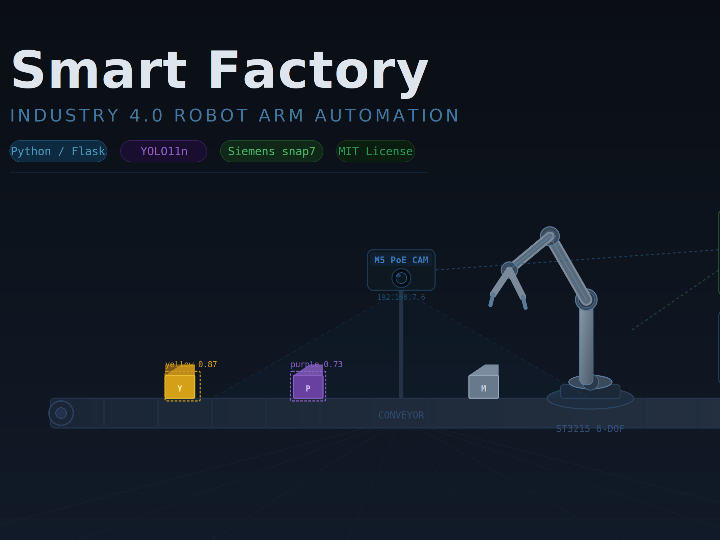
Smart Factory is an open-source project by Hadefuwa that bridges that gap. It is a complete smart factory automation system built around a Raspberry Pi 5, a 6-DOF ST3215 servo robot arm, a Siemens S7-1200 PLC, an M5Stack PoE camera, and a YOLO11n cube detection model — all integrated through a Python Flask backend with a web-based progressive web app (PWA) interface. The system runs entirely on a 192.168.7.x industrial subnet with no Windows PC required in production, and it is licensed under MIT.
The project is not a simulation or a demonstration. It is a production-deployed system with real-time PLC closed-loop control, sub-second arm latency, an always-on computer vision pipeline that writes classification results directly into PLC data blocks, and documented solutions to real hardware problems encountered during deployment — including servo bus corruption, EEPROM motor protection faults, and PLC write queue saturation.
Project Description
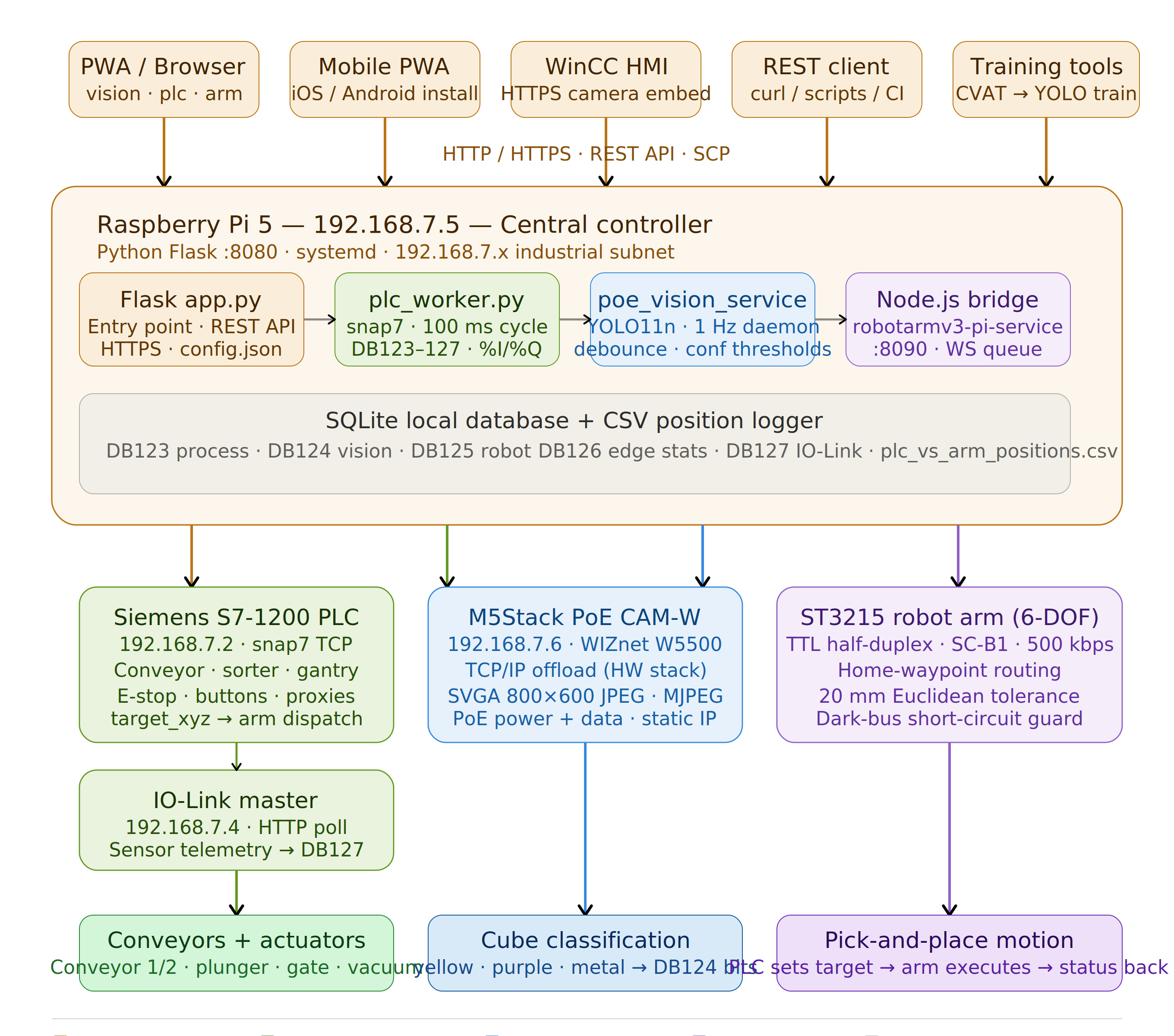
Smart Factory implements a full Industry 4.0 automation cell with four tightly integrated subsystems: robot arm control, PLC communication, computer vision, and a web interface. All of them are orchestrated by a single Flask application running on the Raspberry Pi.
The hardware layer
The network is organised around a fixed industrial subnet. The Raspberry Pi 5 sits at 192.168.7.5 as the central controller. A Siemens S7-1200 PLC at 192.168.7.2 handles the main automation logic — conveyor control, sorting decisions, pick-and-place sequencing. An IO-Link master at 192.168.7.4 aggregates sensor data via HTTP polling. An M5Stack PoE CAM-W at 192.168.7.6 provides the MJPEG video stream for the vision pipeline. The PoE architecture handles both power and data over a single cable run to the camera, keeping wiring clean.
The robot arm is a 6-DOF ST3215 servo arm, communicating with the Pi over a single-wire TTL half-duplex serial bus at 500 kbps via an SC-B1 adapter. A Node.js bridge service (robotarmv3-pi-service, port 8090) handles the low-level servo protocol, exposing a WebSocket interface to the Flask backend. The Flask backend (app.py, port 8080) is the integration hub — it talks to the PLC via snap7, manages the vision pipeline, serves the web UI, and coordinates arm motion.
Robot arm control
The PLC drives arm motion by writing target XYZ coordinates into DB125. The Flask backend polls the PLC worker cache every 50 ms, detects coordinate changes, and dispatches movement commands to the Node.js bridge. A home-waypoint routing state machine ensures the arm passes through the home position before moving to a new target — a safety requirement in pick-and-place sequences. The bridge applies a 20 mm Euclidean tolerance as the acceptance criterion for arrival.
The arm's servo bus runs at 500 kbps (down from 1 Mbps, after a J5 wrist-pitch bus corruption investigation revealed marginal signal integrity at the higher rate). A dark-bus short-circuit prevents the status polling from hanging on unresponsive joints. A background CSV logger writes PLC target versus actual arm XYZ every 0.5 seconds to /home/pi/sf2/logs/plc_vs_arm_positions.csv for diagnostics and tuning.
PLC communication
PLC integration uses the python-snap7 library, which wraps the Snap7 C library for S7-1200/1500 communication. The plc_worker.py module runs a continuous read/write cycle targeting 100 ms throughput. It reads five data blocks: DB123 (main process state), DB124 (vision result bits), DB125 (robot arm bridge), DB126 (edge device stats), and DB127 (IO-Link telemetry). It also reads raw %I and %Q areas directly — digital inputs covering E-stop channels, reset/start/stop buttons, light sensors, proximity sensors, gantry limit switches, and conveyor outputs.
Write idempotency is a key engineering decision throughout the system. The PLC worker tracks last-written values for every tag and skips no-op writes. This keeps the write queue short and the cycle time predictable — a lesson learned after queue saturation dragged cycle time from a 150 ms baseline to 1500–2000 ms before the fix.
Computer vision pipeline
The vision system runs as an always-on daemon thread inside the Flask process, executing at 1 Hz regardless of whether any browser is connected. Each cycle:
- Fetches a raw JPEG from the M5Stack camera at
http://192.168.7.6/capture - Crops and masks the frame (the right 30% is painted black by default, to eliminate background clutter without changing the 800×600 input shape)
- Runs YOLO11n inference with per-class confidence thresholds: 0.35 for yellow cubes (permissive, as the model under-detects them), 0.50 for purple, 0.60 for metal
- Applies a keep-box filter to drop detections whose centre falls in the masked region
- Applies an N-consecutive-cycles debounce (default N=2) so single-cycle false positives never reach the PLC
- Writes the result into DB124:
yellow_cube_detected(DBX0.6),purple_cube_detected(DBX0.7),metal_cube_detected(DBX1.0)
A light-sensor cross-check on the vision page adds an "AI missed it" warning when %I0.5 reports an object present but YOLO returned zero detections — a practical guard against untrained object classes appearing on the conveyor.
Training data is captured through the same camera pipeline used for inference, via a "Capture Training Image" button that downloads the loop's most recent cached JPEG. Annotation is done in CVAT using the Ultralytics YOLO Detection 1.0 export format. Training runs locally with train_cube_detector.py, taking around 10 minutes on CPU for a small dataset. The resulting cube_detector.pt is SCP'd to the Pi and picked up on the next service restart.
Web interface and PWA
The frontend is a Progressive Web App installable on phone or desktop. It includes dedicated pages for the vision monitor (vision.html), PLC data block editing and raw I/O inspection (plc-setup.html), robot arm control (robot-arm.html), RFID, IO-Link, and a hotspot status page. The backend exposes a full REST API covering vision results, annotated frames, PLC data blocks, raw I/O reads, config get/set, robot status, and camera access.
HTTPS is supported via a self-signed certificate generator (generate_ssl_cert.sh), required for embedding camera streams in Siemens WinCC Unified HMI panels.
A Wi-Fi access point mode (setup_wifi_access_point.sh) turns the Pi into its own hotspot (SSID: SmartFactory), allowing phones and tablets to connect directly without a router — useful for field commissioning.
WIZnet's Role in the Project
Networked connectivity is central to every subsystem in Smart Factory, and the most hardware-visible example of that is the M5Stack PoE CAM-W camera module that drives the YOLO vision pipeline.
The M5Stack PoE CAM-W is built around the WIZnet W5500 Ethernet controller — the same hardwired TCP/IP offload chip used in CroPDUster and related projects. The camera firmware (M5PoECAM_SmartFactory.ino, v1.1.0) uses the ETH.h library to initialise the W5500 and assigns a static IP address of 192.168.7.6 on the industrial subnet. The camera then runs a lightweight HTTP server that serves:
/capture— a raw JPEG snapshot (the endpoint the Flask backend polls every second for YOLO inference)- An MJPEG stream endpoint for live monitoring
The W5500's hardwired TCP/IP stack means the camera's ESP32 microcontroller is entirely free for image capture and JPEG compression — no CPU cycles are consumed managing Ethernet frames, IP routing, or TCP sessions. This is what allows the camera to sustain continuous JPEG delivery at the 1 Hz rate the vision pipeline requires while simultaneously serving the MJPEG stream to the web interface.
The PoE capability is equally important in a factory context. The camera receives both power and Ethernet data over the same cable via a PoE splitter, eliminating the need for a separate power supply at the camera mounting point. In a production cell where the camera may be mounted on a gantry or an overhead bracket, this simplifies installation significantly.
The static IP assignment (192.168.7.6) is set in the camera firmware and is part of the overall subnet design — every device in the system has a fixed address, and the Flask backend's config.json references them all. Because the W5500 handles DHCP and static IP configuration entirely in hardware, the camera boots directly into a known network state without any OS-level networking stack to initialise.
One practical note from the project documentation: the camera's HTTP server is single-client. The Flask backend detection loop owns the connection slot, so the /api/poe-camera/stream endpoint serves a cached frame rather than opening a second connection to the camera — a design detail that follows directly from the W5500's socket architecture, which allocates a fixed number of hardware TCP sockets.
Why This Project Matters to Other Developers
Smart Factory addresses a set of problems that industrial IoT and robotics developers encounter regularly, and it does so with unusual completeness and honesty — including documenting the failures and fixes, not just the working end state.
It is a real Industry 4.0 integration, not a simulation. The combination of Siemens S7-1200 PLC communication (via snap7), a 6-DOF servo robot arm on a half-duplex TTL bus, a YOLO vision pipeline writing directly into PLC data blocks, and a web HMI with WinCC integration covers exactly the stack a small-to-medium manufacturer or an engineering school needs to teach and prototype modern automation. None of these components are simulated.
The latency engineering is instructive. The Robot Arm Latency Overhaul section of the README is a rare and valuable piece of documentation: it identifies eight separate root causes for a 2–3 second end-to-end latency problem and explains precisely how each was fixed. Write queue saturation, a post-move creep pass blocking the command queue, dark-bus polling hang, flip-flopping home-waypoint routing logic, stall handling — these are the kinds of problems every robotics integrator eventually hits, and having them documented with before/after timings is genuinely useful.
The vision pipeline architecture is practical. Running YOLO inference as an always-on backend daemon that writes results directly to PLC bits — independent of the browser, independent of any frontend polling — is the correct production architecture for machine vision in automation. The per-class confidence threshold system, the N-consecutive-cycles debounce, and the light-sensor cross-check that catches untrained classes are all production engineering decisions rather than demo shortcuts.
The PLC integration shows how to work with Snap7 correctly. Idempotent writes, cache-compare guards, quantised float comparisons to prevent noise-driven writes, and a tightly bounded 100 ms cycle time are the kinds of details that matter in a real PLC integration and are rarely covered in tutorials.
The project is honest about its hardware limitations. The J5 wrist-pitch bus corruption investigation documents a real signal-integrity problem on the servo bus — incorrect RS-485 termination concepts applied to a TTL half-duplex bus — and walks through the diagnosis and fix. The EEPROM motor protection overload documentation explains how to lift the protection bits to keep a weak joint crawling to its goal rather than declaring a fault. These are the kinds of hard-won lessons that save other developers hours of debugging.
MIT licensing means the project is usable in both commercial and non-commercial applications without restriction.
Getting Started
The system requires a Raspberry Pi (3, 4, or 5), a Siemens S7-1200 PLC (optional for standalone use), an ST3215 6-DOF servo arm with SC-B1 serial adapter, and an M5Stack PoE CAM-W for the vision pipeline.
# Clone and set up git clone https://github.com/hadefuwa/smart-factory-robot-arm
cd smart-factory-robot-arm/pwa-dobot-plc/backend
python3 -m venv venv
source venv/bin/activate
pip install -r requirements.txt
 # Configure hardware nano config.json   # set dobot.port and plc.ip  # Run python3 app.py
Open http://<pi-ip>:8080 in a browser. For WinCC HMI integration, generate the self-signed SSL certificate first:
chmod +x deploy/generate_ssl_cert.sh
./deploy/generate_ssl_cert.sh <your-pi-ip>
For production deployment, register both the Flask backend and the Node.js arm bridge as systemd services — the README includes ready-to-use unit file templates.
The full source, hardware documentation, PLC memory maps, and the YOLO training guide are available at github.com/hadefuwa/smart-factory-robot-arm under the MIT license.