


How to Bridge a ROS2 Jazzy Rover to Wired Ethernet with W5500 on ESP32?
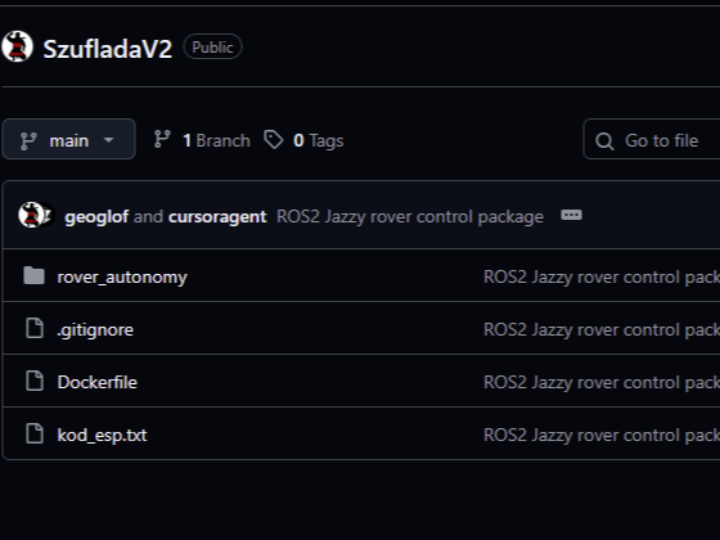
SzufladaV2 is a ROS2 Jazzy rover control stack that splits responsibilities cleanly: an ESP32 handles low-level motor I/O and sensors

WIZnet - W5500
x 1


Espressif - ESP32
x 1
Summary
SzufladaV2 is a ROS2 Jazzy rover control stack that splits responsibilities cleanly: an ESP32 handles low-level motor I/O and sensors, while a ROS2 package (rover_autonomy) runs the higher-level autonomy pipeline. A WIZnet W5500 module gives the ESP32 a wired Ethernet link, and a single ROS2 “MQTT bridge” node becomes the only network boundary for the entire ROS graph—making the rover architecture easier to debug, safer to extend, and more realistic for industrial mobile robotics where Wi-Fi is often the first thing to fail.
What the Project Does
At a functional level, the system is a small rover platform that can be teleoperated and extended into autonomy using standard ROS2 patterns:
- On the rover (ESP32): the firmware drives two motors via PWM, reads wheel encoders, and measures obstacle distance using an ultrasonic sensor. It publishes sensor data and accepts motor/LED commands over MQTT.
- On the ROS2 computer: the
rover_autonomypackage provides the “robot software” side, including a dedicated MQTT bridge node that maps MQTT topics to ROS2 topics (and back), plus a/cmd_velconversion node that turns Twist commands into left/right PWM outputs for the motors. - Navigation pipeline hooks: the repo includes launch files for SLAM (slam_toolbox) and Nav2 navigation with a pre-built map, which is the standard path from “drives around” to “builds a map and navigates to goals.”
Industrial usefulness comes from the pattern, not the exact rover chassis: this is a practical reference for building an AMR/inspection rover where you want a stable “control plane” (motor/sensor MCU) and a swappable “autonomy plane” (ROS2), with a network seam (MQTT) you can audit, log, and harden.
Where WIZnet Fits
The project uses a WIZnet W5500 as the ESP32’s wired Ethernet interface. In the ESP32 firmware, W5500 is explicitly called out, reset via a GPIO, initialized on a chip-select pin, and checked for presence before continuing—exactly what you want in a field device that should fail fast when the network interface is missing or miswired.
W5500 is a good fit for industrial rover networks because it provides a hardware TCP/IP offload model (socket-based Ethernet) over SPI, with 8 sockets and 32 KB internal buffer memory. This reduces the amount of networking complexity you have to carry in the MCU application code and helps keep timing predictable when the MCU is also doing motor control and sensor sampling.
What is ROS2 Jazzy?
A "ROS 2 Jazzy rover" is a mobile robot whose software architecture is built using the "Jazzy Jalisco" release of the Robot Operating System 2 (ROS 2) framework.
To fully understand this, it's best to break it down into its three component parts:
ROS 2 (The Framework)
Robot Operating System 2 is not a real operating system like Windows or Linux. It is a flexible middleware framework—a collection of software libraries and tools that helps developers build robot applications.
- What it does: It handles complex, low-level tasks like hardware abstraction, device drivers, message-passing between different software components, and package management.
- Why it matters: It allows engineers to focus on high-level robotics problems (like navigation, computer vision, or AI) instead of reinventing the wheel for every new robot.
Jazzy Jalisco (The Specific Release)
Like many software projects (like Android or Ubuntu), ROS 2 releases new versions on a predictable schedule. Each release has an alphabetical name, usually combining an adjective and a type of turtle.
- Jazzy Jalisco is the official name of the ROS 2 release that came out in May 2024.
It succeeded "Iron Irwini" and preceded the upcoming "K Turtle" release. - Key Detail: Jazzy Jalisco is a Long Term Support (LTS) release.
This means it is supported with security updates and bug fixes for five years (until May 2029). For someone building a serious, long-term robotics project like a rover, an LTS release is usually the preferred choice because of its stability
A "ROS 2 Jazzy rover" is a mobile robot whose software architecture is built using the "Jazzy Jalisco" release of the Robot Operating System 2 (ROS 2) framework.
To fully understand this, it's best to break it down into its three component parts:
1. ROS 2 (The Framework)
Robot Operating System 2 is not a real operating system like Windows or Linux. It is a flexible middleware framework—a collection of software libraries and tools that helps developers build robot applications.
What it does: It handles complex, low-level tasks like hardware abstraction, device drivers, message-passing between different software components, and package management.
Why it matters: It allows engineers to focus on high-level robotics problems (like navigation, computer vision, or AI) instead of reinventing the wheel for every new robot.
2. Jazzy Jalisco (The Specific Release)
Like many software projects (like Android or Ubuntu), ROS 2 releases new versions on a predictable schedule. Each release has an alphabetical name, usually combining an adjective and a type of turtle.
Jazzy Jalisco is the official name of the ROS 2 release that came out in May 2024.
It succeeded "Iron Irwini" and preceded the upcoming "K Turtle" release. Key Detail: Jazzy Jalisco is a Long Term Support (LTS) release.
This means it is supported with security updates and bug fixes for five years (until May 2029). For someone building a serious, long-term robotics project like a rover, an LTS release is usually the preferred choice because of its stability.
Implementation Notes
Here are the two key integration points that show how the system is “stitched” together.
Snippet 1 — ESP32 brings up W5500 Ethernet, then runs MQTT over it
File: kod_esp.txt
// --- W5500 Ethernet Pins ---
#define ETH_CS  5
#define ETH_RST 21

// --- Initialize W5500 ---
Serial.println("Initializing W5500...");
pinMode(ETH_RST, OUTPUT);
digitalWrite(ETH_RST, LOW);  delay(100);
digitalWrite(ETH_RST, HIGH); delay(100);

Ethernet.init(ETH_CS);
Ethernet.begin(mac, ip, gateway, gateway, subnet);

if (Ethernet.hardwareStatus() == EthernetNoHardware) {
  Serial.println("W5500 not found!");
  while (true) delay(1);
}Snippet 2 — ROS2 uses a single MQTT bridge for the entire stack
File: rover_autonomy/rover_autonomy/mqtt_bridge.py
THE SINGLE MQTT CONNECTION for the entire ROS2 stack.

MQTT -> ROS2:
 sensor/distance -> /distance
 sensor/encoder  -> /encoder_raw

ROS2 -> MQTT:
 /motor_left  -> motor/left
 /motor_right -> motor/right
 /led_cmd     -> sensor/led
Why it matters: industrial robots tend to accrete features (new sensors, safety states, mission logic). Keeping one network boundary makes it far easier to reason about what can cross the boundary, to add logging, and to enforce safety behavior on disconnects.
Practical Tips / Pitfalls
- Treat Ethernet link as a first-class signal. Add link-state checks and explicit reconnect behavior around your MQTT client; don’t assume “wired = always up,” especially with long cables and field connectors.
- Make motor stop behavior independent of MQTT. The ROS2 side already uses a timeout-based safety check in the
/cmd_velconversion node—keep that concept mirrored on the MCU side (watchdog + “no command → stop”). - MQTT topic names are your API. This repo’s topic split (
motor/left,motor/right,sensor/distance,sensor/encoder) is simple and stable—keep it that way, version it if you evolve payload formats. - Prefer static IP or reserved DHCP leases for robots. The ESP32 example uses a static IP config for Ethernet—common in industrial networks where you want deterministic addressing for troubleshooting.
- If you add higher-rate sensors, don’t stream them over the same MQTT path blindly. For cameras/LiDAR, keep ROS2-native transport on the onboard computer and only publish derived features or health metrics over MQTT to the MCU side.
FAQ
Q1. Why choose W5500 for this rover instead of just using ESP32 Wi-Fi?
Because the rover’s control path (commands + telemetry) benefits more from predictable connectivity than from convenience. W5500 provides a hardwired Ethernet interface with a socket model and internal buffering (8 sockets / 32 KB), which is often easier to keep stable in noisy industrial environments than Wi-Fi—especially around metal structures, motors, and EMI.
Q2. How does W5500 connect to the ESP32 in this project?
Over SPI with a dedicated chip-select and a dedicated reset line. The firmware defines ETH_CS and ETH_RST, pulses reset, then calls Ethernet.init(ETH_CS) and Ethernet.begin(...) to bring the interface up.
Q3. What does W5500 do in this system’s data flow?
It carries the MQTT traffic between the ESP32 and the ROS2 side: motor commands and LED control flow down to the rover, while distance and encoder telemetry flow back up. In other words, W5500 is the rover’s wired “control plane” transport.
Q4. Can a beginner reproduce the W5500 portion without being a ROS2 expert?
Yes. The W5500 part is self-contained on the ESP32: define CS/RST pins, reset the module, initialize Ethernet, verify hardware status, then run MQTT over an EthernetClient. You can test it with a desktop MQTT broker and a simple publish/subscribe script before integrating ROS2.
Q5. What’s the practical trade-off versus using Wi-Fi as the only link?
Wi-Fi removes cabling but adds variability: roaming, interference, power-save behavior, and transient dropouts. For industrial robots, you often keep Wi-Fi for UI/video and use wired Ethernet (via W5500) for commissioning, bench validation, or fixed-route deployments where a tether or slip-ring Ethernet is acceptable. This repo’s single “MQTT bridge” architecture makes it straightforward to swap transports while keeping topic-level behavior stable