


How to Monitor Structural Vibration with W5500 on Raspberry Pi Pico 2 W?
PierVibrationSensor is an embedded vibration-monitoring node built around a Raspberry Pi Pico 2 W and a WIZnet W5500 Ethernet interface.

WIZnet - W5500
x 1


Raspberry Pi - Pico W
x 1
Summary
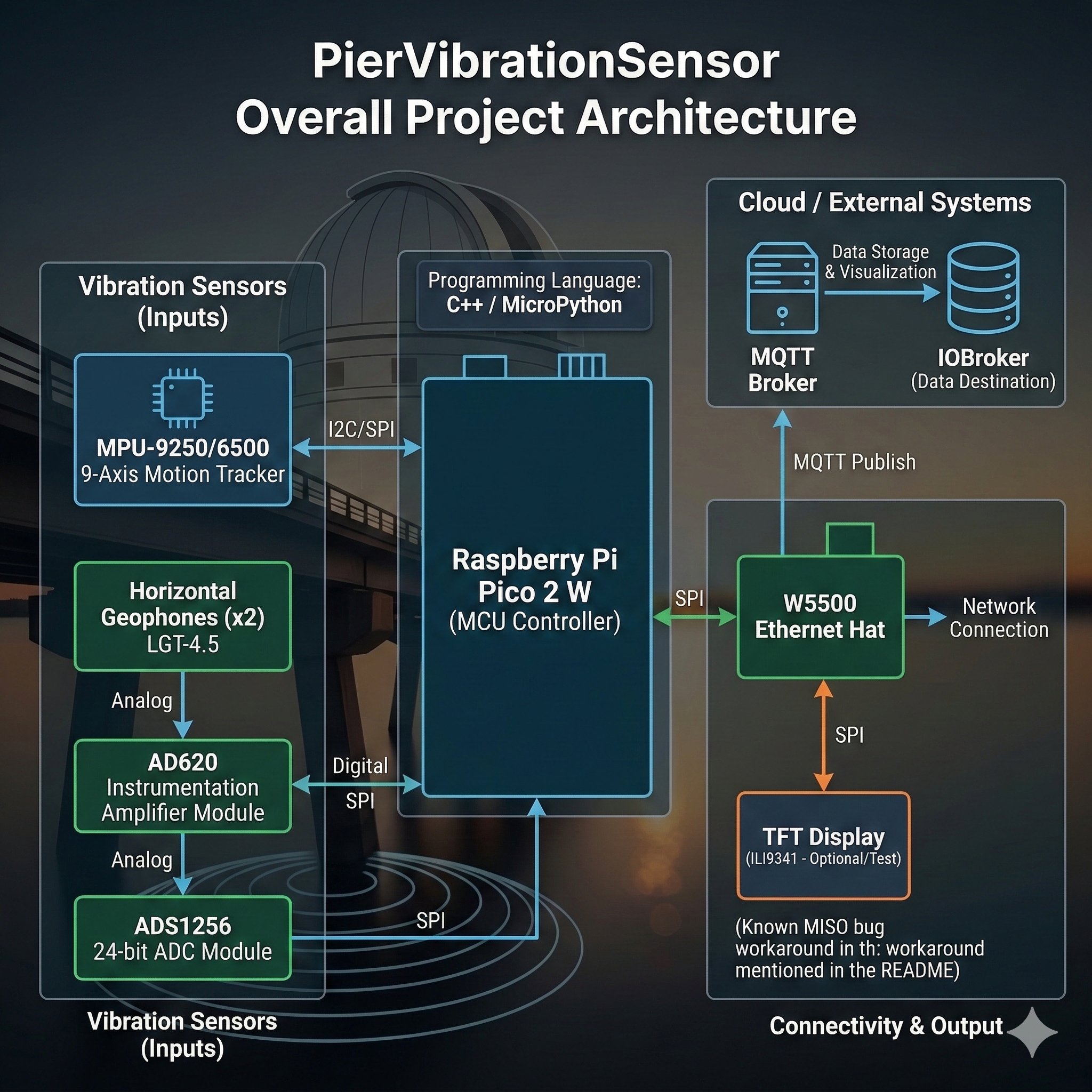
PierVibrationSensor is an embedded vibration-monitoring node built around a Raspberry Pi Pico 2 W and a WIZnet W5500 Ethernet interface. It samples motion and geophone signals, performs on-device visualization/analysis, and exposes the results over a wired network (plus Wi-Fi fallback) via an HTTP server and UDP streaming—an architecture that maps cleanly to industrial condition monitoring where deterministic connectivity and simple field diagnostics matter.
What the Project Does
The project targets long-term vibration monitoring of a fixed structure (the author’s observatory pier), using two sensing paths: an IMU for motion tracking and geophones for low-frequency vibration, with the geophone chain amplified and digitized by a high-resolution ADC. A local UI and network endpoints let you inspect live signals and push vibration data outward for storage and analysis.
From an industrial perspective, this is the “edge node” pattern you see in rotating equipment monitoring, machine foundation resonance checks, and structural health monitoring: sensors → edge sampling → on-device quick-look diagnostics → streaming to a supervisory system (historian, SCADA, or an MQTT bridge). The repo even notes a planned path to publish “key vibration analysis data via MQTT” into ioBroker, which is directly analogous to publishing derived KPIs (RMS, peaks, bandpower) into industrial middleware.
Where WIZnet Fits
This build uses a WIZnet W5500 on an Ethernet “hat” to give the Pico 2 W a wired network interface. The firmware is structured to support both interfaces: it instantiates an Ethernet HTTP server/UDP stream alongside Wi-Fi equivalents, and tracks which network mode is active.
Why W5500 makes sense here (and in industry) is that it offloads core TCP/IP handling into the Ethernet controller and presents a socket-oriented model to the MCU. That keeps the microcontroller focused on sampling, buffering, and DSP (FFT/spectrogram), while still offering a stable wired uplink. The W5500 supports up to 8 hardware sockets, uses an internal 32 KB TX/RX buffer memory, and can connect to an external MCU over SPI (up to 80 MHz), which is a good fit when you want Ethernet without running a full software network stack on a resource-constrained edge node.
Implementation Notes
The repo makes the W5500 integration explicit in both pin configuration and runtime initialization.
Snippet 1 — W5500 SPI and control pins (shared SPI bus)
File: include/pin_config.h (around the “Wiznet (W5500/W5100S Ethernet)” section)
#define WIZNET_SPI_BPS 37500000
#define WIZNET_SPI_CS 17
#define WIZNET_RST 20Snippet 2 — Ethernet endpoints live next to Wi-Fi endpoints
File: src/main.cpp (network objects)
EthernetServer ethServer(HTTP_SERVER_PORT);
EthernetUDP ethUdpStream;Practical Tips / Pitfalls
- Shared SPI bus needs hard CS hygiene. If TFT, touch, and W5500 share SPI, ensure every device has its own CS and that “inactive = high” is enforced before switching peripherals.
- Reset sequencing is not optional in the field. Keep W5500 RST on a GPIO so you can recover from brownouts or bad link states without power-cycling the whole node.
- Watch for SPI MISO direction bugs when mixing libraries. The README documents an Adafruit_SPITFT hardware-SPI read issue on RP2040/RP2350 that can break other SPI peripherals (including W5500) unless you force MISO back to input after reads.
- Plan DHCP failure behavior. The firmware defines a fallback static IP when DHCP is not working; in industrial networks you typically want either reserved DHCP leases or explicit static addressing.
- UDP packet sizing should match your capture pipeline. Keep packets small enough to avoid loss bursts on congested segments, and add a sequence counter if you plan to do trend-quality analytics from UDP alone.
- Treat cabling and grounding as part of the sensor. Vibration installations are EMI-heavy (motors, VFDs). Shield sensor wiring, route Ethernet away from high dV/dt runs, and verify link stability before trusting spectral features.
FAQ
Q1. Why use W5500 here instead of relying on the Pico 2 W’s Wi-Fi?
Wired Ethernet reduces jitter and dropouts in metal enclosures, basements, or electrically noisy plants. The W5500 also provides a socket-oriented interface with hardware TCP/IP handling, letting the MCU spend more time on sampling/DSP rather than network plumbing—useful when you’re doing FFT/spectrogram work at the edge.
Q2. How does the W5500 connect to the Pico 2 W in this project?
Over SPI0, sharing the bus with the TFT and touchscreen but using separate chip-select lines. The project defines dedicated W5500 CS/RST/INT pins and an SPI clock target in include/pin_config.h, then initializes those pins in src/main.cpp.
Q3. What role does W5500 play in this specific system?
It is the wired transport for two network surfaces: (1) an HTTP server for configuration/monitoring UI and (2) a UDP stream for pushing sensor samples outward. The code instantiates Ethernet and Wi-Fi servers side-by-side and selects an active mode, which supports “Ethernet-first” deployments with Wi-Fi as fallback.
Q4. Can beginners follow this project if they’ve never used W5500?
Yes, but it’s not a “single-sensor hello world.” You need to be comfortable with SPI bus sharing, chip-select discipline, and debugging link/DHCP behavior. The repo helps by centralizing wiring in pin_config.h and documenting a real RP2040/RP2350 SPI pitfall that can affect W5500 on shared buses.
Q5. How does this compare to using a pure software TCP/IP stack (e.g., lwIP) on the MCU?
A software stack can work well, but it increases integration surface area (timing, memory pressure, concurrency) and competes directly with sampling/DSP tasks. In this repo you can see explicit steps taken to avoid naming conflicts between lwIP and the Ethernet library, which is a small example of the extra complexity you tend to manage when multiple networking layers coexist. Using W5500 keeps Ethernet behavior concentrated around a dedicated controller and a socket API