


How to Run PicoTuner over Ethernet with W5500-EVB-Pico on Raspberry Pi Pico?
PicoTuner Ethernet Interface
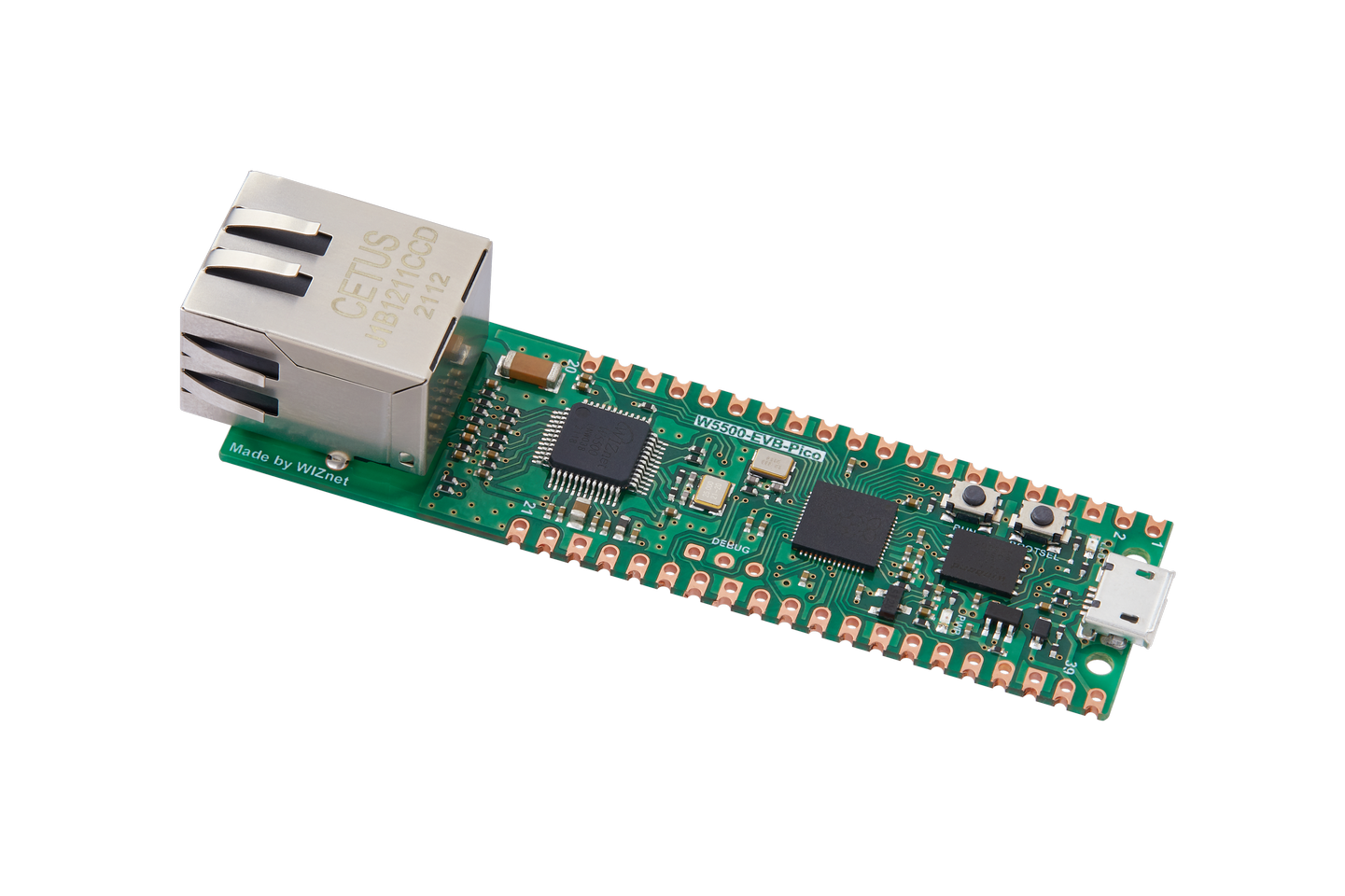
WIZnet - W5500-EVB-Pico
x 1

Summary
PicoTuner Ethernet Interface, also called PicoTunerWH, turns the BATC PicoTuner into a dual-channel Ethernet-controlled DATV receiver by replacing the standard USB-connected Pico module with a WIZnet W5100S-EVB-Pico or W5500-EVB-Pico. The WIZnet module provides the wired Ethernet path used for remote tuning, receiver status, DHCP, broadcast discovery, and transport stream output from the two receivers.
What the Project Does
PicoTunerWH is firmware for the BATC PicoTuner that makes the receiver behave similarly to a WinterHill receiver. Instead of using USB for control or transport stream transfer, the project moves receiver control and MPEG transport stream output onto Ethernet. The wiki states that there is no control or transport stream transfer by USB, and that USB is only used for debugging or firmware loading.
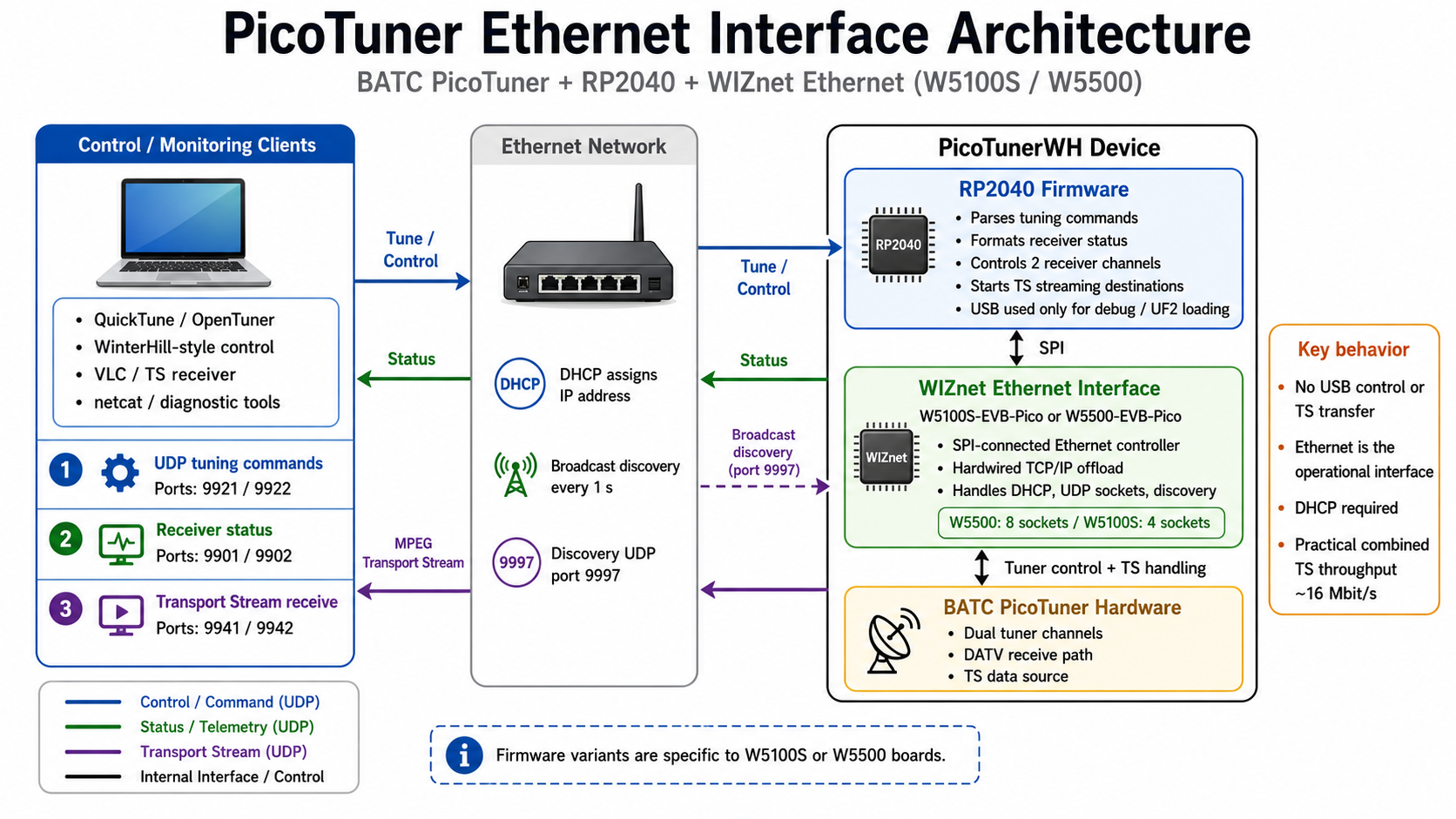
The system exposes two receiver channels. Tuning commands are sent over UDP, status information is available on dedicated ports, and the received transport streams are sent over Ethernet after a command is received. The documented default flow uses ports 9921 and 9922 for tuning commands, ports 9941 and 9942 for transport streams, and ports 9901/9902 for status information.
A broadcast packet is sent every second on UDP port 9997, even if DHCP has not succeeded. This packet reports device identity, WIZnet hardware type, MAC address, host name, DHCP state, IP address, firmware version, receiver mode, base port, receiver frequencies, and transport stream targets.
The practical throughput limit is also documented: the maximum symbol rate of each receiver is about 10 MSymbol/s, and the combined Ethernet throughput for both receivers is about 16 Mbit/s. Multicast is not supported, and fixed IP addressing is not supported; the device expects DHCP at startup.
Where WIZnet Fits
WIZnet is the network engine of the project. The standard Pico module is replaced by either a WIZnet W5100S-EVB-Pico or W5500-EVB-Pico module, giving the PicoTuner a wired Ethernet interface instead of a USB-only control path. The wiki explicitly requires one of these WIZnet modules and provides separate .uf2 firmware files depending on whether the board uses W5100S or W5500.
For the W5500 version, W5500 acts as the Ethernet controller behind the RP2040. It provides hardwired TCP/IP, SPI host access, 10/100 Ethernet MAC/PHY, 8 hardware sockets, and internal packet buffer memory. That matters here because PicoTunerWH is not just serving a configuration page; it is moving receiver status, remote control commands, DHCP, discovery broadcasts, and two transport stream outputs through the same embedded Ethernet path.
For the W5100S version, the role is similar but with a different WIZnet Ethernet chip. W5100S also provides a hardwired TCP/IP stack and connects to an external MCU through SPI or a parallel bus, with 4 independent hardware sockets and 16 KB TX/RX buffer memory.
The main engineering reason for using WIZnet here is offloaded wired Ethernet. The RP2040 firmware can focus on tuner control, command parsing, receiver status formatting, LNB control, and transport stream routing, while the WIZnet chip handles Ethernet socket behavior through the WIZnet SDK and ioLibrary layer.
Implementation Notes
The source archive is linked from the BATC wiki, but the page itself states that the main file is picotunewh.c and that version ptwh0v3e was built by incorporating it into the WIZnet RP2040-HAT-C SDK examples. The wiki also documents required changes to the WIZnet SDK file /home/pi/RP2040-HAT-C/port/ioLibrary_Driver/src/w5x00_spi.c.
Snippet from /home/pi/RP2040-HAT-C/port/ioLibrary_Driver/src/w5x00_spi.c, as documented by the project:
#define USE_SPI_DMA

spi_init (SPI_PORT, 125 * 1000 * 1000 / 4);
This configures the WIZnet SPI path for DMA operation and raises the SPI clock from the SDK example’s default 5 MHz to roughly 31.25 MHz. That change matters because PicoTunerWH is pushing real transport stream data over Ethernet, not only low-rate control traffic.
The project also instructs users to duplicate wizchip_initialize() and rename it:
void wizchip_initialize_ewj (void)Then it removes the blocking PHY-link wait loop from the copied routine:
do {
    if (ctlwizchip(CW_GET_PHYLINK, (void *)&temp) == -1) {
        printf(" Unknown PHY link status\n");
        return;
    }
} while (temp == PHY_LINK_OFF);
This matters because the PicoTunerWH firmware implements its own Ethernet-link and DHCP status behavior. The wiki describes LED states for waiting for physical Ethernet link, waiting for DHCP, and successful DHCP, so removing the SDK’s blocking PHY wait allows the application to manage startup state and reporting more explicitly.
The runtime output verifies the W5500 path in operation:
Net hardware   WIZnet W5500
DHCP state     Success
Software       ptwh0v3e-w5500.uf2
Mode           WinterHill
This broadcast packet is important because it provides a simple field check: the operator can confirm that the correct WIZnet firmware is loaded, DHCP succeeded, and the unit is running in WinterHill mode.
Practical Tips / Pitfalls
- Load the correct
.uf2file for the exact WIZnet module. The wiki states that using the wrong W5100S or W5500 firmware causes the Pico and activity LEDs to repeatedly flash “NO” in Morse code. - Do not assume USB is part of the receive data path. USB is for firmware loading and debug output; control and transport stream transfer are Ethernet-only in this firmware.
- DHCP is required at startup. Fixed IP is not supported, so router compatibility and DHCP reliability matter during field use.
- Use the broadcast packet on UDP port 9997 to find the IP address and confirm WIZnet hardware type before configuring QuickTune, OpenTuner, VLC, or WinterHill tools.
- Watch throughput limits. The documented combined Ethernet throughput for both receivers is about 16 Mbit/s, so high symbol-rate settings can exceed the practical transport capacity.
- Avoid the Pico plus WIZnet Ethernet HAT combination for this build; the wiki warns against it because of voltage regulator issues and mechanical fit problems in the BATC PicoTuner enclosure.
- The wiki notes that
ptwh0v3e.uf2does not work with the newer W55RP20-EVB-Pico module, so treat W55RP20 as a separate porting task rather than a drop-in replacement.
FAQ
Q: Why use W5500-EVB-Pico for PicoTunerWH?
A: W5500-EVB-Pico gives the PicoTuner a wired Ethernet interface with hardwired TCP/IP, 10/100 Ethernet MAC/PHY, 8 sockets, and internal buffering. That is useful because the project needs to handle UDP control, broadcast discovery, DHCP, status output, and two transport stream paths without turning the RP2040 into a full software network-stack workload.
Q: How does the WIZnet module connect to the PicoTuner platform?
A: The WIZnet W5100S-EVB-Pico or W5500-EVB-Pico replaces the standard USB-connected Pico module. The user loads the matching W5100S or W5500 .uf2 firmware, connects Ethernet, and the device obtains an IP address by DHCP.
Q: What role does W5500 play in this specific project?
A: In the W5500 firmware build, W5500 is the Ethernet hardware reported by the device broadcast packet. It carries remote tuning commands, status information, DHCP operation, discovery broadcast packets, and the receiver transport stream destinations used by PicoTunerWH.
Q: Can beginners follow this project?
A: Beginners can load the .uf2 firmware and use the documented ports, but building or modifying the firmware is an intermediate task. The project expects familiarity with Raspberry Pi Pico firmware loading, UDP tools such as netcat, DHCP troubleshooting, and modifying the WIZnet RP2040-HAT-C SDK source.
Q: How does W5500 compare with using USB or Wi-Fi for this receiver?
A: USB is not used for control or transport stream transfer in this firmware, so it is not the operational data path. Compared with Wi-Fi, W5500 provides a wired Ethernet link with hardware TCP/IP offload, which is more appropriate for continuous transport stream output where link stability and predictable throughput are more important than wireless convenience.