


How to Use W5500 Ethernet as the Primary Network Interface on Particle Muon?
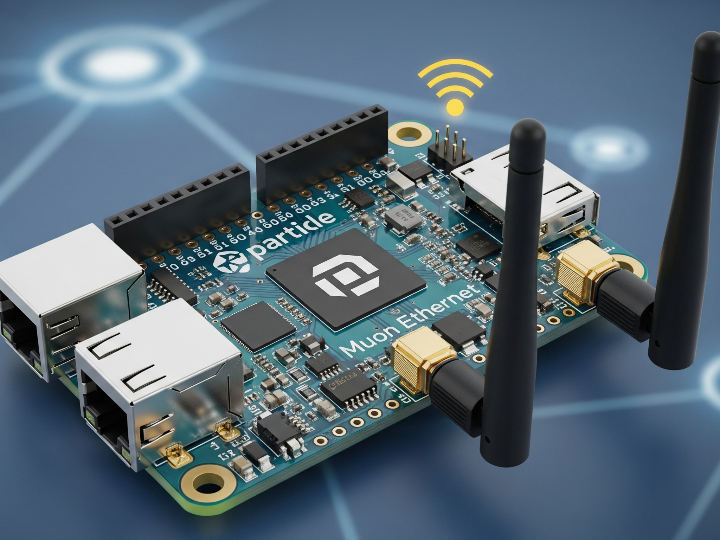
This project shows how to bring up the Particle Muon M524 with its onboard WIZnet W5500 Ethernet path as the preferred network interface for Particle Cloud.

WIZnet - W5500
x 1

Summary
This project shows how to bring up the Particle Muon M524 with its onboard WIZnet W5500 Ethernet path as the preferred network interface for Particle Cloud connectivity. In this design, the W5500 is not used through a custom low-level driver; it is the Muon’s integrated hardwired Ethernet controller, and the main engineering work is power sequencing, feature enablement, and startup timing so Ethernet comes up reliably before Wi-Fi or Cellular fallback.
What the Project Does
The repository contains a single Particle firmware example that publishes Particle Cloud events every 10 seconds and reports which network interfaces are ready. Its boot policy is simple: try Ethernet first, then Wi-Fi, then Cellular. The application runs in SYSTEM_MODE(MANUAL), powers the auxiliary rail needed by the onboard Ethernet hardware, starts the Ethernet interface, and only falls back if Ethernet.ready() does not become true within the configured timeout.
In practical terms, this is a bring-up and interface-priority example for the Muon platform rather than a general networking framework. The repo has one commit, one firmware folder, and a single application source file at firmware/src/main.cpp, so the value is in the documented initialization sequence rather than in reusable middleware.
Muon module and Ethernet baseboard context
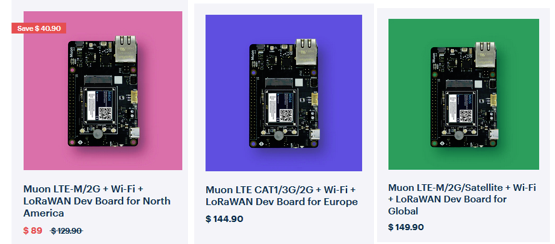
The Particle Muon is best understood as a two-part hardware stack: an M-SoM cellular/Wi-Fi module plugged into an M.2 NGFF socket on a larger developer baseboard. The M-SoM provides the Realtek RTL8722DM MCU, Wi-Fi, BLE, and the cellular modem, while the Muon baseboard adds the prototyping hardware around it, including the WIZnet W5500 Ethernet controller, LoRaWAN, RTC/watchdog, sensors, power input circuitry, and the expansion header. That split is important in this project because the firmware runs on the M-SoM, but Ethernet bring-up depends on baseboard-level power and peripheral control, not just application code. Particle’s Muon documentation also notes that features such as Ethernet and 3V3_AUX are not simply assumed to be on by default, which matches the repo’s need to explicitly enable and power the Ethernet path before calling Ethernet.connect()
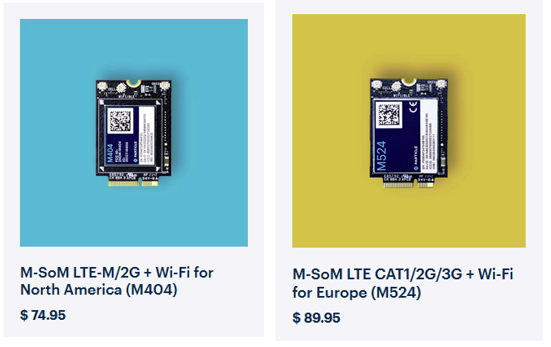
The Muon baseboard adds the WIZnet W5500 Ethernet controller and the associated power and peripheral circuitry needed to make wired networking practical on the platform. Particle offers different M-SoM and Muon variants for different regions because cellular coverage is tied to modem choice, supported bands, and carrier policy: the M404 targets LTE Cat M1 deployments and is fully supported in North America, while the M524 uses an LTE Cat 1 modem aimed at the EMEAA region. That regional split is a hardware decision, not just a sales SKU distinction, and it helps avoid coverage gaps and roaming limitations when the same product must be deployed across different countries.
Where WIZnet Fits
The WIZnet device in this project is the W5500, integrated on the Particle Muon board. Its role is the primary wired transport to the Particle Cloud, with Wi-Fi and Cellular used only as fallback paths when Ethernet is unavailable at boot. The README explicitly identifies the Muon hardware as having onboard W5500 Ethernet, and the firmware uses Particle’s Ethernet API to bring that interface up first.
From a system perspective, the W5500 matters here because the problem is not socket programming but reliable board-level enablement. The repository documents that the Ethernet chip sits on the 3V3_AUX rail, that the rail is controlled through the PMIC using D7, and that the expected initialization order changes when the firmware uses SYSTEM_MODE(MANUAL). That makes this a useful example of how a W5500-based design can fail if power and startup sequencing are not handled explicitly.
Implementation Notes
The repo does use WIZnet hardware directly through the platform stack, and the most important code is in firmware/src/main.cpp.
A first key step is enabling Ethernet detection before the rest of the boot flow proceeds. The repo uses:
System.enableFeature(FEATURE_ETHERNET_DETECTION);firmware/src/main.cpp during setup(), guarded by System.featureEnabled(...), followed by System.reset(). In this project, that code exists because the README notes that FEATURE_ETHERNET is not available on this platform and that FEATURE_ETHERNET_DETECTION persists in configuration flash and requires a reset the first time it is enabled.The second critical step is tying the PMIC auxiliary rail to the pin that powers the onboard W5500:
powerConfig.auxiliaryPowerControlPin(D7).interruptPin(A7);firmware/src/main.cpp, again followed by System.setPowerConfiguration(powerConfig); and System.reset();. It matters because the README explains that the Muon’s W5500 is powered from 3V3_AUX, and without this PMIC configuration the Ethernet chip does not receive power as expected.After configuration, the firmware explicitly asserts the power rail and delays before attempting Ethernet:
pinMode(D7, OUTPUT);
digitalWrite(D7, HIGH);
Ethernet.on();
Ethernet.connect();waitFor(Ethernet.ready, 15000). That sequence exists because the repo author found that on Muon, SYSTEM_MODE(MANUAL) does not automatically assert D7, and that the W5500 requires time both after PMIC startup and after Ethernet.on() before a connection attempt succeeds reliably.Practical Tips / Pitfalls
- Treat this as a power-sequencing problem first. On this board, the onboard W5500 depends on the
3V3_AUXrail, and the repo configures that rail throughauxiliaryPowerControlPin(D7)before Ethernet is started. - Do not assume
FEATURE_ETHERNETexists on this platform. The project usesFEATURE_ETHERNET_DETECTION, and the first enable requires a reset because the setting is stored in flash. SYSTEM_MODE(MANUAL)is part of the solution here, not just a style choice. The repo documents thatSEMI_AUTOMATICtogether withSTARTUP(WiFi.off())prevents the W5500 path from initializing correctly on Muon.- Keep the startup delays. The example uses a 2 second delay before asserting
D7, then 500 ms after powering the rail, then another 500 ms afterEthernet.on(). Those waits are part of the hardware bring-up recipe, not cosmetic pauses. - The failover logic is boot-time priority selection, not a full runtime link manager. The code chooses Ethernet, then Wi-Fi, then Cellular during
setup(), whileloop()only publishes status; it does not later promote Ethernet if a cable is inserted after boot. - There is no visible license file on the repository page, so reuse in another codebase should be checked with the author before treating the example as redistributable source.
FAQ
Q: Why use W5500 in this project instead of relying on Wi-Fi first?
A: In this repository, the W5500 is the board’s integrated wired interface, and the project explicitly gives it highest priority for Particle Cloud connectivity. The technical motivation shown by the code is stable wired startup on the Muon platform, with Wi-Fi and Cellular only used when Ethernet does not become ready during boot.
Q: How does the W5500 connect to the Particle Muon platform here?
A: The repo presents it as an onboard Ethernet device rather than an external SPI wiring exercise. What the firmware must manage is the Muon-side power path: 3V3_AUX, PMIC configuration, D7 assertion, and the Ethernet interface startup sequence exposed by Particle Device OS.
Q: What role does the W5500 play in this specific project?
A: It is the primary transport path to the Particle Cloud. During setup(), the firmware powers the Ethernet hardware, starts Ethernet, waits for readiness, and connects to the cloud before attempting Wi-Fi or Cellular fallback.
Q: Can a beginner follow this project?
A: A beginner can reproduce it, but it is better suited to someone who already understands Particle system modes, interface readiness checks, and embedded power sequencing. The difficult part is not the application logic; it is understanding why PMIC configuration, reset persistence, and boot timing affect whether the onboard W5500 ever becomes ready.
Q: How does this compare with a software TCP/IP approach such as LwIP on an external Ethernet controller?
A: This repo does not benchmark against LwIP, so it should not be used to claim measured performance differences. What it does show is the practical advantage of using the Muon’s integrated W5500 path through the platform Ethernet stack: the application code stays focused on power enablement, readiness checks, and interface policy instead of implementing a separate external-Ethernet integration layer