


Installing Firmware on SP2301 Linux EVB for Dual-Port Ethernet
Installing Firmware on SP2301 Linux EVB for Dual-Port Ethernet

WIZnet - W5500
x 1

Introduction
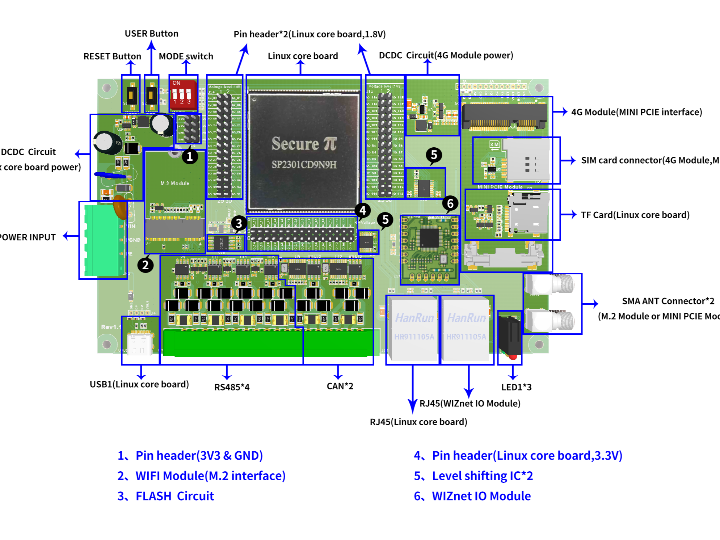
The SP2301 Linux EVB project demonstrates how developers can enable dual-port Ethernet on an embedded Linux platform using the SP2301 module together with WIZnet technology. This project highlights how combining the SecurePi firmware with WIZnet Ethernet controllers makes it easy to build reliable networking solutions without complex driver or kernel setup.
By flashing a prebuilt firmware image onto an SD card, the SP2301 EVB instantly boots Linux with dual-port Ethernet functionality: one native control port provided by the SP2301, and one data port powered by a WIZnet Ethernet chipset.
Why WIZnet?
The project chose WIZnet devices for several reasons:
- Built-in Hardware TCP/IP Stack – WIZnet’s W5100S and W5500 offload TCP/IP processing from the CPU, providing more efficient networking.
- Out-of-the-box Linux Support – The SecurePi firmware includes prebuilt drivers for WIZnet chips, so no additional kernel work is needed.
- Industrial-Grade Reliability – WIZnet modules are designed to operate in harsh environments, with wide temperature ranges and stable performance.
Results
Through this project, SecurePi demonstrated that:
The SP2301 EVB can be quickly configured for dual-port Ethernet.
The process requires only flashing the SecurePi image and booting from SD.
Both control and data ports are immediately available, making prototyping faster and deployment easier.
About the author
Name/Brand: SecurePi by Megahunt
Focus: Linux-based solutions powered by the MH1905 chipset, aimed at delivering advanced security, versatility, and performance.
Origin: Hong Kong
Online Presence:
Hackaday: hackaday.io/SecurePi1905
Hackster.io: hackster.io/securepi1905
GitHub: github.com/securepi1905 (profile references visible from copy text you shared)
Twitter/X: @secure_pi