


How to Control a LifeSize 10x PTZ Camera over Ethernet with a W5500 VISCA-to-IR Bridge?
LifesizePTZ turns standard VISCA-over-IP PTZ commands into infrared signals that a legacy LifeSize Camera 10x understands.

WIZnet - W5500
x 1

Summary
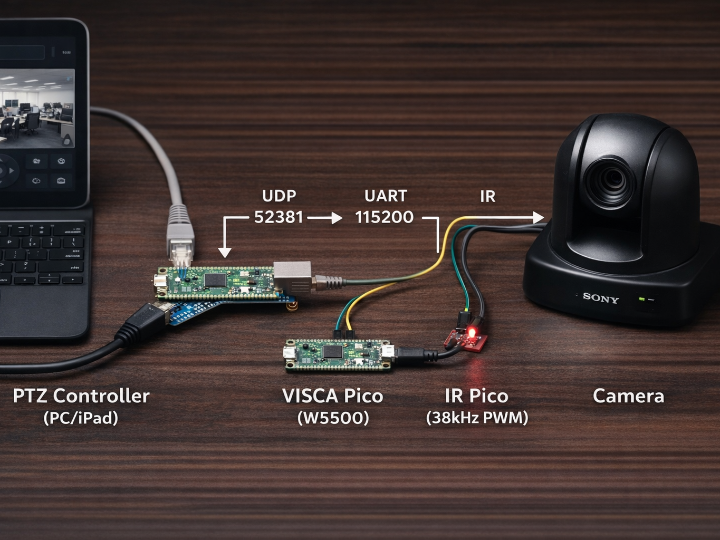
LifesizePTZ turns standard VISCA-over-IP PTZ commands into infrared signals that a legacy LifeSize Camera 10x understands. It runs on two Raspberry Pi Pico 2W boards: one receives UDP VISCA on port 52381 via a WIZnet W5500 Ethernet module, and the other generates precise 38 kHz IR frames with 57.325 ms gaps.
LifeSize Camera 10x: why it’s still worth controlling
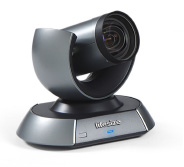
The LifeSize Camera 10x is not a toy PTZ head—it’s a purpose-built conferencing PTZ camera with specs that still match many modern room requirements: 1080p at 60 fps, 10× optical zoom, and wide fields of view (e.g., 81° diagonal / 73° horizontal / 44° vertical), plus large-room mechanical range (±87.5° pan, ±30° tilt) and 10 presets.
That explains the project’s motivation: in lecture halls, council chambers, training rooms, and boardrooms, a working 10× optical PTZ can remain valuable long after its original control ecosystem is obsolete.
VISCA: the control language this bridge speaks
VISCA is a camera control protocol originally developed by Sony, widely used for PTZ functions like pan/tilt/zoom, presets, and power.
In “VISCA over IP,” these commands are transported over a network; port 52381 is commonly used as the default in many implementations.
In this repository, the README documents the specific command forms it expects (for example, pan/tilt movement commands ending in FF, and zoom commands like 81 01 04 07 ... FF).
So the system works like a language interpreter:
- Input language: VISCA-over-IP UDP packets (operator intent)
- Output language: LifeSize-specific IR frames at 38 kHz with strict inter-frame spacing (camera motion)
What this project is (and why it exists)
LifesizePTZ is a “protocol bridge” for environments where you want to use a modern PTZ controller (PC/iPad software that speaks VISCA over IP) but your camera is controlled via IR remote codes rather than native IP control. The repository’s README describes a MicroPython system that listens for VISCA-over-UDP packets and translates them into the specific LifeSize IR command frames needed to move the camera smoothly.

The design choice that stands out is determinism: the LifeSize camera’s IR control requires a precise 57.325 ms inter-frame gap “for smooth movement,” and the author splits the workload across two Pico 2W boards so the IR timing can remain stable while the network-facing Pico handles Ethernet/UDP and parsing.
From an industry perspective, this is a practical retrofit pattern: it lets you keep older but still high-quality conference-room PTZ hardware while integrating it into modern control workflows (centralized AV control, automation scripts, operator GUIs, or room-control tablets).
Why WIZnet matters here (W5500 in the critical path)
On the “VISCA Pico,” the project explicitly calls for a W5500 Ethernet module (SPI) connected to defined GPIO pins, then listens on VISCA Port 52381 (UDP).
That makes the W5500 the front door of the system: it is the hardware interface that receives operator intent (pan/tilt/zoom) as network packets.
The W5500 is a strong fit for this kind of embedded bridge because it integrates a hardwired TCP/IP stack, supports SPI up to 80 MHz, includes 32 KB internal memory, and exposes sockets that a microcontroller firmware can use without running a heavyweight software network stack.
In a control bridge where timing jitter matters (IR transmission) and uptime matters (room systems), this “network offload” approach can simplify firmware and reduce runtime surprises compared to purely software networking.
Architecture and operation (what runs where)
The project defines a clear three-stage pipeline: controller → network Pico → IR Pico → camera.
1) VISCA Pico (Ethernet + parsing + relay)
- Hardware: Raspberry Pi Pico 2W + W5500 Ethernet module over SPI; optional 5V relay for camera power control.
- Network config defaults (static IP, gateway, UDP port) live in
pico_visca/config.py. - Function: receive UDP packets, parse VISCA commands, convert them into a compact UART protocol for the IR Pico.
2) IR Pico (timing-critical IR generation)
- Hardware: Pico 2W + IR LED driver, generating 38 kHz carrier.
- Function: generate LifeSize IR frames with the documented timings (header, bit encoding), and enforce the critical 57.325 ms frame gap.
3) PC GUI controller
- A Python GUI (
ptz_controller.py) is included and launched withpython3 ptz_controller.py, offering buttons, shortcuts, and connectivity checks.
Note on code visibility: The repository clearly lists the implementation files (
pico_visca/main.py,pico_ir/main.py, etc.), but GitHub’s file renderer intermittently returned “error while loading” during analysis, so I’m not quoting internal source lines beyond what’s explicitly documented in the README.
Conceptual MicroPython networking skeleton (based on MicroPython WIZNET5K docs)
Below is conceptual (not copied from this repo) to illustrate the minimum pattern implied by the README: init W5500 via network.WIZNET5K, bind a UDP socket, and parse commands. MicroPython’s WIZNET5K API expects SPI, CS, and RST pins.
Productization opportunity: EVB-Pico boards and a Pico 2W Ethernet “HAT”
The README indicates the author is using a discrete W5500 Ethernet module wired over SPI.
For repeatable builds (education kits, AV integrator installs, small industrial deployments), that wiring burden is a real failure mode: intermittent SPI connections, reset wiring mistakes, and inconsistent PHY/RJ45 magnetics quality.
A clean alternative is to build on WIZnet’s Pico-compatible EVB line:
- W5500-EVB-Pico integrates RP2040 + W5500 Ethernet.
- W5500-EVB-Pico2 targets the Pico 2 generation (RP2350-based) while keeping the W5500 Ethernet integration concept.
And if the roadmap is “Pico 2W + Ethernet + future-proofing,” it’s reasonable to consider a stackable Ethernet HAT (or baseboard) for Pico 2W that exposes:
- W5500 option (SPI, simplest migration, proven in this repo)
- W6300 option for higher host-interface throughput via QSPI and higher performance targets (WIZnet positions W6300 as dual IPv4/IPv6 with QSPI and high-speed operation).
This project is a good “seed customer story” for such hardware because it already demonstrates why deterministic, wired control is valuable: the network side must not destabilize the IR timing side.
FAQ
1) Why use WIZnet W5500 for a VISCA-over-IP control bridge instead of Wi-Fi?
For PTZ control, “good enough latency” becomes “visible jitter” fast—especially when a second MCU must generate precisely-timed IR frames. The W5500 provides wired Ethernet with a built-in TCP/IP stack and SPI host interface, which can make packet reception more deterministic and reduce firmware complexity compared with Wi-Fi stacks that may introduce variable latency under congestion.
2) How do you connect a W5500 to Raspberry Pi Pico 2W?
The repo documents a concrete pin map: SCK GP2, MOSI GP3, MISO GP4, CS GP5, Reset GP6 on the “VISCA Pico,” plus UART pins to the IR Pico.
On the firmware side, MicroPython supports W5x00 modules via network.WIZNET5K(spi, pin_cs, pin_rst), so your wiring must match the SPI instance and CS/RST pins you initialize.
3) What role does the W5500 play inside LifesizePTZ specifically?
In LifesizePTZ, the W5500 is the Ethernet interface that receives VISCA-over-IP UDP commands on port 52381.
Those packets carry PTZ intent (pan/tilt/zoom), which the VISCA Pico translates into a UART message for the IR Pico. The IR Pico then emits LifeSize-compatible 38 kHz IR frames with the required 57.325 ms gap to keep movement smooth.
4) Can beginners reproduce this with WIZnet boards like W5500-EVB-Pico?
Yes—with caveats. Using an integrated board like W5500-EVB-Pico can remove the most error-prone step (hand-wiring SPI + reset + magnetics) and lets you focus on MicroPython deployment and IR driver electronics.
But you still need basic skills in (1) safe transistor-driven IR LED circuits and (2) network setup (static IP/subnet alignment), because the bridge won’t work if the Ethernet segment is misconfigured.
5) Should I consider W6300 instead of W5500 for the next hardware revision?
If your future requirement is higher host-interface throughput, IPv6-first deployments, or scaling beyond “simple control packets,” W6300 becomes interesting because it’s positioned as a dual IPv4/IPv6 hardwired controller with a QSPI host interface and performance-oriented design goals.
For LifesizePTZ as written (tiny UDP packets + UART to IR), W5500 is already sufficient; W6300 is more about roadmap-proofing than necessity.
6) What’s the practical advantage of WIZnet hardware TCP/IP vs a software stack like lwIP?
A hardwired TCP/IP controller shifts much of the network protocol handling into the Ethernet chip, so the MCU firmware can stay simpler: bring up the interface, open sockets, and exchange data. WIZnet’s W5500 explicitly integrates the stack and on-chip memory, which can reduce the burden on the microcontroller compared to running a full software stack alongside timing-critical tasks.