



How to Build a Reliable USB Serial Web Bridge with W5500 on ESP32-S3?
This ESP32-S3 project exposes a USB-hosted serial device through a browser-based HTTP/WebSocket terminal and uses the WIZnet W5500
Summary
This ESP32-S3 project exposes a USB-hosted serial device through a browser-based HTTP/WebSocket terminal and uses the WIZnet W5500 as the preferred wired network interface. The W5500 provides the Ethernet path for web terminal access, DHCP-based IP assignment, and mDNS discovery, while the ESP32-S3 handles USB Host CDC/VCP serial bridging, buffering, the web UI, and firmware/filesystem upload services.
What the Project Does
The project turns an ESP32-S3 board into a network-accessible serial console. A USB serial adapter or USB CDC device connects to the ESP32-S3 USB Host port, the firmware reads serial data from that device, and the data is exposed to a browser through a web terminal. Browser input is sent back through the WebSocket path and forwarded to the USB serial device.
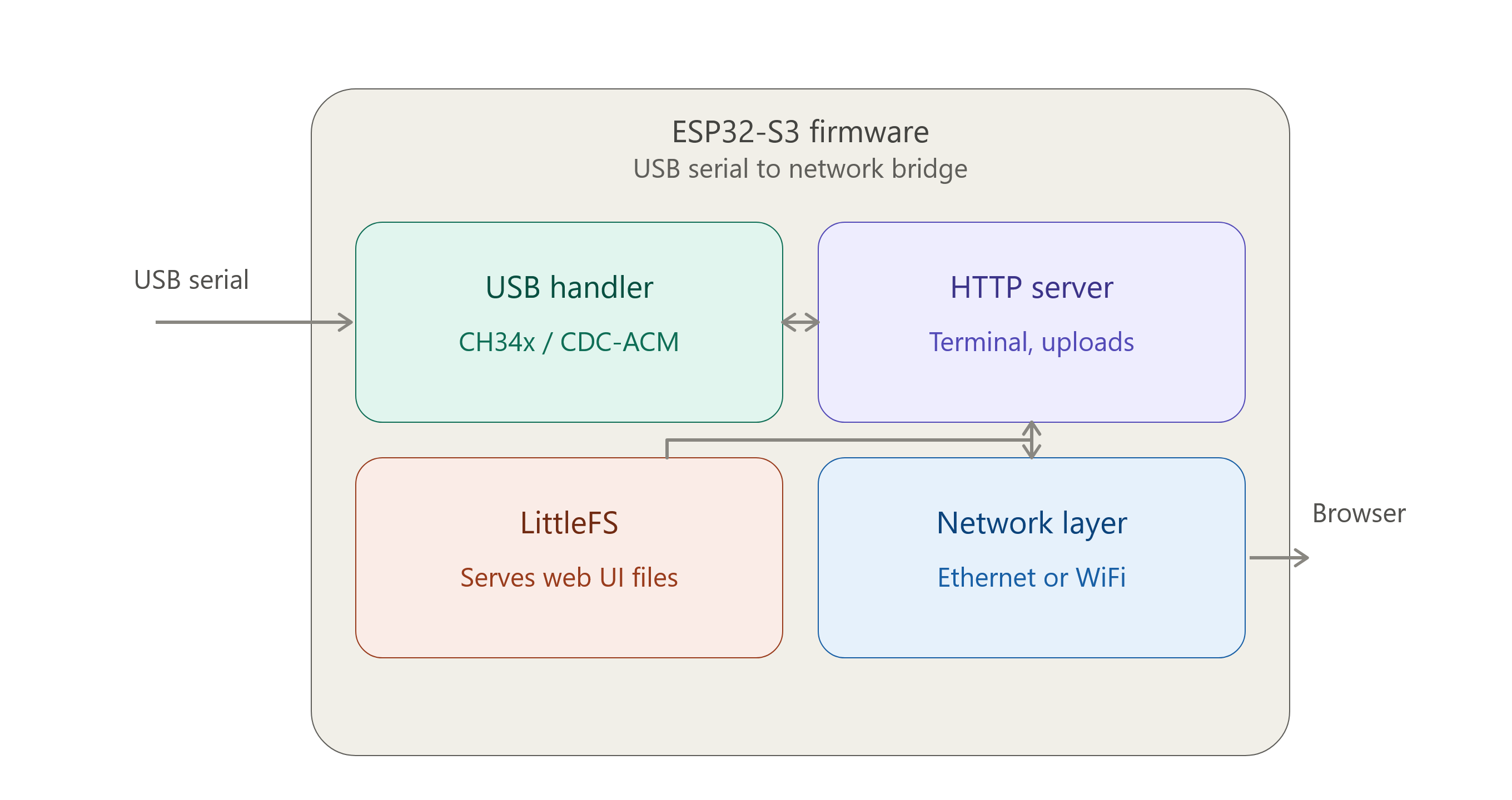
The data path is direct and practical for field tools: USB serial device → ESP32-S3 USB Host driver → receive queue and line buffering → WebSocket broadcast → browser terminal. In the opposite direction, WebSocket frames from the browser are written back to the USB serial device when one is connected. The HTTP server also serves the terminal UI from LittleFS and includes authenticated upload endpoints for firmware and filesystem images.
The repository targets ESP32-P4, ESP32-S2, and ESP32-S3, but the project name and architecture are especially relevant to ESP32-S3 because of its USB Host capability and common availability on compact development boards. The README states that the firmware prefers a W5500 SPI Ethernet interface when available and falls back to Wi-Fi if Ethernet is not present.
Where WIZnet Fits
The WIZnet product used here is the W5500 SPI Ethernet controller. In this project, it is not an optional marketing add-on; it is the preferred network transport for the web terminal. The firmware initializes W5500 first, waits for DHCP, announces the device through mDNS, and only uses Wi-Fi if Ethernet is unavailable.
For industrial IoT, that design choice matters. A serial bridge is often used during commissioning, service, diagnostics, or recovery work, where losing the console connection can interrupt a maintenance procedure. Wired Ethernet avoids RF congestion, access point roaming, SSID/password provisioning issues, and many of the site-specific variables that make Wi-Fi less predictable in cabinets, rail systems, and factory floors.
The W5500 itself provides a hardwired TCP/IP architecture, SPI connectivity up to 80 MHz, 32 KB internal buffer memory, and 8 independent sockets. In this repository, the code integrates W5500 through ESP-IDF’s SPI Ethernet support rather than WIZnet ioLibrary socket calls. Practically, W5500 acts as the wired Ethernet interface that carries the HTTP and WebSocket terminal traffic, while ESP-IDF handles the application-level server behavior.
Implementation Notes
The first important implementation point is that W5500 support is enabled at configuration level, with the SPI pins defined in main/config.template.h. This is the hardware contract between the ESP32-S3 and the W5500 module.
#define ENABLE_W5500_ETH 1 #define W5500_CS_PIN 10 #define W5500_SCK_PIN 14 #define W5500_MISO_PIN 13 #define W5500_MOSI_PIN 11 #define W5500_RST_PIN 2 #define W5500_INT_PIN -1The second important implementation point is in main/w5500.cpp, where the SPI bus and W5500 driver are initialized. The code sets a 20 MHz SPI clock, configures polling when no interrupt pin is used, starts Ethernet, and waits for DHCP before returning success.
devcfg.clock_speed_hz = 20 * 1000 * 1000;
devcfg.spics_io_num = W5500_CS_PIN;
devcfg.queue_size = 20;

w5500_config.int_gpio_num = W5500_INT_PIN;
#if W5500_INT_PIN == -1 w5500_config.poll_period_ms = 10;
#endif

bool got_ip = s_ip_semaphore &&
xSemaphoreTake(s_ip_semaphore, pdMS_TO_TICKS(10000)) == pdTRUE;Practical Tips / Pitfalls
- Keep the W5500 SPI wiring short and direct. Long jumper wires between ESP32-S3 and W5500 can cause intermittent failures at higher SPI clocks.
- Use the reset pin when deploying in cabinets or field equipment. A controlled W5500 reset improves recovery after brownouts or hot-plug events.
- If
W5500_INT_PINremains-1, the driver uses polling. That is simpler to wire, but an interrupt line can reduce polling overhead in a more refined industrial design. - Check that
CONFIG_ETH_USE_SPI_ETHERNET=yandCONFIG_ETH_SPI_ETHERNET_W5500=yare enabled; the repository’ssdkconfig.defaultsincludes both. - Treat DHCP timeout as a deployment decision. DHCP is convenient for lab use, but static addressing may be more predictable for fixed industrial installations.
- Protect the upload pages. The project includes authenticated firmware and filesystem upload routes, but the default password should be changed before connecting to a shared network.
- Verify the USB serial adapter type before field use. The code supports CH34x and generic CDC-ACM paths, while CP210x and FTDI helpers are present but commented out.
FAQ
Q: Why use W5500 for this ESP32-S3 serial bridge?
A: W5500 gives the bridge a wired Ethernet path for the browser terminal, which is more suitable than Wi-Fi for industrial service tools where connection stability matters. The chip also provides a hardwired TCP/IP architecture, SPI interface, 32 KB internal buffer memory, and 8 sockets, although this repository uses ESP-IDF’s W5500 Ethernet driver rather than direct WIZnet ioLibrary socket calls.
Q: How does W5500 connect to the ESP32-S3 in this project?
A: It connects over SPI using CS on GPIO10, SCLK on GPIO14, MISO on GPIO13, MOSI on GPIO11, and reset on GPIO2 according to main/config.template.h. The interrupt pin is optional and disabled by default, so the driver polls the W5500 when no interrupt line is assigned.
Q: What role does W5500 play in this specific project?
A: W5500 carries the HTTP and WebSocket network traffic for the serial web terminal. The ESP32-S3 handles USB Host serial I/O and the web server, while W5500 provides the preferred Ethernet route for reaching that web server from a browser.
Q: Can beginners follow this project?
A: It is approachable for developers already comfortable with ESP-IDF, but it is not a first microcontroller project. The important prerequisites are ESP-IDF build/flash workflow, SPI wiring, USB Host concepts, DHCP or static IP troubleshooting, and basic WebSocket behavior.
Q: How does W5500 compare with Wi-Fi in this design?
A: Wi-Fi is useful as a fallback, and the firmware explicitly falls back to Wi-Fi when W5500 Ethernet is unavailable. For industrial IoT, W5500 is the better primary path because the cable link avoids RF interference, access point dependency, and wireless provisioning problems during maintenance or commissioning.