


How to Add W5500 Ethernet to a Zephyr BLE Concentrator on nRF52840?
This project implements a BLE sensor concentrator on the Nordic nRF52840 DK and adds a wired TCP uplink through a WIZnet W5500 connected over SPI

WIZnet - W5500
x 1

Summary
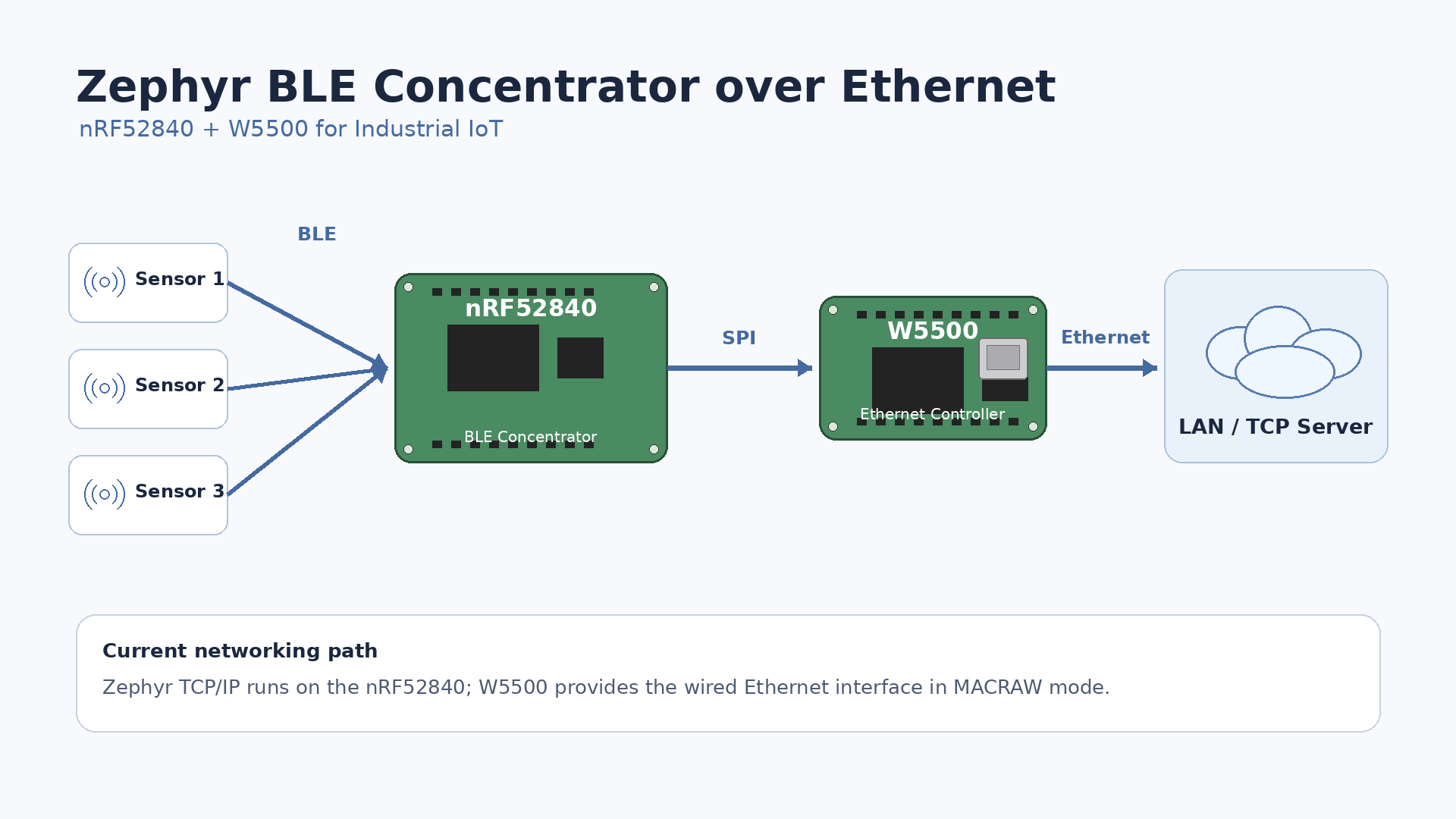
This project implements a BLE sensor concentrator on the Nordic nRF52840 DK and adds a wired TCP uplink through a WIZnet W5500 connected over SPI. The W5500 provides the physical Ethernet interface, MAC, and PHY for the Zephyr network stack. A significant implementation detail is that the project does not currently use the W5500 TCP/IP Offload Engine for TCP processing: Zephyr v4.4.1 operates the W5500 in MACRAW mode and runs IPv4/TCP in Zephyr itself.
What the Project Does
base_platform_zephyr_ble_concentrator collects BLE advertising packets from nearby sensor endpoints. The firmware deliberately keeps Bluetooth callback work short: incoming advertisements are copied into a static pool, queued, parsed later by the acquisition service, and used to update a device table containing the latest reading from each detected device. The communication service then packages those readings for an uplink.
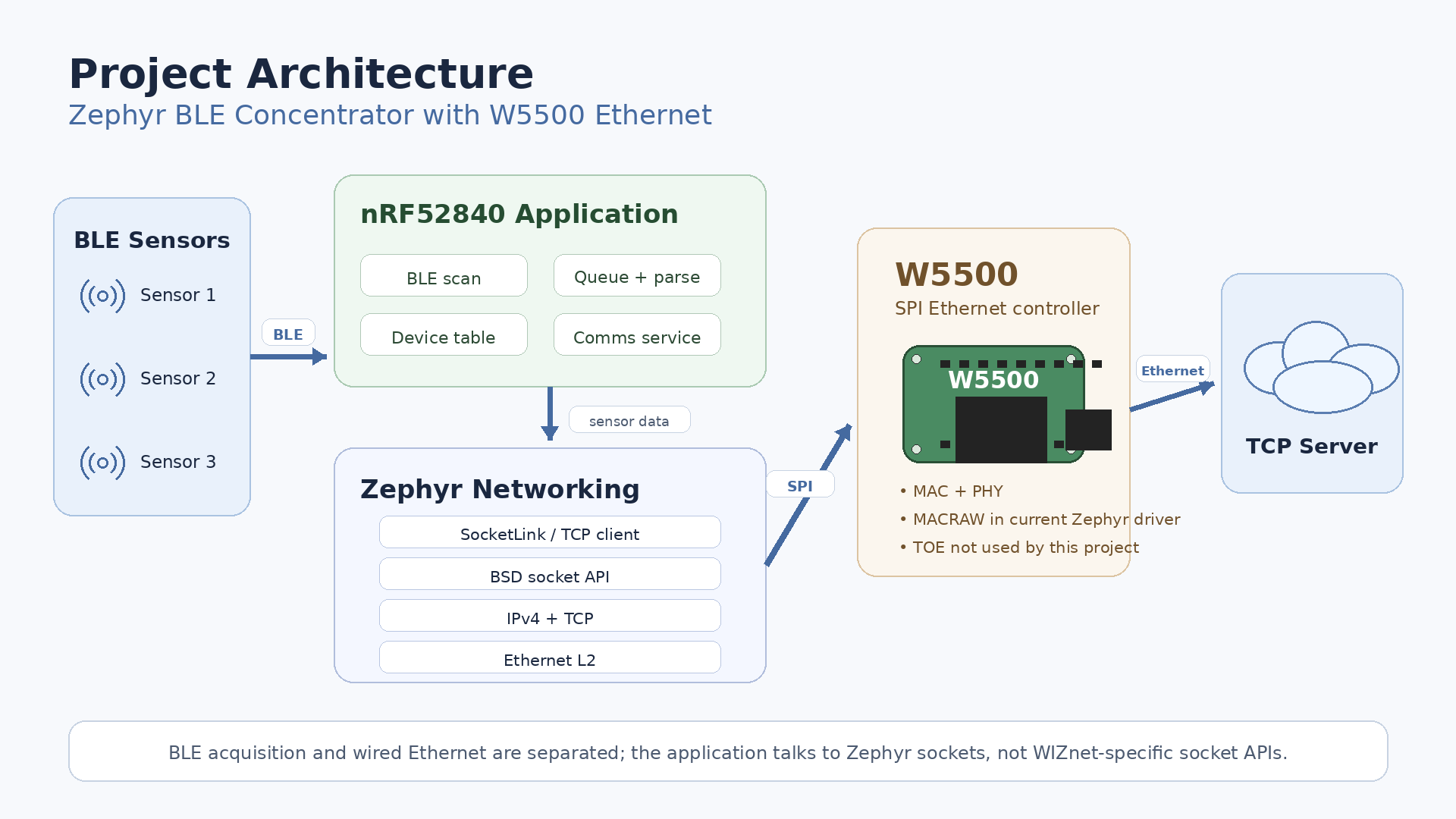
The firmware abstracts the uplink behind hal::link::ILink. One build uses LoRaWAN, while the wired build uses TCP. For the TCP variant, an nRF52840 DK is paired with a W5500 on the same SPI header used by the alternative radio module. Above hal/link, acquisition, device-table management, state-machine handling, diagnostics, and packet formatting remain transport-independent.
The wired data path is effectively:
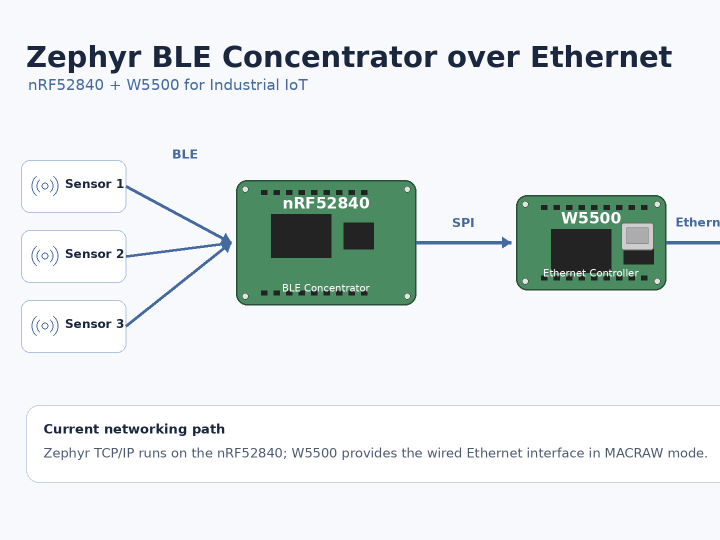
BLE sensors → nRF52840 BLE scanner → acquisition queue → device table → communications service → Zephyr TCP socket → Zephyr IPv4/TCP stack → W5500 MACRAW Ethernet interface → wired network
This architecture is relevant to Industrial IoT concentrators because BLE sensing and Ethernet transmission use separate communication hardware. The repository explicitly notes that its ESP32-S3 Wi-Fi variant shares one 2.4 GHz radio between Wi-Fi and Bluetooth, temporarily preventing scanning while Wi-Fi transmits. The nRF52840 plus wired W5500 path does not have that radio-sharing constraint.
Where WIZnet Fits
The WIZnet component is the W5500, connected to the nRF52840 through SPI. The project assigns SPI MISO, MOSI, SCLK and chip select, plus W5500 interrupt and reset signals. The devicetree configures the controller as wiznet,w5500 and limits SPI to 10 MHz, intentionally below the W5500's supported maximum because the prototype is expected to use jumper wiring.
Architecturally, the W5500 supplies an SPI-connected 10/100 Ethernet MAC and PHY to a microcontroller that has BLE but no native Ethernet interface. That makes wired networking possible without changing the concentrator's BLE-side application architecture.
The important distinction is Ethernet controller usage versus TOE usage. The W5500 itself contains a hardwired TCP/IP engine, eight hardware sockets, and 32 KB of internal TX/RX memory. A conventional W5500 application can therefore perform TCP and UDP through those hardware sockets rather than executing the protocol stack on the host MCU.
That is not what this project currently does. Its Kconfig selects Zephyr's NETWORKING, NET_IPV4, NET_TCP, and NET_SOCKETS subsystems. More decisively, Zephyr v4.4.1's in-tree W5500 driver opens W5500 Socket 0 in MACRAW mode. The driver allocates 16 KB RX and 16 KB TX memory to that raw socket and gives zero buffer memory to W5500 sockets 1 through 7. Raw Ethernet frames move through the W5500, while IPv4 and TCP are processed by Zephyr on the nRF52840.
Therefore, the W5500's TOE capability should not be used to justify CPU-offload or TCP-memory savings for this firmware in its present form. Its verified architectural value here is the SPI-connected wired Ethernet interface and separation of Ethernet traffic from the BLE radio.
Implementation Notes
W5500 Device Configuration
From snippets/eth-w5500/w5500.overlay:
w5500: ethernet@0 {
    compatible = "wiznet,w5500";
    reg = <0>;
    spi-max-frequency = <10000000>;
};
The overlay replaces the alternate SPI radio with a W5500 device and provides Zephyr's W5500 driver with the hardware description it needs. The complete node also defines active-low interrupt and reset GPIOs and a locally administered MAC address.
The repository maps the main W5500 signals as follows: MISO to D12/P1.14, MOSI to D11/P1.13, SCLK to D13/P1.15, SCS to D10/P1.12, INT to D2/P1.03, and RSTn to D9/P1.11. However, the author explicitly states that these W5500 assignments have not yet been checked against a generated devicetree on real W5500 hardware.
TCP Socket Layer
From src/hal/link/socket/socket_link.cpp:
m_socket = zsock_socket(AF_INET, SOCK_STREAM, IPPROTO_TCP);

zsock_connect(m_socket,
              reinterpret_cast<struct sockaddr*>(&server),
              sizeof(server));
This is ordinary Zephyr socket code rather than W5500 hardware-socket programming. SocketLink also performs partial-write handling with zsock_send(), applies send and receive timeouts, and closes a failed socket so that the application state machine can reconnect explicitly.
The wired-specific layer in src/hal/link/tcp/link_tcp.cpp obtains Zephyr's default network interface and either starts DHCP or applies a configured static IPv4 address. Once the interface has an address, the TCP socket implementation is shared with the project's Wi-Fi backend.
For true W5500 TCP/IP offload, this software boundary would need to change. Instead of transporting Ethernet frames through Zephyr's current MACRAW W5500 driver and letting the native Zephyr stack implement TCP, an integration would need to expose the W5500's hardware TCP sockets—such as through WIZnet's socket/ioLibrary model or a Zephyr socket-offload implementation. Zephyr provides APIs specifically for devices that expose their own networking stack at the socket level.
Practical Tips / Pitfalls
- Verify the generated devicetree before connecting hardware. The repository itself warns that the W5500 pin mapping has not been verified on a physical W5500 setup. Check
build/zephyr/zephyr.dts, particularly chip select, INT, and RESET. - Treat 10 MHz SPI as a bring-up value. The overlay deliberately selects 10 MHz for jumper-wire prototypes even though the W5500 supports SPI operation up to 80 MHz. Increase it only after confirming signal integrity and stable transfers.
- Assign a unique MAC address to every concentrator. The sample overlay uses a locally administered address and explicitly warns against deploying multiple units with the same value.
- Choose static addressing or DHCP deliberately. Static IPv4 is the project's default. DHCP starts Zephyr's DHCPv4 client and waits for an address, with the wired implementation using a bounded address-acquisition period.
- Do not size the application as if W5500 TCP sockets were being used. Zephyr's current driver dedicates the W5500 memory to one MACRAW socket; native Zephyr TCP state and buffers still consume nRF52840 RAM.
- Keep the interrupt and reset lines available. They are part of the project's W5500 devicetree definition, in addition to the four SPI signals, and are important for link/event handling and deterministic recovery.
- Treat the TCP path as pre-bring-up software. The repository states that the TCP configurations compile, but no W5500 has yet been connected and the path has never run on physical Ethernet hardware. TCP downlink delivery and TCP-side security are also unfinished.
FAQ
Q: Why use the W5500 for this Zephyr BLE concentrator?
The W5500 gives the nRF52840 a wired 10/100 Ethernet interface through SPI while leaving the nRF52840's BLE radio dedicated to BLE acquisition. That radio separation is useful for a concentrator that should continue receiving advertisements while network traffic is transmitted. In this particular implementation, however, the justification is not TCP/IP CPU offload, because Zephyr currently uses the W5500 in MACRAW mode.
Q: How does the W5500 connect to the nRF52840 DK?
It uses SPI plus two control signals. The repository maps MISO to D12, MOSI to D11, SCLK to D13, SCS to D10, INT to D2, and RSTn to D9, with 3.3 V power and ground. The configured SPI clock is 10 MHz. These assignments still require physical verification because the repository's W5500 hardware has not yet been brought up.
Q: What role does the W5500 play in this project?
It is the Ethernet network interface beneath Zephyr's networking subsystem. BLE readings collected by the nRF52840 are packaged by svc::comms, passed through the TCP link abstraction, sent through a Zephyr SOCK_STREAM socket, processed by Zephyr's IPv4/TCP stack, and finally transmitted as Ethernet frames through the W5500.
Q: Can beginners follow this integration?
It is better suited to developers with some Zephyr experience. The application code is well separated from the Ethernet hardware, but successful bring-up requires familiarity with devicetree overlays, Kconfig, SPI, GPIO interrupts, IPv4 configuration, Zephyr sockets, and network debugging. The fact that the repository's W5500 path has not yet been tested on hardware means a beginner should expect to perform bring-up diagnostics rather than simply flash a known-working image.
Q: How does this W5500 Ethernet approach compare with the project's Wi-Fi path?
Both paths eventually use the same SocketLink TCP implementation, so the major architectural difference is below the socket layer. The wired build uses the nRF52840's BLE radio plus a separate W5500 Ethernet device, while the ESP32-S3 Wi-Fi build shares one 2.4 GHz radio between Wi-Fi and Bluetooth. The repository notes that BLE scanning is temporarily unavailable while that shared radio transmits Wi-Fi traffic. Wired Ethernet avoids that RF coexistence issue, at the cost of an SPI Ethernet device and physical cabling.