


How to Control Ethernet Relay I/O with W5500 on HKL-EM16-S3?
The HKL-EM16-S3 project is an ESP32-S3 industrial controller example-code repository for testing board peripherals, web control, automation interfaces, and wire

WIZnet - W5500
x 1

Summary
The HKL-EM16-S3 project is an ESP32-S3 industrial controller example-code repository for testing board peripherals, web control, automation interfaces, and wired networking. Its WIZnet W5500 role is Ethernet transport: the repository explicitly includes one W5500 web-server example and one W5500 Ethernet relay-control example for stable LAN-based device access.
What the Project Does
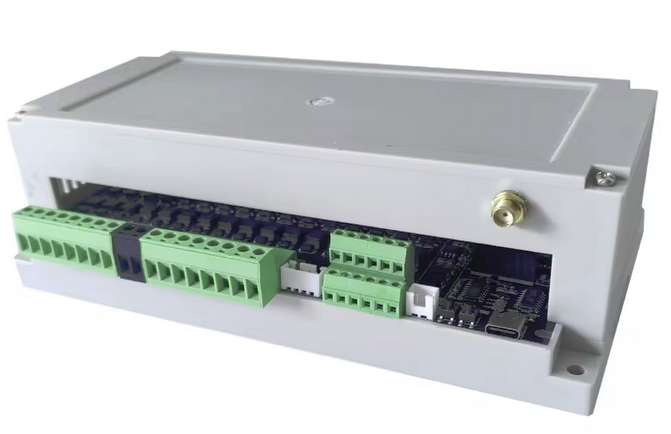
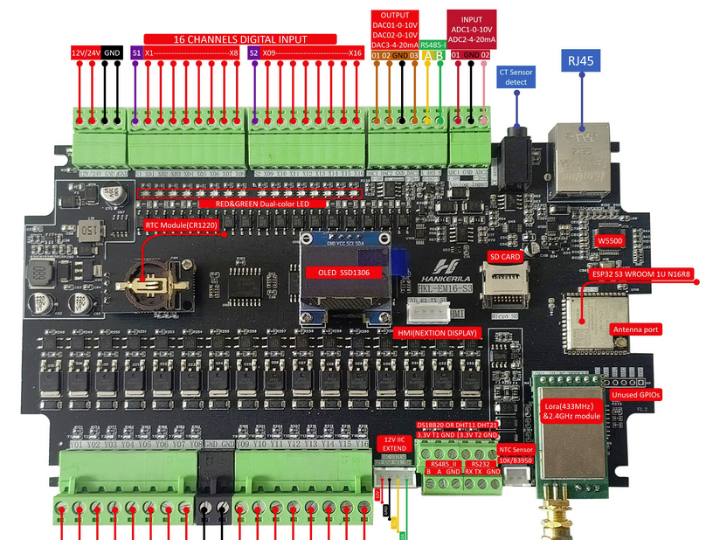
HKL-EM16-S3 is a collection of Arduino and ESPHome examples for an ESP32-S3-based controller board. The repository covers multiple board functions: ESPHome integration, Wi-Fi signal monitoring, 0–10 V analog acquisition with ADS1115, DAC output, PCF8574 digital I/O expansion, HMI communication, SD-card logging, RS485 and RS232 serial examples, current sensing, OLED display, NTP time sync, LoRa, RTC, PSRAM, and temperature sensors.
For WIZnet-specific usage, the practical data flow is straightforward. A browser or LAN client connects to the HKL-EM16-S3 over Ethernet, the ESP32-S3 firmware serves a web interface or receives a relay-control request, and the relay/output logic is applied through the board’s digital output circuitry. This makes the project useful as a reference for small industrial dashboards, local control panels, and wired automation nodes where relay control should not depend on Wi-Fi availability.
Where WIZnet Fits
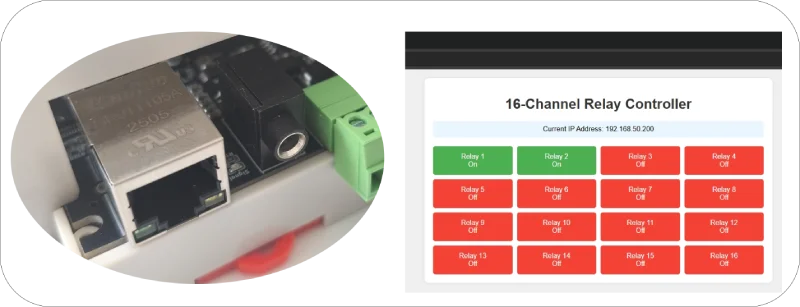
The WIZnet product used by this project is the W5500 Ethernet controller. In the repository, W5500 appears in two examples: 11_W5500_WEB, described as Ethernet connectivity using W5500 to host a basic web server, and 12_W5500_ETH_WEB_control_relay, described as web-based relay control over Ethernet using the W5500 module.
Architecturally, the W5500 provides the wired Ethernet path between the ESP32-S3 controller and the LAN. W5500 is a good fit for this type of controller because it provides a hardwired TCP/IP stack, 10/100 Ethernet MAC/PHY integration, SPI host connection, 32 KB internal Tx/Rx buffer memory, and support for eight independent sockets.
For an ESP32-S3 automation board, those constraints matter. Relay control, RS485 links, analog sensing, and local web access often run in electrically noisy environments. A wired link reduces dependence on RF conditions, while the W5500’s socket-oriented Ethernet design gives the firmware a predictable LAN interface for web control and monitoring tasks.
Implementation Notes
The repository verifies W5500 usage, but the actual demo source is packaged inside EM16-S3_DEMO_code.zip rather than exposed as browseable source files in the GitHub tree. The GitHub page lists the zip package, images, and README, and GitHub does not render the large zip file contents directly.
Verified repository evidence:
README.md
11_W5500_WEB: Implements Ethernet connectivity using the W5500 chip to host a basic web server.
This entry exists to demonstrate the Ethernet bring-up path: initialize the ESP32-S3 side of the network interface, establish W5500-based Ethernet connectivity, obtain or assign an IP address, and serve a simple HTTP endpoint on the LAN.
README.md
12_W5500_ETH_WEB_control_relay: Web-based relay control over Ethernet using the W5500 module.
This entry exists to connect the network layer to an actual control output. Instead of only proving that Ethernet works, the relay example turns the board into a LAN-controlled automation node.
Because the source files are not inspectable as normal GitHub files, this article does not reproduce project code. A safe implementation approach is to treat the HKL-EM16-S3 W5500 examples as Ethernet application references: confirm the W5500 SPI pins from the board pinout/schematic, initialize the Ethernet interface, verify link/IP status, then bind the web-server routes to relay or I/O actions.
Practical Tips / Pitfalls
- Confirm the W5500 SPI wiring from the HKL-EM16-S3 pinout and schematic before reusing generic ESP32-S3 W5500 examples.
- Keep W5500 SPI wiring short and controlled; high-speed SPI Ethernet is less tolerant of loose jumper wiring than slow GPIO tests.
- Decide early between DHCP and static IP. Static IP is often better for relay panels and local HMI dashboards.
- Add link-state and IP-state logging before debugging the web server. Many “web server” failures are actually Ethernet initialization or DHCP failures.
- Avoid sharing the W5500 SPI bus with timing-sensitive peripherals unless the firmware and chip-select handling are tested under load.
- For relay control, add authentication or restrict the device to a trusted LAN segment; a plain local web page is convenient but not a security boundary.
- In industrial panels, verify grounding, surge protection, cable routing, and EMI behavior around relay loads and Ethernet cabling.
FAQ
Q: Why use W5500 for this project?
A: W5500 gives the HKL-EM16-S3 a wired Ethernet path for local web-server and relay-control examples. Compared with Wi-Fi, Ethernet is usually easier to make stable inside cabinets, near relay loads, or in installations where RF coverage changes over time.
Q: How does W5500 connect to the ESP32-S3 platform?
A: W5500 connects to the host MCU over SPI, with additional control pins such as chip-select, interrupt, and reset depending on the board design. The HKL-EM16-S3 repository includes a pinout diagram and schematic reference, so those board-specific pins should be checked before porting generic ESP32 W5500 code.
Q: What role does W5500 play in this project?
A: In this repository, W5500 is used for Ethernet web access. One example hosts a basic web server over W5500 Ethernet, and another uses W5500 Ethernet to control relays from a web page.
Q: Can beginners follow this project?
A: Beginners can use it as a board-level reference, but they should already understand Arduino IDE flashing, ESP32-S3 GPIO, SPI, IP addressing, and relay safety. The W5500 examples are practical, but debugging requires separating hardware link issues, network configuration, and application-layer web code.
Q: How does W5500 compare with Wi-Fi, LwIP, or ENC28J60 here?
A: Wi-Fi is easier when cabling is not possible, but wired Ethernet is usually more predictable for fixed relay-control panels. ENC28J60 is an older Ethernet controller that typically relies more heavily on a host software TCP/IP stack, while W5500 includes hardwired TCP/IP support, internal buffering, and multiple hardware sockets. On ESP32-family software stacks, also check whether the chosen framework uses the W5500 hardware sockets directly or treats W5500 as an Ethernet MAC/PHY path into the ESP network stack.