



STM Lesson 91. LAN. W5500. HTTP Server. Part 4
STM Lesson 91. LAN. W5500. HTTP Server. Part 4
Part 4
LAN. W5500. HTTP server
B previous part lesson we examined the HTTP request that came from the client and began to form an answer to it.
Add a global variable for window size
uint32_t bytesread;
volatile uint16_t tcp_size_wnd = 2048;
The size of the window for the socket — is the size of its buffer. But since we don’t touch the size of the boufers of the sockets and they all silently make up 2 kilobytes, then we are enough for the size of the window of one variable.
And the maximum size of the default segment is also determined, in my opinion 1460, it can also be changed at any time. To do this, there is a special register in the chip.
We continue the response function to the HTTP request. We consider the number of windows ( we do not need to consider the number of segments, the buffer itself shares the segments of the chip without our participation ).
httpsockprop[tcpprop.cur_sock].data_size += sizeof(e404_htm);
}
httpsockprop[tcpprop.cur_sock].cnt_rem_data_part = httpsockprop[tcpprop.cur_sock].data_size / tcp_size_wnd + 1;
httpsockprop[tcpprop.cur_sock].last_data_part_size = httpsockprop[tcpprop.cur_sock].data_size % tcp_size_wnd;
//борьба с неправильным расчётом, когда общий размер делится на минимальный размер окна без остатка
if(httpsockprop[tcpprop.cur_sock].last_data_part_size==0)
{
httpsockprop[tcpprop.cur_sock].last_data_part_size=tcp_size_wnd;
httpsockprop[tcpprop.cur_sock].cnt_rem_data_part--;
}
httpsockprop[tcpprop.cur_sock].cnt_data_part = httpsockprop[tcpprop.cur_sock].cnt_rem_data_part;
sprintf(str1,"data size:%lu; cnt data part:%u; last_data_part_size:%urn",
(unsigned long)httpsockprop[tcpprop.cur_sock].data_size, httpsockprop[tcpprop.cur_sock].cnt_rem_data_part, httpsockprop[tcpprop.cur_sock].last_data_part_size);
HAL_UART_Transmit(&huart2,(uint8_t*)str1,strlen(str1),0x1000);
The whole calculation is similar to the calculation that we used to use when working with the previous module, so he does not need an explanation, I think.
We collect the code, sew the controller and request a bigger dock
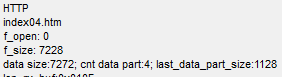
Everything is considered. Fine! Check, I think the calculation is not necessary. Since I have done this many times before giving a lesson. If something goes wrong, then we will see it later in the form of a distorted document in the browser.
Depending on the result, set the status of data transfer
HAL_UART_Transmit(&huart2,(uint8_t*)str1,strlen(str1),0x1000);
if (httpsockprop[tcpprop.cur_sock].cnt_rem_data_part==1)
{
httpsockprop[tcpprop.cur_sock].data_stat = DATA_ONE;
}
else if (httpsockprop[tcpprop.cur_sock].cnt_rem_data_part>1)
{
httpsockprop[tcpprop.cur_sock].data_stat = DATA_FIRST;
}
Everything is simple here. If we have an HTTP response that includes a document along with the heading, ( buffer ) fits in one window, then this is one status. And if not — then another.
And now, based on these statuses, we will cause certain functions. For now, we will only add conditions
httpsockprop[tcpprop.cur_sock].data_stat = DATA_FIRST;
}
if(httpsockprop[tcpprop.cur_sock].data_stat==DATA_ONE)
{
}
else if(httpsockprop[tcpprop.cur_sock].data_stat==DATA_FIRST)
{
}
Add above the function of sending a document that fits into a single package along with the heading
//-----------------------------------------------
void tcp_send_http_one(void)
{
uint16_t i=0;
uint16_t data_len=0;
uint16_t header_len=0;
uint16_t end_point;
uint8_t num_sect=0;
uint16_t len_sect;
}
//-----------------------------------------------
In file w5500.c after the SocketListenWait function, add a couple more functions
//-----------------------------------------------
void SocketClosedWait(uint8_t sock_num)
{
uint8_t opcode=0;
opcode = (((sock_num<<2)|BSB_S0)<<3)|OM_FDM1;
while(1)
{
if(w5500_readReg(opcode, Sn_SR)==SOCK_CLOSED)
{
break;
}
}
}
//-----------------------------------------------
void DisconnectSocket(uint8_t sock_num)
{
uint8_t opcode=0;
opcode = (((sock_num<<2)|BSB_S0)<<3)|OM_FDM1;
w5500_writeReg(opcode, Sn_CR, 0x08); //DISCON
}
//-----------------------------------------------
The first function is waiting for the socket to close, and the second — gives the command to disconnect.
Add prototypes to function data in the title file, return to the file httpd.c and we will process the condition for the transfer of the document together with the heading consisting of a single window
if(httpsockprop[tcpprop.cur_sock].data_stat==DATA_ONE)
{
tcp_send_http_one();
DisconnectSocket(tcpprop.cur_sock); //Разъединяемся
SocketClosedWait(tcpprop.cur_sock);
OpenSocket(tcpprop.cur_sock,Mode_TCP);
//Ждём инициализации сокета (статус SOCK_INIT)
SocketInitWait(tcpprop.cur_sock);
//Продолжаем слушать сокет
ListenSocket(tcpprop.cur_sock);
SocketListenWait(tcpprop.cur_sock);
}
Although the function of sending a document is still empty, but, nevertheless, we will collect the code, we will open the controller and see what changes we have. Of course we will ask for a document that will fit into one package
The result in our terminal program is similar to the previous one, only the difference is that it is displayed only once, that is, the code is no longer fixated with us.
We will also see the result in the traffic analyzer
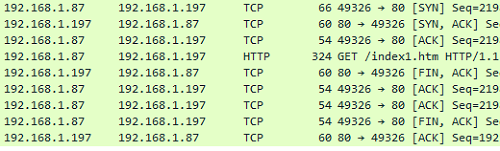
To request a document, we simply close the connection in the correct way. This is good.
Now continue to write the function tcp_send_http_one.
Depending on the type of document, set the HTTP header to the desired array. Moreover, we will do all this when fulfilling the conditions of existence of the document
uint16_t len_sect;if ((httpsockprop[tcpprop.cur_sock].http_doc==EXISTING_HTML)||
(httpsockprop[tcpprop.cur_sock].http_doc==EXISTING_JPG)||
(httpsockprop[tcpprop.cur_sock].http_doc==EXISTING_ICO))
{
switch(httpsockprop[tcpprop.cur_sock].http_doc)
{
case EXISTING_HTML:
header = (void*)http_header;
break;
case EXISTING_ICO:
header = (void*)icon_header;
break;
case EXISTING_JPG:
header = (void*)jpg_header;
break;
}
}
else
{
}
In file w5500.c add two more functions over the initialization function
//-----------------------------------------------
uint16_t GetWritePointer(uint8_t sock_num)
{
uint16_t point;
uint8_t opcode;
opcode = (((sock_num<<2)|BSB_S0)<<3)|OM_FDM1;
point = (w5500_readReg(opcode,Sn_TX_WR0)<<8|w5500_readReg(opcode,Sn_TX_WR1));
return point;
}
//-----------------------------------------------
void SetWritePointer(uint8_t sock_num, uint16_t point)
{
uint8_t opcode;
opcode = (((sock_num<<2)|BSB_S0)<<3)|OM_FDM1;
w5500_writeReg(opcode, Sn_TX_WR0, point>>8);
w5500_writeReg(opcode, Sn_TX_WR1, (uint8_t)point);
}
//-----------------------------------------------
The first of the functions will return the data start address to write to the shipping buffer, and the second — install it.
Add to the data of the prototype function and continue to write the function tcp_send_http_one in file httpd.c, continuing the body of our condition
break;
}
header_len = strlen(header);
data_len = (uint16_t)MyFile.fsize;
end_point = GetWritePointer(tcpprop.cur_sock);
end_point+=header_len+data_len;
In this code we find out the size of the title, data, also the start address of the record. Then we set the address with the added data size and title and read it again.
Although I checked that the previous address is read without adding data size and title, but nonetheless does not work differently.
I also want to note that all the buffers are ring and if the size on the middle address suddenly ends, the data is written and read from zero. No interference on our part is required in this process, the chip will do everything on its own.
In file w5500.c add another global array for the sector, which we will then tie to a certain structure
char tmpbuf[30];
uint8_t sect[515];
Also in this file after function w5500_writeReg add two more pounds
//-----------------------------------------------
void w5500_writeBuf(data_sect_ptr *datasect, uint16_t len)
{
SS_SELECT();
HAL_SPI_Transmit(&hspi1, (uint8_t*) datasect, len, 0xFFFFFFFF);
SS_DESELECT();
}
//-----------------------------------------------
void w5500_writeSockBuf(uint8_t sock_num, uint16_t point, uint8_t *buf, uint16_t len)
{
data_sect_ptr *datasect = (void*)buf;
datasect->opcode = (((sock_num<<2)|BSB_S0_TX)<<3)|(RWB_WRITE<<2)|OM_FDM0;
datasect->addr = be16toword(point);
w5500_writeBuf(datasect,len+3);//3 служебных байта
}
//-----------------------------------------------
One of these functions will write data of variable length in the buffer, and the other will do the same only with reference to a particular socket.
And we tie the buffer to the structure datasect, the first 2 bytes of which contain the memory address ( register ), first with the senior byte, and then the youngest, and the third byte — is opcode. Therefore, we must prepare all this in advance.
In the second function, we do this. We swap bays in the address using macro be16toword. And we prepare the data ourselves in the buffer before calling this function, and for convenience immediately from the address of the fourth byte.
Create a prototype in the header file for the second function, return to the file httpd.c and connect our buffer there
extern char tmpbuf[30];
extern uint8_t sect[515];
We will return to our function, fill out the buffer with header data, write it to the shipping buffer and move the pointer
end_point+=header_len+data_len;
//Заполним данными буфер для отправки пакета
SetWritePointer(tcpprop.cur_sock, end_point);
end_point = GetWritePointer(tcpprop.cur_sock);
memcpy(sect+3,header,header_len);
w5500_writeSockBuf(tcpprop.cur_sock, end_point, (uint8_t*)sect, header_len);
end_point+=header_len;
Here we are just filling out the buffer with data from the address of the fourth byte.
Then we calculate the number of sectors of 512 bytes, add a loop in which we read them from the SD card and write them to the transfer buffer
end_point+=header_len;
num_sect = data_len / 512;
for(i=0;i<=num_sect;i++)
{
//не последний сектор
if(i<(num_sect-1)) len_sect=512;
else len_sect=data_len;
result=f_lseek(&MyFile,i*512); //Установим курсор чтения в файле
sprintf(str1,"f_lseek: %drn",result);
HAL_UART_Transmit(&huart2,(uint8_t*)str1,strlen(str1),0x1000);
result=f_read(&MyFile,sect+3,len_sect,(UINT *)&bytesread);
w5500_writeSockBuf(tcpprop.cur_sock, end_point, (uint8_t*)sect, len_sect);
end_point+=len_sect;
data_len -= len_sect;
}
}
else
Let's go to the file w5500.c and add two more functions there to send the package after the function GetSocketStatus
//-----------------------------------------------
void RecvSocket(uint8_t sock_num)
{
uint8_t opcode;
opcode = (((sock_num<<2)|BSB_S0)<<3)|OM_FDM1;
w5500_writeReg(opcode, Sn_CR, 0x40); //RECV SOCKET
}
//-----------------------------------------------
void SendSocket(uint8_t sock_num)
{
uint8_t opcode;
opcode = (((sock_num<<2)|BSB_S0)<<3)|OM_FDM1;
w5500_writeReg(opcode, Sn_CR, 0x20); //SEND SOCKET
}
//-----------------------------------------------
The first function prepares the shipment by moving all the buffer pointers, and the second directly sends the buffer to the network device with which the connection is created.
We will create prototypes for these functions and return to our unsigned function in a file httpd.c.
While the nasty part of our condition, in which we will send an answer with an error, we will skip and at the end of the function we will send our buffer
else
{
}
//отправим данные
RecvSocket(tcpprop.cur_sock);
SendSocket(tcpprop.cur_sock);
httpsockprop[tcpprop.cur_sock].data_stat = DATA_COMPLETED;
}
Let's collect the code, send the controller, then try to first request a document that fits not only in one buffer ( window ), but even in one segment
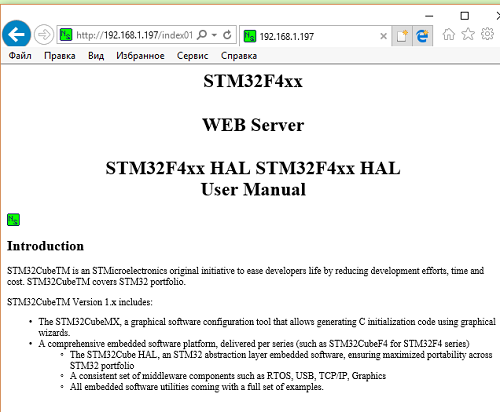
We see that the document was normally transmitted. The icon that I put into the document was also transmitted.
Let's see the traffic analyzer
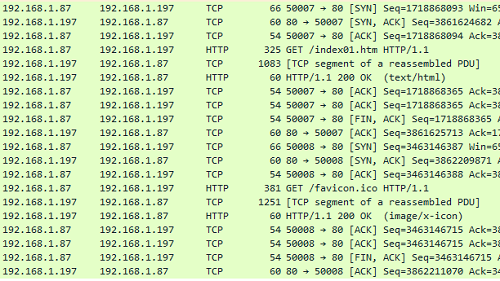
Everything is also fine here.
Now we ask for a page that will fit into one window ( buffer ), but not in the — segment.
She was also transmitted, I think it makes no sense to show. Let's see only the conclusion in WireShark
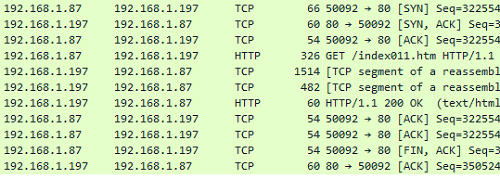
We see that here the process is going right. Everything was transmitted and broken into segments. All confirmations received. Connection created and torn on time.
Let's move on to a bad case now and do the same with the header array for error and the array of the transmitted page document with an error
data_len -= len_sect;
}
}
else
{
header_len = strlen(error_header);
data_len = sizeof(e404_htm);
end_point = GetWritePointer(tcpprop.cur_sock);
end_point+=header_len+data_len;
SetWritePointer(tcpprop.cur_sock, end_point);
end_point = GetWritePointer(tcpprop.cur_sock);
//Заполним данными буфер для отправки пакета
memcpy(sect+3,error_header,header_len);
w5500_writeSockBuf(tcpprop.cur_sock, end_point, (uint8_t*)sect, header_len);
end_point+=header_len;
memcpy(sect+3,e404_htm,data_len);
w5500_writeSockBuf(tcpprop.cur_sock, end_point, (uint8_t*)sect, data_len);
end_point+=data_len;
}
//отправим данные
The code here is similar to the code of the true body and there is nothing to explain here, I think.
We collect the code, send the controller and try to request a non-existent document
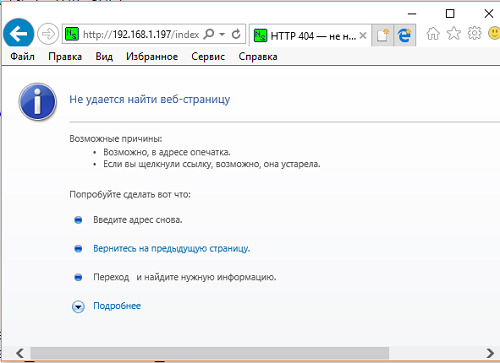
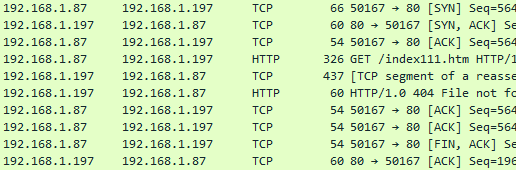
The page with an error and its title is transferred. Also see you with WireShark
B next part lesson we will write three more functions for transferring a large document and thereby complete the writing of the code of our server.