


Setting Up W5500 Ethernet on ESP32-S3 Using ESP-IDF
ESP32-S3-ETH Devkit에서 ESP-IDF를 활용하여 W5500 기반 Ethernet을 설정하고, 안정적인 유선 네트워크 환경을 구축하는 과정을 다룹니다.
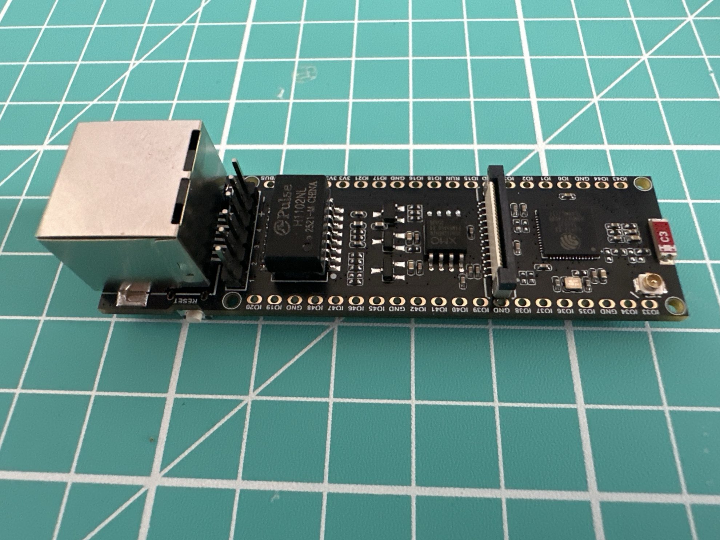

WIZnet - W5500
x 1


Espressif - ESP32
x 1
📌 제목
ESP32-S3에서 W5500 기반 Ethernet 설정: ESP-IDF로 구현하는 안정적인 유선 네트워크
📌 Summary
본 프로젝트는 ESP32-S3-ETH Devkit에서 ESP-IDF를 활용하여 W5500 기반 Ethernet을 설정하고, 안정적인 유선 네트워크 환경을 구축하는 방법을 소개합니다. Wi-Fi 중심의 ESP32 시스템에 Ethernet을 추가하여 산업용 IoT 및 임베디드 시스템에 적합한 Hybrid Network 구성을 구현할 수 있습니다.
📌 Description
🧩 프로젝트 개요
ESP32는 Wi-Fi 중심의 MCU이지만, 산업 환경에서는 보다 안정적인 유선 네트워크가 요구됩니다.
이 프로젝트는 W5500 Ethernet 모듈을 SPI로 연결하여 ESP32-S3에서 Ethernet 통신을 구현하는 방법을 다룹니다.
특히 ESP-IDF 기반으로 Ethernet 드라이버를 설정하고 네트워크를 초기화하는 과정을 포함하여, 실제 제품 개발에 활용 가능한 구조를 제공합니다.
⚙️ 주요 기능
- ESP-IDF 기반 Ethernet 설정
- W5500 SPI 인터페이스 연결
- DHCP 및 Static IP 지원
- Ethernet 연결 테스트 및 검증
- Wi-Fi와 Ethernet 병행 구성 가능
🔧 시스템 구성
- ESP32-S3-ETH Devkit
- WIZnet W5500 Ethernet Controller
- SPI 인터페이스
🧠 기술적 특징
✔️ 1. Hardwired TCP/IP (TOE) 지원
W5500은 TCP/IP 스택을 하드웨어에서 처리하는 TOE(TCP Offload Engine) 기반 칩입니다.
이를 통해 MCU의 연산 부담을 줄이고, 보다 빠르고 안정적인 네트워크 처리가 가능합니다.
✔️ 2. Hybrid Network 구조 가능
ESP32의 Wi-Fi와 Ethernet을 동시에 활용할 수 있어,
- Wi-Fi (무선)
- Ethernet (유선)
을 병행하는 Hybrid Network 구성이 가능합니다.
예:
- 기본은 Ethernet → 장애 시 Wi-Fi fallback
- IoT Gateway 구조
✔️ 3. 산업 환경 최적화
- Wi-Fi 간섭 없는 안정적인 통신
- 낮은 latency
- 높은 신뢰성
🚀 동작 방식
- ESP-IDF 개발 환경 설정
- Ethernet 드라이버 활성화
- SPI 인터페이스 구성
- W5500 초기화
- 네트워크 인터페이스 등록
- DHCP 또는 Static IP 설정
- 연결 테스트 수행
💡 활용 분야
- 산업용 IoT 장비
- 유선 기반 게이트웨이
- 스마트 팩토리 시스템
- 로봇 제어 시스템
- 안정적인 데이터 수집 시스템
❓ FAQ
Q1. 이 프로젝트는 Hybrid Network인가요?
👉 네, 가능합니다.
ESP32의 Wi-Fi와 W5500 Ethernet을 동시에 사용할 수 있어 Hybrid Network 구성이 가능합니다.
Q2. W5500의 TOE 기능은 실제로 사용되나요?
👉 네.
W5500은 TCP/IP 스택을 내부에서 처리하는 Hardwired TCP/IP 칩이므로, MCU는 소켓 레벨 제어만 수행합니다.
Q3. Wi-Fi 없이 Ethernet만 사용 가능한가요?
👉 가능합니다.
이 프로젝트는 순수 Ethernet 환경에서도 동작합니다.
Q4. 산업용 환경에 적합한가요?
👉 매우 적합합니다.
유선 기반 네트워크는 Wi-Fi보다 안정성과 신뢰성이 높기 때문에 산업용 IoT 시스템에 적합합니다.
Q5. ESP-IDF를 꼭 사용해야 하나요?
👉 권장됩니다.
ESP-IDF는 Ethernet 드라이버 지원이 가장 안정적이며, 실제 제품 개발 환경에 적합합니다.
W5500 Ethernet Setup on ESP32-S3 Using ESP-IDF for Reliable Wired Networking
📌 Summary
This project demonstrates how to configure W5500-based Ethernet on the ESP32-S3-ETH Devkit using ESP-IDF. It enables a reliable wired network and supports hybrid networking with Wi-Fi, making it suitable for industrial IoT and embedded systems.
📌 Description
🧩 Overview
While ESP32 is commonly used for Wi-Fi applications, many real-world systems require stable wired communication.
This project shows how to integrate the W5500 Ethernet controller with ESP32-S3 using ESP-IDF.
⚙️ Key Features
- Ethernet configuration with ESP-IDF
- SPI communication with W5500
- DHCP / Static IP support
- Network connection testing
- Hybrid networking capability
🔧 System Architecture
- ESP32-S3-ETH Devkit
- WIZnet W5500 Ethernet controller
- SPI interface
🧠 Technical Highlights
✔️ Hardware TCP/IP Offload (TOE)
W5500 features a built-in TCP/IP stack, offloading network processing from the MCU, enabling efficient and stable communication.
✔️ Hybrid Network Support
Supports both:
- Wi-Fi (wireless)
- Ethernet (wired)
Enabling hybrid networking for redundancy and flexibility.
✔️ Industrial-Ready Networking
- Stable communication
- Low latency
- Reduced interference
🚀 Workflow
- Set up ESP-IDF environment
- Enable Ethernet driver
- Configure SPI interface
- Initialize W5500
- Register network interface
- Assign IP (DHCP or static)
- Verify connection
💡 Applications
- Industrial IoT
- Wired gateways
- Smart factory systems
- Robotics
- Reliable data acquisition
❓ FAQ
Q1. Does this support hybrid networking?
👉 Yes. Wi-Fi and Ethernet can be used together.
Q2. Does W5500 use TOE?
👉 Yes. It offloads TCP/IP processing in hardware.
Q3. Can it run Ethernet only?
👉 Yes, Wi-Fi is optional.
Q4. Is it suitable for industrial use?
👉 Yes. Wired Ethernet provides higher reliability.
Q5. Why ESP-IDF?
👉 It provides stable and native Ethernet support.