


Fixing W5500 Detection Failure in Thread BR
Thread BR에서 W5500 칩 ID가 0으로 읽혀 초기화가 실패할 수 있다. 전원/리셋/CS/SPI 신호/핀맵 점검 순서를 체크리스트로 정리한다.

WIZnet - W5500
x 1

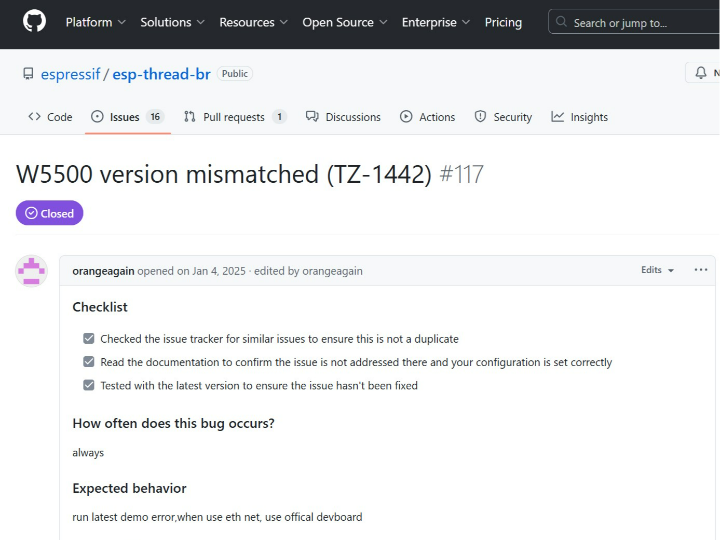
Thread Border Router에서 W5500 “Version Mismatched (expected 0x04, got 0)”로 초기화 실패: 원인 분해·점검 체크리스트·양산 대응
요약
Thread Border Router 예제에서 백홀 연결을 Ethernet(W5500)로 선택하면, expected 0x04, got 0 형태의 “버전 미스매치” 로그가 발생하며 칩 ID 검증에 실패해 이더넷 초기화가 중단되는 사례가 보고되었다. 이 글은 “칩 ID가 0으로 읽히는” 유형을 하드웨어·신호·설정 관점에서 빠르게 분해하고, 현장/양산에서 반복 적용 가능한 점검 순서를 제공한다.
1. Overview
게이트웨이/보더 라우터 같은 네트워크 장치는 설치 환경이 다양하고, Wi-Fi 품질이 불안정한 현장에서는 유선 이더넷 백홀이 특히 선호된다. 하지만 이더넷이 “안 되는” 문제가 아니라, “아예 W5500을 인식하지 못하는” 초기화 실패가 발생하면 디버깅이 크게 지연된다.
이번 사례는 증상이 명확하다.
- W5500의 칩 ID 검증 단계에서 “기대값과 다른 값(0)”이 읽힌다.
- 이후 드라이버 설치/초기화 흐름이 연쇄적으로 실패하며 Ethernet 경로가 막힌다.
- 특정 설정(예: Wi-Fi 비활성, Ethernet 활성)에서 항상 재현되는 패턴이 보고되었다.
하드웨어 구성
- MCU: ESP32 계열(보더 라우터 플랫폼)
- Thread 무선: 802.15.4/Thread 라디오(플랫폼 내장 또는 외장)
- Ethernet: WIZnet W5500 (SPI)
- 네트워크: RJ45(이더넷 업링크)
- 인터페이스: SPI(SCLK/MOSI/MISO) + CS + RESET + 전원(3.3V) + GND
- (현장 변수) 실드/베이스보드/커넥터/배선 길이, 레벨 시프터 유무
소프트웨어 구성
- 프레임워크: esp-thread-br(Thread Border Router)
- 빌드/설정: 예제 설정(Backhaul을 Ethernet로 선택, Wi-Fi 비활성 등)
- Thread 스택/서비스: Thread 네트워킹 + BR 서비스(라우팅/포워딩 등)
- Ethernet 경로: esp_eth + W5500 드라이버(초기화 시 Chip ID read/verify)
- SPI/GPIO: SPI 드라이버 + CS/RESET 제어
- 진단 포인트: 초기화 로그(Chip ID 검증 실패 → MAC init 실패 → 드라이버 설치 실패)
2. 증상 및 의미(“got 0”가 말해주는 것)
2.1 증상
- W5500 버전(칩 ID) 검증 실패 로그
- “expected 0x04, got 0” 형태로 기대값과 실제 읽기값이 불일치
- 그 결과 MAC 초기화 실패 → 이더넷 드라이버 설치 실패 → 네트워크 경로 미구성
2.2 “0으로 읽힌다”의 현장적 해석
칩 ID가 0으로 읽히는 경우는 대개 아래 중 하나로 귀결된다.
- CS(Chip Select) 동작/핀 매핑 문제로 칩이 SPI 응답을 하지 않음
- RESET/전원 시퀀스 문제로 칩이 정상 상태로 올라오지 못함
- MISO 라인이 부동/풀다운 등으로 0에 고정되어 읽힘
- 배선/레벨/속도 문제로 SPI 신호가 깨짐(특히 클럭이 높을 때)
즉, 이 유형은 TCP/IP 설정 이전에 “칩 인식 레벨”에서 막힌 것으로 보는 것이 정확하다.
3. 시스템 구조 관점(왜 Thread BR에서 더 중요해지는가)
Thread Border Router는 Thread 네트워크와 IP 백홀 네트워크를 연결하는 게이트웨이 역할을 한다. 백홀을 Ethernet으로 선택했을 때 W5500이 올라오지 않으면, 제품은 “Thread는 되는데 외부망이 안 되는” 치명적인 상태가 된다.
게이트웨이는 보통 다음 특성을 가진다.
- 현장마다 전원/배선/보드 리비전이 달라짐
- 설치 규모가 커질수록 “초기화 실패”가 유지보수 비용으로 직결됨
- 따라서 초기화 실패를 빠르게 분해하는 체크리스트가 운영 자산이 된다
4. 점검 체크리스트(가장 빠른 순서)
아래 순서는 “현장에서 가장 적은 시간으로 원인을 좁히는” 순서다.
4.1 전원 안정화와 RESET 상태 확인(최우선)
- W5500이 리셋 상태에 머물면 정상 응답을 기대하기 어렵다.
- 전원 레일 상승 시간, 리셋 타이밍, 부트 시퀀스를 먼저 확인한다.
4.2 CS(Chip Select) 제어/핀맵 검증
- CS가 정확히 동작하지 않으면 W5500은 MISO를 구동하지 않을 수 있다.
- “항상 got 0” 패턴이면 CS 핀/폴라리티/GPIO 설정을 우선 의심한다.
4.3 SPI 속도 낮춰서 칩 ID부터 안정화
- 초기 확인 단계에서는 SPI 클럭을 낮추고 칩 ID 읽기부터 안정화한다.
- 배선/커넥터/실드 보드가 있는 경우 속도 민감도가 커질 수 있다.
4.4 MISO 라인 상태(부동/풀다운) 확인
- 칩이 응답하지 않는 상황에서 MISO가 0으로 고정되면 “got 0”이 반복된다.
- 라인 풀업/풀다운, 레벨 시프터 방향, 보드 라우팅을 점검한다.
4.5 소프트웨어 설정 스위치 점검(Ethernet 경로 확정)
- 예제 설정에서 Ethernet 활성화, Wi-Fi 비활성화 등 경로가 올바르게 구성되어 있는지 확인한다.
- “Ethernet으로 들어갔다고 생각했지만 실제로는 다른 경로”인 경우를 배제해야 한다.
4.6 문서 핀맵과 실제 보드 리비전 일치 확인
- “기본 하드웨어 설정”을 사용했다고 해도, 보드 리비전/커넥터/실드 조합에 따라 핀맵이 달라질 수 있다.
- ODM/OEM 커스텀 보드일수록 이 단계가 중요하다.
5. W5500의 역할과 반복 적용 포인트
W5500은 “유선 이더넷 백홀”을 제공하는 핵심 부품이며, 초기화 과정에서 칩 ID 검증이 통과해야만 이더넷 경로가 열린다. 따라서 다음이 중요하다.
- “네트워크가 안 된다”를 TCP/IP가 아니라 칩 인식 단계로 빠르게 분해
- 전원/리셋/CS/SPI 신호 무결성 같은 양산 변수를 체크리스트로 고정
- 고객사(ODM/OEM) 확장 시에도 동일한 순서로 대응 가능
6. 시장 확장 가능성
이 체크리스트는 특정 프로젝트의 단발성 트러블슈팅을 넘어, 아래 시장에서 반복 적용 가능한 운영 자산이 된다.
- 스마트빌딩/산업 현장: Thread 센서망 + 유선 백홀 게이트웨이
- 대규모 설치(기업·ODM/OEM): 현장 조건이 다양해 “초기화 실패”가 빈번
- 원격 유지보수 제품: 초기화 실패를 빠르게 진단해야 운영 비용이 줄어듦
결국 “W5500 인식 실패”를 체계적으로 분해하는 문서는, 제품 개발뿐 아니라 고객 지원/현장 운영 측면에서도 가치가 크다.
7. 결론
Thread Border Router에서 W5500 버전 미스매치(칩 ID 검증 실패)가 발생하면, 우선 TCP/IP 이전 단계인 전원/리셋/CS/SPI 신호/핀맵부터 순서대로 점검해야 한다. 이 점검 순서를 표준화해두면, 양산·현장 설치·ODM/OEM 확장에서도 반복 적용 가능한 안정성 자산이 된다.
FAQ
Q1. “expected 0x04, got 0”는 어떤 의미인가요?
A. 드라이버가 W5500의 버전/칩 ID를 읽었는데, 정상 기대값 대신 0이 읽혔다는 의미다. 보통 칩이 응답하지 않는 상황(전원/리셋/CS/신호)을 먼저 의심한다.
Q2. 소프트웨어 버그일 가능성은 없나요?
A. 있을 수는 있지만, 이 유형은 우선 하드웨어 레벨에서 응답 자체가 없을 때 흔하게 나타난다. “칩 인식 단계”를 먼저 확정한 뒤 소프트웨어를 보는 편이 효율적이다.
Q3. 게이트웨이 제품에서 왜 더 중요하죠?
A. 설치 환경이 다양하고 규모가 커질수록 초기화 실패가 유지보수 비용으로 직결된다. 체크리스트는 반복 적용 가능한 운영 자산이 된다.
W5500 “Version Mismatched (expected 0x04, got 0)” Initialization Failure in a Thread Border Router: Root Cause Breakdown and a Production Checklist
Summary
When enabling Ethernet (W5500) as the backhaul in a Thread Border Router setup, initialization may fail during chip ID verification with a “version mismatched” message in the form of “expected 0x04, got 0.” This article explains what “reading 0” typically implies in the field, and provides a fast, repeatable checklist focused on power/reset, chip select, SPI integrity, and configuration validation—practical for production and large-scale deployments.
1. Overview
Gateways and border routers are deployed across diverse environments. In many industrial and building installations, wired Ethernet backhaul is preferred over Wi-Fi due to reliability and predictable performance. When Ethernet fails because the controller is not even recognized, debugging can stall quickly.
This case is clear:
- Chip ID verification fails (expected value does not match the read value)
- MAC init fails, driver installation fails, and the Ethernet path never comes up
- The failure pattern is reported as consistently reproducible under certain configuration switches
2. Symptoms and What “Got 0” Usually Means
2.1 Symptoms
- Chip ID/version verification failure for W5500
- “expected 0x04, got 0” style mismatch
- Cascading failures: MAC init failure → driver install failure → no Ethernet connectivity
2.2 Field Interpretation of “Reading 0”
A “0” readout is commonly caused by one of the following:
- CS (Chip Select) not asserted correctly (wrong pin mapping, polarity, or GPIO mode)
- Reset/power sequencing prevents the chip from reaching a ready state
- MISO line is floating or effectively held low (pull-down behavior)
- SPI signal integrity issues (wiring, level shifting, excessive clock speed)
In other words, this is typically blocked at the “chip recognition” layer—before TCP/IP becomes relevant.
3. Why This Matters More in Border Routers
A Thread Border Router bridges a Thread network to an IP backhaul network. If the backhaul Ethernet controller never initializes, the product can end up in a critical state where “Thread works locally but upstream connectivity is broken.”
Border routers also tend to:
- ship into many site-specific wiring and power conditions
- run at scale, where small failure rates become high support costs
- benefit greatly from standardized, repeatable diagnostics
4. The Fastest Troubleshooting Checklist (In the Right Order)
4.1 Confirm Power Stability and Reset State (First Priority)
- If W5500 remains in reset, reliable SPI responses are unlikely
- Verify rail ramp-up timing, reset timing, and boot sequencing
4.2 Validate CS Control and Pin Mapping
- Without correct CS behavior, the chip may not drive MISO
- If the pattern is “always got 0,” suspect CS mapping/polarity/GPIO setup first
4.3 Lower SPI Clock and Stabilize Chip ID Reads First
- For initial validation, reduce SPI clock speed and focus on stable chip ID reads
- Shield boards, connectors, and long traces increase sensitivity to speed
4.4 Inspect the MISO Line for Floating/Low-Held Behavior
- If the chip is not responding, MISO can read as a constant 0 depending on the board
- Check pulls, level shifter direction, and routing
4.5 Confirm Configuration Switches (Ensure You’re on the Ethernet Path)
- Validate the example/configuration actually selects Ethernet and disables alternative paths
- Eliminate “wrong path” confusion early
4.6 Ensure Documentation Pinout Matches the Actual Board Revision
- Even with “default settings,” revisions, shields, or ODM variants may alter pin mapping
- This step is critical for OEM/ODM scaling
5. W5500’s Role and Reusable Value
W5500 provides the wired Ethernet backhaul. Ethernet only comes up after chip ID verification succeeds. The reusable value here is:
- quickly separating “chip recognition failure” from “network stack failure”
- standardizing power/reset/CS/SPI integrity checks for production variability
- applying the same checklist across ODM/OEM variants and customer environments
6. Market Scalability (Why This Article Is Useful)
This checklist scales beyond a single project:
- smart building or industrial sites: Thread sensor mesh + wired backhaul gateway
- enterprise/ODM deployments: diverse field conditions increase init failure risk
- remotely maintained products: faster diagnosis reduces operational cost
A standardized “W5500 recognition failure” checklist becomes an operational asset across products and customers.
7. Conclusion
If a Thread Border Router reports a W5500 version mismatch with a “got 0” readout, prioritize checks at the pre-TCP/IP layer: power, reset, CS, SPI integrity, and pin mapping. Standardizing this sequence improves robustness for production, field deployment, and ODM/OEM expansion.
FAQ
Q1. What does “expected 0x04, got 0” mean?
A. The driver expected the W5500 chip ID/version value but read 0 instead. In practice, this often indicates the chip is not responding due to reset/power/CS/signaling issues.
Q2. Could it still be a software bug?
A. It’s possible, but “reading 0” is a frequent symptom of missing hardware-level response. Confirm chip recognition first, then move up the stack.
Q3. Why is this especially important for gateways?
A. Gateway deployments vary widely and scale quickly; initialization failures translate directly into support and maintenance cost. A repeatable checklist reduces that burden.