


Can LoRaWAN Downlink Commands Control an Ethernet LED Display with W55RP20?
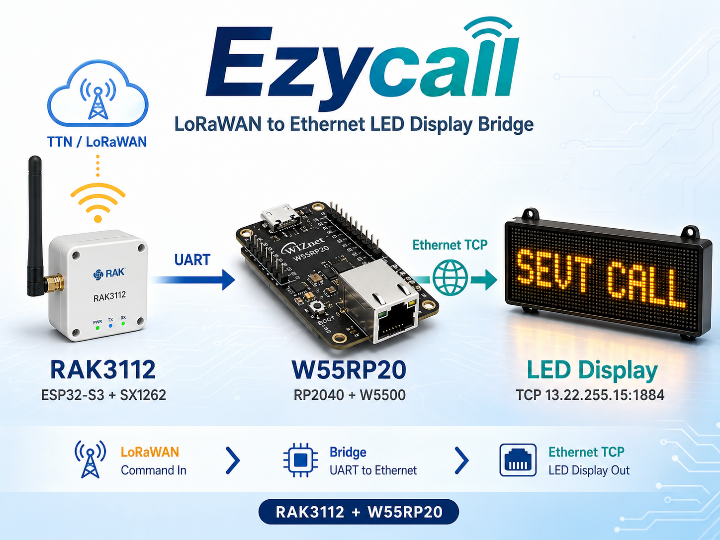
LoRaWAN으로 받은 명령을 W55RP20이 이더넷 TCP로 네트워크 LED 디스플레이에 전달하는, ESP32-S3(LoRa) + W55RP20(이더넷) 2단 브릿지 구조의 시스템
WIZnet - W55RP20
x 1

LoRaWAN 다운링크 명령으로 Ethernet LED 디스플레이를 제어할 수 있을까?
프로젝트 개요
Ezycall은 The Things Network를 통해 LoRaWAN 다운링크 명령을 수신하고, 해당 명령을 W55RP20이 Ethernet TCP로 변환하여 네트워크 LED 디스플레이에 전달하는 원격 호출 시스템입니다.
시스템은 다음 3개의 장치로 구성됩니다.
- RAK3112: LoRaWAN 명령 수신 및 처리
- W55RP20: UART-to-Ethernet TCP 변환
- LED 디스플레이: 수신한 명령을 화면에 출력
*RAK3112는 중국 RAKwireless가 만든 LoRaWAN 통신 모듈이며, 내부에는 ESP32-S3 마이크로컨트롤러와 Semtech의 SX1262 LoRa 칩이 통합되어 있습니다.
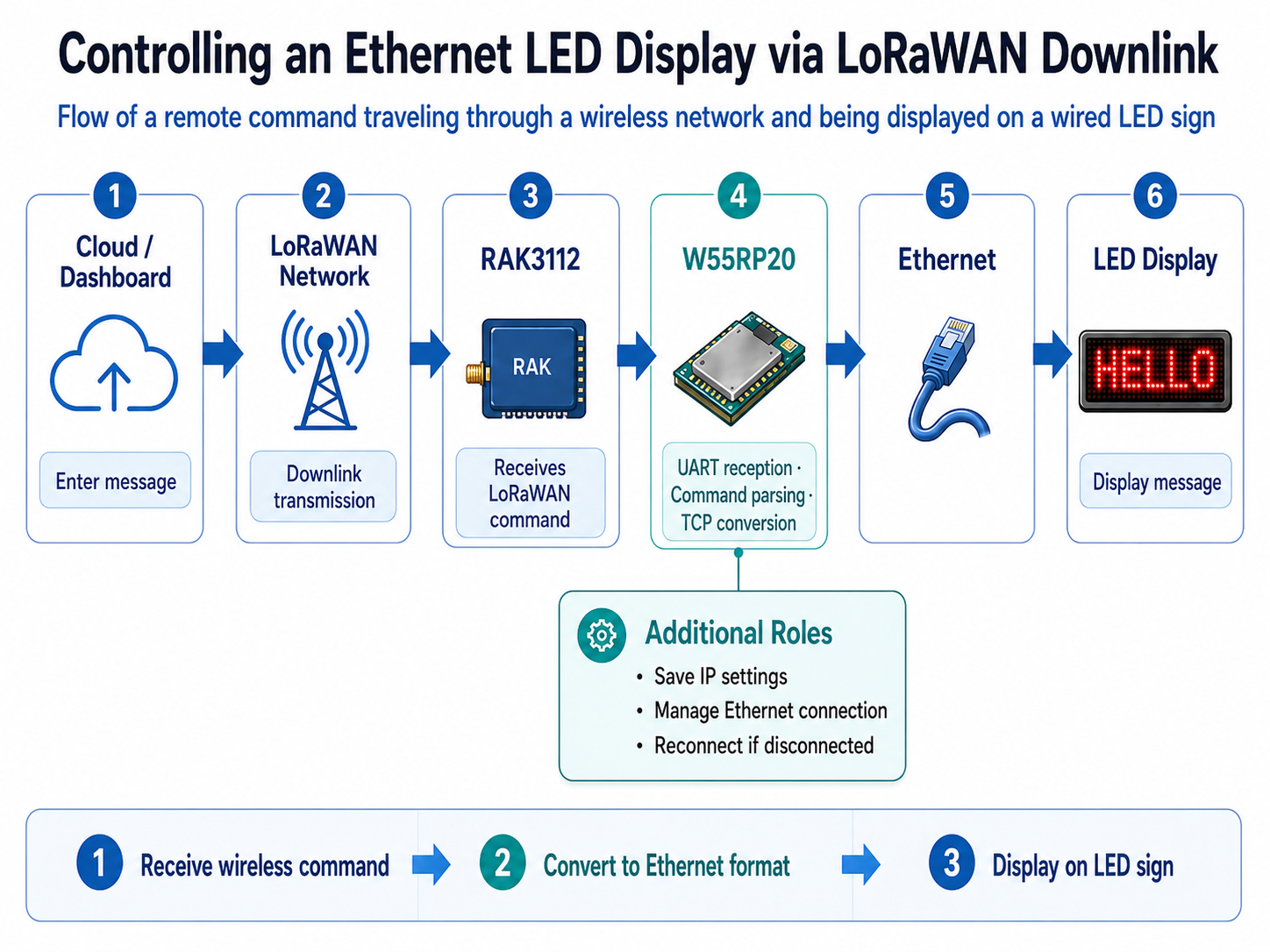
클라우드에서 LED 메시지를 입력하면 LoRaWAN을 통해 RAK3112가 명령을 받고, W55RP20이 이를 Ethernet으로 전달해 전광판에 표시합니다.
LoRa는 무선 신호를 보내는 기술,
LoRaWAN은 그 신호를 여러 장치와 서버가 주고받도록 정한 통신 규칙
예를 들어 공장이나 농장에서 센서가 온도, 습도, 기계 상태를 측정하면 다음처럼 전달
센서 → LoRa 무선 → LoRaWAN 게이트웨이 → 인터넷 → 클라우드 서버
반대로 서버에서 장치로 명령을 내릴 수도 있습니다.
클라우드 → LoRaWAN → 현장 장치
이걸 Downlink 라고 합니다.
전체 데이터 흐름은 다음과 같습니다.
LoRaWAN Downlink
→ RAK3112
→ UART
→ W55RP20
→ Ethernet TCP
→ LED Display
일반적인 LoRa 프로젝트가 센서 데이터를 서버나 클라우드로 올리는 업링크에 집중한다면, Ezycall은 클라우드에서 내려온 명령을 현장의 물리적인 디스플레이로 전달하는 다운링크 중심 구조라는 점이 특징입니다.
제품명은 사용자 매뉴얼을 기준으로 Ezycall이며, 제품 시리얼은 08-44-00-01입니다.
원본에서 확인되는 주요 구성
리포지토리는 다음 자료로 구성됩니다.
TTN-RAK3112-PIO: RAK3112용 PlatformIO 펌웨어FULL_SENDUID_PICO_CODE.ino: W55RP20용 Arduino 펌웨어User_Manual_08-44-00-01.pdf: Ezycall 사용자 매뉴얼
LED 디스플레이는 외부 장치이며, 해당 장치의 펌웨어와 하드웨어 자료는 리포지토리에 포함되어 있지 않습니다.
하드웨어 구성
| 구성 요소 | 주요 칩 | 인터페이스 | 역할 |
|---|---|---|---|
| RAK3112 | ESP32-S3 + SX1262 | LoRaWAN, Wi-Fi, UART | TTN 다운링크 수신 및 명령 생성 |
| W55RP20 | RP2040 + W5500 | UART, Ethernet | 시리얼 명령을 Ethernet TCP로 전달 |
| LED Display | 외부 장치 | Ethernet TCP | 수신 명령 표시 |
RAK3112의 역할
RAK3112는 ESP32-S3 MCU와 SX1262 LoRa 트랜시버를 기반으로 LoRaWAN 통신을 담당합니다.
펌웨어는 PlatformIO 환경으로 구성되어 있으며 주요 라이브러리는 다음과 같습니다.
- RadioLib
- ArduinoJson
RadioLib는 The Things Network 연결과 LoRaWAN 다운링크 수신을 담당합니다. ArduinoJson은 장치 설정과 메시지 데이터를 처리하는 데 사용됩니다.
RAK3112는 수신한 LoRaWAN 메시지를 다음 형식의 명령으로 가공합니다.
SEND |SEVT|...
가공된 명령은 UART를 통해 W55RP20으로 전달되도록 설계되어 있습니다.
Wi-Fi 설정 포털
RAK3112는 현장 설정을 위한 Wi-Fi SoftAP 포털을 제공합니다.
기본 설정은 다음과 같습니다.
- 접속 주소:
192.168.4.1 - 포털 비밀번호:
2240624
이를 통해 펌웨어를 직접 수정하지 않고도 장치와 LoRaWAN 관련 설정을 변경할 수 있습니다.
보안을 위해 실제 배포 환경에서는 기본 비밀번호를 변경하는 것이 필요합니다.
현재 UART 브리지 상태
리포지토리에 커밋된 RAK3112 펌웨어에서는 다음 설정이 확인됩니다.
PICO_UART_BRIDGE_ENABLED = false
따라서 현재 커밋 상태에서는 RAK3112에서 W55RP20으로 명령을 전달하는 UART 브리지 기능이 비활성화되어 있습니다.
전체 데이터 흐름을 실제로 동작시키려면 해당 값을 true로 변경하고, UART 핀과 통신 속도를 확인한 뒤 펌웨어를 다시 빌드해야 합니다.
즉, 리포지토리는 전체 시스템 구조와 각 보드의 펌웨어를 제공하지만, 커밋된 기본 설정 그대로는 RAK3112와 W55RP20 사이의 자동 전달 기능이 활성화되지 않습니다.
W55RP20의 역할
W55RP20은 RP2040 MCU와 W5500 Hardwired TCP/IP Ethernet Controller를 하나의 칩에 통합한 제품입니다.
Ezycall에서 W55RP20은 단순한 Ethernet 인터페이스가 아니라, LoRaWAN 시스템과 LED 디스플레이 사이를 연결하는 애플리케이션 브리지 역할을 합니다.
LoRaWAN으로 명령을 받았다고 해서 Ethernet 전광판을 바로 제어할 수는 없습니다. 두 장치가 사용하는 통신 방식이 다르기 때문입니다.
W55RP20은 중간에서:
- UART 명령을 받고
- 명령 내용을 분석하고
- Ethernet TCP로 전광판에 전달하고
- IP와 장치 설정을 저장하고
- Ethernet 연결이 끊기면 다시 연결합니다.
즉, 단순한 Ethernet 부품이 아니라 LoRaWAN과 기존 유선 장비를 연결하는 컨트롤러입니다.
주요 기능은 다음과 같습니다.
- UART 명령 수신
- 명령 구문 분석
- Ethernet 정적 IP 초기화
- LED 디스플레이 TCP 서버 연결
- UID 및 IP 설정 저장
- Ethernet 연결 상태 확인
- 통신 장애 발생 시 Ethernet 재초기화
Ethernet 네트워크 설정
W55RP20 펌웨어는 부팅 시 Ethernet.begin()을 호출해 정적 IP 방식으로 네트워크를 초기화합니다.
기본 설정은 다음과 같습니다.
- MAC 주소:
DE:AD:BE:EF:FE:ED - W55RP20 IP:
13.22.0.213 - Gateway:
13.22.0.1 - Subnet Mask:
255.0.0.0 - LED Display IP:
13.22.255.15 - TCP Port:
1884 - LED 디스플레이는 TCP 서버로 동작하고, W55RP20은 TCP 클라이언트로 연결합니다.
이 주소는 프로젝트에 설정된 기본값이므로 실제 환경에서는 네트워크 구성과 IP 충돌 여부를 확인해야 합니다.
시리얼 입력 구조
W55RP20은 두 개의 시리얼 입력을 사용합니다.
Serial1
YAT과 같은 외부 시리얼 터미널에서 명령을 입력하는 용도입니다.
이 인터페이스를 이용하면 RAK3112 없이도 W55RP20의 명령 처리와 Ethernet 통신을 독립적으로 테스트할 수 있습니다.
Serial2
RAK3112가 생성한 명령을 수신하는 용도입니다.
RAK3112에서 전달된 SEND |SEVT|... 명령은 W55RP20에서 처리된 뒤 Ethernet TCP를 통해 LED 디스플레이로 전송됩니다.
지원 명령
| 명령 | 기능 |
|---|---|
GETUID | 현재 저장된 장치 UID 조회 |
SETUID | 새로운 UID 설정 및 저장 |
SETIP | W55RP20의 정적 IP 주소 변경 |
RESTART | 장치 재시작 |
SEND | 메시지를 LED 디스플레이로 전송 |
EEPROM 설정 저장
W55RP20 펌웨어는 512바이트 EEPROM 영역에 장치 설정을 저장합니다.
- UID: 주소 0부터 저장
- IP 설정: 주소 32부터 저장
따라서 전원을 껐다 켜거나 장치를 재시작해도 UID와 네트워크 설정이 유지됩니다.
Ethernet 장애 복구
펌웨어는 ethernetOk 플래그를 사용해 Ethernet 상태를 관리합니다.
TCP 통신에 실패하면 기존 연결을 종료하고 Ethernet 인터페이스를 다시 초기화합니다.
이 기능은 장시간 운영되는 호출 시스템이나 안내 디스플레이에서 일시적인 네트워크 오류로 전체 시스템이 멈추는 문제를 줄이는 데 도움이 됩니다.
다만 실제 상용 환경에서는 재연결 횟수, 재시도 간격, 오류 로그, Watchdog 동작까지 추가로 검증할 필요가 있습니다.
이 프로젝트에서 W55RP20이 중요한 이유
이 프로젝트의 핵심은 LoRaWAN 자체보다 LoRaWAN 이후의 연결성입니다.
The Things Network에서 명령을 수신하는 것만으로는 실제 현장 장치를 제어할 수 없습니다. 수신한 명령을 LED 디스플레이가 사용하는 Ethernet TCP 네트워크로 안정적으로 전달해야 전체 서비스가 완성됩니다.
W55RP20은 다음 역할을 한 장치에서 처리합니다.
- RP2040 기반 명령 처리
- UART 입력 수신
- UID 및 네트워크 설정 관리
- W5500 기반 Ethernet TCP 통신
- 연결 상태 확인과 복구
따라서 W55RP20은 단순한 Ethernet 추가 부품이 아니라, 무선 네트워크의 명령을 기존 유선 장치의 동작으로 연결하는 Programmable Ethernet Controller로 사용됩니다.
기존 LoRa Gateway와의 차별점
기존 LoRa-to-Ethernet 게이트웨이는 대부분 다음 방향으로 동작합니다.
현장 센서
→ LoRa
→ Gateway
→ Ethernet
→ Server 또는 Cloud
센서 데이터를 클라우드로 올려보냅니다.
Ezycall은 반대 방향의 명령 흐름을 구현합니다.
TTN 또는 Cloud
→ LoRaWAN Downlink
→ RAK3112
→ W55RP20
→ Ethernet TCP
→ LED Display
따라서 Ezycall은 센서 데이터 수집용 게이트웨이라기보다, 원격 명령을 현장의 출력 장치로 전달하는 LoRaWAN-to-Ethernet 제어 브리지에 가까우며, 원격 제어 사례 입니다.
Maker 유사 콘텐츠 비교
| 유사 콘텐츠 및 링크 | 공통점 | Ezycall의 차이점 |
|---|---|---|
| OpenAlerting LoRa Gateway with ESR-US1 W5500 | LoRa 무선 통신과 WIZnet Ethernet을 결합하여 무선 현장망과 유선 네트워크를 연결합니다. | OpenAlerting은 LoRa 노드 데이터를 서버나 모니터링 시스템으로 전달하는 업링크 게이트웨이입니다. Ezycall은 TTN 다운링크 명령을 LED 디스플레이로 전달하는 제어 시스템이며, W5500 모듈 대신 RP2040과 W5500이 통합된 W55RP20을 사용합니다. |
| LoRa TPMS Gateway with W5500 | LoRa와 W5500 Ethernet을 결합하고, 무선 구간과 유선 네트워크 구간의 역할을 분리합니다. | TPMS Gateway는 타이어 압력·온도·배터리 데이터를 MQTT Cloud Broker로 전송합니다. Ezycall은 센서 데이터를 수집하지 않고, 클라우드에서 수신한 명령을 직접 TCP 방식으로 로컬 LED 디스플레이에 전달합니다. |
| W55RP20: Serial to Ethernet Design | W55RP20을 이용해 UART 기반 장치를 Ethernet 네트워크에 연결합니다. | 기존 콘텐츠는 TTL, RS-232, RS-422, RS-485를 위한 범용 Serial-to-Ethernet 하드웨어 및 펌웨어 설계 가이드입니다. Ezycall은 LoRaWAN 다운링크, 전용 SEND 명령, UID/IP 저장, LED 디스플레이 TCP 연결을 결합한 실제 애플리케이션 사례입니다. |
유사 콘텐츠에서 얻을 수 있는 인사이트
세 프로젝트 모두 무선 또는 시리얼 장치를 Ethernet 네트워크로 확장한다는 공통점이 있습니다.
하지만 Ezycall의 신규성은 다음 세 가지에서 확인할 수 있습니다.
첫째, 데이터의 방향이 다릅니다. 기존 LoRa Gateway가 현장 데이터를 클라우드로 올리는 구조라면 Ezycall은 클라우드 명령을 현장 장치로 내려보냅니다.
둘째, W55RP20이 범용 Serial-to-Ethernet 장치가 아니라 LED 디스플레이 제어 로직을 포함한 애플리케이션 컨트롤러로 사용됩니다.
셋째, LoRaWAN, Wi-Fi 설정 포털, UART 브리지, EEPROM 설정 저장, Ethernet 장애 복구가 하나의 실제 제품 구조 안에 통합되어 있습니다.
활용 가능 분야
이 구조는 LED 디스플레이 외에도 Ethernet TCP 명령을 지원하는 다양한 장치에 적용할 수 있습니다.
- 병원 및 요양시설 호출 표시판 (ex. 3번 환자 호출)
- 공장 생산 상태 표시판 (ex. A라인 점검 필요)
- 창고 작업 알림 시스템
- 건물 안내 및 방송 시스템
- 재난·공공 경보 디스플레이
- 교통 및 주차 안내판
- 산업용 경광등 또는 알람 패널
- 원격 릴레이 및 장비 제어
- Wi-Fi 사용이 어려운 지역의 원격 안내 시스템
WIZnet 관점의 가치
Ezycall은 W55RP20이 단순한 개발 보드나 범용 Ethernet 통신 예제를 넘어, 실제 LoRaWAN 기반 제품의 유선 네트워크 컨트롤러로 적용될 수 있음을 보여줍니다.
특히 기존 Ethernet LED 디스플레이를 교체하지 않고도 LoRaWAN 원격 명령 기능을 추가할 수 있다는 점에서 Retrofit 구조로 해석할 수 있습니다.
이는 다음과 같은 고객에게 활용 가치가 있습니다.
- 기존 UART 장비에 Ethernet을 추가하려는 개발자
- LoRaWAN과 기존 유선 설비를 연결하려는 시스템 통합업체
- 원격 호출 및 안내 디스플레이 제조사
- Wi-Fi보다 안정적인 유선 네트워크가 필요한 산업 현장
- 무선 명령과 로컬 Ethernet 장치를 연결해야 하는 IoT 개발자
확인이 필요한 사항
이 프로젝트를 재현하거나 제품화하기 전에는 다음 항목을 확인해야 합니다.
PICO_UART_BRIDGE_ENABLED활성화- 두 보드의 UART 핀과 Baud Rate 일치 여부
- TTN 디바이스 등록 및 다운링크 설정
- LED 디스플레이 명령 프로토콜
- 기본 IP 주소와 현장 네트워크의 호환성
- 기본 포털 비밀번호 변경
- TCP 연결 실패 시 재시도 정책
- 장시간 운용 및 전원 재부팅 테스트
- LED 디스플레이 보드의 별도 기술 자료 확보
FAQ
Q1. Ezycall은 일반적인 LoRaWAN Gateway인가요?
아닙니다. RAK3112는 The Things Network에 연결되는 LoRaWAN 엔드 디바이스로 동작합니다. Ezycall은 LoRaWAN 애플리케이션 다운링크를 Ethernet TCP 명령으로 변환하는 애플리케이션 브리지입니다.
Q2. RAK3112와 W55RP20을 모두 사용하는 이유는 무엇인가요?
RAK3112는 LoRaWAN과 Wi-Fi 설정을 담당하고, W55RP20은 UART 명령 처리와 Ethernet TCP 통신을 담당합니다. 기능을 분리하면 두 통신 구간을 독립적으로 개발하고 테스트하기 쉽습니다.
Q3. 현재 리포지토리 상태로 전체 시스템이 바로 동작하나요?
RAK3112 펌웨어의 PICO_UART_BRIDGE_ENABLED가 false로 설정되어 있으므로, RAK3112에서 W55RP20으로 자동 명령 전달을 사용하려면 해당 옵션을 활성화하고 펌웨어를 다시 빌드해야 합니다.
Q4. RAK3112 없이 W55RP20만 테스트할 수 있나요?
가능합니다. YAT과 같은 시리얼 터미널에서 Serial1으로 명령을 입력하면 W55RP20의 명령 처리와 Ethernet 전송 기능을 독립적으로 테스트할 수 있습니다.
Q5. W55RP20은 어떤 역할을 하나요?
UART로 수신한 명령을 분석하고, Ethernet TCP 클라이언트로 LED 디스플레이에 접속하여 메시지를 전달합니다. UID와 IP 저장, Ethernet 상태 관리도 담당합니다.
Q6. DHCP를 사용할 수 있나요?
현재 커밋된 펌웨어는 정적 IP 설정을 사용합니다. DHCP가 필요한 경우 Ethernet 초기화와 설정 저장 로직을 수정해야 합니다.
Q7. LED 디스플레이 대신 다른 장치를 연결할 수 있나요?
가능합니다. 대상 장치가 Ethernet TCP를 지원해야 하며, 목적지 IP, 포트 및 명령 형식을 해당 장치의 프로토콜에 맞게 수정해야 합니다.
Q8. Ethernet 연결이 끊기면 어떻게 되나요?
펌웨어는 ethernetOk 상태를 확인하고 통신 실패 시 Ethernet 인터페이스를 다시 초기화합니다. 실제 배포 전에는 반복 재연결과 장시간 장애 상황을 추가로 테스트하는 것이 좋습니다.
Q9. LED 디스플레이의 코드도 제공되나요?
아닙니다. 리포지토리에는 RAK3112 펌웨어, W55RP20 펌웨어, Ezycall 사용자 매뉴얼만 포함되어 있습니다. LED 디스플레이의 코드와 상세 자료는 별도로 확보해야 합니다.
Q10. 이 프로젝트의 가장 큰 차별점은 무엇인가요?
일반적인 LoRa Gateway처럼 센서 데이터를 클라우드로 올리는 것이 아니라, LoRaWAN 다운링크 명령을 W55RP20이 Ethernet TCP로 변환해 현장의 물리적 디스플레이를 제어한다는 점입니다.
결론
Ezycall은 RAK3112와 W55RP20을 결합하여 LoRaWAN 원격 명령을 Ethernet LED 디스플레이로 전달하는 하이브리드 통신 시스템입니다.
RAK3112는 The Things Network에서 다운링크 명령을 수신하고, W55RP20은 UART로 전달된 명령을 Ethernet TCP 메시지로 변환합니다.
이 프로젝트는 W55RP20이 단순한 Ethernet 인터페이스가 아니라, 무선 네트워크와 기존 유선 장치 사이를 연결하는 애플리케이션 중심의 Serial-to-Ethernet 컨트롤러로 활용될 수 있음을 보여줍니다.
특히 기존 LoRa-to-Ethernet 콘텐츠와 달리 다운링크 기반 원격 제어, LED 디스플레이 출력, UID 및 IP 관리, Ethernet 복구 로직을 결합했다는 점에서 실질적인 제품 적용 가치가 있습니다.
Can LoRaWAN Downlink Commands Control an Ethernet LED Display with W55RP20?
Project Overview
Ezycall is a remote call and notification system that receives LoRaWAN downlink commands through The Things Network and forwards them to a network-connected LED display over Ethernet TCP.
The system consists of three main devices:
- RAK3112: Receives and processes LoRaWAN commands
- W55RP20: Converts UART commands into Ethernet TCP messages
- LED display: Presents the received commands as visual information
The complete data flow is:
LoRaWAN Downlink
→ RAK3112
→ UART
→ W55RP20
→ Ethernet TCP
→ LED Display
Many LoRa projects focus on sending sensor data from field devices to a server or cloud platform. Ezycall takes the opposite approach. It receives commands from the cloud and delivers them to a physical display installed at the local site.
According to the included user manual, the product name is Ezycall and its product serial number is 08-44-00-01.
Repository Contents
The repository includes the following resources:
TTN-RAK3112-PIO: PlatformIO firmware for the RAK3112FULL_SENDUID_PICO_CODE.ino: Arduino firmware for the W55RP20User_Manual_08-44-00-01.pdf: Ezycall user manual
The LED display is an external device. Its firmware, hardware design files, and detailed technical documentation are not included in the repository.
Hardware Architecture
| Component | Main Device | Interfaces | Role |
|---|---|---|---|
| RAK3112 | ESP32-S3 + SX1262 | LoRaWAN, Wi-Fi, UART | Receives TTN downlinks and generates commands |
| W55RP20 | RP2040 + W5500 | UART, Ethernet | Converts serial commands into Ethernet TCP messages |
| LED Display | External device | Ethernet TCP | Displays received commands |
Role of the RAK3112
The RAK3112 handles LoRaWAN communication using an ESP32-S3 MCU and an SX1262 LoRa transceiver.
Its firmware is developed in a PlatformIO environment and uses the following main libraries:
- RadioLib
- ArduinoJson
RadioLib manages the LoRaWAN connection to The Things Network and receives downlink messages. ArduinoJson is used to process device configuration and message data.
When a LoRaWAN downlink is received, the RAK3112 converts it into a command with the following format:
SEND |SEVT|...
The command is designed to be transferred to the W55RP20 through UART.
Wi-Fi Configuration Portal
The RAK3112 provides a Wi-Fi SoftAP configuration portal for field setup.
The default access information is:
- Portal address:
192.168.4.1 - Portal password:
2240624
This portal allows the user to modify device and LoRaWAN-related settings without directly editing the firmware.
The default password should be changed before deployment in a real operating environment.
Current UART Bridge Status
The following setting is used in the RAK3112 firmware committed to the repository:
PICO_UART_BRIDGE_ENABLED = false
This means that automatic UART forwarding from the RAK3112 to the W55RP20 is disabled in the current committed configuration.
To enable the complete end-to-end data flow, this value must be changed to true. The developer should then verify the UART pins and baud rate before rebuilding and uploading the firmware.
The repository provides the system architecture and firmware for both controllers, but the committed default configuration does not enable automatic command forwarding between the RAK3112 and W55RP20.
Role of the W55RP20
The W55RP20 integrates an RP2040 MCU and a W5500 hardwired TCP/IP Ethernet controller into a single device.
In Ezycall, it is not used simply as an Ethernet interface. It operates as an application bridge between the LoRaWAN subsystem and the network LED display.
Its main functions include:
- Receiving UART commands
- Parsing application commands
- Initializing a static Ethernet configuration
- Connecting to the LED display TCP server
- Storing the UID and IP configuration
- Monitoring Ethernet communication
- Reinitializing Ethernet after communication failures
Ethernet Network Configuration
The W55RP20 firmware calls Ethernet.begin() during startup and initializes the Ethernet interface using a static IP address.
The committed default settings are:
- MAC address:
DE:AD:BE:EF:FE:ED - W55RP20 IP address:
13.22.0.213 - Gateway:
13.22.0.1 - Subnet mask:
255.0.0.0 - LED display IP address:
13.22.255.15 - TCP port:
1884
The LED display operates as a TCP server, while the W55RP20 connects as a TCP client.
These values are project defaults. Before deployment, they should be checked against the actual network configuration and modified where necessary to avoid IP address conflicts.
Serial Input Structure
The W55RP20 uses two serial interfaces.
Serial1
Serial1 is used to receive commands from an external serial terminal such as YAT.
This interface allows the developer to test the W55RP20 command parser, Ethernet connection, and LED display communication without using the RAK3112.
Serial2
Serial2 is designed to receive commands generated by the RAK3112.
A command such as SEND |SEVT|... is received by the W55RP20, processed, and forwarded to the LED display over Ethernet TCP.
Supported Commands
| Command | Function |
|---|---|
GETUID | Reads the currently stored device UID |
SETUID | Configures and stores a new UID |
SETIP | Changes the static IP address of the W55RP20 |
RESTART | Restarts the device |
SEND | Sends a message to the LED display |
EEPROM Configuration Storage
The W55RP20 firmware uses a 512-byte EEPROM area to store device configuration.
- UID data begins at address 0
- IP configuration begins at address 32
The UID and network configuration remain available after a restart or power cycle.
Ethernet Recovery Logic
The firmware manages the Ethernet communication state using an ethernetOk health flag.
If TCP communication fails, the current connection is closed and the Ethernet interface is reinitialized.
This recovery mechanism can help prevent temporary network errors from stopping a continuously operating call system or information display.
For commercial deployment, additional tests should be performed for retry intervals, maximum retry counts, error logging, watchdog operation, and extended network outages.
Why W55RP20 Is Important in This Project
The key point of this project is not only the LoRaWAN connection, but what happens after the LoRaWAN command is received.
Receiving a command through The Things Network does not by itself control a local device. The received command must be reliably delivered to the Ethernet TCP protocol used by the LED display.
The W55RP20 handles the following functions in a single device:
- RP2040-based application processing
- UART command reception
- UID and network configuration management
- W5500-based Ethernet TCP communication
- Connection monitoring and recovery
The W55RP20 is therefore more than an Ethernet expansion component. It operates as a programmable Ethernet controller that converts wireless network commands into actions on an existing wired device.
Difference from Conventional LoRa Gateways
A conventional LoRa-to-Ethernet gateway usually operates in the following direction:
Field Sensor
→ LoRa
→ Gateway
→ Ethernet
→ Server or Cloud
Ezycall implements the opposite command flow:
TTN or Cloud
→ LoRaWAN Downlink
→ RAK3112
→ W55RP20
→ Ethernet TCP
→ LED Display
Ezycall is therefore better described as a LoRaWAN-to-Ethernet control bridge than as a sensor-data gateway.
Comparison with Similar WIZnet Maker Projects
| Similar Project and Link | Common Points | How Ezycall Is Different |
|---|---|---|
| OpenAlerting LoRa Gateway with ESR-US1 W5500 | Combines LoRa wireless communication with WIZnet Ethernet to connect a wireless field network to a wired IP network. | OpenAlerting is an uplink gateway that forwards messages from LoRa nodes to a server or monitoring system. Ezycall delivers TTN downlink commands to a local LED display and uses the W55RP20, which integrates the RP2040 and W5500, instead of a separate W5500 module. |
| LoRa TPMS Gateway with W5500 | Combines LoRa and W5500 Ethernet while separating the roles of the wireless and wired network sections. | The TPMS Gateway sends tire pressure, temperature, and battery telemetry to an MQTT cloud broker. Ezycall does not collect sensor telemetry. It receives cloud commands and sends them directly to a local LED display through a TCP connection. |
| W55RP20: Serial to Ethernet Design | Uses the W55RP20 to connect a UART-based device to an Ethernet network. | The existing project is a general Serial-to-Ethernet hardware and firmware reference for TTL, RS-232, RS-422, and RS-485 interfaces. Ezycall applies the same principle to a complete LoRaWAN application with dedicated SEND commands, UID and IP storage, and a TCP-connected LED display. |
Insights from Similar Projects
All three projects extend a wireless or serial device to an Ethernet network.
Ezycall, however, introduces three notable differences.
First, the data direction is different. Conventional LoRa gateways send field data to a cloud platform, while Ezycall receives a cloud command and delivers it to a field device.
Second, the W55RP20 is used as an application controller rather than only as a general-purpose Serial-to-Ethernet device.
Third, LoRaWAN, a Wi-Fi configuration portal, a UART bridge, EEPROM configuration storage, and Ethernet recovery logic are combined within one practical product architecture.
Potential Applications
The architecture can be adapted to devices other than LED displays, provided that they support Ethernet TCP commands.
Potential applications include:
- Hospital and care facility call displays
- Factory production status boards
- Warehouse work notification systems
- Building information and announcement systems
- Public safety and emergency displays
- Traffic and parking information signs
- Industrial warning lights and alarm panels
- Remote relays and equipment controllers
- Remote notification systems in locations with limited Wi-Fi coverage
Value from a WIZnet Perspective
Ezycall demonstrates that the W55RP20 can be used beyond a basic development board or generic Ethernet communication example.
It acts as the wired network controller in a practical LoRaWAN-based product.
The project can also be interpreted as a retrofit architecture because LoRaWAN remote-command functionality can be added without replacing an existing Ethernet LED display.
This architecture may be valuable for:
- Developers adding Ethernet to existing UART equipment
- System integrators connecting LoRaWAN networks to wired equipment
- Remote call and information display manufacturers
- Industrial environments that require wired connectivity instead of Wi-Fi
- IoT developers connecting wireless commands to local Ethernet devices
Items to Verify Before Reproduction or Deployment
The following points should be checked before reproducing or productizing the system:
- Enable
PICO_UART_BRIDGE_ENABLED - Confirm matching UART pins and baud rates on both boards
- Register and configure the device in The Things Network
- Verify LoRaWAN downlink settings
- Confirm the LED display command protocol
- Check whether the default IP addresses are compatible with the local network
- Change the default configuration portal password
- Define a TCP reconnection and retry policy
- Perform long-term operation and power-cycle testing
- Obtain separate technical information for the LED display board
FAQ
Q1. Is Ezycall a conventional LoRaWAN gateway?
No. The RAK3112 operates as a LoRaWAN end device connected to The Things Network.
Ezycall is an application bridge that converts LoRaWAN downlink commands into Ethernet TCP messages.
Q2. Why are both the RAK3112 and W55RP20 used?
The RAK3112 manages LoRaWAN communication and Wi-Fi-based configuration, while the W55RP20 manages UART command processing and Ethernet TCP communication.
Separating the functions makes the wireless and wired communication sections easier to develop and test independently.
Q3. Does the complete system work immediately with the committed repository configuration?
Not without a configuration change.
PICO_UART_BRIDGE_ENABLED is set to false in the committed RAK3112 firmware. It must be enabled and the firmware must be rebuilt before automatic command forwarding to the W55RP20 can operate.
Q4. Can the W55RP20 be tested without the RAK3112?
Yes.
Commands can be entered through Serial1 using a serial terminal such as YAT. This allows the command-processing and Ethernet-forwarding functions to be tested independently.
Q5. What is the role of the W55RP20?
It receives and parses UART commands, connects to the LED display as an Ethernet TCP client, and forwards the messages.
It also manages the UID, IP configuration, EEPROM storage, and Ethernet communication state.
Q6. Does the firmware support DHCP?
The committed firmware uses a static IP configuration.
If DHCP is required, the Ethernet initialization and configuration storage logic must be modified.
Q7. Can another device be used instead of the LED display?
Yes.
The destination device must support Ethernet TCP. The destination IP address, TCP port, and command format may need to be modified to match the target device protocol.
Q8. What happens if the Ethernet connection is lost?
The firmware checks the ethernetOk state and attempts to reinitialize the Ethernet interface after a communication failure.
Repeated reconnection and long-duration outage scenarios should still be tested before deployment.
Q9. Is the LED display source code included?
No.
The repository includes the RAK3112 firmware, W55RP20 firmware, and Ezycall user manual. The LED display firmware and detailed hardware information must be obtained separately.
Q10. What is the main difference between Ezycall and other LoRa gateways?
Most LoRa gateways send sensor data from the field to a server or cloud platform.
Ezycall receives a LoRaWAN downlink command and uses the W55RP20 to convert it into an Ethernet TCP message that controls a physical display at the local site.
Conclusion
Ezycall is a hybrid communication system that combines the RAK3112 and W55RP20 to deliver LoRaWAN remote commands to an Ethernet-connected LED display.
The RAK3112 receives downlink commands from The Things Network, while the W55RP20 converts the UART commands into Ethernet TCP messages.
The project demonstrates that the W55RP20 can operate not only as an Ethernet interface, but also as an application-oriented Serial-to-Ethernet controller connecting a wireless network to an existing wired device.
Its combination of downlink-based remote control, LED display output, UID and IP management, EEPROM storage, and Ethernet recovery logic provides practical product value beyond conventional LoRa-to-Ethernet sensor gateways.