


Adding W5500 Ethernet to the Cardputer ADV with the Official Bruce Wiring Guide
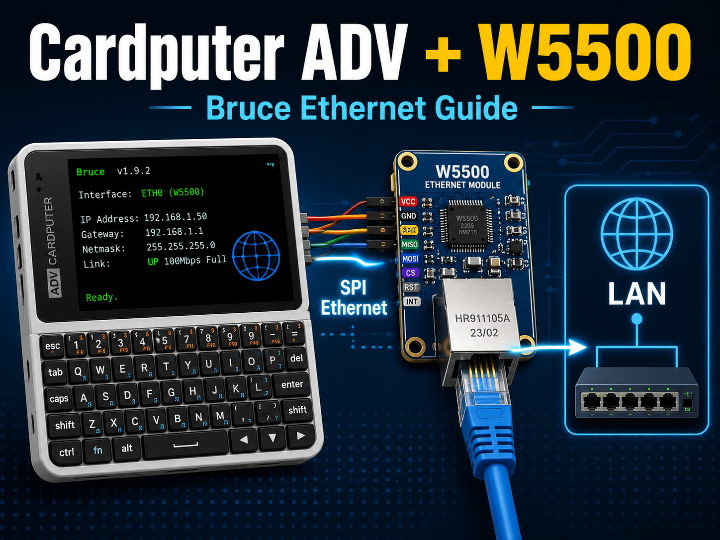
wiring instructions for connecting a WIZnet W5500 Ethernet module to the M5Stack Cardputer ADV

WIZnet - W5500
x 1

Cardputer ADV에 W5500 Ethernet을 추가하는 Bruce 공식 배선 가이드
Bruce 공식 위키는 M5Stack Cardputer ADV에 WIZnet W5500 Ethernet 모듈을 연결하는 배선 방법을 제공합니다. 일반 W5500 모듈과 3.3V 전용 W5500 Mini의 핀 구성을 각각 설명하며, Bruce 펌웨어에서 유선 호스트 검색, 포트 확인, SSH 연결 등 Ethernet 기반 네트워크 진단 기능을 사용할 수 있도록 합니다. 이 프로젝트는 휴대형 ESP32-S3 장치에 안정적인 RJ45 유선 네트워크 인터페이스를 추가하는 실용적인 Ethernet Expansion 사례입니다.
Cardputer ADV에 유선 Ethernet을 추가할 수 있을까?
M5Stack Cardputer ADV는 ESP32-S3, 디스플레이, 키보드와 배터리를 하나의 휴대형 장치에 통합한 개발 플랫폼입니다.
기본적으로 Wi-Fi와 Bluetooth를 사용할 수 있지만, 유선 LAN에 직접 연결하려면 별도의 Ethernet 인터페이스가 필요합니다.
Bruce 공식 위키는 WIZnet W5500 모듈을 Cardputer ADV에 연결하는 배선 방법을 제공합니다.
W5500을 추가하면 Cardputer ADV를 RJ45 기반 유선 네트워크에 연결하고, Bruce 펌웨어의 Ethernet 기능을 사용할 수 있습니다.
공식 배선 가이드:
https://wiki.bruce.computer/wiring-diagrams/cardputer-adv/w5500/
Bruce Firmware:
https://github.com/BruceDevices/firmware
Bruce Firmware란?
Bruce는 ESP32 기반 휴대형 장치에서 다양한 무선·유선 인터페이스를 사용할 수 있도록 개발된 오픈소스 펌웨어입니다.
지원 범위에는 다음과 같은 기능이 포함됩니다.
- Wi-Fi
- Bluetooth Low Energy
- Sub-GHz RF
- RFID
- Infrared
- NRF24
- LoRa
- GPS
- W5500 Ethernet
- 시리얼 및 Web UI
- JavaScript 실행 환경
Bruce는 M5Stack Cardputer, Cardputer ADV, M5Stick 계열, LilyGO T-Embed와 같은 여러 ESP32 장치를 지원합니다.
본 콘텐츠에서는 Bruce의 여러 기능 가운데 Cardputer ADV에 W5500 Ethernet을 추가하는 공식 배선 구성을 중심으로 살펴봅니다.
필요한 구성품
공식 문서에서 요구하는 핵심 구성품은 다음과 같습니다.
- M5Stack Cardputer ADV
- W5500 Ethernet Module 또는 W5500 Mini
- 점퍼 케이블
- RJ45 Ethernet 케이블
- W5500 Mini 사용 시 Micro SD Sniffer 또는 3.3V 전원 접근 수단
일반 W5500 모듈과 W5500 Mini는 전원 핀과 커넥터 구성이 다르므로 사용 중인 모듈의 핀 배열을 먼저 확인해야 합니다.
일반 W5500 모듈 배선
Bruce 공식 위키에 안내된 일반 W5500 모듈과 Cardputer ADV의 연결은 다음과 같습니다.
| W5500 핀 | Cardputer ADV |
|---|---|
| GND | GND |
| SCLK | GPIO40 |
| INT | GPIO2 |
| SCS | GPIO1 |
| RST | 연결하지 않음 |
| MOSI | GPIO14 |
| GND | 연결하지 않음 |
| MISO | GPIO39 |
| 5V | 5V OUT |
| 3V3 | 연결하지 않음 |
이 구성에서 Cardputer ADV와 W5500은 SPI로 통신합니다.
주요 신호 역할은 다음과 같습니다.
- GPIO40: SPI Clock
- GPIO14: MCU에서 W5500으로 전송하는 MOSI
- GPIO39: W5500에서 MCU로 전송하는 MISO
- GPIO1: W5500 선택을 위한 Chip Select
- GPIO2: Ethernet 이벤트를 알리는 Interrupt
일반 모듈은 공식 배선표에서 Cardputer ADV의 5V OUT에 연결하도록 안내됩니다.
이는 해당 모듈 보드에 전압 조절 회로가 포함되어 있다는 전제이므로, 사용 전 모듈의 전원 입력 사양을 반드시 확인해야 합니다.
W5500 Mini 배선
W5500 Mini는 일반 모듈과 달리 3.3V 전원을 사용하며 5V 입력을 허용하지 않습니다.
공식 위키는 Cardputer ADV에서 3.3V를 꺼내기 위해 Micro SD Sniffer 사용을 안내합니다.
배선은 다음과 같습니다.
| W5500 Mini 핀 | Cardputer ADV / SD Sniffer |
|---|---|
| GND | GND |
| 3V3 | SD Sniffer의 VCC |
| 3V3 | 연결하지 않음 |
| NC | 연결하지 않음 |
| RST | 연결하지 않음 |
| MISO | GPIO39 |
| INT | GPIO2 |
| CS | GPIO1 |
| SCLK | GPIO40 |
| MOSI | GPIO14 |
| GND | GND |
| GND | GND |
W5500 Mini에는 절대로 5V를 직접 입력해서는 안 됩니다.
일반 모듈과 Mini 모듈의 외형이 비슷할 수 있으므로 전원 단자를 잘못 연결하지 않도록 주의해야 합니다.
전체 하드웨어 구조
전체 연결 구조는 다음과 같습니다.
RJ45 Ethernet Cable
→ W5500 Ethernet Module
→ SPI
→ Cardputer ADV / ESP32-S3
→ Bruce Firmware Ethernet Menu
W5500은 Ethernet MAC, PHY와 하드웨어 TCP/IP 기능을 담당합니다.
Cardputer ADV의 ESP32-S3는 SPI를 통해 W5500을 제어하고, 화면과 키보드를 이용해 네트워크 기능을 실행합니다.
따라서 W5500은 Cardputer ADV에 없는 RJ45 유선 네트워크 연결을 추가하는 Ethernet Expansion 장치로 사용됩니다.
Bruce에서 제공하는 Ethernet 기능
Bruce 공식 위키는 W5500 Ethernet SPI 카드를 통해 Layer 2와 Layer 3 네트워크 기능을 지원한다고 설명합니다.
네트워크 호스트 검색
호스트 검색 기능은 ARP를 이용해 같은 로컬 네트워크에 연결된 장치를 확인합니다.
특정 호스트를 선택하면 해당 장치에서 열린 TCP 포트를 확인하는 기능도 제공합니다.
이를 통해 허가된 실습망이나 개인 네트워크에서 다음 항목을 확인할 수 있습니다.
- 네트워크에 연결된 장치
- 장치의 IP 주소
- 장치의 MAC 주소
- 열린 TCP 포트
- 기본적인 호스트 정보
SSH 연결
Bruce는 검색한 장치에 SSH로 접속을 시도할 수 있는 기능을 제공합니다.
Cardputer ADV의 화면과 키보드를 활용하면 휴대형 유선 SSH 터미널처럼 사용할 수 있습니다.
단, SSH 계정과 인증정보를 보유하고 있으며 접속 권한이 있는 시스템에만 사용해야 합니다.
Ethernet 기반 보안 진단 기능
Bruce에는 ARP 관련 보안 테스트 기능도 포함되어 있습니다.
이러한 기능은 네트워크 통신에 영향을 줄 수 있으므로 다음 환경에서만 사용해야 합니다.
- 본인이 소유한 네트워크
- 실습용으로 분리된 테스트망
- 명시적인 진단 허가를 받은 네트워크
- 교육용 보안 연구 환경
공용 네트워크나 허가받지 않은 장비에서 실행하면 정상적인 통신을 방해하거나 법적 문제가 발생할 수 있습니다.
W5500이 필요한 이유
Cardputer ADV에는 이미 Wi-Fi가 탑재되어 있습니다.
그럼에도 W5500 Ethernet을 추가하는 이유는 다음과 같습니다.
안정적인 물리 연결
유선 Ethernet은 AP 연결 상태나 무선 신호 세기에 영향을 덜 받습니다.
서버실, 랙, 산업 현장과 같은 환경에서는 RJ45 연결이 더 안정적인 관리 채널이 될 수 있습니다.
유선 네트워크 진단
Wi-Fi 클라이언트 위치가 아니라 실제 Ethernet 단말 위치에서 DHCP, ARP, IP와 포트 상태를 확인할 수 있습니다.
무선망과 분리된 관리
Wi-Fi가 차단되어 있거나 무선 접속 정책이 제한된 환경에서도 물리적인 Ethernet 포트가 있다면 유선 관리망을 사용할 수 있습니다.
휴대형 사용자 인터페이스
Cardputer ADV의 키보드와 화면을 그대로 활용할 수 있으므로 별도의 노트북 없이 간단한 현장 점검이 가능합니다.
W5500의 역할
W5500은 이 프로젝트에서 다음 기능을 담당합니다.
- 10/100Mbps Ethernet 물리 연결
- SPI 기반 ESP32-S3 통신
- 하드웨어 TCP/IP 처리
- RJ45 Link 상태 관리
- 유선 네트워크 패킷 송수신
- Bruce Ethernet 기능의 네트워크 인터페이스
Cardputer ADV는 사용자 입력, 화면 출력과 애플리케이션을 처리하고, W5500은 유선 네트워크 통신을 담당합니다.
Cardputer ADV
→ SPI
→ W5500
→ Ethernet LAN
이와 같은 기능 분리는 ESP32-S3가 UI와 애플리케이션 동작에 집중하도록 돕습니다.
실제 조립 전 확인사항
전원 사양
일반 W5500 모듈은 보드에 레귤레이터가 있어 5V 입력을 받을 수 있는 제품이 많지만, 모든 모듈이 동일하지는 않습니다.
W5500 Mini는 공식 문서상 3.3V 전용이며 5V를 허용하지 않습니다.
모듈 실크 인쇄, 판매 페이지와 회로도를 확인한 후 연결해야 합니다.
SPI 핀
Cardputer ADV 공식 핀은 다음과 같습니다.
- SCLK: GPIO40
- MOSI: GPIO14
- MISO: GPIO39
- CS: GPIO1
- INT: GPIO2
기존 외부 모듈이 같은 핀을 사용하고 있다면 동시에 연결하기 전에 Chip Select와 버스 공유 가능 여부를 확인해야 합니다.
RESET 핀
공식 배선도에서는 W5500의 RESET 핀을 연결하지 않습니다.
일부 W5500 모듈은 자체 Power-on Reset 회로를 포함하지만, 모듈에 따라 다를 수 있습니다.
초기화가 불안정하다면 전원 품질과 모듈의 Reset 회로를 확인해야 합니다.
케이블과 링크 상태
RJ45 케이블과 스위치 포트가 정상인지 먼저 확인해야 합니다.
Link LED가 켜지지 않는다면 다음 항목을 점검합니다.
- 전원
- RJ45 케이블
- 스위치 포트
- SPI 배선
- CS 핀
- 모듈의 전압 규격
일반 Cardputer와 Cardputer ADV의 차이
Bruce Wiki에는 일반 Cardputer와 Cardputer ADV용 W5500 배선도가 각각 따로 제공됩니다.
두 장치는 ESP32-S3 계열이라는 공통점이 있지만, 확장 핀과 키보드·주변장치 구성이 다를 수 있습니다.
따라서 Cardputer용 배선표를 Cardputer ADV에 그대로 적용해서는 안 됩니다.
반드시 다음 페이지의 ADV 전용 핀맵을 사용해야 합니다.
https://wiki.bruce.computer/wiring-diagrams/cardputer-adv/w5500/
WIZnet Maker 유사 콘텐츠 비교
| 유사 콘텐츠 및 링크 | 공통점 | 본 콘텐츠의 차이점 |
|---|---|---|
| Ethernet Adapter for Cardputer | Cardputer 계열 장치에 W5500을 연결해 Wi-Fi 외에 유선 네트워크 기능을 추가합니다. | 기존 콘텐츠는 Cardputer용 Ethernet 어댑터의 개념과 활용을 소개합니다. 본 콘텐츠는 Bruce 공식 위키의 Cardputer ADV 전용 GPIO40·14·39·1·2 배선과 W5500 Mini의 3.3V 주의사항을 구체적으로 다룹니다. |
| How to Add Wired LAN Transport with W5500 on M5Stack Cardputer-Adv? | ESP32-S3 기반 Cardputer ADV에 W5500 SPI Ethernet을 추가해 휴대형 유선 네트워크 장치로 활용합니다. | Poseidon은 별도의 키보드 중심 펌웨어와 확장 HAT 구조를 소개합니다. 본 콘텐츠는 Bruce 공식 펌웨어와 공식 배선도를 기준으로 일반 W5500 모듈과 Mini 모듈의 연결 방법을 설명합니다. |
| T-Embed CC1101 BruceUSB Firmware | Bruce 계열 ESP32-S3 펌웨어가 W5500을 사용해 유선 네트워크 진단 기능을 제공합니다. | 기존 콘텐츠의 대상 장치는 LilyGO T-Embed 계열입니다. 본 콘텐츠는 M5Stack Cardputer ADV의 GPIO와 전원 구성에 초점을 맞춥니다. |
| ESP32 WIZnet W5500 SPI | ESP32-S3와 W5500을 SPI로 연결하고 DHCP와 네트워크 통신을 구현합니다. | 기존 콘텐츠는 ESP-IDF 기반의 범용 ESP32-S3 네트워크 구현입니다. 본 콘텐츠는 완성형 휴대 장치인 Cardputer ADV와 Bruce UI를 이용한 현장 네트워크 도구에 초점을 맞춥니다. |
| W5500 Module: Examples, Pinouts and Specs | W5500 모듈의 핀과 SPI 연결 구조를 설명합니다. | 기존 콘텐츠는 범용 모듈 가이드입니다. 본 콘텐츠는 Cardputer ADV에 바로 적용할 수 있는 장치별 공식 배선과 펌웨어 기능을 함께 제공합니다. |
유사 콘텐츠와 비교한 차별점
1. 공식 Cardputer ADV 전용 배선
범용 ESP32 또는 일반 Cardputer 예제가 아니라 Bruce 공식 문서에서 제공하는 Cardputer ADV 전용 GPIO를 사용합니다.
2. 두 종류의 W5500 모듈 지원
일반 W5500 모듈과 W5500 Mini의 배선이 각각 제공됩니다.
특히 Mini의 3.3V 전원 제한과 Micro SD Sniffer 사용 필요성을 명확히 안내합니다.
3. 하드웨어 연결과 펌웨어 기능의 결합
단순히 Ethernet Link를 확인하는 예제가 아니라, Bruce 펌웨어의 화면과 키보드를 사용해 네트워크 호스트 확인, 포트 정보 확인과 SSH 접속 등을 수행할 수 있습니다.
4. 휴대형 현장 도구
노트북이나 별도 모니터 없이 Cardputer ADV 자체 화면과 키보드로 로컬 네트워크를 확인할 수 있다는 점이 특징입니다.
활용 분야
- 개인 홈랩 네트워크 점검
- 서버랙 유선 관리
- DHCP 및 IP 연결 확인
- Ethernet 장비 설치 현장 점검
- 허가된 보안 교육 실습
- SSH 기반 임베디드 장비 관리
- 네트워크 장치 초기 설정
- 유선 LAN 장애 진단
- ESP32-S3 Ethernet 교육
- 휴대형 네트워크 터미널
WIZnet 관점의 가치
이 프로젝트는 W5500이 일반적인 IoT 센서 연결을 넘어, 화면과 키보드를 갖춘 휴대형 네트워크 인터페이스로 활용될 수 있음을 보여줍니다.
W5500은 Cardputer ADV에 다음 가치를 제공합니다.
- 기존 Wi-Fi 장치에 RJ45 Ethernet 추가
- ESP32-S3의 제한된 핀으로 SPI Ethernet 구현
- 하드웨어 TCP/IP를 통한 네트워크 처리
- 소형 배터리 장치의 휴대형 유선 관리
- Bruce 펌웨어와의 직접적인 기능 통합
특히 공식 위키가 여러 ESP32 휴대 장치에 대한 W5500 배선도를 별도로 제공한다는 점은, W5500이 다양한 소형 장치에 재사용 가능한 Ethernet Expansion 솔루션임을 보여줍니다.
FAQ
Q1. Cardputer ADV는 기본적으로 Ethernet을 지원하나요?
아닙니다.
기본 장치에는 Wi-Fi와 Bluetooth가 있지만 RJ45 Ethernet 포트는 없습니다. W5500 모듈을 SPI로 연결해야 유선 Ethernet을 사용할 수 있습니다.
Q2. 어떤 W5500 모듈을 사용할 수 있나요?
Bruce 공식 위키는 일반 W5500 Ethernet Module과 W5500 Mini 두 가지 배선 방법을 제공합니다.
두 모듈의 전원 규격과 핀 배열이 다르므로 구입한 제품의 자료를 확인해야 합니다.
Q3. W5500 Mini에 5V를 연결해도 되나요?
안 됩니다.
공식 문서는 W5500 Mini가 3.3V 전용이며 5V tolerant가 아니라고 경고합니다. 3.3V 접근을 위해 Micro SD Sniffer가 필요할 수 있습니다.
Q4. RESET 핀은 왜 연결하지 않나요?
공식 배선표에서는 RESET 핀을 사용하지 않습니다.
사용하는 모듈에 자체 Reset 회로가 포함되어 있다는 전제일 수 있습니다. 초기화 문제가 발생하면 모듈 회로와 전원 품질을 확인해야 합니다.
Q5. Wi-Fi와 Ethernet을 동시에 사용할 수 있나요?
하드웨어적으로는 ESP32-S3 Wi-Fi와 W5500 Ethernet이 별도 인터페이스이므로 둘 다 존재할 수 있습니다.
다만 Bruce 펌웨어의 각 기능이 어느 인터페이스를 선택하는지와 동시 사용 정책은 버전별로 확인해야 합니다.
Q6. W5500은 어떤 핀으로 연결되나요?
Cardputer ADV 기준 주요 핀은 다음과 같습니다.
SCLK: GPIO40
MOSI: GPIO14
MISO: GPIO39
CS: GPIO1
INT: GPIO2
Q7. Bruce에서 DHCP를 사용할 수 있나요?
Bruce Ethernet 기능은 W5500을 통해 로컬 Ethernet 네트워크에 연결됩니다.
실제 IP 할당 방식과 설정 메뉴는 사용하는 Bruce 버전과 네트워크 환경을 확인해야 합니다.
Q8. 유선 네트워크의 장치를 검색할 수 있나요?
네.
Bruce의 Scan Hosts 기능은 ARP를 이용해 로컬 네트워크의 장치를 확인하며, 선택한 호스트의 포트 정보도 확인할 수 있습니다.
반드시 본인 소유 또는 허가된 네트워크에서만 사용해야 합니다.
Q9. SSH 터미널로 사용할 수 있나요?
Bruce는 SSH 연결 기능을 제공합니다.
Cardputer ADV의 키보드와 화면을 이용해 접속 권한이 있는 서버나 임베디드 장치에 연결할 수 있습니다.
Q10. 기존 Cardputer 배선도를 사용해도 되나요?
권장하지 않습니다.
Bruce Wiki는 일반 Cardputer와 Cardputer ADV의 배선도를 따로 제공합니다. ADV 전용 페이지의 GPIO 정보를 사용해야 합니다.
Q11. 다른 SPI 모듈과 W5500을 동시에 연결할 수 있나요?
SPI 데이터선을 공유하는 것은 가능할 수 있지만, 각 장치에 독립적인 CS가 필요합니다.
핀 충돌, 전력 소비, 펌웨어 지원과 비활성 장치의 CS 상태를 확인해야 합니다.
Q12. Bruce의 네트워크 보안 기능은 어디에서나 사용할 수 있나요?
아닙니다.
본인 소유의 장비, 분리된 실습망 또는 명시적인 허가를 받은 네트워크에서만 사용해야 합니다. 허가되지 않은 네트워크의 통신에 영향을 주는 행위는 금지될 수 있습니다.
Q13. 이 콘텐츠의 가장 큰 차별점은 무엇인가요?
Bruce 공식 문서를 기반으로 Cardputer ADV와 W5500의 정확한 SPI 핀맵을 제공하고, 일반 W5500과 3.3V 전용 W5500 Mini의 배선을 구분한다는 점입니다.
결론
Bruce 공식 W5500 배선 가이드는 M5Stack Cardputer ADV에 RJ45 기반 유선 Ethernet을 추가하는 방법을 설명합니다.
Cardputer ADV는 GPIO40, GPIO14, GPIO39, GPIO1과 GPIO2를 통해 W5500과 SPI 및 Interrupt 신호를 주고받습니다.
일반 W5500 모듈은 공식 배선에서 5V OUT을 사용하지만, W5500 Mini는 3.3V 전용이므로 전원 연결에 특히 주의해야 합니다.
W5500을 연결하면 Bruce 펌웨어에서 허가된 로컬 네트워크를 대상으로 호스트 검색, 포트 확인과 SSH 접속 같은 유선 진단 기능을 사용할 수 있습니다.
이 사례는 W5500이 기존 Wi-Fi 기반 휴대 장치에 안정적인 Ethernet 연결을 추가하고, Cardputer ADV를 소형 유선 네트워크 터미널로 확장할 수 있음을 보여줍니다.
Adding W5500 Ethernet to the Cardputer ADV with the Official Bruce Wiring Guide
The official Bruce Wiki provides wiring instructions for connecting a WIZnet W5500 Ethernet module to the M5Stack Cardputer ADV. It documents separate pin configurations for a standard W5500 module and a 3.3V-only W5500 Mini. Once connected, Bruce Firmware can use wired Ethernet for authorized host discovery, port inspection, SSH access, and other local network diagnostic functions. The project is a practical Ethernet Expansion example for adding an RJ45 interface to a portable ESP32-S3 platform.
Can Wired Ethernet Be Added to the Cardputer ADV?
The M5Stack Cardputer ADV combines an ESP32-S3, display, keyboard, and battery in a compact portable development platform.
It includes Wi-Fi and Bluetooth, but it does not provide a built-in RJ45 Ethernet port.
The official Bruce Wiki documents how to connect a WIZnet W5500 module to the Cardputer ADV.
The W5500 adds a physical wired-LAN interface and enables Ethernet functions included in Bruce Firmware.
Official wiring guide:
https://wiki.bruce.computer/wiring-diagrams/cardputer-adv/w5500/
Bruce Firmware:
https://github.com/BruceDevices/firmware
What Is Bruce Firmware?
Bruce is an open-source ESP32 firmware supporting multiple wireless, wired, and peripheral interfaces.
Its feature set includes:
- Wi-Fi
- Bluetooth Low Energy
- Sub-GHz RF
- RFID
- Infrared
- NRF24
- LoRa
- GPS
- W5500 Ethernet
- Serial and Web UI control
- JavaScript execution
Bruce supports devices including the M5Stack Cardputer, Cardputer ADV, M5Stick series, and LilyGO T-Embed products.
This article focuses specifically on the official W5500 wiring configuration for the Cardputer ADV.
Required Components
The main components are:
- M5Stack Cardputer ADV
- Standard W5500 Ethernet Module or W5500 Mini
- Jumper wires
- RJ45 Ethernet cable
- A Micro SD Sniffer or another 3.3V access method when using the W5500 Mini
The standard W5500 module and the W5500 Mini use different power inputs and connector layouts.
The exact module pinout and voltage requirement must be confirmed before wiring.
Standard W5500 Module Wiring
The official Bruce Wiki provides the following wiring table.
| W5500 Pin | Cardputer ADV |
|---|---|
| GND | GND |
| SCLK | GPIO40 |
| INT | GPIO2 |
| SCS | GPIO1 |
| RST | Not connected |
| MOSI | GPIO14 |
| GND | Not connected |
| MISO | GPIO39 |
| 5V | 5V OUT |
| 3V3 | Not connected |
The Cardputer ADV communicates with the W5500 over SPI.
The main signals are:
- GPIO40: SPI Clock
- GPIO14: MOSI from the ESP32-S3 to the W5500
- GPIO39: MISO from the W5500 to the ESP32-S3
- GPIO1: Chip Select
- GPIO2: Ethernet interrupt
The standard module is connected to the Cardputer ADV 5V output in the official diagram.
This assumes that the module board includes suitable voltage regulation. The power-input specification of the actual module should always be checked.
W5500 Mini Wiring
The W5500 Mini requires 3.3V and is not 5V tolerant.
The official guide recommends using a Micro SD Sniffer to access the Cardputer ADV 3.3V supply.
| W5500 Mini Pin | Cardputer ADV / SD Sniffer |
|---|---|
| GND | GND |
| 3V3 | VCC on the SD Sniffer |
| 3V3 | Not connected |
| NC | Not connected |
| RST | Not connected |
| MISO | GPIO39 |
| INT | GPIO2 |
| CS | GPIO1 |
| SCLK | GPIO40 |
| MOSI | GPIO14 |
| GND | GND |
| GND | GND |
The W5500 Mini must never be connected directly to 5V.
Because standard and Mini modules may look similar, the power pin and board specification should be verified carefully.
Hardware Architecture
The complete path is:
RJ45 Ethernet Cable
→ W5500 Ethernet Module
→ SPI
→ Cardputer ADV / ESP32-S3
→ Bruce Firmware Ethernet Menu
The W5500 provides the Ethernet MAC, PHY, and hardware TCP/IP functions.
The Cardputer ADV controls the module over SPI and provides the keyboard, display, and application interface.
The W5500 therefore operates as an Ethernet Expansion interface for a device that otherwise relies on wireless networking.
Ethernet Functions in Bruce
The official Bruce Wiki states that the W5500 SPI Ethernet card is used for Layer 2 and Layer 3 network functions.
Host Discovery
The Scan Hosts function uses ARP to identify devices on the same local network.
It can also inspect TCP ports on a selected host.
In an authorized lab or personal network, this can help identify:
- Connected devices
- IP addresses
- MAC addresses
- Open TCP ports
- Basic host information
SSH Access
Bruce can attempt an SSH connection to a selected host.
Combined with the Cardputer ADV keyboard and display, the device can function as a compact wired SSH terminal.
SSH should only be used on systems for which the user has valid credentials and authorization.
Ethernet Security Diagnostics
Bruce also includes ARP-related security-testing functions.
These functions can disrupt network communication and must only be used in:
- Networks owned by the user
- Isolated training labs
- Networks with explicit testing authorization
- Controlled educational security environments
They must not be used on public or unauthorized networks.
Why Add W5500 When the Cardputer Already Has Wi-Fi?
Stable Physical Connectivity
Ethernet is less dependent on access-point association, wireless policy, or signal quality.
A wired interface can be a more reliable management channel in server rooms, racks, and industrial locations.
Wired-Side Diagnostics
The device can test DHCP, ARP, IP, and port behavior from the position of an actual Ethernet endpoint rather than a Wi-Fi client.
Separation from Wireless Access
A physical LAN interface can remain useful where Wi-Fi is disabled or access to the wireless network is restricted.
Portable Interface
The Cardputer ADV already includes a keyboard and screen, reducing the need for a laptop during basic field checks.
Role of the W5500
The W5500 provides:
- 10/100Mbps Ethernet connectivity
- SPI communication with the ESP32-S3
- Hardware TCP/IP processing
- RJ45 link management
- Wired packet transmission and reception
- The network interface used by Bruce Ethernet functions
The Cardputer ADV handles the UI and application logic, while the W5500 handles wired networking.
Cardputer ADV
→ SPI
→ W5500
→ Ethernet LAN
Checks Before Assembly
Power Requirements
Many standard W5500 module boards accept 5V because they include an onboard regulator, but not all modules are identical.
The W5500 Mini documented by Bruce requires 3.3V and is not 5V tolerant.
Always check the board silkscreen, schematic, and product documentation.
SPI Pins
The official Cardputer ADV pins are:
- SCLK: GPIO40
- MOSI: GPIO14
- MISO: GPIO39
- CS: GPIO1
- INT: GPIO2
If another external module uses the same pins, verify SPI sharing and chip-select behavior.
Reset Signal
The official diagram leaves the W5500 RESET pin unconnected.
Some modules include their own power-on reset circuit. If initialization is unreliable, inspect the module reset circuit and power quality.
Cable and Link
If the Ethernet link LED does not turn on, check:
- Power
- RJ45 cable
- Switch port
- SPI wiring
- Chip Select
- Module voltage requirements
Cardputer Versus Cardputer ADV
The Bruce Wiki provides separate W5500 wiring diagrams for the original Cardputer and the Cardputer ADV.
Although both devices use ESP32-S3-class hardware, their expansion pins and peripheral configurations may differ.
The original Cardputer wiring should not be copied directly to the Cardputer ADV.
Use the dedicated Cardputer ADV guide:
https://wiki.bruce.computer/wiring-diagrams/cardputer-adv/w5500/
Comparison with Similar WIZnet Maker Projects
| Similar Project and Link | Common Points | How This Project Is Different |
|---|---|---|
| Ethernet Adapter for Cardputer | Adds W5500 Ethernet to a Cardputer-class device to provide a wired alternative to Wi-Fi. | The existing article introduces the adapter concept and possible applications. This article documents the official Cardputer ADV GPIO40, GPIO14, GPIO39, GPIO1, and GPIO2 wiring and the 3.3V requirement of the W5500 Mini. |
| How to Add Wired LAN Transport with W5500 on M5Stack Cardputer-Adv? | Adds W5500 SPI Ethernet to an ESP32-S3 Cardputer ADV for portable wired-network operation. | Poseidon is a separate keyboard-oriented firmware and expansion-hat project. This article is based on the official Bruce firmware and wiring documentation for both standard and Mini W5500 modules. |
| T-Embed CC1101 BruceUSB Firmware | Uses Bruce-family ESP32-S3 firmware and W5500 for wired network diagnostics. | The existing project targets LilyGO T-Embed hardware. This article focuses on the M5Stack Cardputer ADV GPIO and power configuration. |
| ESP32 WIZnet W5500 SPI | Connects an ESP32-S3 to a W5500 over SPI and implements Ethernet networking. | The existing project is a general ESP-IDF networking implementation. This article uses a finished handheld device with a keyboard, screen, and Bruce menu system. |
| W5500 Module: Examples, Pinouts and Specs | Explains W5500 module pins and SPI connectivity. | The existing project is a general module guide. This article provides device-specific Cardputer ADV wiring and related firmware functions. |
Key Differences
Official Device-Specific Wiring
This is not a generic ESP32 or original Cardputer example. It uses the GPIO mapping published specifically for the Cardputer ADV.
Two W5500 Module Types
The guide includes wiring for a standard W5500 module and the 3.3V-only W5500 Mini.
Hardware and Firmware Integration
The project goes beyond Ethernet link testing. The W5500 is connected to an interactive firmware with a display, keyboard, host discovery, port information, and SSH functionality.
Portable Field Interface
The Cardputer ADV can perform basic authorized network checks without requiring a separate laptop or monitor.
Potential Applications
- Personal homelab diagnostics
- Wired server-rack management
- DHCP and IP connectivity checks
- Ethernet equipment installation
- Authorized security education
- SSH access to embedded devices
- Initial network-device configuration
- Wired-LAN fault diagnosis
- ESP32-S3 Ethernet education
- Portable network terminal
Value from a WIZnet Perspective
The project demonstrates that the W5500 can be used beyond conventional IoT sensors.
It turns a keyboard-and-display-equipped ESP32-S3 handheld into a physical Ethernet endpoint.
The W5500 provides:
- RJ45 Ethernet for an existing Wi-Fi device
- SPI Ethernet with a limited number of MCU pins
- Hardware TCP/IP processing
- Portable wired management
- Direct integration with Bruce firmware
The Bruce Wiki also publishes W5500 wiring for several other portable ESP32 devices, demonstrating the module’s reuse as a flexible Ethernet Expansion solution.
FAQ
Q1. Does the Cardputer ADV include Ethernet by default?
No.
It includes Wi-Fi and Bluetooth but no RJ45 Ethernet interface. A W5500 module must be connected over SPI.
Q2. Which W5500 modules are supported?
The official Bruce Wiki provides wiring for a standard W5500 Ethernet module and a W5500 Mini.
Their pinouts and power requirements differ.
Q3. Can the W5500 Mini be powered from 5V?
No.
The official documentation warns that the Mini is a 3.3V device and is not 5V tolerant.
Q4. Why is RESET left unconnected?
The official wiring table does not use RESET.
The module may include a power-on reset circuit. If initialization problems occur, inspect the module design and power supply.
Q5. Can Wi-Fi and Ethernet coexist?
The ESP32-S3 Wi-Fi radio and W5500 are separate interfaces, so both can exist in the hardware.
Actual simultaneous behavior depends on the Bruce version and the selected function.
Q6. Which GPIO pins are used?
The primary Cardputer ADV connections are:
- SCLK: GPIO40
- MOSI: GPIO14
- MISO: GPIO39
- CS: GPIO1
- INT: GPIO2
Q7. Can Bruce discover devices on the wired LAN?
Yes.
Its Scan Hosts function uses ARP to identify local devices and can display port information for a selected host.
Only scan networks that you own or are authorized to test.
Q8. Can the Cardputer ADV be used as an SSH terminal?
Bruce provides an SSH connection function.
The keyboard and display can be used to access authorized servers or embedded devices.
Q9. Can the original Cardputer wiring be reused?
It is not recommended.
Bruce provides separate wiring diagrams for the Cardputer and Cardputer ADV. Use the Cardputer ADV-specific GPIO mapping.
Q10. Can the W5500 share SPI with other modules?
It may be possible when every device has an independent chip-select signal.
Check pin conflicts, power consumption, firmware support, and inactive chip-select states.
Q11. Can Bruce network-security functions be used on any network?
No.
Use them only on systems you own, isolated training networks, or environments where explicit authorization has been granted.
Q12. What is the main value of this guide?
It provides official, device-specific Cardputer ADV SPI wiring and distinguishes between the standard W5500 module and the 3.3V-only W5500 Mini.
Conclusion
The official Bruce W5500 guide shows how to add RJ45 Ethernet to the M5Stack Cardputer ADV.
The Cardputer ADV communicates with the W5500 through GPIO40, GPIO14, GPIO39, GPIO1, and GPIO2.
The standard module uses the 5V output in the official diagram, while the W5500 Mini requires a 3.3V supply and must not be connected to 5V.
Once connected, Bruce Firmware can use the W5500 for authorized wired host discovery, port inspection, and SSH access.
The project demonstrates how the W5500 can extend a Wi-Fi-based portable ESP32-S3 device into a compact wired network terminal.