


LifxZoneStrip
The LIFX App Thinks It's a LIFX Z — Building a DIY Smart Light with Arduino and Ethernet
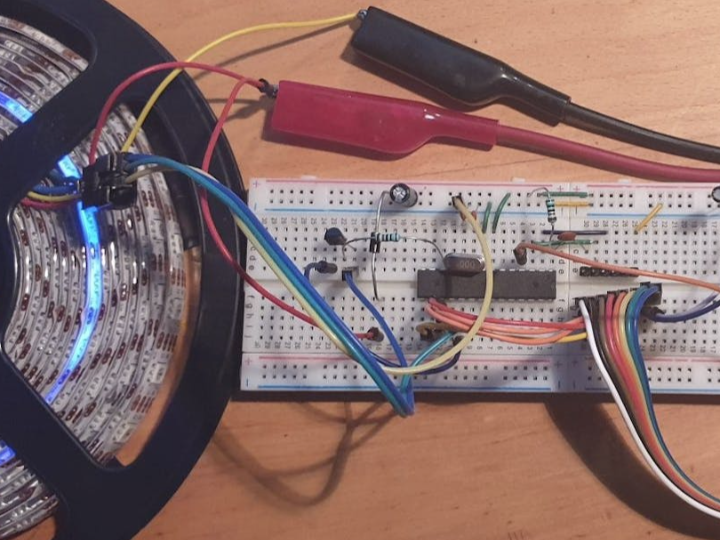
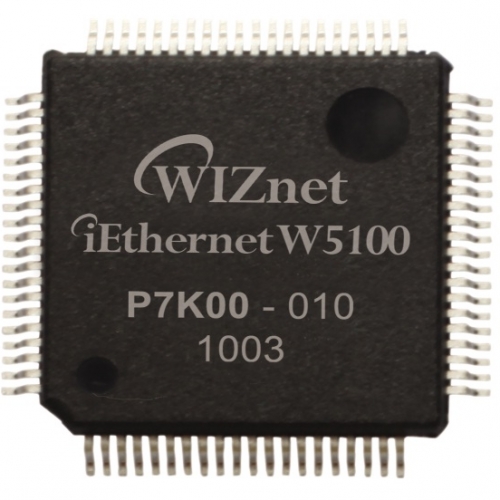
WIZnet - W5100
x 1

Summary
LifxZoneStrip is an open-source project built on an Arduino Uno and a W5100 Ethernet module that tricks the official LIFX app into recognizing a DIY APA102 LED strip as a genuine LIFX Z device. By fully emulating the LIFX LAN protocol, it enables zone-based color control and MOVE animation effects without developing a separate app — and at the core of it all is the W5100, handling hardware UDP processing so the MCU doesn't have to.
Introduction
Open the LIFX app and a device called "LIFX Z" appears in the list. Change colors zone by zone, trigger the MOVE effect, and watch the LEDs flow like a wave. The device actually connected, however, is an Arduino Uno and a few dollars' worth of APA102 LED strip.
LifxZoneStrip fully emulates the LIFX LAN protocol in software, making this DIY device indistinguishable from a genuine LIFX product as far as the app is concerned. The ability to tap into an established smart lighting ecosystem — app, integrations, and all — without expensive proprietary hardware makes this an architecturally compelling project for the maker community.
The LIFX Ecosystem and LAN Protocol
LIFX is a smart lighting brand that connects directly to Wi-Fi without a hub or bridge. Unlike Philips Hue, no separate hub is required — lights connect straight to the router and work with Alexa, Google Home, Apple HomeKit, and other major platforms out of the box.
What makes LIFX particularly interesting from a maker perspective is its openly published LAN protocol specification. LIFX provides full documentation for controlling devices directly over a local network, which has spawned a wide range of third-party libraries in Python, Node.js, and Java. Smart home platforms like Home Assistant and Homey also support the protocol natively.
Key elements of the LIFX LAN protocol:
- Transport: UDP, port 56700
- Packet structure: 36-byte header + payload (discovery, state queries, color commands, etc.)
- Color space: HSBK (Hue, Saturation, Brightness, Kelvin) — color temperature is a first-class parameter alongside hue, saturation, and brightness
- Device discovery: UDP broadcast or mDNS (firmware 4.110+)
The LIFX Z, LIFX's multizone LED strip product, offers 8 independently addressable zones per strip and supports chaining up to 10 strips for a maximum of 80 zones. Each zone can be assigned its own HSBK color independently, enabling gradients, patterns, and the MOVE effect — a flowing color animation exclusive to LIFX Z and Beam. LifxZoneStrip recreates this behavior entirely in software.
System Architecture
Hardware Components
| Component | Role |
|---|---|
| Arduino Uno (ATmega328P) | LIFX protocol parsing, zone management, LED output |
| W5100 Ethernet Module | Hardware UDP processing, LAN communication |
| APA102 LED Strip | SPI-based high-speed LED driver, 32-level global brightness |
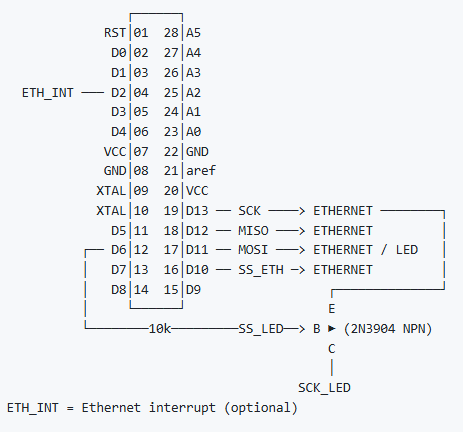
| 2N3904 NPN Transistor | Hardware CS pin switching between Ethernet and LED strip on shared SPI bus |
| 10kΩ Resistor | Base current limiting for transistor |
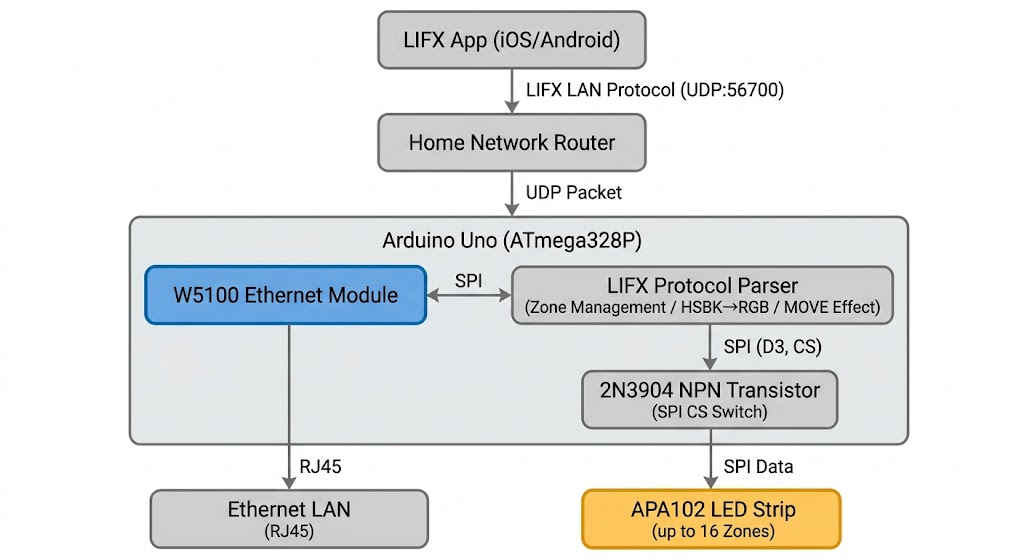
Data Flow Diagram
SPI Bus Sharing
One of the more interesting hardware design decisions in this project is that the W5100 and the APA102 LED strip share the same SPI bus. Since both devices cannot be driven simultaneously, a 2N3904 transistor handles CS (Chip Select) pin switching in software. When receiving a network packet, the Ethernet CS line is activated; when writing color data to the LEDs, control switches to the LED strip side.
LIFX Protocol Emulation
For LifxZoneStrip to be fully compatible with the LIFX app, it must respond correctly to every major packet type the app sends. The project implements the following:
Device Discovery and Basic State
GET_PAN_GATEWAY/GET_VERSION_STATE: Responds as a LIFX Z device during network discoveryGET_BULB_LABEL/SET_BULB_LABEL: Device name stored persistently in EEPROMGET_LOCATION/GET_GROUP: Location and group metadata management
Zone Color Control
SET_COLOR_ZONES/GET_COLOR_ZONES: Applies HSBK color values to a specified range of zonesSET_EXTENDED_COLOR_ZONES: Extended zone color streaming for larger payloadsSET_LIGHT_STATE: Sets all zones to a single color simultaneously
Effects and Power
SET_MULTIZONE_EFFECT: Configures MOVE effect speed and direction; implemented via timer-based LED index cycling to produce a flowing animationSET_POWER_STATE: Power on/off (brightness 0 ↔ 65535)
HSBK-to-RGB conversion is handled by a custom hsb2rgb() function alongside a Kelvin color temperature conversion routine. When a Kelvin value is present and saturation is near zero, the code runs a Kelvin → RGB → HSV conversion chain to accurately reproduce warm-to-cool white tones.
EEPROM is used to persist device label, location, and group information across power cycles. Device names assigned through the app survive reboots — a small but important detail for a seamless user experience.
The Role of the WIZnet W5100
📷 [Image needed: W5100 Ethernet module on breadboard] → Source image URL: https://hackster.imgix.net/uploads/attachments/777521/blob_c5uFdwK1Mi.blob
In LifxZoneStrip, the W5100 is not just a peripheral — it is a structural pillar of the system. With the ATmega328P already responsible for zone management, HSBK conversion, LED output, and effect timing, offloading the entire network layer to dedicated hardware is what makes the design viable.
What the W5100 handles:
- Hardware UDP processing: Sends and receives LIFX LAN packets via a hardwired TCP/IP stack, with no software network stack required on the MCU
- DHCP client: Handles automatic IP assignment during network initialization
- SPI interface: High-speed data exchange with the ATmega328P
- 4 hardware sockets: Sufficient for the single UDP socket this project requires
In an application like this — where continuous UDP send/receive is the architectural backbone — hardware TCP/IP offloading is not optional. An MCU running a software network stack while simultaneously computing LED effects would face inevitable response latency and packet loss. The W5100 absorbs the network load entirely, freeing the ATmega328P to focus on what it does best.
One notable limitation is network event detection. The W5100 does not officially support an interrupt pin, so the project works around this by soldering a wire to the LNK LED pad on the W5100 board and connecting it to Arduino pin D2. Changes in the LED signal — indicating a cable connect or disconnect — are detected as interrupts. It works, but it requires physical modification of the module and is not a robust solution for production use.
The natural upgrade path is the W5500. The project's source code explicitly notes (or a w5200/w5500) in its comments, signaling that the author considered W5500 a viable alternative from the start. The W5500 offers an official INT pin — eliminating the solder hack entirely — along with 8 hardware sockets and improved SPI throughput. Migrating requires only a library swap; the rest of the codebase carries over.
Use Cases and Expansion Scenarios
The architecture of LifxZoneStrip — LIFX LAN protocol emulation + wired Ethernet communication + flexible LED hardware — extends well beyond home DIY into a range of practical applications.
- Home theater bias lighting: A custom-length LED strip behind a TV, controlled through the LIFX app with optional voice assistant integration via Alexa or Google Home
- Event and stage lighting: Custom strip configurations shaped to fit any venue, managed through a single familiar app without being constrained by off-the-shelf product dimensions
- Interactive installations: Stable, hub-free local network control makes this architecture well suited for gallery or exhibition environments where cloud dependency is undesirable
- Commercial accent lighting: Display cases, shelf underlighting, and other retail spaces where standard product lengths don't fit and custom configurations are required
Limitations and Improvement Directions
Current Limitations
- SRAM constraint: The ATmega328P's 2KB SRAM is a hard ceiling on zone and LED count. At 9 bytes per zone, scaling to large installations is not feasible without an MCU upgrade
- Shared SPI bus: Ethernet and LED strip share the same SPI bus, making simultaneous operation impossible. Fast effect sequences may experience packet reception delays
- W5100 interrupt workaround: Network event detection requires soldering a wire to the LNK LED pad — a functional but non-robust solution
- No cloud connectivity: LAN-only operation limits integration with external automation services and voice assistants
- Work in progress: Waveform effects and several other features noted in the README remain unimplemented
Improvement Directions
The network layer is already well served by the W5100; the bottleneck lies in the MCU. Replacing the W5100 with a W5500 resolves the interrupt issue cleanly and doubles the available socket count, with minimal code changes. Migrating to an ESP32 or STM32 takes the improvement further — hundreds of kilobytes of RAM unlock a much higher zone count, and a dedicated SPI bus per peripheral eliminates the CS-switching overhead entirely. The W5500 slots directly into either of these upgraded configurations, making it possible to improve the system incrementally without redesigning the network layer from scratch.
FAQ
Q: What hardware do I need to build this? An Arduino Uno, a W5100 Ethernet module, an APA102 LED strip, one 2N3904 transistor, and one 10kΩ resistor. No custom PCB required — everything can be wired on a breadboard. A Fritzing schematic is included in the GitHub repository. Note that enabling the network interrupt feature requires soldering a wire to the LNK LED pad on the W5100 module.
Q: Can LED strips other than APA102 be used? Yes, with code modifications. APA102 communicates over SPI, so any strip with a compatible interface can be substituted by replacing the APA102_LedStreamer library. The author notes this possibility in the README.
Q: How many zones can be configured? The LIFX protocol supports up to 80 zones, but the ATmega328P's 2KB SRAM is the practical limit. At 9 bytes per zone, 16 to 32 zones is a stable range for this MCU. Pushing beyond that requires migrating to a higher-RAM MCU such as an ESP32 or STM32.
Q: Why Ethernet instead of Wi-Fi? Wired Ethernet offers higher connection stability and eliminates reconnection delays — both of which matter when driving continuous LED effects. Hardware TCP/IP offloading via the W5100 also keeps the MCU free from network stack overhead, which a Wi-Fi solution with a software stack would not provide.
Q: Does it work with the LIFX cloud or voice assistants? Not directly. The project operates on LAN only and does not connect to the LIFX cloud, which means Alexa and Google Home integrations that rely on cloud routing are unavailable. Routing through a local smart home platform such as Home Assistant can bridge this gap.
요약
LifxZoneStrip은 Arduino Uno와 W5100 이더넷 모듈을 기반으로, LIFX 공식 앱이 DIY APA102 LED 스트립을 정품 LIFX Z 기기로 인식하도록 만드는 오픈소스 프로젝트입니다. LIFX LAN 프로토콜을 완전 에뮬레이션하여 별도 앱 개발 없이 존(Zone) 단위 색상 제어와 MOVE 애니메이션 이펙트를 구현하며, 이 모든 동작의 핵심에는 하드웨어 UDP 처리를 담당하는 W5100 이더넷 칩이 있습니다.
들어가며
LIFX 앱을 열면 기기 목록에 "LIFX Z"가 나타납니다. 존별로 색상을 바꾸고, MOVE 이펙트를 켜면 LED가 물결처럼 흐릅니다. 그런데 실제로 연결된 기기는 Arduino Uno와 몇 달러짜리 APA102 LED 스트립입니다.
LifxZoneStrip은 LIFX LAN 프로토콜을 소프트웨어로 완전 에뮬레이션하여, LIFX 앱 입장에서 이 DIY 기기가 정품과 구별되지 않도록 만든 프로젝트입니다. 고가의 정품 스마트 조명 없이도 기성 생태계의 앱과 기능을 그대로 활용할 수 있다는 점에서, 메이커 커뮤니티에서 주목할 만한 아키텍처적 접근입니다.
LIFX 생태계와 LAN 프로토콜
LIFX는 허브(브리지) 없이 Wi-Fi에 직접 연결되는 스마트 조명 브랜드입니다. Philips Hue와 달리 별도 허브 없이 공유기에 직접 연결되며, Alexa, Google Home, Apple HomeKit 등 주요 플랫폼과 폭넓게 호환됩니다.
LIFX 생태계에서 특히 주목할 부분은 LAN 프로토콜의 공개 사양입니다. LIFX는 로컬 네트워크에서 기기를 직접 제어할 수 있는 프로토콜 문서를 공개하고 있으며, 이를 기반으로 Python, Node.js, Java 등 다양한 서드파티 라이브러리가 존재합니다. Home Assistant, Homey 같은 스마트홈 플랫폼도 이 프로토콜을 직접 지원합니다.
LIFX LAN 프로토콜의 핵심 구조는 다음과 같습니다:
- 전송 방식: UDP, 포트 56700
- 패킷 구조: 헤더(36바이트) + 페이로드 (기기 탐색, 상태 조회, 색상 설정 등)
- 색공간: HSBK (Hue, Saturation, Brightness, Kelvin) — RGB 대신 색조·채도·밝기·색온도로 표현
- 기기 탐색: 브로드캐스트 UDP 또는 mDNS 방식
LIFX의 멀티존 제품인 LIFX Z는 스트립 1개당 8개의 독립 주소 지정 가능한 Zone을 제공하며, 최대 10개 스트립을 체인 연결해 80개 Zone까지 구성할 수 있습니다. Zone마다 독립적으로 HSBK 색상을 지정할 수 있어 그라데이션, 패턴, MOVE 이펙트(색상 흐름 애니메이션) 같은 표현이 가능합니다. LifxZoneStrip은 바로 이 LIFX Z의 동작 방식을 소프트웨어로 재현합니다.
시스템 구성 및 아키텍처
하드웨어 구성
| 부품 | 역할 |
|---|---|
| Arduino Uno (ATmega328P) | LIFX 프로토콜 파싱, Zone 관리, LED 제어 |
| W5100 이더넷 모듈 | 하드웨어 UDP 처리, LAN 통신 전담 |
| APA102 LED 스트립 | SPI 방식 고속 LED 드라이버, 32단계 글로벌 밝기 지원 |
| 2N3904 NPN 트랜지스터 | SPI 버스 공유 시 이더넷과 LED 간 CS 핀 하드웨어 분리 |
| 10kΩ 저항 | 트랜지스터 베이스 전류 제한 |
데이터 흐름 다이어그램
SPI 버스 공유 구조
이 프로젝트의 독특한 하드웨어 설계 포인트 중 하나는 W5100(이더넷)과 APA102(LED 스트립)가 동일한 SPI 버스를 공유한다는 점입니다. 두 장치를 동시에 구동할 수 없기 때문에, 2N3904 트랜지스터를 이용해 CS(Chip Select) 핀을 전환하며 사용합니다. 네트워크 패킷을 수신할 때는 이더넷 쪽 CS를 활성화하고, LED에 색상을 출력할 때는 LED 스트립 쪽으로 전환하는 방식입니다.
LIFX 프로토콜 에뮬레이션 구현
LifxZoneStrip이 LIFX 앱과 완전히 호환되려면, 앱이 전송하는 모든 주요 패킷 타입에 올바르게 응답해야 합니다. 프로젝트는 다음 핵심 패킷들을 구현합니다.
기기 탐색 및 기본 상태
GET_PAN_GATEWAY/GET_VERSION_STATE: 앱이 네트워크를 스캔할 때 LIFX Z 기기로 응답GET_BULB_LABEL/SET_BULB_LABEL: 기기 이름을 EEPROM에 영구 저장GET_LOCATION/GET_GROUP: 위치·그룹 정보 관리
Zone 색상 제어
SET_COLOR_ZONES/GET_COLOR_ZONES: Zone 범위 지정 후 HSBK 색상 일괄 적용SET_EXTENDED_COLOR_ZONES: 확장 Zone 컬러 스트리밍 (대용량 페이로드 처리)SET_LIGHT_STATE: 전체 Zone을 단일 색상으로 일괄 설정
이펙트 및 전원
SET_MULTIZONE_EFFECT: MOVE 이펙트 속도·방향 설정. 타이머 기반으로 LED 인덱스를 순환시켜 색상 흐름 애니메이션 구현SET_POWER_STATE: 전원 on/off (밝기 0 ↔ 65535)
HSBK → RGB 변환은 별도 구현된 hsb2rgb() 함수와 Kelvin 색온도 변환 로직으로 처리합니다. 색온도 값이 있고 채도가 0에 가까울 경우 Kelvin → RGB → HSV 변환을 거쳐 따뜻한 백색~차가운 백색을 정확하게 재현합니다.
EEPROM 활용도 주목할 부분입니다. 기기 라벨, 위치, 그룹 정보를 EEPROM에 저장하여 전원이 꺼져도 설정이 유지됩니다. 앱에서 지정한 기기 이름이 재부팅 후에도 그대로 남아 있는 것은 이 덕분입니다.
WIZnet W5100이 이 프로젝트를 가능하게 한다
LifxZoneStrip에서 W5100은 단순한 부품이 아니라 시스템 아키텍처의 핵심 축입니다. ATmega328P가 Zone 관리, HSBK 변환, LED 출력, 이펙트 타이머를 모두 처리해야 하는 상황에서, 네트워크 레이어를 하드웨어가 전담함으로써 MCU의 부담을 크게 줄입니다.
W5100의 역할 구조:
- 하드웨어 UDP 처리: LIFX LAN 패킷의 수신·송신을 하드웨어 TCP/IP 스택으로 처리. MCU가 소프트웨어 네트워크 스택을 구현할 필요 없음
- DHCP 클라이언트: 네트워크 초기화 시 IP 자동 할당
- SPI 인터페이스: ATmega328P와 SPI로 연결, 고속 데이터 교환
- 소켓 4개 지원: UDP 소켓을 포함한 동시 연결 처리
LIFX LAN 프로토콜처럼 지속적인 UDP 송수신이 핵심인 구조에서 하드웨어 TCP/IP 오프로딩은 선택이 아닌 필수입니다. MCU가 LED 이펙트를 연산하면서 동시에 소프트웨어 네트워크 스택까지 처리한다면, 응답 지연이나 패킷 손실이 불가피합니다. W5100이 네트워크를 전담하기 때문에 ATmega328P는 Zone 색상 연산과 LED 스트리밍에만 집중할 수 있습니다.
한 가지 주목할 점은 네트워크 연결 감지 방식입니다. W5100은 인터럽트 핀을 공식 지원하지 않기 때문에, 프로젝트에서는 W5100 보드의 LNK LED 패드에 와이어를 납땜하여 Arduino D2 핀에 연결하는 방식을 사용합니다. 랜 케이블 연결·해제 시 LED 신호 변화를 인터럽트로 감지하는 구조입니다. 이 방법은 동작은 하지만 납땜이 필요하고 보드마다 패드 위치가 다를 수 있어, 제품화 수준의 해결책으로는 적합하지 않습니다.
이 한계를 해소하는 현실적인 업그레이드 경로가 W5500입니다. 프로젝트 코드 주석에 (or a w5200/w5500)이라고 명시되어 있을 만큼, 제작자도 W5500을 유효한 대안으로 고려하고 있습니다. W5500은 인터럽트 핀을 공식 지원하여 납땜 없이 네트워크 이벤트를 감지할 수 있고, 소켓 수도 8개로 두 배 많습니다. Arduino Ethernet 라이브러리 교체만으로 전환이 가능해 기존 코드를 대부분 재사용할 수 있습니다.
활용 가능성과 확장 시나리오
LifxZoneStrip의 아키텍처 — LIFX LAN 프로토콜 에뮬레이션 + 이더넷 기반 통신 + 자유로운 LED 하드웨어 — 는 단순한 홈 DIY를 넘어 다양한 분야로 확장 가능합니다.
- 홈 시어터 편광 조명: TV 후면에 원하는 길이와 Zone 수로 구성한 LED 스트립을 LIFX 앱으로 제어. Alexa, Google Home 연동으로 음성 제어까지 확장 가능
- 이벤트·무대 조명: 고정된 정품 기기 대신 공간에 맞게 형태와 길이를 자유롭게 구성한 커스텀 스트립을 LIFX 앱 하나로 제어
- 인터랙티브 설치물: 이더넷 기반의 안정적인 로컬 네트워크 통신을 활용해 외부 네트워크 의존 없이 실내 설치물 구동. 갤러리, 전시 공간에 적합
- 상업 공간 커스텀 조명: 매장 쇼케이스, 진열대 하단 등 맞춤 길이가 필요한 공간에서 정품 규격의 제약 없이 적용
한계와 개선 방향
현재 한계
- SRAM 병목: ATmega328P의 2KB SRAM은 Zone 수와 LED 수 확장에 근본적 제약. Zone 1개당 9바이트 소모로, 대규모 설치에는 적합하지 않음
- SPI 버스 공유: 이더넷과 LED 스트립이 동일 SPI 버스를 사용해 동시 처리 불가. 빠른 이펙트 실행 중 패킷 수신 지연 가능성 존재
- W5100 인터럽트 미지원: 네트워크 연결 감지를 위해 LNK LED 패드에 와이어를 납땜하는 비공식 방법에 의존
- 클라우드 미연동: LAN 전용 동작으로, 외부 접근 및 음성 어시스턴트 자동화 일부 제한
- Work In Progress: README에 명시된 미완성 상태로, 파형(Waveform) 이펙트 등 일부 기능 미구현
개선 방향
현재 구조의 핵심 병목은 MCU의 SRAM 한계, SPI 버스 공유에 따른 처리 지연, 그리고 W5100의 인터럽트 미지원입니다. 네트워크 레이어만 보면 W5100을 W5500으로 교체하는 것만으로 인터럽트 문제를 공식적으로 해결하고 소켓 자원도 확보할 수 있습니다. 더 나아가 ESP32나 STM32 계열 MCU로 전환하면 수백 KB의 RAM을 확보하여 Zone 수를 대폭 늘리고, SPI 버스를 분리하는 구조도 가능합니다. W5500은 이 구성에서도 그대로 활용할 수 있어, 네트워크 레이어 재설계 없이 MCU만 교체하는 점진적 개선이 현실적입니다.
FAQ
Q. Arduino와 기본 전자 부품만 있으면 만들 수 있나요? 네. Arduino Uno, W5100 이더넷 모듈, APA102 LED 스트립, 2N3904 트랜지스터 1개, 10kΩ 저항 1개가 전부입니다. 별도 PCB 설계 없이 브레드보드로 구성 가능하며, 회로도는 GitHub 저장소에 Fritzing 스케치 파일로 제공됩니다. 단, 네트워크 연결 감지 기능을 활용하려면 W5100 모듈의 LNK LED 패드에 와이어 납땜이 필요합니다.
Q. APA102 외에 다른 LED 스트립도 사용할 수 있나요? 코드를 수정하면 다른 드라이버 방식의 LED 스트립도 사용 가능합니다. APA102는 SPI 방식으로 Arduino와 연결되므로, 동일하거나 유사한 인터페이스를 가진 스트립이라면 APA102_LedStreamer 라이브러리 부분만 교체하면 됩니다.
Q. Zone은 몇 개까지 만들 수 있나요? LIFX 프로토콜 사양상 최대 80개 Zone을 지원하지만, ATmega328P의 2KB SRAM 한계로 실제 구성 가능한 Zone 수는 제한됩니다. Zone 1개당 9바이트를 소비하므로, 현실적으로는 16~32개 수준이 안정적입니다. Zone을 더 늘리려면 ESP32, STM32 같은 대용량 RAM을 가진 MCU로의 전환이 필요합니다.
Q. Wi-Fi 대신 이더넷을 사용한 이유가 있나요? 이더넷은 Wi-Fi 대비 연결 안정성이 높고 재연결 지연이 없습니다. LED 이펙트처럼 연속적인 제어가 필요한 환경에서는 패킷 손실이나 지연이 큰 문제가 되기 때문에, 유선 이더넷이 더 신뢰성 있는 선택입니다. 또한 W5100 같은 하드웨어 TCP/IP 칩을 사용하면 MCU가 네트워크 스택을 직접 처리하지 않아도 되어 성능 면에서도 유리합니다.
Q. LIFX 클라우드나 음성 어시스턴트와 연동이 되나요? 현재 버전은 LAN 전용으로 동작하며 LIFX 클라우드 연동은 지원하지 않습니다. 따라서 Alexa, Google Home 같은 음성 어시스턴트와의 직접 연동은 불가능합니다. Home Assistant 같은 로컬 스마트홈 플랫폼을 중간에 두면 음성 제어를 우회적으로 구현할 수 있습니다.