



Industrial Automation at Your Fingertips: A Step-by-Step Guide to Deploying StamPLC within Home Assi
StamPLC × Home Assistant: Industrial Automation Integration Completed with W5500 PoE
StamPLC × Home Assistant: W5500 PoE로 완성하는 산업용 자동화 통합 가이드
요약
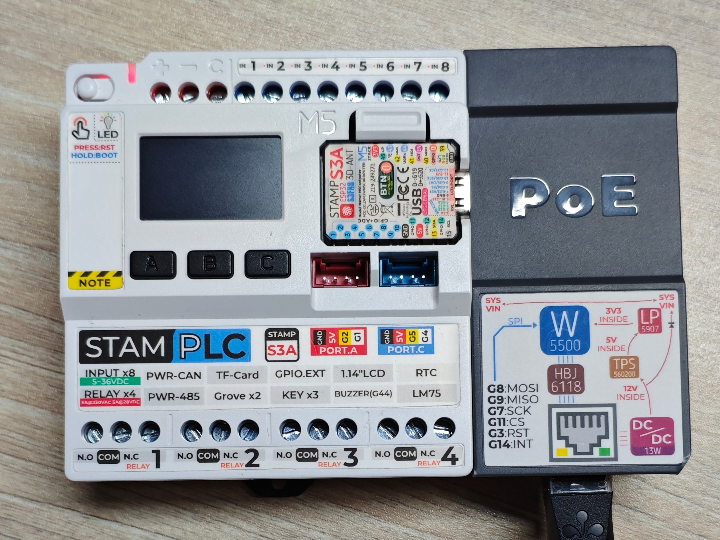
StamPLC는 ESP32-S3 기반의 산업용 IoT PLC로, ESPHome을 통해 Home Assistant에 직접 통합할 수 있습니다. 특히 확장 모듈인 StamPLC PoE에는 WIZnet W5500 이더넷 컨트롤러가 탑재되어, Wi-Fi가 취약한 산업 환경에서 단일 케이블로 전원과 유선 네트워크를 동시에 확보합니다. 본 글은 M5Stack 공식 배포 가이드를 분석하고, W5500이 이 아키텍처에서 갖는 의미를 살펴봅니다.

개요
상용 PLC는 신뢰성이 높지만 도입 비용과 폐쇄적인 소프트웨어가 진입 장벽입니다. 반대로 스마트홈 플랫폼은 유연하지만 옵토아이솔레이트 입력, 릴레이 출력, DIN 레일 장착 같은 산업 요구사항을 충족하지 못했습니다. StamPLC는 이 간극을 메우는 제품으로, 8채널 옵토아이솔레이트 디지털 입력, 4채널 릴레이 출력(AC/DC 부하), RS485(Modbus RTU), CAN Bus를 갖춘 DIN 레일형 컨트롤러입니다.
이 가이드의 핵심은 StamPLC를 ESPHome 펌웨어로 플래싱하여 Home Assistant의 네이티브 디바이스로 등록하는 것입니다. 대상 독자는 경량 산업 자동화, 원격 모니터링, 고전압 AC 부하 제어를 저비용으로 구축하려는 개발자와 엔지니어입니다. 설정 파일은 ESPHome 커뮤니티 기여자 @Beormund가 공개했습니다.
→ 설정 저장소: https://github.com/Beormund/esphome-m5stamplc
아키텍처
시스템은 Home Assistant 호스트와 StamPLC가 ESPHome Native API(암호화 키 인증)로 통신하는 구조이며, 네트워크 경로는 Wi-Fi 또는 W5500 이더넷/PoE 중 택일입니다.
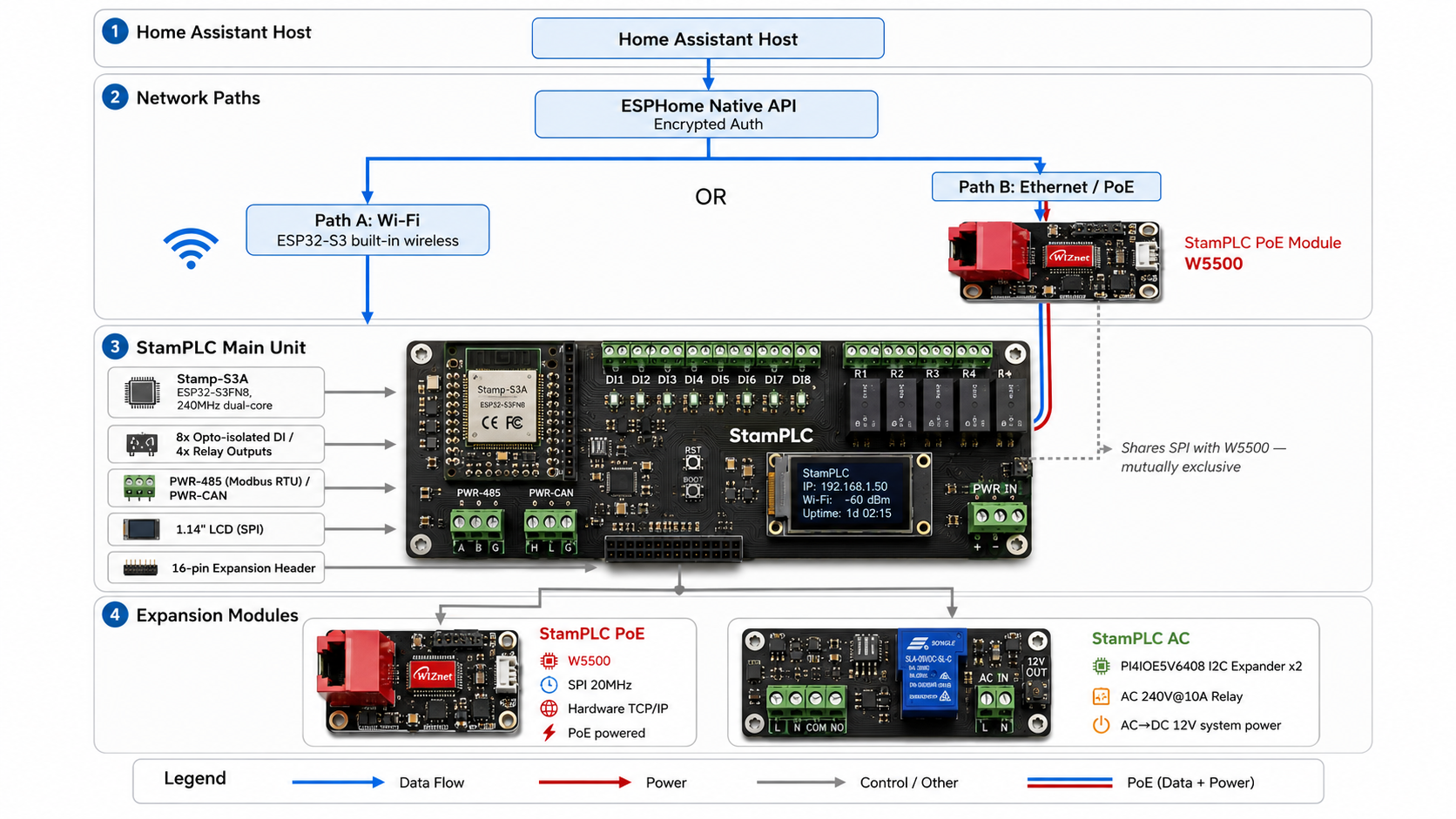
배포 워크플로우
배포는 네 단계로 진행됩니다.
- YAML 구성: ESPHome Builder에서 예제 configuration.yaml을 복사하고 API 암호화 키, 네트워크, 타임존을 수정
- 컴파일·다운로드: SAVE → INSTALL → Manual download로 Factory 포맷 펌웨어 생성
- 플래싱: ESPHome Web에서 USB-C로 연결해 펌웨어 업로드
- HA 등록: 부팅 후 Settings → Devices & services에서 자동 검색된 디바이스를 추가
확장 모듈 구성 시 핵심 포인트는 다음과 같습니다.
- StamPLC AC: I2C 익스팬더(주소 0x43/0x44) 선언 후 GPIO 스위치로 AC 릴레이와 RGB LED 제어
- StamPLC PoE:
wifi,display,spi컴포넌트를 제거하고ethernet: type: W5500블록 추가 (GPIO7/8/9/11, 20MHz)

기술 특징
- 선언형 구성: 펌웨어 코드를 작성하지 않고 YAML만으로 I/O, 디스플레이, 네트워크를 정의. 유지보수와 재현성이 뛰어남
- 산업 인터페이스 내장: RS485(Modbus RTU)와 CAN Bus로 기존 산업 필드버스와 공존 가능
- 모듈식 확장: 16핀 헤더와 I2C 익스팬더 기반으로 AC 전원·릴레이, PoE 이더넷을 비침습적으로 추가
- 센서 통합: LM75 온도, INA226 전압·전류 센서가 기본 탑재되어 자가 진단 텔레메트리 제공
WIZnet 적용 구조 — W5500이 담당하는 역할
이 프로젝트에서 WIZnet 제품은 추정이 아닌 실사용입니다. StamPLC PoE 모듈에 W5500 이더넷 컨트롤러가 탑재되어 있습니다.
- 하드웨어 TCP/IP 오프로딩: W5500이 TCP/IP 스택 전체를 칩 내부에서 처리하며, 8개의 독립 하드웨어 소켓과 10/100M MAC + PHY를 통합. ESP32-S3는 SPI로 데이터만 주고받으면 됨
- SPI 인터페이스: GPIO7(CLK)/8(MOSI)/9(MISO)/11(CS), 20MHz 클럭으로 연결
- PoE 단일 케이블: 이더넷 케이블 하나로 데이터 전송과 전원 공급을 동시에 해결 → 배전반·천장 등 전원 확보가 어려운 위치에 설치 가능
- ESPHome 네이티브 지원:
ethernet: type: W5500한 블록이면 끝. 별도 드라이버 포팅이나 커스텀 컴포넌트가 불필요
W5500의 가치는 단순한 유선 연결이 아닙니다. Wi-Fi 혼잡·금속 차폐·전파 간섭에 영향받지 않는 결정론적(deterministic) 네트워크 경로를 확보한다는 점이 산업 환경에서의 본질적 차별점입니다.
→ 모듈 페이지: https://shop.m5stack.com/products/poe-module-for-stamplc-w5500

WIZnet Makers의 유사 사례
"ESP32 + W5500 + Home Assistant"는 StamPLC만의 조합이 아니라, maker.wiznet.io에서 반복적으로 검증된 아키텍처 패턴입니다.
- Wired Thread Border Router (ESP32-S3 + W5500): StamPLC PoE와 완전히 동일한 ESPHome
ethernet컴포넌트를 사용해 Matter/Thread 네트워크의 유선 백홀을 구축한 사례. Wi-Fi 장애와 독립된 네트워크 경로라는 설계 논리가 본 프로젝트와 일치합니다 - MultiSensor (ESP32-S3 + W5500 PoE 멀티센서 보드): ESP32-S3 + W5500 + PoE 단일 케이블 + ESPHome이라는 하드웨어 구성이 StamPLC PoE와 사실상 동일. 차이는 용도뿐으로, MultiSensor가 환경 센싱 중심이라면 StamPLC는 릴레이·산업 I/O 제어 중심입니다
- Arduino Nano W5500 MQTT 8채널 옵토 I/O 보드: 8채널 옵토아이솔레이트 입력 + W5500으로 HA 연동 I/O를 자작한 2021년 사례. StamPLC와 기능적으로 가장 유사하며, 메이커의 DIY 보드가 상용 완성품(StamPLC)으로 진화한 흐름을 보여줍니다
세 사례 모두에서 W5500의 채택 이유는 같습니다. MCU 부하 없이 안정적인 유선 연결을 가장 적은 코드로 확보할 수 있기 때문입니다.
→ Thread Border Router: https://maker.wiznet.io/Benjamin/projects/esp32-s3-thread-border-router/
→ MultiSensor: https://maker.wiznet.io/irina/projects/multisensor-esp32-s3-w5500-poe-smart-home-multi-sensor-board/
→ Nano 8ch I/O 보드: https://maker.wiznet.io/2021/06/07/arduino-nano-w5500-ethernet-mqtt-based-8-channel-opto-isolated-i-o-board-2/
비즈니스 가치
외부 고객 가치
- 상용 PLC + SCADA 대비 현저히 낮은 도입 비용으로 원격 모니터링·제어 체계 구축
- PoE 기반 설치로 배선 비용·시공 시간 절감
적용 시나리오
- 산업 자동화: 배전반 내 펌프·팬·히터의 원격 제어와 상태 모니터링
- 스마트 빌딩: AC 240V 조명·환기 부하의 스케줄 제어 (StamPLC AC 활용)
- 원격 텔레메트리: INA226·LM75 + 외부 센서를 통한 전력·온도 데이터 수집
- 기존 설비 연계: RS485 Modbus 장비를 HA 대시보드로 통합하는 게이트웨이
WIZnet 내부 인사이트
- M5Stack이라는 대형 메이커 하드웨어 벤더의 공식 확장 모듈에 W5500이 채택된 레퍼런스
- ESPHome의 네이티브 W5500 지원은 HA 생태계 전체가 W5500의 검증된 유통 채널임을 의미
한계 및 개선 방향
이 가이드는 StamPLC를 HA에 통합하는 가장 실용적인 경로를 제시하며, 그 자체로 완성도가 높습니다. 다만 구조적으로 개선 여지가 있는 지점도 존재합니다.
현재 한계
- SPI 자원 충돌: W5500(PoE)과 LCD가 동일 SPI 버스를 점유해 PoE와 디스플레이를 동시에 사용할 수 없음 (원문 명시)
- 네트워크 이중화 부재: ESPHome에서
wifi와ethernet이 상호 배타적이라 유선 장애 시 무선 폴백 불가 - HA 호스트 단일 장애점: 호스트 다운 시 원격 제어 불가 (로컬 자동화로 일부 보완 가능)
개선 방향
- ESP32-S3의 듀얼 SPI 호스트(SPI2/SPI3)를 분리 할당하면 W5500과 LCD의 동시 구동이 가능한 구조 [추정] — 향후 하드웨어 리비전에서 검토할 만한 포인트
- W5500의 하드웨어 소켓 8개 중 일부를 로컬 Modbus TCP 서버 등으로 활용하면 HA 호스트 장애 시에도 대체 제어 경로 확보 가능 [추정]
- 다수 노드 확장 시 PoE 스위치 중심의 스타 토폴로지로 관리성 확보
FAQ
Q1. 도입 난이도는 어느 정도인가요? 펌웨어 코딩이 불필요합니다. 공개된 YAML을 복사해 네트워크 정보만 수정하면 되며, 플래싱은 브라우저(ESPHome Web)에서 USB-C로 진행합니다. 확장 모듈 추가 시에도 YAML 블록 추가 후 재컴파일이 전부입니다.
Q2. PoE 모듈을 쓰면 별도 전원이 필요 없나요? 네. PoE 스위치 또는 인젝터에 연결하면 이더넷 케이블 하나로 전원과 네트워크가 모두 공급됩니다.
Q3. PoE와 LCD를 함께 쓸 수 없는 이유는? 두 장치가 동일한 SPI 핀을 사용하기 때문입니다. PoE 활성화 시 YAML에서 display, spi, wifi 선언을 제거해야 합니다.
Q4. 기존 Modbus 장비와 함께 쓸 수 있나요? 가능합니다. StamPLC는 PWR-485 포트로 Modbus RTU를 지원하므로, 기존 필드버스 장비를 HA로 연결하는 게이트웨이 역할을 할 수 있습니다.
Q5. BOM 관점에서 W5500 추가의 영향은? StamPLC PoE는 별매 확장 모듈이므로 유선이 필요한 노드에만 선택적으로 추가하면 됩니다. Wi-Fi 노드와 유선 노드를 혼합 구성해 비용을 최적화할 수 있습니다.
Summary
StamPLC is an ESP32-S3-based industrial IoT PLC that integrates directly into Home Assistant via ESPHome. Its expansion module, StamPLC PoE, carries the WIZnet W5500 Ethernet controller, delivering power and wired networking over a single cable in industrial environments where Wi-Fi is unreliable. This article analyzes M5Stack's official deployment guide and examines what the W5500 brings to this architecture.
Overview
Commercial PLCs offer high reliability, but their cost and closed software stacks create steep entry barriers. Smart home platforms are flexible, yet they fall short of industrial requirements such as opto-isolated inputs, relay outputs, and DIN rail mounting. StamPLC bridges this gap: a DIN-rail controller with 8 opto-isolated digital inputs, 4 relay outputs (AC/DC loads), RS485 (Modbus RTU), and CAN Bus.
The core of this guide is flashing the StamPLC with ESPHome firmware and registering it as a native Home Assistant device. The target audience is developers and engineers building lightweight industrial automation, remote monitoring, and high-voltage AC load control at low cost. The configuration files were published by ESPHome community contributor @Beormund.
→ Configuration repository: https://github.com/Beormund/esphome-m5stamplc
Architecture
The system connects the Home Assistant host and the StamPLC over the ESPHome Native API (encrypted authentication). The network path is either Wi-Fi or W5500 Ethernet/PoE — one at a time
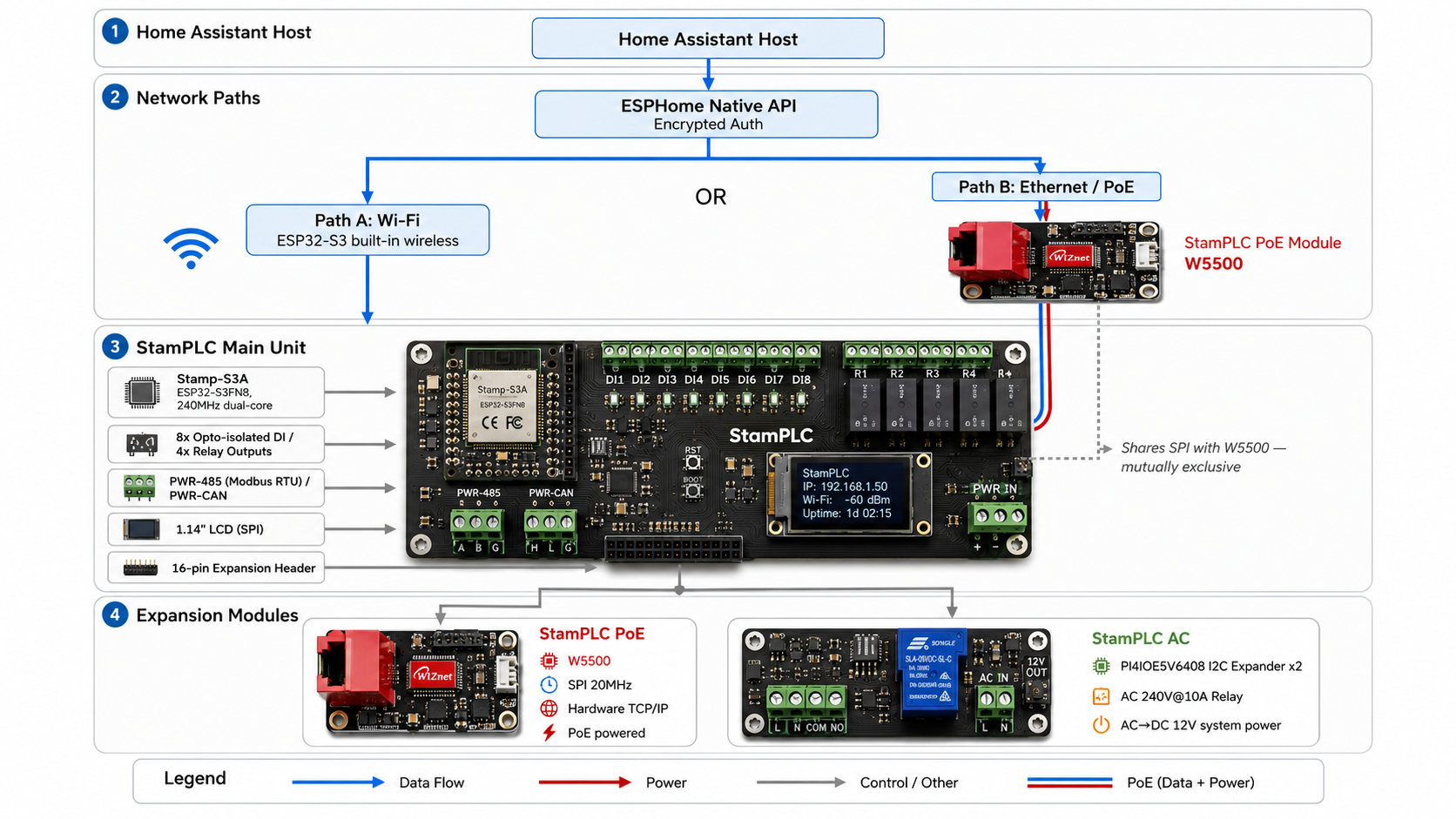
Deployment Workflow
Deployment proceeds in four steps.
- YAML configuration: Copy the example configuration.yaml in ESPHome Builder, then edit the API encryption key, network settings, and timezone
- Compile and download: SAVE → INSTALL → Manual download, then export the firmware in Factory format
- Flashing: Connect via USB-C and upload the firmware through ESPHome Web in a browser
- HA registration: After boot, add the auto-discovered device under Settings → Devices & services
Key points when configuring the expansion modules:
- StamPLC AC: Declare the I2C expanders (addresses 0x43/0x44), then control the AC relay and RGB LED as GPIO switches
- StamPLC PoE: Remove the
wifi,display, andspicomponents, then add anethernet: type: W5500block (GPIO7/8/9/11, 20MHz)
Technical Highlights
- Declarative configuration: Define I/O, display, and networking in YAML alone — no firmware code. Excellent maintainability and reproducibility
- Built-in industrial interfaces: RS485 (Modbus RTU) and CAN Bus allow coexistence with existing industrial fieldbus networks
- Modular expansion: The 16-pin header and I2C expanders add AC power/relay and PoE Ethernet non-invasively
- Integrated sensors: Onboard LM75 temperature and INA226 voltage/current sensors provide self-diagnostic telemetry
Where WIZnet Fits — The Role of the W5500
In this project, the WIZnet part is in actual use, not inferred. The StamPLC PoE module carries a W5500 Ethernet controller.
- Hardware TCP/IP offloading: The W5500 handles the entire TCP/IP stack in silicon, integrating 8 independent hardware sockets plus a 10/100M MAC and PHY. The ESP32-S3 only exchanges data over SPI
- SPI interface: GPIO7 (CLK) / 8 (MOSI) / 9 (MISO) / 11 (CS), clocked at 20MHz
- Single-cable PoE: One Ethernet cable delivers both data and power — enabling installation in distribution panels, ceilings, and other locations where power is hard to reach
- Native ESPHome support: A single
ethernet: type: W5500block is all it takes. No driver porting or custom components required
The W5500's value goes beyond simply adding a wired connection. The essential differentiator in industrial environments is a deterministic network path immune to Wi-Fi congestion, metal shielding, and RF interference.
→ Module page: https://shop.m5stack.com/products/poe-module-for-stamplc-w5500
Similar Projects on WIZnet Makers
"ESP32 + W5500 + Home Assistant" is not unique to the StamPLC — it is an architecture pattern repeatedly validated on maker.wiznet.io.
- Wired Thread Border Router (ESP32-S3 + W5500): Uses the exact same ESPHome
ethernetcomponent as StamPLC PoE to build a wired backhaul for a Matter/Thread network. Its design rationale — a network path independent of Wi-Fi failures — matches this project - MultiSensor (ESP32-S3 + W5500 PoE multi-sensor board): Its hardware composition — ESP32-S3 + W5500 + single-cable PoE + ESPHome — is virtually identical to StamPLC PoE. The only difference is purpose: MultiSensor focuses on environmental sensing, while StamPLC focuses on relay and industrial I/O control
- Arduino Nano W5500 MQTT 8-channel opto-isolated I/O board: A 2021 DIY build pairing 8 opto-isolated inputs with a W5500 for HA-connected I/O. Functionally the closest predecessor to the StamPLC, illustrating how a maker's DIY board evolved into a commercial product
Across all three cases, the reason for choosing the W5500 is the same: it secures a stable wired connection with minimal code and zero MCU networking burden.
→ Thread Border Router: https://maker.wiznet.io/Benjamin/projects/esp32-s3-thread-border-router/
→ MultiSensor: https://maker.wiznet.io/irina/projects/multisensor-esp32-s3-w5500-poe-smart-home-multi-sensor-board/
→ Nano 8ch I/O board: https://maker.wiznet.io/2021/06/07/arduino-nano-w5500-ethernet-mqtt-based-8-channel-opto-isolated-i-o-board-2/
Business Value
External customer value
- Build remote monitoring and control systems at a fraction of the cost of commercial PLC + SCADA stacks
- PoE-based installation cuts wiring cost and installation time
Application scenarios
- Industrial automation: Remote control and status monitoring of pumps, fans, and heaters in distribution panels
- Smart buildings: Scheduled control of AC 240V lighting and ventilation loads (using StamPLC AC)
- Remote telemetry: Power and temperature data collection via INA226/LM75 plus external sensors
- Legacy equipment integration: A gateway that brings RS485 Modbus devices into HA dashboards
WIZnet internal insights
- A reference case where a major maker-hardware vendor (M5Stack) adopted the W5500 in an official expansion module
- ESPHome's native W5500 support means the entire HA ecosystem serves as a proven distribution channel for the W5500
Limitations and Future Improvements
This guide presents the most practical path for integrating the StamPLC into HA, and it is well executed on its own terms. Still, there are structural areas with room for improvement.
Current limitations
- SPI resource conflict: The W5500 (PoE) and the LCD share the same SPI bus, so PoE and the display cannot run simultaneously (stated in the original article)
- No network redundancy: ESPHome treats
wifiandethernetas mutually exclusive, so there is no wireless fallback when the wired link fails - HA host as a single point of failure: Remote control is lost if the host goes down (partially mitigated by local automations)
Improvement directions
- Assigning the ESP32-S3's dual SPI hosts (SPI2/SPI3) separately could allow the W5500 and LCD to run concurrently [Inferred] — a point worth considering in a future hardware revision
- Using some of the W5500's 8 hardware sockets for a local Modbus TCP server could provide an alternate control path even when the HA host is down [Inferred]
- For multi-node deployments, a PoE-switch-centered star topology improves manageability
FAQ
Q1. How difficult is deployment? No firmware coding is required. Copy the published YAML, edit the network details, and flash from a browser (ESPHome Web) over USB-C. Adding expansion modules only requires extra YAML blocks and a recompile.
Q2. Does the PoE module eliminate the need for a separate power supply? Yes. Connect to a PoE switch or injector, and a single Ethernet cable supplies both power and networking.
Q3. Why can't PoE and the LCD be used together? Both devices use the same SPI pins. When enabling PoE, remove the display, spi, and wifi declarations from the YAML.
Q4. Can it work alongside existing Modbus equipment? Yes. The StamPLC supports Modbus RTU through its PWR-485 port, so it can act as a gateway connecting existing fieldbus devices to HA.
Q5. What is the BOM impact of adding the W5500? StamPLC PoE is a separately sold expansion module, so you add it only to nodes that need wired connectivity. Mixing Wi-Fi nodes and wired nodes optimizes overall cost.