


Arduino-Ftp-Server
How to use FtpServer on Arduino
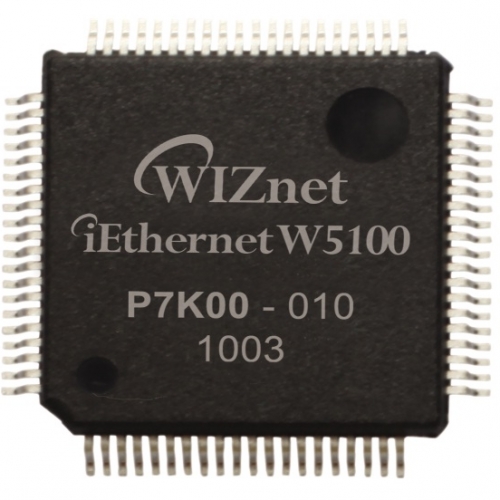
WIZnet - W5100
x 1

WIZnet - W5200
x 1

WIZnet - W5500
x 1

Arduino - Arduino IDE
x 1
======== Arduino-Ftp-Server ========
How to use FtpServer on Arduino
Tested with Ide 1.8.7
On Mega2560 and Due with ethernet module W5100, W5200 or W5500
On Esp8266 (Adafruit Feather Huzzah) with external SD card or internal flash system
- Download and install last versions of
- Ethernet (2.0.0) in the Arduino Ide Manager
- SdFat Library from William Greiman library (https://github.com/greiman/SdFat)
- FatFs (https://github.com/gallegojm/Arduino-FatFs)
- FatLib (https://github.com/gallegojm/Arduino-FatLib)
- To test the access to the SD card is ok :
- verify the correct library is selected in FatLib.h
- load example libraries/FatLib/examples/FatLibDemo or SpiFfsFatLibDemo,
- verify that SD_CHIP_SELECT has the correct value (Chip Select for SD card reader),
- run
- Download and install
- FtpServer (https://github.com/gallegojm/Arduino-Ftp-Server) (this include ExtStreaming, modified Streaming library)
- To test Ftp Server:
- load libraries/examples/FtpServerTest or Esp8266FtpServerTest,
- verify that CS_SDCARD, P_RESET, mac[] and serverIp have the correct values,
- for Esp8266, set the correct value for ssid and password
- run
- annotate in the Ide serial monitor the IP your router assign to the Ftp Server
- open a session in a Ftp client (user "arduino", password "text"), protocol set to normal FTP server (no encryption), select single data connection mode when available)
Definitions
You may have to modify some of the definitions
In ExtSdFat.h
- FF_MAX_LFN is the longest size for a file name, including the complete path. It is set to 255 but can be reduced if memory usage is critical.
In FtpServer.h most definitions are commented
- FTP_DEBUG if defined, print to the Ide serial monitor information for debugging.
- FTP_USER the user' name
- FTP_PASS the password
- FTP_BUF_SIZE is the size of the file buffer for read and write operations. The value 1024 gives the best speed results. But it can be reduced if memory usage is critical.
- FTP_TIME_OUT and FTP_AUTH_TIME_OUT are expressed in seconds.
In FatLib.h
- FAT_USE allow to select a library to manage the file system.
About libraries used with FtpServer
Streaming & ExtStreaming
Streaming is a library from Mikal Hart (http://arduiniana.org/2009/04/new-streaming-library/)
I slightly modify this library because the declaration of 'endl' colides with one in SdFat.
I replace it with 'eol' and rename the library to ExtStreaming.
ExtStreaming is included in FtpServer library so you don't need to download it.
FatFs
FatFs are classes to wrap in Arduino ide the module FatFs from ChaN
FatLib
FatLib allows you to easily switch between libraries SdFat, FatFs and SPIFFS
It includes ExtSdFat and ExtSpiFfs, wrappers for SdFat or FS
SdFat
Library from William Greiman library
It is faster than FatFs and use less memory, but don't allow the use of accentued characters in file names.
Ethernet
With new version (2.0.0) of this Arduino library, it is no more necessary to add function connected() to EthernetServer class as in first versions of FtpServer
FTP clients
I have tested FtpServer with those clients:
Under Windows
FTP Rush, Filezilla, WinSCP, NcFTP (and ncftpget, ncftpput), Firefox, command line ftp.exe
Under Ubuntu
gFTP, Filezilla, NcFTP(and ncftpget, ncftpput), lftp, ftp, Firefox
Under Android
AndFTP, FTP Express, Firefox
With a second Arduino
using the sketch of SurferTim at http://playground.arduino.cc/Code/FTP
When available in client, you have to select single data connection mode.
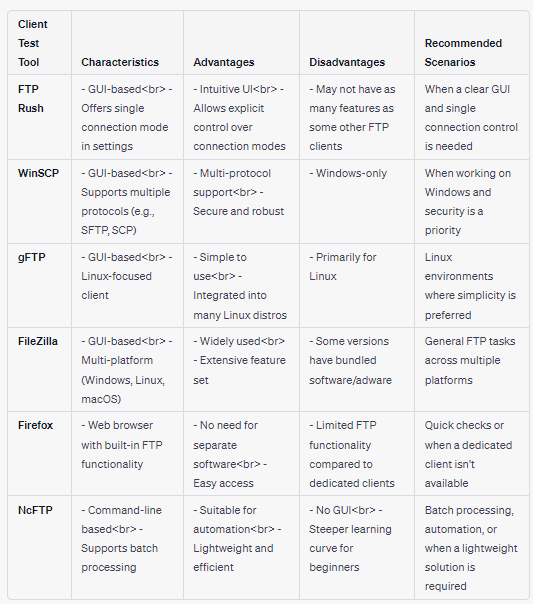
FTP Rush
To force FTP Rush to use the primary connection for data transfers:
Go to Tools/Site Manager, right-select you site and Site Properties
In General, check "Single connection mode"
WinSCP
To force WinSCP to use the primary connection for data transfers:
In Login, go to Tools/Preferences.../Transfer/Background,
set "Maximum number of transfers at the same time" to 1.
gFTP
To force gFTP to use the primary connection for data transfers:
Go to FTP/Preferences...,
In General, check "One transfer at a time"
FileZilla
To force FileZilla to use the primary connection for data transfers:
Go to File/Site Manager then select your site.
In Transfer Settings, check "Limit number of simultaneous connections" and set the maximum to 1
Firefox
Only used to download files.
Enter address ftp://arduino:Due@192.168.1.xxx
You can download any file from the server.
You have to quit Firefox to close the connection with the server.
NcFTP
This client works on the command line and is perfect for batch processing.
For example:
ncftpget -d stdout -u arduino -p test 192.168.1.xxx . /MyDir/MyFile
to download a file to the current directory


