



Why Cable Gives Internet: DHCP Under‑the‑Hood Explained
It explains how DHCP works when you plug in an Ethernet cable
DHCP Dynamic Host Configuration Protocol
- DHCP Protocol Introduction
When we covered the OSI Network Layer earlier, we mentioned that manual configuration of parameters such as IP address, subnet mask and default gateway is required for data transmission using TCP/UDP protocols. As network scales keep expanding, manual configuration becomes tedious and error‑prone. Besides, IPv4 addresses we are widely using are very limited, and manual IP assignment easily causes address waste.
Meanwhile, mobile devices such as laptops and smartphones frequently need IP re‑configuration under different network environments. Manual IP modification is troublesome and may even trigger network disconnection.
That gives rise to the DHCP protocol. DHCP (Dynamic Host Configuration Protocol) is a network protocol for dynamic IP address allocation. By automatically assigning IP addresses and other TCP/IP parameters, DHCP greatly simplifies network connection procedures and prevents IP address conflicts caused by manual setup, where two devices occupy the identical IP address.
- DHCP Protocol Working Principle
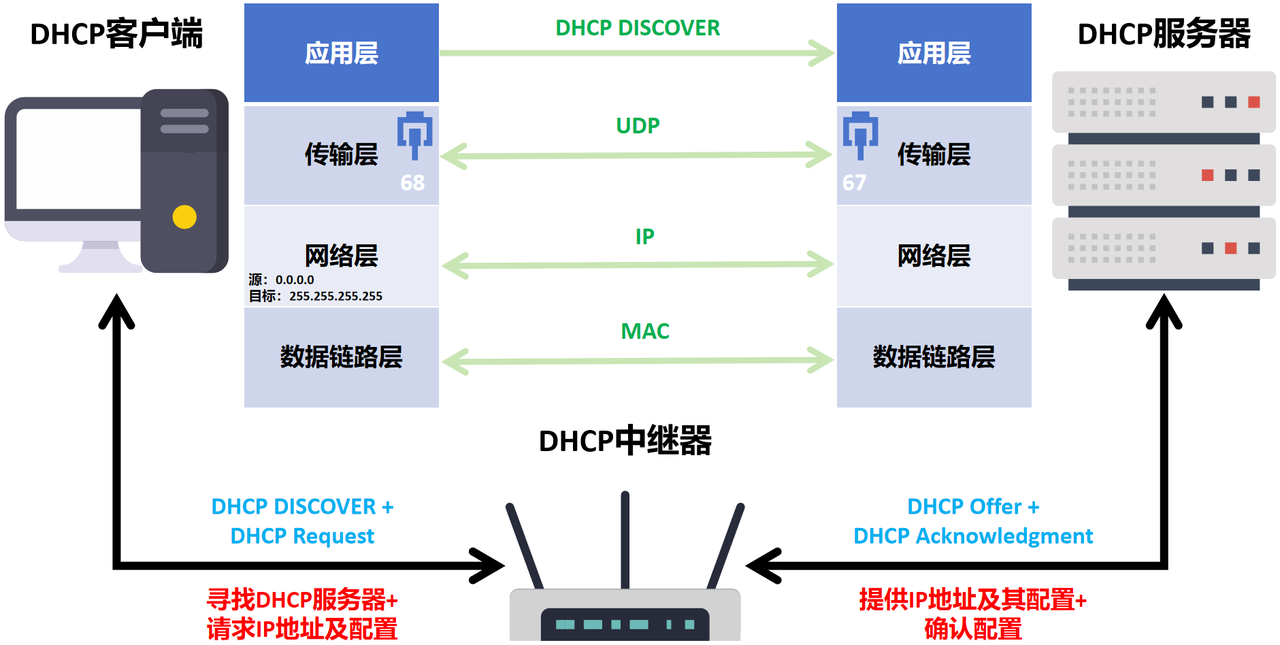
Three major roles exist in DHCP: DHCP Server, DHCP Client and DHCP Relay.
DHCP Server
Assign IP addresses and configurations The DHCP server assigns IP addresses and supplies other network parameters including subnet mask, default gateway and DNS server for client devices inside the network.
Manage address pool The server maintains an IP address pool, managing available IP addresses together with their lease time.
Respond to requests Upon receiving requests from DHCP clients, the server replies with corresponding DHCP messages and delivers configuration parameters.
DHCP Client
Request configurations A DHCP client refers to network‑connected devices such as computers, printers or smartphones. It obtains IP addresses and other network‑configuration information from DHCP servers.
Automatic configuration Clients acquire IP addresses and network settings automatically via DHCP without manual input.
DHCP Relay
Forward requests DHCP Relay is an intermediate device sitting between clients and servers, for example a router or switch. When clients and servers reside in different broadcast domains, the relay forwards client‑side requests toward servers and relays server responses back to clients.
Cross‑broadcast‑domain support DHCP Relay enables DHCP services across different network segments or subnets, allowing clients and servers running on separate networks.
- DHCP Protocol Operation Steps
DHCP runs over UDP. The communication workflow steps are listed below:
- The DHCP client broadcasts a DHCP DISCOVER message containing transaction ID and the client’s MAC address. The source IP of the encapsulated IP datagram is 0.0.0.0, used because the host has not obtained an IP address yet. The destination IP is broadcast address 255.255.255.255. Broadcast transmission is adopted since the host does not know which DHCP servers exist within the local network.
- After receiving the DHCP Discover message, the server broadcasts a DHCP Offer message carrying one available IP address and other configuration parameters.
- The client selects one Offer and sends out a DHCP Request message to apply for that specific IP address.
- The server confirms and sends a DHCP Acknowledgment message to finish IP‑address assignment.
- At this point DHCP network setup completes. Hosts on the communication link can start normal TCP/IP communication.
- When the IP address is no longer needed, the client may send a DHCPRELEASE packet to release the address. Moreover, DHCP configurations include lease duration settings. Within the valid lease period, DHCP clients can send DHCP request packets to request lease extension.