What Is an Interrupt? MCU Interrupt Logic Explained With Real Examples
This tweet introduces MCU interrupt concepts, polling contrast, interrupt types and NVIC fundamentals.
COMPONENTS
PROJECT DESCRIPTION
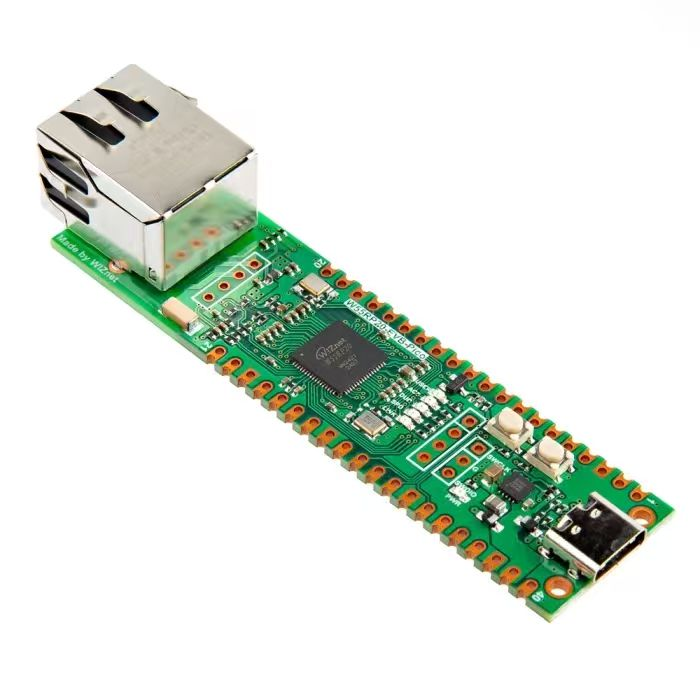
【Preliminary Note】The original hardware example in this article was written based on the RP2040. The actual hardware used in this hands-on demonstration features the W55RP20 as the main controller chip. The circuit logic and UF2 flashing operation principles are universally applicable, with only the main controller model differing. The original chip model mentioned in the circuit descriptions below is provided for reference purposes only.
1. Basic Concepts of Interrupts
Here, we use an example to illustrate the concept and function of interrupts. Imagine the previous routine where we used a serial peripheral to receive data: it required constantly calling the UART. any () method to check whether there is data available to read from the outside. This approach works only when the code flow is simple and the number of peripheral calls is small. However, if we add code to the original program such as driving an LCD screen to display data, performing digital filtering on motion data, interacting with a PC via the USB protocol, and saving program runtime logs to external Flash, the program runtime will increase significantly. During the interval between two calls to the UART. any () method to obtain the serial port status, it is highly likely that the gyroscope has already sent a large amount of data to the serial port, causing the serial port's FIFO memory to overflow.At this point, we need an interrupt. The function of the so-called interrupt is that once there is receivable data on the serial port peripheral, the preset interrupt callback function will be called to receive the data and perform corresponding processing.
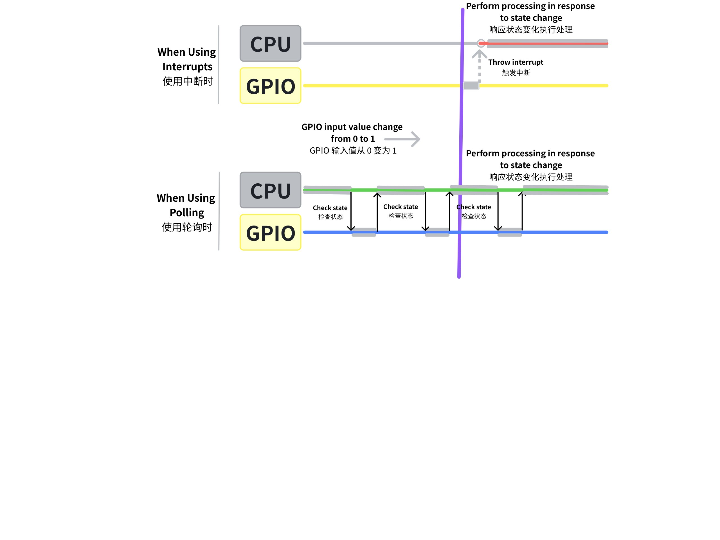
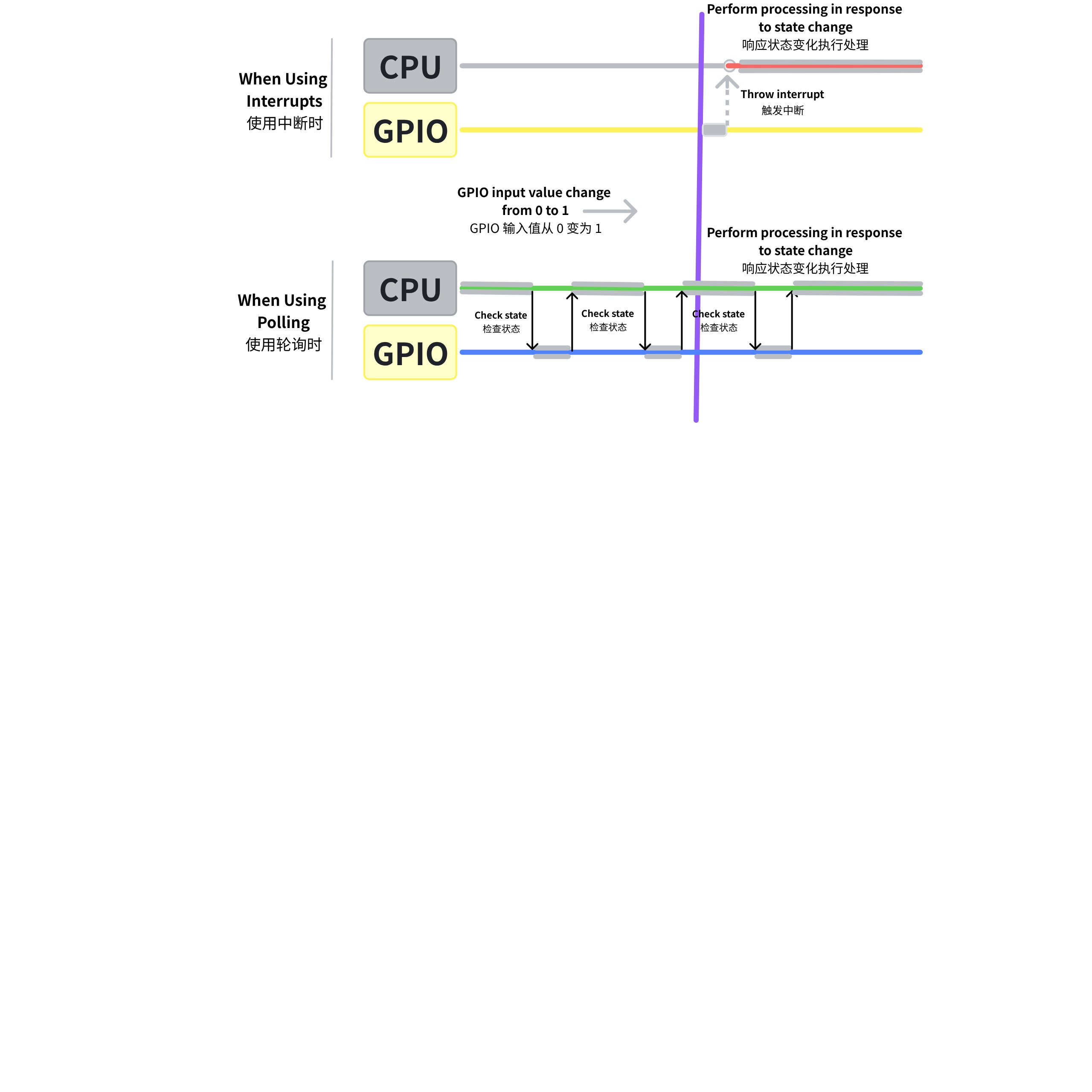
Let's take another example where we previously used GPIO to read the press of an external key. The difference between using the external interrupt method and the polling method is shown in the following figure:
Figure 1.1 Schematic diagram of comparison between GPIO external interrupt and polling mechanism
Extending the above example, we can obtain two different program execution modes: polling and interrupt.
Polling Polling: If a program needs to wait for a specific state change to occur before executing a certain task, it periodically checks that state in a loop. This approach features simple programming and clear logic, but its drawbacks are that if the interval between two checks is too long, state changes occurring during the interval may be overlooked, and most of the checks are meaningless — state changes may only happen a few times over a long period, and the program state remains unchanged in most check scenarios.
中断 Interrupts : Under this mechanism, once a state change occurs, an interrupt signal is triggered, which allows the CPU to immediately suspend the current task (while saving its current state), switch to execute the interrupt-related handler, and resume the previous task state to continue execution after the processing is completed. This method not only improves the response speed of the system but also ensures the efficient utilization of resources.
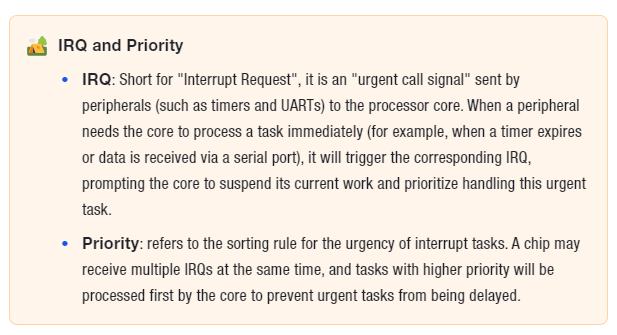
Simply put, an interrupt is the core mechanism for an MCU to handle "sudden tasks" — for example, when a timer expires, data is received via a serial port, or a sensor triggers a signal, the MCU cannot wait until the core "finishes the task at hand" to process these events; at such times, an interrupt will "interrupt" the core's current operation to prioritize the urgent task. Meanwhile, the NVIC (Nested Vectored Interrupt Controller) acts as the "interrupt scheduler" for each core, responsible for managing the priority and execution sequence of interrupts.
2. Types of Interrupts
Interrupts can originate from inside the MCU or from external devices of the MCU. Simply put, they can be categorized into GPIO external interrupts, peripheral interrupts, and core interrupts:
External Interrupt: Its source is the level change signal on the GPIO pin, which is triggered by an external device connected to the IRQ pin of the MCU. When a level change signal is generated (such as rising edge, falling edge, high/low level hold, corresponding to the GPIO interrupt trigger type explained earlier), the external interrupt controller of GPIO detects the interrupt signal, and then sends the corresponding interrupt signal to the NVIC interrupt vector controller.
Peripheral Interrupt: An interrupt generated from on-chip peripherals (such as internal timers, SPI, UART, etc.). When the operating status of a peripheral changes (for example, when the UART detects that there is data available for reception), these interrupt signals are directly transmitted to the Nested Vectored Interrupt Controller (NVIC).
Kernel Interrupt: A signal originating from inside the CPU, mainly including trap instructions, fault instructions and abort instructions, most of which are generated when the CPU executes an instruction and encounters an error or a hardware failure.
3. NVIC Nested Vectored Interrupt Controller
The main function of the NVIC (Nested Vectored Interrupt Controller) is to handle interrupts, and it is responsible for managing the priority and execution sequence of interrupts:
All interrupt requests from GPIOs, peripherals, and the core must go through the unified coordination and distribution of the NVIC before they can be processed by the CPU.
Just like the receptionist dispatcher at a company, all visiting clients (interrupt requests) must first go through the front desk, where the receptionist will arrange the corresponding employee (CPU) to receive them according to the urgency of the clients.
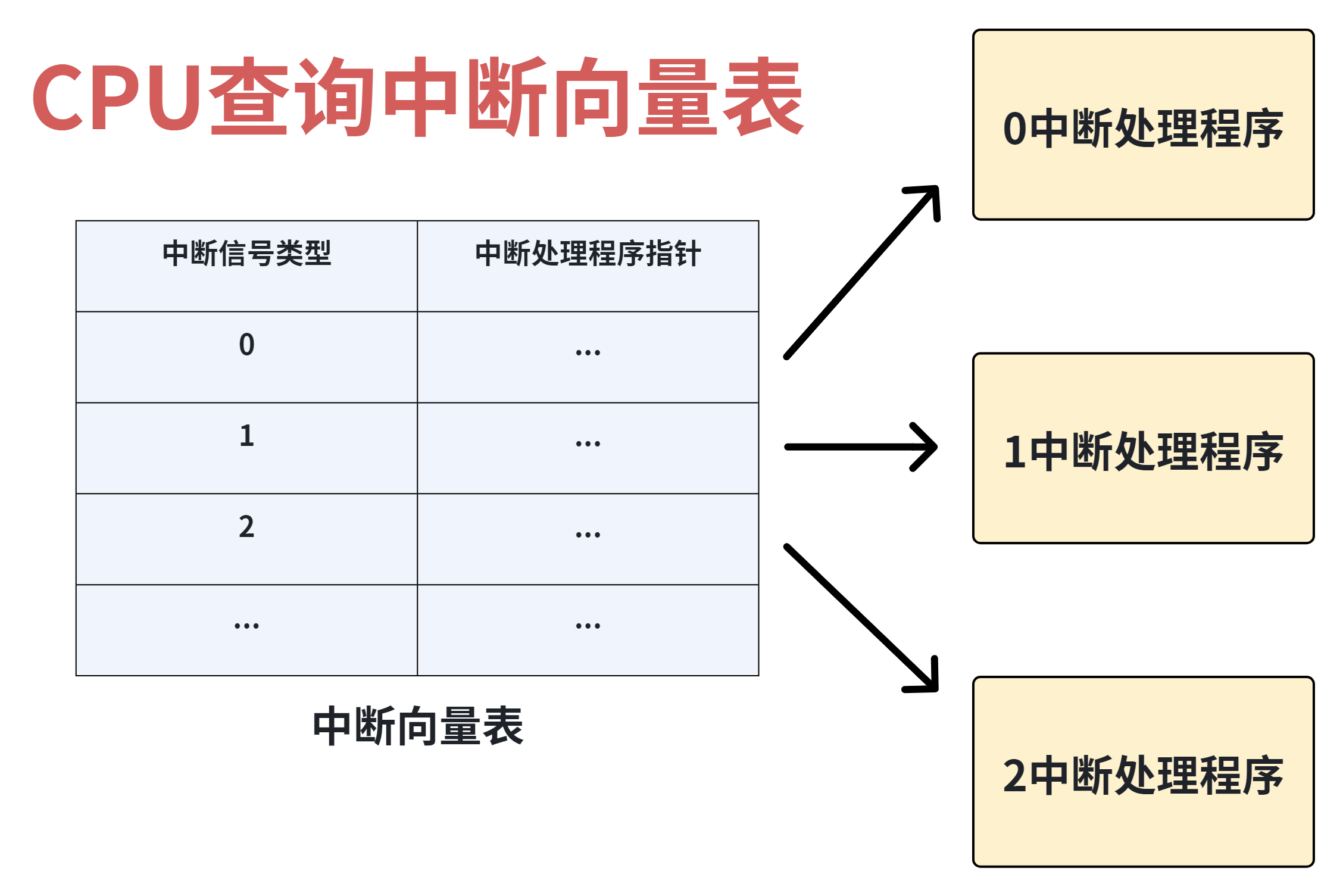
The NVIC contains an interrupt vector table, which serves as the "core navigation tool" for the CPU to process interrupts. Simply put, the interrupt vector table is a table arranged in ascending order of interrupt type numbers, where each entry corresponds to an interrupt type and stores the interrupt vector and the address of the corresponding Interrupt Service Routine (ISR) for that interrupt:
An interrupt service routine is a program specifically designed to handle the corresponding interrupt, and the address refers to the location of this program in memory;
When an interrupt signal is received (for example, when there is data available for reception via UART), the CPU does not need to search for the handler one by one. Instead, it can directly locate the corresponding program address in the interrupt vector table based on the interrupt type number, and immediately jump to the interrupt service routine for execution, which greatly improves the efficiency of interrupt processing.
The "nesting" feature of the NVIC is one of its core characteristics and the key that distinguishes it from ordinary interrupt controllers. The so-called "nesting" means that the NVIC allows users to set a priority level for each type of interrupt:
When the CPU is processing a low-priority interrupt, if an interrupt request with a higher priority arrives at this point, the NVIC will allow the higher-priority interrupt to "preempt" control of the CPU, that is, suspend the processing of the current low-priority interrupt and prioritize executing the service routine of the higher-priority interrupt;
After the higher-priority interrupt is fully processed, the CPU returns to the previously suspended lower-priority interrupt and continues to complete the remaining processing tasks.
This process is called interrupt nesting. This mechanism ensures that the most urgent events in the system (such as hardware failures and important data reception) can be prioritized for processing, preventing delays in urgent events caused by low-priority events occupying the CPU.
In addition, the NVIC also has the function of interrupt masking (disabling): it records which interrupts have been set to the "masked state" by the user, and for these masked interrupts, the NVIC will directly ignore their requests and not pass them to the CPU. This is just like the front desk can refuse to receive customers on the blocklist, ensuring that the CPU will not be disturbed by unnecessary interrupts.
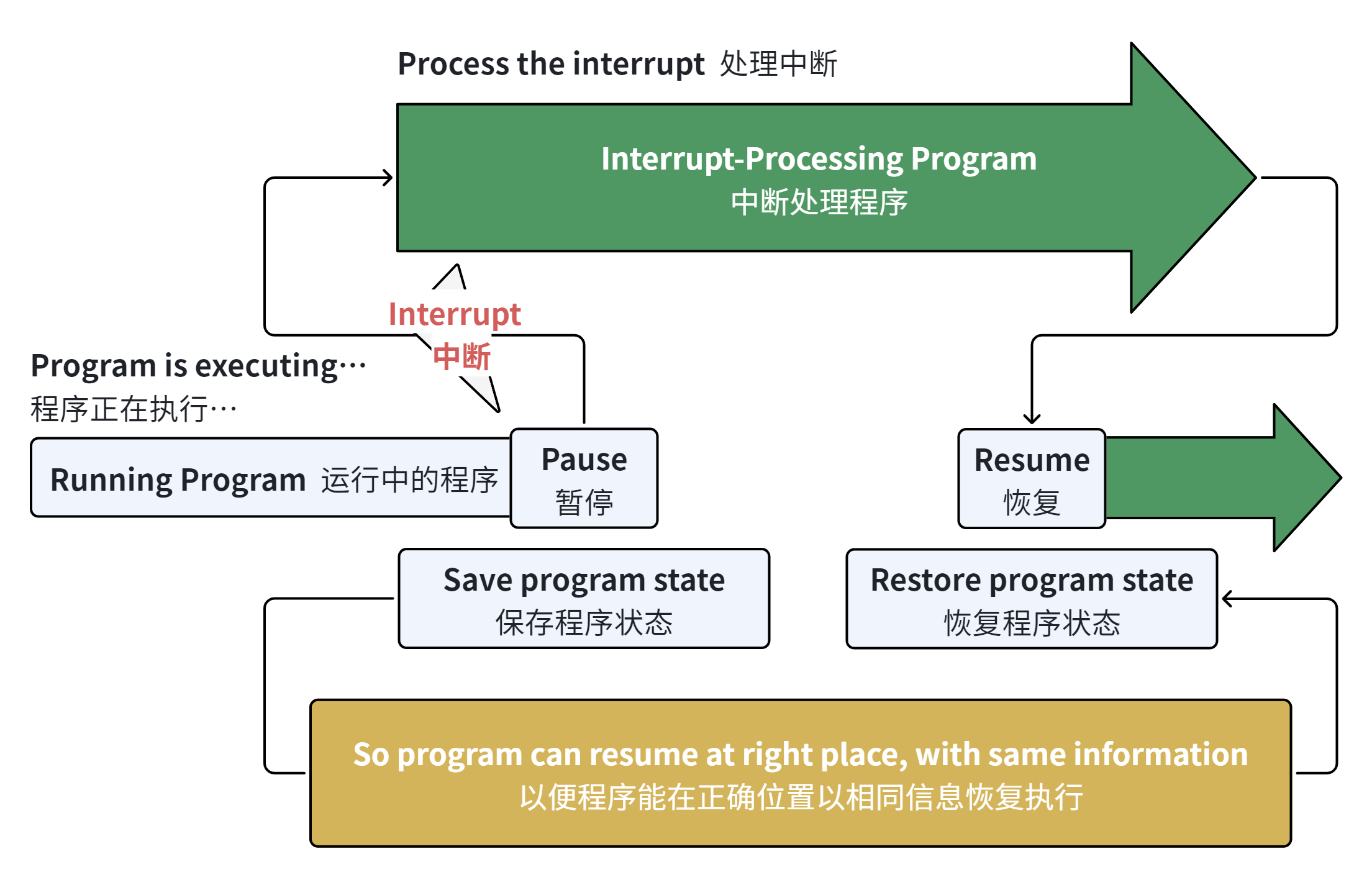
When an interrupt request is generated and scheduled by the NVIC, the CPU will process the interrupt in accordance with fixed steps. The whole process is just like when you are writing a document and suddenly receive an urgent email notification, and you will return to the document to continue writing after handling the email:
The fixed process is as follows:
Normal program execution: The CPU originally executes the user's main program in sequence, and after completing the execution of each instruction, it proactively checks whether the NVIC has any interrupt requests that need to be processed;
Pause the current program: When the CPU detects the interrupt signal transmitted by the NVIC, it will immediately stop executing the current main program;
Save program state: The CPU will automatically save key information such as the execution progress of the current main program and register data to ensure that it can accurately return to the interrupted position and resume execution later;
Locate and execute the interrupt service routine: The CPU queries the interrupt vector table according to the type number of the interrupt signal, finds the address of the corresponding interrupt service routine, and then loads and executes this handler;
Restore program state: After the interrupt service routine completes execution, the CPU will automatically restore the previously saved state of the main program;
Resume execution of the main program: The CPU returns to the interrupted position and continues executing the original main program.
After this processing is completed, the CPU automatically restores the saved information and resumes executing the program from where it stopped.
The following figure shows the state transition diagram when a user program switches to an interrupt service routine:
Figure 1.3 State Transition Diagram of Interrupt Handling Process