



Understand in One Article: MicroPython urequests Library and Pico HTTP‑Client Implementation
urequests usage and Pico HTTP‑client implementation.

HTTP Client Experiment
Here we use http://httpbin.org as test service for HTTP request‑response. It provides test endpoints for various HTTP methods(GET, POST, PUT, DELETE and so on). Developers can quickly verify their HTTP client code with this service.
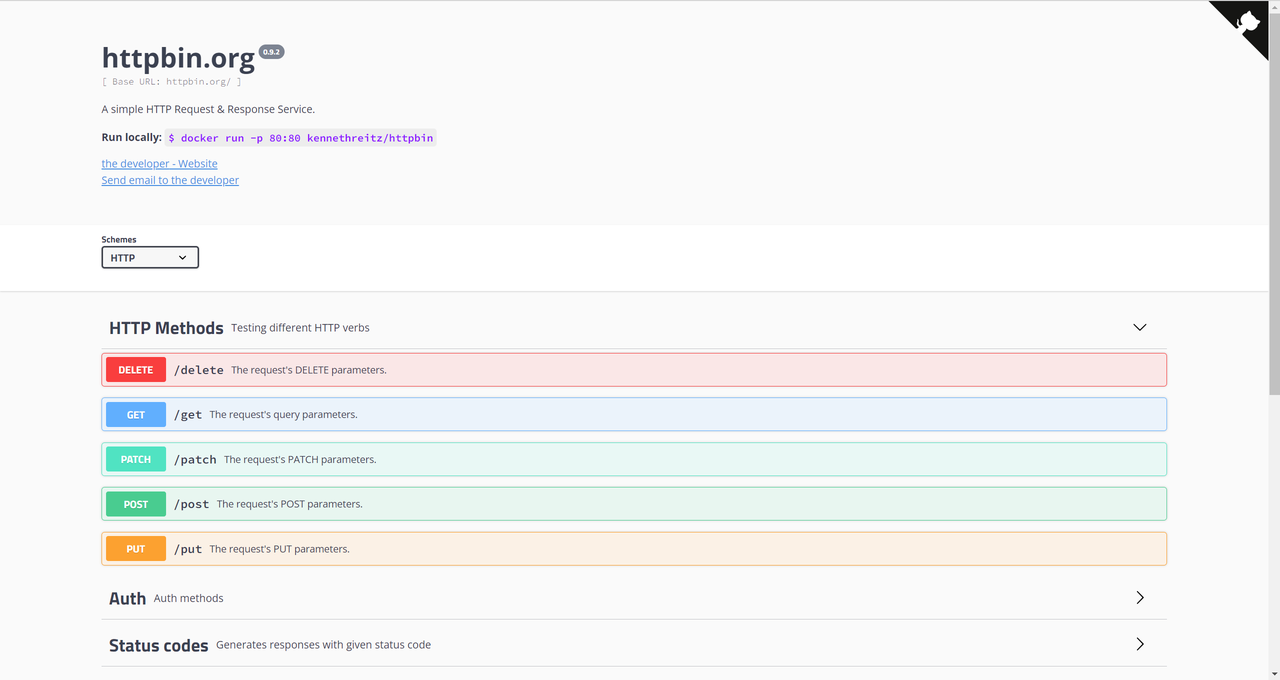
Its main functions include:
Test GET request Send GET requests and view data returned by server.
Test POST request Send POST requests, upload payload and inspect responses.
Inspect request headers View request headers sent by client.
Simulate delay Set response delay to test client behaviour under unstable network conditions.
Test file upload Support file upload and view file information received by server.
Simulate various HTTP status codes Return specified HTTP status codes for client error‑handling verification.
The source code below can be found in the provided resource package under elegance‑devkit v1\Demo\46 ETH_HTTP_Client.
Note: To run the HTTP client experiment normally, the Ethernet port of the W5500 module must be connected to a router.
In this lab we use HTTP protocol to perform GET and POST requests, and print status codes together with response data. Sample code is shown below:
# Python env   : MicroPython v1.23.0 on Wiznet W5500
# -*- coding: utf-8 -*-
# @Time    : 2024/8/8 8:14 PM
# @Author  : Li Qingshui
# @File    : main.py
# @Description : Ethernet experiment for HTTP client test
# ======================================== Import related modules ========================================
# Import HTTP request module
import urequests
# Import hardware‑related modules
from machine import Pin,SPI
# Import time‑related modules
import time
# Import network‑related modules
import network
# ======================================== Global variables ============================================
# Static fallback device IP address
ip = '192.168.1.20'
sn = '255.255.255.0'
gw = '192.168.1.1'
dns= '8.8.8.8'
# Tuple object for static network configuration
netinfo=(ip, sn, gw, dns)
# URL for GET request
geturl = "http://httpbin.org/get"
# URL for POST request
posturl = "http://httpbin.org/post"
# ======================================== Function definitions ============================================
# Initialize network connection
def w5x00_init() -> 'network.WIZNET5K':
    """
    Initialize network.WIZNET5K instance, set static IP and bring‑up network connection.
    Returns:
        network.WIZNET5K: Initialized and connected network.WIZNET5K instance.
    Raises:
        None: This function does not throw exceptions.
    """
    # Declare global variable
    global netinfo
    # Initialize SPI object
    spi = SPI(0, 2_000_000, mosi=Pin(19), miso=Pin(16), sck=Pin(18))
    # Instantiate network.WIZNET5K, pass chip‑select pin CS and reset pin RST
    nic = network.WIZNET5K(spi, Pin(17), Pin(20))
    # Activate network interface
    nic.active(True)
    try:
        print("\r\nConfiguring DHCP")
        # Try to acquire IP, subnet mask, gateway, DNS via DHCP
        nic.ifconfig('dhcp')
    except:
        print("\r\nDHCP fails, use static configuration")
        # Fallback to static IP configuration on DHCP failure
        nic.ifconfig(netinfo)
    # Block until network link becomes available
    while not nic.isconnected():
        time.sleep(1)
        # Print register debug information
        print(nic.regs())
    # Print applied network parameters
    print('ip :', nic.ifconfig()[0])
    print('sn :', nic.ifconfig()[1])
    print('gw :', nic.ifconfig()[2])
    print('dns:', nic.ifconfig()[3])
    # Return WIZNET5K instance
    return nic

# Function to send HTTP requests
def request() -> None:
    """
    Send HTTP GET and POST requests, print response results.
    Returns:
        None: This function returns nothing.
    Raises:
        None: This function does not throw exceptions.
    """
    print("GET Request test")
    # Send GET request with query parameters appended to URL
    r = urequests.get(geturl + "?WIZnet=W5100S_W5500")
    # Print HTTP response status code of GET request
    print("Request response code:", r.status_code)
    # Print value of args field from GET JSON response
    print("Request response args:", r.json()["args"])
    # Send POST request carrying JSON payload
    r = urequests.post(posturl, json={"WIZnet": "W5100S_W5500"})
    # Print hint if no response is received
    if not r:
        print('spreadsheet: no response received')
    print("\r\nPOST Request test")
    # Print HTTP response status code of POST request
    print("Request response code:", r.status_code)
    # Print value of data field from POST JSON response
    print("Request response data:", r.json()["data"])
# ======================================== Custom classes ============================================
# ======================================== Initialization ==========================================
# 3‑second power‑on delay for hardware stabilization
time.sleep(3)
# Print debug banner
print("FreakStudio : Using W5x00 Ethernet to do HTTP Client test")
# Initialize W5500 module
nic = w5x00_init()
# ======================================== Main program ===========================================
# Invoke request function to run HTTP tests
request()
Inside the request function these operations are executed sequentially:
- Use
urequests.get()to send GET request toward target URL for fetching data from servergeturlis predefined base request URL."?WIZnet=W5100S_W5500"is query string appended at the end of URL as request parameters sent to server. Return value is assigned to variabler. Thisris a Response object containing server‑returned information including status code, response headers and response body. GET query parameters are parsed by server and normally returned inside theargsfield of response payload. - Print GET response status code for request‑result inspection 200 (OK): Request succeeded. 404 (Not Found): Target resource cannot be located. 500 (Internal Server Error): Server‑side fault.
- Retrieve and print
argsfield inside JSON response from server to verify correct reception of query parametersr.json()decodes JSON‑formatted response body into Python dictionary.["args"]fetches value mapped by key "args", which corresponds to HTTP query parameters. - Use
urequests.post()to send POST request with JSON key‑value payload for submitting data such as forms or file uploadsposturl: destination URL for POST request.json: payload to be transmitted in JSON format.{"WIZnet": "W5100S_W5500"}is Python dictionary representing JSON request body. Request result is stored inside Response objectr. - Check POST execution result; print error prompt if server returns no response (when
ris None). - Print POST response status code to confirm whether server properly receives and replies the request.
- Retrieve and print
datafield inside JSON response to validate server processing of submitted payloadr.json()decodes JSON‑formatted response body into Python dictionary.["data"]fetches value mapped by key "data". After receiving POST payload, server parses JSON body and echoes it inside thedatafield in response.
Flash firmware and open serial terminal:
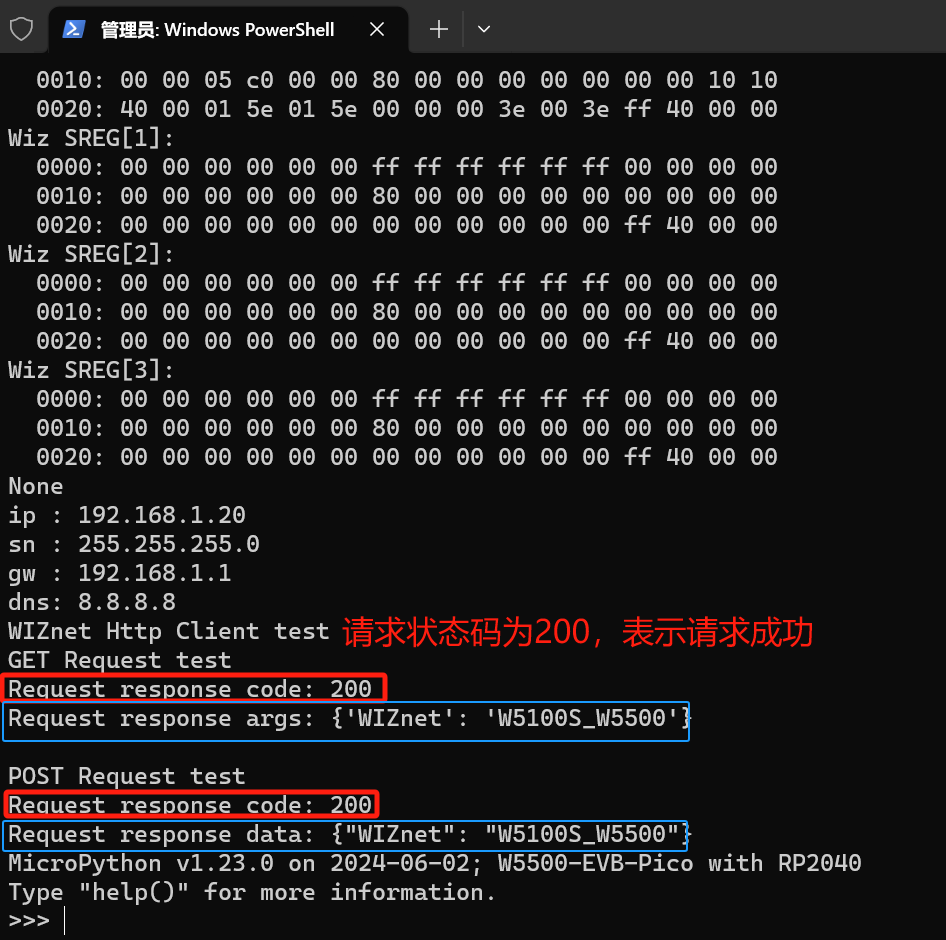
You can see printed status codes and submitted payload contents for both GET and POST requests.