


Step-by-Step Guide to Building an AI Operating Status Indicator [Fully Open-Source Breakdown]
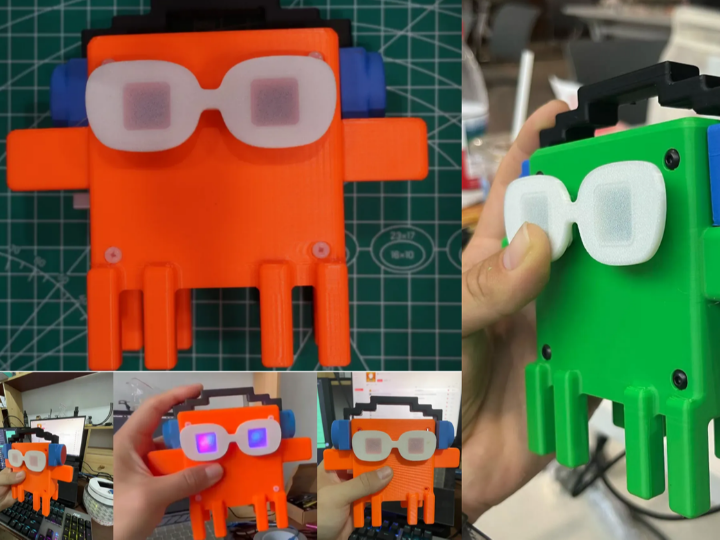
This fully open-source desktop hardware is an AI running status indicator built on WizFi360-EVB-Pico (RP2040 + WizFi360 industrial WiFi module).

Reset Password
Know your password?
Need an account?
This fully open-source desktop hardware is an AI running status indicator built on WizFi360-EVB-Pico (RP2040 + WizFi360 industrial WiFi module).
Similar projects you might like
How to program WIZnet Pico Board using ChatGPT [Arduino IDE]
How to program WIZnet Pico Board using ChatGPT [Arduino IDE]
matthew
0

6288

0

Send an alert notification with a photo to Telegram when a person is detected in a restricted area.
[AIoT] Smart Surveillance System with Human Detection
innovation4x
3
5460
0
"micropython-magic" is an extension that allows you to write and run MicroPython code in the Jupyter notebook environment.
micropython-magic
Benjamin
0
6637
0
This fun "turtle" robot is a low cost education toy that anyone can build and enjoy learning to programme with.
Trundlebot
austin
0
2725
0
Weather Lamp A IoT based 3D Printed Weather Simulating Lamp
Weather Lamp
austin
0
3112
0
Open-source platform to monitor plant health and optimizing on agriculture through data and augmented speech.
FLORAbot
austin
0
2030
0
This is a demonstration of two Wiznet W5500s running a micropython script that sets one unit as a server, and the other as a client, with a small data packet go
Pico Pi Wiznet W5500 Two-way comms via Ethernet with Micropython
scarlet
0
5605
0
This project uses the WizFi360-EVB-Pico and sends data got from pressure sensor to the Azure IoT Hub.
WizFi360-EVB-Pico-AZURE-C Pressure Sensor Working
austin
0
4157
0