


Rotary Encoder Debounce: Implemented with Raspberry Pi Pico MicroPython Timers
EC11 rotary‑encoder driver with timer‑based software debounce, plus terminal progress‑bar demo in MicroPython.
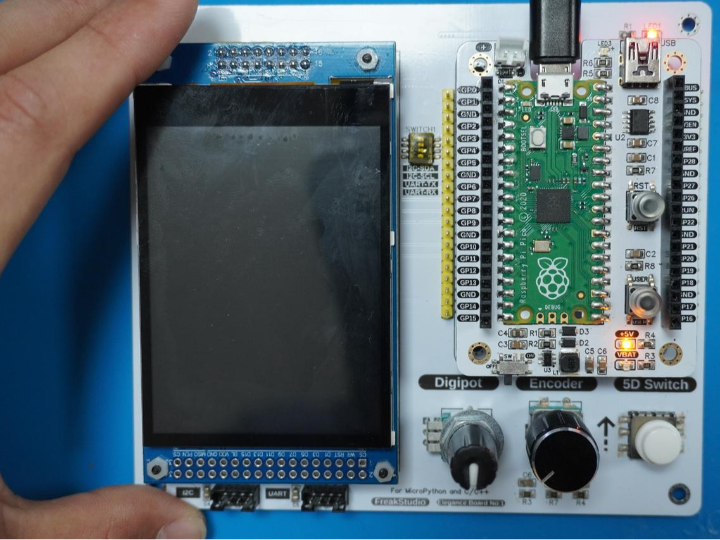
COMPONENTS
PROJECT DESCRIPTION
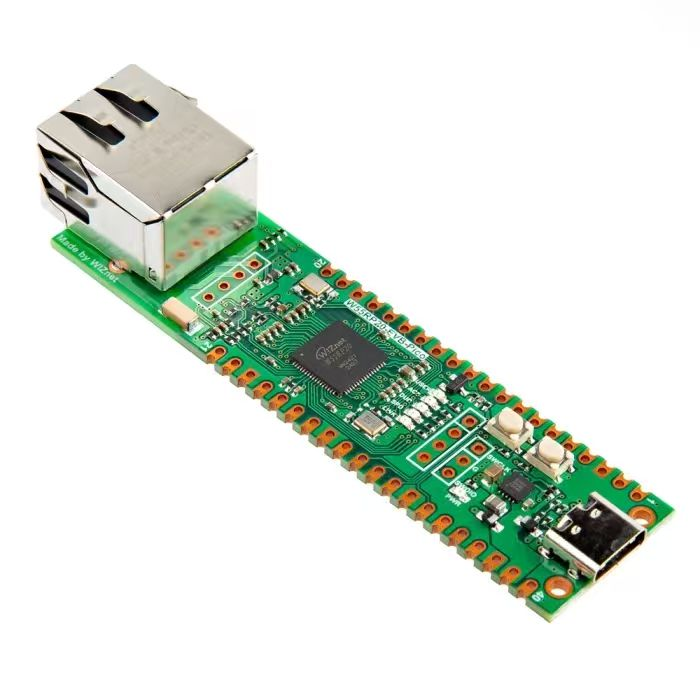
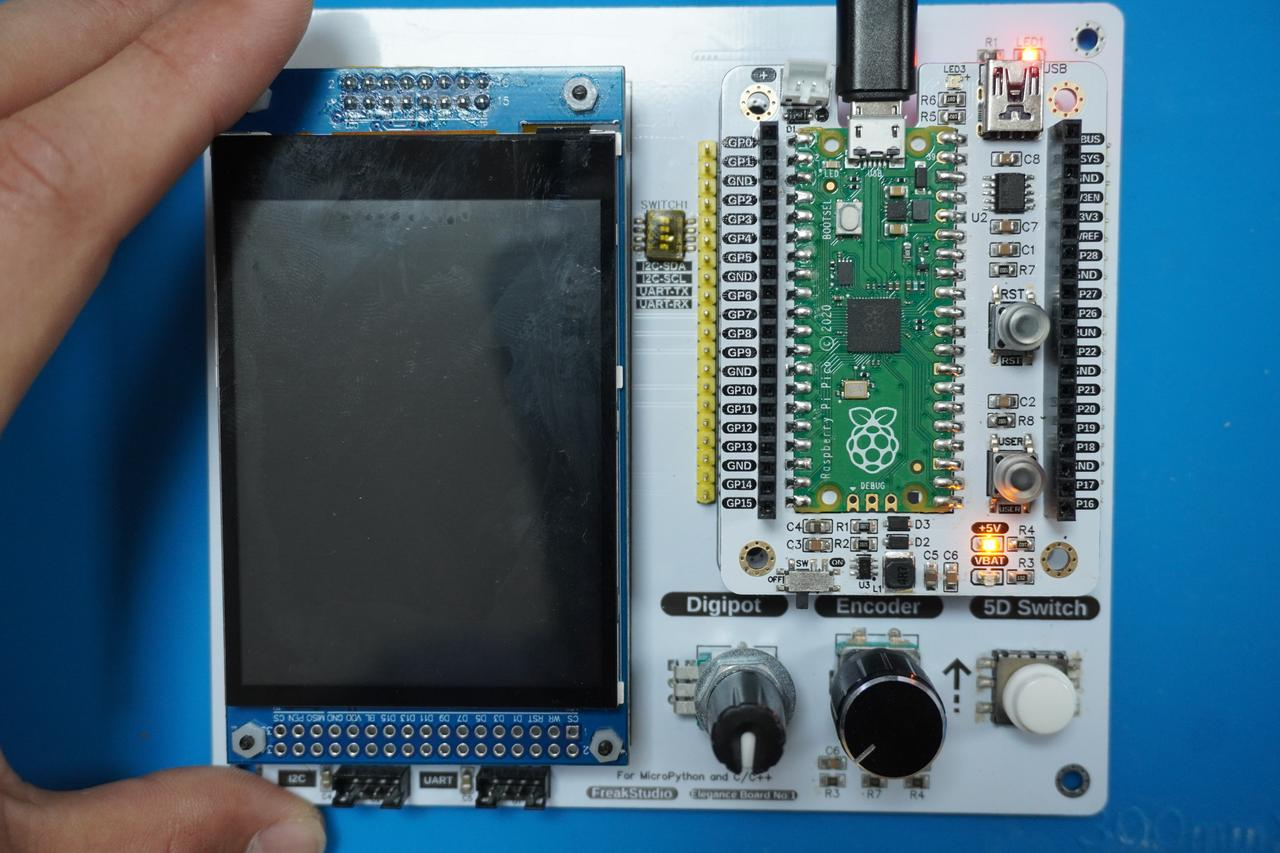
【Preliminary Note】The original hardware example in this article was written based on the RP2040. The actual hardware used in this hands-on demonstration features the W55RP20 as the main controller chip. The circuit logic and UF2 flashing operation principles are universally applicable, with only the main controller model differing. The original chip model mentioned in the circuit descriptions below is provided for reference purposes only.
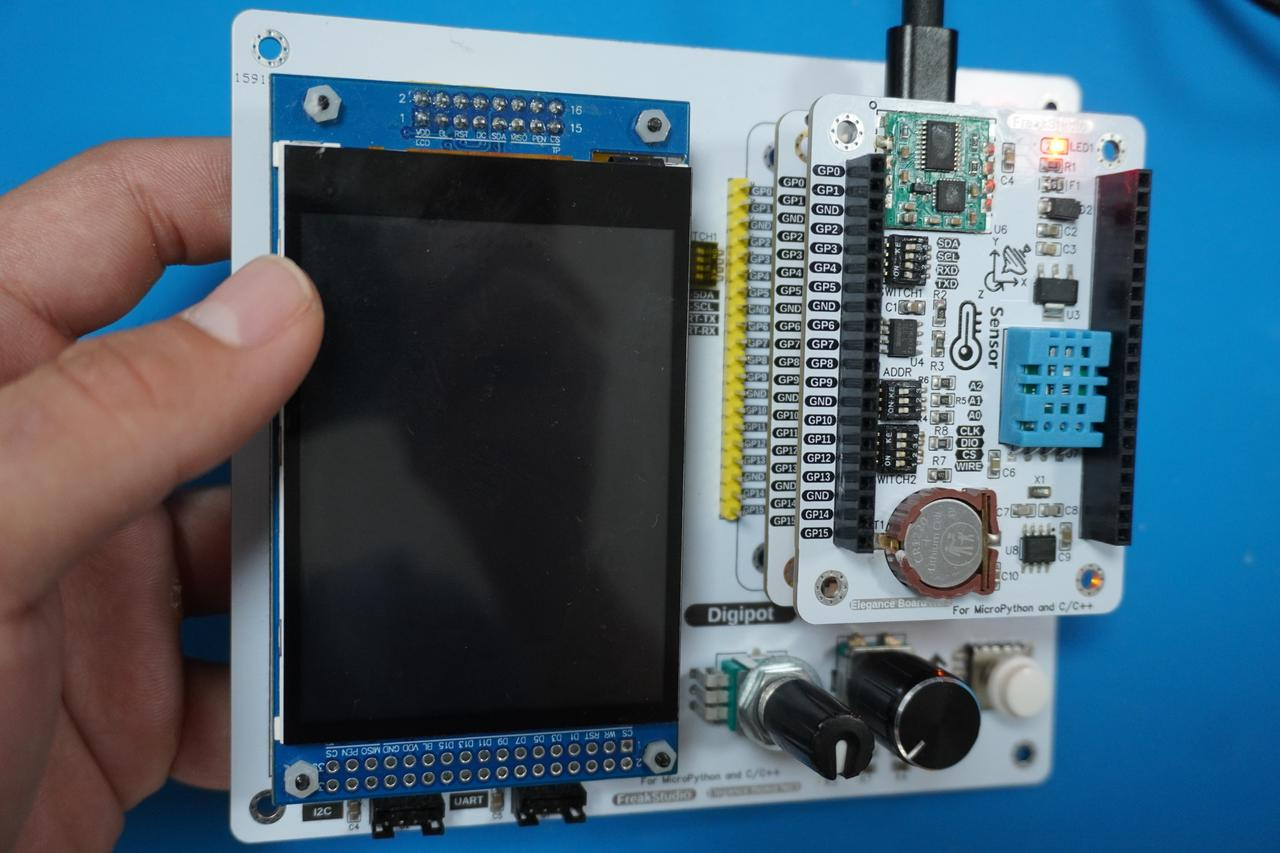
Here, we need to
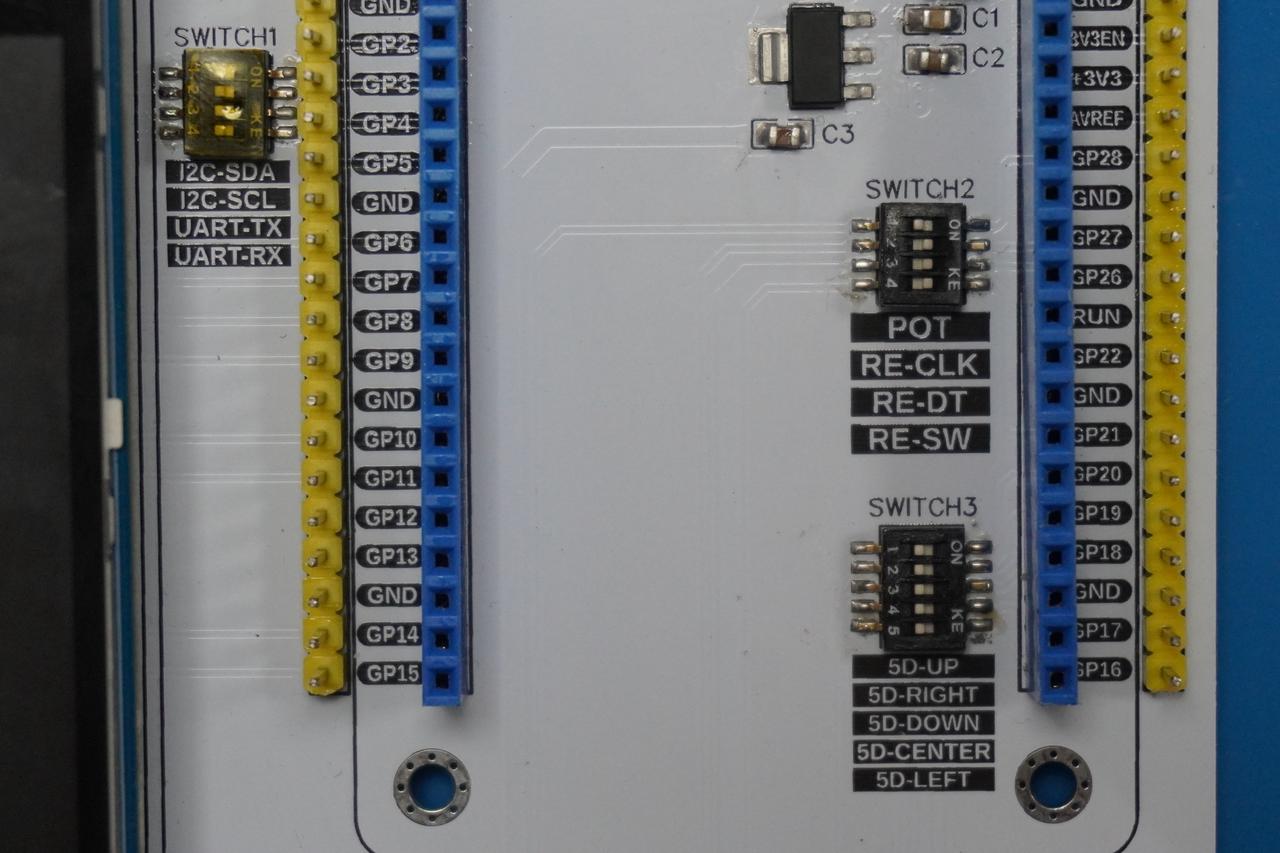
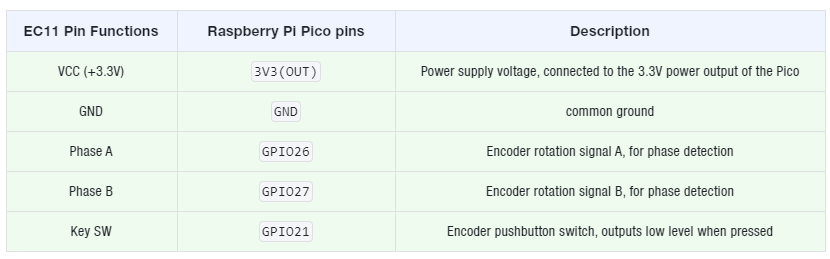
insert the Fengya No.1 board-universal compatible expansion board into the Fengya No.1 board-LCD screen human-machine interaction board , and turn on the SWITCH2 DIP switch on RE-CLK , RE-DT and RE-SW , the physical connection diagram is shown below:The wiring conditions of the components are as follows:
All the code for the experiments below is open-source and can be found in the material package we provide, in the folder
elegance-devkit v1\Demo\24 TIMER_RotaryEncoder.Previously, we mentioned in the GPIO experiment that the count value of the rotary encoder sometimes jumps by several units when it rotates once. This is mainly because the rotary encoder is a mechanical device: when the user rotates it, the contact point will repeatedly make and break contact in a short period of time, causing signal jitter and thus generating redundant count pulses.
In the following code, we use a software timer to implement debouncing for the rotary encoder, and judge the encoder signals collected multiple times in a short period of time: only when the same encoder signal is detected for several consecutive times will it be regarded as valid. The code is shown as follows:
# Python env   : MicroPython v1.23.0
# -*- coding: utf-8 -*-
# @Time    : 2024/9/19 下午7:46
# @Author  : 李清水
# @File    : main.py
# @Description : Timer类实验,读取旋转编码器的值,使用定时器做软件消抖

# ======================================== 导入相关模块 =========================================

# 导入硬件相关模块
from machine import Pin, Timer
# 导入时间相关模块
import time

# ======================================== 全局变量 ============================================

# ======================================== 功能函数 ============================================

# ======================================== 自定义类 ============================================

# EC11旋转编码器类
class EC11Encoder:
    """
    EC11Encoder 类,用于处理 EC11 旋转编码器的信号。

    该类通过 GPIO 引脚读取旋转编码器的 A 相、B 相信号以及按键信号,支持旋转方向的检测和按键状态的判断。
    通过消抖处理确保信号的稳定性,并提供旋转计数和按键状态的查询功能。

    Attributes:
        pin_a (Pin): A 相信号的 GPIO 引脚实例。
        pin_b (Pin): B 相信号的 GPIO 引脚实例。
        pin_btn (Pin): 按键信号的 GPIO 引脚实例。
        rotation_count (int): 旋转计数器,记录旋转的步数(正值表示顺时针,负值表示逆时针)。
        button_pressed (bool): 按键状态,True 表示按键被按下,False 表示按键未按下。
        debounce_timer_a (Timer): A 相信号的消抖定时器实例。
        debounce_timer_btn (Timer): 按键信号的消抖定时器实例。
        debouncing_a (bool): A 相信号的消抖状态标志。
        debouncing_btn (bool): 按键信号的消抖状态标志。
    """

    def __init__(self, pin_a: int, pin_b: int, pin_btn: int) -> None:
        """
        初始化 EC11 旋转编码器类。

        Args:
            pin_a (int): A 相信号的 GPIO 引脚编号。
            pin_b (int): B 相信号的 GPIO 引脚编号。
            pin_btn (int): 按键信号的 GPIO 引脚编号。
        """
        # 初始化A相和B相的GPIO引脚,设置为输入模式
        self.pin_a = Pin(pin_a, Pin.IN)
        self.pin_b = Pin(pin_b, Pin.IN)
        # 初始化按键引脚,设置为输入模式,并启用内部上拉电阻
        self.pin_btn = Pin(pin_btn, Pin.IN, Pin.PULL_UP)

        # 初始化计数器,用于记录旋转的步数
        self.rotation_count = 0
        # 按键状态,用于记录按键是否被按下
        self.button_pressed = False

        # 消抖相关:定时器
        # A相消抖定时器
        self.debounce_timer_a   = Timer(-1)
        # 按键消抖定时器
        self.debounce_timer_btn = Timer(-1)

        # 标记是否在进行消抖处理
        # A相消抖标志
        self.debouncing_a = False
        # 按键消抖标志
        self.debouncing_btn = False

        # 为A相引脚设置中断处理,只检测上升沿(避免重复计数)
        self.pin_a.irq(trigger=Pin.IRQ_RISING, handler=self._handle_rotation)
        # 为按键引脚设置中断处理,检测按键的按下(下降沿)和释放(上升沿)
        self.pin_btn.irq(trigger=Pin.IRQ_FALLING | Pin.IRQ_RISING, handler=self._handle_button)

    def _handle_rotation(self, pin: Pin) -> None:
        """
        中断回调函数,用于检测 A 相的上升沿并根据 B 相状态判断方向。

        Args:
            pin (Pin): 触发中断的 A 相信号引脚实例。

        Returns:
            None
        """
        # 如果正在消抖中,直接返回
        if self.debouncing_a:
            return

        # 启动消抖定时器,延迟1ms后执行判断
        self.debouncing_a = True
        self.debounce_timer_a.init(mode=Timer.ONE_SHOT, period=1, callback=self._check_debounce_a)

    def _check_debounce_a(self, t: Timer) -> None:
        """
        消抖定时器回调函数,检测 A 相是否稳定在高电平状态。

        Args:
            t (Timer): 触发回调的定时器实例。

        Returns:
            None
        """
        # 1ms后A相仍然为高电平,确认有效
        if self.pin_a.value() == 1:
            # 获取B相当前的状态(高或低电平)
            current_state_b = self.pin_b.value()

            # A相上升沿时,判断B相的状态决定旋转方向
            if current_state_b == 0:
                # 顺时针旋转,计数器加1
                self.rotation_count += 1
            else:
                # 逆时针旋转,计数器减1
                self.rotation_count -= 1

        # 重置消抖状态
        self.debouncing_a = False

    def _handle_button(self, pin: Pin) -> None:
        """
        中断回调函数,用于检测按键的按下和释放。

        Args:
            pin (Pin): 触发中断的按键引脚实例。

        Returns:
            None
        """
        # 如果正在消抖中,直接返回
        if self.debouncing_btn:
            return

        # 启动消抖定时器,延迟5ms后执行判断
        self.debouncing_btn = True
        self.debounce_timer_btn.init(mode=Timer.ONE_SHOT, period=5, callback=self._check_debounce_btn)

    def _check_debounce_btn(self, t: Timer) -> None:
        """
        按键消抖定时器回调函数,检测按键是否稳定。

        Args:
            t (Timer): 触发回调的定时器实例。

        Returns:
            None
        """
        if self.pin_btn.value() == 0:
            # 按键按下,更新状态
            self.button_pressed = True
        else:
            # 按键释放,更新状态
            self.button_pressed = False

        # 旋转编码器计数值清零
        self.reset_rotation_count()
        # 重置消抖状态
        self.debouncing_btn = False

    def get_rotation_count(self) -> int:
        """
        获取旋转的总次数(正值表示顺时针,负值表示逆时针)。

        Args:
            None

        Returns:
            int: 当前旋转的计数值。
        """
        return self.rotation_count

    def reset_rotation_count(self) -> None:
        """
        重置旋转计数器,将旋转步数清零。

        Args:
            None

        Returns:
            None
        """
        self.rotation_count = 0

    def is_button_pressed(self) -> bool:
        """
        返回按键是否被按下的状态。

        Args:
            None

        Returns:
            bool: True 表示按键被按下,False 表示按键未按下。
        """
        return self.button_pressed

# 终端进度条类
class ProgressBar:
    """
    终端进度条类,用于在终端显示一个可更新的进度条。

    该类通过在终端中绘制进度条的方式来显示当前任务的进度,支持动态更新显示进度条,并且允许用户
    自定义最大值和进度条的长度。进度条的显示形式使用绿色表示已完成部分,红色表示剩余部分。

    Attributes:
        max_value (int): 进度条的最大值,表示任务的总进度。当当前进度达到此值时,进度条显示 100%。
        bar_length (int): 进度条的总长度,用于控制进度条的宽度,默认为 50。

    Methods:
        update(current_value: int) -> None: 更新进度条的显示,传入当前进度值。
        reset() -> None: 重置进度条,将进度条重置为 0%,显示全红色的条形。
    """

    def __init__(self, max_value: int, bar_length: int = 50) -> None:
        """
        初始化进度条。

        Args:
            max_value (int): 进度条的最大值,达到此值时进度条显示100%。
            bar_length (int): 进度条的总长度,默认为 50。
        """
        self.max_value = max_value
        self.bar_length = bar_length

    def update(self, current_value: int) -> None:
        """
        更新进度条。

        根据当前值计算并更新进度条的显示,确保当前值不超过最大值。

        Args:
            current_value (int): 当前进度条的值。
        """
        if current_value > self.max_value:
            current_value = self.max_value
        if current_value < 0:
            current_value = 0

        progress = current_value / self.max_value
        block = int(self.bar_length * progress)

        # 绿色表示进度,红色表示剩余
        bar = '\033[92m' + '█' * block + '\033[91m' + '-' * (self.bar_length - block) + '\033[0m'
        print(f"\r[{bar}]", end='')

    def reset(self) -> None:
        """
        重置进度条。

        将进度条重置为 0%,即全为红色。
        """
        print(f"\r\033[91m[{'-' * self.bar_length}]\033[0m", end='')

# ======================================== 初始化配置 ==========================================

# 上电延时3s
time.sleep(3)
# 打印调试信息
print("FreakStudio : Using GPIO read Rotary Encoder value, use software debounce by timer")

# 创建EC11旋转编码器对象,使用GPIO26和GPIO27作为A相和B相,使用GPIO28作为按键
# 如果你想改变编码器计数值变大的旋转方向(例如原本是逆时针变大,想改成顺时针变大)
# 只需要在初始化编码器对象时,将参数 pin_a 和 pin_b 的值互换即可
encoder = EC11Encoder(pin_a=26, pin_b=27, pin_btn=28)
# 创建终端进度条对象,用于显示进度,旋转20次达到100%
progress_bar = ProgressBar(max_value=20)

# ========================================  主程序  ===========================================

# 主循环中获取旋转计数值和按键状态
while True:
    # 获取旋转计数值
    current_rotation = encoder.get_rotation_count()
    print(f"Rotation count: {current_rotation}")
    # 更新进度条
    progress_bar.update(current_rotation)
    # 按键被按下时,重置进度条
    if encoder.is_button_pressed():
        progress_bar.reset()
    # 每隔10ms秒更新一次
    time.sleep_ms(10)
The basic logic of timer-based debouncing is as follows:
Rotary Encoder Debouncing: When triggered by the rising edge of Phase A, the rotation count value will not be adjusted immediately. Instead, a 1ms one-shot timer is started, and after 1ms, it is checked again whether Phase A is still at high level; if it is at high level, this trigger is valid; otherwise, it is regarded as jitter and this trigger is ignored.
Key Debouncing: When the key state changes (pressed or released), a timer is started. After waiting for 5ms, the key state is checked to ensure that the key is stably at a low or high level, and then the key state is updated.
Meanwhile, we define
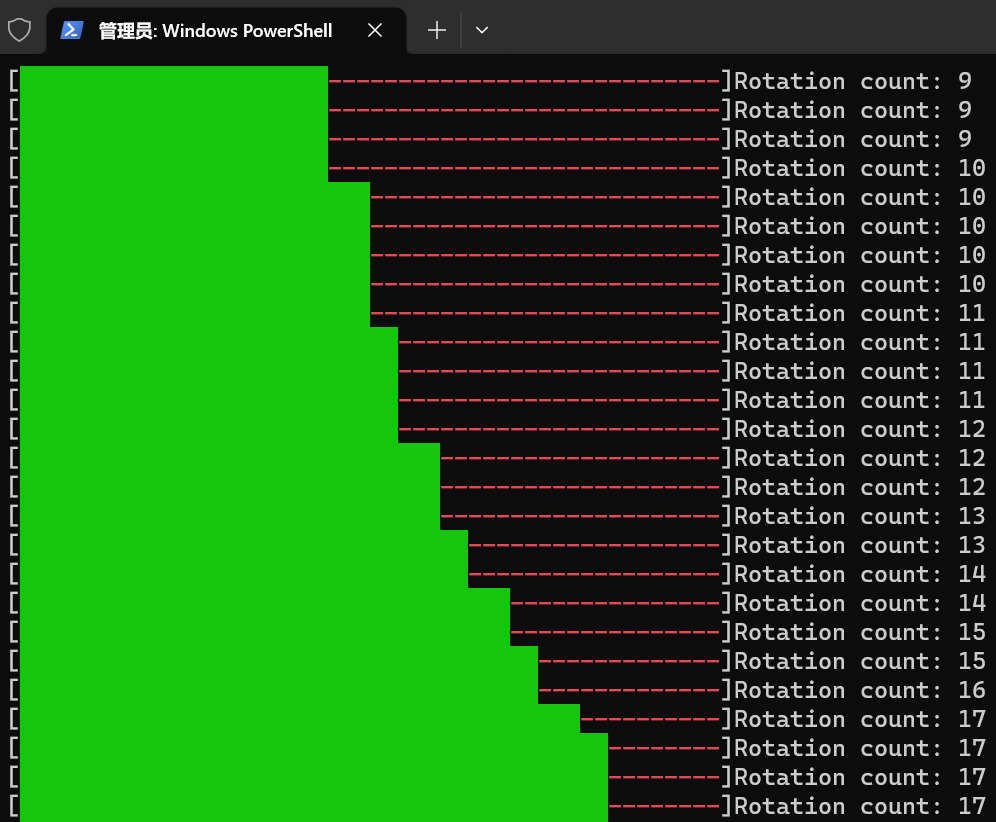
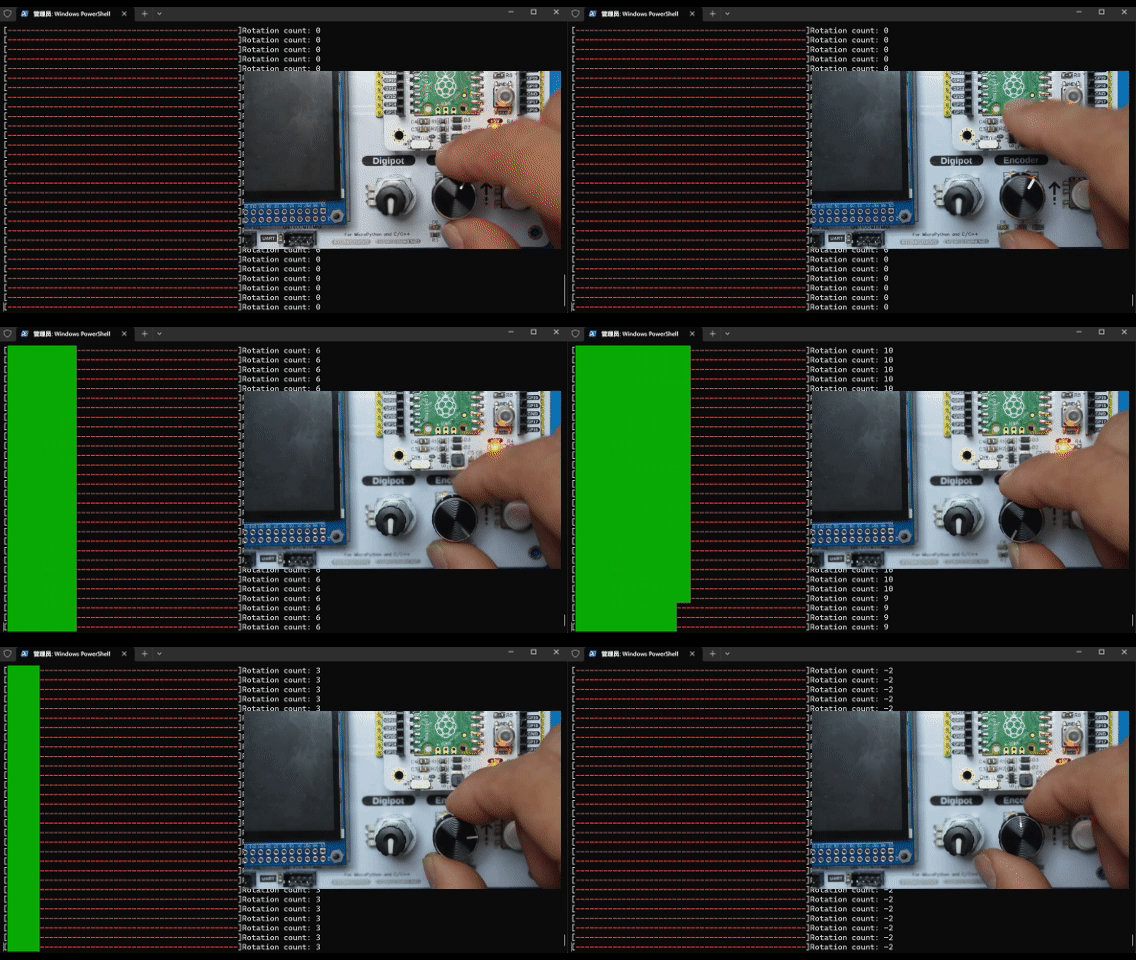
debounce_timer_btn and debouncing_btn debounce flags: after an interrupt is triggered, the interrupt callback function will no longer be executed during the callback period of the first interrupt trigger, so as to prevent repeated interrupt triggering during the debounce period.Burn the code, open the terminal, and the output is as follows:
As you can see, when we rotate the encoder this time, there is no longer the issue of inaccurate rotation counter caused by jitter as before.
Documents
Comments
Write