Wiznet makers

ruilixin6

Published August 05, 2026 ©

94 UCC

0 VAR

0 Contests

0 Followers

0 Following

Raspberry Pi Pico Task Scheduler: Timer‑Based MicroPython Multitasking

MicroPython task scheduler built upon software‑timer, featuring Task/Scheduler classes with task add/delete/pause/resume, idle‑time GC and exception handling.

COMPONENTS
PROJECT DESCRIPTION

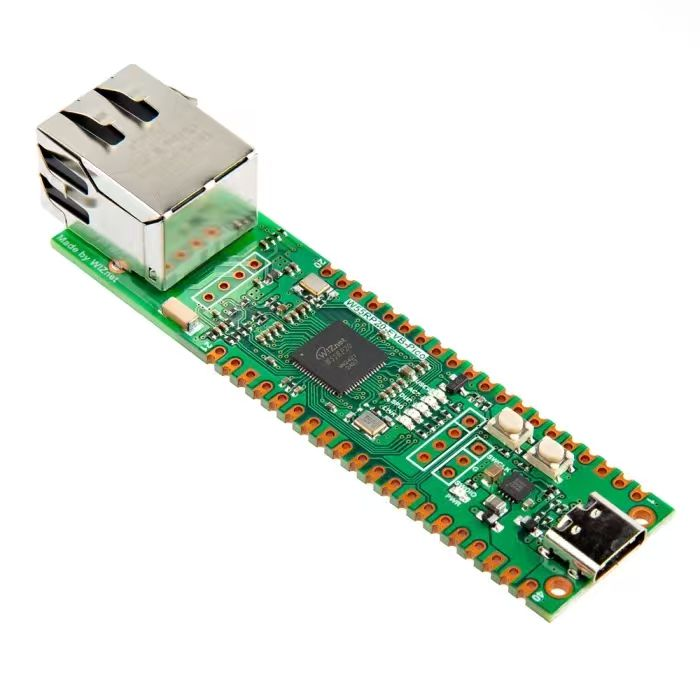
【Preliminary Note】The original hardware example in this article was written based on the RP2040. The actual hardware used in this hands-on demonstration features the W55RP20 as the main controller chip. The circuit logic and UF2 flashing operation principles are universally applicable, with only the main controller model differing. The original chip model mentioned in the circuit descriptions below is provided for reference purposes only.

1. Basic Concepts and Characteristics of Task Scheduling

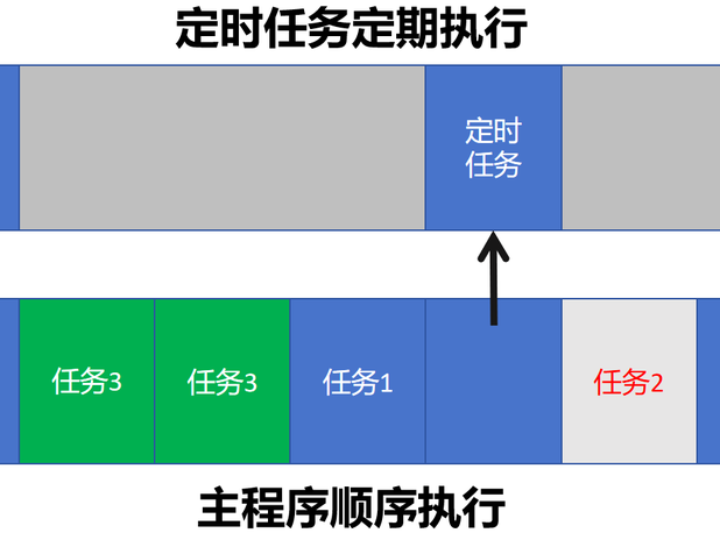
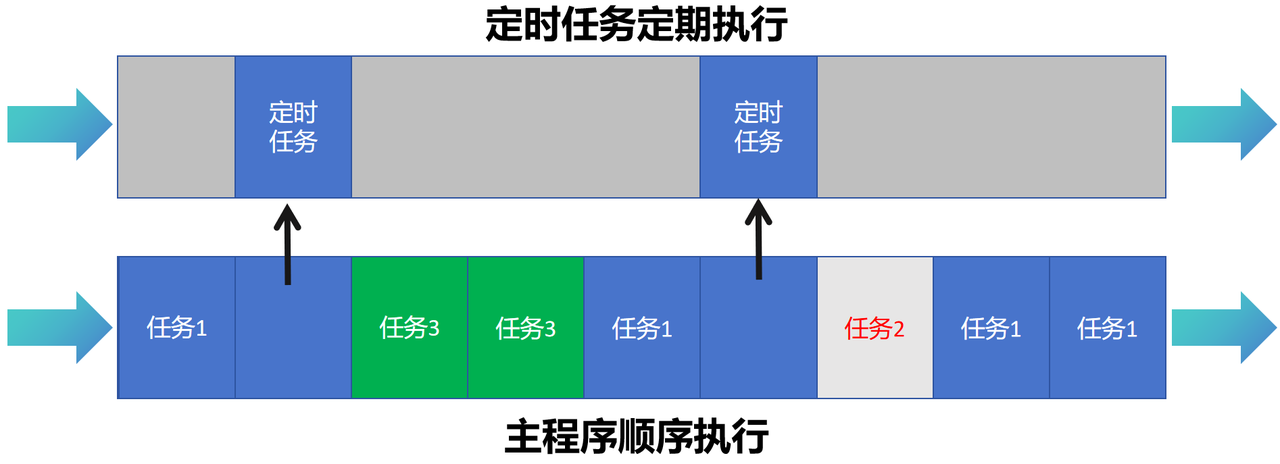
The biggest convenience of using timers is that they allow us to perform certain tasks at specific points in time or at regular intervals, which we can regard as an execution flow different from the while loop in the main program:
We can use the machine. Timer library to create timer objects, run timers in single-shot or periodic mode, execute callback functions and stop timers, which is extremely convenient.
Consider the following scenario:
Task 1 is executed once every 500ms on a scheduled basis, and will no longer run 3000ms after the program starts.
Task 2 is executed once every 1000ms on a scheduled basis, suspended 3000ms after the program starts running, and resumes execution 7000ms after the program starts running
Execute Task 3 periodically every 1000ms starting from 3000ms after the program starts running.
Perform garbage collection when there are currently no tasks to execute
If multiple timer objects are used, a large number of additional global variables and judgment conditions will be introduced, which will make the program complex and difficult to expand, for example:
After Task 1 finishes running, we need to decide whether to start Task 3 based on the data and execution status obtained from Task 1
Task 2 needs to have its scheduled run time modified at 7500 ms after the program starts running, and needs to be paused again at 10000 ms after the program starts running.
In this case, we can use a single timer to implement a task scheduler, which is a common programming pattern in embedded systems or real-time operating systems for managing and executing scheduled tasks.
Its main functions include:
Task Management:
Define the data structure of the task, including task callback function, execution cycle, parameters, etc.
Provides methods for adding, deleting, pausing and resuming tasks
Maintain the task list and track the status and execution progress of tasks
Task Scheduling:
Determine which tasks need to be executed according to the execution cycle of the tasks and the current time
Execute the callback function of the task and handle any possible exceptions that may arise
Simply put, a task scheduler uses timers (such as hardware timers or software timers on microcontrollers) to periodically check the task list, determine which tasks need to be executed and which need to be suspended, and then perform corresponding operations.

2. Implementation of Custom Task Scheduling Class

Here, the routines reference code from the MicroPython Chinese Community, with some comments and minor modifications added on that basis:
https://github.com/micropython-Chinese-Community/micropython-simple-scheduler/blob/main/tmScheduler/scheduler.py
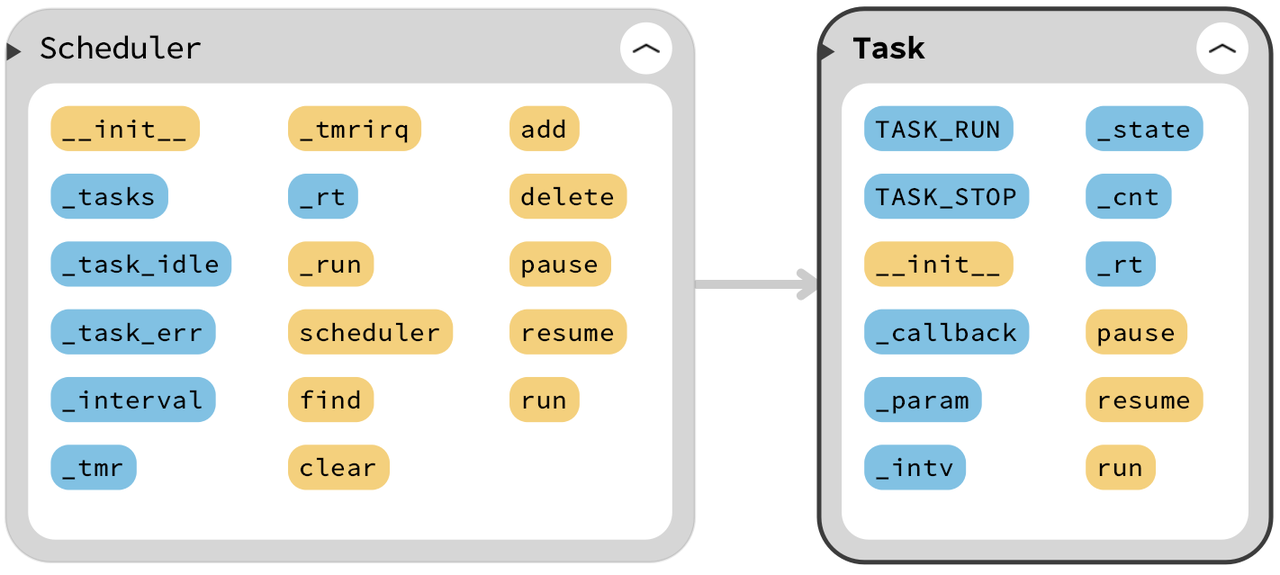
Here, in the Scheduler. py file, we first define a Task class, and the code is as follows:
# ======================================== 导入相关模块 ========================================

# 导入const常量标识符
from micropython import const
# 导入硬件相关模块
from machine import Timer

# ======================================== 全局变量 ============================================

# ======================================== 功能函数 ============================================

# ======================================== 自定义类 ============================================

# 定义Task任务类
class Task():
    """
    Task类,用于表示一个定时执行的任务,包含任务的回调函数、参数、执行间隔和任务状态。

    该类允许任务根据设定的时间间隔重复执行,并支持暂停和恢复任务。可以用于实现定时任务调度等功能。

    Attributes:
        TASK_RUN (int): 任务运行状态标识符,值为0,表示任务正在运行。
        TASK_STOP (int): 任务停止状态标识符,值为1,表示任务已停止。
        _callback (callable): 执行任务的回调函数,任务执行时调用。
        _param (tuple): 任务回调函数的参数。
        _intv (int): 任务执行的时间间隔,单位为毫秒,默认值为1000ms。
        _state (int): 任务状态,默认为 TASK_RUN,表示任务正在运行。
        _cnt (int): 任务计数器,表示任务已执行的次数,默认值为10。
        _rt (int): 任务执行的返回值或其他辅助信息,默认值为0。

    Methods:
        __init__(self, callback, *param, interval=1000, state=TASK_RUN) -> None:
            初始化Task类实例,设置回调函数、参数、间隔时间和任务状态。

        pause(self) -> None:
            暂停任务,将任务状态设置为TASK_STOP。

        resume(self) -> None:
            恢复任务,将任务状态设置为TASK_RUN。

        run(self) -> None:
            执行任务回调函数,并传入相关参数。
    """

    # 任务状态标识符
    TASK_RUN  = const(0)
    TASK_STOP = const(1)

    def __init__(self, callback: callable, *param: object, interval: int = 1000, state: int = TASK_RUN) -> None:
        """
        初始化Task类实例,设置回调函数、参数、执行间隔时间和任务状态。

        Args:
            callback (callable): 任务执行时调用的回调函数。
            *param (object): 传递给回调函数的参数。
            interval (int, optional): 任务执行的时间间隔,单位为毫秒。默认为1000ms。
            state (int, optional): 任务的初始状态,默认为TASK_RUN,表示任务正在运行。

        Returns:
            None
        """
        self._callback = callback
        self._param = param
        self._intv = interval
        self._state = state
        self._cnt = 10
        self._rt = 0

    def pause(self) -> None:
        """
        暂停任务,将任务状态设置为TASK_STOP。

        Args:
            None

        Returns:
            None
        """
        self._state = Task.TASK_STOP

    def resume(self) -> None:
        """
        恢复任务,将任务状态设置为TASK_RUN。

        Args:
            None

        Returns:
            None
        """
        self._state = Task.TASK_RUN

    def run(self) -> None:
        """
        执行任务回调函数,并传入相关参数。

        Args:
            None

        Returns:
            None
        """
        self._callback(*self._param)
Task class represents a scheduled task, which includes attributes such as task callback function, parameters, execution interval and task status. It also provides methods for pausing the task, resuming the task and executing the callback function. The task status is represented by two constants: TASK_RUN and TASK_STOP.
Here, the core implementation principle of the pause method and resume method is to modify the status of the task instance. When the scheduler iterates through the status of each task instance in the task list, it will not execute the task if the task status is Task. TASK_STOP; otherwise, it will execute the task.
Then, we defined the task scheduling Scheduler class, and the Scheduler class is responsible for managing and executing all registered tasks.
# 定义Scheduler调度类
class Scheduler():
    """
    Scheduler 类,用于管理和调度任务的执行。

    该类通过定时器实现任务的周期性调度,支持任务的添加、删除、暂停、恢复和执行。
    任务可以是任意可调用对象,调度器会根据设定的时间间隔定期检查并执行任务。
    此外,调度器还支持任务空闲和任务错误的回调函数,用于处理任务执行过程中的特殊情况。

    Attributes:
        tm (machine.Timer): 定时器实例,用于触发任务的调度。
        interval (int): 定时器的时间间隔,单位为毫秒。
        task_idle (callable): 任务空闲时调用的回调函数。
        task_err (callable): 任务执行出错时调用的回调函数。
        tasks (list): 任务列表,存储所有已注册的任务实例。

    Methods:
        __init__(self, tm: Timer, interval: int = 100, task_idle: callable = None, task_err: callable = None):
            初始化调度器实例,设置定时器、时间间隔和回调函数。

        _tmrirq(self, t: Timer) -> None:
            定时器中断回调函数,用于触发任务的调度。

        _run(self, task: Task) -> None:
            执行单个任务的回调函数。

        scheduler(self) -> None:
            调度器的主循环,负责循环执行所有已注册的任务。

        find(self, task: Task) -> int:
            查找指定任务在任务列表中的索引。

        clear(self) -> None:
            清空任务列表。

        add(self, task: Task, state: int = Task.TASK_RUN) -> None:
            添加任务到任务列表中。

        delete(self, task: Task) -> None:
            从任务列表中删除指定任务。

        pause(self, task: Task) -> None:
            暂停指定任务的执行。

        resume(self, task: Task) -> None:
            恢复指定任务的执行。

        run(self, task: Task) -> None:
            执行指定任务的回调函数。
    """

    def __init__(self, tm: Timer, interval: int = 100, task_idle: callable = None,
                 task_err: callable = None) -> None:
        """
        初始化调度类实例,设置定时器、定时器间隔、任务空闲回调函数和任务错误回调函数。

        Args:
            tm (machine.Timer): 定时器实例,用于调度任务。
            interval (int, optional): 定时器间隔,单位为毫秒。默认为100ms。
            task_idle (callable, optional): 任务空闲时调用的回调函数,默认为None。
            task_err (callable, optional): 任务出现错误时调用的回调函数,默认为None。

        Returns:
            None
        """
        self._tasks     = []
        self._task_idle = task_idle
        self._task_err  = task_err
        self._interval  = interval
        self._tmr       = tm
        self._tmr.init(period=interval, callback=self._tmrirq)
A timer instance (machine. Timer), timer interval, optional task idle callback function and task error callback function need to be passed in during initialization;_tmrirq () method is the timer interrupt callback function, which is used to iterate through the task list and determine whether a task is running; if the task is still in the running state, the task's execution interval will be updated:
def _tmrirq(self, t: Timer) -> None:
    """
    定时器回调中断函数,用于处理定时器中断。

    Args:
        t (machine.Timer): 定时器实例,触发中断。

    Returns:
        None
    """
    # 遍历任务列表
    for i in range(len(self._tasks)):
        # 判断任务状态
        if self._tasks[i]._state == Task.TASK_RUN:
            # 任务_tasks[i]的执行时间间隔+1
            self._tasks[i]._rt += 1
_run () method is used to execute the callback function of a single task and handle any exceptions that may occur during task execution.
def _run(self, task: Task) -> None:
    """
    执行单个任务回调函数。

    Args:
        task (Task): 任务实例,包含需要执行的回调函数。

    Returns:
        None
    """
    # 判断任务状态是否为TASK_RUN
    if task._state == Task.TASK_RUN:
        try:
            # 判断任务执行时间间隔是否大于等于任务需要执行的时间间隔
            if task._rt >= task._cnt:
                # 若是,则执行任务回调函数
                task._rt = 0
                task.run()
        except Exception as e:
            # 若是发生异常,则执行任务错误回调函数
            if self._task_err:
                self._task_err(e)
The key method of the Scheduler class is scheduler (), which is an infinite loop responsible for continuously checking the status of tasks in the task list and performing corresponding operations according to the task status. Specifically, it will:
Iterate through the task list and for each task:
If the task status is Task. TASK_RUN, increase the task execution time interval;
If the execution time interval of the task reaches or exceeds the time interval required for the task to be executed, the callback function of the task will be executed, and the execution time interval will be reset to 0;
If all tasks are in the suspended state and there is an idle processing function, call this function;
If any exception occurs, print the exception information and continue the execution.
def scheduler(self) -> None:
    """
    调度器的主循环,负责循环执行所有已注册的任务。

    Args:
        None

    Returns:
        None
    """

    # 轮询检测任务状态,判断是否执行任务
    while True:
        try:
            # 执行到达执行时间间隔的任务
            for i in range(len(self._tasks)):
                task = self._tasks[i]
                self._run(task)
            # 若空闲,则执行任务空闲回调函数
            if self._task_idle:
                self._task_idle()
        except KeyboardInterrupt:
            return
        # 发生异常时,抛出异常位置和类型
        except Exception as e:
            print('except {}'.format(e))
In addition, the Scheduler class also provides other methods, such as find () for finding the task index, clear () for clearing the task list, add () for adding new tasks, delete () for deleting tasks, pause () and resume () for pausing and resuming tasks, as well as run () for executing tasks immediately.
def find(self, task: Task) -> int:
    """
    查找指定任务在任务列表中的索引。

    Args:
        task (Task): 待查找的任务实例。

    Returns:
        int: 任务在任务列表中的索引。
    """
    try:
        return self._tasks.index(task)
    except:
        return None

def clear(self) -> None:
    """
    清空任务列表。

    Args:
        None

    Returns:
        None
    """
    self._tasks.clear()

def add(self, task: Task, state: int = Task.TASK_RUN) -> None:
    """
    添加任务到任务列表中。

    Args:
        task (Task): 任务实例,需要添加的任务。
        state (int, optional): 任务状态,默认为Task.TASK_RUN,表示任务正在运行。

    Returns:
        None
    """
    if self.find(task) == None:
        self._tasks.append(task)
        # task._cnt为任务需要执行的时间间隔
        # 任务需要执行的时间间隔 = 任务间隔 // 定时器间隔
        task._cnt = task._intv // self._interval
        print('add task:', task._callback.__name__)
    if state == Task.TASK_STOP:
        self.pause(task)

def delete(self, task: Task) -> None:
    """
    删除任务。

    Args:
        task (Task): 任务实例,待删除的任务。

    Returns:
        None
    """
    try:
        # 删除指定任务
        self._tasks.remove(task)
    except:
        print('del task <', task, '> error')

def pause(self, task: Task) -> None:
    """
    暂停任务。

    Args:
        task (Task): 任务实例,待暂停的任务。

    Returns:
        None
    """
    if self.find(task) != None:
        self._tasks[self.find(task)].pause()

def resume(self, task: Task) -> None:
    """
    恢复任务。

    Args:
        task (Task): 任务实例,待恢复的任务。

    Returns:
        None
    """
    if self.find(task) != None:
        self._tasks[self.find(task)].resume()

def run(self, task: Task) -> None:
    """
    执行任务回调函数。

    Args:
        task (Task): 任务实例,包含要执行的回调函数。

    Returns:
        None
    """
    if self.find(task) != None:
        task._rt = task._cnt
        self._run(task)

3. Task Scheduling Application Experiment

All the code for the following experiments is open-source and can be found in the material package we provide, in the elegance-devkit v1\Demo\23 TIMER_Scheduler folder.
Next, we will main. py to complete our sample program. First, import the relevant modules:
# Python env   : MicroPython v1.23.0
# -*- coding: utf-8 -*-        
# @Time    : 2024/7/11 上午9:43   
# @Author  : 李清水            
# @File    : main.py       
# @Description : 定时器类实验,使用定时器完成任务调度
# 代码参考:https://github.com/micropython-Chinese-Community/micropython-simple-scheduler/tree/main

# ======================================== 导入相关模块 ========================================

# 导入硬件相关的模块
from machine import Timer
# 导入任务调度器
from Scheduler import Scheduler, Task
# 导入时间模块
import time
# 垃圾回收的模块
import gc
# 导入系统相关的模块
import sys
Then define some code that initializes the global variable time_start to record the task start time, and RunCnt to record the execution count of the callback function:
# ======================================== 全局变量 ============================================

# 任务开始时间
time_start = time.ticks_us()
# 方法执行次数
RunCnt = 0
Next, define a timing decorator function to measure the running time of the program:
# 计时装饰器,用于计算函数运行时间
def timed_function(f: callable, *args: tuple, **kwargs: dict) -> callable:
    """
    计时装饰器,用于计算并打印函数/方法运行时间。

    Args:
        f (callable): 需要传入的函数/方法
        args (tuple): 函数/方法 f 传入的任意数量的位置参数
        kwargs (dict): 函数/方法 f 传入的任意数量的关键字参数

    Returns:
        callable: 返回计时后的函数
    """
    myname = str(f).split(' ')[1]

    def new_func(*args: tuple, **kwargs: dict) -> any:
        t: int = time.ticks_us()
        result = f(*args, **kwargs)
        delta: int = time.ticks_diff(time.ticks_us(), t)
        print('Function {} Time = {:6.3f}ms'.format(myname, delta / 1000))
        return result

    return new_func
Then we define task_callback task callback function, which is used to perform specific operations when each task is executed, and this function accepts one parameter task_id that represents the ID of the current task. The main execution logic of this function is as follows:
Calculate the time difference from the task start time to the current time, and convert it into milliseconds
Output the number of task runs, task running time and task ID
Increment the task run count by 1
Perform different operations according to the number of task runs:
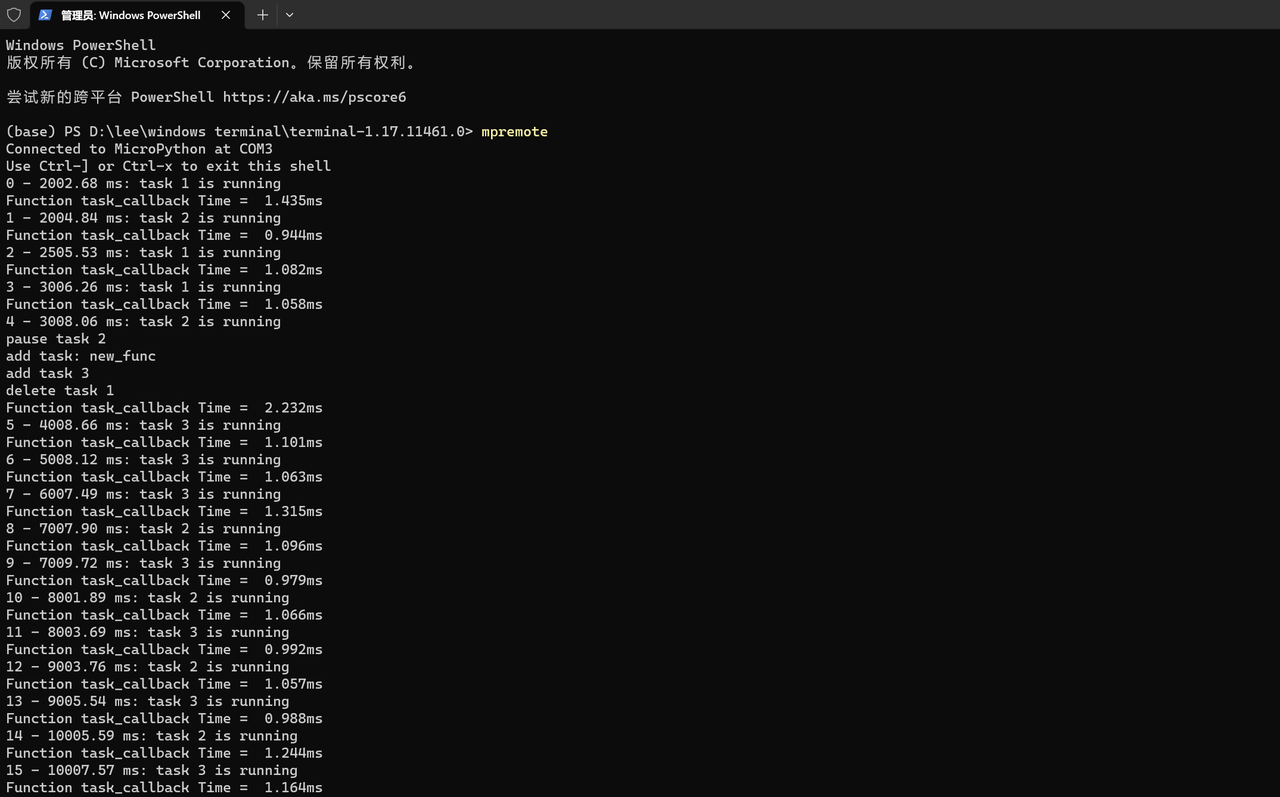
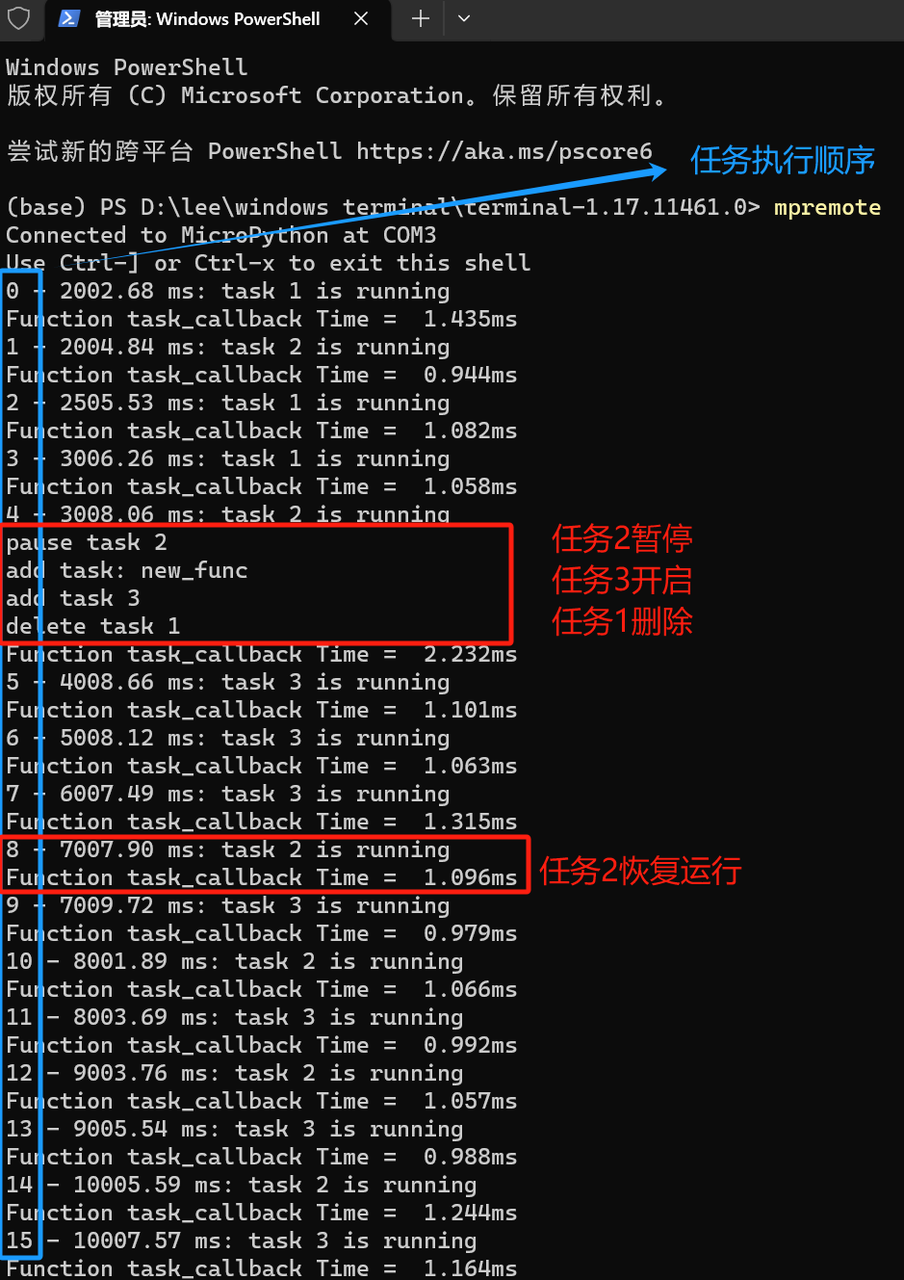
If the task has run 5 times, pause Task 2, create a new Task 3 (executed once every 1000 milliseconds), add it to the scheduler, and delete Task 1
If the task has run 8 times, resume Task 2
# 使用@timed_function装饰器,计算任务运行时间
@timed_function
def task_callback(task_id: int) -> None:
    """
    任务回调函数,用于打印任务信息并管理任务的状态。

    Args:
        task_id (int): 任务ID,用于标识当前任务。

    Returns:
        None
    """
    global time_start, RunCnt, sc, task1, task2
    # 计算从起始时间到现在的时间差
    time_now = (time.ticks_us() - time_start) / 1000

    # 输出任务运行次数、任务运行时间和任务ID
    print('{} - {:.2f} ms: task {} is running'.format(RunCnt, time_now, task_id))

    # 任务运行次数加1
    RunCnt = RunCnt + 1

    # 判断任务运行次数
    if RunCnt == 5 :
        # 任务2暂停
        sc.pause(task2)
        print('pause task 2')
        # 创建任务3,1000ms执行一次
        task3 = Task(task_callback, 3, interval=1000, state=Task.TASK_RUN)
        # 添加任务3
        sc.add(task3)
        print('add task 3')
        # 删除任务1
        sc.delete(task1)
        print('delete task 1')

    # 判断任务运行次数
    if RunCnt == 8:
        # 任务2恢复
        sc.resume(task2)
Then two callback functions are defined: task_idle_callback () and task_err_callback ():
Idle Task Callback Function: The task_idle_callback function is invoked when there are no tasks to be executed in the scheduler. Inside this function, it first checks whether the number of bytes of currently available heap RAM is less than 230000. If so, it indicates that the memory may be insufficient, so the garbage collection function (gc. collect ()) is manually triggered to release memory that is no longer in use. The function of this function is to help the system perform self-optimization when memory is tight.
Exception callback function: The task_err_callback function is invoked when an exception occurs during task execution. Within this function, sys. print_exception (e) is used to print the detailed information of the exception. After that, the function enters an infinite loop, continuously printing "task run error" so that issues can be detected and handled in a timely manner when exceptions arise. The function serves to provide error handling and debugging information when a task execution error occurs.
# 空闲任务回调函数
def task_idle_callback() -> None:
    """
    空闲任务回调函数,用于在内存不足时手动触发垃圾回收功能。

    Args:
        None

    Returns:
        None
    """
    # 当可用堆 RAM 的字节数小于 230000 时,手动触发垃圾回收功能
    if gc.mem_free() < 230000:
        # 手动触发垃圾回收功能
        gc.collect()

# 异常回调函数
def task_err_callback(e: Exception) -> None:
    """
    异常回调函数,用于打印异常信息并处理任务错误。

    Args:
        e (Exception): 捕获到的异常对象。

    Returns:
        None
    """
    while True:
        sys.print_exception(e)
        print('task run error')
Next, we create a task and a scheduler, add the task to the scheduler, and then start task scheduling:
# ======================================== 初始化配置 ==========================================

# 上电延时3s
time.sleep(3)
# 打印调试信息
print("FreakStudio : Using Timer to implement a simple task scheduler")

# 创建任务1,500ms执行一次
task1 = Task(task_callback, 1, interval=500, state=Task.TASK_RUN)
# 创建任务2,1000ms执行一次
task2 = Task(task_callback, 2, interval=1000, state=Task.TASK_RUN)

# 创建任务调度器,定时周期为100ms
sc = Scheduler(Timer(-1), interval=100, task_idle=task_idle_callback, task_err=task_err_callback)

# 添加任务
sc.add(task1)
sc.add(task2)

# ========================================  主程序  ============================================

# 延时2s,等待烧录完成程序后打开终端
time.sleep(2)
# 开启调度
sc.scheduler()
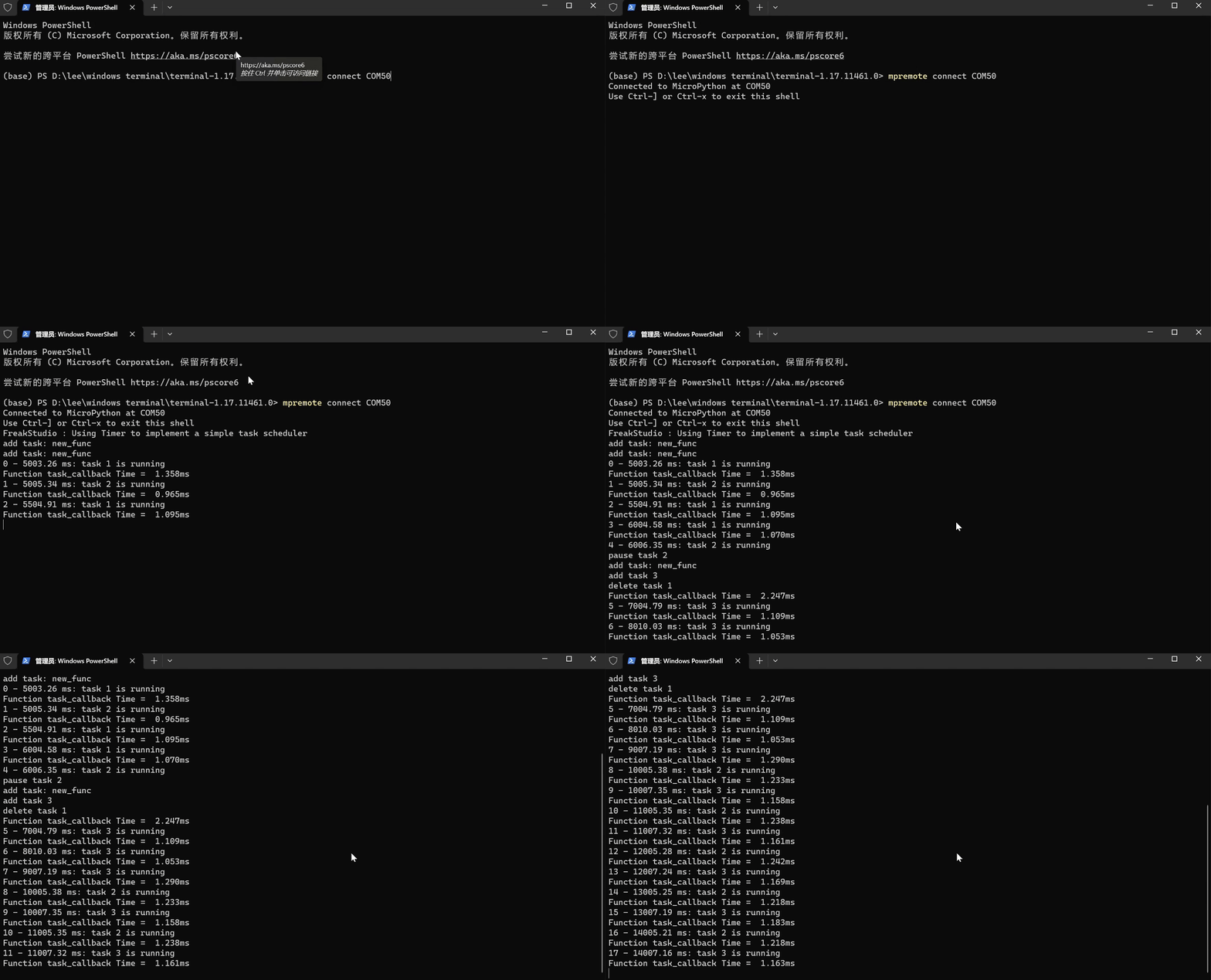
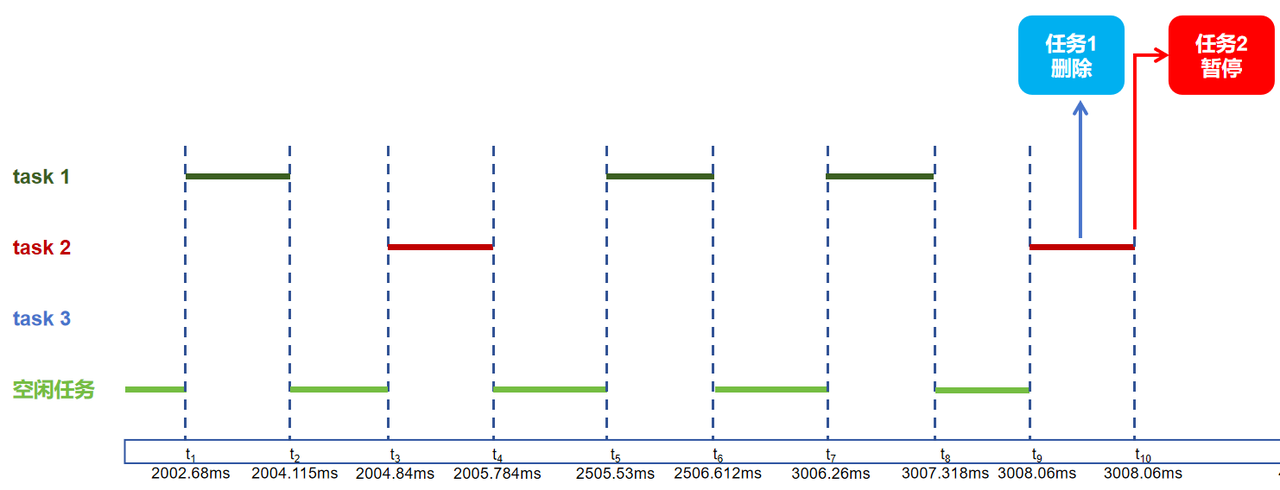
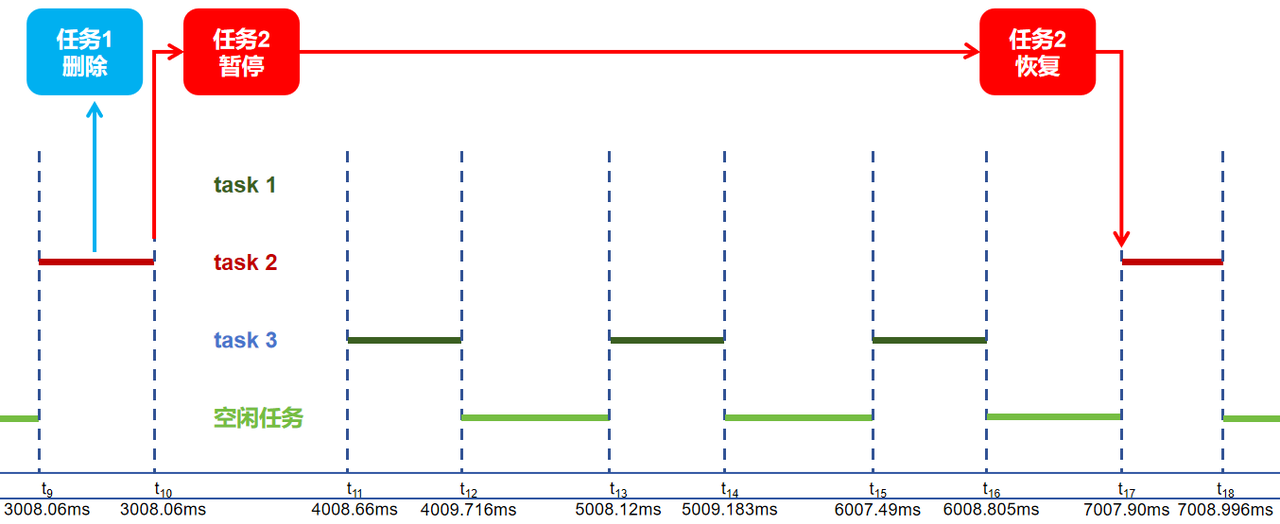
Burn the code, and then open the terminal, where you can see the tasks running in the set sequence:
 
The execution Sequence Diagrams for Task 1, Task 2, Task 3 and the idle task are as follows:
Documents
Comments Write