



Raspberry Pi Pico ADC: API, Temperature Sampling & ISR Tips
Pico ADC software full analysis
- Software Control Methods
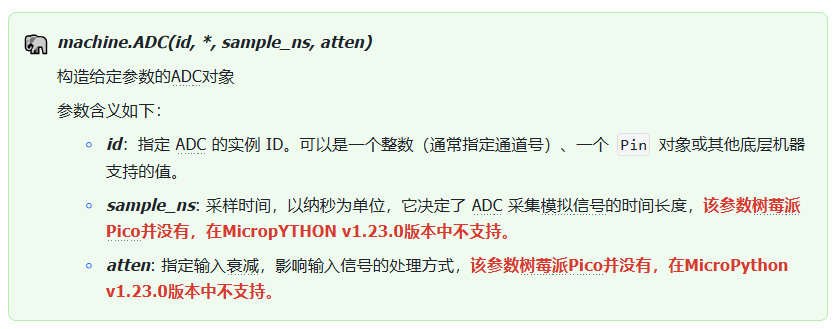
1.1 Constructor of machine.ADC class
The constructor for the machine.ADC class is shown below:
1.2 Other methods of machine.ADC class
The machine.ADC class provides additional methods:
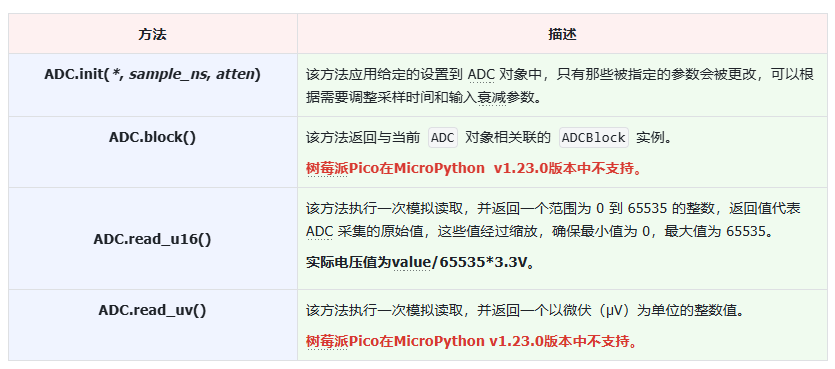
Important notes:
When using the ADC peripheral on Raspberry Pi Pico, only integer ID numbers (ADC channel numbers) may be passed into the constructor.
The Raspberry Pi Pico ADC class has a CORE_TEMP attribute used to specify the special ADC channel for accessing the built‑in temperature sensor:

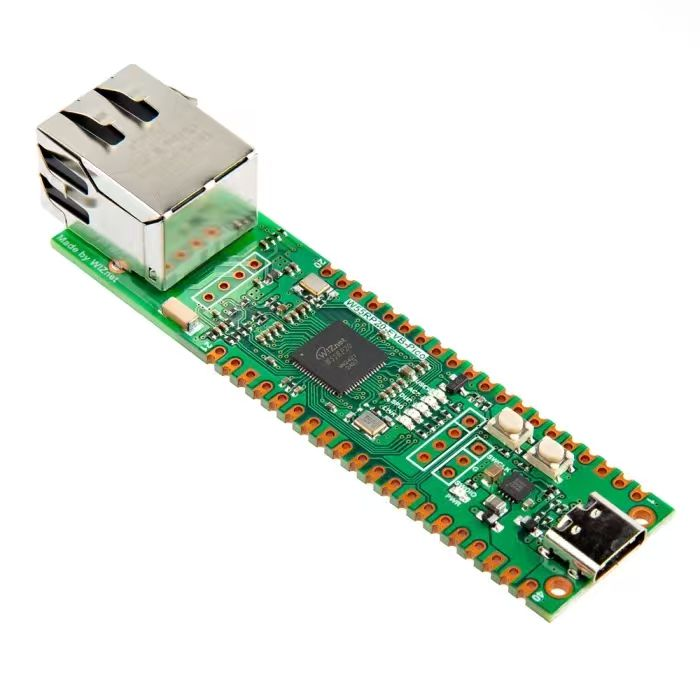
Raspberry Pi Pico exposes three ADC‑capable analog‑input pins:
GP26 (ADC0): physical pin 31
GP27 (ADC1): physical pin 32
GP28 (ADC2): physical pin 34
These Pico ADC pins read analog voltages ranging from 0 to 3.3 V and convert them into 16‑bit digital values between 0 and 65535. They can read signals from analog sensors such as potentiometers and photoresistors.
- Application Example: Periodically Read Built‑in Temperature‑Sensor Data
2.1 Periodic internal‑temperature‑sensor sampling example
The sample code below uses MicroPython timers to periodically acquire readings from the on‑chip temperature sensor and prints results within the main program loop.
Source code is located inside the resource package under elegance‑devkit v1\Demo\57 ADC_Temp.
Sample program:
# Python env   : MicroPython v1.23.0
# -*- coding: utf-8 -*-
# @Time    : 2024/8/26 10:31 AM
# @Author  : Li Qingshui
# @File    : main.py
# @Description : ADC class experiment, periodically sample internal temperature‑sensor data
# ======================================== Import related modules ========================================
# Import hardware‑related modules
from machine import ADC, Timer
# Import time‑related modules
import time
# Import deque container
from collections import deque
# Import module for accessing MicroPython internal structures
import micropython
# ======================================== Global variables ============================================
# Voltage conversion coefficient
conversion_factor = 3.3 / (65535)
# Create empty deque object for storing temperature readings
temperature_list = []
# 10 is maximum deque length, 1 enables overflow checking
temperature_deque = deque(temperature_list, 10, 1)
# Record program start timestamp
start_time = time.ticks_ms()
# ======================================== Function definitions ============================================
# Timer callback function
def timer_callback(timer: Timer) -> None:
    """
    Callback function triggered by timer for periodic temperature acquisition.
    Args:
        timer (machine.Timer): Timer object instance.
    Returns:
        None
    """
    # Use micropython.schedule to avoid dynamic‑memory‑allocation issues inside ISR
    micropython.schedule(collect_temperature, 0)

# Actual temperature‑data collection function
def collect_temperature(t: int) -> None:
    """
    Performs real temperature‑sensor reading and computation.
    Args:
        t (int): Dummy argument satisfying micropython.schedule function signature.
    Returns:
        None
    """
    global sensor_temp, temperature_deque, conversion_factor, start_time
    current_time = time.ticks_ms()
    time_interval = time.ticks_diff(current_time, start_time)
    print("Time interval: {}ms".format(time_interval))
    reading = sensor_temp.read_u16() * conversion_factor
    # Compute temperature in degrees Celsius
    temperature = 27 - (reading - 0.706) / 0.001721
    temperature_deque.append(temperature)
# ======================================== Custom classes ============================================
# ======================================== Initialization ==========================================
# Power‑on stabilization delay
time.sleep(3)
print("FreakStudio : Get internal temperature data regularly")
# Initialize on‑chip temperature‑sensor ADC channel
sensor_temp = ADC(4)
# Initialize periodic timer, sample every 3 seconds
timer = Timer(-1)
timer.init(period=3000, mode=Timer.PERIODIC, callback= timer_callback)
# ======================================== Main program ===========================================
# Main loop
while True:
    if len(temperature_deque) > 0:
        # Pop newest reading from FIFO deque
        temperature = temperature_deque.popleft()
        print("Temperature: {:.2f}°C".format(temperature))
    # Check queue once per second
    time.sleep(1)
Program workflow:
Periodic temperature sampling The timer object is configured as a periodic timer invoking timer_callback every three seconds. Inside timer_callback, micropython.schedule schedules execution of collect_temperature. Actual sensor acquisition and computation run inside collect_temperature, and converted temperature values get appended into temperature_deque.
Main‑loop temperature printing The main program inspects the deque once every second. When data is available, readings are popped from the queue and printed.
Important points to note:
Use micropython.schedule for data‑processing work MicroPython timer‑callback context expects very short execution time. Complex or long‑running operations inside callbacks may destabilize the system. micropython.schedule defers heavy work into main‑program context. Additionally, interrupt service routines forbid dynamic memory allocation (cannot create Python objects such as lists / queues, cannot perform append operations, cannot run floating‑point arithmetic). micropython.schedule permits safe memory allocation in main‑thread without hurting interrupt latency and stability.
Use collections.deque for storing and retrieving data deque implements a FIFO (First‑In‑First‑Out) container well‑suited for time‑series temperature data. New readings append to the tail; oldest readings pop from the head, preserving chronological order.
Creating collections.deque under MicroPython Syntax differs from desktop CPython due to resource‑constrained embedded‑system design goals.
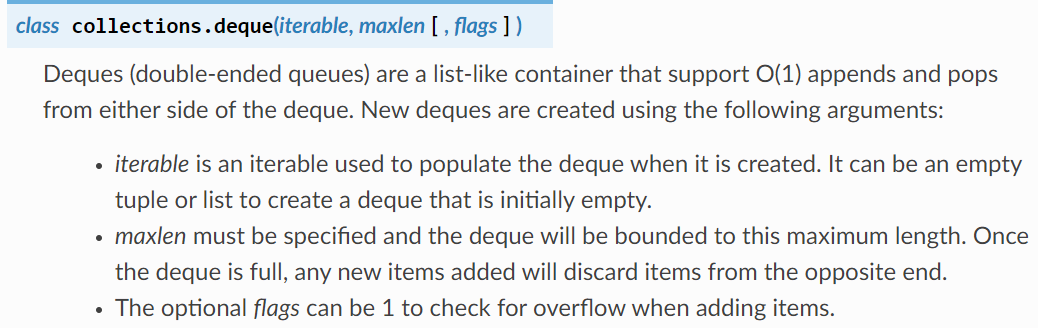
‑ Must supply an iterable initializer (commonly a list). ‑ Must explicitly set maxlen for maximum queue capacity. ‑ Optional flags parameter controls overflow‑check behaviour:
flags=1: overflow checking enabled;IndexErrorraised when appending to full deque.flags=0: overflow checking disabled.
After flashing firmware and opening remote terminal, output appears as shown:
Periodic temperature readings are acquired and printed successfully.
2.2 Guidelines for MicroPython interrupt callback functions
Key considerations for MicroPython ISR (Interrupt Service Routine) callback functions:
- Keep ISR code as short and simple as possible ISR execution suspends main‑program flow. Lengthy or complex ISR logic causes main‑loop starvation, poor responsiveness and system instability. ISR should only perform actions that must happen immediately upon hardware‑interrupt arrival. Defer all other processing to the main loop. Typical ISR responsibilities: service triggering hardware to prepare for next interrupt, update shared flags or variables to notify main‑loop, then return quickly.
- Avoid memory allocation; do not append to lists / dictionaries inside ISR; avoid floating‑point arithmetic Dynamic memory allocation and heavy computation such as floating‑point operations inside ISR can trigger garbage‑collection (GC), producing stalls or crashes. ISR execution context offers no guarantee of available resources for these operations. Never allocate memory or run complex calculations within ISR.
- Use
micropython.scheduleto work around above constraintsmicropython.scheduleoffloads heavy‑duty work to main‑program context instead of executing it directly from ISR. It bypasses ISR memory‑allocation restrictions and shortens ISR runtime. - For multi‑byte return values inside ISR: use pre‑allocated
bytearray. For sharing multiple integers between ISR and main‑code: considerarray.arrayPre‑allocatedbytearray/array.arrayeliminate runtime memory‑allocation inside ISR while providing storage for shared data. - When main‑program accesses ISR‑shared variables: disable interrupts before access and immediately re‑enable afterwards (critical‑section handling) ISR and main‑thread may concurrently access identical variables, creating race‑condition hazards. Disabling interrupts during shared‑data read‑modify‑write blocks prevents ISR from corrupting state; restore interrupts promptly so events are not missed.
- Allocate emergency‑exception buffer If exceptions occur inside ISR while heap memory is exhausted, exceptions may be silently discarded. An emergency‑exception buffer preserves exception tracebacks under low‑memory conditions for debugging.
These practices maximize ISR efficiency and reliability for responsive, stable embedded‑system behaviour.
2.2.1 Limitations of MicroPython interrupt‑callback functions
Special interaction exists between MicroPython interrupt handling and garbage‑collector (GC), primarily around memory‑allocation restrictions:
- Garbage‑collector locking While GC is executing, MicroPython locks memory‑allocation operations to maintain memory‑manager integrity. Dynamic allocations cannot proceed during GC execution. This is highly relevant for ISRs because interrupts may fire at arbitrary program points.
- Memory‑allocation prohibition inside ISR Since interrupts can fire while GC holds allocation locks, MicroPython forbids dynamic memory‑allocation inside ISR. This prevents deadlock‑style failures where ISR attempts allocation while GC holds the heap lock, which could trigger exceptions or system crashes.
- Pre‑allocate memory in advance All data structures and objects used by ISR must be allocated beforehand from main‑program context, never dynamically created inside ISR.
Floating‑point arithmetic is also forbidden inside ISR: float values are Python objects requiring heap allocation. Likewise list .append() is disallowed because it performs memory allocation.
2.2.2 MicroPython emergency‑exception buffer
Developers may pre‑reserve memory to store ISR‑raised exceptions including traceback information. When faults occur inside interrupt handlers, exception details are saved into this pre‑allocated buffer and later printed to the REPL terminal to aid debugging.
Add this snippet at top of main.py or boot.py:
import micropython
micropython.alloc_emergency_exception_buf(100)
This reserves a 100‑byte buffer for ISR exceptions; MicroPython documentation recommends 100 bytes. Note the emergency‑exception buffer can only hold one exception traceback. A second ISR exception overwrites existing traceback, potentially obscuring the original fault and confusing debugging.
2.2.3 Communication between ISR and main program
ISR‑to‑main‑program communication relies on shared objects. Common patterns use global variables or instance attributes within classes. Suitable shared types: integers, bytes, bytearray, and array.array containers. After handling hardware events, ISR updates state or data into shared storage so main‑loop can react accordingly.
2.2.4 Object methods as callback functions
MicroPython supports using bound instance‑methods as interrupt callbacks. This permits ISRs to access instance variables, enabling multi‑instance device‑driver implementations where ISR logic works with object state.
Example: blink two LEDs at different rates:
import pyb, micropython
micropython.alloc_emergency_exception_buf(100)
class Foo(object):
    def __init__(self, timer, led):
        self.led = led
        timer.callback(self.cb)
    def cb(self, tim):
        self.led.toggle()
# Create two separate instances bound to different timers and LEDs
red = Foo(pyb.Timer(4, freq=1), pyb.LED(1))
green = Foo(pyb.Timer(2, freq=0.8), pyb.LED(2))
Here the cb instance‑method of class Foo serves as timer callback: ‑ When Timer 4 triggers, red.cb() executes and toggles LED 1. ‑ When Timer 2 triggers, green.cb() executes and toggles LED 2.
Key benefit: identical class code manages multiple hardware instances. Bound methods carry implicit self reference giving access to instance‑member variables such as counters. red and green maintain independent internal state. Using object‑method callbacks reduces code duplication and improves maintainability for multiple peripherals.
2.2.5 Indirectly "creating" Python objects inside ISR
ISR cannot create new Python objects. Object instantiation consumes heap memory, and heap allocation is non‑reentrant. Interrupts may fire while main‑thread is performing heap operations; therefore ISR context forbids heap allocation. Several work‑around strategies exist:
Pre‑allocated buffers Instantiate bytearray or flags from main‑thread class constructor. ISR writes into pre‑existing buffer locations and toggles status flags. Allocation happens during object creation, not within ISR. Example:
import pyb
class SensorReader:
    def __init__(self):
        # Pre‑allocate storage buffer
        self.buffer = bytearray(3)
        self.data_ready = False  # Boolean ready flag
    def read_sensor(self):
        # Simulate sensor acquisition into pre‑allocated buffer
        self.buffer[0] = 0x01
        self.buffer[1] = 0x02
        self.buffer[2] = 0x03
        self.data_ready = True
    def get_data(self):
        if self.data_ready:
            return self.buffer
        return None
sensor = SensorReader()
def timer_callback(timer):
    sensor.read_sensor() # ISR uses pre‑allocated resources
tim = pyb.Timer(4, freq=0.5)
tim.callback(timer_callback)
while True:
    data = sensor.get_data()
    if data:
        print("Sensor data:", list(data))
    pyb.delay(1000)
MicroPython library I/O methods Many MicroPython I/O functions accept pre‑allocated buffer arguments and are safe for ISR use. Example pyb.i2c.recv():
import pyb
i2c = pyb.I2C(1, pyb.I2C.MASTER, baudrate=100000)
buffer = bytearray(10) # Pre‑allocated buffer
def i2c_callback(timer):
    i2c.recv(buffer, addr=0x42) # Reuse existing buffer inside ISR
tim = pyb.Timer(4, freq=1)
tim.callback(i2c_callback)
while True:
    print("Received I2C data:", list(buffer))
    pyb.delay(1000)
Object creation via default‑parameter trick Object instantiation in default‑parameter expression executes once at function definition time, not inside function body. This avoids runtime allocation inside ISR:
def set_volume(t, buf=bytearray(3)):
    buf[0] = 0xa5
    buf[1] = t >> 4
    buf[2] = 0x5a
    return buf
volume_data = set_volume(10)
print("Volume data:", list(volume_data))
Bound‑method reference caveat Directly passing bound‑method references into ISR callbacks can trigger heap allocation when the callback fires, which is unsafe inside ISR. Bad example:
import pyb
class Foo:
    def __init__(self):
        self.x = 0.1
        tim = pyb.Timer(4)
        tim.init(freq=2)
        tim.callback(self.cb) # Risky direct bound‑method reference
    def cb(self, t):
        self.x *= 1.2
        print(self.x)
foo_instance = Foo()
When timer invokes self.cb, MicroPython may allocate heap memory for handling the bound‑method self context, violating ISR allocation rules and potentially causing faults.
Work‑around: capture method reference during class initialization and wrap call inside micropython.schedule:
import pyb
import micropython
class Foo:
    def __init__(self):
        self.x = 0.1
        self.cb_ref = self.cb # Capture reference at construction time
        tim = pyb.Timer(4)
        tim.init(freq=2)
        tim.callback(self.cb_wrapper)
    def cb(self, t):
        self.x *= 1.2
        print(self.x)
    def cb_wrapper(self, t):
        micropython.schedule(self.cb_ref, 0) # Schedule from ISR
foo_instance = Foo()
2.2.6 Reduce floating‑point operations inside ISR
Floats are Python objects requiring heap allocation, therefore avoid float computation inside ISR. Certain DSP algorithms genuinely need floating‑point arithmetic. On hardware platforms with hardware FPU (such as Pyboard), low‑level ARM Thumb assembly may perform float math without triggering Python‑object heap allocations.
2.2.7 Using micropython.schedule
micropython.schedule queues a function for near‑future execution from main‑thread context. It allows ISR to quickly finish hardware‑handling work while deferring heavy processing to an environment where Python‑object creation and floating‑point operations are legal.
Typical sensor‑interrupt workflow: ISR fetches hardware values and re‑arms hardware interrupt, then schedules processing function via micropython.schedule.
Important caveats: ‑ Scheduled callbacks still must avoid long‑running logic; they block main‑loop execution. ‑ Very high interrupt rates can queue multiple scheduled jobs. Unbounded queue growth causes RuntimeError overflow failures. Keep scheduled‑callback execution time minimal. ‑ Passing bound‑methods to micropython.schedule carries allocation risks; pre‑capture references in constructor or use unbound functions.
Simple demonstration of micropython.schedule:
import micropython
import pyb
sensor_data = 0
buffer = bytearray(4)
def process_data(dummy):
    global sensor_data
    print("Processing data:", sensor_data)
def sensor_isr(timer):
    global sensor_data
    sensor_data = pyb.rng() # Simulate sensor reading
    micropython.schedule(process_data, None)
tim = pyb.Timer(4, freq=1)
tim.callback(sensor_isr)
while True:
    pyb.delay(1000)
2.2.8 Exception handling inside ISR
Exceptions thrown within an ISR do not propagate upward into main‑program call stack. Unhandled ISR exceptions automatically disable that interrupt source, preventing further identical interrupt events until manually re‑enabled.
ISR‑exception behaviour steps:
- Exception propagation rules Normal Python exceptions bubble up call stack until matching
try…excepthandler found; unhandled exceptions crash program and print traceback. ISR executes in separate hardware‑interrupt context; exceptions stay confined inside ISR and will not propagate to main‑loop. - Interrupt auto‑disable Upon unhandled ISR exception, MicroPython disables that interrupt peripheral to defend system stability. No further interrupts arrive until manually re‑enabled.
- Catch exceptions locally within ISR Wrap ISR body with
try…exceptblock to trap errors, perform recovery logic and avoid automatic interrupt disabling.
Example:
import pyb
def isr_handler(timer):
    try:
        data = read_device_data() # Hypothetical hardware‑access function
        process_data(data)
    except Exception as e:
        print("Error in ISR:", e)
        # Add recovery / retry logic here
tim = pyb.Timer(4, freq=1)
tim.callback(isr_handler)
2.2.9 Async‑IO and ISR
ISR execution preempts asyncio scheduler. Invoking asyncio operations directly inside ISR (including code triggered via micropython.schedule) can corrupt scheduler state. Creating / cancelling asyncio tasks from ISR context is invalid.
Safe pattern: use asyncio.ThreadSafeFlag for synchronising ISR events with async coroutines:
import asyncio
tsf = asyncio.ThreadSafeFlag()
def isr(_):
    tsf.set() # ISR sets thread‑safe flag
async def foo():
    while True:
        await tsf.wait()
        asyncio.create_task(bar())
ThreadSafeFlag provides safe signalling path from ISR into asyncio coroutine without scheduler corruption.
2.2.10 ISR programming best practices
2.2.10.1 Interrupt‑service‑routine design
‑ Keep code concise and return quickly ISR suspends main‑loop execution. Long‑running ISR creates unpredictable main‑thread stalls leading to hard‑to‑diagnose bugs.
‑ Interrupt priorities Higher‑priority interrupts can preempt lower‑priority interrupts, complicating shared‑data semantics. Successive identical interrupt events queue if ISR cannot keep‑up; overflow leads to system malfunction.
‑ Avoid loops and slow I/O inside ISR Loops, file‑system operations, UART print statements are slow and non‑reentrant. Permitted operations are those with bounded, predictable execution time such as GPIO pin toggling. I2C / SPI inside ISR is allowed only after careful timing assessment.
‑ Shared‑data handling Share state using global or instance variables: integers, booleans, pre‑allocated array.array. Avoid plain lists. Beware partial‑update race conditions: ISR may fire mid‑way through main‑thread multi‑variable‑update sequence producing inconsistent state.
Shared‑data race‑condition example:
import pyb
import array
import micropython
ARRAYSIZE = 20
index = 0
data = array.array('i', [0] * ARRAYSIZE)
def callback1(t):
    global data, index
    for x in range(5):
        data[index] = pyb.rng()
        index += 1
        if index >= ARRAYSIZE:
            raise Exception('Array bounds exceeded')
tim4 = pyb.Timer(4, freq=100, callback=callback1)
for loop in range(1000):
    if index > 0:
        irq_state = pyb.disable_irq() # Enter critical section
        for x in range(index):
            print(data[x])
        index = 0
        pyb.enable_irq(irq_state) # Exit critical section
        print('loop {}'.format(loop))
    pyb.delay(1)
tim4.callback(None)
Here ISR fills data array and increments index. Main‑thread reads and resets index. Without critical‑section guards, interrupt can fire mid‑processing and corrupt state. pyb.disable_irq() / pyb.enable_irq() wrap shared‑variable access block.
2.2.10.2 Reentrancy
A function is reentrant if it can be safely interrupted and re‑invoked concurrently without corrupting internal state. Reentrant‑function requirements:
- Do not rely upon static or global state; use only input‑arguments and local stack variables.
- Do not mutate persistent internal state. If state must persist, pass as explicit input parameter or local variable.
- Avoid invoking non‑reentrant sub‑routines; prefer low‑level reentrant library primitives.
2.2.10.3 Critical sections
Critical‑section denotes code segment accessing multiple variables susceptible to ISR modification. Interrupt firing mid‑access creates race‑conditions producing inconsistent values.
‑ Approach one: wrap critical‑section code with disable_irq() / enable_irq(). Keep critical‑section minimal to minimise interrupt‑latency impact. ‑ Approach two: use mutex locks (threading.Lock). Mutex reduces interrupt‑disable duration. ISR checks lock status and skips guarded section if lock is held.
2.2.11 Interrupt‑handlers and REPL in MicroPython
Timer and other interrupt objects can keep running even after user program finishes execution, producing unexpected side‑effects. Example:
def bar():
    foo = pyb.Timer(2, freq=4, callback=lambda t: print('.', end=''))
bar()
The timer object created inside bar() keeps running after function exits. You must explicitly call .deinit() to shut down timers and disable their callbacks; otherwise interrupts persist until board reset via Ctrl+D. Call deinit() to stop timers and terminate callback execution.