Pico + MicroPython: Build Rotary Encoder Progress Bar – Hardware, Principles & Full Code
This tutorial covers EC11 rotary encoder and its MicroPython interrupt experiment with a terminal progress bar.
COMPONENTS
PROJECT DESCRIPTION
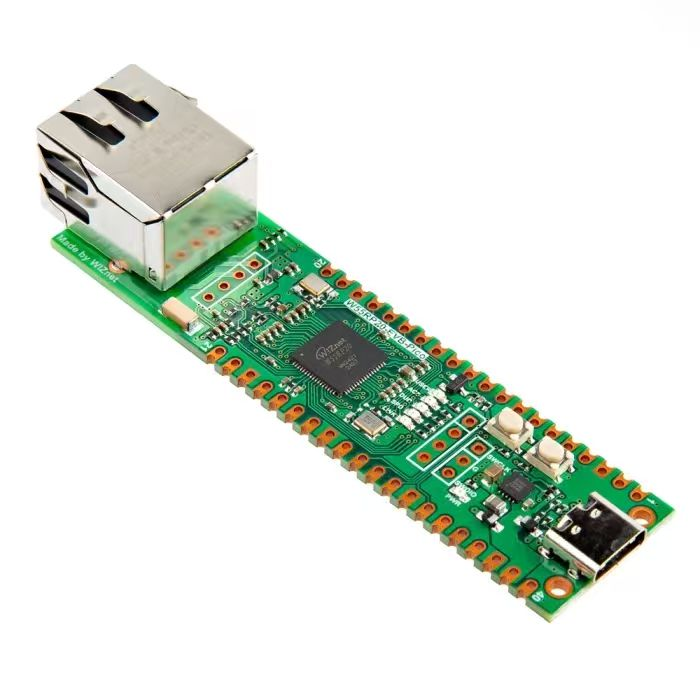
【Preliminary Note】The original hardware example in this article was written based on the RP2040. The actual hardware used in this hands-on demonstration features the W55RP20 as the main controller chip. The circuit logic and UF2 flashing operation principles are universally applicable, with only the main controller model differing. The original chip model mentioned in the circuit descriptions below is provided for reference purposes only.
1. Basic Knowledge of Rotary Encoder
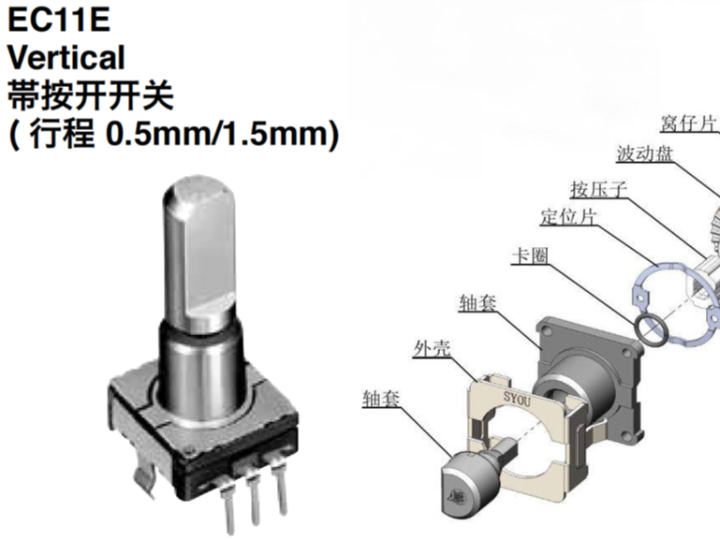
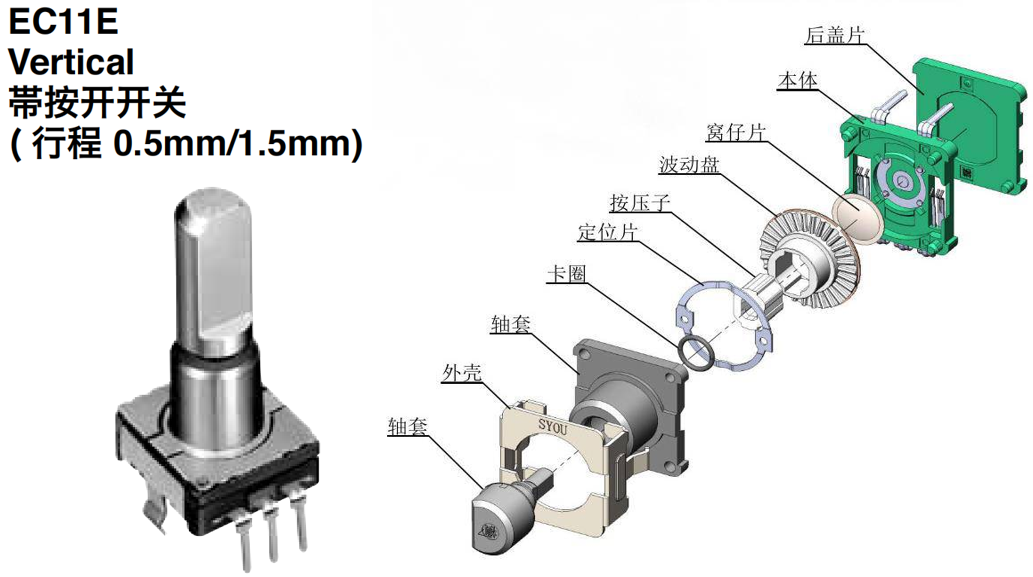
Here, we adopt the EC11 rotary encoder component with 20 pulses and 20 positioning points, whose structure is as follows:
The names and functions of the respective components are as follows:
Code wheel: A core component of an encoder that generates signals through rotational operation. Equally spaced conductive strips are distributed on the wheel; when the wheel rotates, these conductive strips sequentially come into contact with the output contacts, thereby generating pulse signals.
Detent piece: It locates each rotational position and provides mechanical feedback, giving the encoder a distinct rotational feel. The EC11 we use has 20 detents, meaning there is a pause for every 18 degrees of rotation;
Contact: works in coordination with the wave plate to detect the position change of the conductive strip and generate a signal;
Shaft sleeve and housing: They provide physical structural support for the encoder, and electronic components and pins are usually mounted on the housing.
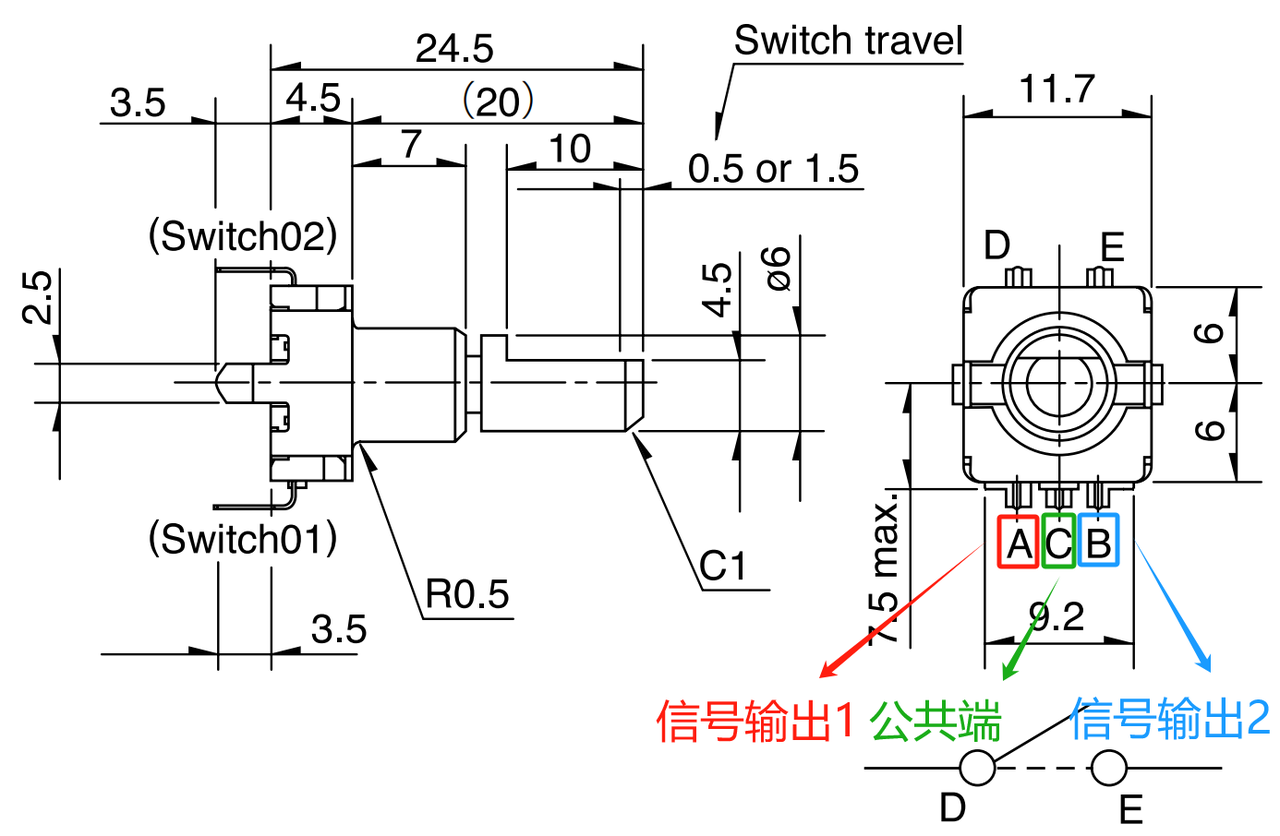
EC11 usually has 5 pins, as shown in the following figure:
Pin A (Red) Signal Output 1: Outputs rotation pulse signals
Pin B (blue) Signal Output 2: Also outputs a pulse signal, but with a phase difference relative to Pin A
Pin C (Green) Common Terminal: Common ground terminal for signal channels A and B
Pins D and E: the two terminals of the push switch, which are short-circuited when the button is pressed
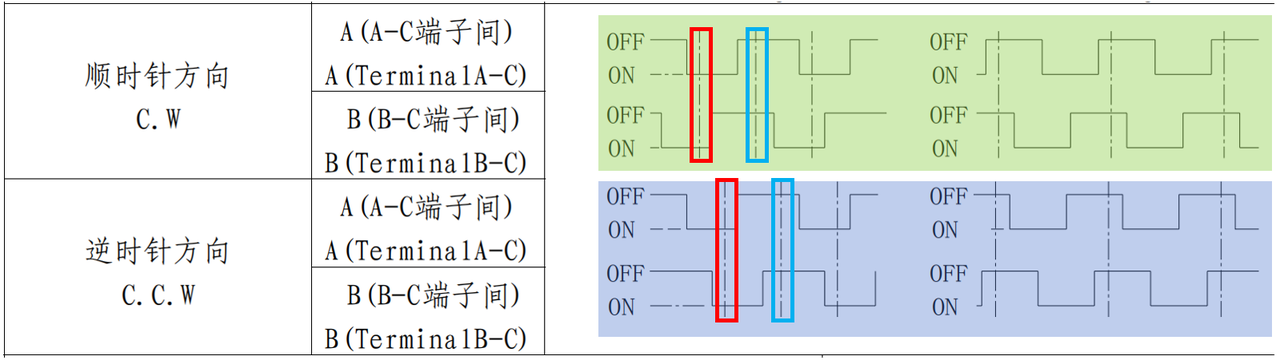
Its working principle is as follows: EC11 outputs incremental rotation signals through two signal channels (pins A and B). During rotation, the A and B signal channels generate interleaved pulses, and the rotation direction (clockwise or counterclockwise) can be determined by comparing the phase relationship between the two:
Simply put, it means:
When rotating clockwise, phase A leads phase B by 90 degrees, that is, when phase A is at the falling edge, phase B is at low level; when phase A is at the rising edge, phase B is at high level.
When rotating counterclockwise, phase B leads phase A by 90 degrees, that is, when phase A is at the falling edge, phase B is at a high level; when phase A is at the rising edge, phase B is at a low level.
It is not difficult to find that whenever a level transition occurs in phase A or phase B, the rotation direction can be determined only by detecting the state of the other phase:
Clockwise: both phases are at the rising edge simultaneously or at the falling edge simultaneously;
Counterclockwise: the two phases do not present rising edges at the same time, nor do they present falling edges at the same time;
Meanwhile, the number of rotation steps (increment) can be determined in combination with pulse counting.
Here, the EC11 rotary encoder also comes with a push switch (pins D and E): when the encoder is pressed, its internal mechanical structure triggers a key signal, which is typically used for operation control or confirmation.
2. Application Experiment
In the following code, we have customized an EC11Encoder class, which reads the rotation steps and button status of the rotary encoder through interrupt processing, and updates the Progress Bar on the terminal in the main program loop to display the rotation degree of the rotary encoder.
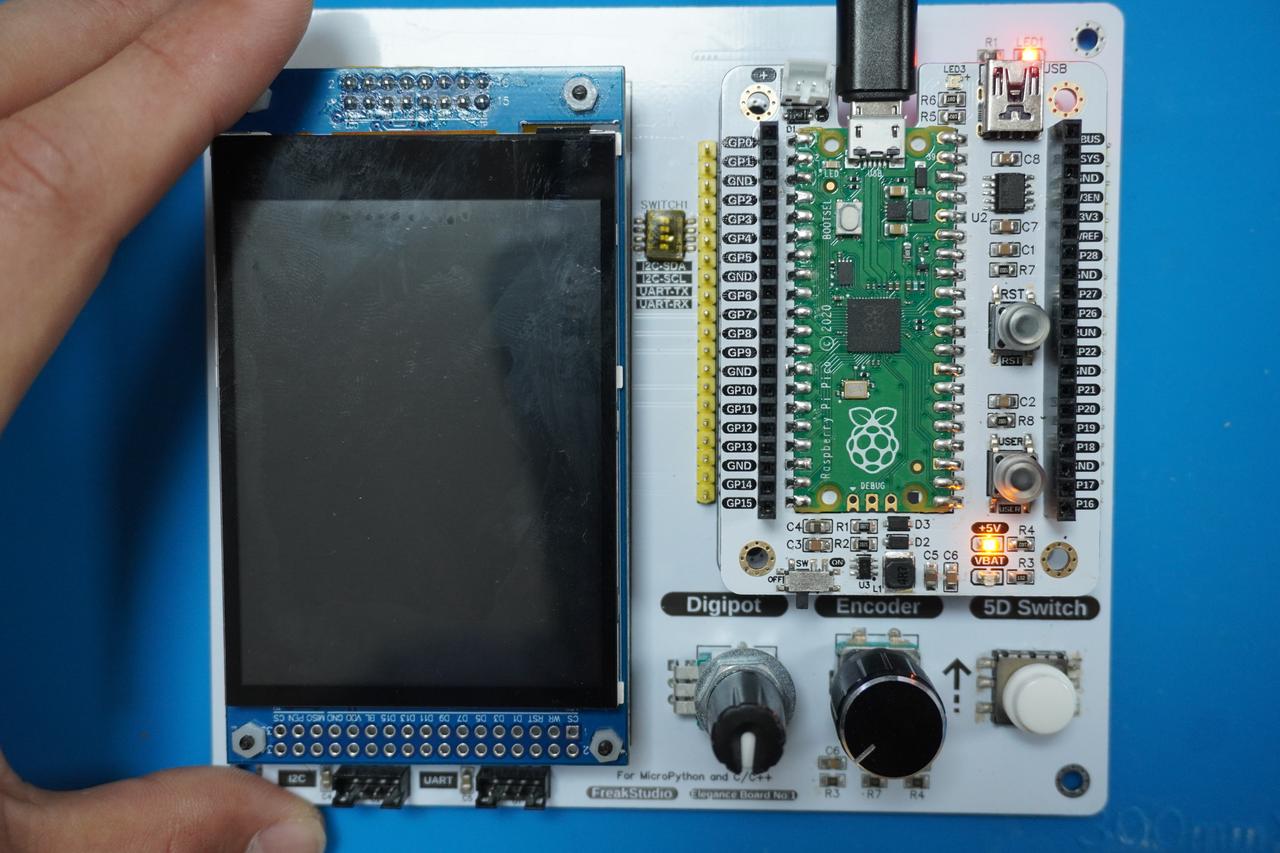
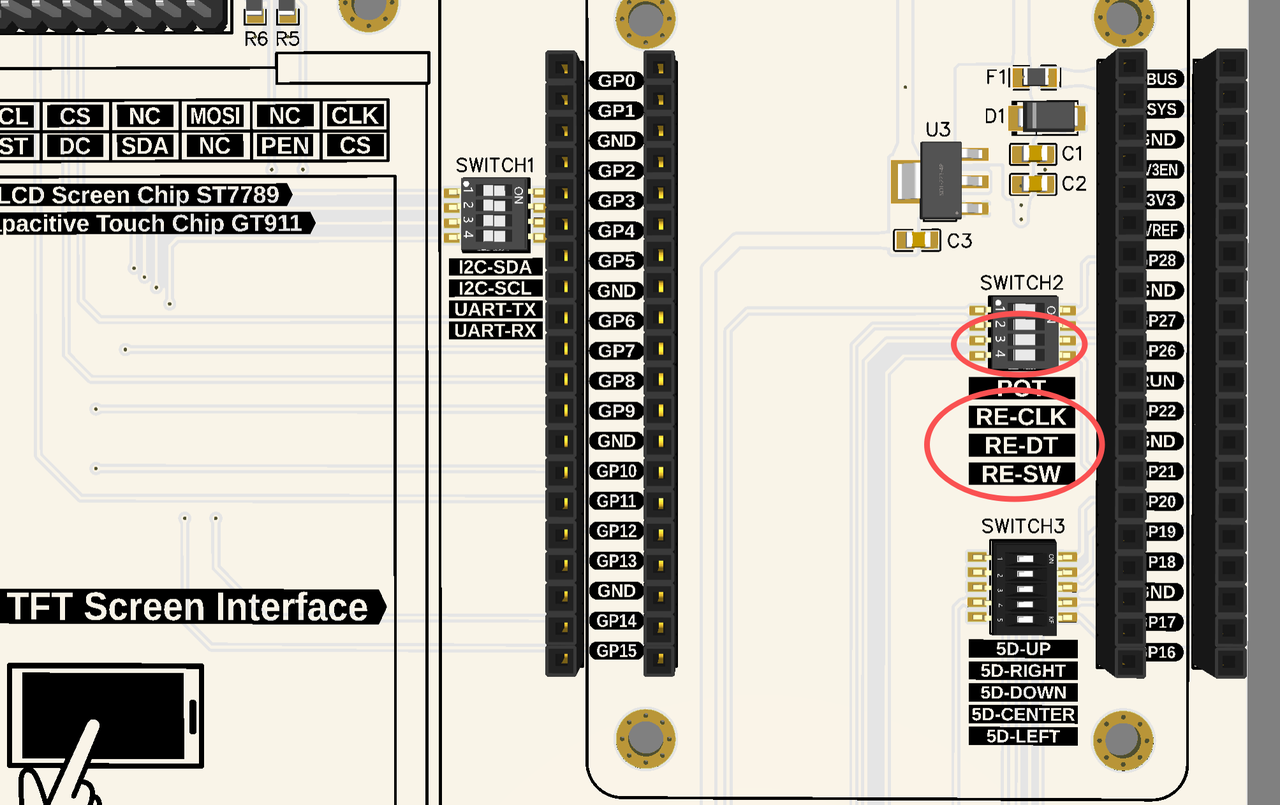
Here, we need to insert the Fengya No. 1 Board - Universal Compatible Expansion Board into the Fengya No. 1 Board - LCD Screen Human-Machine Interaction Board, and turn on the RE-CLK, RE-DT, and RE-SW on the SWITCH2 DIP switch. The physical connection diagram is shown below:
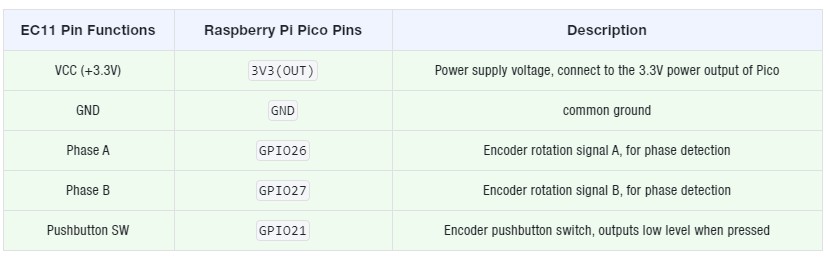
The wiring conditions of the components are as follows:
The sample code is as follows, located in the folder of the supporting materials: elegance-devkit v1\Demo\05 GPIO_RotaryEncoder:
Here, the core part that detects the rotation count and rotation direction of the rotary encoder is the _handle_rotation method; we configure the pin connected to phase A of the rotary encoder to input mode and enable rising-edge triggered interrupt, and set its interrupt callback function to the _handle_rotation method:
def _handle_rotation(self, pin: Pin) -> None:
    """
    中断回调函数,检测旋转编码器的旋转方向。

    根据 A 相的上升沿触发,并读取 B 相状态来判断旋转方向。

    Args:
        pin (Pin): 触发中断的 A 相信号引脚。
    """
    current_state_b = self.pin_b.value()

    # 顺时针旋转
    if current_state_b == 0:
        self.rotation_count += 1
    # 逆时针旋转
    else:
        self.rotation_count -= 1
When the rising edge of signal A is detected, the system enters the _handle_rotation method to obtain the status of signal B and make a judgment:
When the B-phase signal is at a low level, it is considered as clockwise rotation, so the rotation counter self. rotation_count increments by 1
When the B-phase signal is at a high level, it is judged as counterclockwise rotation, so the rotation counter self. rotation_count decrements by 1
Meanwhile, we also set the key of the rotary encoder to be triggered on the falling edge, and when the key is pressed, the _handle_button method will be called, in which the key status is updated and the rotary counter is reset.
We use a custom ProgressBar class to dynamically display progress in the terminal. We can dynamically update the display of the Progress Bar via the update method, or call the reset method to reset the Progress Bar to zero for a fresh start of display. The core code snippet is as follows:
In this code, we ensure that current_value stays within the valid range, i. e., no greater than the maximum value and no less than 0; then we calculate the proportion of the current value to the maximum value to obtain the number of blocks displayed in the Progress Bar.
In the code for building the Progress Bar section:
'\033[92m': ANSI escape code, sets the text color to green
'█' * block: Green progress segment
'\033[91m': ANSI escape code, sets the text color to red
'-' *(self. bar_length - block): Remaining red portion
'\033[0m': ANSI escape code, resets the text color to the default value
Next, we use the Print method to print the Progress Bar, where we utilize the carriage return character '\r' to return to the start of the line so as to overwrite the previous Progress Bar output in the terminal; then we add the end parameter set to end='' to avoid line breaks after each print, ensuring that the Progress Bar only prints dynamically updated content within the same line.
In the main program section, we continuously read the value of the rotary encoder and update the Progress Bar, and reset the Progress Bar when a key press is detected.
Burn the code, open the terminal, and the following content will be displayed:
When we rotate the EC11 encoder clockwise, we can see that the green rectangular box of the Progress Bar increases:
When we rotate the EC11 encoder counterclockwise, we can see that the green rectangular box of the Progress Bar decreases:
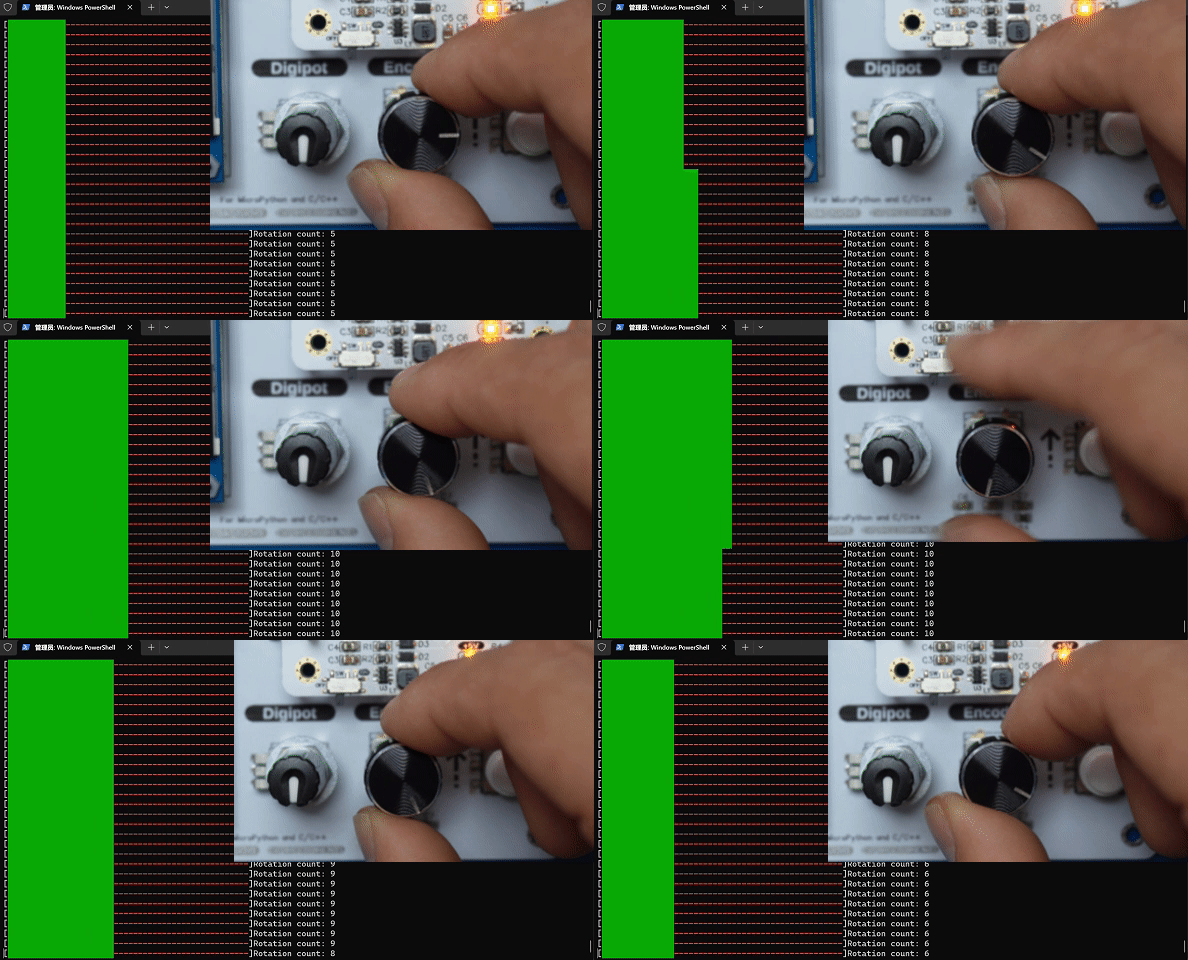
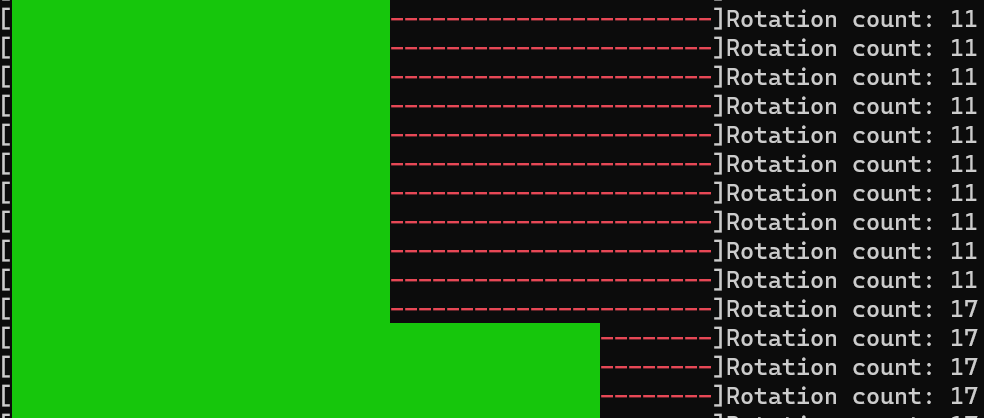
Here, we may find that when the rotary encoder rotates, the terminal Progress Bar sometimes jumps by several units. The reason is that the count value of the rotary encoder does not only change by one unit each time the rotary encoder rotates. We add the following code in the main loop to print the rotation count value of the rotary encoder:
print(f"Rotation count: {current_rotation}")
Burn the code, run it, and then open the terminal:
It can be observed that the count value of the rotary encoder sometimes jumps by several units when it rotates once. This is mainly because, as a mechanical device, when the user rotates the encoder, the contact points will repeatedly make and break contact in a short period of time, causing signal jitter and thus generating redundant count pulses.
To solve this problem, we can use a capacitor or an RC circuit to filter the signal, slow down its rapid changes and smooth out jitter; alternatively, at the software level, we can judge the signals collected multiple times in a short period of time, and only regard a signal as valid when the same signal is detected for several consecutive times, so as to address this issue.
In the timer chapter, we will use a timer to scan the encoder status every 10ms for debouncing.
Here, you can refer to the following articles for knowledge related to Object Oriented programming and custom classes in Python: